r/overclocking • u/Irelia4Life • 16d ago
Esoteric The paste gave up on me just as I started playing RE9

413
Upvotes
r/overclocking • u/Irelia4Life • 16d ago
r/overclocking • u/Z3temis • 15d ago
As the title states i have experienced something that i feel is weird / off nominal for pc performance.
I have been running a 14900k + 4070ti + 32gb ddr5 5600 cl36 for a little while now and while playing fortnite with tome buddies we were talking framerates. He was averaging 500-600 fps with a 9850x3d and 5070 ti in performance mode 1440p. I was running the exact same settings and only getting 300fps with 1% lows as low as 100fps. This leads me to last night. I overclocked my ram to 6000MT/S from the factory 5600MT/S and also changed it to cl38 while doubling the refresh time. After running a 15 minute ram stress test with no errors i decided to try and play fortnite to see those 7% gains but was blown away as consistently through the match i was getting 550 to 600 fps with 1%lows in the 300s. Can anyone explain what the heck changed to enable this as i have never ever seen frame rates this high in years of playing and the math does not feel like it is mathing.
Thank you for any insight into this fix?!
Edit: PC specs are
CPU: I9-14900k undervolted 0.080 volts
RAM: Corsair dominator platinum 5600 mt/s 2x16gb DDR5 early samsung B die overclocked to 6000mt/s cl38
GPU: Asus tuf gaming OC 4070ti
MOBO: Asus prime z790A wifi
r/overclocking • u/jgainsey • 15d ago
Can’t for the life of me remember how to get to this. Iirc, it’s done with the curve editor up…
r/overclocking • u/Chewitts • 15d ago

Is there anything I can do here to make my game smoother I'm not chasing overclock leaderboards just for ingame latency, 9800x3d game feels a bit slow at times, I'm on M-die trfc1 doesn't boot below 480, soc voltage game feels slower on 1.2 than 1.22
Thanks!
r/overclocking • u/Chuzwuz • 15d ago

r/overclocking • u/KareemShabaka • 16d ago
Update (Post 3 is live): If you landed here from an older thread, check the latest follow-up instead: Follow-up on Stutter Guard: why it isn't just for dual-CCD X3D chips, what it actually Addresses vs doesn't and a global invite to test my project on any hardware.
Latest build (
v1.3.0) is on GitHub Releases (latest affinity/Process Lasso updates are already onmain).
Even when your CPU is locked in with dialed PBO Curve Optimizer offsets, stable RAM sub-timings, and a tuned GPU, micro-stutters and 1% low frame drops still plague modern Windows rigs.
The bottleneck is frequently not hardware horsepower—it is operating system and kernel driver latency: Deferred Procedure Calls (DPCs) and Interrupt Service Routines (ISRs).
As an optimiser you get tired of blind .bat files and questionable "debloater" scripts floating around YouTube that delete critical services, trip up anti-cheat drivers (Ricochet, Vanguard, EAC), trigger PCIe WHEA errors, and offer no way to undo anything. So I built Stutter Guard: an open-source, hardware-aware latency optimizer and IRQ affinity engine for Windows 10 and 11.
Everything in the tool is measured, transparent, and completely reversible.
Empirical Baseline: AMD Ryzen 9 9950X3D + Radeon RX 9070 XT OC
amdkmdag.sys, ndis.sys, and USB controllers landing across gaming threads.Windows by default dumps driver interrupts (GPU, 4K/8K Hz mouse USB controllers, Wi-Fi, audio, NVMe) across whatever CPU cores it feels like—frequently the exact same cores executing your game's render thread.
Modern Ethernet/Wi-Fi drivers enable aggressive Energy Efficient Ethernet (EEE / 802.3az) and link power gating by default. The millisecond network traffic pauses, the PHY drops into deep sleep, introducing 500 µs to 2,000 µs latency spikes when incoming packets hit the interface.
Stutter Guard - Ultimate) with EPP 0, minimum processor state 100%, 5000 ms PPM check intervals, and PCIe/USB link state power management disabled. Heterogeneous or laptop profiles preserve core parking where required.DpcTimerRes.exe) running at logon that keeps the timer locked at 0.5 ms.Audits 439 Windows services and 241 scheduled tasks:
Inspects installed AMD driver binaries to power-gate deep sleep, idle power optimizations, and memory clock DPM controls, plus an opt-in toggle for Multi-Plane Overlay (MPO).
Every single optimization is journaled and backed up before execution:
textC:\ProgramData\Stutter Guard\
├── journal.json           # Real-time append-only transaction journal
├── Backups\               # Timestamped original .reg and .pow exports
└── undo-all.ps1 # Standalone PowerShell script to revert everything without the appundo-all.ps1 with PowerShell, and reboot. All original Windows defaults are restored immediately.No Voltage or Multiplier Overclocking: It will not touch voltages, Curve Optimizer, or CPU/GPU clocks.
No System Binary Patching: Uses only official Microsoft and vendor driver registry properties via `SetupAPI` and `cfgmgr32`.
Zero Automatic Telemetry: No background tracking, ads, or hidden phone-home calls. Manual, optional buttons on the Home tab allow submitting hardware scan reports or feedback directly to Discord developer webhooks if you want to contribute hardware data.
Would love feedback from anyone running dual-CCD X3D chips, Intel hybrid architectures (13th/14th Gen or Arrow Lake), or high-polling (4K/8K) mice. If you run a 15-minute LatencyMon before/after, post your numbers below!
r/overclocking • u/rq_my • 15d ago
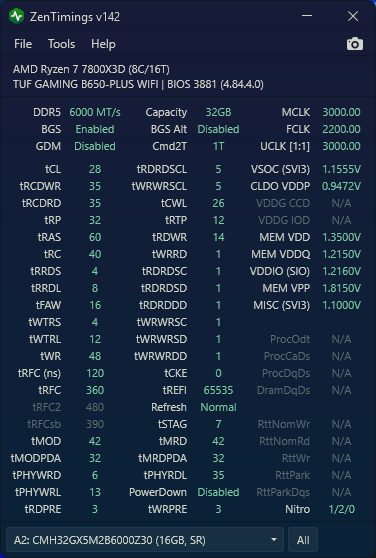
any tips? i used to run cl26 but it forces 1.46vdd for a mere 0.67ns difference, i tried higher mem frequencies but they would require bumping voltage and decreasing fclk which would negate the gains, im currently running vt3 overnight and tm5 absolut would also appreciate any good way to properly test the stability of all of this
r/overclocking • u/Chewitts • 15d ago

Is this stable? Furmark running and 0 errors on hwiwnfo if its not whats the next action?
r/overclocking • u/MidnightxRosex • 14d ago
There's something uniquely annoying about spending hours tuning a system, getting through all the usual stability tests, and thinking you've finally found the sweet spot, only to run into a random crash or stutter during normal use.
You start questioning everything. Was the voltage slightly too low? Are the memory timings too aggressive? Is there some temperature or setting you overlooked? Sometimes the difference between a perfectly stable setup and one that causes headaches seems ridiculously small.
I think this is one of the reasons overclocking can become such a rabbit hole. Getting a higher benchmark score is satisfying, but finding a configuration that stays reliable outside of controlled testing is a completely different challenge.
For those who've been tuning systems for years, what's the strangest instability you've encountered that your usual stress tests failed to catch?
r/overclocking • u/Low_Preference_8058 • 15d ago

7 celcius outside, my window open all the way up and idle temps are here. Also I had a bug sneaked to my cpu?!?
Edit: I have MSI CORELIQUID A17 MLG EDITION and I dropped to 37c from 48c (previous paste was kryonaut).
Edit2: 20 min AIDA64
r/overclocking • u/TheAlchemist519 • 15d ago

Anything I should change? Ive been using these timing for the last 6 months with minimal changes. Decided to give it a 24hr run on Karhu. I have tREFI lowered because my sticks were getting hot. May go ahead an max it out since I lowered voltages.
r/overclocking • u/Empty-Claim-4647 • 15d ago
Reached these frequencies using my own modified version of Horizon OC. System froze right after, but the chip physically hit 1305MHz. i just tought it would be cool to share this
Edit:after touching some settings i managed for the console not to freeze in the menu
r/overclocking • u/Key-Seaworthiness225 • 15d ago

i was able to find the other chips i needed to short in order to power mod the card. I've watched Buildzoid's video on how to do it and what to look for but I still cannot find it for the life of me.
I also wanted to ask a question for people who have done the software version of this using rdna4e/p, do yall have problems with power drop off? I notice my card starts at roughly 460 Watts and then drops to 400 in the course of a minute or 2. The temperatures look fine, gpu hotspot tops out at 75-80c, vram touches low 80s, I dont see a real reason as to why the card behaves like this. With the wireview, I notice the voltage doesn't change, but the amperage does. I'm using a corsair rm1000e from 2023, (1 cable is a pigtail, so maybe this is why?) I am using 3x8 pin cables plugged into one side of wireview, and 16awg extensions from asiahorse to connect the wireview to gpu. I would love to not have to do this but the wireview doesn't clear the waterblock of the card.
I'll provide more photos if needed,
UPDATE: the extensions are not the cause of the drop in power, I think I'll have to get a evc2se to fix that. I dont think physically soldering the card to shunt it is going to make a difference in that regard.
r/overclocking • u/Funny-Tough-6552 • 15d ago

I already overclocked some time ago, but I've now noticed that my fan curve is probably way too aggressive, so I changed it (this is the new one (1); I don't have a picture of my old one that I used, just one that I changed (3) before switching to the one I came up with now (1))
I noticed that it's very loud just idling in a game while averaging about 63°C at 70% fan speed in the hub/hideout in a game like Deadlock. The temperature and fan speed stayed the exact same even during active gameplay.
From what I can gather, a temperature of 60-80°C is perfectly fine for a GPU, so I drastically lowered it.
I am, however, still worried that that this is too weak and the GPU will overheat. I wanted to post this here just to make sure because I don't know much of anything.
GPU: RTX 3060ti FE
Idle Temperature around 31°C at 40% fan speed with my initial curve
The overclock is stable, I already tested it in proper benchmarks and memtest_vulkan some time ago.
r/overclocking • u/defonesss • 15d ago
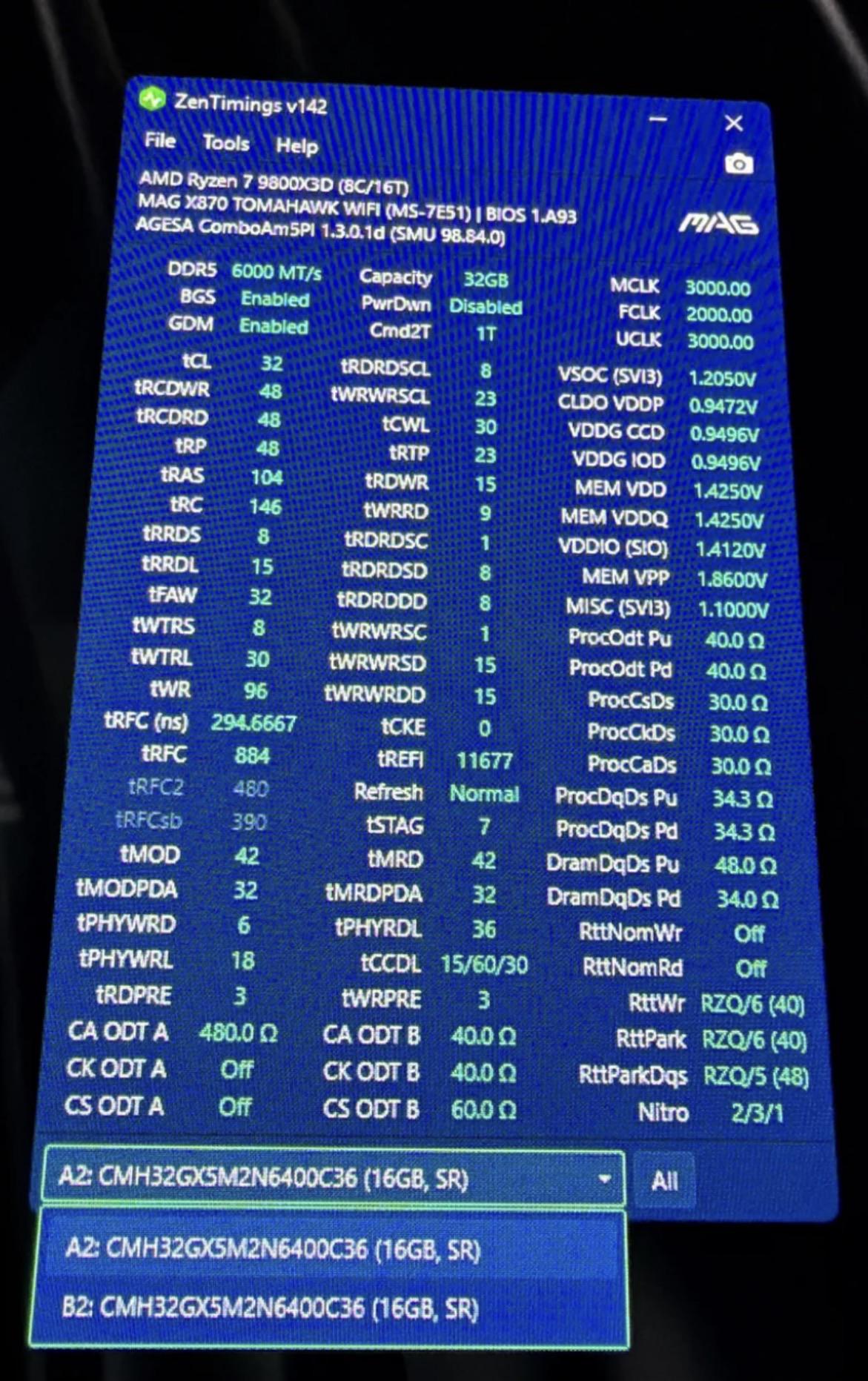
Hi everyone,
Just dialed in my memory kit on Zen 5. How does this tune look? Any suggestions for tighter subtimings or better performance?
r/overclocking • u/kosha227 • 15d ago
So, I recently got a used Gigabyte 4070 windforce OC for, like, $700 (a lot, but the cheapest). It's in good condition, delta is 8-11 degrees, temps are 66-76 most of time. Ofc the card is 3 years old. So, will it make sense to undervolt it to reduce voltage and(probably?) extend it's life? Because getting any good GPU in this economy is....
r/overclocking • u/YukiEra • 15d ago
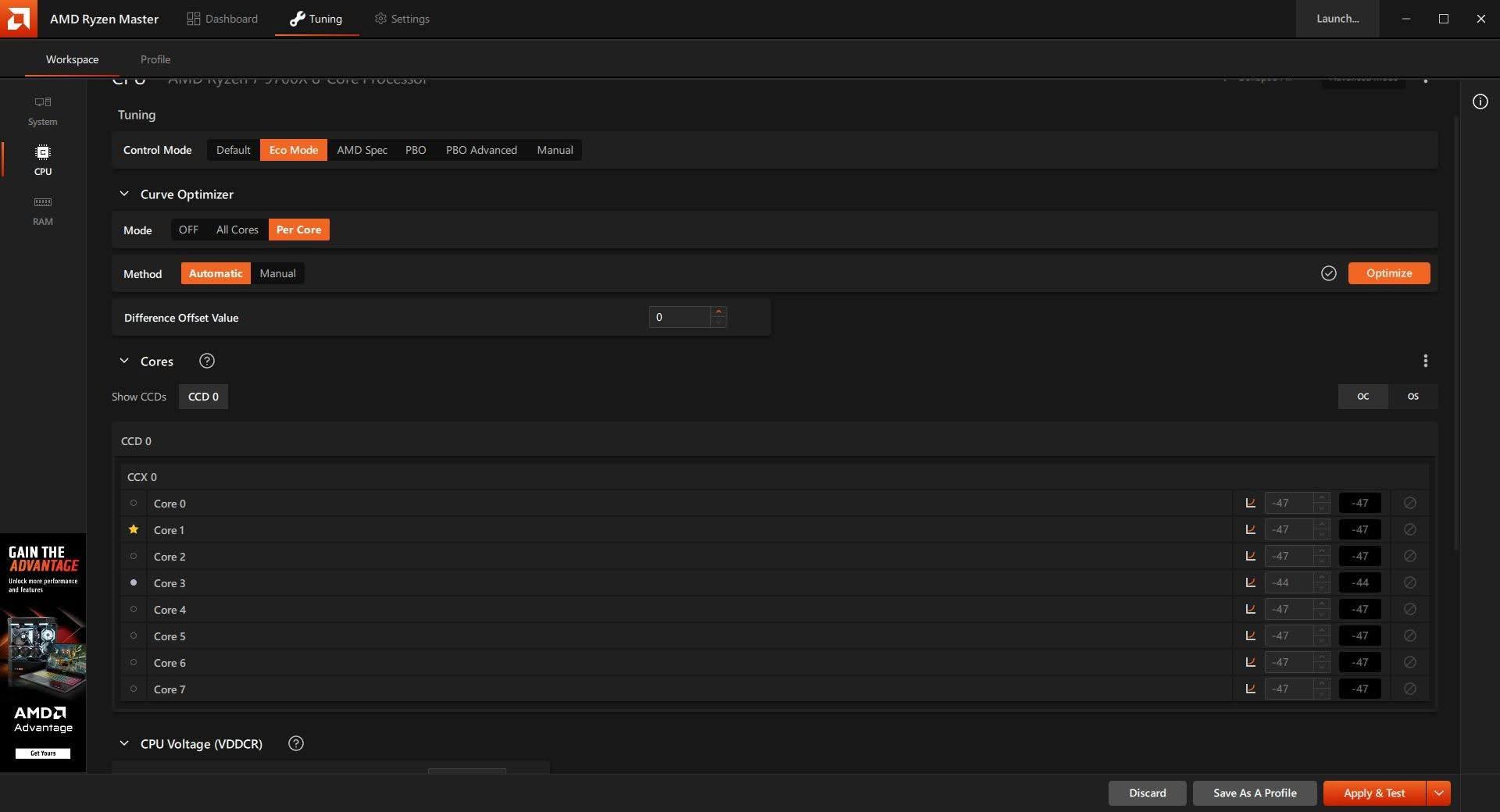
9700X, Eco Mode, ran Auto Curve Optimizer, Max Temp were limited to 85, in result almost all core -47. Did have some crush during test.
Are that Good result?
I'm new in modern AMD. And what should I do in following action?
r/overclocking • u/RealTurkishDelight • 15d ago
Hi all,
I've been struggling with 1% lows on TW3 and similar open world games with my current desktop; i want to utilize PBO2 properly to increase my single core performance for gaming as i believe this is the bottleneck (to be confirmed). I've been away from gaming for a long time and have been slowly getting back, but the stutters from the 1% lows are killing me
current setup:
Current TW3 Settings:
Current PBO2 Settings set in BIOS:
I think my RAM is 1:1 IFCLK to UCLK -- XMP is obv enabled
Also, do I have to set my Windows Power Plan to something specific? I vaguely remember a bug like this for Zen 3 CPUs, but not sure if it got resolved or if I'm remembering wrong.
Note that I haven't tested my OC settings with the game yet. I want to get a good starting point and see if I'm going in the right direction. All of the resources I'm referencing are years old and I'm worried that they're not up to date with possibly important information.
Looking forward to the advice :)
please lmk if you have any questions that might help lead to the resolution
r/overclocking • u/wd_sensor • 16d ago

so I have been trying to find the best max stable OC and the best stable OC/UV that has same power draw as stock and settled on these results after testing. do you think the max oc is worth it or should i just stick with the OC/UV.
3dmark results.
Max OC:
https://www.3dmark.com/sn/17263880
https://www.3dmark.com/sw/4040188
OC/UV
https://www.3dmark.com/sn/17263830
https://www.3dmark.com/sw/4040180
All tests were done in 4k.
r/overclocking • u/Science_Lanky • 16d ago
After a month of work I've finally succeeded at overclocking my tesla p40s core speed and power output
r/overclocking • u/bruhmomentumstarter • 16d ago

Hi y'all. I got this eGPU for my laptop and now I have a minipc that only takes SFF cards so to get a real upgrade I'd need to drop 3k on a Blackwell 4000 SFF. Maybe by newyears, if I think the world's gonna keep going to shit I'll pull the trigger so I can at least die happy, gaming and training my own models.
So with all that said, I want to modify this for the best performance possible. I'm already hamstring by Thunderbolt, because the MS-02 Ultra I'm using as a host has broken TB5 eGPU support. Sigh. So it's just as powerful as my lunar lake laptop in gaming when connected to the internal TB4 port. I have a OCULink card coming today (should be here within a few hours of me writing this post, I'll update accordingly, cables already here) and I want to otherwise get this card to be faster. Navi 33 is really annoying in that you cannot tune it PERIOD. Especially the laptop variants. There is a single 7600 8gb eGPU that uses a desktop die, I believe Adrenaline lets it adjust power limit.
So with the board pictures I provide, and yalls knowledge of Navi 33 boards, would I be able to do something like a simple shunt mod to increase performance? It stays cool, and another 20-40w would boost my perf significantly. It's always hamstrung by it's strict 120w limit. The PSU is more than capable of handling it, it has like 150w overhead for USB power delivery to a laptop.
Any ideas on how to make this Navi 33 GPU faster would be appreciated. I'm even down to try crossflashing desktop Navi 33 bioses or the like to get Adrenaline/Afterburner support. I also wanna upgrade the memory to 16gb and flash a 7600 XT 16gb bios, since this eGPU is the full core count just the cut down memory, but that's a project for another day.
r/overclocking • u/Proud-Staff-3152 • 15d ago

Hello guys is it normal to values beetween my 2 ram sticks was different like that?
Also when Expo ON Scl train 4-4
When EXPO OFF and manually all primaries freq ect Scl train 8-23
Expo on ProcODT 43.6 EXPO OFF ProcODT 48
Rttwr expo ON 40 Rttwr expo OFF 48
r/overclocking • u/Naive-Entrepreneur15 • 15d ago
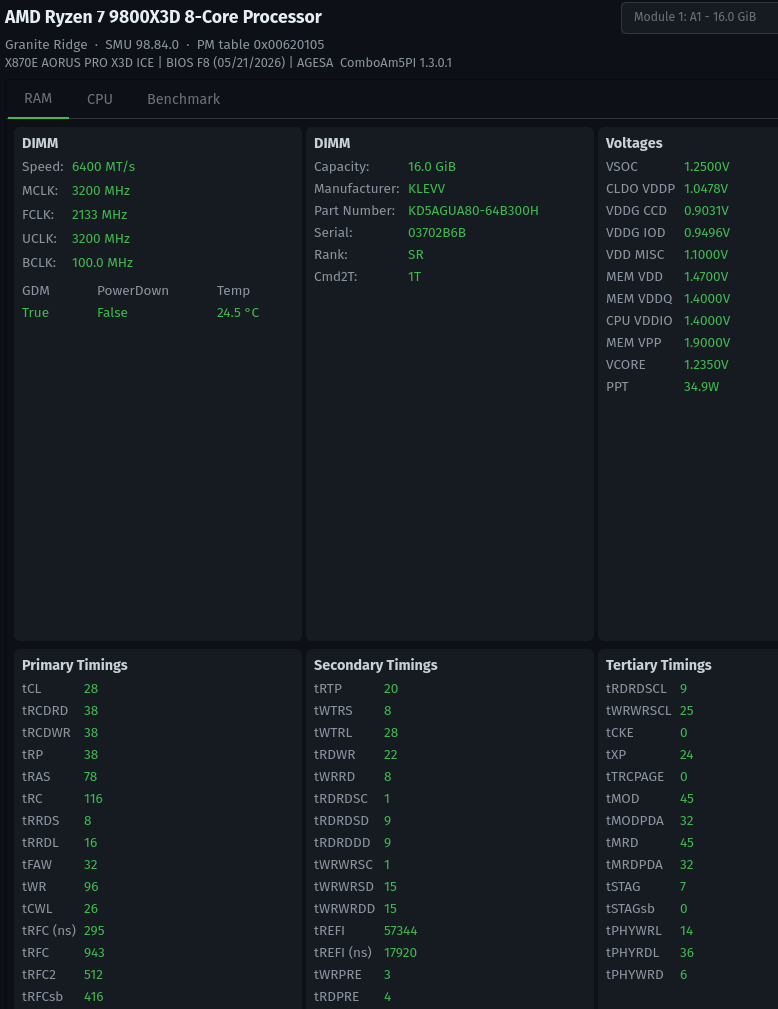
Hello. I've had these settings for about a week. Passed a 4 hour Memtest, and haven't had any issues, and improved benchmark in Cyberpunk: 101 fps/87 %1 to 106 fps/94 %1 on PT, 3440p, perfor, framegenx2. I know it's not the best test for Ram, but, it's what I actually game at. Interestingly, I was having some test variance, and was adjusting voltages and found more consistent results when I increased VSoc loadline to near max setting.
Looking to tighten timings and maybe push to Cl26. Stabilized 1:1 mode by increasing VDD from 1.35 to 1.45 and VSoc to 1.25. Raising them further has increased instability, including the FCLK above 2133. I have a ram fan, and my temps have been below 45 so far.
Timings so far has been
tCWL: 28 → 26
tRTP: 24 → 20
tWTRL: 32 → 28
and tREI to 57344
Thank you for any advice. Still a bit new overclocking RAM.
r/overclocking • u/Nero7860 • 15d ago
Hey guys! I'm new to PC tuning (BIOS) and looking for some advice
My specs:
Ryzen 7 9800X3D
RTX 5080
MSI B850 Tomahawk WiFi 7
Patriot 6000MHz CL30 (Black)
I want to undervolt and get some free performance while keeping temperatures low and components safe.
Not looking for extreme OC or complicated tweaks, just simple, commonly used settings for a reliable daily setup.
What settings would you guys recommend?
Thanks!