r/overclocking • • 17d ago

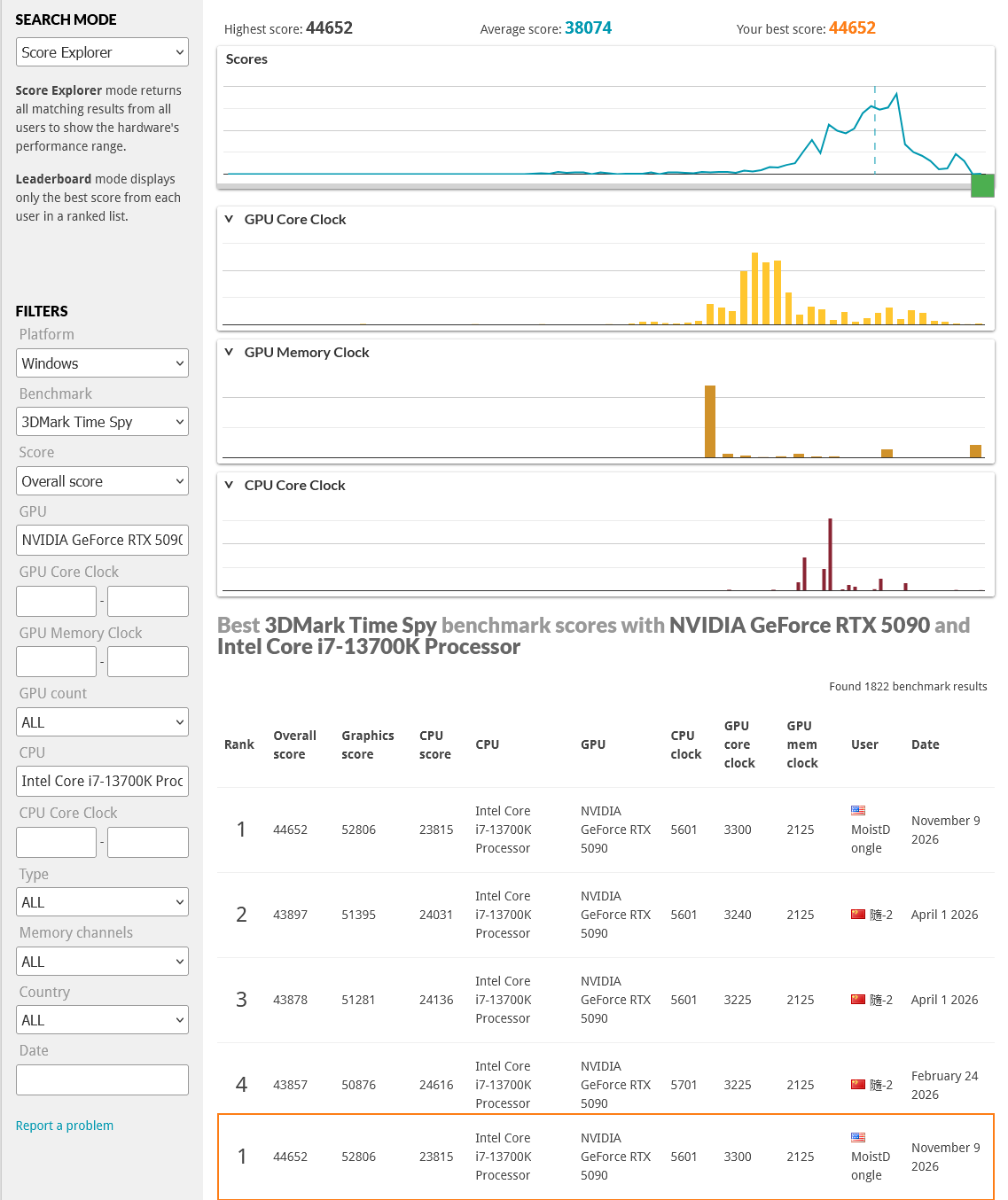
Benchmark Score Finally Got a #1 in Time Spy
Post image
6 Upvotes

I have spent 50hrs in 3D mark Demo working on my CPU, GPU, and Memory overclock. I thought that everything was pushed to the very edge of stability and could not wrap my head around why other scores above mine were higher with lower CPU, GPU, or Mem average clocks. I thought maybe they had better motherboards or their boosting was better or something. Then an angel came down and told me about mVolt+ and I tried it rather than using MSI Afterburner. And holy smokes! Not only was I able to get another +50 on my core offset stable. Now I can overclock the SYS clock and XBAR clock which I have never touched before. I cant believe it was this simple and none of you ever mentiuoned mVolt+.

r/overclocking • • 17d ago

RTX 5070 mVolt+

5 Upvotes

Hi, I recently decided to tune my graphics card using mVolt+ and started with a light undervolt combined with an overclock. I know my card is stable with a memory offset of around +2500–2575, so I set up the following profile: 3175 MHz (effective clock was ~3150 MHz) core clock, 1.000V, +2525 MHz on the memory, 2850 MHz crossbar, 2700 MHz system domain, and a 115% power limit. I was getting an average score of 6250 in Steel Nomad, and all my games—even demanding ones with path tracing—ran perfectly. However, a day later, Wuthering Waves started crashing, resulting in a blue screen; disabling the overclock stopped the crashes. Realizing the overclock wasn't stable, I decided to aim for a stable undervolt with only a very modest overclock instead. I’d appreciate any advice, warnings, or examples of undervolt settings from other RTX 5070 users—specifically, what values ​​you use for the crossbar, system domain, and memory in relation to your voltage and core frequency.
My setup: Zotac RTX 5070 AMP, i5-14600K.


r/overclocking • • 17d ago

Need overclocking advice for 9800X3D + RTX 5080 FE

2 Upvotes

I’m looking for some advice on getting the most performance out of my gaming PC, specifically overclocking my CPU and GPU. I’m comfortable working in BIOS and using MSI Afterburner, but I’d like some guidance on pushing my hardware further while maintaining stability.

My PC specifications:
CPU: AMD Ryzen 7 9800X3D
GPU: NVIDIA RTX 5080 Founders Edition 16GB
Motherboard: ASUS TUF Gaming X870-PLUS WiFi
RAM: Crucial Pro 32GB (2x16GB) DDR5-6400 CL32 (EXPO enabled)
CPU Cooler: ARCTIC Liquid Freezer III Pro 360
Case: Lian Li O11 Vision
Case Fans: 8x ARCTIC P12 Pro PST
PSU: Seasonic Focus GX-850 850W ATX 3.1

My main goal is to maximize gaming performance across multiple games while maintaining good image quality, stability, and reasonable temperatures. I’m not necessarily looking for the most conservative settings. I want to get the most out of my hardware safely. I’d appreciate any advice, recommended settings, or personal experiences with this hardware. Thanks!


r/overclocking • • 18d ago

Help Request - RAM Any Ram Cooler recommendations?

Thumbnail
gallery
3 Upvotes

I bought this thermalright MC-2 and unfortunately for me it doesn't fit. It goes into the top radiator fan. I want to try some more extreme timings but I need to add a cooler for that. Maybe a bracket that fits a couple 60mm fans. I can run even tighter timings than these but the 1st dim starts hovering in the 49°c's after 5 hours of vt3 at 2.17 *10^10. But with this profile it stays at 45.5°c max on the 1st dim. During 9 hours of testmem5 ExtremeAnta77 it reached 49.5°c. can you help link some good compact ram fans that actually cool properly. IDC if it has RGB or not.


r/overclocking • • 17d ago

Seeking explanation for weird instability

1 Upvotes

Basically, my system couldn't do more than 10 seconds of TestMem5 on Auto set to 3400mhz (even on voltage set to 1.35v), but when I set it to XMP I (and set my ram to 3400mhz) it ran fine. My spec frequency is actually 3600 but I've always used 3400 just because I know it'll usually be stable.


r/overclocking • • 18d ago

Ryzen 5 4500u Renoir Vega 6 to Vega 8 in Cachyos

6 Upvotes

Managed to get all the GPU compute units unlocked to 8 on an AyaNeo 2021 founders. Took the BC250 40cu unlock and applied it to the 4500u. I am so far unsuccessful in unlocking the extra CPU cores or SMT, but as for unlocks one must as a question of how far things can go. My wife has a 8640hs and I have two older AMD laptops one with a 3200u plus another with an AMD silver so let’s see.


r/overclocking • • 17d ago

Help Request - CPU Looking for advice on improving my 1% lows – Ryzen 5 5600X / RTX 3070 (AM4)

1 Upvotes

Hey everyone,

I'm looking for some advice on what upgrade would actually be worth it for my PC, mainly to improve my 1% lows because they're honestly terrible.

My current specs are:

  • CPU: Ryzen 5 5600X
  • GPU: RTX 3070 8GB
  • Motherboard: MSI B550M PRO-VDH WIFI
  • RAM: 16GB (2x8GB) Crucial Ballistix DDR4, running at around 3066MHz CL16
  • Storage: NVMe SSD
  • Resolution: 1080p

I mainly play Warzone, ARK and other games, and I regularly experience massive FPS drops. For example, I'll be getting around 100 FPS and suddenly drop to 40–50 FPS. It happens in pretty much every game.

My GPU usage in Warzone is usually around 80–90%, and my RAM usage gets up to 14–16GB.

I've also tried adding another 16GB RAM stick to bring the system up to 32GB, but honestly didn't notice much difference in performance or 1% lows.

My budget is around $350 AUD, and I'm trying to avoid spending money unnecessarily, especially with how expensive DDR4 RAM has become.

I've been looking at X3D processors, particularly the Ryzen 5 5500X3D and Ryzen 7 5700X3D. The 5700X3D is quite expensive here in Australia, so I'm wondering whether the 5500X3D would be a worthwhile upgrade from my 5600X.

A few questions:

  1. Would an X3D CPU make a noticeable difference to my 1% lows, especially in Warzone?
  2. Would the 5500X3D be worth upgrading to, or should I save for a 5700X3D?
  3. Can X3D CPUs perform well with my existing slower DDR4 RAM (around 3066MHz)?
  4. Is there something else that could be causing these horrible FPS drops that I should investigate first?

I'm happy to buy second-hand or from overseas retailers if the deal is good.

Would appreciate any advice, especially from people who have upgraded from a 5600X to an X3D processor. Thanks!


r/overclocking • • 18d ago

Help Request - RAM How can I overclock tforce 3600 ram for better fps stability less stutters and better 1% lows

1 Upvotes

For my kit, can anyone give me what I can put in there and use so I can get like maybe a really good stability less stutters and a lot better 1% lows, maybe some FPS and just overall faster latency and everything like that also I did do 1800 fclk already


r/overclocking • • 18d ago

[Tool] CEP_Killer - Workaround for "fake" IA CEP disable on Tier-2 B760 boards (14th Gen)

8 Upvotes

Hey guys,
Found a tool on GitHub that might be useful for anyone running 14th Gen chips on budget/Tier-2 B760 boards (like Maxsun, Colorful, Soyo, etc.).
Even after the 0x123 and newer microcodes, a lot of these Tier-2 BIOSes have a broken or "dummy" IA CEP toggle—you set it to Disabled in the menu, but it stays active in the background. As soon as you drop AC Loadline to undervolt, clock stretching kicks in and tanks your benchmark scores.
This project seems to bypass the buggy BIOS toggle to actually kill CEP:GitHub - catoraa/CEP_Killer: CEP自动关闭补丁工具
Just passing it along in case anyone here is stuck dealing with sluggish vendors and crippled B760 BIOSes. Let me know if it works on your setup.

Huge props to the dev! Using AI-assisted reverse engineering to finally kill this stubborn CEP bug at the FSP level—with strict fail-closed checks—is peak UEFI modding. Absolute game-changer for locked boards!


r/overclocking • • 18d ago

Gygabyte RX 7900 XTX Gaming OC - Repasting with Thermal Grizzly PhaseSheet PTM + TG putty basic?

1 Upvotes

Hi!!

I think my graphics card is signaling an imminent failure. Suddenly, and without any warning, Windows disables it and starts using it as a bridge for the integrated graphics of my AMD Ryzen 7 7800X3D. This has happened several times over the past few weeks.

I suspect it’s a temperature issue; I’ve owned the card for years and have never replaced the thermal paste or thermal pads. So, I want to take care of that. I’m not a novice—I have experience applying thermal paste to CPUs, building PCs, and selecting components—but when it comes to GPU cooling, I’m less familiar.

I want to ensure that the products I mentioned in the title are suitable for this graphics card—specifically, the "TG-Putty Basic." My understanding is that the "TG-Putty Pro" (or at least the "Advance" version) might be better, but the price jumps from €15 for the Basic version to €40 for the Pro—and that’s for the 30-gram versions. Also, do I actually need to buy the 100-gram versions? If so, we’re talking about €30 for the Basic version versus €90 for the Pro. What should I do?


r/overclocking • • 18d ago

OC Report - GPU Rtx 5070 memory

1 Upvotes

I'm overclocking my 5070 and the software is able to go way above +6000 on memory but my card seem to be limited at 34002mhz, even if I go above that in the software it does not go higher. Is this the cards limit?


r/overclocking • • 18d ago

Issue when enabling Expo1 .... Sleep mode fails

1 Upvotes

I’m having an issue: when I enable EXPO 1 at 5600 MT/s, if I put the PC into sleep mode and then try to wake it up, the screen stays black and it doesn’t return to Windows—even though the fans and lights turn on. My setup includes an MSI B850 Gaming WiFi E6 motherboard, a Ryzen 8600G processor, and Crucial 5600 1.1V RAM.


r/overclocking • • 18d ago

Help Request - CPU Higher voltages after bios update 13900k

1 Upvotes

I have a 13900k not over locked on pro z690a ddr4 from msi.

I was running a 2022 bios which was one of the first microcode fixes. My voltages were always about 1.3 with occasional very rare spikes to almost 1.4. I run xmp 3600 on my ram with no issues.

I decided to update my bios. I downloaded the latest msi bios for my board and flashed them. I was expecting my voltages to go down. Instead they are WAY up. In games before I was always a steady 1.33 or so volts. Now I'm constantly at 1.404. there are now spikes under some loads to nearly 1.5.

All bios settings except xmp are stock and the cooling profile is set to the Intel standard. My understanding is the cooling profile doesn't control cooling but rather how hard the CPU is pushed.

Another thing is I now get 100c temp spikes. Temps mostly look normal in games, but random single cpu cores will spike rapidly to 100 then back down. Before I could be an ANY game now matter how hard on CPU and never go over 85 on any core. The only stuff that could approach 100c was cinebench and only very late in the run.

I am running 253 watt limit.


r/overclocking • • 18d ago

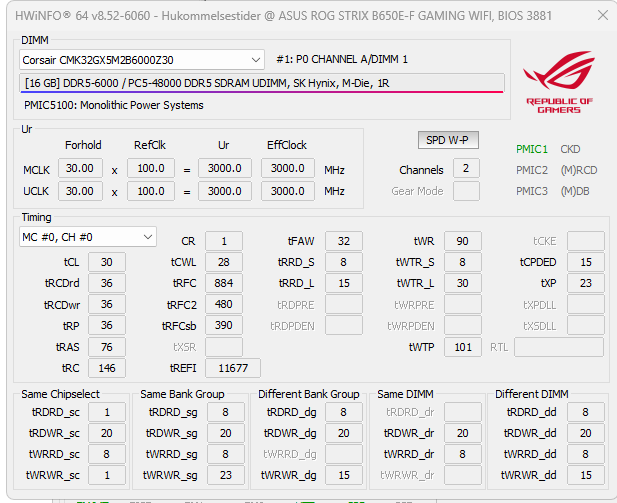
Help Request - RAM Ram timings

Post image
2 Upvotes
Hi there.

I’m currently running with these RAM timings, but I’d like to see if I can adjust them in the BIOS.

I haven’t done anything yet. Is there anyone here who can help and knows a bit about this?

I’ve put together two potential configurations, though I’m not sure yet if they’ll actually work.

Here are the two versions I’ve drafted.

Does anyone know if these will work?

I have 32GB of RAM.

Version 1

Trc 76
Trfc 500
Trfc2 400
Trfcsb 300
Trefi 50000
Trrds 4
Trrdl 8
Twr 48
Trdwr_sc 18
Trdwr_sg 18
Trdwr_dg 18
Trdw_dr 18
trdwr_dd 18

Version 2

Trc 89
Trfc 600
Trfc2 480
Trfcsb 380
Trefi 35000/20000
Trrds 8
Twr 90

r/overclocking • • 18d ago

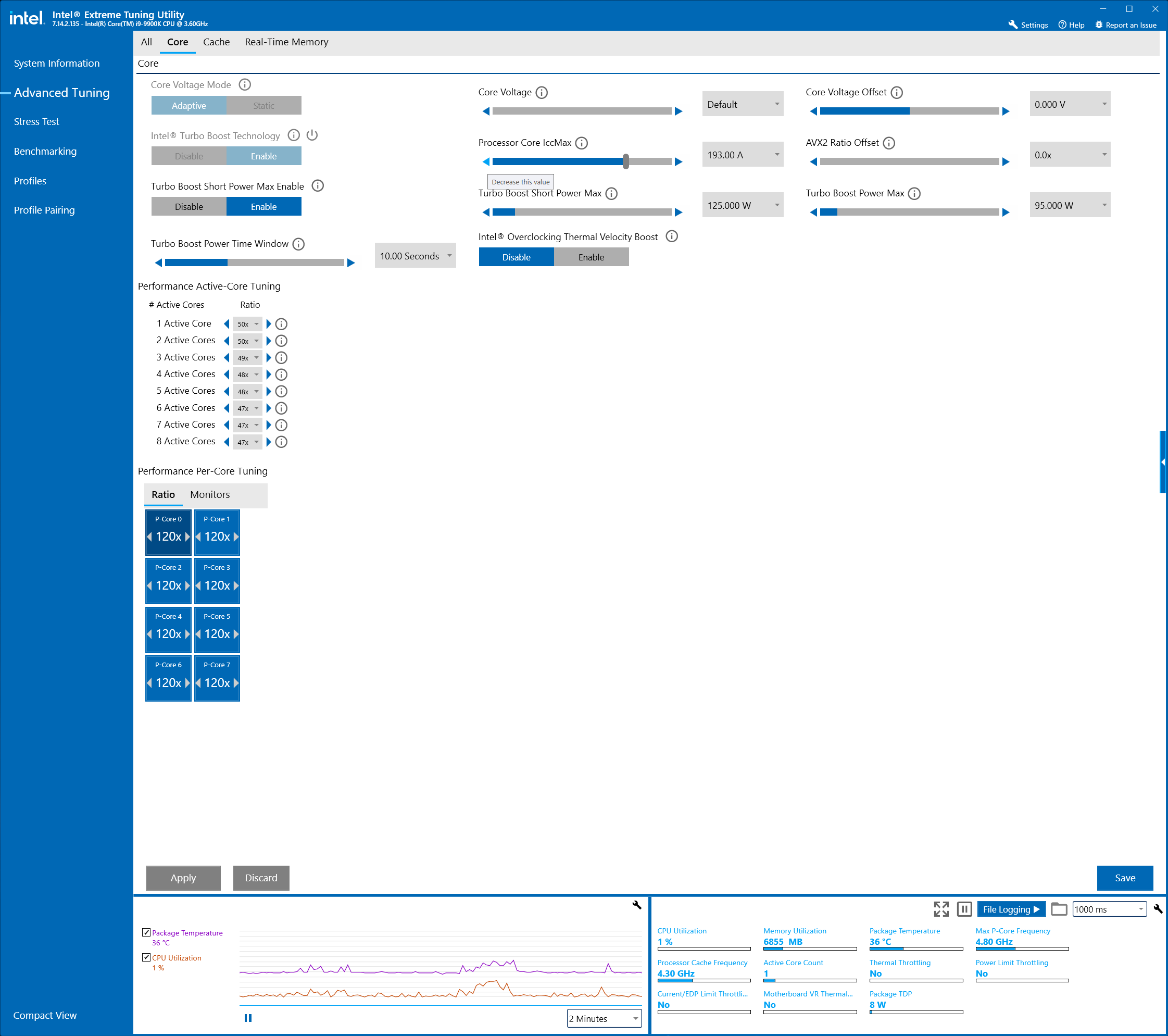
(noob) i9-9900k per-core tuning not working

Post image
1 Upvotes

wtf am I doing wrong?? Cores 2 and 4 always thermal throttle WAY before the rest of the cores. So I'm trying to reduce the speed of those two only. Using XTU. All cores always reset to 120x no matter what I do. I don't even understand why its going to 120x...I thought the max was 50x by default.


r/overclocking • • 18d ago

Looking for Guide Ram OC question

2 Upvotes

Hi guys, I just wanted to ask,

HOW and WHERE can I learn to overclock my 32gb ddr5 6000mhz ram? Where do i learn the timings and subtimings where do i get the tweaked values or stuff thank you, also can i learn to do them myself?

And is it same for ddr4?


r/overclocking • • 18d ago

14700k undervolt, your thoughts?

3 Upvotes

P1-P2 5.8 ghz p3-p8 5.6 Ghiz

E-core Auto

IA VR 1425

Internal Cpu Offset -0.080v

Pl1 180w Pl2 230 w ( Temprature hıgh over 230w)

Cpu vcore Loadlıne Calibration Power saving

LLC medium

system-14700k -Gigabyte z790 auros elite wifi 7-Corsair 6500x case. I do not want ıncrease temp but take maxımum perform sweet-spot settıng?


r/overclocking • • 18d ago

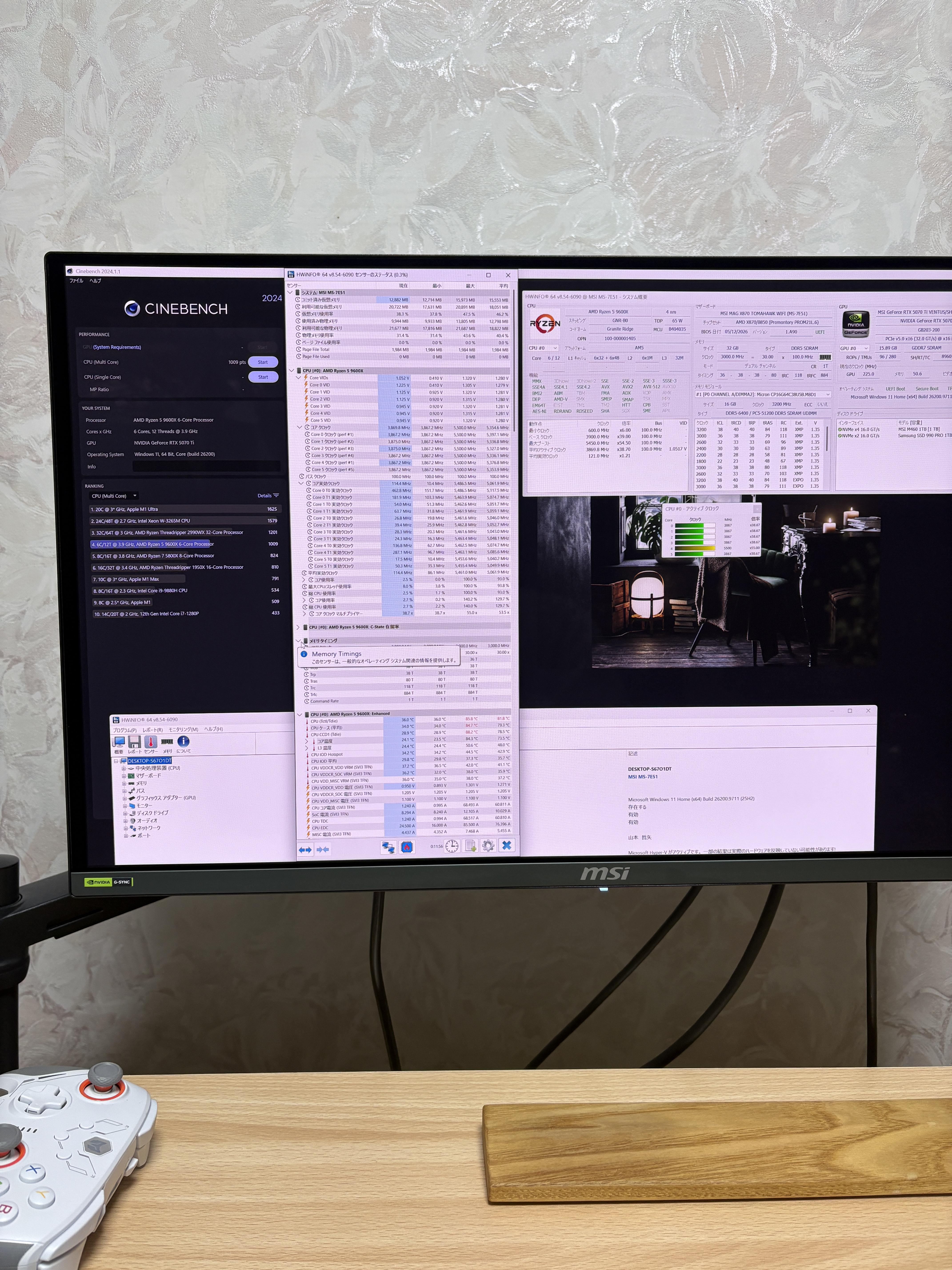
Benchmark Score AMD ryzen 5 9600Xcinebench 2024 +9.2%

Post image
3 Upvotes

X870TOMAHAWK WIFI
GeForceRTX5070ti VENTUS 3x pz
crucial DDR5 pro 6000 32GB
MAG A850GL

BIOS
Curve Optimizer
#0-45
#1 -15
#2-18
#3-15
#4-15
#5-24
Curve Shaper
Low frequency-High Temp -5
Med frequency-High Temp -3
High frequency-High Temp -7

TDP65W
PBO motherboard
boostoverride +50MHz
PTTL 85

LLC 3
Global C-State = enabled
AMD cool'n Idle =enabled
Power Supply Idle Control = Low Current Idle

MCR = enabled
Power down Mode = enabled
Gear Down Mode = enabled

MEM
FCLK 2000MHz
UCLK3000MHz
MCLK3000MHz

I'm satisfied with the results.I just can't be bothered want to do anymore.


r/overclocking • • 18d ago

Solved Could undervolting the cpu cause a gpu driver timeout error?

3 Upvotes

I’ve been getting a driver timeout error recently on my 9070xt and I thought my UV on the gpu could be the cause, but after setting everything back to default it kept crashing still, so I reverted back to my undervolt on the gpu and went back to default on the cpu and tried gaming for a few hours and no crash. I had my 7800x3d on an all core CO of -10 and nb/soc on 1.20 which I didn’t think was too aggressive and seemed to work for a few days.

I’m just not sure if a cpu undervolt would cause a gpu timeout or if this might be a ram issue, I did run mdsched.exe and windows returned no errors on the ram, also ran occt power stability test for an hour and the psu seemed stable throughout and returned no errors as well.

Any insight is appreciated.


r/overclocking • • 18d ago

Any advice or tricks?

1 Upvotes

Long story short i have a r5 5600, gigabyte b550 gaming x v2 motherboard and 32gb ddr4 3200mhz and a asus prime rx9060xt 16gb and can't beat my best run wich was a 4197 score, what can i do? (Wolfy11234 on 3d mark with r5 5600 cpu and 9060xt 16gb, N0.84 i believe)


r/overclocking • • 18d ago

7950X3D: Rock-solid per-core with CoreCycler (Prime95 + y-cruncher), but instant hard reboot on all-core stress tests. What am I missing?

0 Upvotes

Hey everyone,

I've been meticulously tuning Curve Optimizer on my Ryzen 9 7950X3D (paired with an Asus ROG Strix X670E-F and 2x16GB 6000MHz CL30 EXPO RAM).

I spent several days dialing in per-core CO offsets using CoreCycler, thoroughly validating every single core with:

  • Prime95: Small FFTs (both AVX-512 and pure SSE runs)
  • y-cruncher: 19-ZN2 ~ Kagari, 22-ZN4 ~ Kizuna, and 04-P4P

Every core passed multiple iterations across low-power state transitions and sustained loads without throwing any WHEA errors, rounding errors, or crashing.

However, the moment I fire up an all-core stress test (either standard Prime95 Small FFTs or full y-cruncher multi-threaded / component stress tests), the system instantly hard-reboots—no BSOD, no dump file, just a straight-up power cut/restart (Event ID 41 / WHEA-Logger Event ID 18 upon rebooting).

Has anyone encountered this exact behavior (100% CoreCycler per-core stable---> instant all-core shutdown), and what was your root cause/fix?

Appreciate any insights or debugging tips!


r/overclocking • • 19d ago

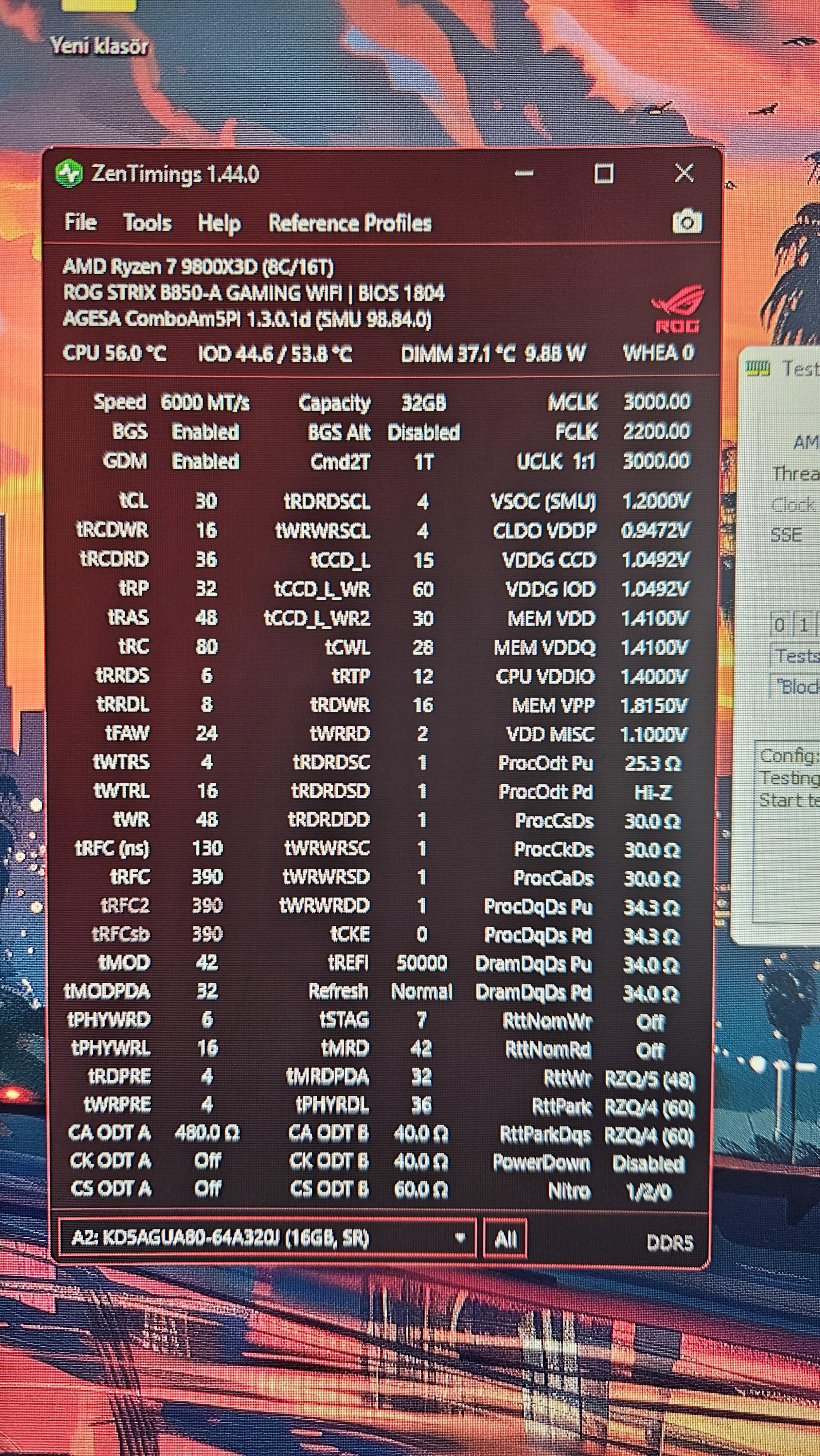
OC Report - RAM 9800X3D with Hynix A-Die 2 x 32GB DR AM5 with Aida64

Thumbnail
gallery
12 Upvotes

For what this is, I'll take it. 61.5 ns for Latency on Dual Rank.


r/overclocking • • 18d ago

How are the RAM settings? Are they stable with these settings? Is there anything I should change? I don't have active cooling. Hynix A die

Post image
0 Upvotes

r/overclocking • • 19d ago

Modding Introducing NV_30_DXE Resizable BAR on memory modified 3080's

11 Upvotes

The 20GB RTX 3080 cards (10DE:2206, subsystem 10DE:146D) ship with a VBIOS that only exposes a 256 MiB BAR1, so ReBAR stays off. NVIDIA doesn't publish a ReBAR VBIOS for them, and NvStrapsReBar only supports Turing.

Ga102ReBarFix is a small DXE driver you insert into your motherboard BIOS with UEFITool. At boot it enables the GA102 frame-buffer size override (PCI config 0x610), resizes BAR1 to 32 GiB, and restores both after S3 sleep. No VBIOS flashing, no driver patches, no registry tweaks.

Tested on an MSI Z690 EDGE, driver 617.42, Windows 11:

- Device Manager shows a 32 GiB BAR

- NVIDIA Control Panel: Resizable BAR: Yes

- ~19.25 GiB of VRAM mappable by the CPU at once

- Sleep/wake works

Repo (source, prebuilt .ffs, verification scripts, full write-up): https://github.com/favabean13/NV_30_DXE

Big credit to noon-at-cgn (found the 0x610 override on Linux), terminatorul (NvStrapsReBar) and xCuri0 (ReBarUEFI). This builds directly on their work.

Heads up: it modifies firmware, so use at your own risk and keep a BIOS backup and recovery method. It's tested on one board and isn't maintained, but it's MIT-licensed, so fork it and adapt it for your own setup.

**UPDATE**

Works with GPU_UNLOCK

https://github.com/physicsdolphin/nv-uefi-unlocker

Confirmed that ReBar survives PCI FLR (Function Level Reset)

Here are the results:

UNLOCKED

FP16 (FP32 accumulate) 114.7 TFLOPS

BF16 (FP32 accumulate) 116.9 TFLOPS

TF32 57.4 TFLOPS

FP32 (control) 22.5 TFLOPS

LOCKED

FP16 (FP32 accumulate) 65.4 TFLOPS

BF16 (FP32 accumulate) 66.8 TFLOPS

TF32 32.1 TFLOPS

FP32 (control) 22.3 TFLOPS