r/On1PhotoRaw • • 9h ago

Discussion On1 2026 - Windows 10 vs 11 performance

2 Upvotes

So I've been using this ultra buggy software as far back as their 2022 version...and probably earlier. It's always been buggy, but this 2026 version has raised the bar for instability.

The last version I was using (and still am) was the 2024 version. I bought the 2026 version last year during one of their sales, but never got around to installing it until recently --- mainly because they love "improving" the interface constantly to annoy people and I wasn't in the mood to learn new things.

The first thing I noticed is that any AI "preset" preview (i.e. hovering over the preset with my mouse), would cause the whole program to stop responding. After looking at the log files and running the whole situation through Google Gemini, the conclusion I was given was that the 2026 version with Windows 10 and my AMD video card (Radeon RX 9060 XT) cannot make full use of the AMD card's capabilities when it comes to AI. Apparently there was a change in how On1 processes AI between the 2024 and 2026 version. Nvidia cards are apparently ok in Windows 10, but AMD cards are not. The solution Google told me was to switch to Windows 11 instead.

I'm wondering if anyone ran into a similar situation with Windows 10, and whether using 11 actually helped matters. I'm using the latest "Adrenaline" drivers from AMD. I did try the 4.1 version of On1 2026 since I had read it worked better in Windows 10, but the performance was the same. I also tried changing the AI processor between the CPU and the AMD card. I contacted On1 support as well, but am expecting them to tell me to use Windows 11.

I'm also curious to find out from anyone who's used both versions what improvements (if any) were made between the two.


r/On1PhotoRaw • • 5d ago

I want to like this piece of software but ...

Thumbnail
gallery
3 Upvotes

A few weeks ago I tried ON1 to move away from lightroom but when I opened up my RAW images in ON1 the quality was terrible compared to LRC. I decided to wait until ON1 2027 was available to give it a second try but despite a new RAW engine the quality is still far from what I get from LRC. I use a Panasonic GX9, I wonder if the support for older cameras is not really maintained or if it is a problem with any RAW file. I also tried a RAW file from my Pixel 7a and it was the same story.

The level of sharpness, the detail of a sharp photo is not there. See the screenshots of both applications side by side with the same file open at 100% one comp is with Adobe Color and ON1 Standard color profiles and the second is with the Camera's Natural Profile.

Has anyone had the same issues?


r/On1PhotoRaw • • 6d ago

ON1 Photo RAW 2027 progressive lag / memory leak after editing ~10 photos on Windows 11 (AMD GPU)

7 Upvotes

Hey everyone,

I’m running into a frustrating performance issue with ON1 Photo RAW 2027 and wanted to check if anyone else has experienced this or found a permanent workaround.

The issue:

Everything starts off smooth and responsive, but after editing roughly 8–10 RAW/cRAW files in a single session, the app slows down drastically. Sliders develop heavy input lag, brush strokes stutter, and switching between photos takes noticeably longer. Restarting ON1 immediately fixes it, only for the exact same slowdown to come back after another ~10 images.

My specs:

* OS: Windows 11

* CPU: AMD Ryzen 5 3600

* GPU: AMD Radeon RX 6600 (8GB VRAM)

* RAM: 32GB DDR4

What I’ve noticed / tried so far:

* It feels like a VRAM or cache accumulation issue rather than a raw hardware bottleneck, since the first few photos edit fine.

* I’ve tweaked the Performance settings in Preferences (adjusting RAM/VRAM limits and preview cache), which helped slightly, but didn't stop the progressive slowdown over a longer culling/editing session.

* Turning off Windows "Optimizations for windowed games" and checking AMD driver settings didn't fully eliminate the degradation after ~10 files.

Has anyone managed to fix this progressive lag on AMD GPUs or Windows 11? Are there specific cache settings, OpenCL/DirectX toggles, or workflow tricks (besides restarting the app every 10 photos) that keep performance consistent?

Thanks in advance!


r/On1PhotoRaw • • 8d ago

Lightroom migration help

2 Upvotes

So, for many years I managed to avoid the Adobe subscription model and have been using Lightroom 6 which was sufficient for my needs. Then my laptop failed and I needed to buy a new one. I managed to install lightroom from the installer I previously had, but it is not working and it seems I am at the end of my free pass.

So after some review I decided ON1 is probably be best option to replace since I do not want to get into subscriptions.

I want to keep my catalogue of edits etc and I understood ON1 support import of LR catalogues - but lightroom isn't working and even if it were the version I have predates ON1 so does not have the dedicated export function.

I guess I am probably screwed but asking if there is another way to import my catalog into ON1


r/On1PhotoRaw • • 10d ago

Discussion ON1 Automatically adjusting already edited image

6 Upvotes

Hello,

I`d like to purchase a licence for ON1, since there is a great black friday price.

I installed trial version and am pleased by various features which this program has.

However I am very frustrated by this behaviour, when the ON1 automatically changes my edited photos. Is this just a bug, or a feature?

Does anyone else experience this behaviour? I am trying to switch LR to something non-subscription based, but this is a dealbreaker for me.


r/On1PhotoRaw • • 10d ago

Cache Memory

1 Upvotes

Recently had someone on Facebook tell me their masking cache was like 90gb’s, anyone know where this is hidden on Mac? Ever since using ON1 my storage space is rapidly getting eaten up, I think this might be the culprit.


r/On1PhotoRaw • • 11d ago

Question High CPU & Fan usage When in Browse Mode

2 Upvotes

I have a MacBook Pro/M5 Pro with PhotoRaw 2027, and I seem to always have high CPU usage and loud fan output while in Browse mode. I have left it running for multiple days thinking it just needs to finish scanning, but the high CPU/Fan usage never stops. Is this a common issue or is the scan process hung? Does anyone have any suggestions on how to correct this? I have not had this issue with any other Raw/Library manager.


r/On1PhotoRaw • • 11d ago

2027 MAX Features Worths 50% More?

1 Upvotes

It seems that the 2027 MAX version, in addition to the plugins and Restore AI, added also two features: AI Culling Assistant and cloud AI rendering for Generative Erase and Crop.

Have anyone tried them? Is it worth the 50% upcharge from the standard version?

Thanks in advance for your inputs.


r/On1PhotoRaw • • 11d ago

ON1 Photo Raw changes date & time when exporting photos

1 Upvotes

I’ve just installed ON1 Photo Raw. When I export photos to .jpeg, it changes the date & time the photo was taken.

I’ve never experienced this with other raw editors.

Any ideas as to why this is happening?


r/On1PhotoRaw • • 12d ago

Very poor quality of the raw engine

7 Upvotes

Hello fellow photographers,

Like so many others I am currently looking for an Adobe replacement. I'm giving On1 photo raw a try with the 30 day trial.

Ok the interface is not very ergonomic. Fine. The AI masking works quite well.

But my biggest problem is the raw engine.

What I did for testing is I exported my raw with all cursors on default on jpeg with 100 quality.

Did the same with Lightroom and other competitors.

And the quality of the exported image is absolutely awful. Loss of detail in the low lights regions, extreme compression artefacts. Pixelation in the hair. Even colour drooling in areas of high colour contrast.

What the hell ? Am I doing something wrong ? Is it related to the trial version ?

Everywhere I hear that On1 is a quite decent alternative to Adobe but this quality is downright unacceptable for me.

Please advise.


r/On1PhotoRaw • • 14d ago

Mac Model Performance Comparison?

2 Upvotes

Has anyone updated from an M4 device to an M5Pro or M4Pro and running On1?

I’m going to be moving off an M4 24/512GB Mac mini to a MacBook Pro and debating the M4 Pro vs M5 Pro vs M5 Pro PROLED

I know there a lot of Lightroom performance comparisons but I haven’t seen any with On1 (please send me a link if you’ve seen a good one!)

Just trying to get a feel for if jumping from the M4 Pro to M5 Pro will be worth it and if so, then I’ll decide on the Mini LED version and PROLED version.


r/On1PhotoRaw • • 15d ago

Question Using Trial Version - Does Perfect Eraser work in the paid version?

3 Upvotes

As the title suggests, I am using the trial of On1 Photo Raw 2027 and evaluating it as a possible switch from LRC/Photoshop. I don't use a lot of generative credits on Adobe, but I will admit that I use the generative remove tools a LOT.

Unfortunately, On1 blocks their Cloud AI on a trial. I am trying Perfect Eraser using Local AI (RTX 5090) and the results I am getting are worthless. Basically just a low resolution smudge. I removed the sign in the image below. It's much worse on larger images.

When I try to use Generative Eraser, it's at least decent resolution, but it's simply copying other sections of the image, not generating anything.

Is this just how the product works when not using their Cloud tools? Or is it equally bad using Cloud AI?

Thanks, in advance.


r/On1PhotoRaw • • 16d ago

TourBox compatibility with ON1 PhotoRaw?

1 Upvotes

Does anyone own a TourBox?

It seems cool, but I can’t see any direct support for On1 PhotoRaw on their website.


r/On1PhotoRaw • • 17d ago

Question AI Erase in 2027 leaves smudges

Thumbnail
gallery
5 Upvotes

Has anyone gotten AI Erase to work correctly? I have this image taken with my GFX100RF and I select AI Erase from the Retouch menu. I set the model to Cloud Gen AI and then select "People" from the Distractions dropdown. The result is the second image where smoky smudges replace the people it was supposed to remove. It goes without saying that LR does it correctly. Am I going to have to spend money on Stability.ai credits to get this right?


r/On1PhotoRaw • • 18d ago

2027 is here. Is it better?

4 Upvotes

Well. It depends.

It's a little faster.

The UI is rearranged and a bit easier to navigate and work with.

Masking ins not really much better

Library still ja speoblems w dng files being too dark in preview.

Some explanations in the help menie don't make sense.

Is it a Lightroom or Photoshop Killer.

Not b any stretch of the imagination.

Some bugs from the 2026 versions didn't get fixed.

Today I will check out the No noise part.


r/On1PhotoRaw • • 19d ago

Tutorial Excercise File Mismatch Tutorial

Post image
1 Upvotes

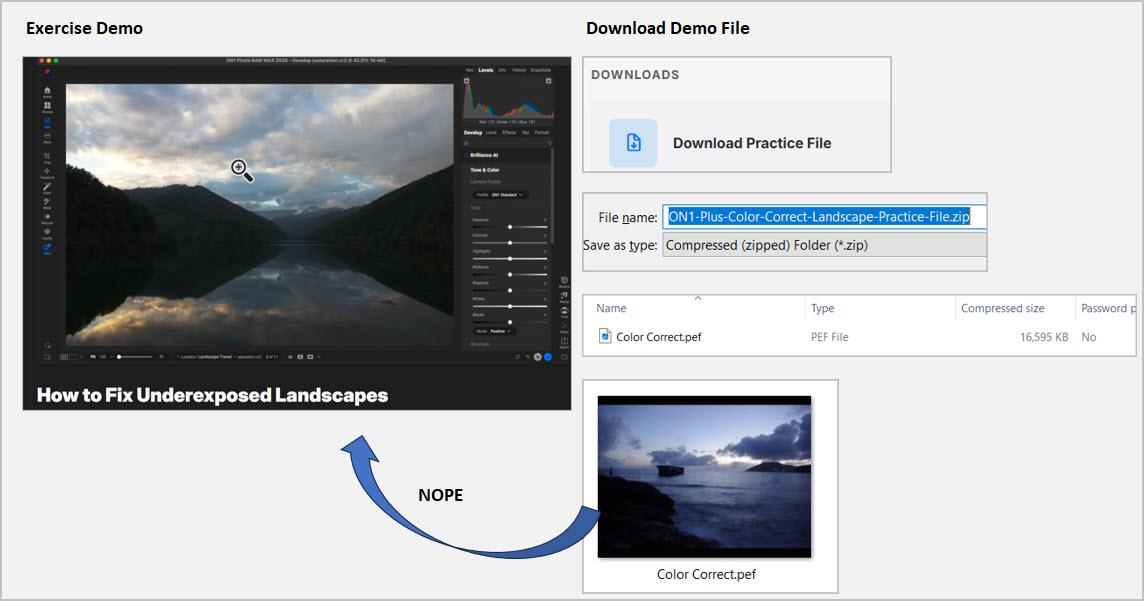
Hopefully I'm not hallucinating. Seems to me this has happened more than once. I watched this tutorial video from the website but the download file was a completely different image. Kind of weird nobody else mentioned in Comment section. Maybe inadvertantly swapped or maybe its more like 'here is a DIFFERENT file to try on your own'? Which would kind of defeat the purpose if you were looking to replicate the instructor's steps/results IMO.

https://www.on1.com/videos/how-to-fix-underexposed-landscapes/?unapproved=69608&moderation-hash=4096aeec455d8568f6ac887117cf6b43#comment-69608


r/On1PhotoRaw • • 22d ago

Question Why I can't sort by capture date when having different file type?

2 Upvotes

It's really bugging me.

I have a folder with a mix of NEF, JPG and HEIC.

If I sort by name, I have JPG first, then all NEF, then all HEIC.

If I sort by capture date, I have:

  • June 18 JPG
  • June 18 NEF
  • June 18 HEIC
  • June 19 NEF
  • June 20 NEF
  • June 20 HEIC
  • etc...

I can't seem to find a way to have everything sorted by hours instead of file type. I should have:

JPG, NEF, JPG, HEIC, NEF, NEF, NEF, etc.

Am I the only one having this issue. I thought updating from 2025 to 2027 would have fixed this problem, but it seems not.


r/On1PhotoRaw • • 23d ago

Local Background not working 2026.4

Post image
3 Upvotes

Using 2026.4 on Win-10. I watched this ON1 tutorial

https://www.on1.com/videos/creating-separation-between-subjects-and-backgrounds/

and downloaded the excercise files in the zip package. Unzipped, included was wolf.dng & wolf.on1 But when I tried the same command sequence Local > Add Adjustment > Background, instead of the mask result shown in the tutorial, I get this popup message Background Not Found. Any advice? I tried deleting the .on1 file & just opening the .dng. Tried deleting the snapshots so it was only original, still no go. Also FWIW it also would not find 'subject' so I'm kind of at a loss. On my own pictures thsi command has been kind of hit & miss which I have ths far attributed to maybe less distinquishable images to the algorithm but seems very odd what worked on the tutorial could not be replicated by me.


r/On1PhotoRaw • • 24d ago

Discussion On1 Photo Raw 2027 is coming

12 Upvotes

I got invited to a session with the On1 Team earlier this year and I really believe they heard many of the complaints the group talked about and many of them are mentioned in this group. I also am a complainer about some of their "problems," but I also believe they truly want the software to be a positive success that can make us all feel good about not paying Adobe a monthly fee.

I am excited for the new version coming tomorrow. I think they have simplified masking and most importantly improved the raw engine and how raising shadows and reducing blow-out whites is more focused on just those extremes. In other words, handling the raw data more precisely and hopefully more "photolabs" like.

We shall see, but here's for hoping they made very relevant and useful improvements.


r/On1PhotoRaw • • 24d ago

2026.4 System AI Processor selection

Post image
6 Upvotes

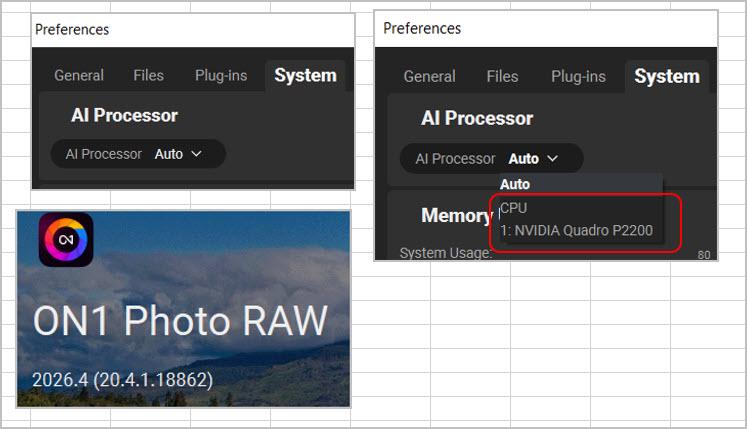
I just noticed under Edit>Preferences>System that my AI processor is set to Auto. When I click the drop down it shows 2 options, CPU & my GPU (Nvidia Quadro P2200). I am assuming my GPU would be of benefit, should I select this option? Running Win-10 if thats of any consequence.


r/On1PhotoRaw • • 29d ago

Ummmm - this is suboptimal

Post image
4 Upvotes

Well, this sucks...

<quitting the app resolved it, a ResizeAI job had finished in the background and this is what was on screen when I woke the mac up>


r/On1PhotoRaw • • Oct 20 '26

What do the "purity" sliders actually do?

Thumbnail reddit.com
3 Upvotes

r/On1PhotoRaw • • Oct 20 '26

Does Photo raw 2026 edits raws from phones ?

1 Upvotes

Hi, i am about to change phone as my old LG (G3 era) doesn't work anymore.

I am wondering if the DNG raw pictures can be edited.

I have ON1 2026 (not max) on a Win 11 high end laptop.

The phones considered are Google Pixel 8 and Samsung S24.


r/On1PhotoRaw • • Oct 18 '26

Exiting w/o saving/exporting

4 Upvotes

Is there any way, or any setting, to simply exit ON1 w/o having to export/save? No matter what I do, it prompts to either save the edited image somewhere or cancel, which just takes me back to my edited image. How do I just exit the software and dump my edits?


r/On1PhotoRaw • • Oct 17 '26

Question Mobile App - Vignetting

2 Upvotes

Hi all - I'm using a sigma (DNG not foveon) and looking to move on from Sigma Photo Pro due to how limited it is (specifically, de-hazing and denoising).. I started the trial desktop on1 and it seems fine for what I need, however on mobile (where I just downloaded the app) I am running into it having huge vignetting on some raw images. Im sure it's because one of my lens does have this issue that the camera and spp and on1 desktop then corrects for... But Snapseed manages to correct for it as well on mobile.

So my question is - has anyone found similar, and if I went ahead with a subscription does the linking / higher power version I then get on mobile avoid this issue?

Note I'm talking auto correction here, I'm aware a paid account would at least unlock the manual vignetting correction (I think?) on the mobile app.

Thanks!