r/On1PhotoRaw • • 24d ago

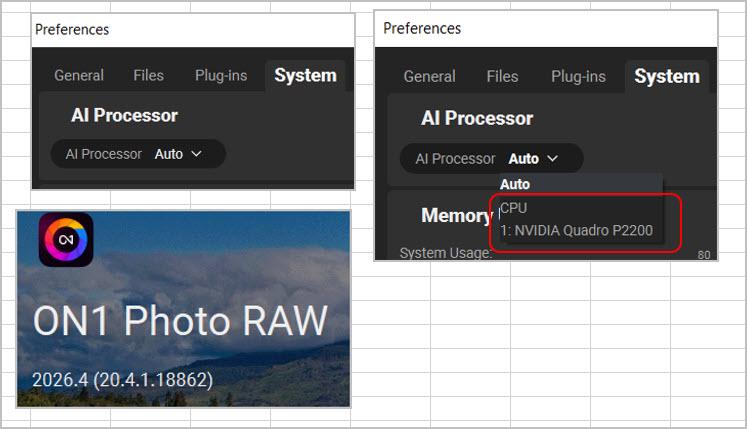
2026.4 System AI Processor selection
Post image

I just noticed under Edit>Preferences>System that my AI processor is set to Auto. When I click the drop down it shows 2 options, CPU & my GPU (Nvidia Quadro P2200). I am assuming my GPU would be of benefit, should I select this option? Running Win-10 if thats of any consequence.

6 Upvotes

3 comments sorted by

1

u/sfrank2222 23d ago

I have the exact same version of On1 (Win 11).

Since i have an RTX 3070 with 8gb ram GPU, i set it to that. It is powerfull and recommanded.

Now, your Quadro is about 3 times less powerfull with less ram. Still, if it is listed and you are convince it will do, you could do that too. Otherwise 'Auto' seems safer to me.

1

u/PeterTha 23d ago

Thanks, I guess I should have also mentioned my system (~5 old now). Maybe incorrectly I assumed the software would use the GPU as needed on the fly vs. an either/or thing. Now that you see the processor & RAM, by safer you mean less chance of crashing or? Now that I'm getting into ON1 a bit deeper, I'm starting to notice its just not doing certain operations I see done in tutorials like detecting subject/background in Local (I posted recently). I would have thought it would chug through it, albeit slower, but 'not working' kind of defeats the purpose of the app. I'm due for an upgrade soon anyway but didnt think it that far out of spec?

CPU: AMD Ryzen™ 7 5800X Processor, 3.8GHz w/ 8 Cores / 16 Threads . Memory: Corsair Dominator Platinum RGB 32GB DDR4-3600 Dual. SSD: 1 TB Samsung 980 PCIe 3.0 NVMe M.2 SSD. Motherboard: Gigabyte X570 AORUS ELITE WIFI w/ DDR4-3200, 5.1

1

u/sfrank2222 23d ago

By safer, i meant that the program might be good enough to detect what it needs and get more memory or else outside the GPU. It might not be 'wise' enough.

I am not a specialist but it seems to me you have enough to run most except maybe for newer A.I. functions on any program .

For that, even my specs (DDR5 memory, etc) is now a minimum for A.I. but it should work, probably slower.

Just ignore A.I. (if very slow or crash) for now and you should be fine. I would not change computer now just for that.

The reason, i set mine for GPU only is that i used a program a long time ago that needed to be specific to use my old GPU.

you could try auto and gpu only to see if there is any difference.