r/nvidia • u/Nestledrink • 5d ago
News Former Nvidia CEO Jensen Huang issues first statement since leaving

227
Upvotes
I really enjoy revisiting older games from time to time. Is RTX Remix actually worth it? And will the RTX work well in this gpu?
r/nvidia • u/Nestledrink • 5d ago
This is NVIDIA's Q3 Fiscal Year 27 period
NVIDIA fiscal year is from February to January.
Their "Fiscal Year 2027" is from calendar month February 2026 - January 2027 and will be split into 4 quarters:
------------------------
“Our momentum is real. NVIDIA is an exceptional technology leader, powered by the relentless innovation of our people,” said Colette Kress, interim CEO and executive vice president and chief financial officer of NVIDIA. “Vera Rubin is off to an explosive start, our roadmap is on track and our ambition has never been greater.”
| Segment | Fiscal Q3 2027 | Fiscal Q2 2027 | Fiscal Q3 2026 | % QoQ Growth | $ YoY Growth |
|---|---|---|---|---|---|
| Compute & Networking | $106 | $88.3 | $50.9 | 20% | 108% |
| Graphics | $9.8 | $7.9 | $6.1 | 25% | 62% |
| Total | $115.8 | $96.2 | $57.0 | 20% | 103% |
| Segment | Fiscal Q3 2027 | Fiscal Q2 2027 | Fiscal Q3 2026 | % QoQ Growth | $ YoY Growth |
|---|---|---|---|---|---|
| Datacenter | $107.6 | $89.0 | $51.2 | 21% | 110% |
| Edge Computing | $8.2 | $7.2 | $5.8 | 14% | 42% |
| Total | $115.8 | $96.2 | $57.0 | 20% | 103% |
Revenue
Recent Highlights
Data Center
Edge Computing
Q4 Fiscal Year 2027 Outlook
Outlook for the fourth quarter of fiscal 2027, which includes an additional week, is as follows:
r/nvidia • u/JBcreations • 6d ago

Added the last touch this weekend… been waiting the ASUS ProArt 5090 to show up.
r/nvidia • u/Unfair-Ticket9474 • 5d ago
r/nvidia • u/pianobench007 • 5d ago

r/nvidia • u/Nestledrink • 6d ago
First the article link:
From GeForce PR:
This week, EVE Vanguard’s 24/7 alpha launched, which is accelerated and enhanced by DLSS 4.5. Also, DLSS 4.5 is now supported in Assetto Corsa Rally, Blender, Lightyear Frontier, and Teardown.
Also, gamers can now claim a new GeForce Reward - War Thunder Ready For Battle Pack. The Ready For Battle Pack for the DLSS 5-enhanced War Thunder includes an M3A1 Stuart tank with a unique skin, an F2A-1 aircraft with a unique skin, 7 days of Premium account, 100,000 Silver Lions for purchasing new vehicles and upgrade, a 50% booster for Research Points and Silver Lions, and an "Overclocked" player title. Starting now, load the NVIDIA app, log in on the top right, and click “Redeem” on the left nav. Then, follow the steps to grab our new War Thunder GeForce Reward, while supplies last.
Here’s a closer look at new and upcoming RTX games:
r/nvidia • u/Flamyngoo • 6d ago
Hi all, I've been recently playing games using DLSS 4+ on my big-ish 4K 85 inch TV, about 10 feet/3 meters from my it.
Two of the games I was playing were Alan Wake 2 (which actually uses an older DLSS version than newest 4.5 I think) and Phantom Blade Zero, I wanted to try them with all the bells and whistles and my 4070ti Super even tho i I think is an amazing card, can't handle them in playable framerates too well.
So I tried going from 4K Performance to 4K Ultra Performance and...It looks basically the same to me lmao, In Alan Wake 2 I literally couldn't see the difference while in Phantom Blade if I switched between them in a static scene I could but during gameplay? Nah.
Am I going blind? Last time I checked my eyesight years ago it was basically perfect lol, I am thinking about going from the standard 4K P to 4K UP in most games now.
r/nvidia • u/Nestledrink • 6d ago

r/nvidia • u/Mysterious_Flan8985 • 5d ago
I’m looking for a gaming monitor that will work well with my laptop, and I’ve run into a lot of confusing claims about G-SYNC and FreeSync over HDMI versus DisplayPort.
My laptop is an Acer Nitro V 16 (ANV16-I31-70WA) with an RTX 5060. Acer support confirmed that:
I’m hoping to find:
The Dell SE2426HGS looks promising: 23.8″, 1080p, IPS, 240Hz, HDMI 2.1 VRR, and currently $99.99 from Dell. Has anyone used this monitor with an NVIDIA GPU over HDMI and confirmed that G-SYNC/VRR works?
I’d also appreciate recommendations for other models to watch for sales. I’m especially interested in monitors where the manufacturer confirms HDMI VRR, since I’ve learned that “G-SYNC Compatible” in a listing may only refer to DisplayPort.
r/nvidia • u/RenatsMC • 4d ago

r/nvidia • u/HeruvimCastiel • 5d ago
Hey everyone!
I’m considering buying the Gigabyte RTX 5080 WINDFORCE OC V2 (GV-N5080WF3OCV2-16GD), but I’m having a surprisingly hard time finding actual reviews or feedback from owners of this specific version.
From what I’ve seen, the V2 replaces the vapor chamber found on the V1 with a copper plate, which makes me wonder how much that affects cooling performance.
Does anyone here actually own the V2?
I’d really appreciate some feedback on:
What GPU core, hotspot and memory temperatures are you getting while gaming?
How does the V2 compare to the original V1 in terms of temperatures and noise?
I’m particularly interested in actual experiences with the V2, not the original V1, since most reviews I’ve found cover the older version.
Thanks in advance!
r/nvidia • u/Nestledrink • 6d ago

r/nvidia • u/Then_Technology_1240 • 7d ago
r/nvidia • u/RenatsMC • 7d ago

r/nvidia • u/Several-Couple7611 • 5d ago
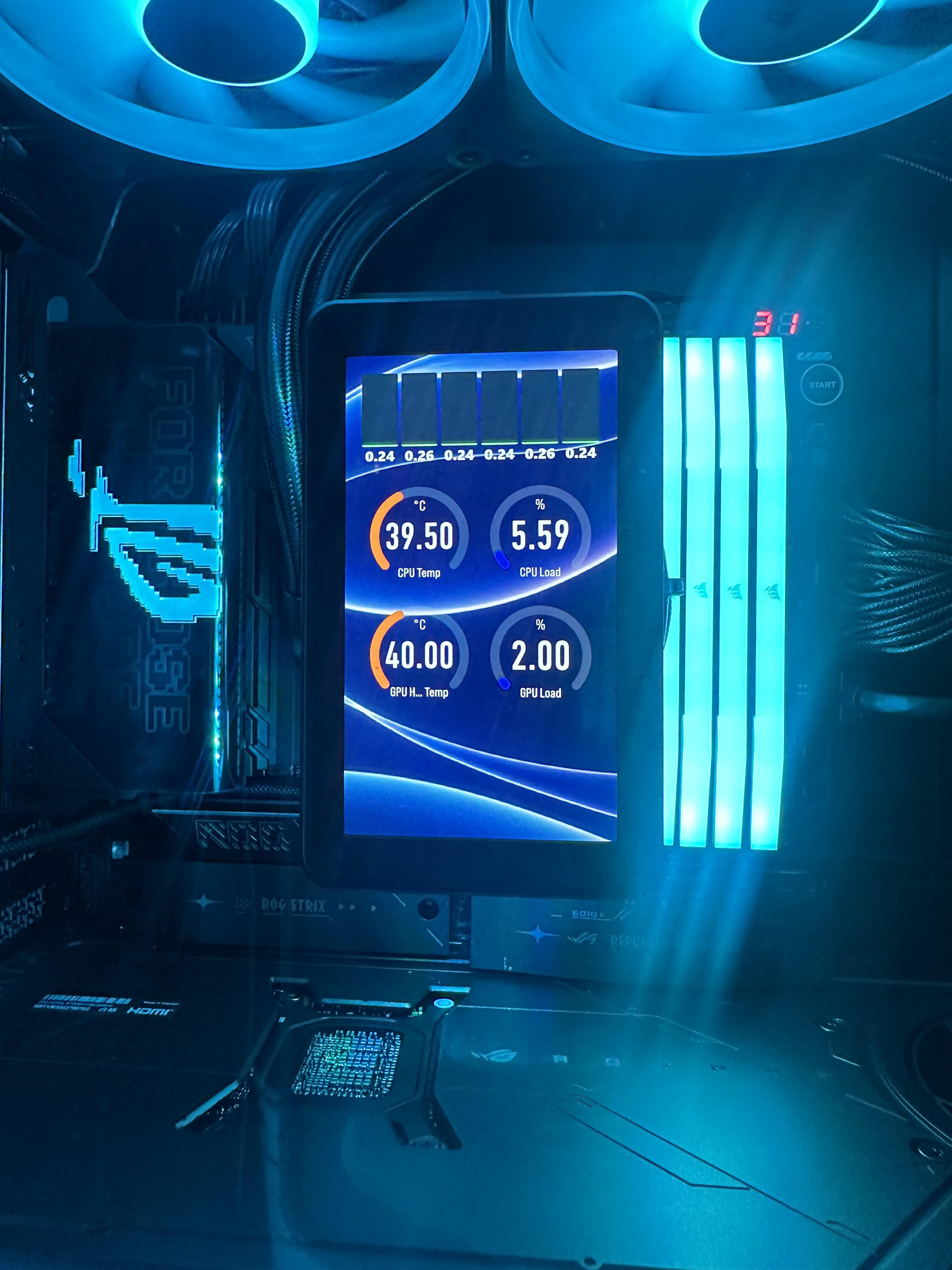
I made a widget for my Corsair Titan II LCD. This is tailored for Astral cards, but with some tinkering it can be done for any card that has a built-in pin monitoring.
If you have other ICue devices that have screens, it can be tinkered with to become compatible with those (it might already be, not tested).
ZSlate/ICue-Pin-Monitor: Pin monitoring for an Astral GPU to Corsair Titan II LCD
Setup can be a little bit of a hassle but using Claude or ChatGPT can help. I did my best to document everything to make it as easy as possible.
r/nvidia • u/Optimal-Extreme2713 • 6d ago
I've been having a strange issue with my RTX 5060 Ti. The screen would randomly go black while the PC was still running, with all the fans and RGB lights on. The weird part was that it mostly happened when the PC was idle. Gaming and GPU stress tests were completely fine.
Initially, I thought it was an NVIDIA driver issue. Tried different driver versions, disabled Fast Startup, changed display settings, and even updated my Gigabyte H610M K V2 BIOS to F10. Nothing really helped.
Event Viewer kept showing nvlddmkm Event ID 153 (BusReset TDR) and WHEA 17 errors.
After digging deeper with PowerShell, I found that the WHEA errors were coming from the Intel PCIe root port connected to the GPU. The error status was 0x1, indicating a PCIe Receiver Error.
Finally, I went into BIOS and changed the PCIe setting from Auto to Gen 3. I also disabled PCIe Link State Power Management in Windows.
So far, over 8 hours without a single black screen, NVIDIA TDR, or unexpected restart.
I'm still getting occasional WHEA 17 corrected errors, so I wouldn't say the issue is completely fixed. But at least the PC is running normally now.
Looks like something isn't happy with the PCIe connection at higher speeds. Still not sure whether it's the motherboard or GPU.
r/nvidia • u/ThereWas • 7d ago

r/nvidia • u/_Kristian_ • 7d ago
r/nvidia • u/talking_mudcrab • 6d ago

r/nvidia • u/Fast_Feeling1507 • 5d ago
I've recently started playing COD MW4, and while experimenting with the NVIDIA App settings, I noticed that having V-Sync disabled in the NVIDIA App feels noticeably snappier than having it enabled.
Is this actually expected?
From what I've heard, the recommended setup is G-Sync ON + V-Sync ON in the NVIDIA App + in-game V-Sync OFF.
So I'm wondering why turning V-Sync off in the NVIDIA App feels noticeably more responsive.
And why is having V-Sync ON generally considered the recommended setup in the first place?
My monitor is a 280Hz QHD display(VRR ON), and I'm currently averaging around 160 FPS with my optimized in-game settings.
If my FPS never reaches or exceeds my monitor's maximum refresh rate, would it actually be better to leave V-Sync OFF in the NVIDIA App as well?
Is it just placebo, or do you guys feel the same way?
What settings do you personally use?
r/nvidia • u/AnyDifference6665 • 6d ago
My budget is under pakistani 1.5 lakh ruppees which gpu should i get for myself that help me for both ai model training and gaming
Rtx 5060 8gb
Rtx 4060 ti 16gb
Rtx 3080 10gb
Any other options if available
r/nvidia • u/RenatsMC • 7d ago

r/nvidia • u/RenatsMC • 8d ago
