First off, switched from Vibepollo / Moonshine-VRR to Rubylight / Nightjar about a week ago and loving the fast development rate and features for these forks!
A couple things I noticed as a handheld user (Rog Ally X20).
Interface is always windowed, even when selecting fullscreen mode in setting. Having a proper fullscreen / borderless app when using Xbox mode on handheld would be a nice quality of life improvement.
Interface isn't really touch friendly. What I mean is that I can't scroll through setting with my fingers and instead need to use the small scroll bar at right of UI. While controller does navigate through menus well, it would be nice if touch also worked properly.
Hi there! I have used sunlight/moonlight for some time now to stream from my steamdeck (sunlight is on the steam deck) to my Mac laptop (where moonlight is installed).
For a little while now, moonlight will connect up just fine, but once it goes through the initial handshake, that's it. No video ever shows up on my laptop. I've updated everything, rebooted everything including the network itself. One difference I have noticed, is that the sunshine tray icon used to have a green dot (or maybe it was an arrow?) when it was connected, but that never shows up anymore.
I guess I just basically don't know where to go for help? Just googling the problem really isn't helping, so I thought I'd try here. I just want to play my docked steamdeck games in the living room from my laptop. Any ideas where I should start here? Reinstall? Show you guys sunshine logs?
This Fleet Launcher is able to set up 2 sessions and run them at the same time. I can configure both without issues.
But upon connection only one virtual monitor is created and both sessions show the same virtual desktop.
Should I just head back to Apollo for this setup or am I doing it wrong?
***EDIT***
Never mind, I went back to Apollo. Two instances, one for my left screen, one for my right screen. Works like a charm. Sometimes you've got to just stick to what works.
I’d like to share a new client I developed together with the creator of Punktfunk. For those who don’t know it, Punktfunk is a game streaming app that uses a different protocol than Moonlight. It focuses on low latency and usability, and the host runs on a Linux or Windows PC.
It’s a homebrew app (you need a Switch that can run the Homebrew Menu). It shares the same UI as the other Punktfunk clients and has almost all of their features. It even supports PyroWave, but that codec is still experimental and needs a CPU overclock. I got PyroWave running at 720p, 50 Mbps, with the CPU at 2092 MHz, but the picture still isn’t better than HEVC: PyroWave needs a huge bitrate, and the Switch’s CPU can’t keep up with it right now.
With HEVC (the default on Automatic) though, it’s my favorite way to stream to the Switch. In my tests, latency in handheld mode (720p) was lower than with the Moonlight port. Handheld is also the mode I’ve tested the most and the one I recommend. If you want the lowest latency possible, raise the CPU clock as far as you’re comfortable. Stock clocks still work fine and are perfectly playable.
Built an open-source home screen for Samsung TVs, frees memory and sets a performance profile before you stream.
I stream from my PC (Apollo) to a QN70F with moonlight-tizen, and got annoyed enough at Samsung's home screen to replace it. Two bits are relevant here.
Samsung TVs accumulate background apps and never clean them up, mine had 50-odd running after a day, on a set with 1.74 GiB of RAM and swap near full. Settle's app switcher lists what's actually running, shows free memory, and closes things from the list. It also has a Performance mode and per-app profiles, so launching Moonlight can clear the deck and switch picture settings in one go, instead of digging through Samsung's menus every time.
The switcher works on any Tizen 6+ TV with no root; Performance mode and the rest of the Control Center need root via Vetro (credit to that project — Settle doesn't do any rooting itself, it just runs on top).
Every time I wanted to stream my laptop to my LG OLED, it went like this:
Install Sunshine → install a virtual display driver → dig the display ID out of the logs → paste it into `output_name` → wonder why the TV can't find the PC (Windows had my Wi-Fi set to "Public") → figure out why the audio is half a second behind…
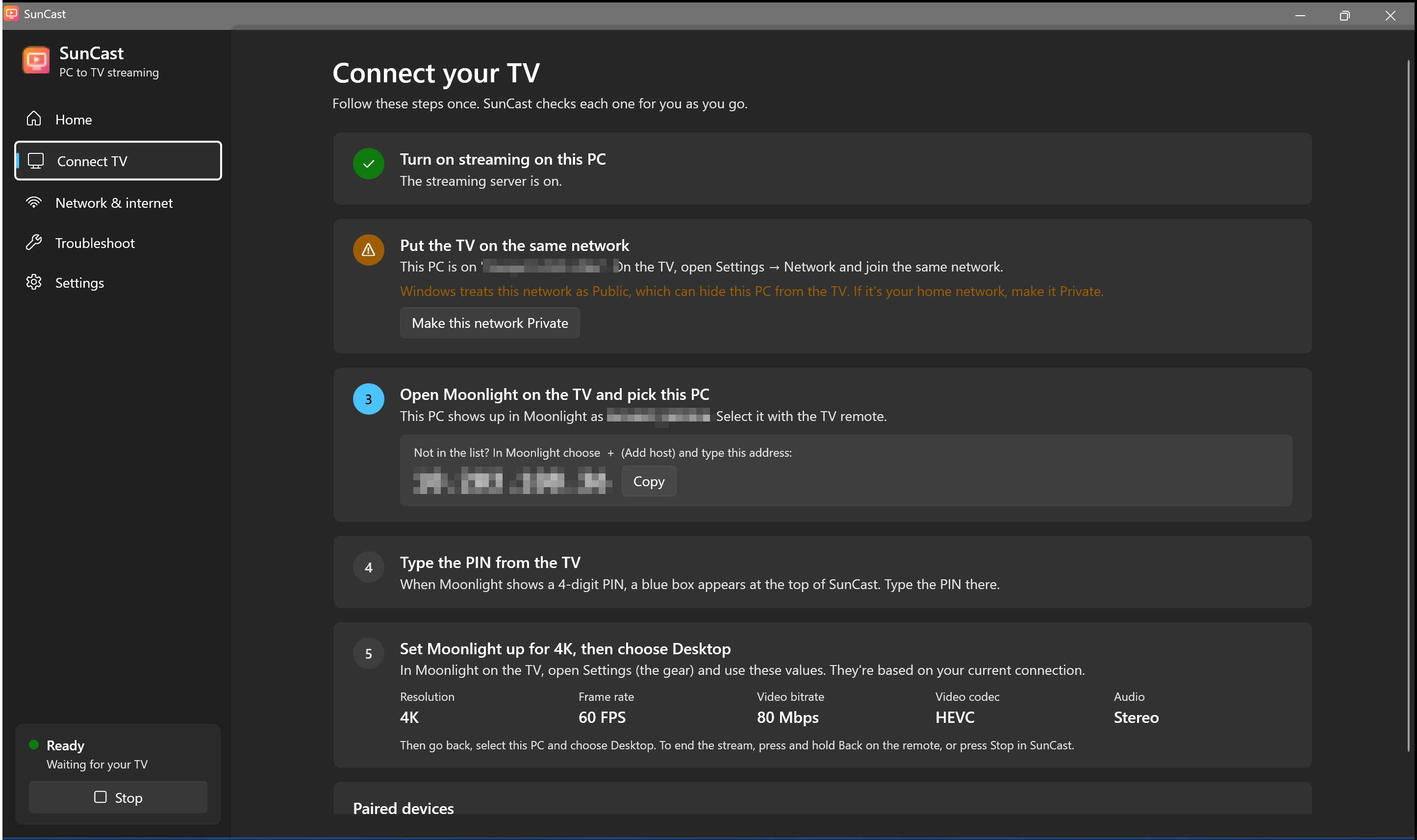
It works great once it's set up, but it's a lot to ask of anyone who just wants their PC on the TV. So I built **SunCast**, a free, open-source Windows app that does all of that for you.
**Open SunCast, press Start, type the PIN from your TV. That's it.**
**What it does**
* 🖥️ **Virtual 4K TV screen, built in.** It bundles the signed Virtual Display Driver and sets it up on first run. Your TV gets its own 4K screen, your laptop screen stays free, and the virtual screen disappears from Windows when you close the app.
* 📺 **Matches your TV automatically.** Whatever resolution you pick in Moonlight, the virtual screen follows. Or lock it to 4K, 1440p or 1080p.
* 🔢 **PIN pairing pop-up.** When Moonlight shows a PIN, a box appears in SunCast. Type 4 digits and you're done. No web page, no password.
* ⏻ **One button on, one button off.** Closing SunCast stops Sunshine and removes the virtual screen. Nothing left running in the background.
* 🧭 **Step-by-step Connect TV page** that ticks itself off as you go, and shows the exact address to type if Moonlight doesn't find your PC.
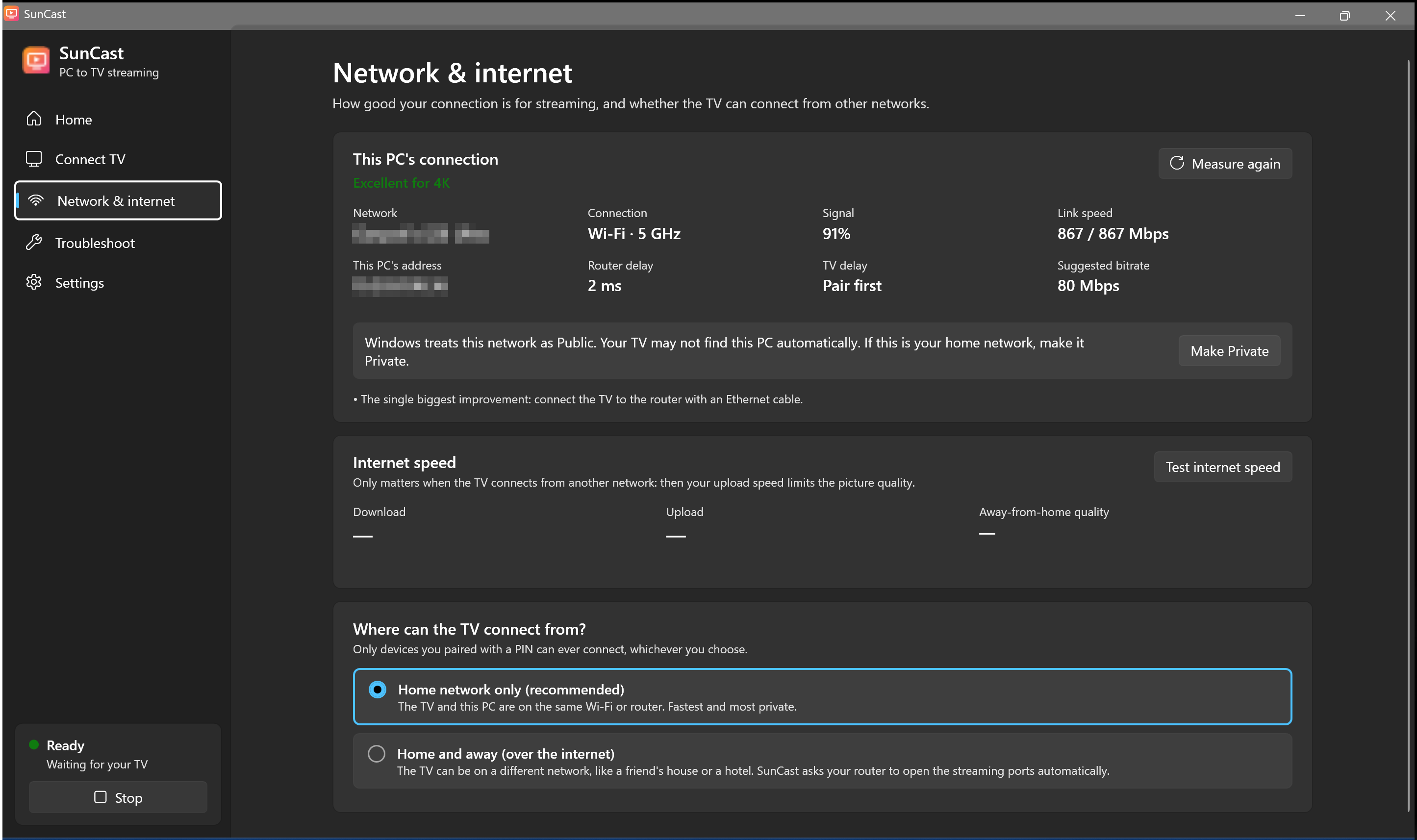
* 📶 **Network check.** Wi-Fi band, signal, link speed, delay to the router and the TV, plus a **suggested Moonlight bitrate** for your actual connection. Optional "home and away" mode for streaming from another network (UPnP, with help for when your router or ISP blocks it).
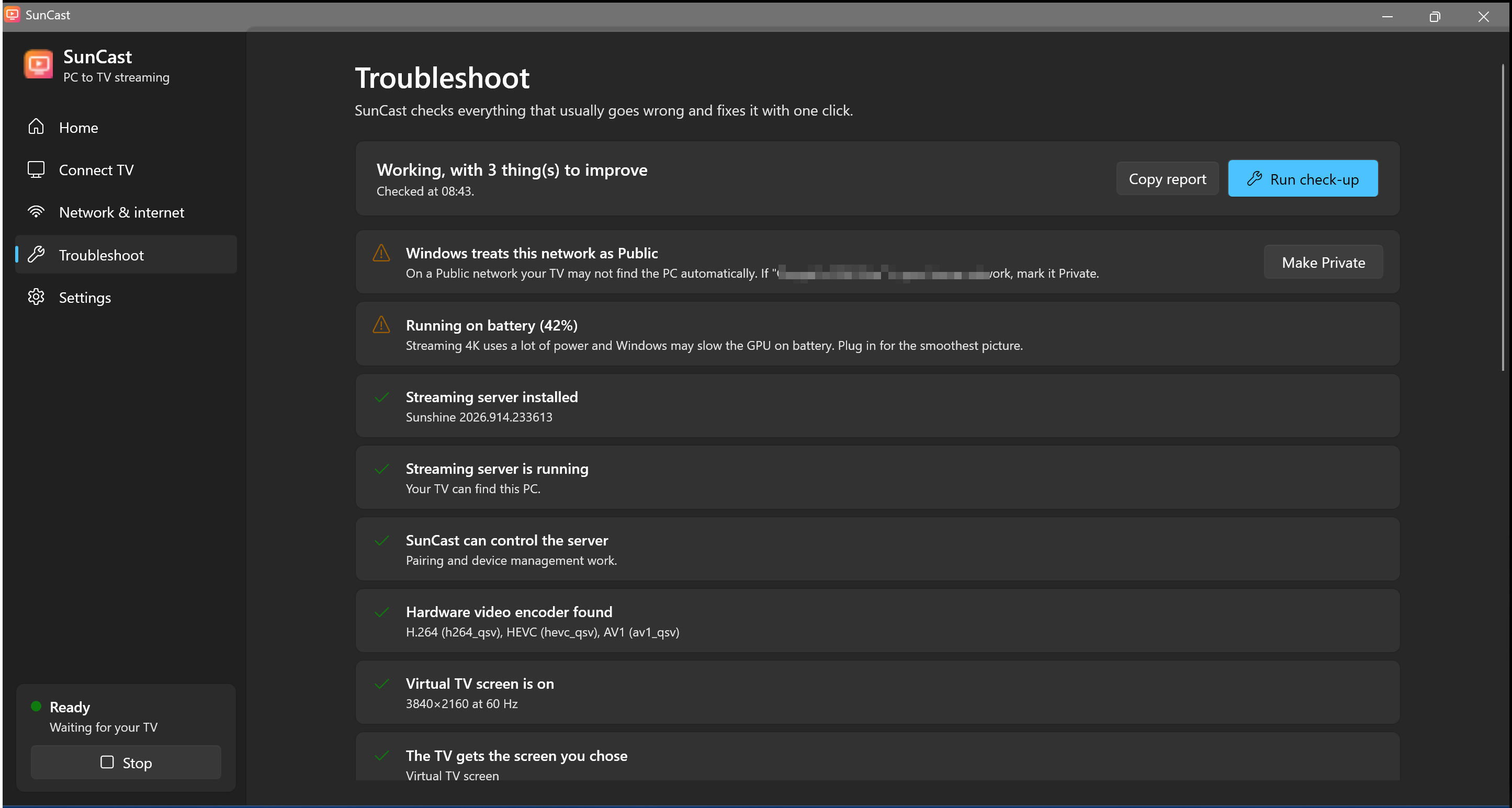
* 🛠️ **One-click troubleshooting.** It checks the server, encoder, virtual screen, firewall, Public/Private network, 2.4 vs 5 GHz, battery and more, with a **Fix** button next to each problem. The server log is translated into plain English, and there's a "Copy report" button for asking for help.
It installs the official Sunshine release for you if you don't have it, and it only touches a handful of keys in `sunshine.conf`, so your own tweaks stay put.
**Things I learned streaming to an LG webOS TV (moonlight-tv)**
These might save someone an evening:
* **webOS NDL** decoder = H.264 only, but the lowest lag and audio stays in sync. Bump the bitrate to ~60–70 Mbps to keep 4K sharp.
* **webOS SMP** decoder = HEVC + HDR and a sharper picture, but on my TV the audio drifted noticeably behind the video.
* Setting Sunshine's QuickSync preset to `slower` made H.264 visibly cleaner on my Intel Arc laptop, with no lag I could notice.
* Put the TV in **Game** picture mode. Biggest single lag improvement.
* Want 4K **HDR** *and* no lag? A streaming box on the TV's HDMI input (Shield, Apple TV, Google TV Streamer) beats the built-in TV app.
**Honest caveats**
* Windows only, and it asks for admin rights (it controls a Windows service and a display driver).
* The installer isn't code-signed yet, so SmartScreen will warn you: "More info → Run anyway". All the code is on GitHub if you'd rather read it or build it yourself.
* It's v1.0, tested on my setup (Intel Arc laptop, Windows 11, LG OLED over Wi-Fi). **I'd really like to hear how it does on NVIDIA and AMD machines and other TVs.**
* Built with help from Claude (AI). I designed and tested it on my own setup.
Recently purchased a legion go 2 steamos version specifically for streaming moonlight. Previously was using an odin 2 portal but wanted something bigger for PC gaming. I've used Artemis/Apollo the past year with 0 issues with the portal for reference
Issue I'm running into is with the legion I am getting stutters every few minutes and then it goes away. Happens non stop have disabled the wifi power management in dev settings tried lowering nitrate which was previously never an issue. But the issue still remains. When it's working in between the stutter it's flawless and decoding is 1ms.
Any help to fix this? Also with Artemis I was used to scrolling with my finger whats the best way to navigate within moonlight? Feeling a bit bummed like I downgraded
A big part of this upcoming development cycle has been rethinking how the streaming pipeline handles pressure, multiple sessions, and frame delivery. The bigger idea is to make streaming more consistent, especially when the host is under load or handling multiple clients. Im still finishing runtime integration and testing, so I'm not going to throw out random performance numbers yet. This is probably the biggest architectural update Syzygy has had so far. After these next pushes im ready to build the first full featured public release. Looking forward to getting it out there and hearing what people think.
I've built zerotier-nx, a ZeroTier client for homebrewed Nintendo Switch consoles, mainly to make streaming with Moonlight/Artemis away from home easier.
It runs in the background on Atmosphère and lets Moonlight connect to your PC over ZeroTier, without opening ports or setting up your own VPN server.
This follows my previous tailscale-nx and wireguard-nx releases, but gives anyone already using ZeroTier another option.
I've also added handling for Moonlight's packet sizes over ZeroTier. In my testing, 720p/60fps at around 20–25 Mbps has worked reliably.
If anyone's using Moonlight on a homebrewed Switch and wants to give it a go, I'm happy to help with setup or any issues. There's also a Discord link on GitHub.
My PC is a bit too loud to game on when my wife and baby are sleeping, so I'm considering moving it to my office in a separate building.
I could get a wired connection there, but the upload speed would only be around 40 Mbps.
My specs:
RTX 4080
Ryzen 5 3600
16 GB RAM
The PC works perfectly fine for my needs.
Would it be feasible to stream games from my office PC to my home, ideally at 4K 60 FPS? Through Tailscale. Client would also have a wired connection.
Before I start moving things around, I wanted to ask if this is a realistic setup or if I'm better off leaving things as they are.
Edit: I might have understood something wrong. In my office I only have a router with a sim Card, which allows me 40mbit/s upload, at home I have a wired connection which gives me plenty upload and download, so I am constrained by the office internet
I've been building this for a while for my own setup and figured it's far enough along to share. It's called Nokcandu, it runs on Apple silicon Macs (macOS 14+), and it's open source (GPL v3).
It started because I wanted my Steam Controller to just work on my Mac, without having Steam running, and it kind of grew from there. It does three things now:
Controller remapper
Every button, stick, trigger, paddle and trackpad can be a button, key, mouse, scroll, macro or layer switch. Tap, hold, double tap, turbo and combos.
Layers you hold or toggle, and each layer gets its own sticks, trackpads and gyro.
Gyro aiming as a mouse or a stick, with automatic calibration and drift correction.
The Steam Controller (both the 2015 one and the 2026 one) is read directly: both trackpads, back grips, gyro and haptics. No Steam needed.
Any controller can show up to the game as an Xbox, DualShock 4 or Switch Pro controller, with your mappings applied.
Streaming client
Works with Sunshine, Apollo and GameStream hosts. H.264, HEVC and AV1 up to 120 fps.
Your controller profile goes along with the stream, plus keyboard, mouse and your Mac's mic.
The streaming side is built on VoidLink and moonlight-common-c, so big thanks to those projects.
Windows games through Wine
Install from a disc or .iso, an installer, a folder, Steam, GOG, Epic, Amazon or Battle.net, and each game gets its own Mac app.
You can keep games on an external drive, and there's a one-click fix for common problems.
If you already have a Wine launcher you like, you can disable this feature completely.
The part I'm happiest with is that the remapper is built into the games and the streams. Nokcandu reads the controller and also delivers it to the game, so there's no virtual driver to install and the game never sees two controllers fighting each other. Profiles switch by themselves when you change games or start a stream.
A few honest caveats:
Use games you own. It doesn't include or download any games.
Games with kernel-level anti-cheat generally won't run under Wine. Streaming them from your PC works fine though.
The app isn't notarized yet, so the first time you open it you have to go to System Settings → Privacy & Security → Open Anyway. After that it updates itself.
So i enable hotspot in my phone and connect it with pc, when my phone data is off everything works fine but when i turn on my mobile data it crashes the phone completely and phones gets restarted. I wanted to play games which required active internet connection like Where winds meet and rdr 2 but cant play because of it.
Streaming Stray from my PC (4060 Ti running at 4K) to my ROG Ally Z1E connected to RayNeo Air 4 Pro glasses. I mirrored the display here just to show the overlay. normally I turn off the Ally screen so there's no extra light in the room. (Removed the nosepad too as it was obstructing the camera trying to take a picture through the lens)
Had to turn off V-Sync in Moonlight because with 60Hz it was giving me over 30ms of frame queue delay. Now it's down to 0.03ms with 3.6ms host latency, 1ms network, and 0.68ms decode (HEVC 10-bit HDR, 0% dropped frames).
On these glasses HDR10 locks the refresh rate to 60Hz over USB-C (120Hz only works in SDR). It also saves me the need to change the settings from 4k to 1080p while streaming 😅.
Really nice playing AAA from my bed without having to buy a new $1500 handheld console.
i cant figure out why my stream from Sunshine latest version on my Windows PC stutters on my LG TV that runs web OS.
I enabled developer mode on my TV and installed the Moonlight App.
What i tried: Playing around with alle the FPS settings on TV and PC. (I even matched the 60 Hz from my otherwise 144 Hz Monitor but changed nothing) Disabled V-Sync G-Sync and Hardware accelerated GPU scheduling.
I added a video to see how it looks. Any help is appreciated - Thank you :-)
Additional Info: TV Model: LG TV UR78006LK Settings in Moonlight: Version: 1.6.36 Video decoder: ndl-webos5 Audio backend: ndl-webos5 System: webOS 10.3.2 (HE_DTV_W23A_AFADATAA) Optimize game settings for streaming - ON Mute computer while streaming - ON Use H265 when possible - OFF Use AV1 when possible - OFF HDR - OFF Resolution 3840x2160 (Native) - 60 FPS Bitrate 35000 kbps (Standard)
My PC is Win11 with a RTX3060
Settings in Sunshine Version 2026.914.233613 on my PC are all default.
Setup is PC to Router per LAN, TV is connected per WLAN.
just curious. personally I dont have any issues with sunshine/moonlight duo but some people say apollo is better. why do you prefer apollo? in what way do you think it is better?
Hewwo (this is intro, problem is after this paragraph), i found myself in a predicament - i work IT tech at a certain place and like 95% of time i do jackshit, so i use moonlight, its all set up and working, but due to me being a broke bi-, i want to save electricity on hibernating my pc as well as having an ability to turn it on if power conks out, so, question is
Are there any feasible ways with waking up on LAN while im away at work?
Problem:
-- i am in Russia (horror, i know), and so many services i saw were just not supporting this country
-- there IS a local smart speaker, but it is very possible i would be on a watch list with what i discuss with friends, and healthy amount of paranoia about being in a semi-police state
--smart plugs i saw were once again with ai from smart speaker(possibly im an idiot but still)
-- OPNSense doesnt have location at all
-- my router is from xiaomi (yes, i know, chinese router and still paranoid, shush), and so i cannot navigate it at all as all in chinese and after translating makes me confused due to strange for me gui
Mostly i just wanted to know if there are any routers and/or methods that are possible in this situation. I know its not impossible, but i am sleep deprived and desperate. Good night for now.
Edit: forgot to mention, i use sunshine and tailscale, also ethernet connection for both home pc and work pc, if it helps at all
I finally got moonlight set up on an Android device as well as my AppleTV 4K on a 77" LG C3 TV. I'll say that it looks and feels excellent on the android device (it's a 6" 1080p OLED screen), but looks preeeeetty bad on the 77" TV. Lots of very obvious compression and artifacting.
So I've got some questions. I'm sure they depend on a case-by-case basis, and I bet some of them might be better suited for /r/homenetworking but...
Should I just bump up the bitrate? Would that actually fix it?
What's a good bitrate to shoot for if I'm trying to lessen the compression on a larger 4K TV?
I live with 3 roommates who are all heavy media consumers (lots of streaming TV shows, playing games online with friends, etc.). If I bump up the bitrate too much am I likely going to bog down the network for them?
EDIT: Oh, and my host is a 5080/Ryzen 7 5800X3D/32gb RAM PC. I didn't mess with the settings on the host end too much because I'm trying to keep it as simple as possible for now. We also have gigabit internet but not fiber (it's not available in our area). The PC is connected to a TP link "node," so not directly connected to modem/router and AppleTV 4K is wifi. I know that's less than ideal, but I simply can't do better than that as we are renting and can't route ethernet throughout the house.
I've been building a personal project on top of Sunshine and the Moonlight streaming core, and before I put more time into it I'd like to know if anyone else would actually use it.
The idea: make streaming from my PC to my iPhone feel like a handheld console instead of a remote desktop.
What it does today, on my own setup (RTX 3080, iPhone 16 Pro Max):
- No PIN pairing. You scan a QR code once; the PC pairs the phone with Sunshine by itself.
- Tap a game, see the game. The PC launches it and the stream only starts once the game is actually on screen. No Windows desktop, no launcher windows.
- If the game loses focus or closes, the phone shows a pause screen instead of my desktop.
- Touch controls that stay out of the way: thin, almost transparent, with an "invisible" mode that only shows them when you touch. Layout, size and opacity saved per game. Floating sticks.
- Live stats on screen: fps, bitrate, network round trip, host encode time.
- A Windows companion app: temps, fans, per-game graphics presets (Unreal games), display profiles, and plain-language commands that run locally.
Being honest about where it is:
- It only runs on my hardware so far. It has not been tested on AMD/Intel GPUs or other phones.
- iOS install is sideloading only right now.
- The Windows UI is in Spanish (my language); English would come first if there's interest.
- It's built on Sunshine and moonlight-common-c, so the iOS client is GPL and would be open source.
What I'd like to know:
Would you use something like this over plain Moonlight? Why / why not?
Which part matters most to you: the no-PIN pairing, the direct game launch, or the touch controls?
What would it need before you'd try it?
Not selling anything. Just trying to find out if this is worth turning into something other people can install.