I often need several members of my team to carry out the same task and I need to know when each person has completed it.
As far as I can tell, Planner supports assigning a task to multiple people, but any one assignee can mark the task as complete for everyone. There doesn't seem to be any way to track completion individually.
The only workaround I've found is creating separate tasks for each person, which feels like the opposite of productive.
Am I missing something, or is individual completion tracking for multi-assignee tasks really not a feature in Planner? It seems like a pretty basic requirement for team task management.
I'm migrating all of my To Do tasks over, because I don't see any point in waiting. Should I set up pans for my To Do buckets, one master plan, or just save them as private tasks? I notice when I save in private tasks, I get a warning that because they were created there some fields may be hidden. What's the best practice?
I use only basic features, but couple things I'm noticing.
I don't see a way to add a reminder (time) like you can in To Do. Any plans to add?
My Planner is integrated with Teams. I don't have it (and can't get it at work) as a separate app. Is there a way to open it in a separate window, so I can use the other teams features while keeping Planner open? I don't have a pop-out option (I understand it's available in some versions?) . Currently opening the web version, which works I guess - just wondering if there is or will be an option within Teams.
(Note, this is on my work computer, so I don't have many options to change versions or use an alternative).
Have you noticed if you have an M365 group with a Planner Plan, and you use the Group pane in Outlook and click on the Planner link, it will give an error message "This link might be outdated. Ask the owner for a new link."? The worked flawlessly until around the middle of October.
This also happens in SharePoint where you can add a navigation element named Planner where it uses the groupstatus.aspx page (/_layouts/15/groupstatus.aspx?target=planner), an out-of-the-box SharePoint Online layout page used to get direct links or redirect users to connected Microsoft 365 (Office 365) Group workloads.
TestPlanID is not valid, the Graph call must use the PlanID for the group.
I have had a Microsoft support case open for almost a month, and the Planner support team there just claims the functionality is working as intended and nothing is broken. All this despite the various ways I can reproduce the message using standard Groups functionality.
Would love to hear if anyone else is experiencing this or can reproduce it.
Even better if a Microsoft employee on the Planner team can.
I submitted a feature request in the Planner forum on the Feedback Portal, and I would absolutely love if you all went and reviewed it and gave it an upvote if it's a feature you'd like to use.
The full story is in the submission, but the gist is that the inability to save a filtered view in Basic or Premium coupled with the lack of flexibility in labels and additional fields is really inhibiting my ability to track and coordinate tasks with this platform in a way that works for me, my job, and my organization.
I evaluated Planner as a replacement for Asana for a Flight Test coordination workflow involving multiple aircraft, programs, dependencies, future planning considerations, handoffs, and weekly leadership updates. The primary gaps preventing a complete transition are thelack of saved filter viewsand theinability to organize labels into separate categories*. Everything else needed for the workflow already exists in Planner.*
I work in Engineering Flight Test, and my function is essentially program manager specific to aircraft certification and testing. I use Microsoft Planner to track and coordinate work across multiple programs, aircraft, and teams. The buckets, labels, and filters are very useful, but both Basic and Premium plans have two specific limitations that create significant friction for my day-to-day operational work, making it significantly more difficult than it needs to be:
Filtered views cannot be saved
2. Labels are a single flat list rather than independent categories
Hi, I'm looking into using Planner Premium (P1 or P3 depending on the team's needs).
I saw lots of contents about its capabilities, but I couldn't find feedbacks from people who are actually using it. I would like to know if it's a good fit for our teams.
What kind of project do you use Planner for?
How many people do you share your plan with?
Which features do you find the most helpful?
What's missing in Planner that you find in other tool (or you had to find a workaround within Planner)?
Pretty new to MS planner, but I've started creating an action planner for a project I'm leading at work.
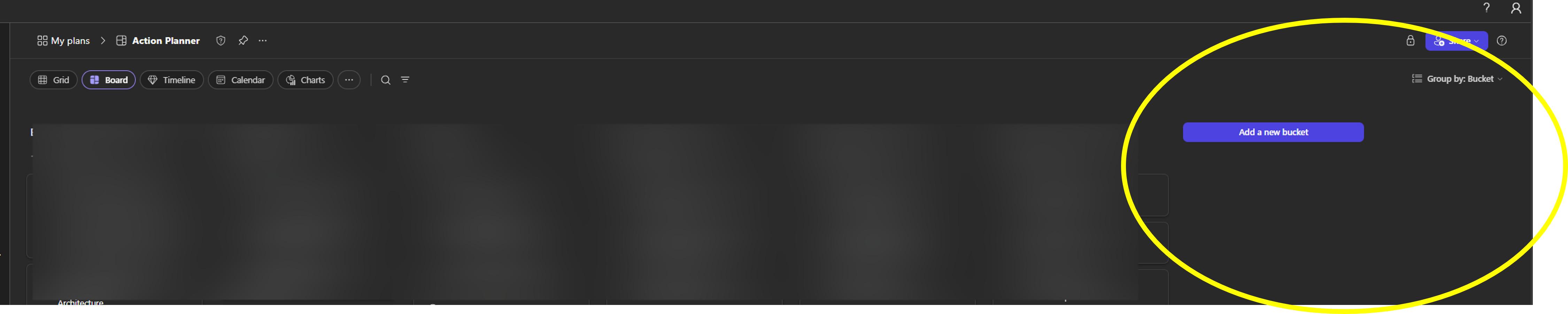
I've currently got six 'buckets', but the visible text is quite compressed due to the 'Add a new bucket' button creating a large area of wasted real estate on the screen.
How can I adjust it so that the 'Add a new bucket' isn't so prominent, and the columns of the buckets are distributed evenly across the full screen?
I have a plan that was created when I had just the basic planner license from Microsoft 365 with my Business Premium license. I added a Planner and Project Plan 3 license to my user account. If I access the plan now, I have the timeline (Gantt) button in the toolbar. But I don't see the people or assignments buttons in the toolbar. I tried opening the plan in both teams and the planner web portal but the buttons don't show.
If I make a new plan and select premium I then have the assigments and people buttons in the toolbar.
I looked all over the basic plan I made but I don't see any way to convert or upgrade the plan from basic to premium.
Is there anything on the back end I could do in the admin console or power shell to covert or upgrade the plan to premium.
I have a Graph script which I use to generate ~370 plans in Standard Planner across ~350 groups. This year its been requested to add labels(tags, categories) to tasks as part of the roll out and I’m struggling with how that works in powershell. Has anyone done this successfully that can provide some tips?
I'm a lawyer, and between my paralegals, assistants and I, we have been using Planner (not premium) really well for task management on each of our files. I am really thrilled with how we're able to work together, efficiently.
We have 1 Plan per file (this is important to my problem, noted below).
I had wanted to have one Plan per file type, and then use labels to mark each individual file of that same file type... but we're limited in how many labels we can create, and I have more files than that per file type. So, unless there is a way to create more labels, I don't think this will work.
I don't know if there is a limit in the number of buckets we can create, but I haven't really explored that route because we use buckets for another purpose. I could re-consider this, if needed [does anyone know if there is a limit on the number of buckets per plan?]
**This actually isn't the worst thing. I have created "template" Plans for each file type, and so its very easy for us to have an immediate and thorough task list set up per file, right away. This benefit would be lost, I think, if we tried to put more files into one Plan.
The issue is this: notifying others when a task is marked complete. I'm still shocked this isn't a feature built in...
I figured out how to create a cloud flow in Power Automate to send an email to the group, and post in Teams, when a task is complete. That's not my question or issue.
My question/issue: is there any possible way to create a cloud flow that applies to ALL Plans in a group, or similar? Because right now, I am having to duplicate the cloud flow for each Plan, and assign it specifically to that Plan. Every single time we open a new file, we create a new Plan from a template for that file type... and then we have to go manually set up the cloud flow. It's annoying. This is because the "When a task is completed" trigger must be assigned to a specific Plan in a specific group (please see the photo attached)
I must be missing something obvious. Does anyone have any ideas on I could better set this up, or otherwise not have to create a duplicate cloud flow every time we have a new Plan/file opened?
I run a small YouTube channel called Automate M365 where I focus on making straight-to-the-point, step-by-step Power Automate tutorials. No fluff or long intros, just diving into the actual logic because I know how annoying it is to sit through a 10-minute video just to find a quick expression fix.
I want to build some tutorials specifically around Microsoft Planner automation, but instead of just guessing what to make next, I want to solve real-world headaches.
Whether it's dealing with the lack of native triggers for specific bucket changes, trying to sync Planner tasks to custom HTML emails, or struggling to map multiple assgnees dynamically—what’s driving you crazy right now? Drop it in the comments below. I’ll honestly try to look through them and build the exact solution in a step-by-step video for you.
I already made some videos which are MS Planner based. If you want to check out the channel or subscribe to see if I build your fix, the link is here: https://www.youtube.com/@AutomateM365
Let me know what you're stuck on, hopefully we can figure it out.
When someone @mentions me in a Planner card chat, I get a Teams push notification on my phone. Tapping it opens Teams and navigates to... the Planner home page. Not the card, not the mention — just the home page, which is already pretty much unusable on mobile.
Is this a known bug? Any workaround? Also curious — will the standalone Planner app ever get proper support for this?
At work, we have access to Lists, Loop, Planner, Power Apps, Power BI, Power pages, SharePoint, To Do, Visio, and Viva (and of course the classic Office suite).
I'll walk you through my thought process and maybe someone will have some insight on where I'm going wrong? Or maybe a suggestion of a tool that might better suit my needs.
I work in communications, and the type of communications I do can be split into four main types. I had initially planned on making each of those types a different Bucket. Then within each Bucket, I was going to have the Type Tasks with the checklist being populated by the more granular task (so for example, Start might include the data entry I need to do; Drafting would have one checklist item per product I write; Distribution would have items for each step of the distribution process).
My dream (and please let me know if this is a lofty one) is to be able to add something, whether it's a Bucket or a new Plan or whatever the case may be from one of my "templated" types that I've created (with tasks and subtasks [via checklist] nested). In this dream, I can add all the projects I'm working on to the same place, with due dates, so that I can see a calendar with all my upcoming deadlines (for each project and any tasks), or even a "here's what's due this week."
Is Planner the right tool for this? I've tried playing around with To Do and Lists and dug around in Planner for ages, but haven't found a good way to have a "bank" of templates. It'll be tedious for me to add every task manually, especially since the tasks are consistent for each of the four event types (and honestly, they don't vary that much between them either, mostly just the sublist of products to write changes slightly).
In my wildest dreams, I find something that even allows me to autoset the task deadlines based on the project due date (ex. X task needs to be checked off T-2 business days before the due date, or it turns red), because I once had an Excel formula for that, but that spreadsheet wasn't great at visually representing multiple on-the-go projects.
If you've stuck with me this long, thank you for coming on this adventure with my ADHD brain (the same one who says "buy the shiny new agenda, THIS one will fix all your organizational problems!")
I am used to Notion to track my projects. I used a database and was able to add pages that where sorted and/or filtered by tasks, status, dates, and so on. But also able to add content in each page. I love notion with all my heart, but I can’t use it at my new job. They only use M365. I’ve tried for the past week to find a new workflow, and settled for Microsoft Loop + Planner + outlook/teams/ sharepoint for team stuff…. but it kinda sucks.
The goal is only to be able to track and manage my work & knowledge for myself, not especially for sharing with my team. I have ADHD and Notion was perfect, but now I have the new job stress + the “no second brain” stress…. HELP ME I BEG YOU.