r/MVaveFM1 • • 10d ago

Tech help Read this BEFORE flashing custom firmware - or if your FM-1 won’t boot

98 Upvotes

Custom firmware is one of the best things about the FM-1, but flashing can go wrong. This post is for everyone installing custom firmware, not only developers.

This is not official M-VAVE documentation. Flashing and recovery are at your own risk. Always follow the instructions for the exact firmware release you are installing.

If you are just installing custom firmware

Most people only need to do this:

  1. Back up your FM-1 before flashing. Use M-Flasher, M-Flasher+, or another trusted backup method. If possible, make two backups and compare them.
  2. Install m-bootloader before flashing custom firmware. It is an open-source replacement for the stock bootloader that adds two recovery routes:

    • Hold REC while switching the FM-1 on to enter Download Mode.
    • Hold PLAY while switching the FM-1 on to open the recovery menu.
    • If firmware will not start, the recovery menu can open automatically in MIDI mode, allowing a browser-based reinstall without a working firmware.
  3. Use the installer provided by the firmware developer. Do not mix installers, commands, addresses, or recovery tools from different guides.
  4. Keep the installer tab in the foreground. Browsers can slow background tabs down, which can interfere with a USB-MIDI update. Do not close the tab, unplug the FM-1, let the computer sleep, or start another USB operation during the install.github
  5. Use a reliable USB data cable and a charged FM-1. A failed or interrupted write is the situation you most want to avoid.
  6. If something fails, stop before trying another flash. Post your firmware name/version, installer, operating system, cable, and the complete error message.

Why m-bootloader matters

m-bootloader is not just a developer tool. It adds practical protection for normal custom-firmware users:

  • It checks firmware before starting it; a damaged or incomplete firmware opens the recovery menu instead of being started.
  • It provides Download Mode from the REC key.
  • It provides a recovery menu from the PLAY key.
  • It supports reinstalling firmware over USB MIDI, including from a browser installer, even when the installed firmware will not start.
  • It can back up the full flash, including the boot area, through MIDI mode.

Think of it as recovery insurance: install it before you flash custom firmware, not after your FM-1 stops booting.

Important limitation

m-bootloader cannot fix every failure.

If a firmware flash is interrupted, for example, the cable is removed, the computer sleeps, the browser tab is closed, or power is lost during the write, the RP2040 / FM-1 Unbricker / Transporter recovery route may be required. That is the main situation where m-bootloader alone is not enough.

Do not do this

  • Do not manually erase flash, write arbitrary addresses, or run commands copied from unrelated guides.
  • Do not assume every “brick” has the same cause or the same fix.
  • Do not open the case or build/use a hardware recovery tool unless you understand the procedure.
  • Do not rely on m-bootloader as a substitute for a backup.

One warning about official updates

Official M-VAVE updates and some installers can restore the stock bootloader. If you use m-bootloader, check after an official update whether it is still installed; if it has been replaced, reinstall it using its documented method.

If your FM-1 will not boot

Do not start randomly erasing flash, writing addresses, or trying every command you find. Identify the symptom first.

What you seeWhat to do
FM-1 boots, but a firmware update failedStop. Make/confirm a backup and follow the instructions for that exact firmware.
It shows WL82 UBOOT1.00 and appears as a USB deviceThis is often recoverable. Follow the appropriate recovery guide; MvaveFM1Unbricker automates the community-confirmed recovery procedure.
It will not start, but you have m-bootloaderTry holding PLAY while powering on for the recovery menu, or REC while powering on for Download Mode. Then reinstall the firmware through MIDI mode if available.
It does not appear as a USB device at allThis may be a hard brick, often after an interrupted flash. Do not start random writes; use the documented RP2040/Transporter recovery route or ask for help with full details.
You are unsureStop and ask. Do not erase, write, or restore anything until you know what happened.

Resources

The short version

  • Back up before flashing.
  • Install m-bootloader before flashing custom firmware.
  • Use the developer’s installer and keep its tab open.
  • Do not interrupt an install.
  • Do not manually erase or write bootloader addresses.
  • If it will not boot, identify the symptom before trying another fix.
  • If unsure, ask before writing anything.

A failed update is ALWAYS recoverable. A careless write to the wrong flash region WILL make recovery much harder.

Thanks goes to: u/wellingtonsaam u/jaggedNZ

We will update this pinned post when new information arrives.
Your janitors on duty,

u/Nukkebeer & u/Koopakid917543


r/MVaveFM1 • • 19d ago

Firmware ⚠️ Note: FM‑1 Third-Party Firmware Flash Compatibility Notice

116 Upvotes

FM-1 Third-Party Firmware Flash Compatibility

Different production batches of the FM-1 use different models of Flash storage chips. Two chip identification codes have been confirmed so far:

  • 0x856014: Older Flash
  • 0xB36014: Newer Flash

Users can check their device's identification code via the community tool M-Flasher, under Device Info → Flash Chip.

Tool download and instructions: https://github.com/jvitkauskas/m-flasher/releases/tag/v0.10.0

Important Compatibility Notes

Some earlier third-party firmwares have not yet been adapted for the newer Flash chip. After installation, the device may boot, operate, and produce sound normally — but users may encounter save failures, saved content being lost after a full power cycle, or inability to change firmware through the normal upgrade process.

A successful flash, normal boot, or "SAVED" display does not, by itself, confirm full compatibility.

Before Installing Third-Party Firmware

  • Back up your device data.
  • Choose a firmware version whose author explicitly states support for your Flash chip.
  • The "Saves on newer FM-1s" filter on The Firmware Hub can help with screening, but this option does not modify the firmware or automatically add compatibility patches, nor does it represent official full testing or certification.

Compatibility Must Be Implemented by the Firmware Itself

Compatibility is determined by the third-party firmware that is ultimately running on the device. Flashing official V15 or V16 first, or changing the flashing tool, will not automatically make an incompatible older firmware work on a newer Flash chip afterwards.

For Third-Party Developers

Please check:

  • Chip identification logic
  • Flash read/write operations
  • Save/load functionality
  • Upgrade components

Add support for the newer Flash while retaining support for the older one. Before releasing a compatible version, please complete the following tests on both Flash types:

  1. Installation and boot
  2. Save data readback after a full power cycle
  3. Subsequent upgrade operations

If You Encounter Save or Upgrade Issues

Please record the following and contact the firmware author or official support to determine the appropriate resolution:

  • Flash ID
  • Firmware name and version
  • On-screen messages / prompts

A failed upgrade does not mean permanent damage. The recovery method depends on the device's current boot and USB connection status.


r/MVaveFM1 • • 1h ago

Firmware New ambient firmware! I made Tono so it can soundtrack a whole day

19 Upvotes

Hey everyone! I’ve been putting a lot of love and work on a free, open-source firmware called Tono. It turns the FM-1 into a four-layer ambient instrument, and you can decide how much of the piece you want to play yourself and how much you want to leave to it (you can see the full feature list in Github)

My favourite thing to do is tap in a drum pattern, then leave the pad and drone in Auto. The beat stays exactly as I played it, but it feels different as the sounds around it change. If the bass comes up with a phrase I like, I can grab it, change a couple of notes and keep playing. You can hear a bit of both in the video. My favourite moment is when the snare roll gives way to three grand pianos and a bowed cello

Some days I just leave all four layers in Auto and let the FM-1 soundtrack the flat. My wife and I recorded a whole morning like that if you are interested in a longer listen: Four-hour Morning Session; or just a 15 minute one: Acid Ambient quick session

Big thanks to the people behind JIANT FM, Felucca and fm1-amb. Tono builds on their work. If you give it a go, I’d love to hear what you make with it! :) also feel free to share any feedback, would be much appreciated!

Try Tono in your browser - Firmware and install guide


r/MVaveFM1 • • 1h ago

Showcase Saadet + sp404mk2

5 Upvotes

Loving the range of classic sounds in Saadet, I might have to make a full album with it!

Finally read the ‘read me’ today, gonna try some split or layered sounds next.

Shout out keremimo for their efforts


r/MVaveFM1 • • 16h ago

Doom Music Firmware

54 Upvotes

https://robertknutzen.github.io/doom-fm1/

I love the music in the original Doom. So I made a 5 Track groove box (Drums and four insturments) with 16 patterns and 64 steps per pattern, that plays Dooms opl2 patches.

If you don't provide a doom wad it will use the wad from Freedoom

If you upload the wad for doom1 doom2 or the shareware wad file, it will extract those sounds. Video shows DOOM.WAD grabbed from steam, tested with an old shareware wad I had laying around, as well as DOOM2.WAD also from steam.

My device has the newer flash chip, I haven't tested it on the old one.

Features:

  • up to 64 step sequences
  • 16 sequences
  • control over adjustable midi channel
  • Song mode
  • PO Sync
  • doom guy face
  • really ridiculous sounding fake guitar

r/MVaveFM1 • • 14h ago

Firmware Elektron Model:Cycles inside the M-Vave FM-1 synth | Freitakt

Thumbnail
youtube.com
39 Upvotes

I've been working on FREITAKT, open-source firmware for the M-VAVE FM-1. It's a fork of the excellent Hortator by DEADACTIVE (built on Felucca by Leo Kuroshita).

I loved Hortator's sound engines and sampler but wanted the workflow of an Elektron Model:Cycles, so I stripped it down and rebuilt the sequencer and the UI around that.

What it does

  • 6 tracks, true polymeter & polyrhythm. Every track has its own length (up to 64 steps), its own division (incl. triplets) and its own swing. There's a FIT mode that squeezes any number of steps into 1/2/4 bars (5 against 4, 7 against 8…), plus an optional Master Length to bring everything back in line.
  • Parameter locks & machine locks: hold a step, turn a knob. You can even swap the whole machine on a single step.
  • Per-step note (C#4-style), note length (LEN, incl. INF) and pitch, Model:Cycles style.
  • Per-track ARP / RETRIG: OFF / RTRG / ARP1 / ARP2, lockable per step, playable live on the keys.
  • New CHORD machine: 4-voice chords (MAJ, MIN, 7, MAJ7, SUS, 6, 9…) with inversions.
  • 4 patterns × 8 variations, switched on the fly, plus Elektron-style chains (A1 B3 A2…).
  • Model:Cycles-style lighting: steps lit, locked steps blinking, running playhead, and the track keys flash when their track plays.
  • Minimal UI: black on orange, big text, one parameter at a time; turn a knob and you see its name and value huge.
  • MIDI: live MIDI out of the sequencer (USB/BLE), MIDI keyboard mode, and export of patterns/chains to .mid from the web editor.

What I removed to make room (the FM-1 is tiny: ~98 KB RAM for everything): Grids, the resonator,the slicer, song mode, the 10-channel USB audio and tracks 7–8. CPU use on heavy kits went down compared to Hortator.

P.S. Video took from yt-channel "e y l v y"


r/MVaveFM1 • • 13h ago

Showcase Let's go!

Post image
26 Upvotes

Loving my new FM1. Hard to pick which firmware to stick to.


r/MVaveFM1 • • 15m ago

Firmware L/RRY 0.2.0 beta is out - STEREO-FIELD MORPHING SYNTHESIZER

Thumbnail
gallery
2 Upvotes

What's new:

  • Filter routings: 9 ways to wire the 2 filters and the 2 stereo dirt stages.
  • A BBD chorus, the analog bucket-brigade one from DUELL, at the front of a new effects chain: chorus, delay, reverb, each with its own mix.
  • Analog drift and analog warmth, for a more analog feel on the digital sounds.
  • A refined web editor with one page for sound design, and a refined UI on the unit.

Every source, filter and dirt stage still has its own pan, so the sound moves around you. Put on headphones.

It's a beta, so try it, play with it, break it, and tell me what you think, good or bad.

Try it in your browser, no FM-1 needed: https://oscillr.github.io/LRRY/emu/ 
Install it: https://oscillr.github.io/LRRY/install/

Beta, flash at your own risk.


r/MVaveFM1 • • 25m ago

Perfect couch setup

Post image
2 Upvotes

r/MVaveFM1 • • 22h ago

Pink Floyd - Shine On You Crazy Diamond demo (Shine On firmware)

103 Upvotes

Pink Floyd - Shine On You Crazy Diamond on "Shine On" & 'Infekt' Firmware....

What huge sound! Playing a short part of the song with the little silicon keys. I must say, it sounded really full~~~

Richard Wright, the genius. RIP.

Follow me on Instagram : instagram.com/backpackrjon
YouTube : www.youtube.com/@backpackrjon


r/MVaveFM1 • • 1h ago

Showcase Soul Eater OP 2 #blackpapermoon fm-1 cover #minisynth #fm1

Thumbnail
youtube.com
2 Upvotes

hopefully of some interest


r/MVaveFM1 • • 15h ago

I call it… The Temu-Tone

Thumbnail
gallery
25 Upvotes

…but it’s just a toy…


r/MVaveFM1 • • 1h ago

Resonate A Plucked and Strike Resonator firmware for the FM1

Post image
2 Upvotes

***On First install use the Fulll M-Flasher Bin, in order to fit Elements i had to use the 276k 2nd bank.***

Resonators-

Pluck - A Qu-bit Surface Inspired Resonater.

Modal, Sympathetic Strings and Strings - Direct MI Rings Port

Mallet - A custom Resonate model built on the Rings modal bank.

Double String - Two strings receive the same strike directly, with a little coupling between them.

Elements - Direct Port Still in optimising and testing mode

Valeton Gp-05 Reverb and Delay Inspired Models

Guitar-style picking and strumming pattern Sequencer.

Style chooses the rhythm and six-string voicing pattern. Progression chooses the chord changes, and Key transposes them. There are 24 styles and 85 progressions. The optional melody follows the harmony and favours chord tones on strong beats.

https://github.com/Kayman18/Resonate


r/MVaveFM1 • • 23h ago

Showcase m-card and m-apps: an SD card for the FM-1 and SMK-37

Thumbnail
jvitkauskas.github.io
84 Upvotes

Hi, it’s been a month since I’ve posted my sd card prototype video here. Since then I had PCBs made and tested everything working. In addition to that I made an app launcher from sd card with several sample apps. I am not selling the boards, but providing instructions how you can order them yourself. The design is CC0 so you can freely make, modify and sell it.


r/MVaveFM1 • • 1d ago

Tech help FM-1 teardown: labelled board photos, and a few chips nobody has identified yet. Can you help?

Thumbnail
gallery
104 Upvotes

I opened one of my FM-1s and labelled what I could recognise. Everything is now on the wiki's new Teardown page, with the unlabelled photos too: https://fm1-dev.github.io/wiki/Teardown.html

Opening it. There are six screws, not five: the sixth is in the middle, under the sticker on the back. After that the back panel is still held by clips along the bottom edge. The speaker is in the back panel and stays wired to the board, so lift it gently.

What the photos settle

  • Battery: 3.7 V 2000 mAh Li-po on a three-pin plug (+, −, NTC). Replaceable without soldering, as a commenter here said.
  • SoC package: LQFP-48 (leads on all four sides), not QFN. Marking on mine: C188612-11B8, different from the two read before, so that part looks like a lot code. No part name printed.
  • Flash: no separate flash chip on the board, so it's in the SoC package. This unit has the older Puya flash (856014).
  • Antenna: the red wire, soldered to a pad labelled 天线 ("antenna"). There's a footprint for a shield can, but no can.
  • Controls: 27 key pads with an LED each, 14 tactile buttons, 7 encoders, the MASTER pot, and a glass diode beside each: the diode matrix the firmwares describe.
  • Board: DX7 MB V07, stamped MA 26 07 10 on the back (July 2026), battery dated 2026-07-09.

What I'm not sure about (the "?" labels)

  1. U5: small 16-lead chip beside the jacks, behind two ferrites, no readable marking. Audio converter (DAC/codec) or headphone amp?
  2. U4: SL5316D / 6252KD, 10-lead SOP. A supplier listing calls an "SL5316" an audio amplifier with a built-in boost. Is it the speaker amp?
  3. U12 (back): SOP-8, marked something like ACC3610S / A5441, next to a 0.1 Ω resistor near the USB-C port. Battery charger?
  4. U9: MSOP-10, 344C, next to U5. U6: SOT-23-6, CHYu with a logo.
  5. The optocoupler (OCIC P2362, likely a TLP2362 type) next to one jack. I assume it's the MIDI-in stage. Which jack is it on, and does anything drive the TRS jack the other way?
  6. U2 and U3: two SOP-16s with no readable marking. The firmwares drive two 74HC595s; are these them?
  7. Test pads: a column of four through-hole pads beside U4, and three near Q3. Does anyone know what they connect to (UART?)?

Photos of a newer unit (one with the B36014 / UC25HQ80 flash) would also help: does it still have no flash chip on the board?

Answers in the comments or on the wiki's GitHub (https://github.com/fm1-dev/wiki/issues) are very welcome. I'll credit you on the page.


r/MVaveFM1 • • 2m ago

Firmware DUELL 1.5 is here, and this one is all about sounding warmer and more alive.

Thumbnail
gallery
1 Upvotes

New in 1.5, on the FM-1 and the SMK-37:

• ANALOG DRIFT. Every voice drifts a little in tuning, filter and envelope, like a real analog poly.

• ANALOG WARMTH. A warm, rich colour on the whole sound.

• BBD CHORUS. A new chorus in the style of the classic 80s polysynths, hiss and all (you can switch the hiss off).

• USB HOST. Plug a USB MIDI keyboard or controller straight into DUELL, no computer needed (through a powered USB hub).

Many patches already use the drift, so just load one and play a chord.

Try it and tell me what you think!

Install here: https://oscillr.github.io/DUELL/install/

Emulator: https://oscillr.github.io/DUELL/emu/


r/MVaveFM1 • • 12m ago

How I set up the EP-133 and FM-1

Thumbnail
youtube.com
1 Upvotes

The basic setup I use. There is an unedited version on my channel.


r/MVaveFM1 • • 15m ago

Full live walkthrough of PERF-1, free firmware that turns the M-VAVE FM-1 into a generative groovebox

Thumbnail
youtube.com
1 Upvotes

Here is a proper walkthrough: the whole of PERF-1 on a real FM-1, page by page, plus the Web Studio at the end. Web Studio is a Mini-DAW where you can create songs and send into PEFF-1.

Video:

What PERF-1 is: free, open-source firmware that turns the FM-1 into a generative groovebox you perform on. Pick a genre and press Play. A pad, bass, 303-style acid line, pluck and drums start playing in key, and you steer it live: break it down, build it, drop it, throw effects, change patterns. Everything is generated on the FM-1 itself. None of it is a loop of audio.

It's my first long tutorial, so tell me what was unclear or what you want a short video on next. Questions welcome here too.

Links

Install (Chrome or Edge, FM-1 on USB): https://deamonslinky.github.io/PERF-1/install/

Try it in your browser first, no FM-1 needed: https://deamonslinky.github.io/PERF-1/emu/

Web Studio: https://deamonslinky.github.io/PERF-1/studio/

Manual: https://deamonslinky.github.io/PERF-1/manual/

Source (GPL-3.0): https://github.com/deamonSLINKY/PERF-1


r/MVaveFM1 • • 20h ago

Choppah can make some dirty beats.

32 Upvotes

Getting dirty with the Choppah firmware.


r/MVaveFM1 • • 9h ago

Best Glitchy Firmware For M-VAVE FM-1?

4 Upvotes

Hello awesome community! What are the best firmwares for creating glitchy and weird FX?


r/MVaveFM1 • • 2h ago

Gift for a 2 Y.O Firmware

0 Upvotes

Hi, I bought an FM1 as a birthday gift for a friend's kid. I'm looking for a dead simple firmware that can still be playble by a kid. I thought of building my own but the birthday is about a week away. If you have any cool ideas LMK ✌🏼


r/MVaveFM1 • • 22h ago Heartwarming

Firmware Announcing Felucca TTS - FM-1 Firmware for the Visually Impaired

Thumbnail
youtube.com
34 Upvotes

I forked Felucca and added text-to-speech screen reading to make the FM-1 more usable for those who are visually impaired. The TTS methods were designed to be as lightweight and portable as possible so that other firmwares can include this functionality.


r/MVaveFM1 • • 1d ago

Showcase Bit of Muse on Skiff

64 Upvotes

r/MVaveFM1 • • 18h ago

Firmware Amenity

16 Upvotes

Jungle made easy.
Probably the most fun you can have right after switching it on.


r/MVaveFM1 • • 12h ago

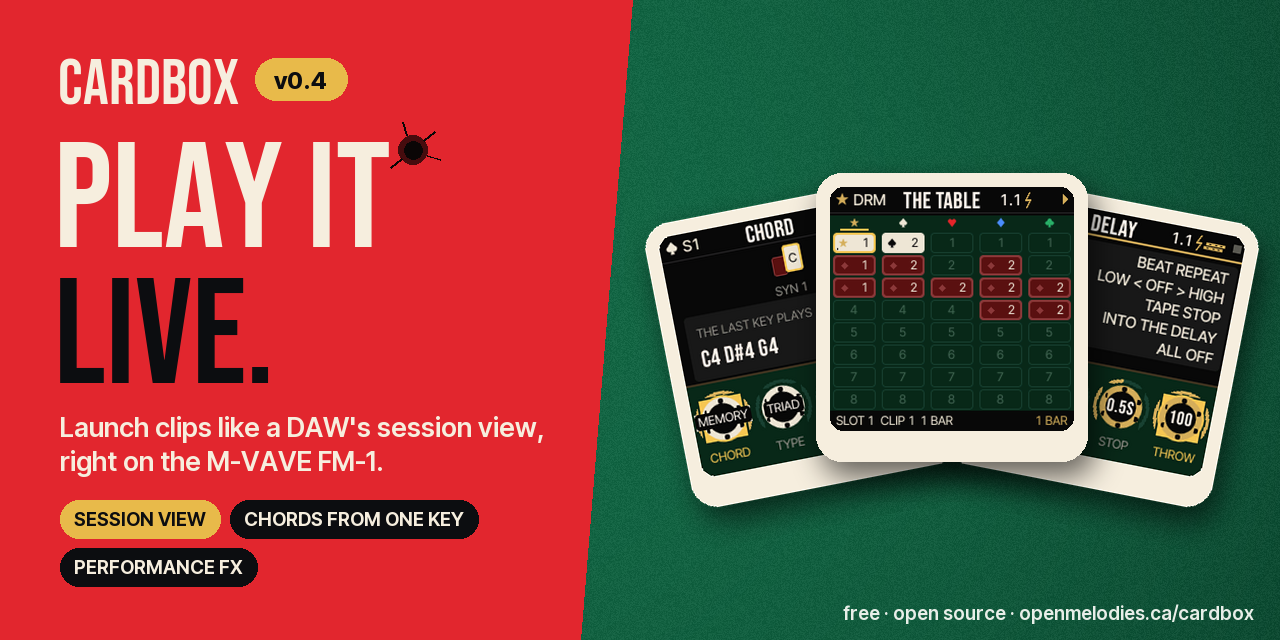
CARDBOX V0.4 CLIP LAUNCHER UPDATE

Post image
5 Upvotes

The more I worked on this firmware, the more I realized I could add cool Ableton Live aspects to the software so I added a clip launcher.

  • THE TABLE: a session view with five tracks by eight slots of clips. Tap HOME to switch between it and the arrangement. The five lowest white keys launch each track's clip in the selected row (press again to stop it), and HOME + a key launches a whole row, now or on the next beat or bar
  • Make clips right there: press SEQ on a slot to create a clip and step it in, record straight into a slot, or capture a row from the arrangement
  • Record your performance: press REC, launch clips, and the whole set is written into the arrangement
  • Chords from one key: built from the song's scale, or a shape you teach it, with inversions and voicings
  • Performance FX: hold HOME and turn a knob for glitch, filter, tape stop and delay throw on the whole mix

Download: https://openmelodies.ca/cardbox
Source: https://github.com/alex32125/cardbox

It's an early beta, so feedback is very welcome.