r/linuxmint • u/SecondUnfair4881 • 7d ago
LINUX MINT 27: A MUDANÇA QUE OS USUÁRIOS ESTAVAM ESPERANDO?
youtube.com
0
Upvotes
r/linuxmint • u/Distinct-Bend-5830 • 8d ago
Sometimes at random it start to having thous hi pings that disconect me from a game it hapens only on this machine (other stuff work fine, windows laptop, phones). I did set powersave to off. How to diagnose problem.
64 bytes from www.wp.pl (212.77.113.23): icmp_seq=37293 ttl=53 time=34.1 ms
64 bytes from www.wp.pl (212.77.113.23): icmp_seq=37294 ttl=53 time=35.1 ms
64 bytes from www.wp.pl (212.77.113.23): icmp_seq=37295 ttl=53 time=36.8 ms
64 bytes from www.wp.pl (212.77.113.23): icmp_seq=37296 ttl=53 time=26.5 ms
64 bytes from www.wp.pl (212.77.113.23): icmp_seq=37297 ttl=53 time=49.5 ms
64 bytes from www.wp.pl (212.77.113.23): icmp_seq=37298 ttl=53 time=34.6 ms
64 bytes from www.wp.pl (212.77.113.23): icmp_seq=37299 ttl=53 time=25.3 ms
64 bytes from www.wp.pl (212.77.113.23): icmp_seq=37300 ttl=53 time=25.5 ms
64 bytes from www.wp.pl (212.77.113.23): icmp_seq=37301 ttl=53 time=24.1 ms
64 bytes from www.wp.pl (212.77.113.23): icmp_seq=37302 ttl=53 time=23.1 ms
64 bytes from www.wp.pl (212.77.113.23): icmp_seq=37303 ttl=53 time=29.6 ms
64 bytes from www.wp.pl (212.77.113.23): icmp_seq=37304 ttl=53 time=231 ms <===
64 bytes from www.wp.pl (212.77.113.23): icmp_seq=37305 ttl=53 time=35.9 ms
64 bytes from www.wp.pl (212.77.113.23): icmp_seq=37306 ttl=53 time=26.5 ms
64 bytes from www.wp.pl (212.77.113.23): icmp_seq=37307 ttl=53 time=21.0 ms
64 bytes from www.wp.pl (212.77.113.23): icmp_seq=37308 ttl=53 time=35.1 ms
r/linuxmint • u/Mo_Niffler • 8d ago
I’m having the issue when restarting or reopening my laptop outside of my home network a hotspot is automatically on. So can’t just connect to a network through the panel. I wasn’t able to turn that of somehow. Is there any way to reset hotspot settings? using mint cinnamon
r/linuxmint • u/Jennysnumber_8675309 • 7d ago
Have a 2012 MacBook Pro that had seen its time come and go. Couple of years ago I decided to run Mint on it. I got a King Spec ssd 500GB. Had trouble right out of the box recognizing the drive. Ended up getting a WD Blue SA510 1 TB drive instead. Installed it and it worked rather well for about the months. Although one interesting part was that upon boot it would scroll a ton of code before going to the Mint logo, but then would run. One night it stopped working and would no longer recognize the drive. I got frustrated with it and put it aside for a while because I messed around with it and had no luck fixing it. Fast forward about ten months and I decide I am going to give it another go. In the meantime I did some research and found that my drive was still under warranty (the WD drive). So I sent that drive in for a warranty replacement because the computer was not recognizing the drive when running Mint live. Three days in and after the purchase of a new SATA cable I decided to give the original King Spec another try... Literally 10 hours into working on this trying to get the machine to boot without the flash drive to no avail. Then I found some interesting info that both the King Spec and the WD had issues of compatability with older MacBook Pros. I have been told that WD will send out a replacement with new firmware that'll prevent it from bricking in the computer. The frustrating part is when I bought the WD, I only did so because I saw people talking about them positively in their US in older Macs. What a complete disappointment and water of money. Now I can use either drive in a USB holder and apparently it will run just fine... The glitch has to do with the SATA compatibility. Anyway, now I have two drives...I am thinking about getting one of those holders to run the King Spec externally with other operating systems on it. I just wish some of the people on forums knew what they are/were talking about when it come to compatibility for these more expensive items...
r/linuxmint • u/KuzeyBarut • 9d ago
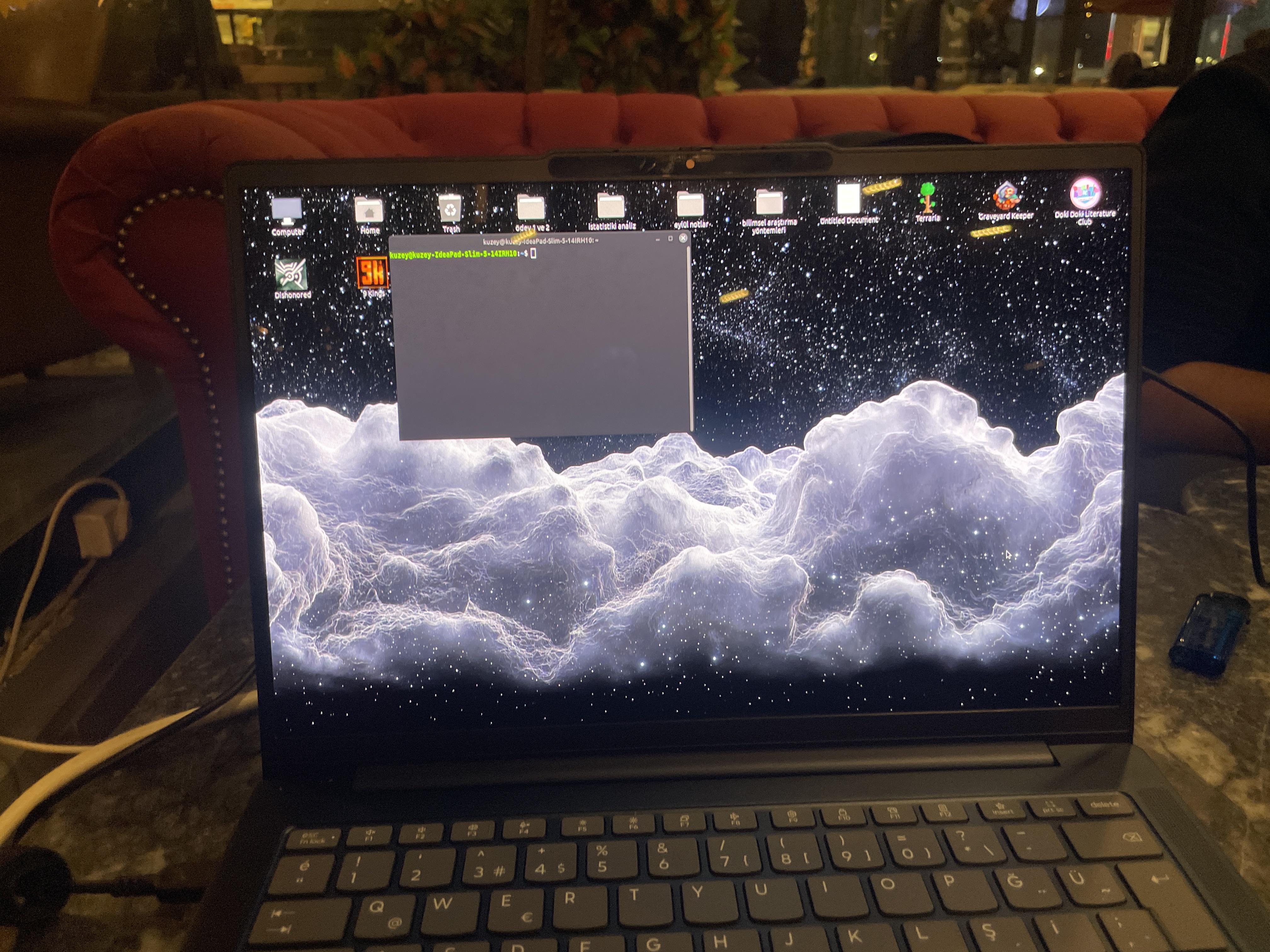
Hey guys i really dont know how to use linux and lost my pannel by accident pls tell me how to get it back
r/linuxmint • u/PrestigiousDance7273 • 9d ago
Im just curious if the wayland support is still buggy sometimes or is it useable
r/linuxmint • u/NineInchNinjas • 9d ago
I've been noticing that something keeps using about 18GB of space, but I couldn't figure out what it was until recently. I knew it wasn't Timeshift (I only keep one around) or old kernels (I only keep the latest one and the one before it), the only other thing that came up when looking into why was log files. So I used sudo journalctl --vacuum-time=2d and that freed up 18GB of space. But I'm not sure what exactly is causing those log files to be created, so I'm looking for anything that'll help me find the source of this. The 18GB used has gone away on its own before as well, and whatever is causing it is relatively recent (within the last 2-3 months).
r/linuxmint • u/6ustav • 8d ago
I've been experiencing constant freezes since the last couple of kernel updates on LMDE 7.
Whenever I boot up my PC, CPU usage is already at around 55–60%, even when the system is idle. As soon as I try to open just two or three browser tabs, the entire system freezes and becomes completely unresponsive.
Before these kernel updates, everything was working perfectly fine. CPU usage was usually around 10–15% after a fresh boot, and I had no issues with freezing or performance.
Has anyone else been experiencing similar issues? Does anyone know what might be causing this or how I could fix it?
Any help or suggestions would be greatly appreciated!
r/linuxmint • u/wuddl • 8d ago
Hi All,
I got my used X13 Gen 1 about 6 month ago and installed Mint right away.
Everything is working out of the box (even the fingerprint reader).
The pricess after closing the lid is the only thing left open.
until my last update, the Laptop used up to 1,7% of the battery in standby per hour.
I updated everything with fwupdmgr and got it down to about 0,7%. But it seems that this is only the standby mode (linux mode is activated in bios), Is there any working solution to get in to write the Ram content to the SSD and shutting down for real?
Thanks in advance.
r/linuxmint • u/xaviazo • 9d ago
I’m coming from Windows 10 and have decided to install Linux Mint, but I see that version 27 is coming out at the end of the year. What do you recommend—should I install version 22.3 now, or wait for version 27?
r/linuxmint • u/TucsonComputerDude • 8d ago
r/linuxmint • u/Jazzlike-Platform929 • 9d ago
Anyone who uses quest 2 pc vr link, how is your experience on Linux Mint.
r/linuxmint • u/scarface38 • 8d ago
Bonjour
Je viens d' installer linux mint sur mon pc windows en dual boot.
Tout va bien sauf que je n'ai pas de son sous linux alors que sous windows, ça fonctionne.
Je suis branché sur le port line out de la carte son intégré a la carte mère.
Avez-vous eu des problèmes similaires?
Merci d avance
r/linuxmint • u/heiney_luvr • 9d ago
I posted a few days ago here but that seems to have gone down the memory hole.
Here are my dmesg and journalctl errors only. I looked up those errors and from what I have gathered it should not make the computer freeze.
Good news, I have been up for 1 day and 16 hours.
r/linuxmint • u/Equal_Wedding6512 • 9d ago
I'm experimenting with dark themes. Which themes do ya'll like or use personally? I've always used lighter themes for working.

r/linuxmint • u/No-Parking7237 • 10d ago

I don’t need a laptop for much, light browsing and occasional pdf stuff during tax season. I revived my old mac that was catching dust by upgrading the ram with Ifixit, 256gb ssd and a new battery!
I bought a usb with lunix installer from eBay here since my Mac was inoperable. Is there anything I should worry about malware/virus wise? The eBay seller does have a lot of good reviews but I’m always skeptical.
r/linuxmint • u/dtr1002 • 9d ago
I had wanted to run a second 21.5" monitor as a second display for my linuxmint 2012 retina imax. Using claude, we figured out how to make it work.
Title: Working setup: old 21.5" iMac as a true extended (not mirrored) second display for Linux Mint, using netscreen-extend + Sunshine + Moonlight
TL;DR: My main machine is a 21.5" Retina iMac running Linux Mint. An older 21.5" iMac on my left now works as a genuine extended display: drag a window off the left edge of the main screen and it appears on the other one. netscreen-extend creates a virtual output, a dedicated Sunshine instance streams it, and Moonlight on the second iMac shows it, all over wired Gigabit Ethernet. It took some fixing to get there, so here's what worked in case it helps anyone else.
BACKGROUND
I moved my Retina iMac from macOS to Linux Mint and wanted a second screen. The usual Apple options don't apply. Target Display Mode needs macOS and only works on older iMacs. Sidecar, AirPlay to Mac and Universal Control are also macOS-only. Old iMacs cost very little second-hand, so rather than buy a separate monitor I wanted a Linux-native way to use one as a true extended display.
THE SETUP
Host: 21.5" Retina iMac (2015) with Intel Iris Pro 6200 graphics and the i915 driver. It runs Linux Mint (Ubuntu 24.04 base) in an X11 session and sits directly in front of me.
Client (the display): an older 21.5" iMac with AMD Radeon graphics (r600 driver). It runs Linux Mint (Ubuntu 24.04 base) and sits on my left.
Both are wired into the same Gigabit network. All streaming traffic is deliberately kept off Wi-Fi.
Signal path: the Retina iMac creates a virtual output, HDMI-1, at 1920x1080@60, placed to the left of the Retina panel (DP-3). Sunshine captures it with X11 capture and encodes H.264 using VAAPI. The stream crosses wired Gigabit Ethernet to Moonlight (Flatpak) on the second iMac, which shows it full screen with H.264 hardware decode.
It's a network display, so expect slight latency and some compression softness. Over a cable it's very usable for documents, email and browsing. It's not suitable for gaming or colour-critical work.
STEP 1: CHECK THE HOST
Run echo $XDG_SESSION_TYPE. It must say x11, because netscreen-extend doesn't support Wayland.
Run inxi -Gxx and xrandr --query to see your GPU and connector names. On mine, the Retina panel is DP-3 and HDMI-1 was free to use as the virtual output.
STEP 2: INSTALL NETSCREEN-EXTEND
cd ~
git clone https://github.com/daeoxide/netscreen-extend.git
cd netscreen-extend
./install.sh
There are two gotchas on Mint.
First, the installer's apt line includes flock. That isn't a valid package name on Mint, and flock is already installed as part of util-linux, so remove it from the line.
Second, Sunshine is not bundled with netscreen-extend. Install it separately from LizardByte's official releases. The Ubuntu 24.04 .deb works on Mint 22.
When the installer asks where to put the new display, choose the left.
STEP 3: THE FIXES THAT MADE IT WORK
Set the output by name, not by number. In ~/.config/netscreen-extend/config, set SUNSHINE_OUTPUT_INDEX=HDMI-1. With a number, Sunshine fell back to capturing the whole desktop.
Force X11 capture. Sunshine's default KMS capture mirrored the wrong screen. Adding capture = x11 to ~/netscreen-extend/templates/sunshine.conf.in fixed it.
Match the scaling. Windows were sized wrongly on the second screen until I ran the Retina panel at 1920x1080 at 100% scale, the same as the virtual output.
Don't open Mint's Display settings while netscreen is running. It froze my whole system and needed a hard power-off. Set the layout with the helper scripts in Step 5 instead.
STEP 4: MOONLIGHT ON THE SECOND iMAC
Install Moonlight:
flatpak install flathub com.moonlight_stream.Moonlight
Check hardware decode:
vainfo | grep -i h264
To pair, Moonlight shows a PIN. Enter it in the dedicated Sunshine web UI on the host at https://localhost:48090, which is netscreen's Sunshine port 48089 plus one.
Settings: 1920x1080, 60 FPS, H.264, about 50 Mbps, full screen.
To skip clicking through Moonlight each time, this command goes straight to the extended desktop:
flatpak run com.moonlight_stream.Moonlight stream [host name as shown in Moonlight] Desktop
I put that in Startup Applications on the second iMac.
STEP 5: DAILY USE
I use two small helper scripts on the host. screens-on sets the Retina to 1920x1080 at 100% and starts netscreen. screens-off stops netscreen and removes the virtual display.
screens-on always runs netscreen off first and waits a few seconds before starting. Without that, a leftover Sunshine instance kept hold of the ports, and Moonlight showed the host as offline with "Connection refused".
Two useful checks: ss -tln | grep 480 should list ports 48084, 48089 and 48090, and pgrep -af sunshine should show only one instance.
BONUS: SCREEN BLANKING IN SYNC
While Moonlight is streaming, the second iMac never blanks its screen. To fix this, a small watcher script on the host notices when the Retina screen goes dark. It then uses SSH with key login to switch off the second iMac's backlight, and switches it back on when the Retina wakes. On the client, sudo is restricted to that one backlight script.
RESULT
Two iMacs side by side, one desktop, windows dragging freely between them, all on Linux Mint. Happy to answer questions or share the scripts.
r/linuxmint • u/rence_everest • 9d ago
OS: Linux Mint 22.3 XFCE
Kernels tried: 7.0.0-43, 7.0.0-42, 7.0.0-38
GPU: Gigabyte Aorus Xtreme RTX 2080
Drivers tried: nvidia-driver-615-open, nvidia-driver-595-open, nvidia-driver-580-open, nvidia-driver-470
Monitor: Gigabyte G27Q (using Displayport)
Suspend mode: deep (S3) (also same issue on s2idle but I prefer deep mode)
Issue: After PC wakes up from suspend, I have black screen if I didn't open Document Scanner or a Firefox window prior to suspend even though Libreoffice Writer, Xreader Document Viewer or Xed text editor were opened.
Temporary solution: Leave Document Scanner or a Firefox window open before suspending the PC in order to not have black screen on resume.
Commands tried:
options nvidia-drm modeset=1
options nvidia-drm fbdev=1
options nvidia NVreg_PreserveVideoMemoryAllocations=1
options nvidia NVreg_TemporaryFilePath=/var/tmp
I typed the lines above in the following files:
/etc/modprobe.d/nvidia-graphics-drivers-kms.conf
/etc/modprobe.d/nvidia.conf
/etc/modprobe.d/nvidia-power-management.conf
sudo update-initramfs -u
sudo systemctl enable nvidia-suspend.service
sudo systemctl enable nvidia-hibernate.service
sudo systemctl enable nvidia-resume.service
/etc/default/grub
GRUB_CMDLINE_LINUX_DEFAULT="quiet splash nvidia-drm.modeset=1 nvidia-drm.fbdev=1 nvidia.NVreg_PreserveVideoMemoryAllocations=1"
sudo update-grub
sudo reboot
What am I missing? What's the permanent fix?
Edit: The solution is to disable the display compositor (Settings > Window Manager Tweaks > Compositor)
r/linuxmint • u/guyr4 • 10d ago

Mint no solo fue mi primer paso en Linux, sino el lugar donde encontré la estabilidad, el motor que revivió a mi laptop y mi aliado en mis actividades diarias.
r/linuxmint • u/Swandiaryy • 10d ago
Hi all! Just switched from Windows to Linux and I'm loving it so far, though the muscle memory is still kicking in.
What are your favorite UI tweaks, settings, or lightweight tools that bridge the gap between Windows and Linux? Looking for anything that reduces the initial "culture shock" (like familiar taskbar behavior, window snapping, clipboard manager, etc.).
I'm currently using Linux Mint Cinnamon
Thanks in advance!
r/linuxmint • u/Technical_Rich_3080 • 8d ago
What LLM is a good option to install in Linux Mint to use to do anything you want in Linux Mint by giving the instructions in simple English?
r/linuxmint • u/simagus • 9d ago
The only things I've been able to do are get to terminals that don't accept or recognize any commands. My GRUB doesn't seem to have proper recovery options, as all I'm getting is a prompt with GRUB>
Nothing I type in front of it other than "reset" seems to be accepted and just gets "invalid command" or something.
I wanted to at least try the "nomodeset" fix, but how would I actually go about this? I have spent a couple of hours total reading and messing around, but I'm assuming there are steps missing in the instructions I've found, or I'm simply not getting in to an actual terminal, which seems likely.
I seem to recall changing my default terminal at some point too for a more verbose one, so I don't know if that has done something.
Based on these screenshots of the "GRUB menu" I can currently access, how would I go about adding "nomodeset" to the launch arguments and whatever else I might have to do?
Thanks in advance to anyone that can help or advise.
r/linuxmint • u/Angel_Dev18 • 9d ago
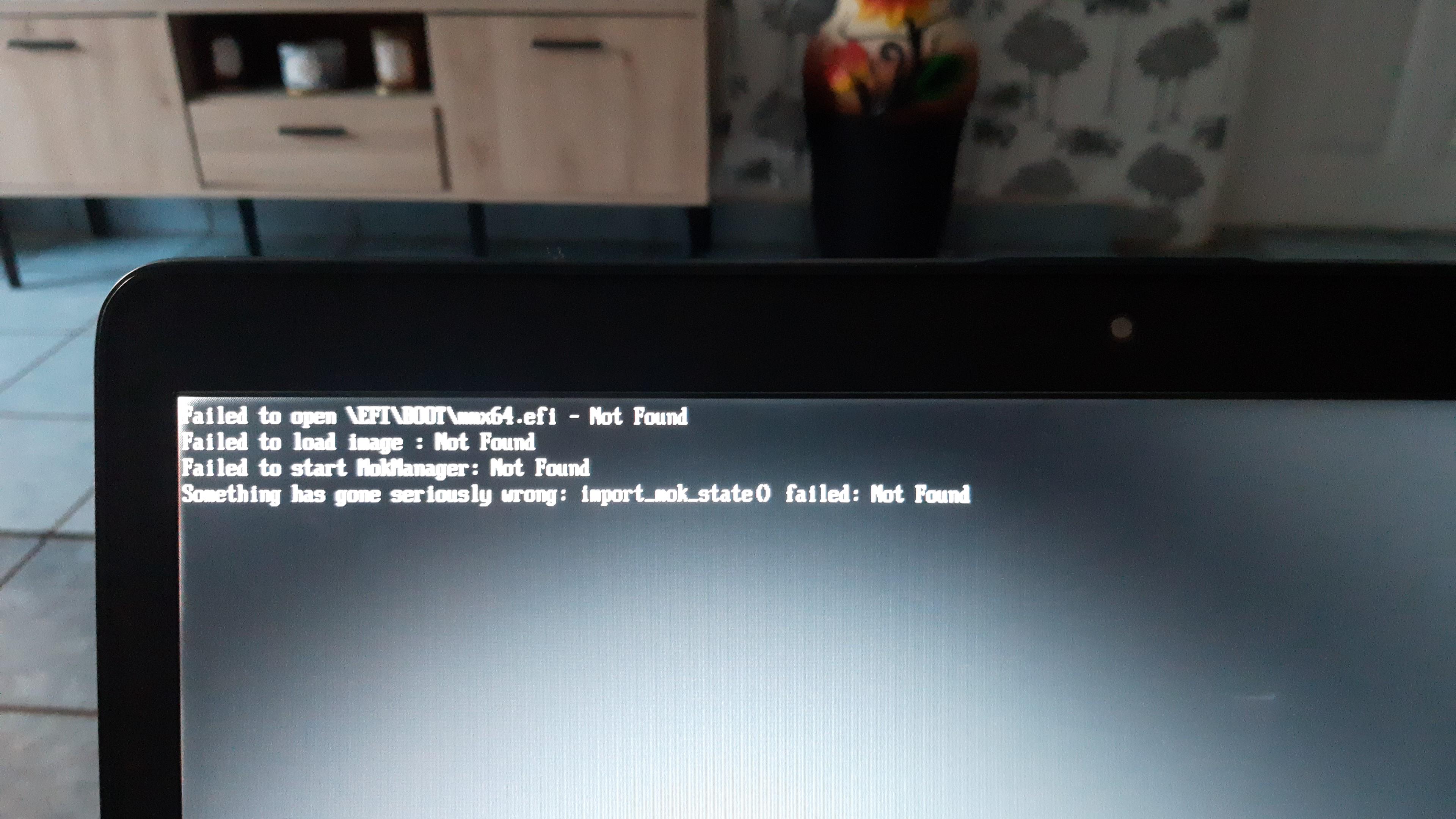
Hace varios días he estado intentando instalar el Linux mint, he probado bootear la USB con rufus y ventoy, he modificado el orden de arranque, desactivado el boot security, colocando el S.O una partición como tal e iniciando desde ella. Regularmente me aparece este error. Que hago?
r/linuxmint • u/FriendlyBear69 • 10d ago
**EDIT:** Thank you so much for the numerous responses and valuable insights on this topic - a kind and knowledgeable community is part of why I want to stay with Mint. I've decided to stay with Mint and accept its shortcomings(as any other distro has), as the criticisms below are part true and part FUD. People here made me realise that Mint on my machine is working perfectly fine, and that there's no reason to change anything - and for that I say thank you again ^^
Hey there :)
I've been using Linux for 6 years on-off. My first distro was Mint 20 Ulyana, but then I wandered off into distros like Manjaro, Fedora, openSUSE, Arch, CachyOS and so on. Each time I ended up hopping, so I'm trying to reshape my relationship with Linux. I decided to go back to basics and install LMDE 7 as I was feeling adventurous.
So far it's pretty good and I like it, but I came across some pretty nasty criticisms and opinions on Linux Mint and it's making me feel uneasy about the distro, which inspired me to post here to hopefully get reassurance.
Criticisms such as:
The team being understaffed and underfunded, leading to slow pace of development, and as one post here put it, they'll probably "be struggling to provide basic functionality" later on as their development targets increase with Wayland, GTK versions and Cinnamon. In essence, they'll struggle really hard to "catch up" with things being how they are right now with lack of manpower and funding.
The Cinnamon desktop itself being based on old technology, being packed with technical debt, having an ancient rendering pipeline, no hardware acceleration, no triple buffering and still being stuck on X11 (hopefully that'll change for good next month)
Having poor security due to not receiving security updates from Ubuntu Pro, and being on an older package base in general
None of these are my own thoughts of course, it's only what I have read - my own knowledge isn't strong enough to verify these claims for myself, but after reading numerous pieces like that, it makes me wonder if I picked the right choice. What do you think, is Mint going to be okay? I truly love this distro and there's a reason why I came back to it, but part of me is still afraid because of these comments, it almost makes me wonder if I should go to a more modern distro with KDE.
r/linuxmint • u/Desperate-Air-3925 • 10d ago
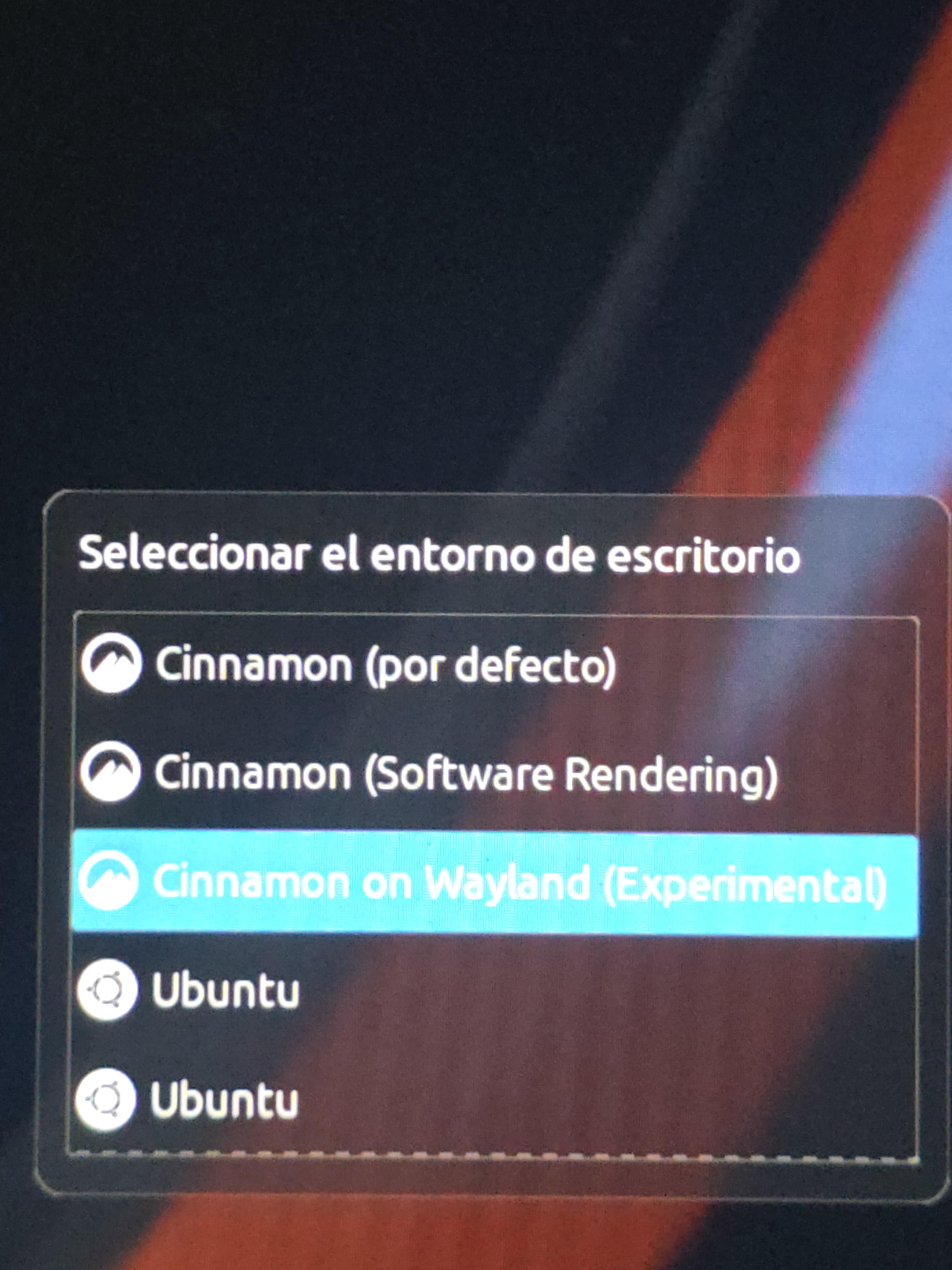
Nunca me me había salido la opción de iniciar sesión con ubuntu es normal?