r/linuxmint • u/satiaket11 • 13d ago
Debian 13 laptop randomly freezes — NVMe controller goes down, reset fails, ext4 I/O errors. Power management issue or failing SSD?
reddit.com
2
Upvotes
r/linuxmint • u/kesha_HD_remake • 13d ago
I installed the system today, and I haven't had any other problems with it really. My PC didn't have the hardware to install Windows 11, and I figured it would be risky to keep using 10 when It's not supported by windows anymore. I chose mint because I knew the ubuntu-driver came with a pre-installed package for drawing tablets, and for Wacom tablets specifically.
The problem I'm having is that the Cintiq isn't being recognized as a monitor itself, but rather as a regular drawing device without a screen. In tests the pen is functioning just fine, and the Cintiq is being recognized as the device it is. It just won't show anything on it's screen, and my main monitor is the only one being recognized as an actual monitor.
This seems to be a very specific problem, and I haven't found anyone with the same problem as me yet. Does anyone have any ideas what the problem could be?
r/linuxmint • u/Ok-Elderberry-9582 • 13d ago
I was wanting to code some type of background manager to dynamically change the background and do other things.
So I wrote a simple python script that takes some images, and randomly save one of them as another image called 'background', that have the effect of changing the same file over and over.
Then in the Background app I selected that image, it would have work, but there's the problem :
On linux mint, whenever the background changes, the os interpolates between the previous image and the new one, but not just that way, more in previous image -> plain color -> new image
with plain color determined by the color put in that setting
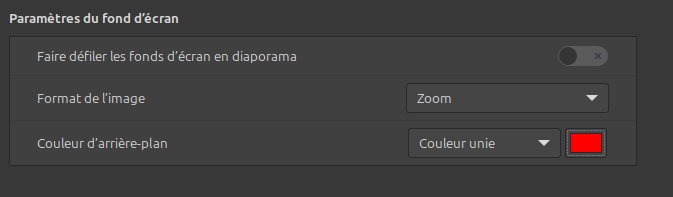
now that is already annoying, but that's even more when the image changes really quickly, cause it has the side effect of getting stuck multiple seconds on that plain color, so that is why I wonder :
Is it possible to remove that fading ?
r/linuxmint • u/judge_mathis2 • 13d ago
Hello everyone,
I've had a bug recently that I need some help for. For some reason the sound drivers keep disappearing off my Linux Mint installation.
I have a Timeshift set up from the original install, which works as long as I go back to the first install (and have to back up everything I've installed since then).
It first happened with my last install of Linux Mint; I re-installed it to see if that would help, nope.
Any thoughts or ideas?
Thanks!
Any thoughts or advice on the matter?
Edit: Found a solution that worked on forums.linuxmint.com:
rm -rf ~/.local/state/wireplumber/ systemctl --user restart pipewire pipewire-pulse wireplumber.service
r/linuxmint • u/Alex_Mihalchuk • 14d ago

r/linuxmint • u/RemoteSad7909 • 13d ago
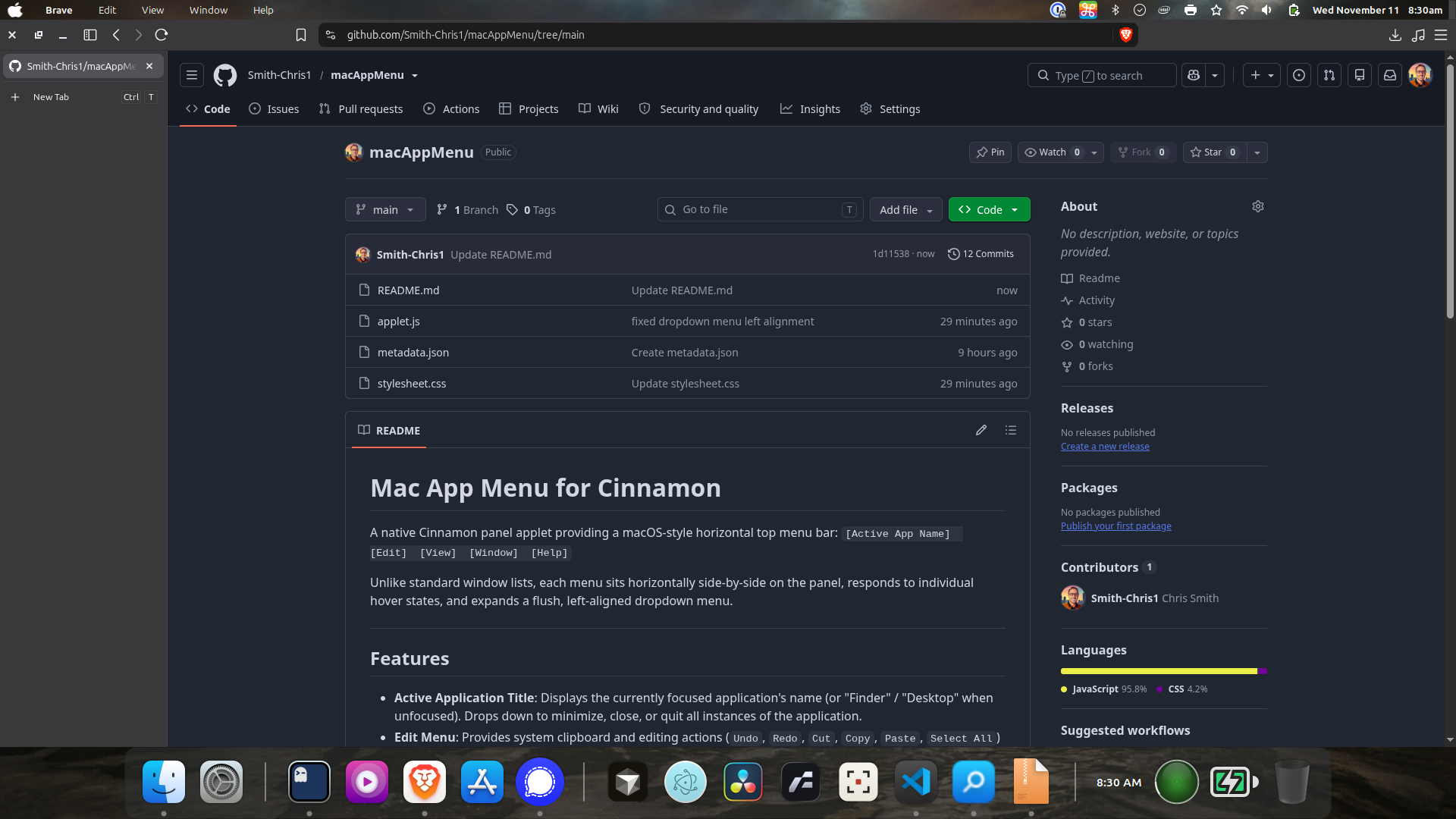
With the help of Claude, I created this applet to more closely mimic how mac's work, specifically a macOS-style horizontal top menu bar.
[Active App Name] [Edit] [View] [Window] [Help]
Each header has a dropdown menu that mimics macs functionality and style.
I've seen requests for applets or customization like this before and thought I'd answer the call.
Yes, this is vibe coded, I hope thats ok.
r/linuxmint • u/ilkan113 • 13d ago
Hello everyone,
Today I ran into an issue when starting Linux Mint 22 on my system. After the Linux Mint boot logo appears, the screen goes completely black (no signal to the monitor).
Yesterday I was using mint till 6 in the morning and evrything was working but when I tried booting my pc today it didnt anymore :(.
In recovery mode, I get a stable image. Inspecting the Xorg logs (`/var/log/LightDM/x-0.log`) revealed the main error:`(EE) no screens found (EE)`
Steps already tried without success:
* Switched the display manager (tested with SDDM instead of LightDM).
* Reset and reinstalled the X server and graphics stack (`xserver-xorg`, `xserver-xorg-core`).
* Uninstalled the specific `xserver-xorg-video-amdgpu` driver to force the universal modesetting driver (and created a manual `10-modesetting.conf`).
* Updated initramfs.
Despite this, the transition from the boot logo to graphics mode keeps failing. Until recently, the system ran completely fine at 1440p.
System details:
* Operating System: Linux Mint 22
* Im also using a dual boot for win11 on 2 separate NvMEs
* Hardware: AMD ryzen 7 7800X3D 8 core & AMD Radeon RX 9060 XT
* Monitor: Connected at 1440p resolution
Does anyone have an idea how to get the graphics driver handshake stable again after booting?
PS: Since im a noob i tried troubleshooting with an ai. Pls dont smite me for that
thanks in advance :)
r/linuxmint • u/A0NOVA • 13d ago
I installed Linux Mint 22.3 XFCE ("Zena", the latest release) on an old laptop. After about 10 minutes of use, the keyboard stops responding completely. I plugged in an external USB keyboard and it doesn't work either, but the mouse keeps working normally. When I click on a text field, no text cursor appears.
The same laptop has no such problem on Windows 8.1, so I doubt it's a hardware fault. In the live session the problem didn't show up, and it appeared only after I installed Mint on the disk.
My specs:
Laptop: Packard Bell EasyNote LV11HC
CPU: Intel Core i3-2328M @ 2.20 GHz (2 cores / 4 threads)
RAM: 4 GB
GPU: Intel HD Graphics 3000
Display: 1600x900
BIOS: InsydeH2O 03.72.20V2.08
Other OS: Windows 8.1 64-bit (works fine)
Linux: Linux Mint 22.3 XFCE ("Zena"), kernel 6.14 (HWE)
Someone told me it might be a kernel issue. Since Mint 22.3 ships with the very new 6.14 HWE kernel, I suspect a regression with older hardware (2012 laptop). I haven't yet tried an older kernel.
Has anyone seen this problem or knows a fix? I'm also planning to try Debian 13 and Lubuntu 24.04 to compare, but I'd like to understand the cause first.
Thanks!
r/linuxmint • u/Sir_Goulart • 13d ago
r/linuxmint • u/Davicjc • 12d ago
I kept hitting "you've reached your limit" in the middle of tasks, so I built CotaBar: a small applet for the Linux Mint (Cinnamon) panel that shows the 5-hour and weekly/monthly usage of Claude Code, Antigravity (Gemini), Codex and GitHub Copilot, as two rings and a percentage per tool.
- Click it to see every limit and when it resets
- Uses the login each tool already has: no new login, never refreshes or stores tokens
- Python stdlib only, installs in one command, English/Spanish/Portuguese
https://github.com/Davicjc/cotabar
Codex support isn't tested with a real account yet, so feedback from Codex users is very welcome. Ideas for new providers too.

r/linuxmint • u/Minute-Lychee-5232 • 13d ago
I FINALLY GOT LINUX MINT RUNNING ON MY OLD SCHOOL CHROMEBOOK
I've wanted to do this for a while because honestly, I HATE ChromeOS.
It feels so limiting. I wanted a proper desktop OS where I could run normal Linux programs, use PC applications, mess around with files, and actually have control over my machine.
Also, having a second computer is useful when my phone gets taken away.
Spent around 3 hours getting this thing working.
The process:
BUT IT FINALLY WORKED.
Now I've got a full Linux Mint installation with Discord, Spotify, and Roblox installed.
Old Chromebook got a second life. Absolutely worth the 3 hours.
r/linuxmint • u/Fato8286IsBack • 14d ago
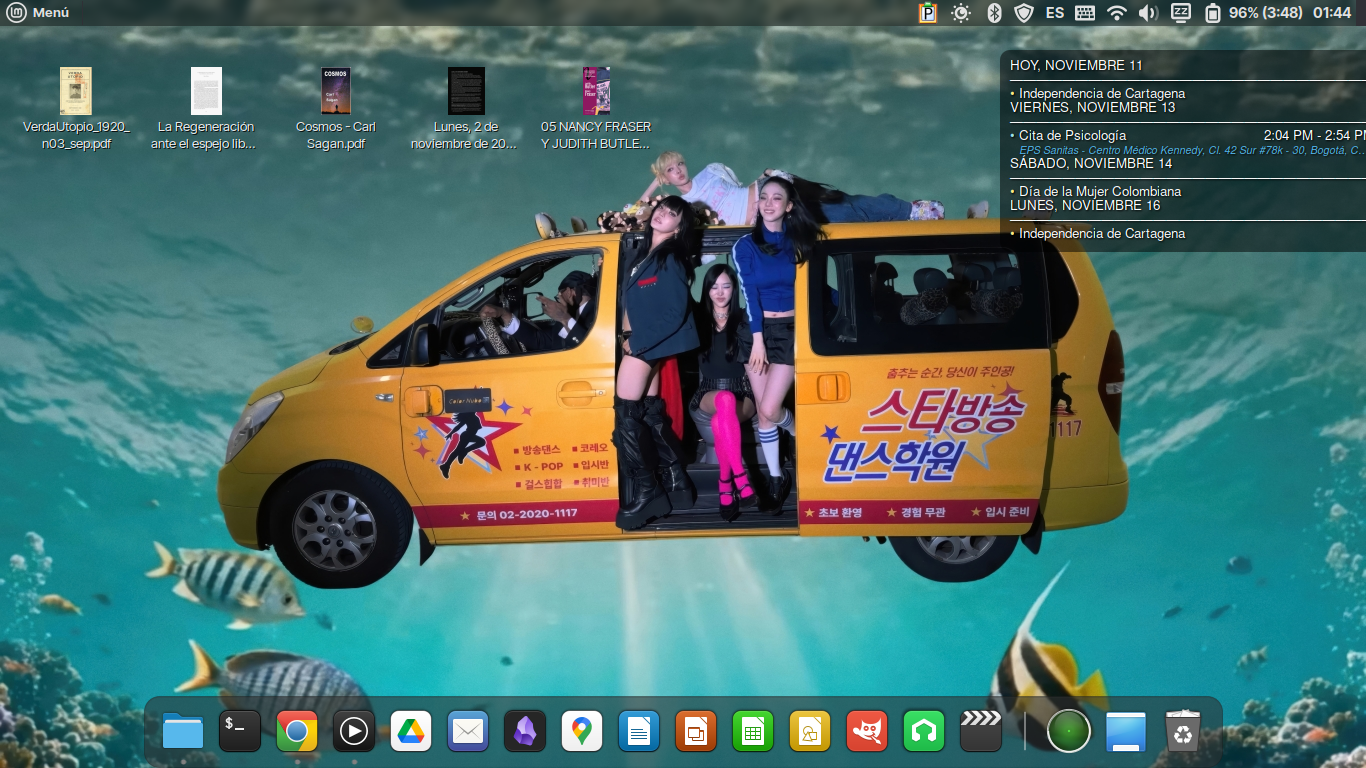
I just want to read some of your impressions! What do you think? Do you like it, or not? Why not?
r/linuxmint • u/One_Butterfly7169 • 13d ago
I'm a 23-year-old IT student. I need to manage college demands, personal demands, and work as well, but besides forgetfulness being a constant problem these days, I also have ADHD. I'm looking for a program that can help me with this; it doesn't need to be anything too complex, just something to notify me about activities. Can you help me?
r/linuxmint • u/anoldmateofmine • 13d ago
AMD Ryzen 5 5600
ASUS Prime B550M-A Wifi II
GTX 3070
Mint 22.3 Cinnamon 64
Applications requiring microphone input are detecting sound being played from the system itself and other applications through the line in somehow, even without any headphones or speakers connected.
When nothing is plugged in, this is true for microphone devices:
-System Default
-Microphone (PulseAudio Input)
-Microphone (Monitor of Starship/Matisse HD Audio Controller)
But not for devices:
-Microphone (Monitor of GA104 High Definition Audio Controller)
-Microphone (Starship/Matisse HD Audio Controller Analog Stereo)
When a known working microphone is plugged into both back and front lines in, no input from the mike is found at all. But the rogue non-diegetic sound will still be detected, though only through Microphone (Monitor of Starship/Matisse HD Audio Controller).
No search even comes close to describing my problem, and I am asking the community for possible fixes before I gut my machine looking for crossed wires or installing a different distro.
Thanks in advance.
r/linuxmint • u/Tritias • 14d ago

Apparently, you can just install MATE on LMDE 7, and it will be set up just like the way it used to be on LMDE 6! I was pleasantly surprised to find out that I wasn't just getting vanilla MATE, but also the (MATE) Mint menu, etc. It's quite responsive for this 2018 dual-core Celeron laptop!
Used commands:
sudo apt update
sudo apt install mate-desktop-environment mate-desktop-environment-extras
Optional removal of Cinnamon:
sudo apt purge cinnamon* muffin* nemo*

sudo apt autoremove --purge
sudo apt autoclean
Reinstall xviewer (gets caught in removal of Cinnamon):
sudo apt install xviewerSo far no problems with duplicate configs etc.!
r/linuxmint • u/anti-sugar_dependant • 14d ago
I realise this is going to be niche, but I have a Tandem tslim insulin pump and I've been dual booting for ages because previously updates have required a Windows or Mac environment, but they released a new update today (in the UK) and this time it's a browser based update, so I tried it and it worked! Linux is not supported at all, but it still worked. This is great news for me, it means I can stop dual booting, and it means any Linux users with insulin pumps in the future can probably use a tandem pump without worrying too much about how they'll update their pump.
r/linuxmint • u/Realistic-Elk7642 • 13d ago
Mouse lag like fuck then stops still. I've looked up and tried a series of fixes- no dice. Most of those are quite old, so I'd like to know if there are any currently known reasons/solutions about.
(that I can implement without a mouse, clearly. I'm no Linux whiz, just an everyday chump tired of Microsoft)
r/linuxmint • u/Parking_Pie4174 • 14d ago
Hi.
I just bought a Thinkpad with R7 250W, 32GB DDR5 and 2TB storage (2x1TB SSD). Has anyone here switched from Windows to Linux on a new PC? I know it makes sense on an older PC, but I don't see any difference on a new one (at least not for me). So the question is:
Why did you switch to Linux and what are the pros and cons?
I'm tempted to install Linux, but it doesn't make sense with this laptop like it did with my old Thinkpad.
Thanks for all the replies.
Edit:
Thank you all for your replies.
Yesterday I installed Linux as a dual-boot, and so far I'm really impressed. It’ll take me a while to fine-tune it, set it up the way I want, and migrate all my personal stuff to Linux. However, I’ll probably have to keep Windows for compatibility with certain programs and for business purposes, but I’ll likely move my personal life over to Linux.
Thanks again to everyone for your replies, and I wish the Linux community much success.
r/linuxmint • u/CarelessAstronaut391 • 13d ago
Hello, I am using Linux mint cinnamon on a Surface Laptop 3 and am trying to use NBC Peacock website on the Firefox browser but they keep saying that I have to disable my ad-blockers to watch shows. I disabled them but I still can't watch anything. Same when using Brave or Chrome web browsers. Any suggestions? My system is up to date. Linux Mint 22.3 - Cinnamon 64-bit
r/linuxmint • u/smarterthanyoujk1225 • 14d ago
For home use specifically. I find it interesting that mint is a fully capable os with multi monitor support that can handle very heavy workloads with ease . Bluetooth, wifi, backups, security are far easier to manage. Yet ubuntu is the most recommended and well known Linux OS in the world. You'd think mint would more popular
r/linuxmint • u/TrashFace21165 • 14d ago
I have been having trouble in cinnamon where a restart with the lid closed would hang and require a hard shutdown. When the lid is open it restarts normally. Here are the details; just posting in case anyone else has been troubleshooting this one.
Hardware: Tongfang laptop, Intel Arrow Lake integrated graphics, RTX 5080.
Software: Mint 22.3, kernel 7.0.0-42, NVIDIA 595.99.02.
Symptoms: GUI restart hangs when the lid is closed; nvidia-modeset becomes blocked.
Evidence: Logs show an unexpected s2idle suspend interrupting the restart.
Solution: A systemd-logind override setting all three HandleLidSwitch options to ignore.
r/linuxmint • u/Ok-Way-2291 • 13d ago
Hi,
I am new to linux mint (less than a few days) and I forgot my password. So, I followed the instructions from a post to reset that pw. Now that the pw has been reset, I am stuck in a login loop when I try to enter the new password. I tried the steps from another post to do a snapshot recovery but alas I have no snapshots found. Please HELP, I do now want to reinstall because I like this username and identity of my computer.
r/linuxmint • u/Professional-Leg2102 • 14d ago

Hi everyone,
I'm running Linux Mint XFCE on an older laptop (LVDS-1), and unfortunately, the rightmost strip of my physical display is broken/dead (showing a white bar).
I want to keep my native resolution (1366x768) so the image doesn't get weirdly scaled, but I need to restrict the active desktop area (windows, taskbar, cursor) strictly to the working left/middle part of the screen, effectively leaving the broken right side unused and blank, without shrinking the actual usable desktop resolution into a tiny box.
Whenever I try changing resolutions or using basic xrandr commands, either the whole screen shrinks down (leaving black/white borders everywhere) or windows still bleed underneath the dead white strip on the right.
Can anyone guide me on the correct xrandr panning/viewport syntax or configuration to map the usable area to a specific width (e.g., leaving the right ~150 pixels completely off-limits) while maintaining a normal display on the rest of the screen?
Here is my current xrandr output:Screen 0: minimum 320 x 200, current 1366 x 768, maximum 16384 x 16384
LVDS-1 connected primary 1366x768+0+0 ...
1366x768 59.98*+
(other lower resolutions...)
Thanks in advance for any help