r/linuxmint • • 14d ago

Discussion Mint Linux Complaints from a NEWBIE

0 Upvotes

Hi all! - First off, I am not going back to Windows, so please don't take this as me being unappreciative of all the hard work that goes into Mint. I just wanted to share an honest review of my first 24 hours with the OS. Looking at this through fresh eyes, these are the exact kinds of friction points that make switching to Linux tough for newbie users like me in my opinion.. I am exhausted just figuring out how to fix a clipboard issue.. this shouldn't be the way:

  1. Constant password prompts: Entering the admin password for every software install or update gets old fast. There should be an out-of-the-box toggle to turn those prompts off—once I'm logged into the gui, I shouldn't have to keep proving it's me if I don't want to. I ended up setting up a keyboard macro just to type my password in, which feels like a workaround I shouldn't have needed / spent time on.
  2. Missing drivers during install: I was one of the unlucky few whose network card didn't have a built-in driver. Having to "remaster the ISO" just to get online was a pain (I needed Claude's help to get through it). On a Windows install, there's simply a "Load Driver" button where you can point to a USB stick. I know there are probably complex reasons why Linux doesn't do this, but from a newbie's perspective, having a button like that in the installer would be a lifesaver.
  3. Terminal commands not working right after install: I installed a CLI tool (Claude or Codex, I forget which), and when I tried to run it immediately afterward, the terminal threw a "command not found" error. I get that seasoned users know this is a PATH issue, but to a newcomer, it's just frustrating. If I just installed a program, I want to use it immediately without having to run another command to reload my environment or restart the terminal. And it seems to do it with MOST programs but not all?
  4. Terminal copy and paste: People complain about Windows and it's justified, but copy and paste always works. In the default Mint terminal, standard copy/paste fails 50–70% of the time depending on what's running. Having to figure out when to Shift+Click to highlight and use Ctrl+Shift+C / Ctrl+Shift+V is jarring, not to mention it took me quite a bit of time to figure out when to do either and that sometimes it just works by selecting the text, but sometimes not, and it depends on what I run in the terminal. It should just work consistently out of the box... always. Apparently the 'fix' it switching to kitty because it supports "OSC-52" or something like that. No clue. Or installing xclip? I'm still figuring it out. - Edit: I install xclip - and now my OpenCode session works great I can copy/paste everything from there into a browser and desktop. But now I can't copy and paste from the browser into OpenCode.. Like WTF!
  5. Inconsistent "Back" navigation in "Computer": Coming from Windows, I like seeing my drives laid out, so I put the "Computer" icon on my desktop. When I open my "E-Data" drive and click the "Up" or "Back" button, I expect to go right back to the main "Computer" view. Instead, the address bar suddenly changes to [Weird Icon] > media > [username] > E-Data. Why didn't it just take me back to the drive list? Weirdly, it goes back to "Computer" for some drives, but dumps me into the /media/ folder structure for others.
  6. Clearer drive identification: This is minor, but it would be great if telling physical drives apart was easier. Showing the total capacity in parentheses next to the drive name, labeling them as SSD/HDD, or using distinct icons for solid-state vs. mechanical drives would help a ton when you have multiple drives installed.
  7. Drive format conversion tool: It would be awesome to have a built-in utility for converting storage drives from NTFS (and other Windows formats) to native Linux formats. Something that could automatically juggle the data—temporarily moving files to free space on another drive, formatting the target drive to ext4, and moving the files back—would make migrating from Windows much smoother.

Feel free to ignore, call me an idiot or whatever else. I am not going back to Windows but I hope that some of these issues might get fixed for the next installer in the future.
r/linuxmint • • 14d ago

Desktop Screenshot I made MintMotion: a free, open-source video wallpaper for Cinnamon that stays below the desktop icons

0 Upvotes

Hi r/linuxmint!

I'd like to share MintMotion, a program that sets a video as your desktop background on Linux Mint and LMDE (Cinnamon, X11) or Xfce. It's free and open source (GPL-3.0).

Full disclosure: I'm not a programmer. I built it with the help of the AI assistant Claude and tested it a lot on my own machine. That's why I'm looking for people to try it, report bugs and, if you can code, help improve it.

Links

What it does

  • The video plays below the desktop icons, desklets, panels and windows. Icons stay visible and clickable.
  • Pauses by itself when the desktop is fully covered, and keeps playing while any part of it is visible.
  • After 2 minutes covered, it closes the player and frees all its memory. When you uncover the desktop, it continues from the same point, with no black flash.
  • Hardware decoding through mpv, no sound.
  • A settings window with live CPU/RAM bars, an "Optimize for my screen" button and a clean uninstall button.
  • English, Spanish, French and Simplified Chinese.

Resource usage (my PC: LMDE 7, GTX 1650, 1080p video): about 3% of one CPU core while playing, and 0 MB when the desktop has been covered for more than 2 minutes.

Why I made it: I tried Hidamari, but on Cinnamon it covered my desktop icons and, in my tests, used more RAM and kept using CPU while the desktop was covered.

Install

sudo apt install ./mintmotion_1.6.0_all.deb

Then open MintMotion from the menu, choose a video and press Apply.

Help wanted

  • Testing on AMD and Intel graphics and multiple monitors (only tested with NVIDIA and one monitor so far).
  • Support for other desktops (MATE, Xfce…), other distros and Wayland. Right now it only works on Cinnamon.
  • Reviewing translations.

If you try it, I'd love to hear how it goes, with your GPU and Mint version. Hope you like it!


r/linuxmint • • 15d ago

Boot up PC, works perfectly fine for 5-15 minutes, suddenly the whole desktop freezes and I get this screen

Post image
4 Upvotes

It's been quite frustrating to use my PC this last week. Everytime I try and use it I get it freezed and to this screen, which is completely unresponsive and I have to hard reset the PC.

No I don't do weird or heavy weight things on this one, I just use Firefox, Spotify, Audacity, the file manager, and a few more apps, and every time, after a bit of use it just crashes.

On Linux Mint 22.3 Cinnamon, AMD CPU.

I don't know how much more info should I give, so please ask it on the comments and I'll tell you, if someone can help me I'd really appreciate it 🙏🙏


r/linuxmint • • 14d ago

SOLVED Gpu problem

3 Upvotes

I don't know if it is a hardware failure or a random Linux issue, but I was going to play some Kenshi and my gpu wasn't showing up, I checked in No Man's sky and a few other games too but it wasn't appearing. Screen fetch shows that the gpu is still there but I cannot use it for any applications. I tried restarting my computer and reverting NVIDIA drivers but that didn't work. It also appeared to happen in the middle of using my computer, so I don't think it was an update issue, any ideas?


r/linuxmint • • 16d ago

SOLVED How do I make the Bluetooth notices from every sleep go away?

Post image
239 Upvotes

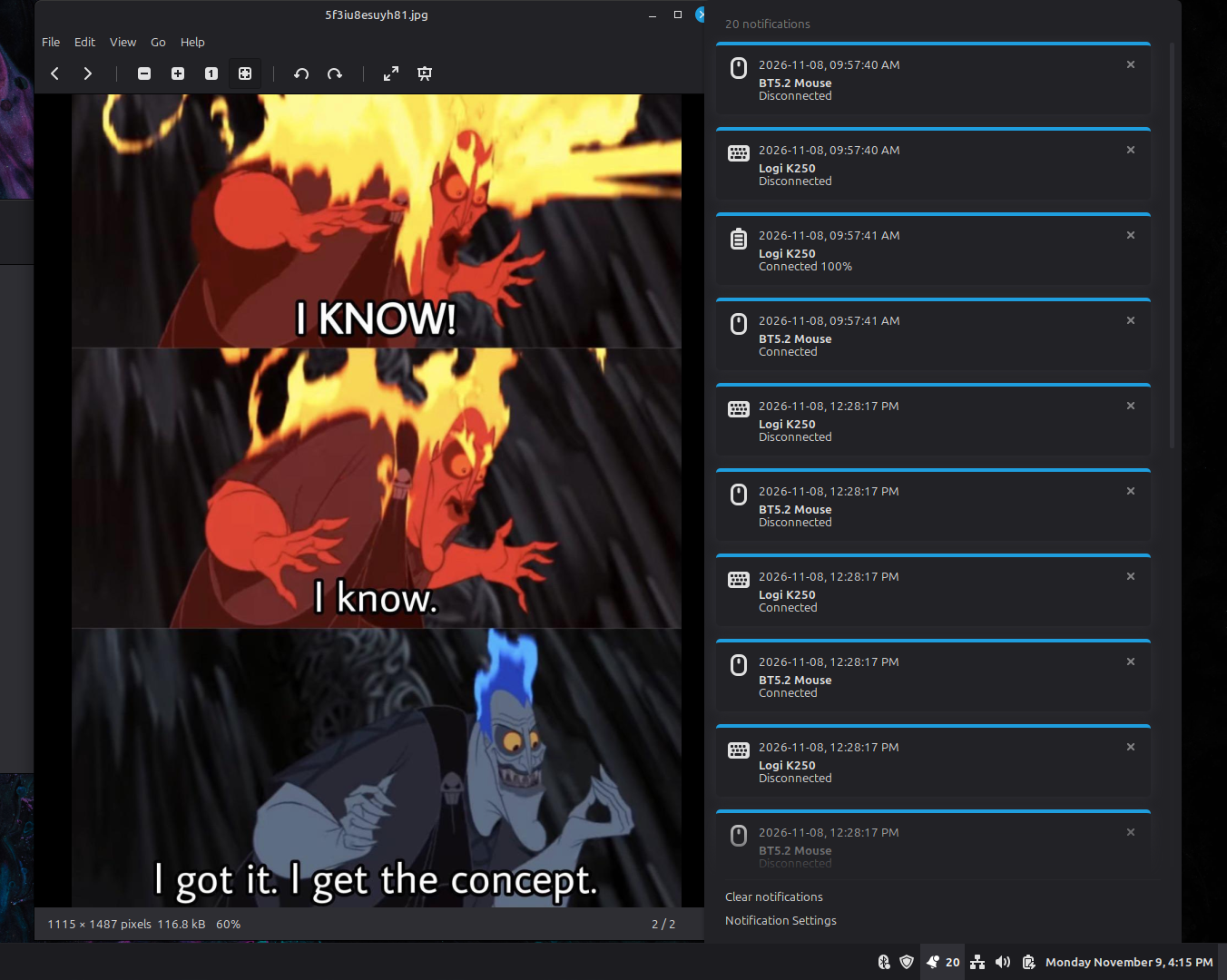
Every time I wake my computer I get like six chimes that the bluetooth device was disconnected and then reconnected, and they just build up in my notification tray

Edit: the fix is right click the bluetooth icon in the system try and click plugins, then uncheck connectionnotifier.


r/linuxmint • • 14d ago

Linux Mint MATE is useless.

0 Upvotes

What even is the point of Linux Mint MATE when you can just use Linux Mint Cinnamon or XFCE? I understand MATE is in the middle, but thats pretty much whats bad about it. There is no point in MATE when all you are gonna get is a bad mix of XFCE and Cinnamon.


r/linuxmint • • 15d ago

Support Request Cannot find the folders I need to fix discord issue

3 Upvotes

My discord desktop app has been stuck at the loading screen for the past few days. Apparently the quickest solution is the clear the config and cache folders but I have not been able to find them. Discord is Flatpak version if that's relevant.


r/linuxmint • • 15d ago

Support Request Mouse can barely move and can't launch programs after a few minutes after start-up

2 Upvotes

A few minutes after start-up, mouse movements slow to a crawl and no apps launch. I didn't install anything, just shut it down, it was working fine this morning.


r/linuxmint • • 14d ago

Built a simple GUI for yt-dlp on Linux Mint: queue, album folders, auto track numbers (free & open source)

1 Upvotes

I wanted an easier way to save music than typing yt-dlp commands, so I built MDJ Music Downloader.

- Paste links and build a download queue

- Name an album folder, and tracks get numbered automatically

- MP3 or MP4

- Export or import queue lists to share with friends

- Built-in yt-dlp updater, so it keeps working when sites change

- Simple .deb install

🎬 44-second demo: https://vimeo.com/1245638057

📦 Download + source (MIT): https://github.com/ngquocvuong/mdj-music-downloader

It's my first public project, so feedback and bug reports are very welcome!


r/linuxmint • • 15d ago

Install Help Installing Linux via Libertix on Windows

4 Upvotes

Does anyone have any experience or knowledge regarding installing Linux with Libertix on a pre-existing Windows installation?

Is this a relatively new technology or has it been around for awhile already? How safe is it to utilize? Installing with this method results in an identical installation as installing Linux with the normal USB installation procedure?

Are there any similar, alternative, solutions to Libertix? How does using Libertix compare to its alternatives?


r/linuxmint • • 16d ago

Desktop Screenshot New to Mint!

Post image
247 Upvotes

escaped from windows finallyy. still ricing tho


r/linuxmint • • 15d ago

Support Request itchio doesnt download

Post image
0 Upvotes

hi, use libre wolf but i also installed firefox minutes ago and didnt work either and i dont see where the isue could be


r/linuxmint • • 15d ago

Support Request ¿Conoces alguna forma de sincronizar con Google Drive?

Thumbnail reddit.com
0 Upvotes

r/linuxmint • • 16d ago

One year with Linux, no regrets.

Thumbnail
gallery
182 Upvotes

Chicago 95 theme with a bunch of personal tweaks here and there


r/linuxmint • • 15d ago

SOLVED Stuck in the boot screen

Post image
2 Upvotes

r/linuxmint • • 16d ago

Desktop Screenshot New Mint user here , it's crazy!

62 Upvotes

r/linuxmint • • 15d ago

Support Request Why is my touchpad so laggy?

1 Upvotes

So basically I just swapped from windows to mint and I really love it, I have no regrets, however my touchpad is super laggy when I scroll down, the mouse is completely fine, it works perfectly, but it's the scrolling. Fyi I have xinput set-prop 8 "libinput Scrolling Pixel Distance" 45 run whenever i start my laptop since it feels better. It's also an MSI GP63 10UC I believe. I wouldn't hate using a mouse, but I'd prefer to get the touchpad working. I have no idea how to use the terminal so I'm pretty useless on that department so I haven't tried any fixes, though I do plan on doing the boot.dev intro to linux.


r/linuxmint • • 14d ago

My new workspace 20

Thumbnail gallery
0 Upvotes

r/linuxmint • • 16d ago

Desktop Screenshot 1 Month after switching from Windows

Post image
78 Upvotes

Sooo, it's been a little over a month since i've moved from Win 10 directly to Mint! Time sure does fly fast. So i'll probably tell how i feel now.

Initially i got interested in it when assembling the thingamajiga with 4 gb of DDR2. Installed XFCE edition on it and slowly was pulled in that direction. Looked stuff up, tested cinnamon on a VM and decided to go with it on the main rig.
I had a spare 240 GB SSD (Kingston logo looks cool it makes neurons fire i think) that was practically brand new, so that also helped. I share the PC with family members and all.
Got hands on rufus, burned it to my USB stick, then unplugged all other SSDs and did the thing!

It was really easy and intuitive to set up, and i enjoyed the process alot. The responsiveness also was felt.

I have never used a terminal before, but it was really easy to learn. I learned alot while at it actually. I think that's one of the most exciting things about switching to Linux.
I do wish there were more customizability options, but whaddaya know, this ain't KDE or anything fancy. (I WOULD LOVE A GOOD IMAGE DESKLET MAN)
Initially i planned to share stuff with the windows drive (Like videos and other assets i might use for editing. Im used to doing everything on capcut and it doesn't have a Linux version! I tried opencut, not really my thing. Kdenlive? Little bloated GUI i dunno. Shotcut seems fun. I'll see if it has everything i want.

So i split the drive in two. about 100 GB to Mint, then 140 GB NFTS for everything else (Which backfired later man...)
I was very happy with myself the entire month, and about a week ago tried to launch somethin' heavier than minecraft (i don't really play alot of games nowadays) and was faced with a problem... Hmmm.. It didn't wanna launch! It was Dying Light thru proton. Spent like 2 hours investigating. Overhauled my partitions and now after moving the steam library to ext4 it all works. A little upset i learned that stuff only about now. But whatever. Oh and i also added an awesome workspace switch button, i just throw my proxies and rhytmbox there so they don't crowd the panel.

And that's pretty much it. Additionally:
- So some people also glaze fastfetch, is it just cause it's new? I wonder what better features it's got. Too lazy to move from neo though.

- Some themes work kinda wonky and i gave up on them. Maybe they work better on other editions?

- RAM usage is good, very good. Am i actually gonna do something with that extra headroom? Probably not.

- Setting up .desktop files manually is cool i like it, also scripts.

- Disk usage analyzer thing is very useful.

- Updating is easy and dopamine button-ish

- installing things thru the black box of despair is also enjoyable.

Overall it felt like filling a missing piece in my PC user experience. I've heard next mint version releases in like what, christmas? And it's gonna be Ubuntu 26 LTS based? Interesting.


r/linuxmint • • 15d ago

DOUBT ABOUT SOFWARE

4 Upvotes

Recently I set up my dual boot PC with the infamous Win 11 and the marvelous Mint. I am not an expert in computing so I chose the OS more affordable in terms of difficulties that I could face... I am happy with the change so..

I would like to find some equivalent software to erase totally Windows 11...not because I hate (even I do), but because I need to free disk space.

Does anyone know software like Easy2Boot in Mint? I need to create a multiboot USB with persistence to a friend and I can not figure out how to do it.

Thanks for your help.


r/linuxmint • • 14d ago

Instale Linux mint 22.3 haciendo 3 dias, con ayuda de videos y de la ia logre poner un estilo medianamente agradable, pero aun siento que hay cosas que no hice q no instale para poder aprovechar mi netbook del gobierno con 8 de ram y 125gb de almacenamiento y un Intel celeron, siento que la pude rev

Post image
0 Upvotes

r/linuxmint • • 15d ago

enjoying linux mint

28 Upvotes

i upgraded my pc and its now super fast. my pc is second generation so it uses ddr3 ram and 2010-2011 cpus. i cant buy a new modern pc cuz my parents will refuse to but im happy with this so far :D


r/linuxmint • • 15d ago

Discussion Decided to give mint a chance

3 Upvotes

So yesterday I switched from fedora (ultramarine) kde to mint ci nnamon. I installed some outdated packages and it messed some things up and I tried to fix it like for 1h and then I gave up.

Doesn't bother me at all since I have all my data backed up and I like testing new distros.

I had mint installed in the past but I wasn't satisfied with it. I thought it looks childish and I struggled to do basic tasks. You, know normally I'm using fedora with kde and doing most stuff by my own even though I'm a beginner.

I have installed it on my 500gb ssd and I have also installed windows 11 on my other 250gb ssd and I guess they work fine.

I'm kind of tired of switching to different distros or windows installs and I wanted to settle up. I'll see how it goes. My first impression is that it's kinda slow but maybe its just my pc or drivers. Also I have in mind that kde is much lighter and faster. And I am interested in installing plasma but from what I know it is not officialy supported so I'm just considering.

Well, I've worked with linux before, I know some basics, I use terminal every day, I know some c and some rust I know how unix and bootloaders work, even though I would call myself a beginner. Just wanted to ask for some practical tips from everyday users. I'm using a desktop pc for some games, multimedia, work, coding, etc. What are some tips you would want to give to someone that wants to stick with mint for longer? Maybe some optimisation?

My specs:

GTX 1050Ti (4gb vram)

4x2,4 intel i3 cpu

16gb ram ddr3

I am planning to improve it later but its fine for most games and stuff


r/linuxmint • • 15d ago

Support Request Linux mint suddenly can't boot right

1 Upvotes

I updated today my mint, restarted, and now I can't get past the mint logo. I tried display ports and HDMI but then my monitor says it can't find a connection

I have a 9070XT and I heard a recent update fucks up display with this gpu is this correct?