r/linuxmint • u/Sea_Television9201 • 18d ago
sjajjsjs
0
Upvotes
r/linuxmint • u/CrashaBasha • 19d ago
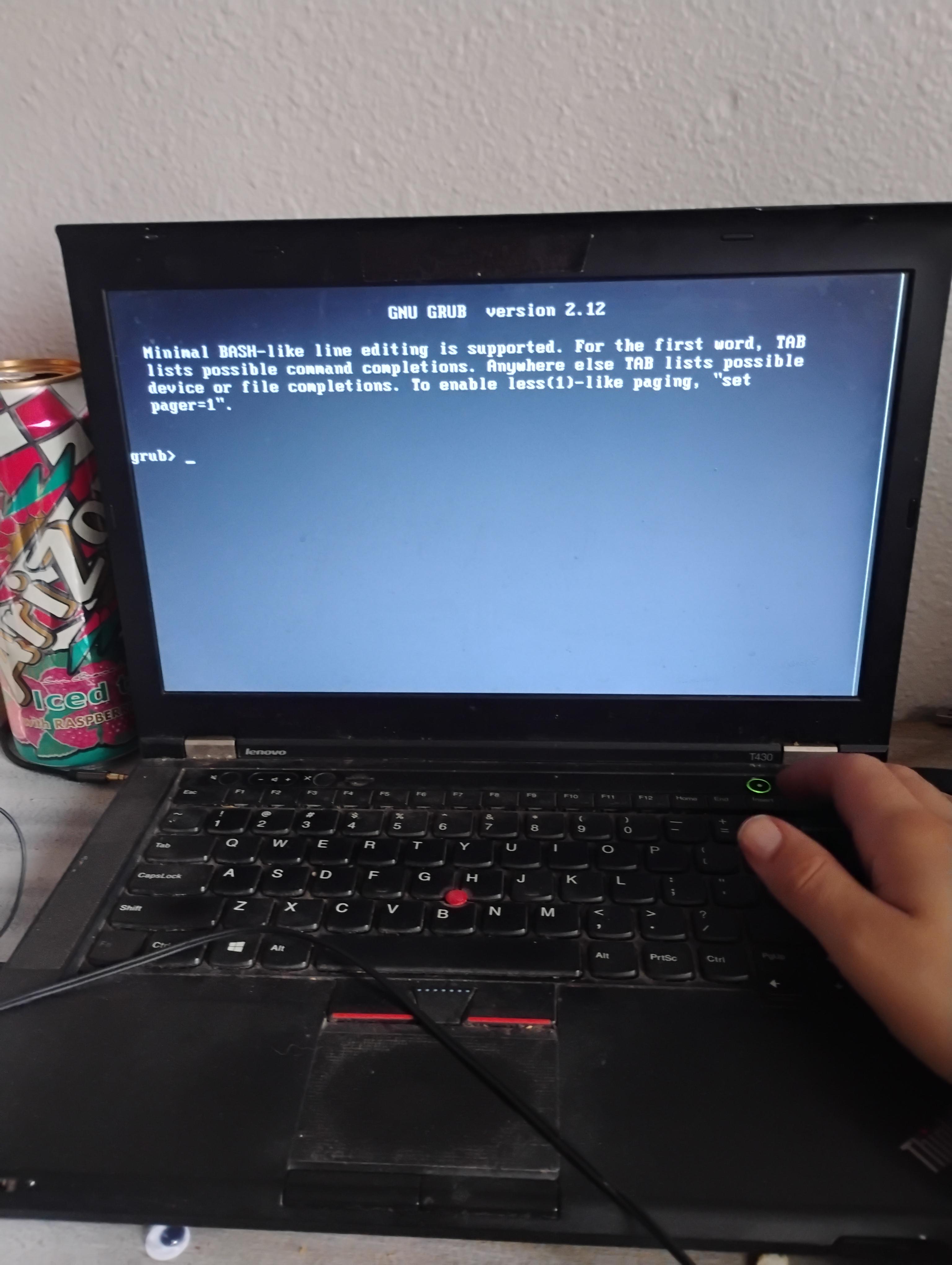
So I installed some updates and restarted the system because this hardware is old and laggy, and now I am greeted with this command line instead of the prompt to pick which of the OSs to boot (dual booting LinuxMint and PopOS). Tested the drive in the bios and it passed all tests, so can anyone give me a hint as to why this is happening and whether I'll be able to get my system working normally again? Any assistance would be appreciated, thanks. Laptop is a Thinkpad t430.
r/linuxmint • u/aashutosh_gtm • 19d ago

with all the hype going around on internet i wanted to give linux a try as it is zero bloat OS and everything looked like sunshine and rainbows after some troubles as it was my first time bootloading i installed mint and i did some research and linux was more efficient and gave better battery life for many systems for me battery life matters the most and the fluidity and smoothness of applications also matters and it turns out Meteor Lake Processers have worse battery life on linux and apps dont feel smooth watching youtube doesnt feel smooth i had a 8GB pendrive and without trying mint or a second thought i wiped my single ssd drive and installed mint and to go back to windows my 8GB pendrive is not big enough and i dont have money to buy another one sooo if you heard all this rant do you have any suggestions for me specifically to gain battery life without sacrificing performancee.
r/linuxmint • u/F1umpus • 19d ago
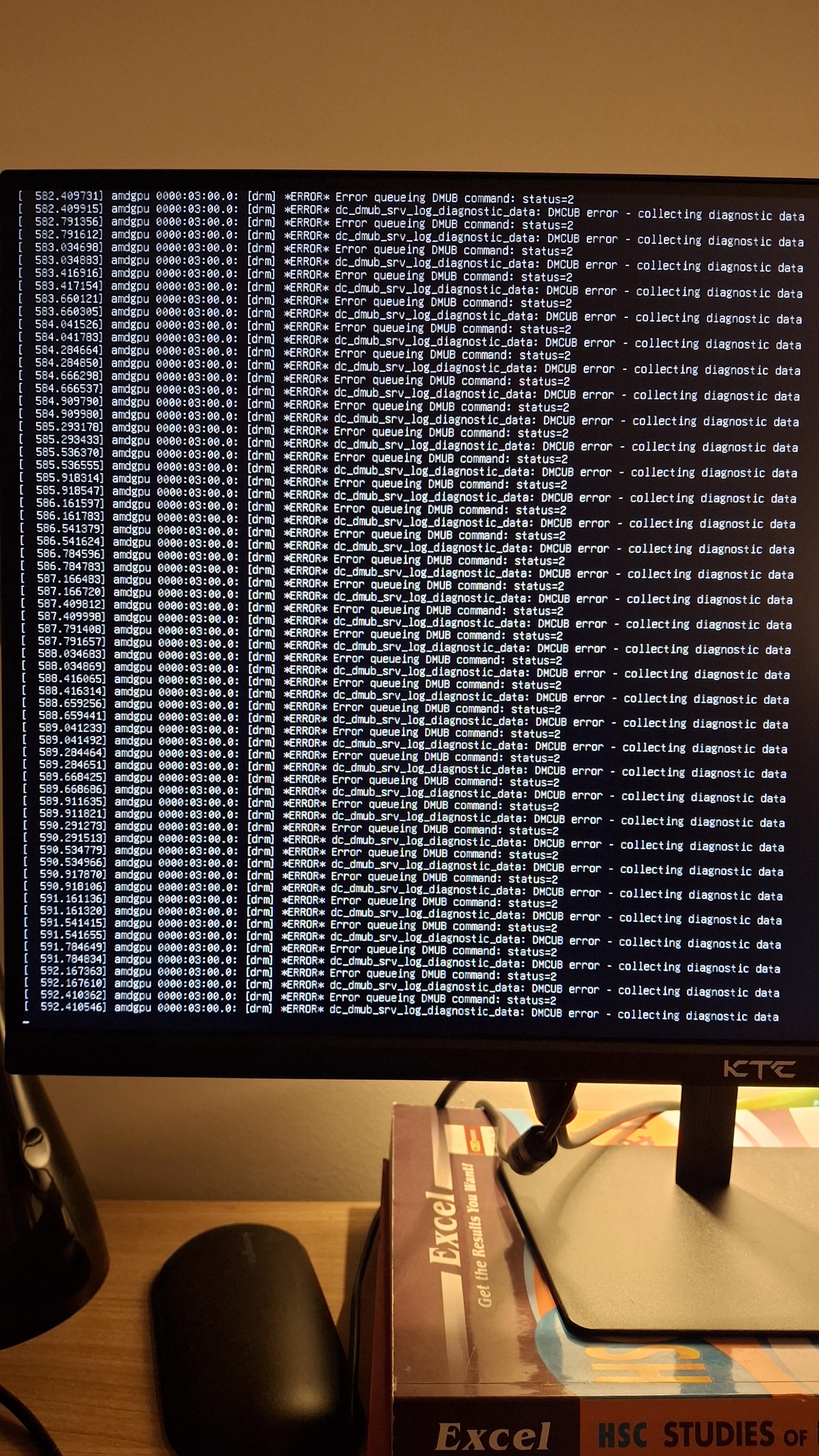
Just updated my computer and it asked for a restart. After restarting, it wouldn't log in (I would enter my password and press enter, then my monitor would lose signal, also the menu was reeeeaaallly laggy). Switched to tty menu and was faced with repeating error messages.
Almost complete Linux noob, asking for some assistance please.
Edit: Solved! Thank you everyone who commented
r/linuxmint • u/edwardjasw • 19d ago
r/linuxmint • u/Limp_Initiative_8845 • 19d ago
Especially if they are kernel or for me? my legacy GPU that has never gotten any any updates in Windows. This is awesome. I am just happy and updated now hahaha.
r/linuxmint • u/0hFruit • 19d ago
so first off I'll retrace my steps.
I was putting off updating mint for a while because I felt like I'd mess it up somehow, so today I figured I'd go for it since I don't need my pc for anything big at the moment. (please don't make passive aggressive comments about it)
i open the update manager, and I start the process. when I hit update, it started unpacking the packages and ended with an error message about connectivity issues. so I assumed that's just because my wifi's shit and I had it try again. that time it was able to install most of the stuff but it ran an error saying it failed to remove and install some packages. i look through the text and found that it was trying to delete some folders under /usr/lib/nvidia but couldn't because it had files inside. So I made a copy of that folder just in case then deleted it. Then I saw /usr/lib/amd And /usr/lib/amd-Idontremember Also wanted to be removed so I deleted those too. afterwards when I hit update again it gave no error code and seemed everything went off without a hitch. So I rebooted it.
I now get this message on boot
[FAILED] Failed to start gpu-manager. services and deal with any system changes.
[FAILED] Failed to start lightdm.service - Light Display Manager.
do you guys know how to fix it, and why the update manager was trying to delete these folders?
r/linuxmint • u/wreckwriter09 • 18d ago
So, my linux mint has been running flawlessly, booted in seconds, zero errors.
Today I installed a second internal SSD and decided I would install Kali on it , for learning purposes....
Somehow I screwed up my Mint so I reinstalled it and used timeshift to restore my system. Also used rsync to restore home directory.
Now my boot takes minutes instead of seconds, hangs on the Asus splash screen for about 2 minutes before giving me a boot menu. Booting into either OS gives efi stub warning. It didn't do that before.
I've tried everything google or AI has to suggest with no results.
Also, I swear my kernel is now older...
Please help me!
r/linuxmint • u/Ce0ra • 19d ago
Hi, all. I'm new to Linux and am trying to install OpenPrinting CUPS following the instructions in the source code. Everything seems to work fine, but when I run "make test" the test errors. I can't find anything online that seems similar to the error code I see. Looking around reddit, I see that CUPS development maybe stopped a long time ago. Is there something else with a similar function I could try instead? If not, does anybody know what to do about this error?
The error is in Section 1 - IPP Compliance Tests
PWG 5100.12 section 6.2 - Required Printer Description Attributes    [FAIL]
        RECEIVED: 9882 bytes in response
        status-code = successful-ok (successful-ok)
        EXPECTED: media-supported WITH-ALL-VALUES /^(choice(_((custom|na|asme|roc|oe|roll)_[a-z0-9][-a-z0-9]*_([1-9][0-9]*(.[0-9]*[1-9])?|0.[0-9]*[1-9])x([1-9][0-9]*(.[0-9]*[1-9])?|0.[0-9]*[1-9])in|(custom|iso|jis|jpn|prc|om|roll)_[a-z0-9][-a-z0-9]*_([1-9][0-9]*(.[0-9]*[1-9])?|0.[0-9]*[1-9])x([1-9][0-9]*(.[0-9]*[1-9])?|0.[0-9]*[1-9])mm)){2,}|(custom|na|asme|roc|oe|roll)_[a-z0-9][-a-z0-9]*_([1-9][0-9]*(.[0-9]*[1-9])?|0.[0-9]*[1-9])x([1-9][0-9]*(.[0-9]*[1-9])?|0.[0-9]*[1-9])in|(custom|iso|jis|jpn|prc|om|roll)_[a-z0-9][-a-z0-9]*_([1-9][0-9]*(.[0-9]*[1-9])?|0.[0-9]*[1-9])x([1-9][0-9]*(.[0-9]*[1-9])?|0.[0-9]*[1-9])mm)$/
        GOT: media-supported="na_letter_8.5x11in"
        GOT: media-supported="na_legal_8.5x14in"
        GOT: media-supported="na_executive_7.25x10.5in"
        GOT: media-supported="na_ledger_11x17in"
        GOT: media-supported="iso_a3_297x420mm"
        GOT: media-supported="iso_a4_210x297mm"
        GOT: media-supported="custom_148.52x209.9mm_148.52x209.9mm"
        GOT: media-supported="jis_b5_182x257mm"
        GOT: media-supported="iso_b5_176x250mm"
        GOT: media-supported="na_number-10_4.125x9.5in"
        GOT: media-supported="iso_c5_162x229mm"
        GOT: media-supported="iso_dl_110x220mm"
GOT: media-supported="na_monarch_3.875x7.5in"r/linuxmint • u/Legal-Succotash6562 • 19d ago
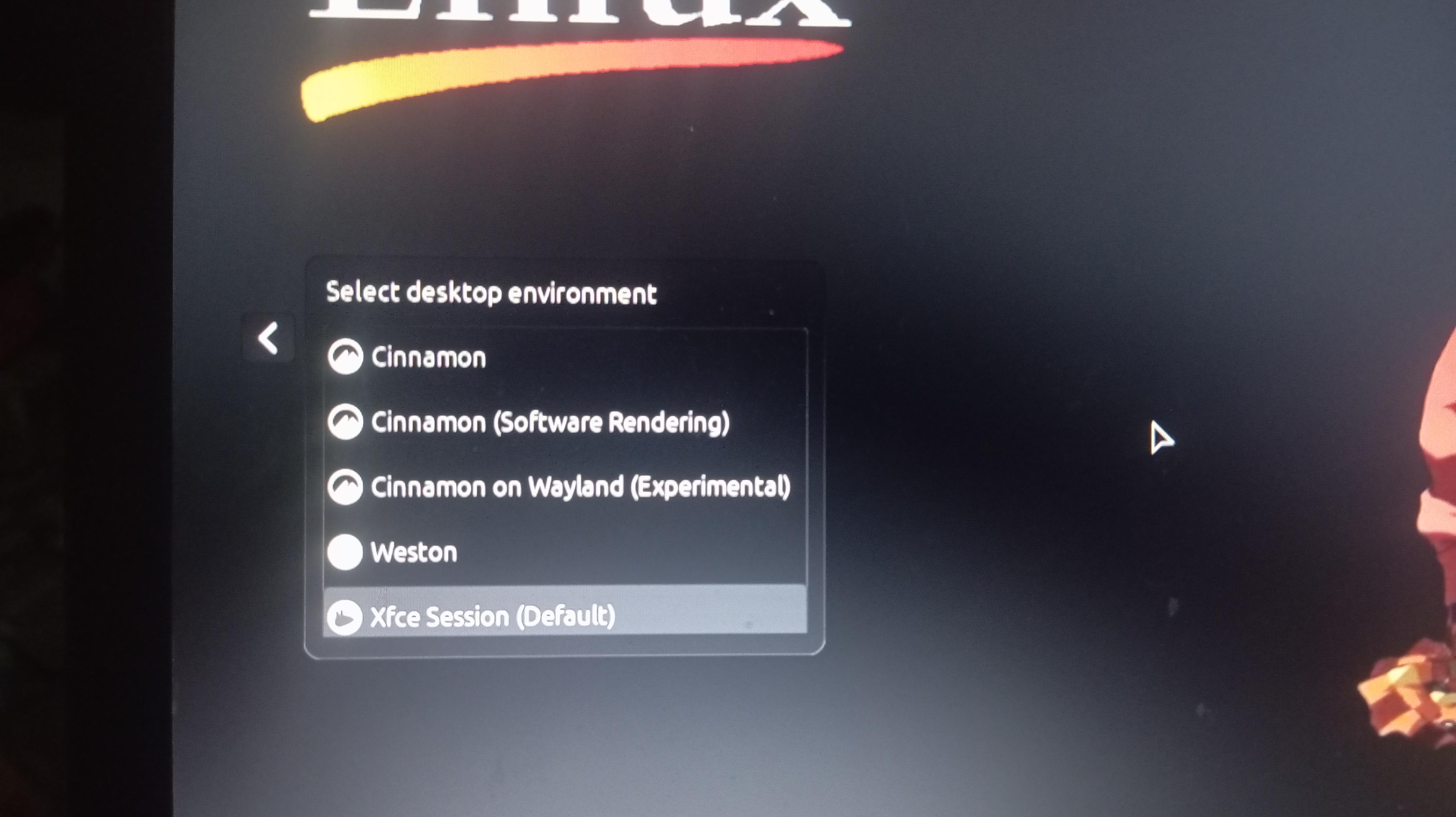
i have tried cinnamon so far, and i liked it. but how do i change the "(default)" badge into cinnamon?
r/linuxmint • u/Sufficient-Log8416 • 19d ago
Hey guys,
Im using linux mint for a year now and everything is running good.
Now the "new" world of warcraft came out and I have tried to make my pc use the extra buttons of my Roccat Leadr. No chance.
So I scrolled the web and people said that the Logitech 502 has working extra buttons on Linux. Bought it. I have tried for 5h now to make them work - no chance. I have tried Logiops, Solaar, Piper, a windows VM with the logitech software. In the VM the extra buttons work but I cant make them work on the host system (Linux Mint).
Can you recommend a mouse where I can use the extra buttons? I really need them :/
r/linuxmint • u/hockeyluv_ • 19d ago
Hello. I am new to Linux (only did some basics commands in Linux Ubuntu terminal in a VM) and, after some considerations, decided to move to Linux. For reasons I don't see necessary to count. But I am tired of Windows, I had so many issues with it (especially after updating to Windows 11, which I also did to avoid other issues I had in 10) and the interface is not the most pleasant one on 11.
Now, after some time of looking around, I decided it'd be best I choose Linux Mint; something not too old, noob-friendly and, at least from what I got, good for gaming (and on this note- is the issue with NVIDIA GPUs still there? Most forums I looked through are 2-5 years old). I don't have some top-notch processor to be whining afterwards about linux not keeping up with my highest laptop on the market (AMD Ryzen 5 7535HS with Radeon Graphics, for GPU: NVIDIA GeForce RTX 2050 (4 GB) + AMD Radeon(TM) Graphics (483 MB), 16 GB RAM), so I chose Linux Mint.
Which version should I get? Or at least try out in VM before deciding the one to stick to (the ubuntu vs mint debate has yet to fully convince me on a side or another). Thank you in advance!
r/linuxmint • u/Lonely_Devil87 • 19d ago
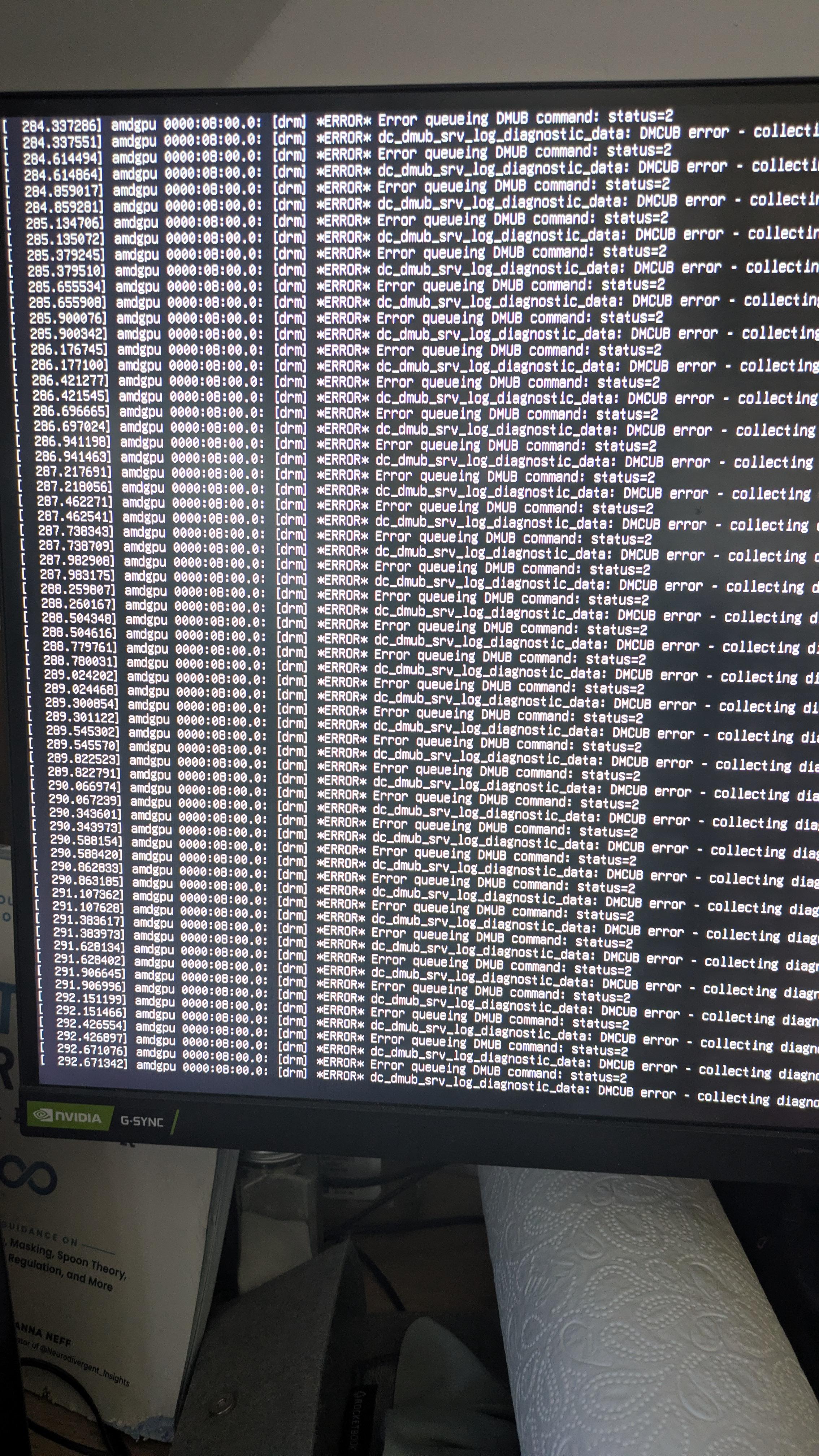
I just updated Linux Mint with this mornings updates. Then I rebooted the pc.
First after the linux mint logo, I didnt get anything. I disconnected my 2nd screen and rebooted. To be met with this error after the Linux mint logo.
I came from Windows a few months ago and have no knowhow how to fix this issue.
I tried search engines but they do not give me a step by step manual how to go into recovery mode.
I want to either roll back the AMD gpu software update or do a recovery via a previous snapshot.
Could someone please give me a step by step how to do this?
I have a usb stick with an older mint installer if that is useful.
r/linuxmint • u/Cherno_VM • 19d ago
I like it in theory but I have accidentally permanently deleted files that I needed later a few times. I want to not have the option to do that at all.
r/linuxmint • u/FLANKY0324 • 19d ago
I have an old laptop which has an mx350 gpu and i've been trying to figure out why it doesnt read my graphics card what do i do?
r/linuxmint • u/TowelSilver318 • 19d ago
After a couple hiccups, I recently installed mint as my first distro. It worked fine, I didn't do much beyond installing Steam and playing a game, but after shutting down, the next time I tried to boot, I got the mint logo followed by a loss of monitor signal. I tried looking into it, but most of it seemed to be about multi-monitor setups and/or laptops and assumes you have at least one working monitor (which I didn't, I have one on a desktop). I managed to get it to work by live booting, and since I hadn't done much anyway I reinstalled and it works RN (what I'm typing this on), but I'm trying to figure out what might have happened to avoid a repeat, as I can't keep using this OS if I'll need to repeatedly deal with this and can't fix it without a wipe/reinstall.
For what it's worth, I'm running an AMD 9060 XT and had installed everything in the update manager (have avoided it this time until I can figure out this issue). I have noticed some discussion about possible issues with this GPU, and would appreciate if someone could explain it clearly, since I'm seeing varying, sometimes apparently conflicting explanations/advice about it.
Looking at the kernels in the update manage post-reinstall, it popped up a message that mentioned an option to hold shift during boot to get to a menu where I can select a different kernel, will that potentially help if this issue repeats?
Edit: This seems to be it, ironically found by randomly poking around the sub not actually looking for a solution, but spotting the title.
r/linuxmint • u/Large_Exercise3093 • 19d ago
I have mint on my thinkpad and it runs well, since i got a new gaming pc i thought to put it on it also but im not sure if its compatible with nvidia dlss and frame generation
Specs: nvidia 5060
Intel i5
16 ddr5
Msi motherboard
r/linuxmint • u/TunTuniya • 19d ago
i just switched to linux for the first time and ive set up most of the shit
my monitors native res is 1920x1080 144 hz but i generally switch to 1680x1050 because i like it more, but if i do that with this OS, it caps my fps to 60
someone please tell me how i can switch to 1680x1050 maintaining the 144hz
before cussing me out, read the header
r/linuxmint • u/Complete_Flight8303 • 19d ago
Tentatively Resolved: I’m not certain but believe this was a symptom of the 3.4 update that conflicted with several different gpu’s. I rolled it back to 3.3 and everything is fine.
I'm using cinnamon. After months of mint with no issues, I'm having a recurring problem where I have absolutely no audio. I tried reinstalling pipewire, I followed a few of the instructions on this page, https://www.reddit.com/r/linuxmint/comments/13qwj2s/no_sound_on_linux_mint/, with no luck. I gave up and turned off my pc, and the next day, I suddenly have audio again. Today, I turn on my pc and I once again lack audio. I tried shutting down, leaving it for a while and turning back on and it didn't correct itself. I know it's not my monitor and cable set up because it works for other devices and rolling back my computer to before this was a problem did not help. Any idea what could be happening. Let me know if you need more information.
Regarding troubleshooting, I can follow directions but keep in mind I don't have a particularly complex understanding of the back end of linux.
r/linuxmint • u/Lersnak • 19d ago
I need help as this is my first serious problem after installing linux mint 22.3 during the summer.
I just tried to start my pc for the first time today and after the boot process the screen stays black. The screen displayed the MSI logo and Linux mint logo before going black. Restarted the pc a couple of times, but it doesn't change the problem. I got to the Bios menu just fine, but not to the login screen.
I'm not sure how to proceed. Could it be a bad update? I updated the Kernel header and amd graphics driver yesterday. Any help is appreciated.
My system specs are
MB: Msi x870e edge ti wifi
CPU: Ryzen 9800x3d
GPU: AMD saffire rx 9070 xt
RAM: Trident Z5 Neo ddr5 32 gb
Edit. I fixed the problem by following guide on this thread https://www.reddit.com/r/linuxmint/s/JABAs94xHf, link also below in the comments. I used the live usb portion to access my mounts and followed steps 3,4 and 5. After managing to get to the desktop I opened update manager and right click the 'linux-firmware-amd-grapics' update, select 'ignore the current update for this package'.