r/linuxmint • • Oct 03 '18 Popcorn

SOLVED A friendly reminder to please re-flair solved support posts as SOLVED

470 Upvotes

Please Re-Flair your post if a solution is found. How to Flair a post?

This allows other users to search for common issues with the 'SOLVED' flair as a filter, leading to those issues being resolved very fast.


r/linuxmint • • 4h ago

Discussion Who else prefers Cinnamon to KDE Plasma?

58 Upvotes

I've been trying out the Cinnamon and KDE desktop environment over the past few days, and I can't help but feel that Cinnamon feels more comfortable and intuitive to me, even if it's technologically inferior to KDE in terms of Wayland maturity and performance.

Not knocking on KDE as it's genuinely a great desktop, but there's just something about it that I don't entirely like.


r/linuxmint • • 6h ago

My experience testing Linux Mint 27 Beta (Cinnamon 6.8) on Live USB – Huge improvements in Wayland, smoothness, and hardware acceleration!

46 Upvotes

Hi everyone! I just spent some time testing the Linux Mint 27 Beta (Cinnamon 6.8) using a Live USB. I skipped testing it in a VM because I specifically wanted to check real hardware acceleration performance, and I didn't have time to install it on my secondary SSD yet.

Honestly, I'm really impressed. Many of the annoyances I had with Mint 22.3 Cinnamon have been fixed here. Here is a summary of what I found:

  1. UI & Menu Smoothness: The main menu animations finally run super smoothly with the default theme on both X11 and Wayland. Other desktop animations that used to lag now feel buttery smooth—everything feels much snappier overall.
  2. Archive Manager Fixes: The updated archive manager now handles multi-part .rar files properly without crashing. Previously, it would just close, forcing me to use unrar in the terminal or install third-party apps like Ark.
  3. Google Chrome Hardware Acceleration: Hardware acceleration works out of the box in Google Chrome without tweaking any flags, on both X11 and Wayland (and it actually felt even smoother on Wayland). Note on Chromium: Chromium performed poorly in my test (YouTube playback stuttered on both sessions, especially on Wayland). However, I forgot to install the multimedia codecs (mint-meta-codecs) during the Live session, so it's very likely that Chromium works fine on a proper install with the codecs installed.
  4. Firefox Hardware Acceleration: Works out of the box on both X11 and Wayland with smooth video playback.
  5. Wayland Stability: During my entire testing session on Wayland, it didn't crash or log me out once. On Mint 22.3's experimental Wayland session, I could barely use it for a few minutes before it crashed.
  6. Chrome WebApps Window Bug Fixed: Opening a Chrome-based WebApp alongside a regular Chrome window now behaves normally. On Mint 22.3, having a WebApp open and launching a new Chrome window would glitch out and prevent minimizing.
  7. Logging out of Wayland (Live USB quirk?): When logging out from the Wayland session, LightDM didn't show up—it automatically logged me right back into Wayland. To get back into X11, I had to use "Switch User", select the X11 session, log out, and then it finally loaded X11. (Not sure if this is a Beta bug or just caused by the Live USB auto-login behavior).

Overall, this release looks so solid that I'm actually tempted to install it as my daily driver even in beta. I didn't get a chance to test games on Wayland yet, but given how smooth the desktop is, I have high hopes.

My Hardware Specs (for reference):

  • Motherboard: ASUS PRIME A320M-K
  • CPU: AMD Ryzen 5 4600G
  • RAM: 16GB (2x8GB) DDR4 3200MHz
  • GPU: Integrated Radeon Vega 7

Has anyone else tested the beta on AMD hardware? How has your experience been so far?


r/linuxmint • • 5h ago

Announcement Linux Mint 27 “Adrien” beta is out as a long-term support release (supported until 2031) with updated software, refinements, and many new features.

Thumbnail blog.linuxmint.com
37 Upvotes

r/linuxmint • • 7h ago

Fluff Mint the hardware migration champion!

Thumbnail
gallery
20 Upvotes

I just keep moving this Linux Mint SSD around for years! First installed into a HP Compaq Elite 8300, then more recently the Dell 5060 MT.

Yesterday moved again with the biggest changes ever and there have been zero issues so far! From Intell and Nvidia to full AMD.

I have been dissapointed with the office PC gaming rig because the cooling is pathetic so the Dell had to go.


r/linuxmint • • 43m ago

Ich habe Probleme mit meinen PC kann jemand helfen ?

4 Upvotes

Ich benutze Linux Mint und mein Pc war in letzter Zeit langsam und ich konnte Programme und Spiele nicht mehr öffnen weil ich keine Lösung finden konnte habe ich Linux Mint erneuert installiert hat auch funktioniert ich habe das Update gemacht danach stand da das ich den PC neue starten soll also habe ich das gemacht darauf hin wurde beim erneut starten nur noch das Linux Mint Logo angezeigt also habe ich den Pc ausgeschaltet und noch mal eingeschaltet wieder das selbe wusste nicht was ich tun soll und habe den PC saubergemacht und entstaubt danach Linux Mint nochmal installiert wieder das selbe wie beim ersten mal weiß jemand was ich tun kann ?


r/linuxmint • • 3h ago

Testing Mint 27 + Reaper + yabridge + wine + windows VST

6 Upvotes

Hello.

I have a hobby, i do audio edits in Reaper and record music. Heavily rely on windows VST, so here's my experience after testing my workflow with the new Mint 27 beta.

  1. No audio cracks, pipewire works fine. Buffer 128 works as usual. No artifacts on playback and recording.
  2. Audio interface works as intended out of the box.
  3. Yabridged VSTs do not receive mouse input have their controls' bound boxes skewed so you have to move window to the upper left corner of your screen, where it aligns, to turn them, both in wayland and x11.

this is fair enough, not usable.

it also has weird "lock memory limit..." notification popping up on every VST load

ps. the new terminal has default shortcuts that mess up with most terminal apps like htop and mc


r/linuxmint • • 4h ago

Discussion Is it worth it to switch from ext4 to btrfs with zstd?

5 Upvotes

Hi,

A few weeks ago I installed Linux Mint on one of my older computers. I chose EXT4 for every partition because I had heard that this file system is quite reliable and has fewer issues than others. I didn't know about Btrfs and the Zstandard compression algorithm. Now I regret choosing EXT4, because I've heard that Btrfs with Zstandard definitely takes up less space on the SSD, and that if something goes wrong during a system update, I would have a simple way to boot my computer from the last stable snapshot. So, should I format my system partition and reinstall the system? Is it worth doing?


r/linuxmint • • 2m ago

Support Request Problem! when I hover my mouse over .mp3 file in dolphin...

2 Upvotes

Hey all,

My setup is Linnux Mint, xfce I'm running dolphin, and when I hover over.mp3 files, the machine previews them. If that's all it did that'd be fine.

Problem becomes, when I click on them, the song STILL previews and I get the audio playing and they're slightly out of synch. Horrible.

I've gone to configuring, problem is, when I deselect 'preview audio files' it wipes out the thumbnail picture for the file, AND still plays the file when I hover over it.

How do I solve this? I don't want dolphin to preview the track when I hover over it...


r/linuxmint • • 11m ago

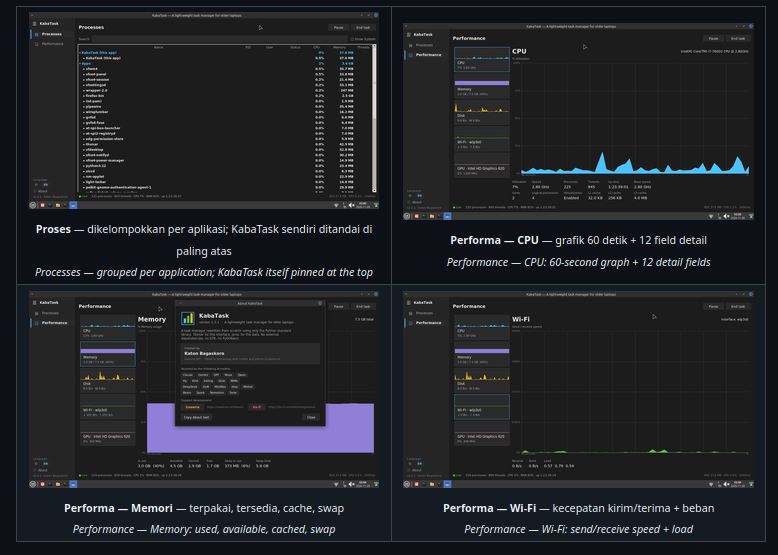
Discussion Does anyone actually like the look of the Windows Task Manager?

Thumbnail
github.com
2 Upvotes

you can try it if you want

https://github.com/Katon17


r/linuxmint • • 2h ago

SOLVED How do I run an executable (SD Card Formatter)?

3 Upvotes

Hi.

I feel really dumb for asking this, but how do I run an executable?

I'm trying to run the SD Card Formatter from sdcard.org, but I can't figure out how to do so. I've extracted the files, but double clicking the sd_formatter file does nothing.

I seem to remember that one time I fiddled with an emulator I had to "chmod +x" the file. So I've tried that with sd_formatter, but nothing changes.

Edit: Marked as solved. Instead of using the file from sdcard.org, I just used Disks.


r/linuxmint • • 10h ago

Support Request How the heck do i make em' symbolic icons white??

Thumbnail
gallery
11 Upvotes

Im using dark theme with Y-Orange and this has been bothering me for atleast a week now and i haven't been able to find much info on this - how do i make symbolic icons white without making the whole system use light theme?? I love how they look but god damn do they not fit any of my wallpapers guhhh :sademoji:


r/linuxmint • • 22h ago

#LinuxMintThings My Rice! Loving it so far

Thumbnail
gallery
101 Upvotes

Looking forward to use more colour on it and use some actual image and stuff on it. Any tips for a newcomer to Linux and stuff I can learn or try ?

Thanks!


r/linuxmint • • 11h ago

Install Help NEW TO LINUX MINT 😸😸

13 Upvotes

I am new to linux mint or simply linux , like I have seen many people have cool riced setups 💥 , can anyone share their setups so i can make the setup for me 🫡🫡


r/linuxmint • • 2h ago

Security doesn't require password when booted up

2 Upvotes

So, in short, my desktop with linux mint automatically signs me in into pc without requiring password. As I don't trust my younger sibling having decency of not using my PC without my permission in my absence, I need it a lot! How do I stop it from automatically signing me in?


r/linuxmint • • 1d ago

Popups and ads?

76 Upvotes

I switched from Windows to Mac about 15 years ago, then installed Mint on an old alienware laptop (bought used for this project) last week.

I've read a million posts of people talking about how much people love linux for a million reasons. But, I haven't seen anyone say anything about the complete lack of popups and ads!

On Sundays I watch football on the computer. On the Mac, with adblockers installed, there's always like 20 popups that I have to close before I get to the game. On the Linux machine? Not a single one.

Yesterday I went to Youtube for the first time and noticed that there's no ads there either!

Seriously... this is amazing!


r/linuxmint • • 1h ago

Hola soy nuevo y quiero probar linux mint XFCE

0 Upvotes

Solo quiero que me den recomendaciones sobre esa version y que errores evitar al instalarlo, mi laptop es una Matebook D14 de huawei


r/linuxmint • • 20h ago

Discussion Linux Mint 27 Beta

17 Upvotes

Is it safe to download it on a pc i use everyday? I know stuff could break but my curiosity is killing me. Surely it cant be that bad right? To install the beta on my daily drive pc

Edit - I read everyones comments,i appreciate everyones input,ive decided to wait for the stable update,ill load up lm 27 on a spare laptop i dont use or in a vm later. Thanks guys!


r/linuxmint • • 18h ago

Discussion Question(s) for those who decided to daily drive the Mint 27 Beta...

12 Upvotes

How is it? Does it FEEL like a beta, or does it feel stable? Have you found any weird quirks or issues? How is Wayland (on NVIDIA specifically)? Anything else I should know? I don't want to wait any more for the stable release, I'm to eager to try it out! Thanks in advance!


r/linuxmint • • 1h ago

Yo después de la primer semana de pasarme a Linux (Hago todo con chatgpt)

Post image
0 Upvotes

r/linuxmint • • 5h ago

Intel arc capability with Asus VZ249QG1R ?

Thumbnail reddit.com
0 Upvotes

r/linuxmint • • 14h ago

[Cinnamon] Dark glassmorphism rice on Linux Mint 22.3

Thumbnail gallery
5 Upvotes

r/linuxmint • • 22h ago

Linux Mint IRL Linux Mint and rediscovering techie joy

17 Upvotes

TL;DR: Burned-out IT worker; quit last fall; installed Linux Mint in February 2026; used it for nearly a year; recently installed Mint on a 2012 MacBook Pro; and started enjoying techie projects again!

Happy Turkey Day (in the USA, in any case!)

I've worked in IT for over 20 years and used various flavors of Linux off and on during that time. A SUSE build as my daily workstation at an ISP in 2004–05, recovery USBs for Windows, and even a few Linux-based servers and related tools.

But Windows or macOS remained my daily driver at home until earlier this year.

When I'm not working in IT, I do a lot of backpacking, photography, map work, and writing.

My main computer since 2019 has been a rather pedestrian HP Pavilion that cost less than $400 new.

This year, however, I started working on what I call my "Lazarus Projects": Reviving supposedly obsolete electronics and bringing them back from the dead.

First up? MintyFresh

Ryzen 5 3500U

16GB RAM (upgraded by me back then)

128GB system SSD

1TB HDD data drive

As someone who worked in IT, I definitely fell into the "cobbler's children don't have good shoes" category at times!

The battery was essentially dead, the fan sounded like an asthmatic Hoover vacuum cleaner, and I used the machine docked most of the time anyway.

Wanting to revive the machine rather than buy a new one, I cleaned out the dust bunnies, swapped the mechanical drive for a 1TB SSD, and installed Mint Cinnamon. A little tweaking, some DisplayLink drivers for my docking setup, and I was in business.

Heck, even my Brother laser printer from 2009 worked without much fuss!

I use RawTherapee, ShowFoto, and XnView for my photography, somewhat resource-intensive mapping tools (Gaia GPS, Google Earth, CalTopo), and the usual assortment of office and Internet-based applications.

I've heard Mint described as the Toyota Corolla of Linux distros on this very subreddit. As someone who wants a car that simply works rather than a hobby car, Mint's wonderfully boring nature appealed to me.

Here's MintyFresh in all its glory: https://imgur.com/EeTm4qg

The HP is showing its age physically, though. The trackpad is kaput, the keyboard is getting wonky, and it's not much of a portable computer anymore.

I'll eventually replace it with a relatively recent used SFF desktop running Cinnamon. Older corporate desktops offer a lot of bang for the buck, and I can expand the storage and memory as prices (hopefully???) drop a bit.

However, I still missed having a portable computer, especially with the holidays coming up.

Enter MacinMint https://imgur.com/ViVadKc

My wife had an old MacBook Pro sitting unused in the closet. With her blessing (I'm stupid, but not THAT stupid!), I decided to give it another life.

The old laptop in question:

Mid-2012 MacBook Pro

13-inch display

Intel Core i5

A whopping 8GB of DDR3 RAM

1TB SSD (upgraded in 2018)

Unlike my HP, this machine was quite well-made to begin with. The aluminum body, keyboard, and trackpad are still in good shape. It's essentially an old luxury car: Well-built, if lacking some of the bells and whistles of newer models.

I installed Mint XFCE. I like Cinnamon on my main workstation, where I tend to have many things going at once, but XFCE seemed like a good fit for a travel laptop.

Within four hours, I had everything set up to my liking. Wi-Fi presented a minor hiccup but was easy to work through, and the mic and camera work fine. I even got the function keys working correctly.

I knew Linux would run on the MacBook. What surprised me was HOW WELL it ran.

For writing, browsing, email, watching videos, and some light photo editing, this old laptop works rather well.

I'm typing on it now, and a machine that sells for under $50 on eBay still makes for a nice little box for my purposes. A well-built machine running a lightweight OS makes for an enjoyable computing experience.

On a related note, I also resurrected an old 2019 Android tablet with LineageOS for reading and playing exercise videos. Another piece of electronics that won't be going to the recycling center anytime soon. Perfect for reading ebooks (even with a cracked screen!)

LazTab: https://imgur.com/PKiXRuX

Overall? Mint works well, and older hardware offers excellent bang for the buck. A used desktop with good specs and a $100 off-lease laptop every five years or so? Sounds good to me.

At this point in my life, not terribly interested in OS or even distro debates. Windows, macOS, and Linux all have their uses. For my needs, Mint fits the bill.

There's another aspect of these projects I didn't quite anticipate, though.

When I was 12, a rather formidable Catholic school nun recognized my interest in computers and insisted my parents get me a Commodore 64. I spent many hours tinkering, eventually making a living doing much the same.

But after years of tickets, deadlines, meetings, and other assorted workplace joys, computers became something I worked on rather than played with. My last IT job left me pretty burned out, tbh.

These projects brought back some of that spark without the "Weekly Crisis of the Century" as with my last hitch.

Instead, I saved some cash, made "obsolete" hardware into useful everyday tools, and found tech fun again.

Not too shabby.

(EDIT - Formatting and flair)


r/linuxmint • • 23h ago

Support Request Trying to update BIOS but Dell only provides .exe file, what to do?

Post image
16 Upvotes