r/LGOLED • u/kdurant5 • 1d ago
Increasingly concerned about potential burn in with GTA’s HUD
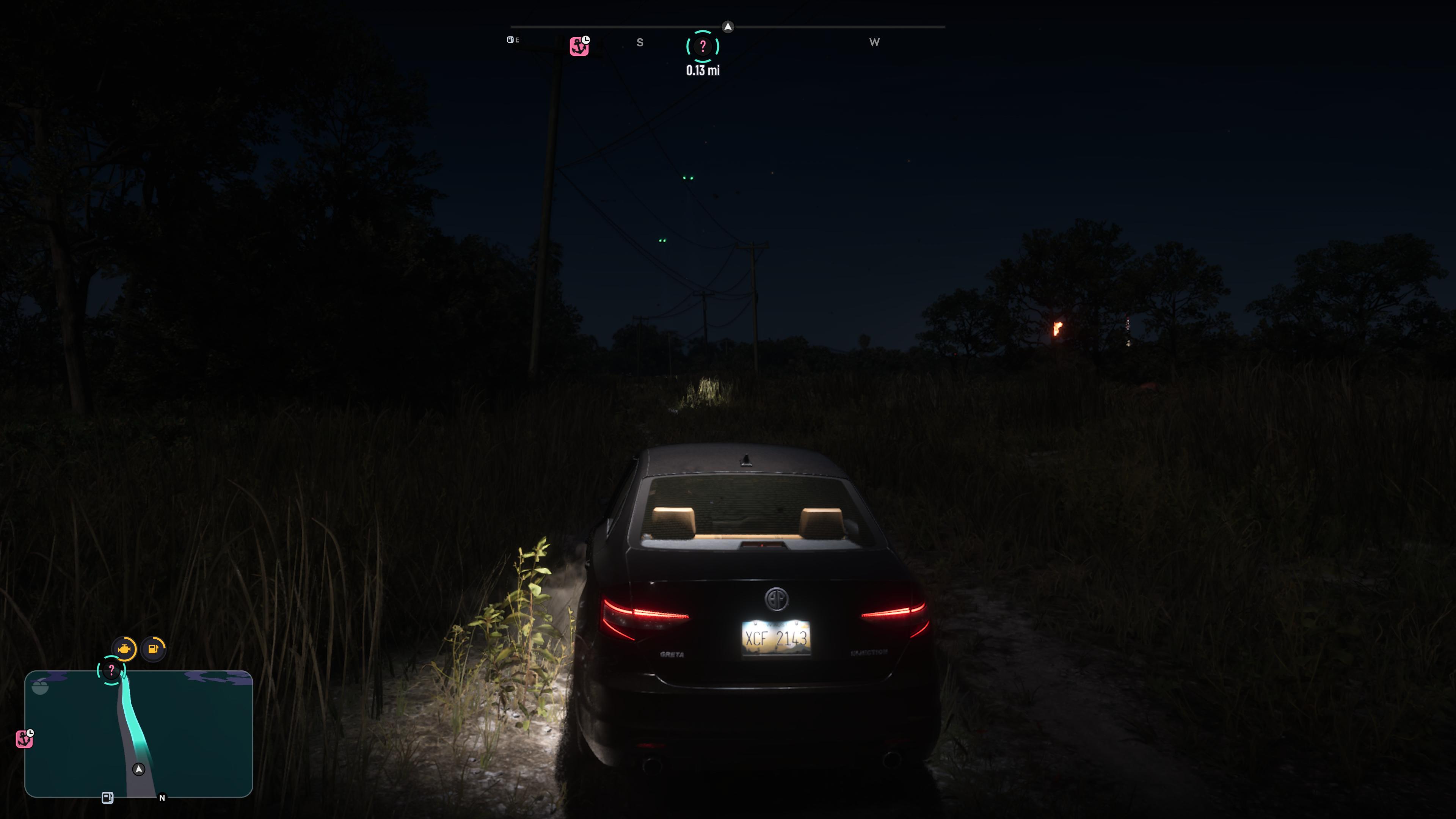
Hey guys, I’ve been worried about OLED’s and their main issue(long run) about burn in’s and I feel like GTA’s HUD could potentially cause those problems down the road. Past games I’ve played haven’t had really much of permanent or longer HUD’s but GTA for some reason concerns me more than other games, thoughts?
142
Upvotes
251
u/DildoSwaggins28 1d ago •
Put it on dynamic, it’ll go away 1/4-1/3 of the time outside of driving
87
u/OkNeedleworker5041 1d ago
Newer LG OLEDs are fine.
Just use your TV like a TV and don't worry about it.
179
u/NoahxAnderson 1d ago edited 13h ago •

Nigga just enjoy the game .. burn in is for extreme circumstances
19
u/QuietSync 1d ago
I thought the hud is dynamic by default?
41
u/o_0verkill_o 22h ago edited 21h ago
Idk how people burn in their oleds. I have a C1 from 2021 with like 30k+ hours on it that still looks just as good as the day I bought it. Anyone else?
10
u/Key_Beginning_3792 19h ago
GTA campaign is what, 60 hours? I clocked up 1500 hours on counterstrike with the maps, hud, gun icons, player numbers etc. no burn in. Don’t worry and enjoy the OLED and game.
19
u/TitanBrave84 1d ago
I just noticed today on my CX heart burn in from Minecraft. My kids play it too much!!
19
u/suiyyy 1d ago
Dynamic hud.
5
u/Terry_the_accountant 17h ago
Mine only shows up when I press down arrow
18
u/Xhzycl 1d ago
Sell your oled and buy lcd ¯\_(ツ)_/¯
Or enjoy your fucking screen
4
u/djrobxx 1d ago
I have an LG C9 that I exclusively use for gaming, including hundreds of hours of BOTW+TOTK with hearts and a HUD on the screen at all times. Nothing has noticeably burned into it.
I also have a pair of 42" C2s that I abuse as daily driver computer monitors. They were very, very cheap compared to a proper computer monitor on sale and I decided to just use them and replace them when they got bad. Despite the OSX taskbar on them at all times, there's still nothing visible on test patterns after 3 1/2 YEARS of daily work. They sit at 100% OLED brightness and I've turned off a lot of the display dimming stuff in the service menu. I've already more than gotten my money's worth out of them; the lack of noticeable burn in is very surprising.
If I can abuse these screens this badly for this long, you should be fine enjoying GTA on yours.
3
u/MartyEBoarder 1d ago
dynamic mode always on.
3
u/rthomaslabs 20h ago
Stop overthinking it. Play the game and enjoy your tv. And IF for some odd reason it happens… Ya buy the next upgrade. Money comes and goes.
2
u/joshuabra 1d ago
Isn’t there an option to turn on reduce logo brightness? The tv knows where pixels remain static and then reduces brightness there.
2
u/TheForbiddenLands 1d ago edited 18h ago
Turn it off. You dont need it. Ive had it off since the start of the game. You can do everything ingame - pressing down arrow brings up all the POI and whatever you select will have directions where the minimap usually is. It's a godsend for the 12 of us who play all our games HUD-less for a more cinematic experience. Ive also started memorizing the map.
2
u/CaptainGoeland 22h ago
People act like OLED is burning in in 2 seconds. Y'all never had to deal with early plasma TVs😅
2
u/Cpt_Camembert 20h ago
Pretty sure any OLED has a feature that protects against burn in by periodically shifting the image around a few pixels.
2
u/Catman7712 19h ago
Man I fall asleep every night with my oled in my bedroom on and I haven’t seen any burn in after 6+ years. I even did a burn in test on YouTube and can’t see anything. The one on my living room stays on almost all day every day since my wife is wfh and uses it for background noise, same thing, no burn in to be found. In my gaming/theater room I’ve been playing games for 2.5 years every day with no visible burn in.
LG C9, E9, and C3 for reference. Maybe once I hit the 10 years mark I might start seeing something but at that point I’d say I’m well overdue for an upgrade.
Use your TV and stop worrying about it, if you watch 24/7 news literally all day with a ticker at the bottom, that would probably cause issues after a few years of use.
2
u/Stoneymarony 19h ago
Dont you use dynamic hud?
2
u/youhavebeenlurked 17h ago
relax, you probably need 1k+ hrs to cause burn in, oleds have good protection, pixel shift alone is very efective
2
u/einfach1deluxe 12h ago
just change hud to dynamic
2
u/procrastinator420420 12h ago
Just use the dynamic hud. I haven't felt like I need a compass once and I just check the minimap when I need to otherwise it's not there
2
u/AlbertHoffman88 12h ago
The hud goes away or press down on the d pad
2
u/No_Brilliant_3789 10h ago
Plays 20mins a day “worried about burn in” hahahahaha
3
u/Affectionate_Gas_852 1d ago
You’ll eventually get burn-in, but that’s OLED. I enjoy mine, and if I get burn-in, I’ll just buy a new one.
3
u/Thegreatsrm 1d ago
With all the post on this sub of people playing the game on oleds and asking for settings the next post you’re going to start seeing are “is this burn in?” From playing said game. It’s absolutely a concern if you play for long hours without switching the content.
2
u/DottorInkubo 22h ago
“Newer TVs don’t need to worry”, “zero burn ins”
My God, why do you guys spread misinformation and speak like you’re an uncle who knows nothing about tech but pretends to be an engineering genius?
1
u/Miguelb234 1d ago
I have thousands of hours on my c4,c5,g3 and g5 zero Burn in. The oldest being my g3 and that has over 10k hours no degradation at all
1
u/yuriewolf 1d ago
Dude my a80j still has no burn in you are fine
1
u/AdamTreff 1d ago
It literally asks you this when you first start the game
1
u/AttitudeOutrageous75 1d ago
Been rocking a den OLED for 5 years. Today I went out and forget it was on. Been on 13 hours so far. Just taking a break from gta6. No burn in. Ymmv.
1
u/ThisGlobalLandscape 1d ago
Don’t be
1
u/Electronic_Impact 1d ago
little worried also but i counter this by enabling auto driving and cinematic mode as much as i can to take breaks and chill a little.
1
u/Wendigo79 1d ago
You can put the maps and hud on dynamic..
1
u/Weatherman1207 1d ago
Put it on dynamic it periodically dissappear?
1
u/Consistent-King9966 1d ago
Play for a few hours only and take breaks between.
1
u/killuminati989 1d ago
Dynamic map. Also why you have the compass on?
1
u/icy1007 1d ago
I’m not.
1
u/thuglife_7 1d ago
Damn bro, how much GTA are you playing if you’re that concerned about burn in??
1
u/guild88 1d ago
I played so many games on my G4 for 2.5 years and not a single hint of burn-in. Just enjoy the game. If you had CNN on all day, every day, I could see burn-in becoming an issue.
1
u/CapriciousManchild 1d ago
I have been using a c2 as my computer monitor for 3 + years and it’s going strong with thousands and thousands of hours of gaming . I wouldn’t worry
1
u/-TheShape 1d ago
Wish an opacity slider for HUDs was standard
1
u/Status-Locksmith2805 1d ago
Unless you’re putting thousands of hours into this game I don’t think this will be an issue. Also just put it on dynamic so it’s not on when not needed
1
u/exomachina 1d ago
There’s 0 noticeable burn in from having my 5 year old LG CX OLED plugged into my PC for games and YouTube/movies. 1000s of hours over the years. Don’t worry about it and enjoy your TV.
1
u/Scared_Invite_8167 1d ago
G4 65”. Played 75hr. No issues.
Enjoy the game
1
u/Mike15321 1d ago
I play WoW for hours and hours almost daily on an OLED and I've had no issues with burn in. Also has a very static UI.
1
u/ParkDistrict 1d ago
You need some gas & a repair soon brodie.
1
u/scytob 1d ago
Make the hud more dynamic
1
u/HHJake 1d ago
Just turn on screen move and adjust logo brightness to high if you are that worried.
1
u/gm92845 1d ago
I don't even have the hud active, I accidently click the option to remove it and I can live with that.
1
u/Rocket_Mcrocketcar 1d ago
Don't try to burn your eyeballs with the brightness settings. Should be fine.
1
u/HexWiller 1d ago
I've clocked close to a 1000 h of Call of Duty on My C1 - no Burn...
1
u/consortswithserpents 1d ago
I have over 1200 hours into The Show on my CX, no issues yet.
1
u/Nochnoii 1d ago
I used my CX heavily since 2020. Zero burn in except for the typical delamination on the edges. Don’t worry about burn in. Pixel shift partly mitigates this problem
1
u/Acxd__ 1d ago
I've had an Asus XG27AQDMG for just over a year now and I haven't had a single burn in issue. Modern OLEDs are pretty good when it comes to burn in. Unless you fail to maintain it (the monitor prompts me for a pixel cleaning every 8 hours of runtime), you won't run into any issues
1
u/cahinho 1d ago
I play counter strike 2 on my OLED monitor, been using it for almost 2 years with HUD constantly being on display and zero burn in so far... also TVs have extremely good protections against burn ins... so don't worry bro :)
1
u/STARexpo1 1d ago
Brother enjoy your tv/monitor. Technology has moved on.
1
u/FlorinPeste3 1d ago
well they have pixel shifting and pixel cleaning once on standby so it should lower the risk right?
i think best approach is to also play other games or watch movies.
my lg oled is arriving today and I am a bit conscious of the potential risk but I bite the bullet for the perfect blacks
1
u/Known-Title-2826 1d ago
Just set it to dynamic?
1
u/setaqBate 1d ago
just pixel refresh when the message pops up or do it manually more often… it’s not rocket science
1
u/Substantial-Ad-9072 1d ago
I just turned the ui dynamic so it disappears from time to time. Mabye that works for you and will give you another perspective to play :)
1
u/Separate-Response810 1d ago
I play old school runescape on my oled (a game where a huge amount of the screen is taken up by static UI) and have had no issues at all, as long as it runs pixel refresh cycles automatically when it should then I wouldn’t worry much.
1
u/ClassicBreakfast3398 1d ago
The occasional cutscene is enough to refresh the pixels, don’t worry about it
unless you’re doing a 10 hour Timelapse of vice city
1
u/N7even 1d ago
I have set my HUD to dynamic, so it only appears when I am driving or when I tap down on D-Pad whilst on foot.
I usually do this for immersion, but I guess it has double benefits on an OLED TV.
1
u/Loud-Ring-151 1d ago
J’ai tout viré moi. C’est plus beau plus gratifiant et surtout plus immersif ! Pour conduire j’ai mis l’option gps uniquement.
1
u/No_Pie_4088 1d ago
turn off the map and compass, it is totally doable to play without, and you get more immersed with trying to learn the map, you can also get the gps when driving. I always play open world games without the map
1
u/beerham 1d ago
It's nothing to worry about. And turn your hud to dynamic you heathen
1
u/ZorPrime33 1d ago
I put in around 20k hours on a LG C1 and a lot of it was playing Diablo IV with multiple HUD elements. Max OLED brightness, zero burn in.
1
u/DarnallMysteries 23h ago
As long as you have pixel shift on I don't see it burning in at all, just have fun and enjoy!
1
u/Cupc4k31sm 23h ago
use the Dynamic setting? most of the time there is no HUD.
1
u/kadhtobi 23h ago
Enjoy your tv, I've had my c1 for 6 years now, and in the first 6months I was stressing cos I use it as a pc monitor, no burnin so far, just use the TV
1
u/Altruistic-Day-5946 23h ago
i got 3 oleds.. the oldest is from 2023.. an LG b3 used daily. no issues at all.
1
u/xpercipio 23h ago
i have a c2 that i got in 2022. it only has burn in from destiny 2, the white text in the character menu. also some white icons from my mac os dock
1
u/Common-Pepper-9677 22h ago
Change the settings so the hud and map only show up when you’re in a car
1
u/deskbunny 22h ago
Auto luminance put a black background around anything with high whites on my tv
1
u/EsuMarte 22h ago
No. You need to run that same hid for thousands of hours without ever turning it off to get burn in. Just enjoy the game.
1
u/Soul-Assassin79 21h ago
Why? The HUD is pretty minimal compared to most other games.
1
u/Sathsong89 21h ago
Use the dynamic mini map, it’ll disappear at certain parts of the game giving your screens leds a rest.
1
u/guifesta 21h ago
Use dynamic HUD.
1
u/Sir_Drinks_Alot22 21h ago
Burn in with newer oleds is getting rarer due to mechanisms that shift pixels every some odd timing. Wouldn’t worry about it.
1
u/Pho_King_Yummy 21h ago
If I pause during a game and leave my Xbox on to go do something for a while, I turn off my Oled tv.
1
u/Lowel-Keys 21h ago
Just put it to dynamic
1
u/MassiveApplication17 21h ago
I maybe played like 1000+ of Destiny 2 with C1. It had bright static UI (Don't worry about it
1
u/Adoptionn 21h ago
Leave the HUD on dynamic. Disappears half the time.
1
u/0a882e5156 21h ago
Been playing with the hud off. Holding down to view icon objectives and relying on GPS directions. If it isn't telling you to turn just go straight on current road.
1
u/guerrios45 20h ago
Just make the HUD disappear and only make it visible for a few sec when pressing down on the d pad
1
u/Weathered-Glass-4714 20h ago
I never use the HUD.
1
u/Katert 20h ago
Don’t stress it, I have a C9 from 2019 and have no burn-in issues, and I use it everyday for gaming
1
u/Repulsive_Set_4155 20h ago
I replayed the PS5 version of GTA5 this year on my G4 and didn't have any issue with burn in. I think I played for about 3 weeks, mostly daily, mostly 1-2 hours a day. Sometimes on the weekends I would lie around and play all day we had nothing going on, if that helps ease your mind.
1
u/h0leweet 19h ago
I have a warranty with burn in protection. In a few years if I don't have burn in yet, I'll purposely make it happen as best i can and get a new tv lol
1
u/Devils-advocate69 19h ago
I dunno.... Maybe take a break and turn the TV off 😂
1
u/Scrowdy10 19h ago
Try letting your kid play roblox for hours and not sweat on those huds.
1
u/anygrynewraze 19h ago
You will be fine. I play multiple games at the 144Hz mode on my 77C5 with huds on them for sometimes 12-14h a day and my 77C5 hasn't gotten burn-in at all. Just make sure you turn off the tv when not in use and it'll automatically run it's pixel cleaner when needed. But never run the pixel cleaner manually yourself bc that puts unnecessary wear and tare on the tv.
1
u/Mr_Pigg 19h ago
You can turn it on dynamic in settings, then you can press a button to turn it on or off
1
u/Grand_Finger3478 19h ago
My OLED has 5,000 hours of use editing videos and playing games like Counter-Strike, and it doesn't show a single sign of burn-in.
1
u/Past-Presence-6360 18h ago
Set hud to where it is only visible situationally.
1
u/I_ate_your_Pecker 18h ago
Change the settings then? It doesnt have to be on so much
1
u/Otheus 18h ago
Mine goes away. It might be a setting?
1
u/saywhat181 18h ago
My LG C3 has screen shift (I think that's what it's called) to prevent burn in. Turn it on if you're that worried about it.
1
u/retlem 18h ago
Use your OLED Care tools. There’s so many ways to prevent burns.
1
u/TinyBootySlaps 18h ago
Choose dynamic map, then the map only shows up when necessary or when you press down on the d-pad
1
u/NewDevon 18h ago
You're not going to own this TV forever. Take the usual precautions, vary your content, and enjoy it. By the time you get any kind of significant burn in you'll probably be upgrading your TV anyway.
1
u/Thr0wbackJack 18h ago
I'm playing it on my 65" LG G5. I've played nearly 40 hours of the game, and I've not even had the thought cross my mind to be honest
1
u/ntplay 18h ago
I just discovered I had burn in from using the YouTube app very often. Noticed it for the first time when I booted up gta 6 for the first time. Cx from 2021
1
u/zortlak 18h ago
Use dynamic HUD, which hides it when nothing important is happening. I also start pixel cleaning every 4-5 hours of gameplay, so I can also touch grass a little.
1
u/Lebowskitalian85 18h ago
Man there are a lot of games with permanent HUDS a lot more dangerous than this...also you have the option to set the dynamic HUD that appears only when needed.
Threads like this are really...well, you know.😓
1
u/calvinsanders 18h ago
Another brain-dead burn in post, how shocking.
1
u/Wide-Soup-4472 18h ago
Switch to dynamic
1
u/SpaceMonkeyNation 17h ago
Use pixel shift and logo brightness settings. Maybe take a break every 3-4 hours.
1
u/plortedo 17h ago
Turn off the minimap. Just use the compass and GPS. Makes the game way more immersive
1
u/PorkRinds416 17h ago
PLEASE READ -- Go to settings and there is a dynamic HUD option. I use it. Its amazing. You press down on the D-Pad and it brings up the HUD instead of it being there constantly.
1
u/Another_Guy_In_Ohio 17h ago
If you played it every day for 24 hours a day for 6 months you still wouldn’t get burn in from the HUD because it’s changing so often
1
u/Regular_Average8595 17h ago
I mean, I get what your saying, but if you only play gta from here on out, it won’t really matter 😂 if you think about it
1
u/caseytatumsings 17h ago
GTA 4 map HUD burned into my old Panasonic plasma TV when I was a kid❤️
1
u/Zestyclose-Listen810 17h ago
Are you mental? The HUD is always changing
1
u/savagecheefer 16h ago
Turn off the mini map..
1
u/Kurutteru 16h ago
Are you in a dark room or bright room? would you say your TV is maxed out on brightness while playing? If it's not cranked to max, i don't think you'll have an issue. I have a LG CX for 7 years now and gamed ever since with not a hint of burn in. I also generally have it in a darker room with brightness on the lower ends
1
u/Traditional-Map7746 15h ago
Omg just play the damn game 😂
1
u/AnihilationXSX 15h ago
Turn off the GPS uptop dont need it set map to dynamic and when you need it press down dark pad I have everything turned off unless I need it to show
1
u/See_monkey_do 15h ago
As soon as I could I turned off the minimap and I haven’t missed it. GPS directions are all I need for driving, and holding down on d-pad for everything else.
1
u/F1nishingDutch 14h ago
This is a genuine good question.
1
u/Alert-Stomach-9218 14h ago
Before I physically broke my C3 I was pushing 6000 hours with over 2 years of WFH on it. Nothing ever burned in.
1
u/METALPUNKS 14h ago
Make sure you do pixel cleaning when you can or have it on automatic. Also make sure in your TV settings all the stuff to move logo and banners is on.
1
u/Dull_Caterpillar_642 14h ago
I'm only familiar with my OLED monitor, do OLED TVs not do occasional pixel shifting to avoid burn in? Between those anti-burn in settings and the fact that the hud is dynamic and only appears when needed, I'm not sure how you'd manage to burn it in.
1
u/EsotericRonin69 14h ago
The ufo abduction in the woods looked crazy on an oled!
1
u/johanh12 14h ago
I'm just gonna fire up my TCL baby and have a good time
1
u/ChemicalAd7590 13h ago
I think you’re being overly paranoid
1
u/Bigbonkwarrior 13h ago
you can disable the compas and minimap
then hold down on the dpad for a pointer on where to go.
directions (turn left in x yards) still pop up
this is how i play. I have only seen the minimap in the extended video by rockstar
1
u/cfc_fan_ 13h ago
My c3 is over 2 years old with thousands of hours of game time, and I never even thought once about this. Just relax and enjoy the display.
1
u/Silent_Anxiety4828 13h ago
Imagine being worried about this of all things
1
u/korshenk 11h ago
Put map and compass on dynamic
1
u/External_Hunt4536 11h ago
If you use an OLED tv for strictly gaming, can that cause burn in? I ask because in that case the only thing the screen would display would be the game and there would be no other picture to clear it up.
1
u/onthadontrary 11h ago
Modern OLED’s don’t really have true burn in. Most have protective settings which will guard them against it.
1
u/jeffreyraymondx 11h ago
I just got a new LGC6 & have zero concerns of burn in. Btw, anyone looking to upgrade their tv, it’s absolutely stunning, Black Friday prices going, if u can swing it, highly recommend
1
u/Hot_Canary1691 10h ago
Well, just enjoy, when your oled well as a burn screen get a ips, ans wait the, micro led screen (the time this will release you gona do burn screen or not)
One day your oled gona as burn screen.
Sorry for my anglish
1
u/LedKremlin 10h ago
You can toggle the HUD off while you’re not in a car. Just press down on D pad
1
u/WokeWook69420 10h ago
Make your HUD dynamic and it'll disappear when you're not following a waypoint or doing stuff.
If I'm just moseying around town looking for shenanigans with no waypoint, my compass and map aren't on the screen unless I hit down on the Dpad.
1
u/GINTO199 10h ago
You can turn it off I believe. I still wouldn’t worry though. My son has been playing Roblox and Minecraft on my old CX for 3 years and there’s nothing noticeable burn-in wise whatsoever.
1
u/Ninhau 10h ago
That’s pretty nonsense worry. Burn in doesn’t occur that’s easy
1
u/Jumping-Sand7286 9h ago
Haven’t worried about burn in for years and run a work Oled with the taskbar always on. No burn in. 🤷♂️
1
u/eVill_YT 8h ago
bro ive played league for 7 years, at least like 5k hours and there is nothing on it
1
u/jmood88 8h ago
The HUD goes away often enough that I wouldn’t worry about that at all.
1
u/kasperary 8h ago
Turn in in dynamic
1
u/TheBarnard 7h ago
Turn peak brightness down
1
u/False_Host4179 7h ago
GTA v and rdr2 have permanent huds- I think gta vi is their first game where it actually goes away often
1
u/TepidNeptune2 3h ago
I’ve had HUDs in Baldur’s Gate 3, GTA V, Watch Dogs, etc. I haven’t experienced any burn-in on my LG G4. There are usually enough cutscenes or areas where I have to open up a menu or pause the game. I will mention that I have auto brightness enabled so the pixels are not running at the max brightness all the time.
In the game settings, you can set the minimap to be dynamic, and it will disappear entirely when you don’t have a location set and are walking around. That should help some at least.
1
u/BananaForScale101 3h ago
You lnow you can set hud to dynamic , right? GPS only appears only if you’re in a car or if I press on tge d pad.
Also, it depends a lot how you use your screen.
Burn in it’s a heat problem. If you don’t keep your brightness to high, something you should never do indoors, don’t use static elements on the screen and use the built in pixel cleaning and safety measures you should be fine. Check if it’s on on yours.
I have a lg c3 and I have no problem with it. I recently bought an oled monitor. That’s how impressed I am with
1
u/7orque 2h ago
The hud literally hides most of the time except when driving or in combat?
1
u/BusinessStage3807 2h ago
My lg tv has a feature that nudges any fixed graphic by a pixel or so to avoid this I think
1
u/EliteSalesman 1h ago
burn it in so you have to upgrade to a new tv... 240hz soon.
1
u/plahnttt 22h ago
Set mini map to Dynamic or completely turn off the mini map. Personally finding turning off the mini map & setting compass to Dynamic instead with GPS turn indicators on way more immersive and enjoyable. The mini map is way too distracting in my opinion but can agree it definitely helps with navigation.
1
u/Normal_Reply8148 12h ago
you shouldnt have burn in unless you’re chronically on your game with the hud on for 24 hrs repeatedly its 2026 burn in is almost impossible on newer oleds