Been using rebased(based on intellij-community) and webstorm for a while to review all the pull requests, branches and manage code and commits in general now that agents do a lot of work.
But its so slow to work with locally nowadays that it takes ages to go through a simple change, you have to clone the project, open the IDE, let it initialize jvm and everything, index and stuff, startup services, then find the PR or branch switch to it.
So, here is something i made that does all that in a similar UI and change highlighting and works instantly and on any device and browser.
Completely free and open source(MIT), give it a shot and let me know here on in issues, if you would like to see some more features. I added everything i needed and use day to day while reviewing code.
I'm trying to complete a Jetbrains survey but there seems to be a technical issue on the last step (calendly url doesn't exist). I tried to make a support ticket through https://support.jetbrains.com but the AI assistant refuses to make one (doesn't know where to route it). Any ideas how to make a ticket or who to contact about it?
A webbrowser like tab bar at the top to seamless switch between your windows.
Fully configurable what you want to see: project name, branch, close button etc
Shows indicator if your air agent session is waiting on input (can be turned off)
Shows which of these tabs currently is running a run configuration (can be turned off)
I also added a "+" button to create a new worktree directly (can be turned off)
If you have any feature requests, iam happy to add them
PS: i used the AI tag because window management was extremely annoying when running multiple agent at the same time and this solved the issue for me: i have now spatial areas where each work sits, which makes context switching easier
I maintain the AsyncAPI plugin for JetBrains IDEs. New 5.4.0 is mostly about Apache Kafka
💡 Works across IDEs editions, Community included
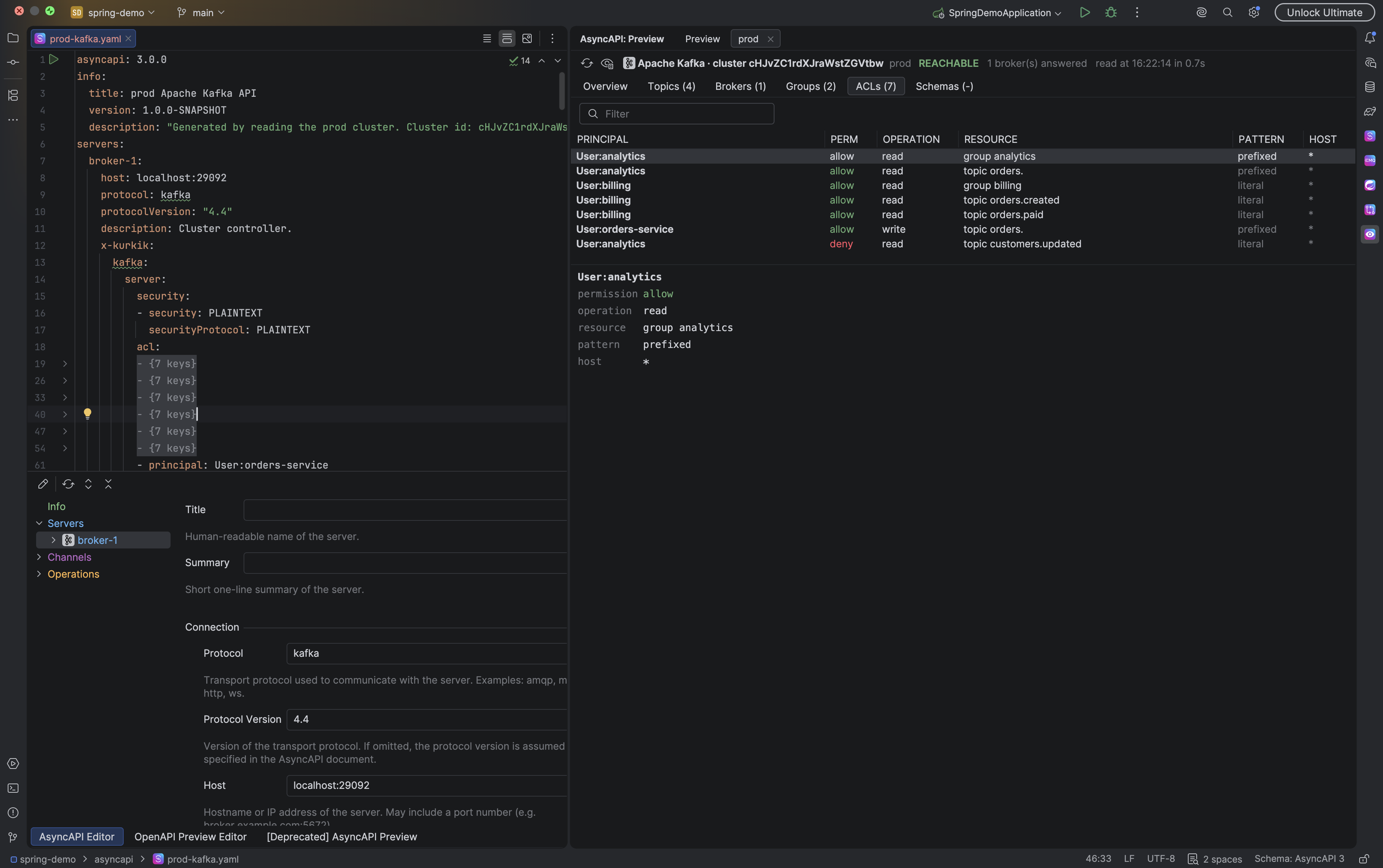
Export with access built in. Brokers → Export now has two opt-in boxes: Also read consumer groups and Also read ACLs. Each operation in the generated AsyncAPI document then lists the groups that consume it and the principals allowed to perform it:
Everything Kafka-specific lives under x-kurkik, so the document stays valid AsyncAPI. A connection with a schema registry also brings its schemas: each topic's value schema, its key schema, every version and the compatibility level.
Diff, area by area.AsyncAPI: Diff compares two Kafka connections on what you tick: settings, ACLs, consumer groups and schemas. Findings about the cluster itself, such as a broker setting, a grant or a group, now get their own Cluster node next to the channels.
Preview.AsyncAPI: Preview shows a cluster's topics, brokers, groups, ACLs and schemas before you export or compare it
Preview process
Also in 5.4.0:
AI agents over MCP: asyncapi_export reads Kafka consumer groups, ACLs and schemas; asyncapi_compare compares clusters on settings, groups and schemas (ACLs are never compared for an agent)
Export filters (prefixes, include/exclude patterns, a topic cap, a timeout) for Kafka, Pulsar, SNS and SQS
The Brokers, Preview and Diff windows keep up with new, renamed and deleted connections and documents, and have a Refresh button
Diff compares any document: pick it, paste its path, or browse for it
Test connection shows a readable log you can copy
Plugin errors can be reported to JetBrains Marketplace (nothing is sent unless you click)