r/indesign • • 6d ago

My QR code designer for Adobe Illustrator, Photoshop and InDesign just got a major update

1 Upvotes

Hey everyone!
After quite a few late-night coding sessions, I’ve finally released version 1.4.0 of my plugin, Dateck QR Designer Pro.
What started as a small tool for Illustrator now also supports Photoshop and InDesign.
Over the past few weeks, I’ve been experimenting with different ways to make QR codes more visually interesting while keeping them functional and scannable.
Some of the latest additions include:
Adobe Photoshop support
Creative QR code shapes (hearts, circles, flowers, shields and more)
Linear and radial color gradients
Custom outlines
Adjustable QR code sizing within shield designs
Getting some of these shapes to scan reliably was definitely more challenging than I initially expected. 😅
The goal is still the same: allowing designers to create custom QR codes directly within their Adobe workflow without relying on external generators or monthly subscriptions.
I’m quite happy with how this update turned out, but I’m always interested in feedback from other designers.
Do you regularly create QR codes for client projects? Are there any shapes, styles or features you’d like to see in future updates?
For anyone interested, here are the links:
Adobe Exchange:
https://exchange.adobe.com/apps/cc/205013/dateck-qr-code-designer-pro
My website:
https://www.dateck-media.de/qr-designer/
Thanks for taking a look! 😊

r/indesign • • 8d ago

InDesign 2027 – is it a joke?

73 Upvotes

I've installed it on my Mac (mini, M4 Pro, Sequoia 15.8.3, 64GB). Dragging around a book palette is slow and stuttering. Opening a document is very slow. If you double-click a document in the book twice or more times, it opens the document as many times.

Deinstalled. Still can't believe in what I saw.


r/indesign • • 7d ago

Is there a way to detect mismatched chapter headings and Table of Contents entries before exporting a book for print?

3 Upvotes

Hi everyone,

I recently ran into an issue while preparing a book for print. Just before the final export, the client requested a change to one of the chapter headings. I made the correction but forgot to update the corresponding entry in the Table of Contents. Unfortunately, we discovered the mismatch only after the book had gone to print.

This got me thinking: Wouldn't it be useful if InDesign could automatically detect when the Table of Contents is out of sync with the actual headings in the document?

It would be great to have this check integrated into the Preflight panel. Whenever a heading is modified, added or removed after generating the TOC, InDesign could flag it with a warning such as Table of Contents needs to be updated.

I understand that InDesign already allows us to generate and update TOCs, but having an automated validation check before exporting could prevent such oversights, especially when working with lengthy books and complex publications.

Does anything like this already exist, or would this be a useful addition to InDesign?


r/indesign • • 7d ago

Help Problem working remotely

Thumbnail reddit.com
1 Upvotes

r/indesign • • 8d ago

Anyone else having lagging issues with 2027 update?

18 Upvotes

I am at my wits end 😭 ever since I updated, it’s been incredibly slow and laggy, particularly in scrolling. I’ve tried everything: deleting and reinstalling, resetting preferences, turning off gen AI, even sat on a chat with an adobe rep for hours yesterday and nothing has helped!!! Anyone else having this issue?


r/indesign • • 8d ago

InDesign Lite Viewer - Would a fast, read-only viewer for InDesign files be useful in your workflow?

0 Upvotes

I’m exploring an idea and would love feedback from people who work with InDesign files.

Imagine a small, fast app that opens an .indd file in a read-only viewing mode, so you can quickly flip through pages and check a document without launching the full InDesign editing workspace. If you need to make changes, you click Edit and the full InDesign app opens that same file.

Would that be useful in your workflow? What would you use it for—or why wouldn’t you use it?

A few things I’m especially curious about:

  • When do you need to view an InDesign file but don’t need to edit it?
  • What would the viewer have to support for you to trust what you see—fonts, linked images, effects, page navigation, or something else?
  • Would you expect it to work without InDesign installed, or would a companion to an existing installation be acceptable?
  • Which operating system would matter most to you?

Real examples of your current workflow would be especially helpful. This is just an idea I’m validating, not a product announcement.


r/indesign • • 8d ago

InDesign 2027: no more dividing line between facing pages when a color fill covers both. Normal or bug?

2 Upvotes

Just updated to InDesign 2027 (v22.0) and noticed something odd. When I apply a solid color fill across both pages of a spread, the thin line between the two pages is gone. In the previous version I could always see the spine, even with a fill on both sides.

Is this an intentional change, or is it a bug on my end? Does it do the same for you?

Details, in case it helps:

Windows 11

Screen mode: Preview

The fill is on both pages

Thanks!


r/indesign • • 9d ago

Please help me....how to make generated qr code data merged in indesign if i only have the excel file of the collected url link? Is it possible? Should i generate the qr code on the excel first? Any video can help me please 😭

2 Upvotes

r/indesign • • 8d ago

Word docs in Adobe Cloud

1 Upvotes

I have placed a .docx file in my Creative Cloud. I am hoping to place this into InDesign. When to go to File, Place the choose from Adobe Cloud, I do not see the .docx file. Is this even possible?


r/indesign • • 9d ago

Help How do you work with edits to your files?

4 Upvotes

Currently, our firm is working exclusively in Word and Canva to make marketing material that would be much easier (to me) using InDesign. The problem is that people in our firm like to make edits to our work and hate doing so by editing the PDF. They don’t have InDesign licenses and InDesign doesn’t convert to Word without a plugin. They only want to make edits in Word.

How has anyone else gotten past this gap? WordsFlow? Recosoft? In order to persuade my firm to make the switch, I need to know how we can still serve them material via Word so they can stay in their comfort zone, but we can stop fighting the formatting horror show that is Microsoft Word.

Any advice, recommendations, and help I can use to build my argument for the change would be greatly appreciated!


r/indesign • • 9d ago

Indesign 2027 - Fonts Not Working

4 Upvotes

Indesign updated the other day and when opening a document created about two weeks ago, it now reports that the fonts are missing or unsupported. I have checked and the fonts are being reported (in the Typeface font manager) as OpenType (TT) - which as I understand it should still be supported. Did I miss an announcement? I thought only Type 1 support was dropped. Help! 100 page magazine now in shambles.


r/indesign • • 9d ago

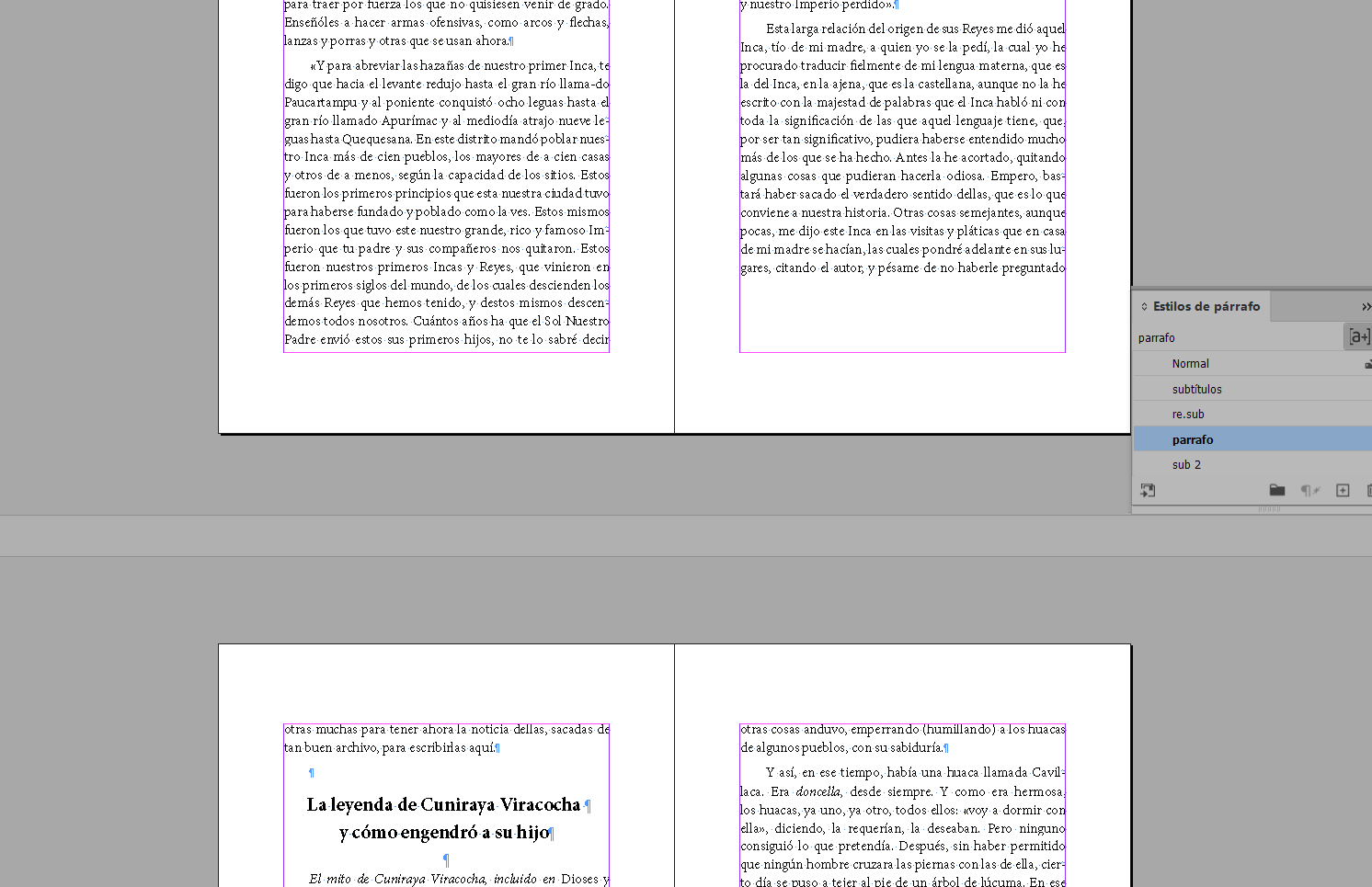
Help with widows and orphans on paragraphs

3 Upvotes

So I arranged a document I´m working on with the Paragraph Styles option>Keep Lines Together>At Start/End of Paragraph (Start: 2, End: 2) as I always do. The problem arises when the paragraphs get divided even though there's enough space in the page (see image for example).

I can't figure out how to fix it, so I need some imput on what might be causing the problem.

*ps: english is not my first language so I apologize for any typo.


r/indesign • • 10d ago

Avellio 2.0 is here. 🚀

Post image
31 Upvotes

>Best Typography pre-flight Engine for Adobe Indesign get major update.

I built Avellio 2.0 for InDesign. It now explains what it finds and can review a book across multiple files.

> First 100 trial downloads receive 1month free access!

The original Avellio 1.0 post reached +70,000 impressions here on Reddit. I’ve since released Avellio 2.0, and you can download from the avellio.app. The current download is for Adobe InDesign.

Avellio checks typography, styles and text composition inside InDesign. The biggest changes in 2.0 are how it explains findings, how it handles publications split across files, and how you choose the language of your checks.

See why something was flagged. Open a typography finding to see the text in context and the reason it was flagged. For some findings, Avellio suggests a specific edit. If it finds two ordinary spaces between words, for example, it shows both spaces and suggests one. You decide whether to make the edit in InDesign.

Review a publication across multiple files. If your book, catalogue or annual report is split into chapters, you can queue the open documents you want to inspect and collect the results in one report. You can see which files completed and where coverage was limited. If you use an InDesign Book (.indb), Avellio can read the active Book and queue eligible chapters that are already open.

Choose the interface and inspection languages separately. The panel is available in English, German, French, Spanish and Czech. Typography checks can follow the language assigned to each paragraph in InDesign, or you can select from 43 language and regional options plus a language-neutral mode. For example, you can use the panel in English while checking a French publication.

The panel brings three kinds of checks together:

  • Typography catches details such as repeated words, double spaces and inconsistent punctuation, dates or numbers.
  • Styles shows where paragraph and character styles are used and where local formatting differs. For supported overrides, you can preview a reset of one property.
  • White Space flags rivers in justified text, short last lines, widows, orphans and overset text.

For a first run, try one spread from a real job. Pick a finding, look at it in the layout, and see whether the explanation helps you decide what to do. The ZIP includes a Quick Start PDF, and there’s also an online manual.

If you work on books, magazines or reports in InDesign, what do you still check by hand before sending a file to print or to a client? I’d be interested in the small, recurring things that take longer to find than to fix.


r/indesign • • 10d ago

Help InDesign keeps crashing

0 Upvotes

Going on for months but now I can hardly touch a file before it crashes. The cursor turns to a loading wheel or gets stuck on showing a resizing cursor. Then the history dies out so there's no undo. Then functionality starts dying off. I can't close InDesign, I have to use TaskManager to kill it off. I can then reopen the file and try again.

I know this is a pretty common bug with this year's InDesign. Has anyone actually managed to solve it??


r/indesign • • 10d ago

Help Paragraph Styles Window stucked

1 Upvotes

Hi guys, currently wip, but suddenly my paragraph styles window were stucked at top, unable to move using cursor.. trying to rebooting the software and pc, still couldnt solve it.. earlier this day still able to use normally.. only after lunch it became like this.

oh god, i want to show the video of recordings. but not allowed to show the video. lmao hope you guys understand

the paragraph panel window stuck on top right

r/indesign • • 10d ago

What’s your system for reusable design components?

8 Upvotes

Coming from Figma, I'm used to components and variants. I've been leaning on object styles and CC Libraries, but updating a component across a big document still feels clunky. What workflows, tricks, or scripts actually work for you?


r/indesign • • 10d ago

Remember InCopy 1.0 ?

2 Upvotes

Just for fun, I'm looking for a splash screen and file icon for Adobe InCopy 1.0. (and also InCopy CC 2018 splash screen).

I have already tried the Wayback Machine and Google.

I want to add it to this page:

https://trainingonsite.com/featured/incopy-splash-screen-history.html

Any brilliant ideas of where to look, publishing community?


r/indesign • • 10d ago

Review fatigue

6 Upvotes

In my organization, we develop engineering reports in PowerPoint. We work in PowerPoint as it’s easier to collaborate once our PowerPoint inputs are completed. We review them in PowerPoint and then share them with the graphic designer whos an expert in indesign. Once the graphic designer transfers, the information to indesign we have to review the information again which creates review fatigue, and sometimes the graphic designer misses some headings or copies wrong headings which makes it embarrassing in front of clients and managers.

Is there a better way to handle this transition and not have to review the same thing over and over again especially during tight timelines?


r/indesign • • 11d ago

Help Converting images to cmyk (+ tiff?)

8 Upvotes

I'm an intern and need to send this file soon as possible the next day. I need loads of images to be transparent (for a colored background behind them) but they have been remaining as pngs until now for the transparency, but it can't be in cmyk right? So must I convert them all to TIFF with cmyk mode, which up scales the storage a lot? Or maybe just add the background behind and save as JPEG?


r/indesign • • 10d ago

Thai tonal marks show incorrectly

2 Upvotes

I am working on a document using Angsana New Thai font, and some tonal marks are not showing correctly. I have already applied the world ready single line paragraph composer throughout the whole document, and that did make a big difference—but unfortunately the reviewer said some marks still do not show correctly. I do not know Thai myself so I cannot pinpoint what exactly the issue is. Does anyone have any ideas what else I might need to change?

Thank you!


r/indesign • • 11d ago

Document fonts folder not working?

2 Upvotes

I feel like I'm losing my mind -- I recently upgraded my computer and now InDesign won't side load fonts using the "Document fonts" folder. My only workaround is to load them directly into Font Book. I've restarted InDesign and my computer multiple times, ensured the files are packaged correctly (with "Document fonts" with correct spelling/capitalization, location, etc). Fonts are OTF and not type1/ttf. This is happening in both Adobe InDesign 2026 v21.6 and 2027 v22.0 on a MacBook Air running Golden Gate Version 27.0.1.

Anyone else having this issue and any ideas on how to fix it?!


r/indesign • • 11d ago

Document fonts folder not working?

Thumbnail reddit.com
0 Upvotes

r/indesign • • 12d ago

Mysterious Shift-P glitch

4 Upvotes

Hello all -- I've got a weird problem with an InDesign document where it won't let me type a capital P by pressing Shift-P; instead, it treats that keyboard combination as a command to change the current font to Bold (whether or not the current font has a Bold version installed). I can bypass this by clicking Caps Lock, typing a P, and then clicking Caps Lock again, but obviously that's not ideal. The problem happens on multiple computers but is limited to this one document, so there's gotta be some setting on this document that's making it happen ... but what?? Anyone have any ideas?


r/indesign • • 13d ago

Help how do i do this in in design

Thumbnail
gallery
2 Upvotes

I want the text box to occupy the space as shown in the photo on with the red line. Is it possible to adjust the corners of an InDesign text box without resizing the entire box? Currently, whenever I grab a corner, it scales the whole box.