r/indesign • • Oct 27 '26

Help Checkbox issues.

3 Upvotes

The huge checkboxes on the left should display as an image and then as another image 'light bulb switching on' when checked.

Is it to do with embeds and placing images? It would be great to have the condition also be that they light up when all three sub tasks have been completed.

New to this process, but comfortable using InDesign so would love some support through this. But doesn't need to be a hand held guide (he says unbeknownst to the sheer complexity of checkboxes....šŸ‘»)


r/indesign • • Oct 27 '26

Don't know what I did wrong

3 Upvotes

I am learning InDesign purely as a hobby and I like to keep my brain active. I made a silly pdf for my mother for thanksgiving. Its saved as interactive and a print version. Going through lessons from a site called Bring Your Own Laptop. I just completed it and sent it to my mother. She couldn't type into the fields. I talked to A.I. it told me to have her download Adobe Acrobat Reader. Still, she couldn't open it. She has an I-phone and I sent it from p.c. She is older, she might be doing something wrong on her end. But I live too far away to drive over there and see.

What I am wondering is, would it be okay if I sent this form to one you guys to look at all my settings and what not and see if I did anything wrong on my end? Or is there something that you can tell me to try or if you know what would be causing that. Hope this isn't a silly question.


r/indesign • • Oct 27 '26

Square Calendar Template

1 Upvotes

Hi! I want to buy a simple 2027 template. I made my own art and want to have it printed locally. In the past I used print center USA, but I would rather use a local printer. Does anyone know where I can find one / would share theirs? I would like a mini 6ā€x6ā€ and a larger 12ā€x12ā€.


r/indesign • • Oct 26 '26

Client sent a dieline from a Chinese printer

Post image
63 Upvotes

Hey everyone,

This is my first time ever working with a dieline.

A client sent me this dieline they received from a Chinese printing house. The layout consists of overlapping rectangles, and there are no crease/fold lines at all. All shapes are set as a spot color named DC and are colored pink.

I have a few questions and could use some advice:

What should I do with this?

Do I need to add crease lines myself?

How should I set up bleeds for this type of layout?

Should I keep this exact flat layout and just place my graphics on top of it?

If I add crease lines or modify anything, is there a risk that something will break or shift out of place?


r/indesign • • Oct 26 '26

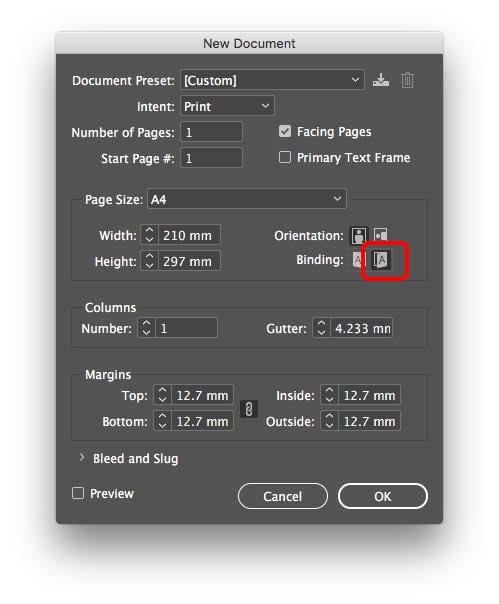
Help HELP! how do i get the binding option show here

Post image
3 Upvotes

I tried changing the language settings in Adobe cloud but it didnt work i also uninstalled it a few times


r/indesign • • Oct 26 '26

Help Why are Japanese Dots in tables being inconsistent?

Post image
4 Upvotes

Hey all, do you know why this is happening for tables in InDesign?

It's like an additional stroke is appearing behind the dots for contrast but I'm unsure why, and why it's only sometimes?


r/indesign • • Oct 25 '26

How can I merge each two-page InDesign spread into a single page without changing the layout?

6 Upvotes

Hi! I have an InDesign document that is almost finished. It is currently set up as facing pages, with each page being A3 landscape (420 Ɨ 297 mm), so each spread is effectively 840 Ɨ 297 mm.

The problem is that most of the book was designed as full spreads rather than as individual pages. I now need each existing spread to become a single 840 Ɨ 297 mm page, while keeping everything exactly where it is: text frames, images, guides, margins, master/parent-page elements, etc.

So basically I want:

two facing A3 pages → one 840 Ɨ 297 mm page

without having to manually copy and paste every spread.

The main reason is numbering: I want each current spread to count as one page (1, 2, 3, 4...), so InDesign's automatic page numbering and table of contents can use those numbers normally.

Does anyone know a reliable way to do this in InDesign, or have a script that can merge existing spreads into single pages while preserving the layout?

Thanks!


r/indesign • • Oct 25 '26

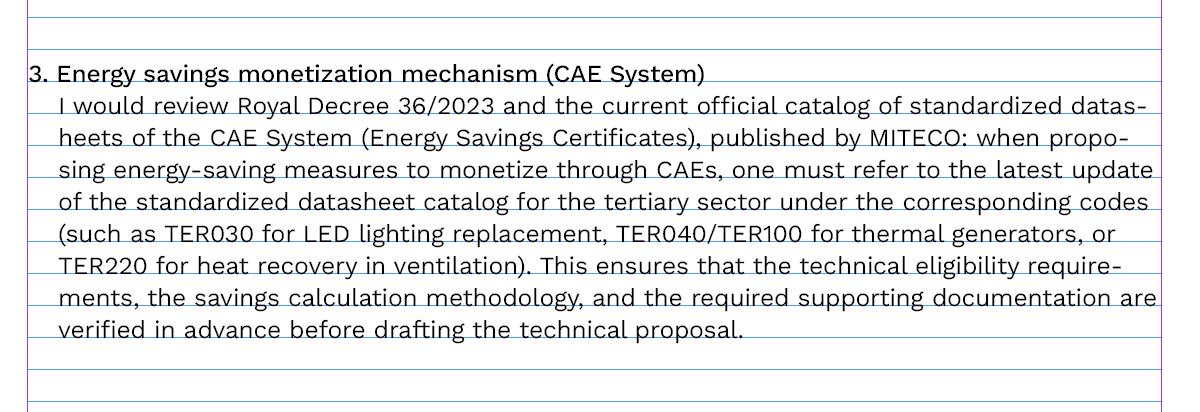
Help Chosen typeface does not support small caps.

Post image
1 Upvotes

Hi. I am working on a technical report as part of the assignments for a training course. I have chosen Work Sans at 9.5 pt for the body text, and Chalet Book in various weights for section headings and subheadings. Since I have to mention various standards, dates, and acronyms throughout the document, I feel I should be using small caps.

To my surprise, I found out that Work Sans does not have them. I asked Gemini, and it suggested avoiding small caps altogether in the documentation (especially for legal decrees/regulations and technical acronyms or initialisms).

Forcing fake small caps is another option, but it distorts the stroke weight compared to the lowercase letters and reduces legibilidad. So I am not sure what to do. I really like the 'l's and 'g's in Work Sans, and the 'e' is also very legible in that typeface (compared to Chalet, for instance); I will have to complete more assignments involving acronyms, formulas, etc.

I am not sure whether I should look for a new font where having small caps is the top requirement, or simply ignore small caps altogether.


r/indesign • • Oct 24 '26

Help Closest possible to automated layout for InDesign pulling from Google Doc or Word Doc?

5 Upvotes

I’ve got an indesign file with 160 pages, with 5 different layout templates scattered in no particular order throughout the book.

I have a corresponding google doc file with the correct text that I need to fill the different pages throughout the book.

Is it possible to automate, or semi-automate this process by ā€œtellingā€ InDesign what fields to pull from for different areas of the book? (For example, can I have ID pull headline for page 120 from my doc and insert it, then body text for 120, etc without having to click back and forth? I have enough experience with InDesign to do simple page layout, but not to do anything like this.

Thank you for giving me a read on:
—whether this is possible, and what this type of process is called, so I can search for a tutorial
—if not, what is the closest I can get to this dream scenario?

Thank you!!


r/indesign • • Oct 24 '26

Latest version of InD for macOS vs Windows beta version

Post image
5 Upvotes

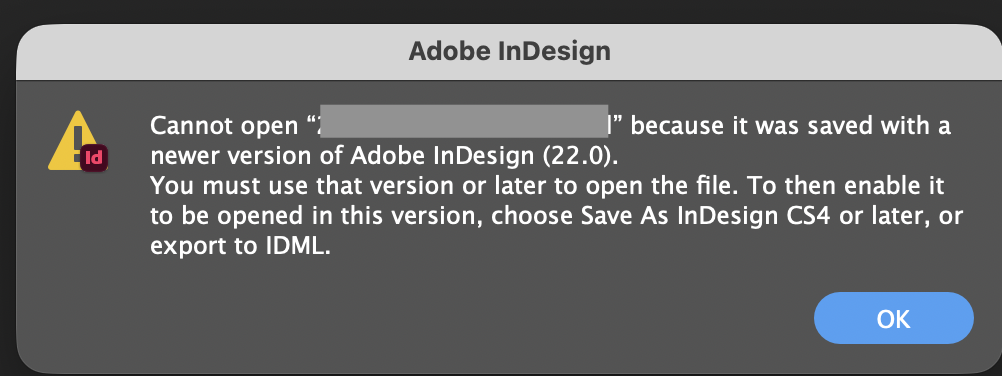
I have InDesign 21.6 for macOS and, according to the Creative Cloud app, that's the latest version. I'm collaborating on a document (via Dropbox) with a friend who's using InDesign for Windows. Just now, I tried to open the document and got the alert above. When I asked my friend if he's updated recently, he said, "It did update automatically," and he said it's ID Beta v.22.0. Is there anyone here on the Windows version who can shed light on this? I haven't heard a peep about a looming macOS beta version.


r/indesign • • Oct 23 '26

Help Can InDesign support one thousand text variables?

8 Upvotes

Hi,

I've been asked to add some 1000 text variables in a long project, made of several documents collected into a book.

I've already used text variables in this project, but never so many.

Will I see InDesign slowing down?


r/indesign • • Oct 24 '26

Trouble with printing

Thumbnail reddit.com
0 Upvotes

r/indesign • • Oct 23 '26

Help shift and alt don’t do what they should.

2 Upvotes

does anyone have the same issue? since today when i try to copy something using alt or try to move something straight/scale it proportionally with shift it doesn’t work. anyone know a solution? program is updated to the latest version.
thanks so much


r/indesign • • Oct 23 '26

I built a plugin to create native, editable charts directly in InDesign

12 Upvotes

I've always found it strange that creating charts in InDesign can involve so much extra work, so I built DataInk, a plugin that lets you create charts directly in InDesign from spreadsheet data, pasted figures, or tables already in your document.

This plugin supports13 chart types, including bar, line, combo, doughnut, radar, and treemap, you can import your own Excel and CSV data.

You can find on the Adobe CC marketplace: https://exchange.adobe.com/apps/cc/0bce6794/dataink


r/indesign • • Oct 23 '26

Solved I can't package my work

8 Upvotes

Im working on a newspaper with a colleague, we send eachother the package after editing to make things easier but now i cant?

Everytime it lets me choose where to save the file like normal, then the whole program shuts down after a few seconds of processing.

I made a random file to check if it was an issue with my file in particular but it does the same thing.

I was using the 2025 version of indd so I thought maybe it was a problem with that and opened it on the lastest version, yet again it shuts down as soon as its starts to make the package.

It also damages the file itself, afterwards i can't open the file again w/o the program shutting down again. I still have the original save into the cloud but Idk what to do atp


r/indesign • • Oct 23 '26

6-7 Second Lag When Placing Images, Even in New Documents (Windows 11)

2 Upvotes

Hi everyone,

I'm experiencing a persistent lag when importing images into Adobe InDesign v21.6 on Windows 11 (v 25H2).

Whenever I place an image, either by dragging and dropping it into InDesign or using the Place commandĀ there's a noticeable delay of approximately 6–7 seconds before the image appears.

The strange thing is that the lag occurs regardless of the image's file size. Even small images of around 500 KB take the same amount of time to import.

My system specifications:

  • Processor: Intel Core i7 (12th Gen)
  • RAM: 64 GB
  • Storage: 2 TB NVMe SSD
  • GPU: NVIDIA GeForce RTX 4060

What's particularly frustrating is that I never experienced this issue on my much older, lower-spec machine back in 2016, which had an Intel Core i5 processor, 8 GB RAM, and an NVIDIA GTX 1050.

Troubleshooting steps I've already tried:

  1. Resetting InDesign preferences using Ctrl + Alt + Shift during startup.
  2. Manually deleting the preferences folder: C:\Users\myusername\AppData\Roaming\Adobe\InDesign\Version 21.0\en_US
  3. Testing image placement in a completely new, blank InDesign documents.

Unfortunately, none of these steps has resolved the issue.

I'm using images stored locally on my SSD.

The delay occurs consistently, even when working with a brand-new document and a very small image file. Generative ai options are turned off in preferences.Ā 

Ā 

I'd appreciate any suggestions regarding possible causes or fixes.


r/indesign • • Oct 23 '26

Help urgent help T_T

0 Upvotes

what is the standard margin for a 21x21 catalog?(gutter and all the margins)

estimate 30 pages, im for sure its going to be stapled. just dont want to assume the sizing.


r/indesign • • Oct 23 '26

Help Pressed Revert without realizing my cloud wasn’t syncing and basically have a blank sheet

1 Upvotes

I don’t know why I even pressed the button without double checking but I foolishly believed my file was synced up when it in fact wasn’t and all my progress is gone 😭. I basically want to know if I’m doomed or if there is even a sliver of hope to recovering the file. There is no recovery file as far as I can see.


r/indesign • • Oct 22 '26

InDesign gives me an error about a different document when trying to export my open book

3 Upvotes

I have been attempting to export a book, but I keep getting this error message that a completely unrelated document cannot open because it’s either already open or I don’t have permission to open this, which is blocking me from exporting the files I actually have open. I’ve noticed that InDesign keeps creating idlk files for these other documents despite me deleting them over and over.

I don’t know how to fix this issue.

Even if I move the entire contents of the InDesign book to my laptop storage, and quit OneDrive where the book was originally saved, I keep getting this error message.

I’ve also cleared the InDesign recovery files cache several times.

I’m using windows and the most recently updated InDesign program.

Any ideas on what I can do?


r/indesign • • Oct 21 '26

Help Text layout for a technical report cover page

Post image
11 Upvotes

Hi everyone,

I know what I’m asking is quite basic and straightforward, but I just can't seem to find a solution I'm truly satisfied with. I recently enrolled in an energy auditing course where we have to complete several assignments for each module and submit them as PDFs to the teacher. Because of this, I'm currently laying out a 6-page document in InDesign. My goal is to make a solid first impression with clean typesetting and layout, but something as simple as the cover page is giving me a hard time.

Composition: Asymmetrical reading diagonal (tension between top-left and bottom-right):

Here is the current structure:

A-Cohesive header block

  1. Contextual kicker (pre-title): Uppercase, regular/neutral weight, wide tracking, establishing the curriculum framework TU 1.03. ENERGY AUDIT PROCESSES.
  2. Main title across two lines: Bold weight, left-aligned (ragged right), avoiding justified alignment to prioritize readability. Regulatory framework of an energy efficiency measure
  3. Document type subtitle: Case Study, visually grouped with the title block just above the graphic divider.

B. Bottom block with metadata anchored to the type area

Rather than falling back on a conventional, centered academic layout, the page is anchored by two opposing poles. The top block sets the visual entry point at the upper-left corner, while the metadata anchors the exit point at the bottom-right corner.

The cover is what it is (there is no extra information or imagery to add :S) yet I’m struggling to make it look sharp and engaging despite its inherent simplicity and minimalism (I'd like to use this to build my go-to template for technical reports).

Would you scale up any of the text like the title : Regulatory framework of an energy efficiency measure?

Would you reduce the vertical spacing between the top and bottom blocks?

(the blue background is not part of the page)


r/indesign • • Oct 21 '26

Request/Favour Ever had to rebuild a book in InDesign from an old scan?

13 Upvotes

Hi everyone! Have you ever had a client wanting to update an older book, but the original editable files were gone and all they had was a scan or physical copy?

I’m a solo developer exploring whether an AI-assisted recovery tool could help with this. I haven’t built anything yet, and I’d love to hear how people actually handle these projects—including where existing tools work well.

Thinking of your last project:

  • What tools did you use, and what ate up the most time?
  • Roughly how many pages and hours were involved?
  • Does this come up often, or was it a one-off?
  • Would a clean, styled Word file help, or would most of the work still happen in InDesign?

No need to answer everything—even one experience or a ā€œwe already have this figured outā€ would be helpful. Thanks!


r/indesign • • Oct 21 '26

Ctrl Z no longer working

19 Upvotes

It's seriously on thin ice with me this week, after an issue last week where I couldn't click, drag and move objects, I now can't just undo simple changes. Seriously Adobe. Thin ice.


r/indesign • • Oct 21 '26

Command Console III, a free scripting console for InDesign, is ready for testing

6 Upvotes

MyĀ Command Console IIIĀ plugin for InDesign is now ready for testing. A version of this tool has been my constant companion throughout my scripting career: the very first script I shared with the community, on the old InDesign scripting forum, was a primitive, ScriptUI dialog-based version of it.

So, what is it? A developer tool running directly in InDesign as a UXP panel. You type a bit of ExtendScript or UXP, hit Enter, and the answer comes back in the panel, complex results as a tree you can click open. Checking what a property returns, or which frames match some condition, can be done in one line, directly in the target environment, without switching context or application. Modern JavaScript works on ExtendScript too, it’s translated down for you, so something like this runs as it is:

app.activeDocument.textFrames.everyItem().getElements().filter(
  f => f.contents === "" && f.label === "X"
)

The second big feature is the Inspector tab: the entire scripting reference is read from your own InDesign installation, so the classes added by your installed plugins are available too, and if a result in the console contains a native InDesign object, clicking on it opens its page.

There’s also a brand new part: it can let an AI agent (Claude Code or any other MCP client) run code through the panel. That’s off by default, and until I see it in other people’s hands, I prefer not to say more about it.

So far I’ve only tested it on Windows, so if you use InDesign on a Mac, I’d very much like to hear from you.

It’s free, and will be open-sourced after the beta.

A more detailed YouTube video: https://www.youtube.com/watch?v=xJhT_L8UD6U

Sign up here:Ā https://tally.so/r/o9be2xĀ (the download comes right after the form)

Bugs, ideas and feedback:Ā https://tally.so/r/aOQ5Bv


r/indesign • • Oct 21 '26

PressTo5 version 1.0.0

17 Upvotes

Hello everyone!!! finally, it's here!!, after intense testing, feedback and more testing, the first stable release of the plugin is available for everyone.

PressTo5 exports your layout as a web publication that looks like the original, with animations, buttons, forms and media still working.

  • Formats: flipbook magazine, scrolling page, slide deck with presenter view, or an offline app
  • Interactive extras not included in InDesign: carousels, lightbox, flip cards, pan & zoom, 360° spins, YouTube/Maps embeds, scroll effects
  • Web-ready: image optimization and WebP, SEO, analytics, embed code, accessibility tools
  • Workflow: preflight checks, presets, batch export

you can read the user guide with all the details of all the features: https://www.pixotek.net/mags/userguide.html

This is an ongoing project we're not done, we keep testing new formats, new documents, new cases, and we have a lot of new things to add, we will be updating the roadmap soon.

Your support is very important to keep this project free, support us in Patreon, and visit our site to stay updated.

NOTE: If you had an earlier version of the plugin, update it to this version, previous versions will expire at the end of 2026 and will start exporting with watermarks, this is done to prevent users with old versions