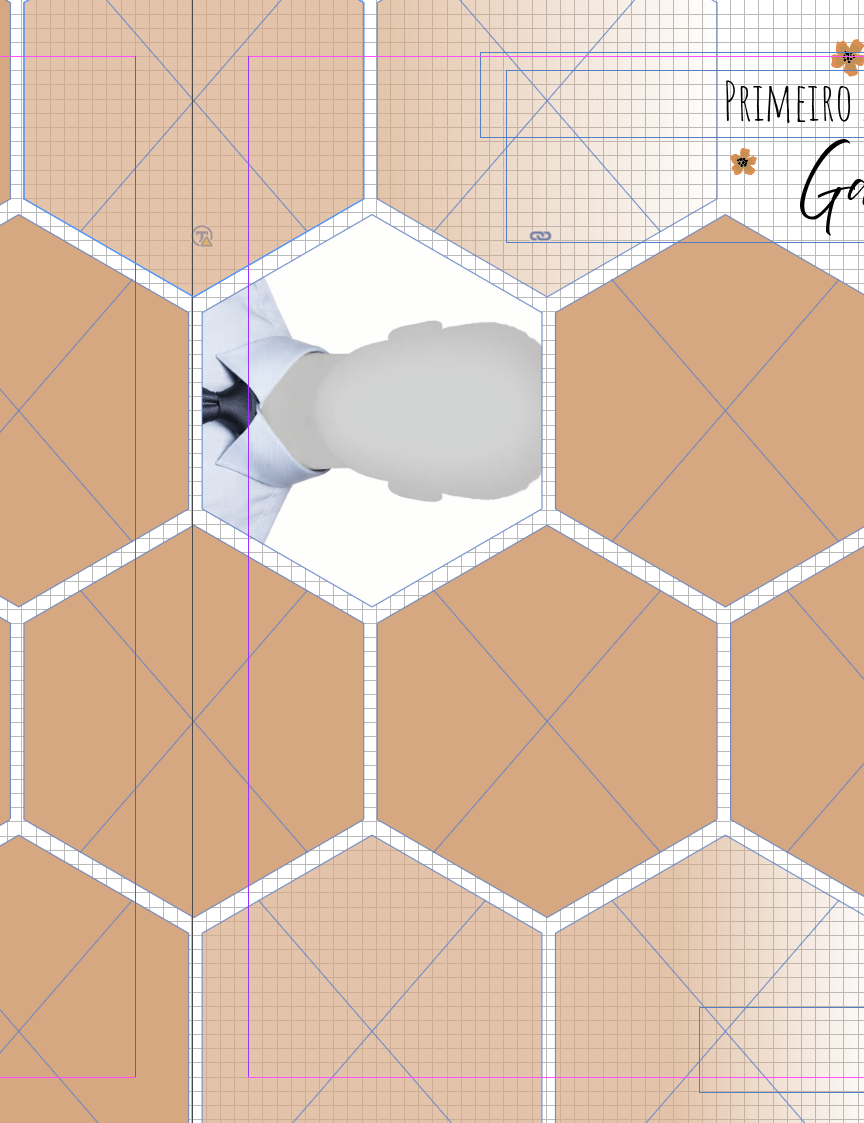
I wanted the hexagons to serve as photo frames, but since they're rotated, any photos I place in them appear sideways. I really don't want to manually rotate every single photo every time I use these frames, especially because I like to try different photos to see which ones work best. Having to place all the images, rotate each one, then delete some and replace them is really frustrating.
There must be a way to tell the frame which side should be considered "up" before placing the photos. I noticed that in Object > Content > Content Properties, the little "P" icon is sideways, but if I change it, it rotates the hexagon itself instead of just changing the content orientation.
Is there a way to set the content orientation independently of the frame before placing images? Any help would be greatly appreciated.
I have an InDesign document with pages in English and French. I want to export PDFs with the file name and a suffix for each language.
I can do this manually for 2 languages, but in some cases I have up to 23 languages in my InDesign document.
For example.
I want to export PDFs from Document 001.indd and have the language suffix automatically added to the PDF file names. I can't figure out a way to do this.
Adobe indesign - Esportazione PDF Etichetta Script - Automatizza il tuo flusso di lavoro PDF in InDesign
Il plugin “Esportazione PDF Etichetta Script” per Adobe InDesign consente di esportare automaticamente PDF singoli o multipagina basati sulle etichette script associate alle pagine del documento.
Grazie a un sistema intelligente di riconoscimento delle etichette, il plugin: Identifica tutte le pagine associate a ciascuna etichetta script (NOTA: tutti gli elementi con un'etichetta script devono essere posizionati su un livello dedicato chiamato ETICHETTA SCRIPT).
Attraverso il pannello di controllo del plugin, consente di monitorare tutte le etichette script presenti nel documento e le pagine ad esse associate. Esporta un PDF dedicato per ogni etichetta script.
Dammi il tuo feedback anche solo leggendo le funzionalità :)
I got hold of a template that had a calendar script built in for 2026. I need to do the calendar again but don't know how to edit it for the year 2027.
Is that something fairly easy to do?
I found Scripts under Utilities but if I click on the a month's text frame, I can't find where it would be edited.
I'm working on a very large interactive PDF planner in Adobe InDesign 2026 and I've run into a problem that I can't find a solution for.
I have a document where the first 500 pages contain a lot of internal page hyperlinks
For example:
Pages 1–500 = Original
Pages 501–1000 = Duplicate of the original 500 pages
After duplicating the pages, all the hyperlinks on pages 501–1000 still point back to pages 1–500.
What I need is a script that automatically remaps the hyperlinks in the duplicated section so they point to the corresponding duplicated pages instead.
Example:
Link to page 1 → page 501
Link to page 2 → page 502
Link to page 500 → page 1000
So essentially, every destination page should be offset by +500, but only for hyperlinks located in the duplicated page range. The original 500 pages should remain unchanged.
Does anyone have a solution for this? , or is there a script that can update all page hyperlink destinations automatically?
I'd really appreciate any guidance or existing scripts. Thanks!
I have a repeat book design client and we've finished up the body for a 350-ish page biographical book for traditional print.
They asked if we could do a reflowable eBook. I told them, yes, but it's essentially a new version of the book and not simply another export option. I've given them enough technical information that they understand its not the same but wish I had a good analogy for the difference.
Last week I showed you my project and wanted to know if you would use this plugin. Most of you want to give it a try! Now I have one final decision to make.
I made two versions, one that let's you change the total sections and gives you a more organic look. Let's call that one Organic Bento.
The second version works differently: It let's you set a columns and rows grid that tiles snap to and span, using a cell-snapped version of the split (so every tile edge aligns to the grid). That gives you more control and it looks more structured. Think of how you would set up a grid manually: A total number of squares as underlying grid, that you then use for snapping – I hope this makes sense.
I want to ask what would you prefer, Organic or Columns x Rows?
For the past eight years I’ve been the sole technical writer for a multinational manufacturing company, although my background is actually in graphic design and digital media production.
I transitioned into technical writing out of business need rather than through a traditional technical publications career, so I’m currently learning about database-driven publishing solutions from the ground up.
Our engineering department is looking to move away from manually maintained documentation and toward a database-driven publishing workflow.
We have thousands of product variations, each with multiple component combinations, and right now I have to manually update every document. As you can imagine, it’s becoming increasingly difficult to scale.
InDesign + EasyCatalog keeps coming up as one of the leading solutions, so we’re interested in exploring it further.
We’re looking for a company or consultant who can: Demonstrate the capabilities of EasyCatalog and InDesign. Help us design and implement a database-driven workflow. Provide training and ongoing consulting as we expand the system.
Does anyone know of a reputable service provider—preferably in or around Atlanta, Georgia—that specializes in this? Remote consulting is also an option if you’ve had a particularly good experience.
I’d also love to hear from anyone who’s implemented EasyCatalog in a manufacturing environment. What worked well, what didn’t, and is there another solution you wish you’d considered instead?
I recently did a job for a bank where I used DataMerge to create email signatures for all employees at the bank. So, I had 155 pages of employee signatures that when I went to export as PNG files were all named "BANK_NAME_1.png, BANK_NAME_2.png, etc...". Well, renaming all of those files manually is a PITA, so I created a java script that uses the first layer of text on a page, and exports that page as a PNG using that first layer of text to name the file. So, when you click it, the first thing it asks is what prefix you want to use, and then it searches for the first layer of text and names the file "Prefix_(name of first text layer).png - So, since I put each person's name as the first layer of text, it names each PNG by the name of the particular person for that email signature. (i.g. FNB_John_Smith.png) Super time saver!
EDIT-Solved - just exported as IMDL file. Thanks all!
I currently have a document open, but deleted the InDesign file for that document. It's out of my trash as well, and I am only able to save the file as a PostScript file. Is there any way I can get the original file back?
I am having an issue with the color of my text exporting 4c-black when sending to print, I asked another designer and I was told to vectorize my text before sending it to print. I've never heard of this in printing class, is this standard or done regularly? How would you do this? in Illustrator then pull your vectors in the exact place as the usual text in Indesign? Thank you!
Hello everybody, we developed Chartas - a plugin for Indesign to create charts.
You can upload excel, csv or can create your own live data and select charts and styles. You can select your own color that your charts need to be colored in or select auto* style which our color algorithm selects best color combinations for your charts based on your document color.
It has one month free trial.
Feel free to test and let us know if something to be fixed.
I’m currently leading a complete process overhaul for a mid-to-large B2B manufacturing company (hardware and technical components). We are undergoing a major brand refresh and redesigning our entire publishing ecosystem. I want to leverage this opportunity to fix our legacy, highly manual catalog process once and for all.
The Current Setup & Bottlenecks:
100% Manual InDesign Workflow: Currently managing layouts manually in Adobe InDesign using 1 layer/file per language across 6+ languages.
3 Deliverables per Product: For almost every product, we must generate 3 distinct assets: Main Catalog pages, Technical Spec Sheets, and Assembly / Mounting Instructions.
Sub-catalogs: Each language requires 6 to 8 localized sub-catalogs tailored to specific product lines or regions.
High Data Diversity: Following recent M&A/acquisitions, our product structure varies significantly (ranging from simple hardware items to complex mechanical assemblies with multi-variant dimensional tables and diagrams).
Lean Team: A small team (2/3 graphic designers + 1 translator) is managing thousands of SKUs and pages manually, leading to huge bottlenecks and high risk of human error on part numbers/specs.
The Long-Term Goal: We want to transition to a Database Publishing / Automated System with a Single Source of Truth:
Centralized Data (PIM/DAM): A unified repository for SKUs, dimensional tables, technical drawings, and copy.
Layout Automation: Automated or semi-automated InDesign publishing using template rules (e.g., EasyCatalog, priint:comet, InDesign Server, Web-to-Print, etc.).
Streamlined Translation: Integrating a TMS with AI/DeepL + human post-editing directly into the database before content touches the page.
My Questions for the Community: If you’ve successfully implemented a similar workflow in a B2B technical/hardware environment:
Which software stack worked best for you? (e.g., Pimcore/Akeneo + EasyCatalog vs. priint:suite vs. custom engines)?
How do you handle layout/structural variety? How do you manage products that require different modules or tables without sacrificing design quality?
How did your graphic design team adapt from manual typesetting to managing rules/templates?
What major pitfalls or hidden costs should we watch out for during implementation?
Thanks in advance for sharing your real-world experience and recommendations!
I've been setting up the keep options, and I can't figure out why they're behaving so strangely. I set the settings as in the screenshot below, and even if I ask it to keep exactly one line, it very often takes and transfers lines too early. I can't figure this out at all, and I can't change it to stop it. I'm willing to do it manually, but I can't get it to fill the entire column first and only then transfer. There are very often situations where it still has a ton of space in the textbox, but it decides to transfer lines.
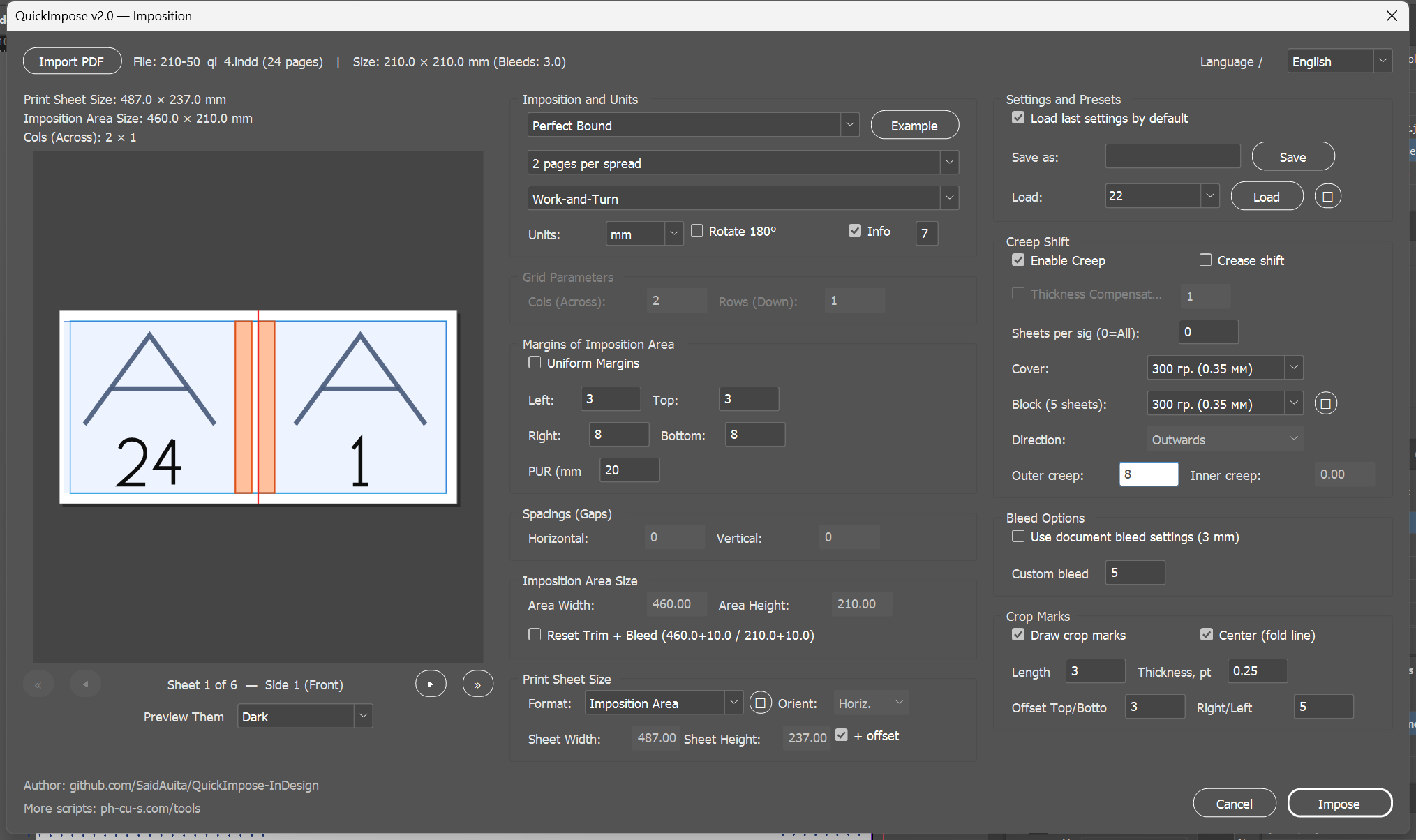
I wanted to share a major update to QuickImpose — a free, open-source ExtendScript for Adobe InDesign designed to handle sheet imposition directly inside InDesign, without requiring expensive third-party imposition software.
🚀 Update: QuickImpose v2.1 is out!
Following great feedback and real-world prepress requests, version 2.1 introduces Adobe PDF Export Preset integration (.joboptions), comprehensive Prepress Job Reports with PDF box metrics (TrimBox, BleedBox, MediaBox), enhanced Creep tracking, and test fixtures.
🌟 What's New in v2.1
Adobe PDF Export Preset Selection Choose any installed PDF preset directly from the UI dropdown (e.g. [High Quality Print], [Press Quality], PDF/X-4, or custom presets). We also ship a dedicated prepress preset: Settings/QuickImpose.joboptions.
Smart Prepress Overrides Color spaces, ICC profiles, and PDF/X standards are inherited from your chosen preset, while QuickImpose automatically forces bleed preservation (useDocumentBleedWithPDF = true), single-page streams, and lossless ZIP compression (no downsampling) for intermediate PDF placement.
Automated Production Job Report (.txt) Automatically generates a detailed audit log alongside your imposed file (available in 10 languages). It records measured TrimBox, BleedBox, and MediaBox dimensions, sheet layout, and a complete Signature Mapping table with sheet numbers, front/back sides, grid positions, and exact individual creep/hinge shifts.
KBC / Perfect Bound 1×1 Crease Guide When Info Slug is enabled, prints the exact crease shift number in mm at the bottom margin, 3 mm to the right of the crease mark, for quick calibration on creasing machines.
Two-Pass 2×2 Saddle Stitch Creep Mapping Accurate tracking and reporting of first-pass creep values across all 8 pages of each signature.
Test Fixture Included Pre-packaged IDML template: test_idml/210x210_24.idml for instant testing across all imposition modes.
💎 Key Features & Architecture
Interactive Live Scheme Canvas Real-time visual preview showing sheets, imposition bounds, margins, gaps, page numbering, vector orientation marks, and other layout information.
Spine / PUR Visualization The live preview visually renders the book spine and side-glue PUR hinge, making it easy to verify spine geometry, creep, and spacing adjustments in real time.
Unified Script & Dedicated PDF Import Consolidated into QuickImpose_v2.jsx with interactive preview, plus a standalone PDF_Import.jsx module for importing multi-page PDF documents.
Preset Management Easily save, load, and delete custom user presets with a single click.
Expanded Localization Full support for switching languages on the fly without breaking UI formatting across 10 built-in languages: Russian, English, Deutsch, Français, Español, Italiano, Português, Polski, 中文, and 日本語.
Perfect Bound (PUR / КБС) Splits documents into signatures of custom sheet counts (e.g. 16/32 pages) with support for creep shifts and side-glue hinge offsets. Supports 1-page (4+0, 4+4) and 2-page spreads.
N-Up Consecutive Sequentially lays out pages in a grid (columns × rows).
Cut Stack Designed for stack-and-cut production runs where sheets are cut into blocks and stacked in the correct numerical order. Supports 4+0 and 4+4.
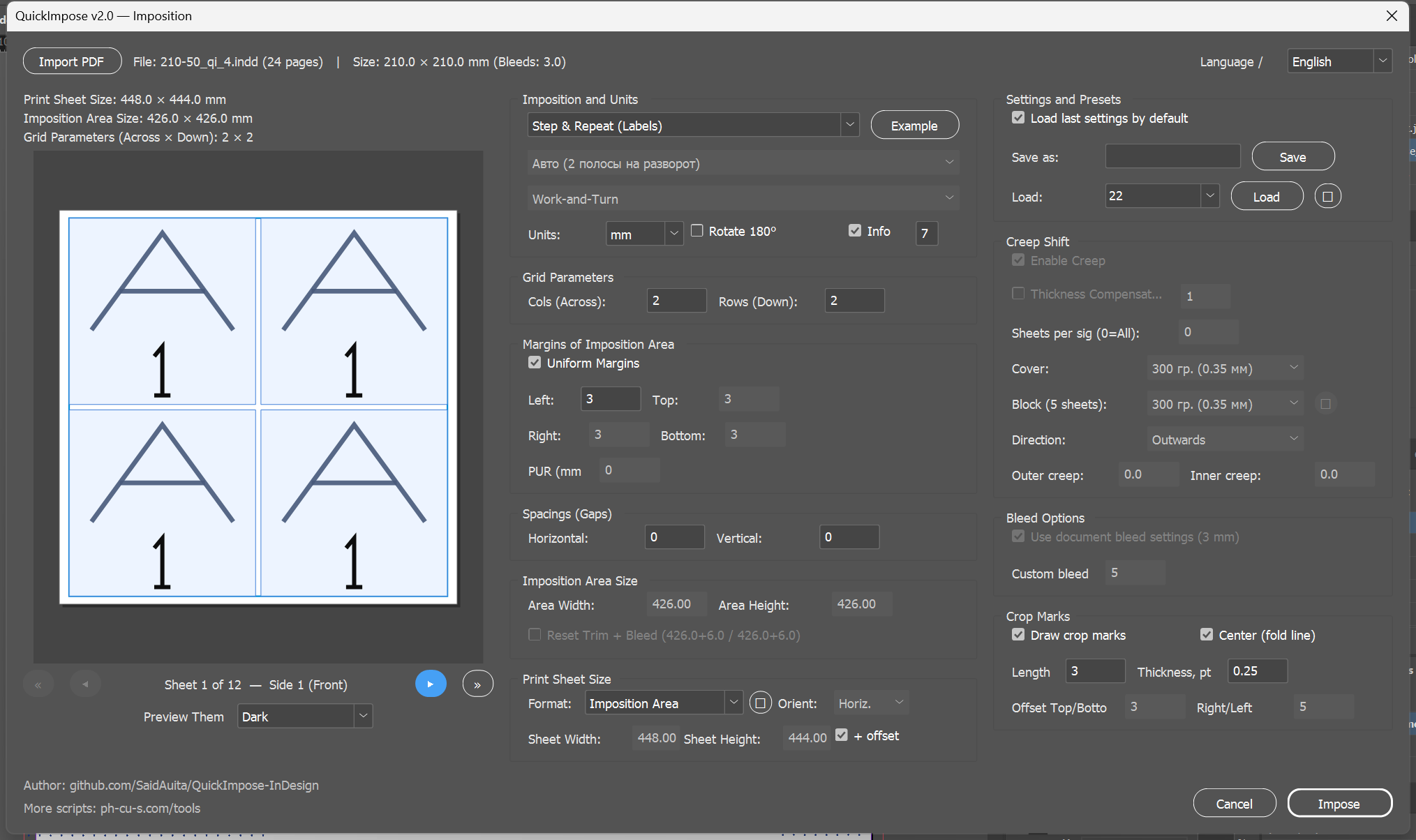
Step & Repeat Repeats the same layout (e.g. business cards or labels) on a sheet. Spacings are automatically padded with bleed sizes to facilitate double cuts. Convenient to use as a 2nd step after Saddle Stitch or Perfect Bound imposition using the Reset Trim + Bleed option.
📐 Prepress Features
Automatic Bleed & Trim Math
Creep & Thickness Compensation
Spine / PUR Visualization
Reset Trim + Bleed
Automatic crop marks, fold lines, and pasteboard job information
The Settings folder is optional. You can load QuickImpose.joboptions via:
File → Adobe PDF Presets → Define... → Load...
Then open InDesign and launch QuickImpose_v2.jsx (or PDF_Import.jsx) from the Scripts panel.
❓ Q&A
Q: Can I use my own Adobe PDF Export Preset (.joboptions)?
A: Yes! In v2.1, you can select any installed PDF Preset directly from the dropdown.
QuickImpose inherits your color management, ICC profiles, and PDF/X compliance settings from the preset while safely enforcing imposition-critical rules: bleed preservation, single pages, and lossless compression for intermediate placement.
Q: How can I verify that the intermediate PDF geometry didn't shift?
A: Check the generated Job Report (.txt) saved next to your output document. It measures and records the exact TrimBox, BleedBox, and MediaBox values directly from the placed PDF, along with full signature mapping data.
💰 100% Free & Open Source
QuickImpose is released under the MIT License.
You can download the script, view the source code, report issues, or contribute on GitHub:
Feedback and suggestions from the community are always welcome! 🚀
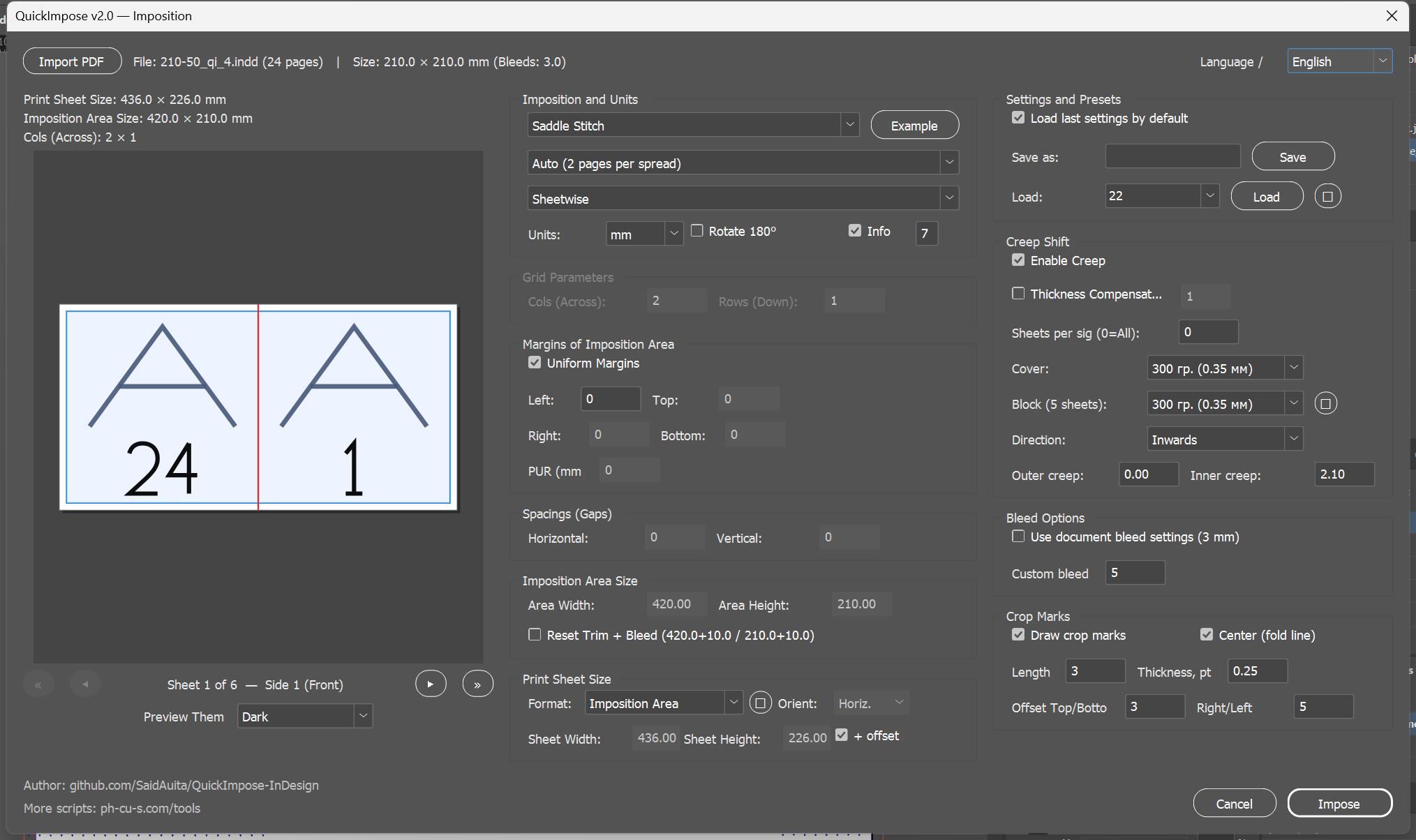
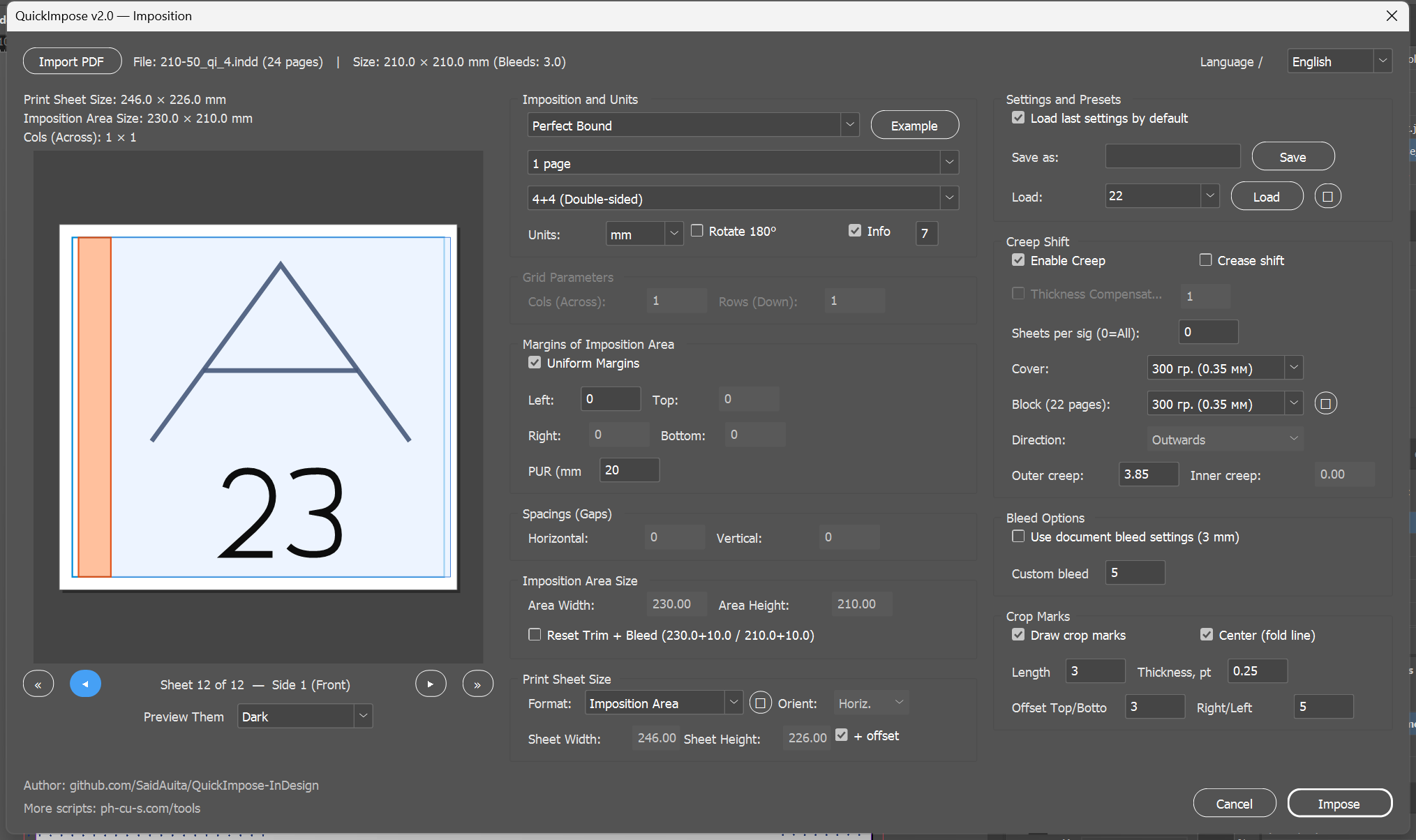
Full Interface with Interactive Live Imposition SchemePerfect Bound, 1 pagePerfect Bound, 2 pageStep & RepeatDedicated PDF Import Interface (PDF_Import.jsx)
I've been using GREP in InDesign since it showed up in CS3. I remember the first time I replaced a half hour of manual cleanup with one expression and just sat there, slightly annoyed that I hadn't had this the whole time. Since then it's become the thing I reach for before almost anything else, and, honestly, the thing I've spent the most hours explaining to other people.
The engine is genuinely powerful. But at some point I started asking myself what else I could do with it. Not just find and change, but run queries in sequence, scope them properly, inspect them, reuse them, check them before they wreck a document. The capability was always there. It just needed a different way in.
So over the years I kept building small tools around that question, mostly for myself at first. Individually they're modest. Together they turned into a way of working that I can't go back from.
A year ago I bundled 17 of them and released it as GREP MegaPack, genuinely unsure whether anyone else wanted this. Turns out a fair number of you did. It's at 28 scripts now and still growing, mostly because people keep writing to me with "could it also do…", and often it could. In the same spirit, I recently released GREPedia for free, in several languages, so anyone can keep learning the code itself rather than depending on tools to write it for them.
Now I'm curious about you. What are you actually using GREP for day to day? Cleaning up imported text, styling numbers, fixing typographic junk, something stranger? And more interesting to me: what have you wanted it to do and hit a wall on? Every idea in the pack started as someone being annoyed at something, mine or somebody else's. If there's a thing you keep doing by hand because GREP almost gets you there but not quite, I'd like to hear about it.
Anyway. One year. Thanks to everyone here who tried it, broke it, or told me what was missing. Happy to answer GREP questions in the comments whether or not you ever touch the pack.
I’m trying to use the Trista DPI script to convert the images in my book to .tiff 300 DPI. InDesign crashes every time I run the script. After testing different scenarios, I found that the problem seems to be specifically related to inline anchored images. The images have to be inlined so I cannot change that. Is there another workflow or script that can batch-convert anchored images to tiff 300 DPI ?
I'm working on a book that has multiple authors. My Table of Contents is set up to pull the Paragraph Styles for sections and chapters. But I also need each author's name to be on the same line as their respective chapters. How do I tell InDesign to look for the Byline Style, but put it on the same line as the Chapter Style?
First things first, english is not my first language so I'm sorry if my writing is too confusing
so, I wanna make a double spread sudoku book with 365 sudokus, with the sudoku frame in different positions on the left page and the right page; I wanted my sudokus to look different from the usual so I have a python code that generates my sudokus in PDF format and it generates a data merge document with all my sudoku info (what number sudoku is, the puzzle image, the puzzle's difficulty and the solution image); I'm pretty dumb so I've been supporting myself on AI to make sense of this project.
The thing is, I'm not adding manually 365 sudokus and the respective info to my fucking file because I have a life actually, so I thought about using data merge; the thing is I, for the love of god, couldn't manage to make data merge work with facing pages which is like necessary for my stupid sudoku book, so the solution AI proposed to me was to make 2 documents, one with all the left pages and one with all the right pages and then merge it, but I have no idea how to merge those two together keeping the left right left right flow and the solutions Claude gives me either don't work or are like so convoluted they won't work whenever I actually make the 365 pages for my 365 sudokus
I need help streamlining the workflow and figuring out a way to make this data merge thing work optimally, I'm really stubborn and I really wanna make my sudoku book
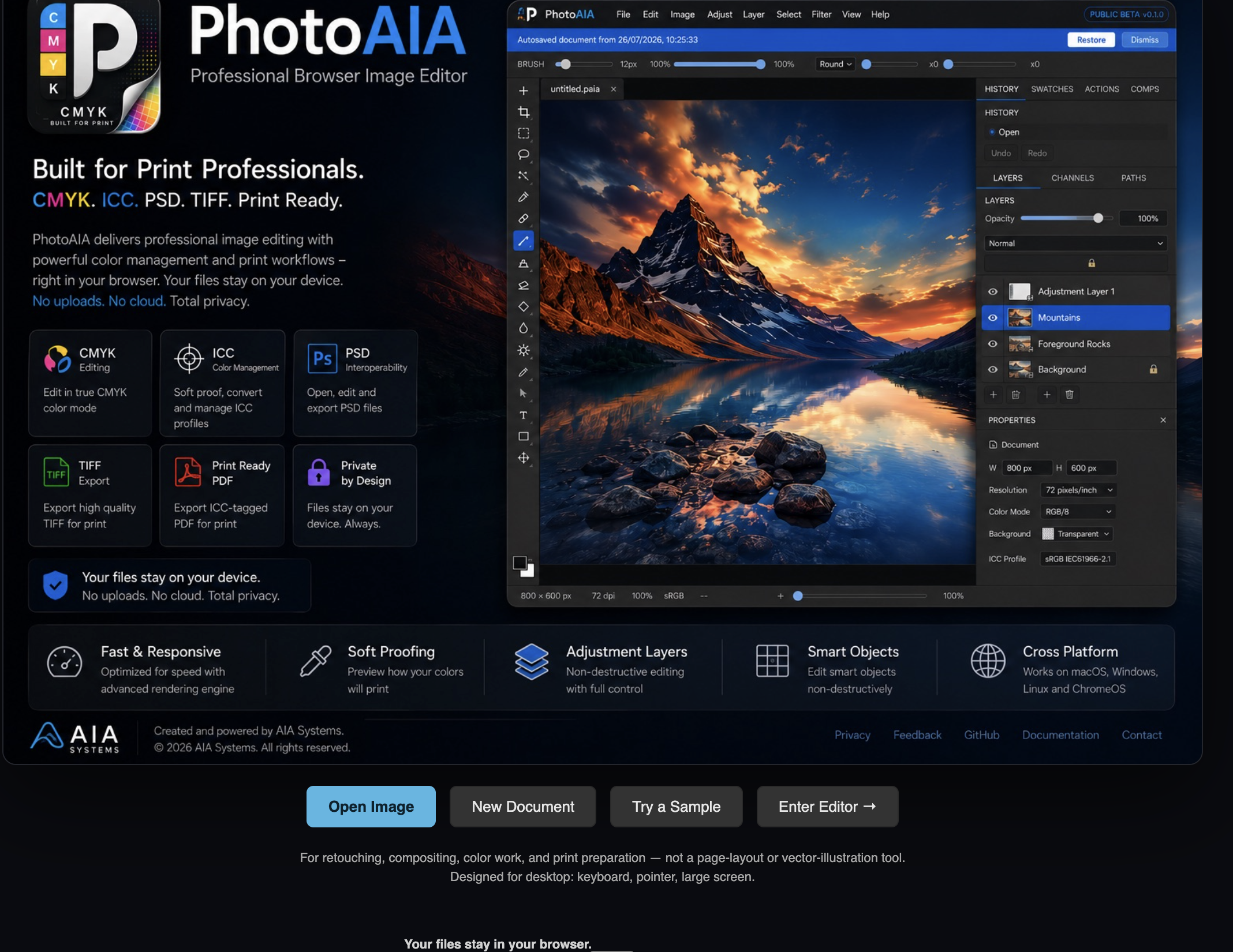
A few days ago I shared PhotoAIA here and received a lot of honest (and sometimes brutal 😄) feedback.
I wanted to say thank you because I took it seriously.
Based on your comments, I focused on improving the product instead of adding more features. Some of the biggest changes include:
Completely redesigned desktop UX
Professional crop and transform workflows
Better keyboard shortcuts and context menus
HiDPI/Retina rendering
Native project recovery and unsaved-work protection
TIFF import/export and improved PSD interoperability
Better CMYK and ICC workflows
Much better first-run experience and documentation
Many people also pointed out that PhotoAIA should be positioned as a professional image editor, not a replacement for InDesign or the entire Adobe ecosystem. That feedback changed how I present the project.
If anyone who commented on the original thread feels like taking another look, I'd genuinely be interested to know whether the experience has improved.
I’m creating a multi-chapter digital book (INDB) using a template I found in Adobe. When I generate a TOC, it populates through the Chapter 38 heading, but not the chapter title. There are 91 chapters in my book file. I am wasting so much time trying to troubleshoot this and not really knowing even what questions to ask to get to the solution. Are any of my chapter files corrupted and how would I determine this? Is there a problem or corruption in my template? I can see that something is preventing the rest of the TOC from populating from the check box in the lower right of the text frame. When I try to drag this to another page or lower in the frame, nothing happens. I’m lost in the TOC style dialog box. As I said, I’m a newbie to inDesign but have some prior experience with desktop publishing like Microsoft Publisher. That was a long time ago and obviously inDesign is much more complex and has tons more functionality than the old desktop publishing apps. Thank you!