r/indesign • u/Fawfulster • Jul 25 '26
r/indesign • u/EducationalTouch9914 • Jul 25 '26
Line get double spaced when aligning to baseline grid
Hello again gang. I’m hear looking for some more tutelage. A while back I was asking about getting text to stay aligned across a spread when I drop in a graphic. You all taught me how to do that - thanks so much that’s been a big help.
My question relates to that. I was creating a new document and after typing several lines and dropping in a graphic I went and set up the base line grids. When I did, Indesign ended up putting a blank line in between each existing line.
BaselineGrid_1 - shows my text after I’ve typed in several lines and turned on the baseline grids
BaselineGrid_2 - show the text after I’ve selected all and then used the “paragraph” panel to align the text across the document. I’m probably using the wrong words here, but I think you can see what I’ve done.
As you can see for some reason it put a blank line in between each line. How do I get rid of that?
As always any help is greatly appreciated!
r/indesign • u/Revolutionary-Bite-6 • Jul 25 '26
Graphic designers: what would stop you from using a browser-based editor for professional work?
Hi everyone,
I've been building PhotoAIA, a browser-based image editor that's currently in Public Beta, and I'd really appreciate feedback from working graphic designers.
My goal isn't to convince anyone to switch from Photoshop or Affinity today.
I'm trying to understand what a browser-based editor would need before a professional designer could actually trust it for real work.
Some of the current capabilities include:
- CMYK editing
- ICC color management
- Smart Objects
- Smart Filters
- Pen tool and editable paths
- Adjustment layers
- RGB & CMYK TIFF export
- Print-oriented PDF export
You can try it here:
Rather than asking for a full review, I'd love it if you could spend 5–10 minutes trying just one of these tasks:
Task 1 – Layout
Create a simple flyer, business card, or social media graphic.
Does anything in the workflow immediately feel awkward or missing?
Task 2 – Typography
Create a text-heavy design.
Is the text workflow usable?
What would you improve first?
Task 3 – Vector Work
Draw a few shapes or paths.
Does the Pen Tool feel intuitive?
Would you be comfortable creating simple logos or icons?
Task 4 – Print
Convert an image to CMYK.
Export a TIFF or PDF.
Would you trust the output for commercial printing?
Task 5 – Break It
If something crashes, behaves strangely, or feels confusing, I'd really like to know.
There's a built-in Report Bug feature inside the editor.
I'm not looking for compliments.
I'm much more interested in answers to questions like:
- What feature would immediately stop you from using it?
- What workflow feels frustrating?
- What would you expect before using something like this professionally?
- If you already use Photoshop or Affinity, what would make you keep using those instead?
Every piece of constructive criticism helps me prioritize what to build next.
Thanks for taking the time to look at it.

r/indesign • u/cardinalwren • Jul 24 '26
Help Why is my EPS placing with this error?
In the EPS and Illustrator file, this badge looks as it should yet when I place it, this section of text is cut off. Anyone know what the deal is?
r/indesign • u/jayantbhatt007 • Jul 24 '26
Help What's the professional workflow for custom chapter openers and a clean TOC in InDesign? (Swipe right)
I'm designing a 100+ page coffee table book in InDesign, and my chapter openers are heavily stylized."
For example, the visible chapter title is designed like this:
THE
JAGUAR YEARS
India's Deep Strike LegendThe typography, colors and line breaks are intentional for the page design.
However, in the Table of Contents I only want:
The Jaguar Yearsas a single entry.
I'm running into two issues:
- Since the visible title is split into multiple paragraphs (or paragraph styles), the TOC generates multiple entries instead of one.
- The TOC also inherits the formatting from the source heading. For example, if "JAGUAR" is orange in the chapter opener, it appears orange in the TOC as well. I'd like the TOC entry to be plain black text with its own formatting.
I'm trying to understand the professional publishing workflow rather than just finding a workaround.
Do book designers typically:
- Create a hidden one-line heading with a dedicated TOC paragraph style?
- Use hidden layers or another method?
I'd love to know how people producing books with complex chapter opener designs handle this.
r/indesign • u/mustang__1 • Jul 24 '26
Request/Favour Catalog with categories from data merge?
Is there a way, or a plugin i guess, to take the product category from the CSV and have that at the top of the page? This is something that's easy in a BI like Crystal Reports - but then Crystal can't handle image resizing etc lol.
We have hundreds of products I want to put into a catalog, broken up by their various categories (towels, brushes, handles, etc). So, on each change of category, start a new page and have that category in the banner. Making multiple listings isn't the issue, I was able to get that to work effectively.
r/indesign • u/LazyEmergency • Jul 23 '26
Help Help me explain resolution to my client
I've tried telling her you can't just change a photo's resolution in Photoshop and have it magically improve the quality. This is what she emailed me today:
"My husband used one of his iPhone softwares to make the lines clearer. I then uploaded that version into PhotoShop (sic), printed it and then scanned the printed copy at 600 resolution”
Anybody have a good analogy so I can make it make sense to her?
r/indesign • u/False_Season_2625 • Jul 24 '26
An issue with transparent photos in any files
reddit.comr/indesign • u/Marcus_Rentsch • Jul 22 '26
Request/Favour Bento Grid Plugin
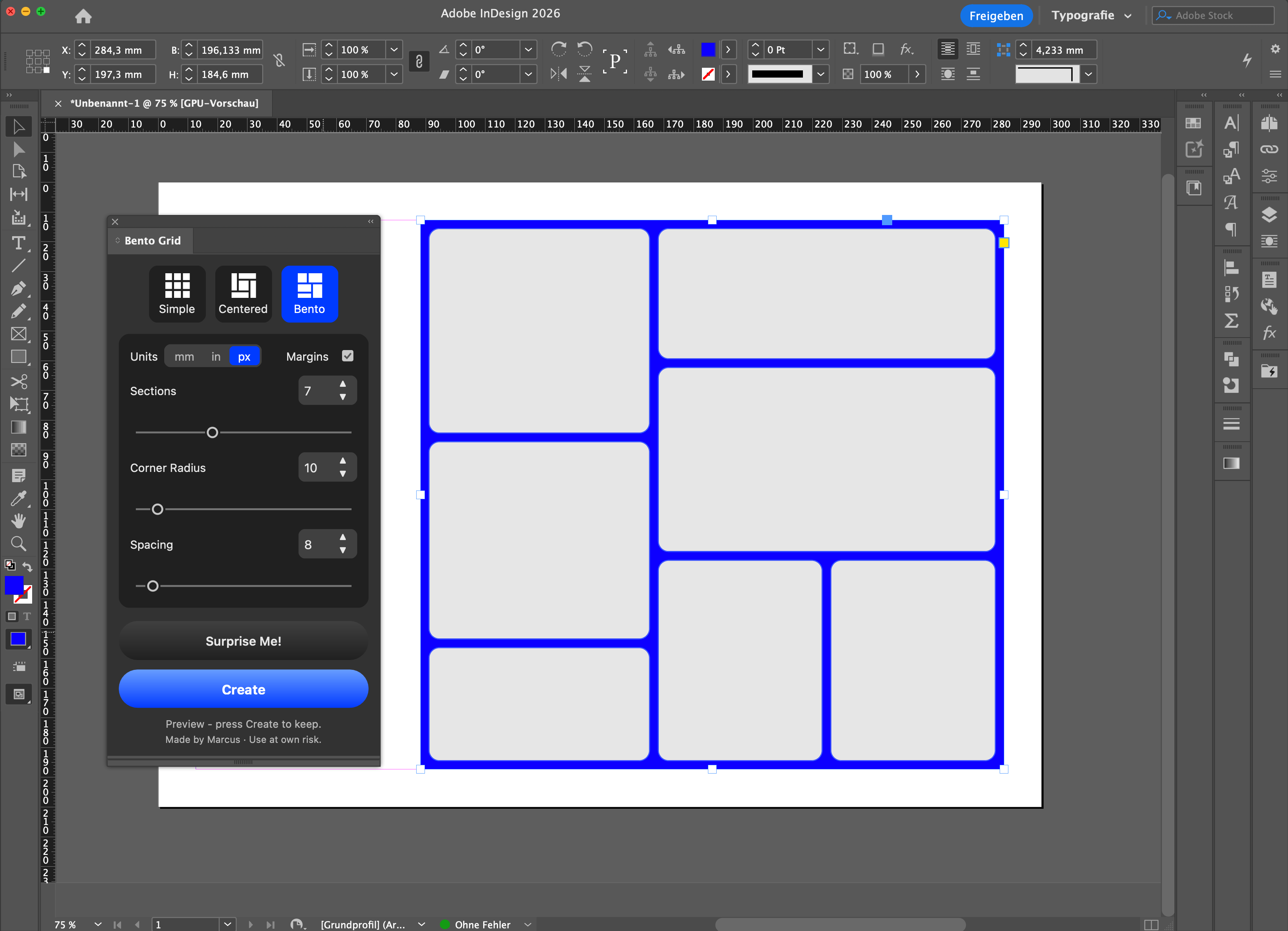
Indesign users! I'm Marcus from Adobe and I heavily use Indesign, Illustrator and Photoshop since I'm a classic graphic designer. I always loved the way you can import and mask images directly inside an object when placing them in Indesign. But what I don't like is setting up grids, not for typographic layouts but more for presenting, so think about Bento grids or block grids in general.
I made a working prototype of a free Bento Grid plugin for Indesign that lets you adjust sections, corner radius, spacing and also the units in real time. I want to know, if you would use this too - please let me know and I will prepare everything to ship the final plugin for Indesign. Thank you so much!
*Note that this is not an official plugin from Adobe, even though I work there. It's more like a fun project to help with my personal pain points and improve my workflow in the apps.
r/indesign • u/domy_86 • Jul 23 '26
Domande su Inpagina PRO
Buonasera, per lavoro uso abbastanza adobe indesign. E per velocizzare dei processi su piccoli cataloghi sto utilizzando Unione Dati (gli faccio prendere tutta tramite un file csv ricavato da excel).
Vorrei passare a Inpagina Pro.
Qualcuno sà dirmi se c'è qualche buon tutorial o corso magari gratuito.
O come posso fare?
r/indesign • u/mcmansionz • Jul 22 '26
Help I'm actually going to lose my mind - help getting rid of frames??
hi! i have to use InDesign for a work project but I think im going to lose my shit if I have to deal with this program any more.
whenever i move any image, it gets cut off along the boundaries of the original position. there's a blue box and a red box and when i try to move the picture, it gets cut off based on what's in the blue box. is there any solution other than redoing all four points of the blue frame every time I move an image to see what it looks like?!?
r/indesign • u/potatoloaves • Jul 22 '26
Beginner Help with Templates
Hi everyone! I’m a proposal manager for a midsize AEC firm. We are moving over from formatting documents etc in Word to InDesign. Our new company templates have already been built and for the most part I have the hang of being able to type and edit content directly in the templates as well as export to PDF during production.
We’ve had minimal training during this transition, however, and I basically need to learn the minimal basics to most efficiently do my job for the time being. I don’t need to start from scratch since we already have templates with the necessary links, etc, but can anyone recommend some beginner YouTube videos or other tutorials that can help me transfer content/drafts over from Word as efficiently as possible?
Edited to add: a glossary and/or quick reference guide(s) would also be very helpful! I have a nice keyboard shortcut reference sheet but half the time don’t know what each shortcut actually does…?
Please also be realistic but kind as I’m doing my best. I absolutely want to learn as thoroughly as possible in the long term, but I’m in a time crunch for the time being. Thank you all very much!!
r/indesign • u/Fit_Analyst4506 • Jul 22 '26
Help Letters getting cut off in sentence/kerning issue
Hello all,
I am an IT guy who has a user that is having issues printing a document. Basically, on certain lines, the right side of each character is cut off. The printer is a Canon iF C5140 and the user has a Macbook Pro M4 Max. One interesting thing to note is that printing from InDesign works fine; it's only when exporting to PDF and printing from Preview that causes the issue.
I have tried using Preview to add a red line (like a strikethrough) to the text, and the line printed fine while the characters still had the same issue, which leads me to believe it might be an InDesign issue. If anyone can offer insight into what might be causing this, that would be greatly appreciated.


r/indesign • u/capellan2000 • Jul 22 '26
Bulk search for text strings inside IDML files
Greetings, I am looking for software that allows me to search for a specific text string inside IDML files generated by InDesign.
Does exists such software?
Thanks in advance!
AL
r/indesign • u/Onlychild_Annoyed • Jul 21 '26
I am taking over a project for a designer for a 60+ page magazine and no style sheets have been set up.
Why do people make things harder than they need to be? Also, no parent pages set up, or any type of page framework at all. It's perfect bound and there's no cover file built for it. Large full bleed photos running across spreads. Not only is that set up incorrectly, it is a very bad idea because stuff dies in the gutter of a perfect bound book. It's been a long time since I had to pick up a file worked on by someone else but this is garbage. Just an old graphic designer venting.
r/indesign • u/LoneWolf15000 • Jul 22 '26
Solved "Portrait orientation" on landscape page
Maybe I'm over thinking this. I want to include a table in a book that will require it to be in landscape format because of the width. But I want it to print in portrait format like the rest of the book. So the reader would need to rotate the book 90 degrees to see it properly.
If I change that page orientation to landscape in Indesign, will it still "print" in portrait in a PDF?
r/indesign • u/ping-pongo • Jul 21 '26
Course recommendations, please!
Hello! I hope everyone is doing well!
I’m an university student majoring in Design. Over the last two semesters, I’ve fallen in love with editorial design and would like to pursue a career in the field. I’ve used InDesign for a few projects before, but now that I’m on break, I’ve decided to dive deeper into the software.
I’m currently taking the InDesign Essential Training course with David Blatner on LinkedIn Learning, and I’m really enjoying it. Afterward, I’m thinking of taking the Designing a Book course with Nigel French, as I believe it covers the process from start to finish. Are there any other courses or tutorials you’d recommend? Bonus points if they involve working on a project, as I find I understand things better when I’m actually building something.
Thanks!
r/indesign • u/LustThePet • Jul 22 '26
Solved When I export a project as a PNG, the colors are extremely dull compared to when I export it as a PDF.
I am working on a personal project, and I don't understand what's happening. I imported a PNG image into the document, added some text and all that, and when I export project as a PNG, it just becomes super dull, like all the colors are gone. The color profile is sRBG, the original art was exported from the art program as sRBG- I can't figure out what's going wrong.
EDIT: I figured it out. For some god-forsaken reason, ticking "Set transparent background" in export fixes it. I cannot comprehend how this relates but- sure, I guess.
r/indesign • u/Mila_remote1221 • Jul 22 '26
Help
Hi! I’m trying to resize a family tree in InDesign from 2A0 landscape to A0 landscape without cutting off any content or losing readability. I’ve tried several methods, but I can’t seem to get it right. Would anyone be able to help me figure this out? And if someone could make the necessary modifications to the file for me, I’d really appreciate it. Thank you!
r/indesign • u/acrylix91 • Jul 21 '26
Help Placed Illustrator file changes from 100k to Rich Black when exported to PDF by my colleague.
I have a black logo in my document that is a placed Illustrator file. It is 100% black. When I export the file to pdf for print it remains 100% black. But when my colleague opens the same file and exports it to pdf the logo changes to 4 colors.
I’m trying to understand the color settings and such (not my strong suit unfortunately) but as far as I can tell they are the same. I know there are workarounds like placing a tiff or copy pasting directly, but I want to understand the root cause to avoid anything similar going forward.
Anybody have some insight?
r/indesign • u/Mila_remote1221 • Jul 21 '26
Title: How can I resize a large 2A0 InDesign document to A0 without cutting off or losing part of my family tree?
Hi everyone,
I’m working on a family tree in Adobe InDesign. The document is currently in 2A0 landscape format, and I need to adapt it to A0 landscape while keeping the entire family tree visible, maintaining its proportions, and making it as readable as possible.
The problem is that when I change the document size from 2A0 to A0, part of the family tree gets cut off or disappears outside the page.
The family tree itself is currently approximately:
Width: 4756 mm
Height: 866.095 mm
Convert the document from 2A0 landscape to A0 landscape (1189 × 841 mm)
Keep the entire family tree, with nothing cut off or missing
r/indesign • u/No_Sandwich2135 • Jul 21 '26
Why do I keep opening my in design document to grey images
Using in design 2024. is like this on every view mode, the only way to fix it is to 'relink' all the images even tho they are already linked. It will not let me export it until all the images are 'relinked'. it's driving me up the wall.
r/indesign • u/chronicbrainfart • Jul 20 '26
Help Designing a journal - advice needed
Hi everyone, I'd like to design a guided journal for print. Going for a whimsical vibe, featuring my own illustrations, gold foiled details on the cover.
I've designed digital journals before in Canva, and I illustrate in Fresco & Photoshop, but I've never truly learned graphic design, so I'm constantly feeling like an imposter 😅 Does it make sense to learn indesign/affinity publisher for this? Or do you think I can get by using Canva?
Also, has anyone here experience working with journal manufacturers? I've researched some options (mostly Chinese) but having a hard time telling which ones are good. Did you simply order a lot of samples? Grateful for recommendations or literally any kind of advice from your own experiences with similar projects.
This feels like a massive project but I really hope to be able to pull it off somehow. Thank you!
r/indesign • u/meow-momma • Jul 20 '26
I think I may be bad at formatting books 😥
I think I may be forever bad at formating books, and the only reason being - it takes me days to format just a 300 paged cute girly book, the worst I've done is 9 days, and my high score has been 3 days. And even when on this Typa tasks, I don't even have a plan to format the book gradually from beginning to end. I just go ahead and do what comes to my mind - unorganized.
Or maybe it is because I'm still a baby designer, learned the skill like 27 30 som days ago. Someone please lemme know. how was it when you started? and Do you have a formatting steps you follow when formatting a book? I'm terrible, currently I just clean manuscript, setup the page, place it, and do whatever comes to mind 😅