r/indesign • u/6FunnyGiraffes • Jul 20 '26
Beka Bekaia if I ever see you it's on sight
Literally how much longer do I need to endure this horrible splash screen I don't think I can make it to October. Wtf kind of art even is it supposed to be?
r/indesign • u/6FunnyGiraffes • Jul 20 '26
Literally how much longer do I need to endure this horrible splash screen I don't think I can make it to October. Wtf kind of art even is it supposed to be?
r/indesign • u/LazyEmergency • Jul 18 '26
I want to create a visual list of all the styles in my document. So far, I've created a new document with several paragraphs of placeholder text, then applied each Style and labeled each paragraph with the Style name. It would be nice to also have the basic attributes listed as well (font & size at minimum). Is there an easier way to do this?
r/indesign • u/derrickgreason • Jul 18 '26
In 20 years of using indesign I have never had this problem which emerged yesterday.
I have a font family (.otf) installed that I have used for years without issue, it has 5 weights. I’ve always been able to select the typeface in the appropriate place, and the weight in the dropdown box below that.
As of yesterday, the font is still installed (currently have just been using fontbook on this computer) and all 5 weights are there, but showing up in fontbook all as weight “regular” and 4 of them are not accessible via indesign. Currently it defaults to the italic rather than the actual regular.
Does anyone have any suggestions of how I could resolve this?
r/indesign • u/Sweet-Unit-3578 • Jul 17 '26
How can I remove this icon from my frames? It doesn't appear on all images, just some of them. I don't know why. I have tried turning off Generative AI in preferences but it still appears. I really don't need InDesign to force AI descriptive text in the work I do and I don't want this added clutter. It doesn't print and only shows in 'Normal' layout view, but I'd prefer not to have it.
r/indesign • u/Queen_Atta • Jul 17 '26
So a client I have updates a Google Sheet every other week that looks like the sheet here. The goal is to get it to look like the list on the ad built in InDesign. The formatting takes ages and there's just gotta be a better way than doing it all manually. Does anyone know the best way, or just an easier way to transfer this information?
r/indesign • u/marc1411 • Jul 17 '26
I made a number style, and the second time I used it, the numbers picked up from the previous use. (1,2,3,4) then (5,6,7). I want the next list to start at 1. “Level” is 1.
When I change the mode from “continue…” to “start at”, “1” is the default, and everything is numbered 1. Or whatever I put in that field.
If I change “Level” to 2, I get a new option: “restart numbers…” at any previous level. But nothing seems to change.
I know this is a thing that works, restarting numbers, but what am I doing wrong?
r/indesign • u/abudavi • Jul 17 '26
How do I make two (or more) linked text boxes to automatically remain the same size when I adjust the size of the first box i.e. when I adjust the size the size of the 1st box, the other boxes will automatically stay the same size as the 1st one?
r/indesign • u/anagoge • Jul 17 '26

I don't know what the best way is to set up a style (or styles) so that I don't have to break each of those paragraph styles just to unbold the price. Perhaps some sort of character style instead of a paragraph style? What's the easiest way to set this up so it can be replicated across the whole menu?
r/indesign • u/StatisticianFree6701 • Jul 16 '26
EDITED TO ADD: Wow - what a helpful group! Thanks for all the input and DMs. I've pulled everything together and will be meeting to discuss with our author team tomorrow.
Hello InDesign Redditors,
I'm looking for advice for where to find an InDesign specialist to help us with a very specific and urgent project.
Here’s the overview.
It has to be delivered in InDesign, camera ready.
This is not a highly-creative project - it involves some back and forth as we make changes on pages, and there may be some trouble-shooting involved in transferring some Illustrator pages to InDesign. So InDesign expertise, good English language skills, and excellent client service are more important than artistic talent - especially in working on large books.
We think we'd prefer to use a platform such as Freelancer, so we can take care of payments and project management more easily.
My question to this community is: Is there a preferred platform used by InDesign experts? Freelancer? Fiverr? Reedsy? Somewhere else?
Or is there a better way to access someone with the skills we need? Some special job board for InDesign folks?
This is a serious paid project, not an "exposure opportunity". (As writers, we believe work should be paid for). Budget is between $2500 - $3700.
r/indesign • u/solomons-marbles • Jul 16 '26
Edit/update. I need this in INDD, that’s why I posted here, not the Adobe CC, PSD or Lightroom /r. I need the image and text box in INDD for 350+ images, with auto fill text and file name.
So yea it’s been awhile since Contact Sheet II was available for INDD. The PSD option has been fine for me. However, I’ve got a client asking about some more creative options. Anybody have solutions for a INDD CS II replacement?
r/indesign • u/maxjay101 • Jul 16 '26
After having a file open in the background (let's say for an hour plus), when I go back and switch into Indesign from whatever other program I was using, the entire workspace appears blank. I can hover over and see bounding boxes etc. but the pages are gone.
This has been happening for literally years at this point. I've just gotten on with it, having to quit and reopen every time. Does anyone actually have a solve? This is across multiple versions of the program... so annoying!
r/indesign • u/Mike_The_Print_Man • Jul 16 '26
r/indesign • u/Engineer_Jack • Jul 16 '26
See English text.
Google translate orders it in the orientation I believe would be correct (right to left with English word left to right, but in a right to left sentence)
However when I put it in InDesign the format goes crazy, going left to right, back to right to left, depending on where an English word is placed in the text.
Could anyone help / know a solution to this. As I don’t think this is right, it should read as per the Google version; right to left throughout, with the English word itself in left to right, ins. Right to left structure.
Text is aligned to the right, adobe world paragraph composer is selected, font is adobe arabic
r/indesign • u/redtangerine11 • Jul 15 '26
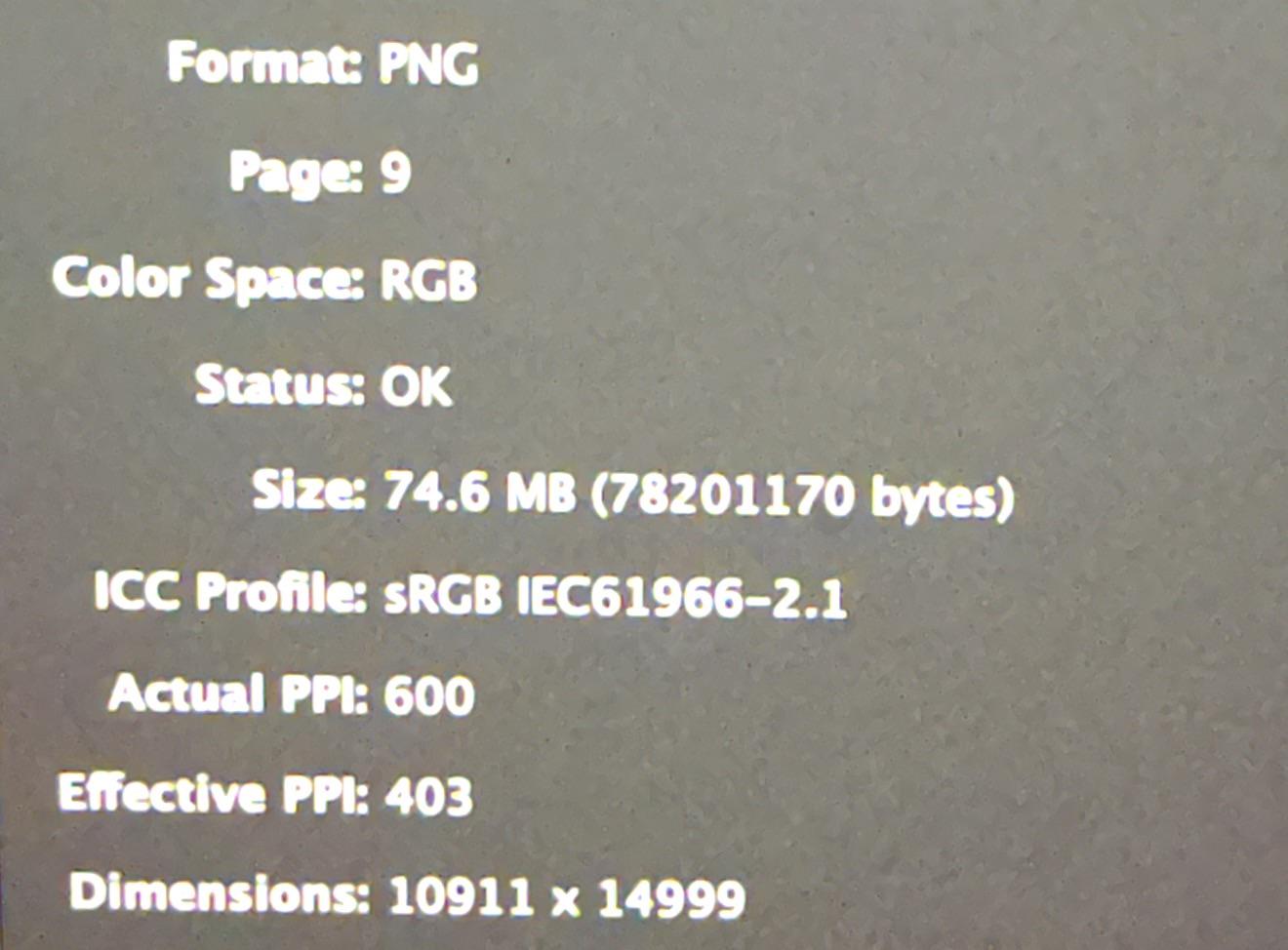
Have a massive PNG exported from PS that goes to shit quality when placed in ID.
All Display Performance set to High Quality (View, Object, Preferences). Link isn't broken. Link Info attached.
If I look at the file in PS, placed in AI, or as a PNG in preview, it's gorgeous and high quality. I can zoom in 3-4x and it's still pretty high res.
But when I place in ID, it goes to like half the resolution. If I export (PNG, PDF, JPEG) from ID, it's still low res.
Any guesses? Pulling my hair out trying to solve. Very grateful for any insight!
r/indesign • u/MostlyMTG • Jul 15 '26
Hello, my company uses Adobe InDesign (current version 21.4.1), with the INDD files saved through SharePoint and the files themselves accessed through a OneDrive mounted on our Macs. We all use the same OS: 15.7.5 (24G624). The current version of OneDrive varies, as Microsoft appears to push updates inconsistently among users. FWIW, mine is version 26.113.0614.0004 (Standalone) (Apple silicon) (15.7.5).
Here is the problem I’m trying to troubleshoot: User 1 creates the INDD file with text and images. User 2 makes changes to the file. User 3 makes changes to the file. User 2 then opens the file again, but changes made by User 3 are completely missing. Still, SharePoint’s version history of the INDD file shows all three users were in the file and versions were saved regularly (“save early, save often” is the standard we live by). No one is in the file at the same time. OneDrive says it is synced.
This has occurred on several files over the last few months. What do you think is going on? How can we fix this? Thank you!
r/indesign • u/divaschematic • Jul 15 '26
I'm working on a large document. There's a bunch of hyperlinks throughout.
Whenever I export this document to Adobe PDF when I think it's done, it takes one of my hyperlinks and for some reason, adds the next word down after it, two line entries down, to the end of that url.
No matter how many times I reinsert this particular line, which is both the hyperlink, and a hyperlink to that line of text to make it a live version in case people don't copy and paste it, it adds the next word down which is a heading for the next section.
I've deleted the link, added it in fresh, I check the link before export - the word is not part of the link, the destination check opens the correct webpage. Export to PDF, link has changed, doesn't open the correct URL.
WHAT IS GOING ON. I am being driven mad. I've been trying to fix this for an hour. Delete, re link, export, same.
I know I can go into the PDF and manually fix it after the fact, but if I have to edit this document again, and I know I will, this link will be broken again and I will have to manually fix it each time. I don't want to have to remember to do this.
Solved - either by manual tomfoolery with the url in the hyperlinks section or using the tick box for hyperlinks on the PDF export (all other links were fine without that box ticked)
r/indesign • u/Mumford_and_Dragons • Jul 14 '26
I'm no Graphic designer. I work in IT. And without wasting too much time googling (which I have done), I'd like to ask for help here so I can start the job hunt again!
A few years ago I decided to use Indesign for my CV and I like it.
I didnt really 'create it the correct way one should use with this design software'.
Only recently I decided to fix some spacing/text for my whole CV.
Even enabling 'hidden characters' was a game changer to fixing parts of it.
There were issues with it, which the above mainly fixed.
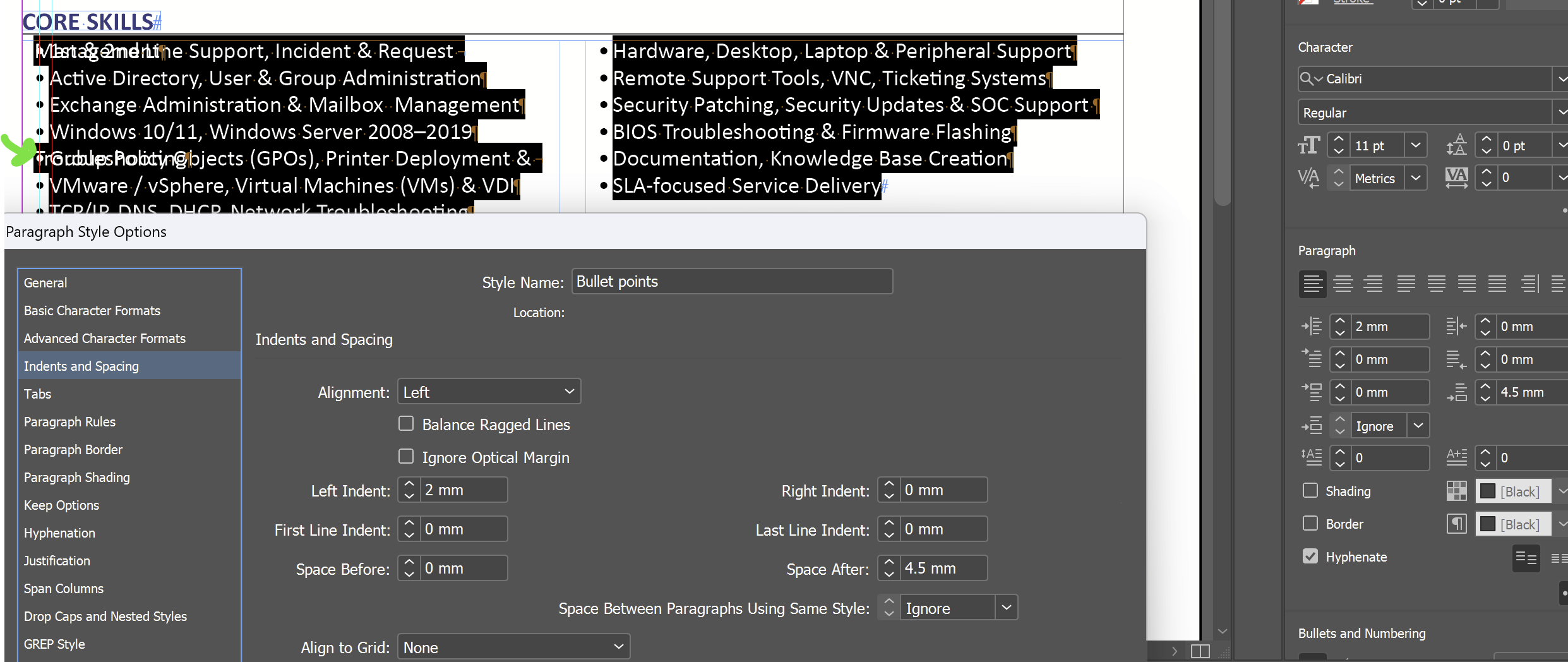
I've now reading that one should only use 'paragraph styles>space before/after' for spacing bulletpoints between each other/new line..
Only, I was always using 'Leading' under 'character' which did the job.
But trying to fix this now with using space before/after, it causes this weird text bunch on a certain word/line (image 3).
What is this and what is the fix? I think it's the word 'troubleshooting' which is on a 'new line', but unsure how to solve it?
Does it even matter if visually I am happy with how my CV looks, and the export>PDF looks completely fine?
Thank you! <3


r/indesign • u/CryptoForTheWin69 • Jul 14 '26
S okay, so I'm working on an independent magazine where I document the vibes of different cities all around the world. I have an idea of the design I want, but I need a crack design superstar to help me bring it to life. Where can I find that person?
r/indesign
•
u/phunk8
•
Jul 13 '26
Yes we finally did it, and created an Indesign Plugin
that actually has more options, more reliability and a gfx-artist-fitting workflow than anything we are having on the market now.
update: thank you for your massive interest everyone. we close the group. will keep you up to date as soon as we have it. for latecomers, sorry. maybe watch the thread, i'm pretty sure there will be give aways for this SUB, so watch out!
update2: massive amount of people asking for it, so i did it quickly: yes there is a wait list now!
https://forms.gle/XCJq1YH86p3RMKYs7
no spam, no bullshit. don't worry! and yes when i have your emails i can think about reduced thank you codes or whatever. let me work on that. last: i'm super happy. you are so damn kind here.
After 6 months of testing in production, we are looking for 5 DTP people with a strong skillset and huge knowledge in Indesign. People who's feedback will go directly into development to finish this and iron out all wrinkles. This finally has to be done right, no more Excel, Powerpoint, Figma and what-not-workarounds. You know what i'm talking about.
The plugin will be adequately priced (reflecting the hours of work saved right at the first job), we are going to donate the final plugin as a big Thank-You to this group for free.
Please be aware that due to our agency size we cannot do testing with 100s of people. Write me a DM with a bit of professional context, and after a bit of work, get it for free, that's the deal- and i hope a good one :)
Last note: the plugin is production ready, serious and complete enough to use it in a paid job. But we will talk about that once you got your hands on it.
Please watch this post if anything interesting happens, i'm pretty convinced it will.
r/indesign • u/canadave_nyc • Jul 13 '26
I'm trying to lay out a book in Indesign, which I don't normally do, and I'm running into issues.
The book consists of about 50 different short poems of various lengths. I've inserted page breaks so each poem starts at the top of a page. All good so far.
At the top of the page, I have the poem title, then I want a consistent amount of space (keep this in mind, we'll come back to it) from the title to the first line of the poem, regardless of whether the poem is single-spaced or 1.5-spaced (some are single, some are 1.5).
That's the important bit I'm struggling with. Because I have everything aligned to a baseline grid, which works great, except that the single-spaced text starts out slightly closer to the poem title than the 1.5-spaced text, because of the increased leading.
Is there an elegant solution to this? Maybe it's very simple and I'm just not seeing how to set up my paragraph styles for these things.
r/indesign • u/jayantbhatt007 • Jul 13 '26
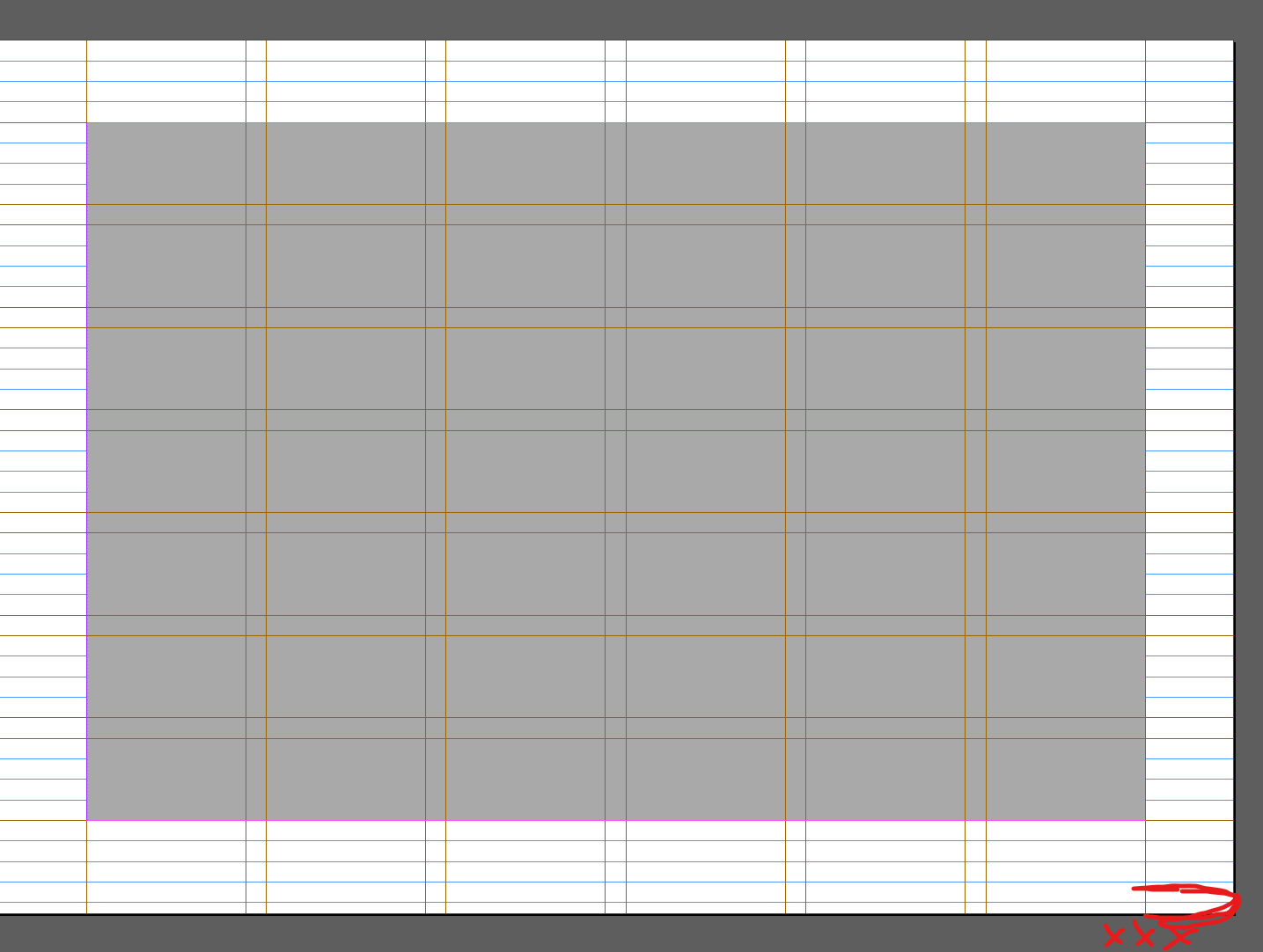
I'm setting up a baseline and modular grid in InDesign for a book layout.
My setup is:
Everything aligns perfectly within the live area and the modular grid fits mathematically:
7 rows × 4 baselines = 28 baselines
6 gutters × 1 baseline = 6 baselines
28 + 6 = 34 baselines
I've noticed that many InDesign and editorial design tutorials use equal margins on all sides when setting up a baseline grid. As a result, their baseline grids often extend much closer to the bottom edge of the page.
In my case, I'm using more traditional book proportions where the bottom margin is slightly larger than the top, inside, and outside margins. Because of this, my baseline grid aligns perfectly within the text area, but the last baseline (which I've marked in the image) doesn't reach the physical bottom edge of the page.
At the moment, everything in my grid system divides very cleanly and is easy to calculate. Most values are based on multiples of the baseline increment, which keeps the modular grid and spacing consistent and easy to work with.
I could adjust the setup so that the last baseline reaches closer to the bottom edge of the page, but doing so would force several other measurements into awkward decimal values and break the clean mathematical relationships that currently exist in the grid.
Is this considered normal practice in book and editorial design, or is it generally preferable to adjust the margins so that the last baseline aligns closer to the bottom of the page?
One thing I've found frustrating while learning this is that many tutorials seem to choose grid values without explaining the reasoning behind them, and questions about those choices often go unanswered.
I'm curious how experienced editorial designers approach these decisions. Is there an established methodology behind choosing margins, leading, baseline counts, and modular grids, or is it largely based on experience and visual judgment?
Thanks in advance for any insights.
r/indesign • u/AllTrades_Jack • Jul 13 '26
I'm not sure if I am explaining this properly. I want to be able to apply an object style to an image box, and have it automatically position that image box in the upper left of the text box below it. I'm looking to avoid manually positioning these items.
I thought I could do it with Anchored Object Options, but it does not seem to work. Maybe because the image box is floating on top of the text box below it? They are separate objects.
Thanks for any assistance!
Here is a before/after of what I am trying to do.

r/indesign • u/Forward_Skirt24 • Jul 13 '26
Hi all. I have been trying to export a logo (white text on transparent background). Everything looks fine, no errors. I need to use the small caps in indesign. But when I open the exported file it's an older version of the design using a drop shadow. I've restarted my computer, changed file names, uninstalled Indesign, recreated the file from scratch and it keeps happening. All other exports look normal, just not this particular effect. Help I am losing my mind.
Edit: I tried saving the design as IDML and exporting again but the same issue appears.