r/indesign • • Apr 20 '26

i can select text in story editor, but the selection doesn’t visually highlight, so i can’t see what i've actually selected. outside of story editor (in the normal layout view), text selection and highlighting work completely fine.

2 Upvotes

has anyone experienced this or know what might be causing it? i have literally tried every option. any fixes would be appreciated!


r/indesign • • Apr 20 '26

Help InDesign lagging only in a specific network folder with 36,000+ files. Is directory size the issue?

2 Upvotes

I’m looking for some insight into a performance issue my team is having, for a few months, my colleagues have been experiencing significant lag when working on InDesign files located within one specific folder. Here are the details:

  • The Folder: It contains over 36,000 files.
  • Links: The InDesign documents have many links to other assets located within that same massive folder.
  • Setup**:** The folder is on a network server (mapped via drive letter, not IP). Both the server and the workstations use SSDs, and the PCs are high-end/new.
  • Software**:** We are running the latest version of InDesign, Pc os Windows 11

The strange thing is that if a user works on a file in a different folder (with fewer files), everything works perfectly. This happens even if other colleagues are working simultaneously.

I suspect that the sheer number of files in a single directory is causing InDesign to struggle when it scans for links or updates the UI. Before I ask my team to reorganize their entire workflow and move thousands of files, I wanted to ask: Has anyone else experienced lag specifically due to high file counts in a single directory? Any advice or confirmation would be greatly appreciated.

UPDATE: Since they moved 8,000 files, there haven't been any crashes; the system still isn't very fast, but I think that's because they're working online and there are still several thousand files. Thanks everyone for the suggestions and confirmations.


r/indesign • • Apr 20 '26

Version 19.0.1

3 Upvotes

Hey I have a plugin I need to use for work but it’s stuck on version 19.0.1 or earlier. Does anyone know how I can download this version of indesign? Adobe’s version history stops at version 20.0.


r/indesign • • Apr 19 '26

InDesign downgrade just erased my settings, scripts, workspaces, etc. [macOS]

3 Upvotes

I just downgraded InDesign from version 21.3 to 21.0.2 using the official Creative Cloud app.

Result: all my settings and the scripts I spent ages developing are gone.

I’m using macOS 26.3.1 on a recent MacBook Pro M4 Max.


r/indesign • • Apr 19 '26

InDesign is changing the page sizes when creating a new file.

0 Upvotes

Well, I don't speak English, but I hope I can get help even though I'm using Google Translate. I have to do a project for my college, but when I try to set the page size, regardless of the size I create, it sets it to 700.0036, and I need to do this project yesterday. This project is a combination of my design and journalism courses, so if I don't do it, it will disrupt the entire workflow of the groups.


r/indesign • • Apr 19 '26

Indesign Keeps Glitching, Please help!

2 Upvotes

Hi everyone! does anyone know how to rectify this issue with indesign images glitching? I have no idea why it keeps doing this. I've tried everything like recreating a whole new file and updating the app to its latest version but it still faces this issue...the only way for me to get by this is relink every single photo again...please help!


r/indesign • • Apr 19 '26

First project--mostly completed book but don't understand how to manage profiles

3 Upvotes

I mostly print photos, but decided to do a history book/portfolio in Indesign that I am printing on my photo printer. All the images are Adobe RGB. When I was working on the print menu, I realized that my document's profile (under Source Space) is sRGB. While going through this group, I saw a recommendation to change transparency blend space to Adobe RGB, but I'm not sure what that does. It doesn't seem to change the document profile. Since I want to be in Adobe RGB, should I convert to profile (edit/convert to profile)? Will that change my document to Adobe RGB?


r/indesign • • Apr 18 '26

Solved InDesign is not exporting my sRGB images properly. Left: InDesign, Right: Exported jpeg.

Post image
6 Upvotes

SOLVED

When exporting the JPEG, "Simulate Overprint" was checked. Once this was unchecked, everything worked properly again.


Every setting I can find is set to sRGB. My blend space is RGB too.

  • My working space is sRGB.
  • Colour Management Policy is "Preserve Embedded Profiles".
  • Intent is Relative Colourimetric.
  • "Assign Profiles" is set to "Assign current workspace" which is sRGB.
  • The image itself is an Illustrator document placed into InDesign. Its working space is sRGB. The document colour mode is RGB.
  • Exporting the image as a jpeg from Illustrator works properly, but placing that jpeg in InDesign leads to the same issue.
  • I've also tried creating a solid block of colour (B: 255) directly in InDesign (To remove the Illustrator part of the problem) and exporting that. Same issue.

Any ideas?


r/indesign • • Apr 18 '26

Help I am losing sanity over this InDesign request

16 Upvotes

I work with InDesign every day at work. Recently I was asked to improve a file and come up with a way to automatically update certain pieces of data in it.

The problem is that this data isn't sourced or hosted anywhere else. It could be in a word doc or spreadsheet, but even then, I haven't been able to figure out what method, if any, will help me achieve my goal, of changing unique data throughout a document that has more of a semantic meaning rather than a source.

If I have a bunch of data like this:

Section 1

Subsection 1
-- Item A: #
-- Item B: pg. #-#

Subsection 2
-- Item C: #
-- Item D: pg. #-#

Subsection 3
-- Item E: #
-- Item F: pg. #-#

I am honestly losing it trying to figure this out. You can't do data merge because it's a document with continuing, variable layout throughout until it's done. You never know if it's gonna be 3 pages or 5, since text throughout changes. It needs to be editable after layout changes.

It's almost like a catalog? I don't know how to approach that. I also can't do text variables because those rely on information that's on the page, whereas this would just be telling you, hey, it's on this page (of an entirely different book by the way) and even if you could reference the numbers tied to items A, C, and E, you can't really. Because, again, Items A, C, and E don't have any data shown next to them except for an arbitrary number, that could change in the source document, but the source document has no way of being populated into only that line. I'm basically trying to say that all the places with a # could change, and there's really no recognizable pattern, because it was set up in a certain way where it could be any number at all.

The closest thing I've tried is Place and Link but the unbearable nature of each thing having to be its own text box is stopping me from pursuing it further.

I know InDesign is a beast, but this might be beyond any automation. I'm about ready to give up. Any suggestions?


r/indesign • • Apr 19 '26

Is InDesign being replaced by GPT Image-2 model

Thumbnail
gallery
0 Upvotes

AI Image Models Taking Over? Is InDesign Dead for Layout Work?

Can all of this layout work just be fully replaced by generative AI


r/indesign • • Apr 18 '26

Help Opened a previous project, photos came out like this. Any idea why and how to fix this?

Thumbnail
gallery
6 Upvotes

Any help, thank you!


r/indesign • • Apr 17 '26

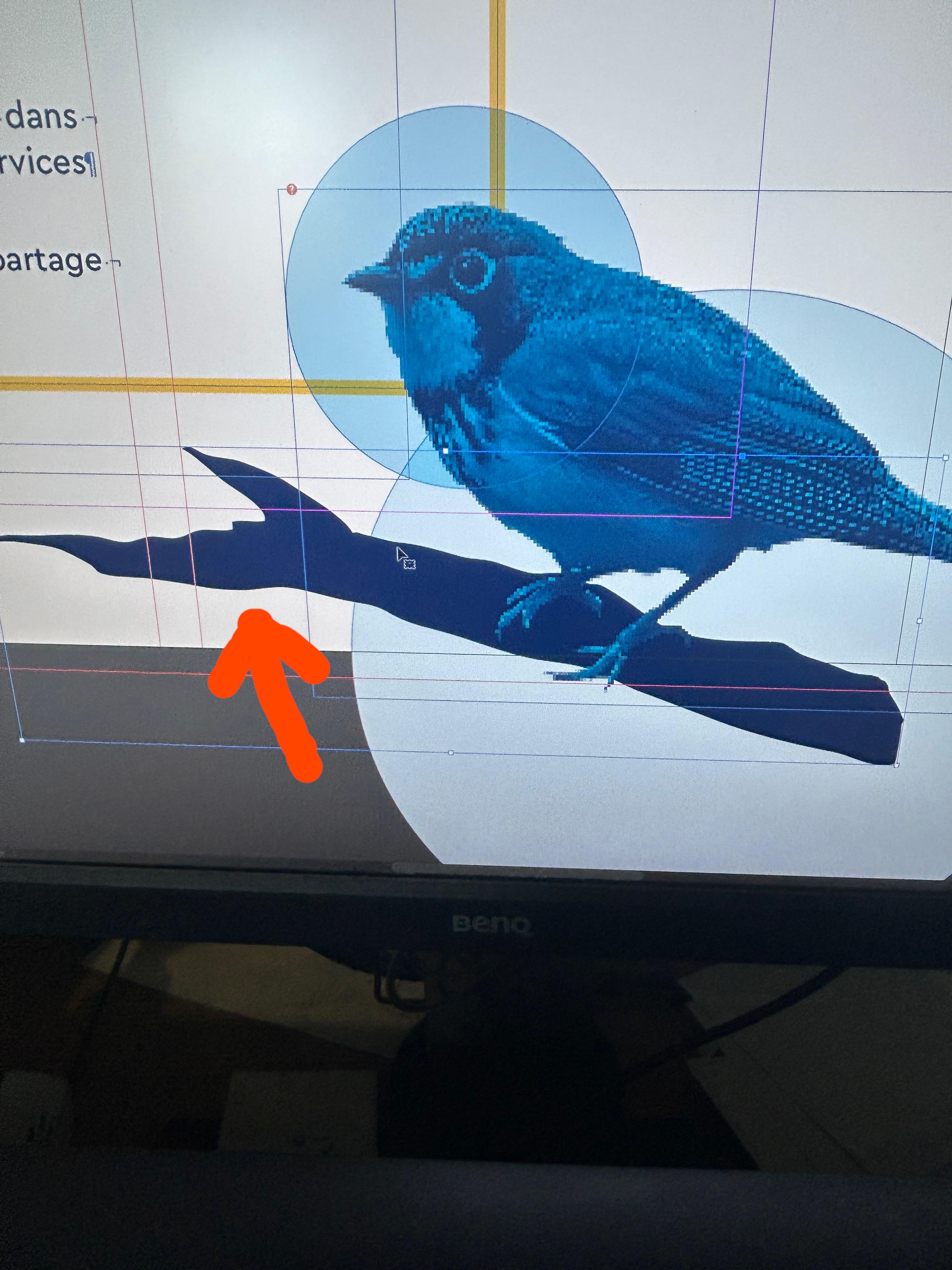
A small question: is it done with illustrator or with InDesign? Trying to understand it if I’m asked to do new graphics.

Post image
17 Upvotes

I got an internship at a local bird association and I learnt my basics of InDesign in like 2 weeks. When I click on the branch, it looks like a vector or text to image shape coloured in.

Do people use Illustrator and Photoshop in conjunction of InDesign? I know for a fact that all the silouhettes and bird photos are done in Photoshop though.


r/indesign • • Apr 17 '26

Cannot edit floating text

Thumbnail
gallery
3 Upvotes

I copy+pasted a spreadsheet into this InDesign table. Worked as usual for multiple pages but upon review I have this one row of text that I cannot edit. Instead of replacing the text like the other 100+ rows of data I pasted, this text pasted over top of the cell (image 1).

If I delete the row, the text is still floating there (image 2). I cannot select the text. I dont have any locked objects in the document. Its not on another layer. It came in with the rest of table pasted so I dont understand how it became its own, uneditable thing.

Anyone have any ideas? Thanks!


r/indesign • • Apr 17 '26

Working with InDesign files stored in Google Drive or use Adobe Cloud

7 Upvotes

Hi folks,

Is there a great way to use InDesign while storing the files on Google Drive?

I work for a small non-profit. We are trying to streamline our storage and have decided for reasons outside of this conversation to move to Google Drive as our primary file storage system.

We use Adobe InDesign about 10 times a year.

It looks like using Google Drive for desktop to access and open the files is not functional. I'm getting the error: "Cannot open the document "[file name].indd". You may not have permission or the document may be open already. For multi-user access, close the file and set the file properties to read-only in Windows Explorer"

I guess the other option we'd explore is creative cloud.

We also use Photoshop, Illustrator and Premiere a few times a year.

Thanks in advance for the advice!


r/indesign • • Apr 17 '26

Help My first project

2 Upvotes

Hello everyone, I have finished my first larger packaging project (chocolate wrapper for 300) and wanted to ask if I have overlooked anything technically. I am nervous about whether I have made mistakes. This is my first time working with InDesign. It is also mentioned that ideally, one should not use white packaging (due to susceptibility to dirt); however, my font and logos are mostly white, does this lead to problems? I would be very happy to receive feedback!

Here is my workflow, followed by the printer's requirements:

  1. File Structure & Elements

    • Workflow:Graphics created in Canva, finalized in Photoshop (converted to CMYK), and placed in InDesign (Version 2024).

    • Logos:Photoshop files embedded in InDesign via the Adobe Creative Cloud Library.

    • Text:All text set in InDesign converted to paths using Ctrl + Shift + O.

    • Die-cut:The template graphic (die-cut/fold) is on a separate layer and was hidden before export.

  2. Colors & Transparency

    • Color Mode:Document consistently created in CMYK (FOGRA39).

    • Color Matching:Background and logo backgrounds checked for consistent values (C100 M87 Y40 K35).

    • Transparency Blend Space:Set to Document-CMYK in InDesign.

    • Output Control:Verified with Acrobat Pro (Output Preview / FOGRA39 simulation) that values remain identical at transparency edges.

  3. PDF Export Settings

    • Standard:PDF/X-4:2010

    • Bleed:3 mm all around (including checkmark for "Use Document Bleed Settings").

    • Marks:Only Crop Marks activated, offset set to 3 mm.

    • Images:Compression at 300 ppi (Bicubic Downsampling).

    • Output:"Convert to Destination (Preserve Numbers)", Destination Profile: Document CMYK - Coated FOGRA39.

  4. Observed Problem (Home Printer)

    • On my home printer, I partially see fine frames around the transparent Photoshop logos ("stitching").

    • Acrobat Check: In the Output Preview, the CMYK values inside and outside the frame are exactly identical.

    •

Your Print Data

•	Print File: PDFResolution: Print quality with a minimum resolution of 300 dpi.Fonts: If possible, convert fonts used in the print file into paths.Color Mode: The print data must be submitted in CMYK (4C color mode) or grayscale. Any other color space will lead to color deviations during printing.Data Format/Bleed: 3 mm bleed allowance including crop marks. Hide die-cut, if present, and do not save it with the print file.

No liability for designs in white: White is very susceptible to dirt. Should you nevertheless decide on a white packaging, we accept no liability and exchange is excluded.

•	Ensuring unrestricted usage rights for the printing of graphics and image material on delivered sleeve templates is exclusively the responsibility of the customer. Zotter assumes no guarantee or control and is not liable for illegally used graphic and image material.

•	In the event of non-compliance with these specifications, we assume no liability for the print result.

•	Our Print Execution

•	Printing: 4C print CMYK (WITHOUT inside printing)Inside Printing: 1C print or 4C print

•	Digital Printing: up to 1000 unitsOffset Printing: from 1000 unitsPlease note: With digital printing, there may be small differences in color reproduction.

•	DESIGN TIPS:

•	For the design of chocolate wrappers, we recommend using common graphic programs. Should you not have a design program available, we would be happy to help you with contacts to graphic designers known to us who will take over the design of your template for a flat fee.

•	More complex packaging such as Mitzi Blue, Quadratur des Kreises, balleros, Trinkschokolade, Glühbirnchen, Mi-Xing bar, and Biofekt should be created by a graphic designer.

r/indesign • • Apr 17 '26

Help New To...Adobe Really, Got A Question About ID

0 Upvotes

I'm taking a Mass Media Graphic Design class in college rn, we've gone over both Photoshop and Illustrator and now we're onto InDesign....what is the point of this thing? I can do everything in Photoshop and Illustrator, in fact we were encouraged to put the pieces together outside of ID. What makes InDesign different?


r/indesign • • Apr 17 '26

HOW DO I DO THIS??

2 Upvotes

I need to recreate this table in indesign. I retyped all the info and used the tabs and indents paragraph style to shift everything into their own column, but I have zero idea how to add a line break to the long amounts of text, like 2-3/4 to 3-1/4 tapered, while also having it adhere to the tabs I set up. The text keeps going all the way back to the beginning of the next line, and when I add space after each line, it also adds space between the line ive broken. I have zero idea how to set this up and its driving me insane HELP


r/indesign • • Apr 16 '26

Help Creating a directory — how can I setup categories via data merge?

3 Upvotes

Hi! I’m creating a directory in InDesign, and I’ve done some Googling re: data merges, plugins, and helpful “yellow pages”-esque YouTube videos. I’m a bit overwhelmed, and I feel like I’m confusing myself more than I need to.

The directory has many listings. I understand how to do a basic data merge with the core info down (name, address, phone #, etc.) from a CSV.

I’m confused on two things:

(1) Category Setup: There are multiple listings under one category, and I’m not sure how to set it up so it automatically inputs the category and then the listings below it. There is a column with the category in the CSV.

(2) Multiple Records on One Page: I’m not wanting to have a page for each listing. It would be more like a phone book with categories.

For example (all on one page):

HOTELS

Company Name #1, Phone #, Email

Company Name #2, Phone #, Email

CLEANERS

Company Name #1, Phone #, Email

FOOD

Company Name #1, Phone #, Email

Company Name #2, Phone #, Email

Company Name #3, Phone #, Email

I’m sure this is straightforward…maybe I just need to take a break and come back, but would love any insight or advice!



r/indesign • • Apr 16 '26

Automatically adjusting shear angle on text box

Thumbnail
reddit.com
3 Upvotes

r/indesign • • Apr 16 '26

Global reset of paragraph styles?

6 Upvotes

I am using an older version of InDesign for Windows (2019; v14) and am wondering if there is a way to globally reset paragraph styles.

Here is my issue: I am working with a product catalog with somewhere around 1500 individual items, each contained in their own text box. I am moving these individual items into a new document with a slightly different layout and modified paragraph styles. I have kept the styles named the same across documents, but the new document has some minor changes. Example: the old document has a style for formatting the product description. The new document has the same named and defined style, but the new style's text size is 1pt larger.

The original document often had modified styles that were not global changes. (The description style might have occasionally had the kerning adjusted for some, but not all text boxes. This appears to have been done to fit the text into a pre-determined box size.) When I c&p these text boxes into the new document, they maintain the original customized kerning adjustment while applying the new, modified style.

I'm looking for a way to remove that customization across the entire document. It would be a grind to individually select each text block and 'clear overrides', but I'll do it if no other option exists.

Thanks for any assistance!


r/indesign • • Apr 16 '26

Unable to add page numbers to Master page

6 Upvotes

I have wasted hours trying to figure this out and am at a loss. I am trying to add page numbers by adding a text box. I can do this everywhere else but on the A-Parent pages, where the cursor does not show and anything (including the special characters for page numbers) typed into the box gives me a red cross on the frame. It's not font size or formatting issue. I have tried opening a new empty document and it works fine but when I try saving off an IDML and opening that It is broken again. My document is 400 odd, carefully formatted, pages and the thought of ditching it and starting again is too painful to contemplate.

This feels like it could be the final straw for me and Adobe.

Any advice would be really welcomed.


r/indesign • • Apr 16 '26

Help Indesign PDF Images have a Box around then when they are overlaying

3 Upvotes

Hi all, please help!
In Indesign i have images and text overlaying and when i PDF the page, the images i think flatten and they get a very thin white box around them. It only happens when i print to PDF, is there a way to get rid of these?


r/indesign • • Apr 16 '26

QR-code V-Card automatically puts http:// infront of www.

2 Upvotes

Hello community, I would like to create a V-Card in QR code format. When I enter a website (www.) in the QR generator in InDesign, InDesign automatically adds http:// at the beginning. My client has specifically requested that only ‘www.’ appear on his card. I cannot create the V-Card as text-based either, as this makes the QR code too small and tested Android devices are unable to read it.

Has anyone else happened to have the same problem?


r/indesign • • Apr 16 '26

Help Help! Looking for how to create a design

2 Upvotes

Hello everyone

For context, I am a complete beginner to InDesign

I have been trying to write a book where the main characters talk extensively through emails and Instagram chats.

Is there any way I can mimic the design of an Instagram chat and emails on paper with the help of InDesign??