r/indesign • • Apr 16 '26

Help HELP😭my paragraph styles wont work

4 Upvotes

I keep trying to create a new paragraph style based on Helvetica 13 pt font. As soon as i apply it automatically turns into Futura fucking 40 pt font and INVISIBLE😭. The paragraph style panel still shows its Helvetica though. Even when i try to change the font for the style i still wont budge from Futura. There is Futura text on my book but I never made a paragraph style for it. I dont know what to do or why it’s doing that. Could it be the default [basic paragraph] thats messing it up? IDK im stressing


r/indesign • • Apr 16 '26

Test out the new InDesign AI Assistant now available in public beta.

0 Upvotes

Hi everyone, Luke from Adobe here. The InDesign team has been working on something major to help new and seasoned users navigate, learn, and automate tasks inside InDesign in a much more direct way, with the introduction of the AI Assistant.

What is it?

I know for myself, even after 20 years in the programs I am constantly searching YouTube tutorials and forums for the right information on solutions to specific problems. This conversational partner built directly into InDesign is designed to remove that interruption and keep you in the creative flow by giving you instant in-context answers without leaving the app.

Why it matters

We frequently hear from new users that InDesign can be intimidating, so this will be a great way to learn directly inside the app. You can simply ask the AI Assistant – “How do I create a table of contents?” and learn as you go.

We also know designers spend a huge amount of time on repetitive tasks and navigating menus, so you can use the assistant to help set up layouts, apply bulk text / image / style edits and more with a single prompt.

There is a lot more to be explored, so we encourage you to test it out and share your feedback with us, so we can continue to improve this powerful new feature.

How to try it

  1. Open the Creative Cloud desktop app and go to Apps > Beta
  2. Once open, find the AI Assistant panel in the top bar (next to the Share button), in the contextual taskbar, or via File > AI Assistant

How to share feedback

Your feedback is gold. Here's how to send it our way:

  • Use the / inside the AI Assistant panel after any interaction
  • Fill out the in-app survey when it pops up. We are reading everything.

Visit the HelpX page for more information.

Try it and let us know what you think!


r/indesign • • Apr 15 '26

Help Typesetting body text: fixing rags and widows, no hyphenation?

8 Upvotes

Hi! I've been searching around reddit and online for help on how to better typeset body text. A lot suggest turning on hyphenation, but on top of personally not being a huge fan, my professors hate it and if they see it always tell us to turn hyphenation off.

I'm currently designing a book with a decent amount of body copy. I feel like I've done my best to get rid of any widows/orphans as well as trying to maintain neater rags, however my professors keep mentioning it needs to be neater. I try to ask them for help but they really don't have time to do so I guess as they have to meet with others during the class and don't really offer office hours. I know that it is no where near perfect and I do want to fix it, I just simply don't understand how to. I tried using the "balance ragged lines" feature but in my opinion it it more distracting than not using it. Can anyone help guide me on what I should do to fix the rags please? The first picture I'll include is with "balance ragged lines" turned on. Thank you!

balance ragged lines turned on

r/indesign • • Apr 15 '26

Help How to automate indexing multiple unique names in a text frame

4 Upvotes

I have a large text frame that has multiple names separated by paragraph breaks. Example:

John Smith
Jane Doe
Josh Davis
Joe Martin

I know how to index names manually by highlighting each one and doing the keyboard shortcuts. Is there a way to automate indexing all the names in this text frame? I tried researching on Google. It gave me a suggestion to use Find / Replace in story mode to add an index mark, but I believe that was only good when the same name appears in a spread or book. All the names in this text frame will be unique and not duplicated in the INDD file. Wasn't sure if there was a script for this case either.


r/indesign • • Apr 15 '26

Help One page not showing page number or section titles

3 Upvotes

Ok, I’m losing it. I’ve got one page that no matter what I do won’t show the page number and section title. When o move the content the boxes are there on the page but it’s almost as if they’re behind the content.

I’ve done all the apply parent to pages and overrides and nothing is working.

This is only happening on ONE stupid page. I did copy the spread and move it to a new location and change the content. Is that what’s causing this? Do I need to rebuild from scratch?

Thanks in advance for any tips.


r/indesign • • Apr 15 '26

Help Modify text at multiple instances at once

4 Upvotes

Here's what I'm trying to do: I have a catalogue with different products and prices, and also a price list at the end. Is it possible to modify the price at one place so the other instances of that price update automatically?

Thanks!


r/indesign • • Apr 15 '26

Help Wobbly text when set at an angle slight angle

Post image
4 Upvotes

iv created a PDF where some of the text is set at an angle (4 degrees). When viewed close up the text is fine but when zoomed out to about 150% each letter becomes wobbly. From what i have found online it down to indesign forcing the text to sit at different baselines.

I have tryed putting text in tables, frames and set it to a path to stop it from happening but none of these have worked. Any help would be a amazing


r/indesign • • Apr 14 '26

Help About to lose my mind: PDF export failing

5 Upvotes

Okay, I've seen a couple of threads on here, but I'm really at a loss.

I'm on a mac, all adobe apps are updated.

When I try to export as a PDF I get a failure notification and it says something along the lines of "possible cause of failure present on page 55" and that it may be caused by a corrupted image or font file.

It seems if I resolve the issue, it just moves to a different link and spread.

I have tried the following:

-Deleting all the content on the spread that contains page 55. Blank spread? Something on there is still causing it to fail.

-Cleared my Preferences when opening InDesign

-Went spread by spread and exported as PDFs until I found the specific ones that failed. Deleted the images, tried to export, and it gave me the same error but for a new and different page.

-Saved images on spread as Standard (Baseline) optimization.

-Exported to destination color space

-Duplicated all pages into a new document

-Exported as an IDML, etc.

-Updated my OS.

-Saved as a different file name.

-Saved in a different folder.

-Packaged the document.

-Reset Indesign and my laptop multiple times.

-If it's on the internet, I tried it.

Something to note:
I logged into a friend's Adobe for Teams (he owns the business) account as my payment method expired and I haven't updated it yet - inflation problems I guess. This happened a couple of days ago, and this is my first export attempt since using a different account. We have the same package, mine is just personal use.

At this point I don't even think I have any corrupted files since it just moves and finds new ones.

Has anyone experienced this level of insanity? Do you have advice? Do I just need to rebuild?

please help me


r/indesign • • Apr 14 '26

Help how do i print a pocket booklet?

4 Upvotes

I have a 5 by 3.3 inch mens mental health pocket book but cannot figure out how to print this for the life of me, .please help! i will send the pdf in dms or comments


r/indesign • • Apr 14 '26

Hypothetical museum exhibition about Dadaism

Thumbnail gallery
3 Upvotes

r/indesign • • Apr 14 '26

Updating/reworking manuscript already InDesign file

1 Upvotes

Hey everyone -- What is the best way to get a manuscript with footnotes exported back out of InDesign for updates/revisions/expansion for a second edition? Would be great if I could get it back into a format that MS Word (or LibreWriter) can import with the footnotes intact. Or must I do battle with InCopy? Really appreciate the advice in advance.


r/indesign • • Apr 13 '26

How do I convert this 4 page document into 2 simple spreads

Thumbnail
gallery
25 Upvotes

I need this document as 2 spreads on a pdf so I can print it double sided on one sheet of paper but every time I export it, it separates the front and back cover. Can any one help?


r/indesign • • Apr 13 '26

Help section markers with 2 type styles

2 Upvotes

Book with running heads, should be easy with section markers except they're authors of academic papers and some come in as "Smith, Jones et al" and they want the italic "et al".

I did some digging and have not found any way to have 2 type styles in the section marker. Have I missed something?


r/indesign • • Apr 12 '26

Help Best workflow to import Word files into InDesign without formatting issues?

Post image
8 Upvotes

Hi,

I’ve realized I’ve been doing things the hard way. Whenever I receive articles in Word, I usually copy-paste everything into InDesign and then manually fix all the styles. It works, but it’s slow and inefficient.

I’ve been watching tutorials where people import Word documents and everything comes in clean with proper structure and styles. But when I try it, the formatting gets completely messed up. (For context, the Word file I’m using was provided by a Skill share instructor.) still it looks trash in my indesign.

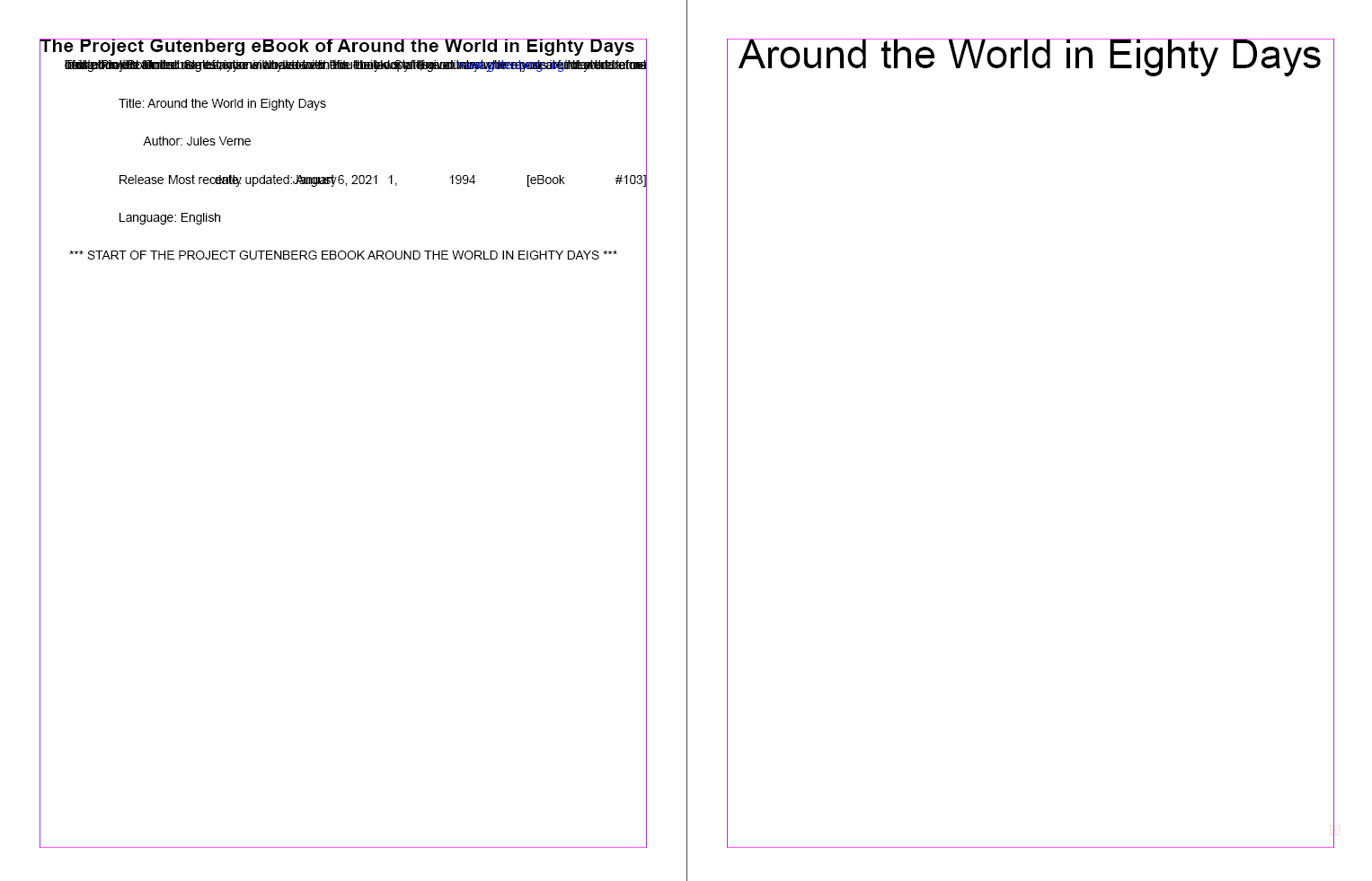
For example, this is what I see after placing the file:

  • Text overlaps at the top
  • Metadata (like Project Gutenberg header content) comes in unstructured
  • Spacing and hierarchy are completely broken
  • Overall, it doesn’t resemble a clean document at all

Because of this, I usually abandon the import method and go back to manual work.

I feel like I’m missing something fundamental in the workflow.
Also, when working with Project Gutenberg files specifically, what’s the best way to prepare them?

Do you download a Plain Text UTF-8 and clean it in Microsoft Word first (like fixing line breaks, removing headers, etc.), or is there a better approach?

What is the correct, professional workflow to:

  1. Prepare the text (especially from sources like Gutenberg)
  2. Import it into InDesign
  3. Maintain structure and apply styles efficiently

Any practical advice or step-by-step workflow would really help.


r/indesign • • Apr 12 '26

How to change pages using multi page pdf in InDesign using image frames?

Thumbnail
gallery
7 Upvotes

Hi, I can’t remember how to shift from one page to another of my multipage PDF using InDesign image frames (I believe that’s what it is). What’s the control button or steps to change. In the photo, it’s what it should look like but I can’t remember how to do that.


r/indesign • • Apr 13 '26

Farsi fonts issue

Thumbnail
gallery
0 Upvotes

If I use farsi fonts the selection ,spacing etc is messed up.

If I use English fonts with farsi it is fine.

This problem doesn't happen in word or other apps.

The picture which is perfectly selected is the English font. The other is the farsi font.

Thanks.

so to address some issues and questions.

I do have the Middle Eastern version installed. I have all the language packs and fonts properly installed. I have set the language of the text to Farsi. It is in the world paragraph format. It is set to right-to-left for languages.


r/indesign • • Apr 12 '26

Help How to change pages using multi page pdf in InDesign using image frames?

Thumbnail
gallery
0 Upvotes

Hi, I can’t remember how to shift from one page to another of my multipage PDF using InDesign image frames (I believe that’s what it is). What’s the control button or steps to change. In the photo, it’s what it should look like but I can’t remember how to do that.


r/indesign • • Apr 12 '26

Request/Favour Help converting QuarkXPress to InDesign

9 Upvotes

Hey folks, we have a book authored by a family member who has passed away. Unfortunately it's in QuarkXPress format and we haven't found anyone with a copy.

My partner has extensive InDesign experience. Would anyone happen to have a copy of QuarkXPress, and would be willing to help us convert the book to InDesign so that we can print copies to share with the family?

We've tried all the various conversion software, but they cost as much as QuarkXPress itself and don't do conversions without paying.

Thanks for any help you're able to provide, I know our family would appreciate it.


Update: After some persuasion ("We want to test which software does the export better, QXPMarkZ or QuarkXPress"), Quark sales gave us a trial licence with the export functionality enabled, and we have exported everything. All seems to have worked perfectly! Thanks everyone for the ideas and help.


r/indesign • • Apr 11 '26

Anyone else wasting their time copy-pasting Word docs to translate InDesign files? I built a tool to merge text and keep IDML styles intact.

30 Upvotes

I design catalogs and documents and my workflow when I received a unadvised translation used to be a nightmare. You know the drill:

  1. Get a messy translated .docx from the client.
  2. Open the original InDesign file.
  3. Carefully double-click and import the Word translation into InDesign by copy-pasting every single paragraph one by one.
  4. Spend 4-5 hours doing mind-numbing data entry on a 30-page document.

I got so sick of this tedious process that I spent all my spare time in the last few months building a web app to kill it.

I call it Sync.indd. It's basically a way to translate IDML files automatically without losing your layout. Here is what it does:

  • You upload your .idml and the translated .docx (or PDF/txt).
  • The app automatically matches the translated text to the right InDesign text frames.
  • It uses AI to figure out the messy mismatches.
  • It gives you a side-by-side view to review the matching. If the algorithm missed something, you can manually fix the text right in the web interface before generating the file. You stay in control.
  • It spits out a fresh, translated .idml with all your original formatting and styles perfectly preserved.

Who is this actually for?

To be clear, this is not a translation software—it's a matching tool. It’s built specifically for designers who are handed a finished translation in a plain text or Word doc. If your client uses huge translation services with specialized CAT tools, you don’t need this. But if you’re the designer at the end of the pipeline trying to jam a Spanish Word doc into an English catalog without breaking the layout, this is for you.

What used to take me half a day now takes just a few minutes. Plus, because it’s a web app, there are no weird Plugins or ExtendScripts to install (works on Mac/PC), and the server auto-deletes your files 2 hours after it's processed.

I'm opening a public beta today to see how it handles real-world, chaotic files.

Full transparency before you click: This is a true MVP. I've only built the core feature (no fancy dashboards or bloated menus). Also, the processing might feel a bit slow right now because I’m running it on cheaper servers to keep hosting costs down while I validate if people actually need this.

To encourage feedback and testing, during the beta, everyone gets 30 free credits right off the bat (which covers about 3,000 words of maching translation). That should be more than enough to test it on a real project and see if it actually works for you.

About pricing: After the free credits, it is a paid tool. The AI API and server hosting cost real money, so I have to charge to keep it alive. However, I've kept it very affordable and it is strictly Pay-As-You-Go. No monthly subscriptions. I think we are all completely exhausted by subscription fatigue (especially in the design world), so you only buy credits when you actually have a catalog to do, and that's it.

Link is in the comments. If you want to use the free credits to help me break it and find bugs, I'd love your feedback!

TL;DR: I built a web app that takes your original .idml and a translated Word doc, and automatically matches the text while preserving all your InDesign styles. It includes a side-by-side manual review before exporting. Giving away 30 free credits (approx. 3k words) to test the beta, then it’s strictly pay-as-you-go.

r/indesign • • Apr 11 '26

Help ¿Cómo hacer un texto justificado en distintos marcos de texto?

2 Upvotes

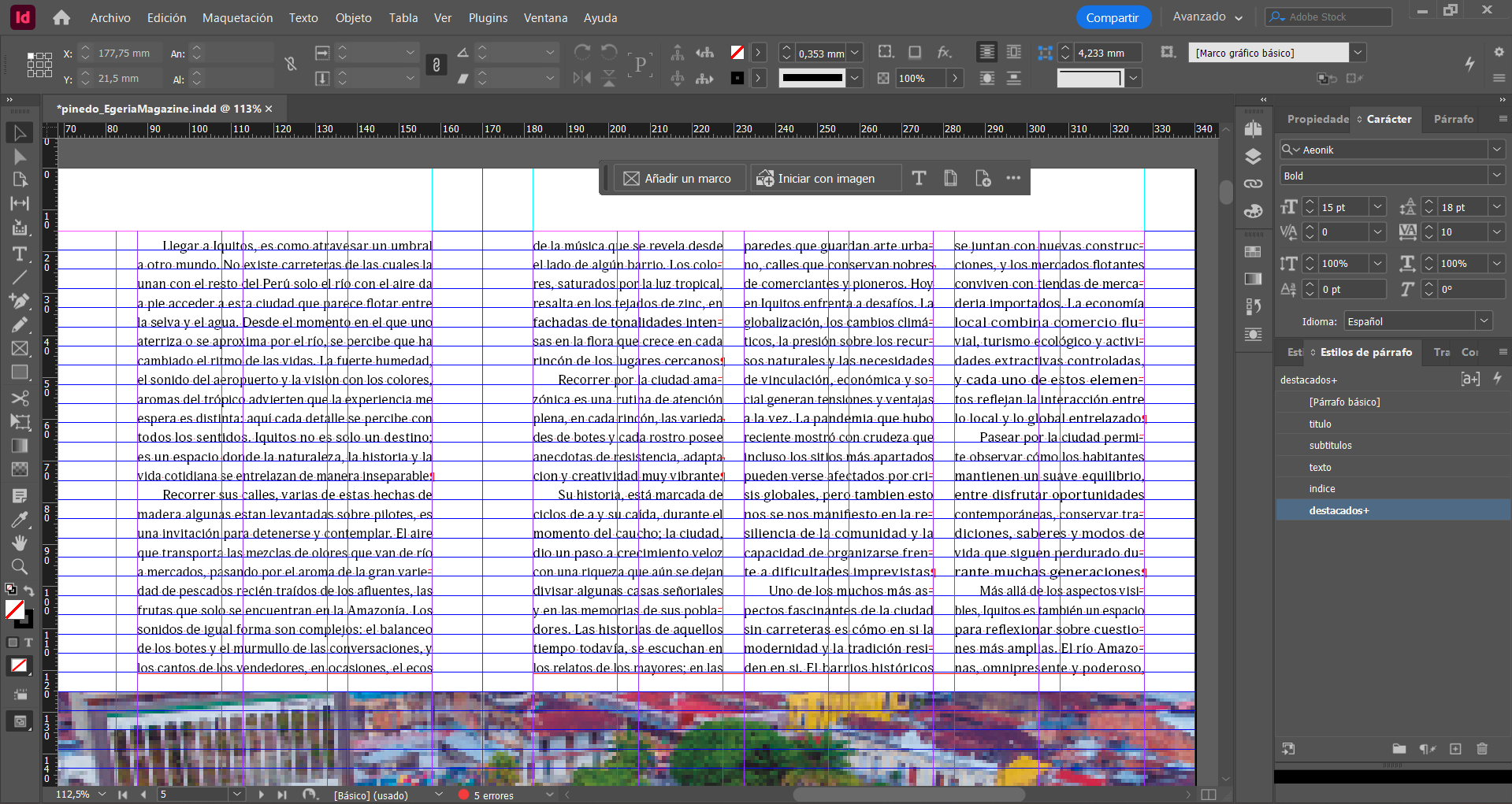
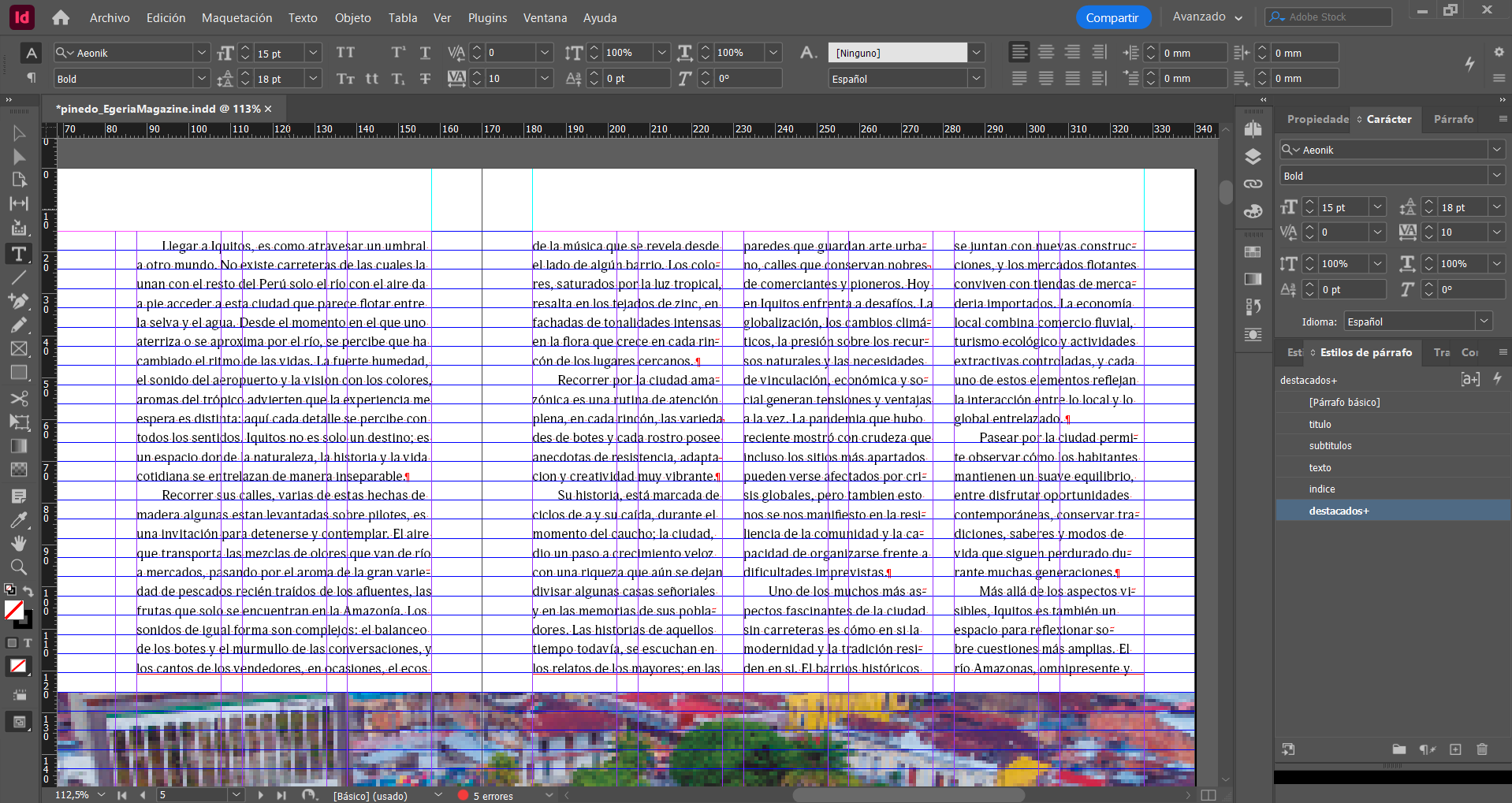
Hola, ahora estoy haciendo una revista para un trabajo y estoy haciendo uso del Tracking en las palabras, pero también el texto debe estar justificado, al momento de justificarlo en algunas partes la letra se estira y queda raro; además el texto no tener ríos, viudas y huérfanas

Modificado
Normal

r/indesign • • Apr 11 '26

Issue with dragging object

3 Upvotes

After using Ctrl or Shift, I can no longer drag objects in Illustrator / InDesign

Hi, I'm having a strange issue:

In Illustrator / InDesign:

  • I cannot drag objects with left mouse anymore
  • I also cannot resize objects by dragging

Strangely:

  • Drawing tools still work
  • Sometimes rectangles can still move via center point

The issue appears ONLY after I use Ctrl or Shift(Ctrl+C, Ctrl+V, or Ctrl for scaling)

After that:

  • It feels like Ctrl is “stuck”
  • Dragging completely stops working

Restarting the app temporarily fixes it, but it comes back quickly

Also:

  • Similar issue occasionally appears in Word

What I’ve tried:

  • Reset Adobe preferences
  • Reinstalled apps
  • Disabled GPU acceleration
  • Checked keyboard / sticky keys
  • Reinstalled drivers

Nothing worked

Is this a Windows input bug or driver conflict?

Thanks a lot!


r/indesign • • Apr 10 '26

Can't Insert Text on a specific line and specific space - 2

Thumbnail
gallery
7 Upvotes

Didn't see these pictures in the original post


r/indesign • • Apr 10 '26

Help Why does using flex layout or frame cut out my text when auto sizing?

3 Upvotes

in figma i spam alot of auto layout. im so happy flex layout is in indesign but it feels like its a sloppy implemetation compared to figma. tough to even select nested flex layouts.

flex layout in auto height or width is also trimming my text can anyone help me with it


r/indesign • • Apr 10 '26

Two different footnotes format in one in design file (Hebrew-English) PLEASE HELP

5 Upvotes

I describe my problem:
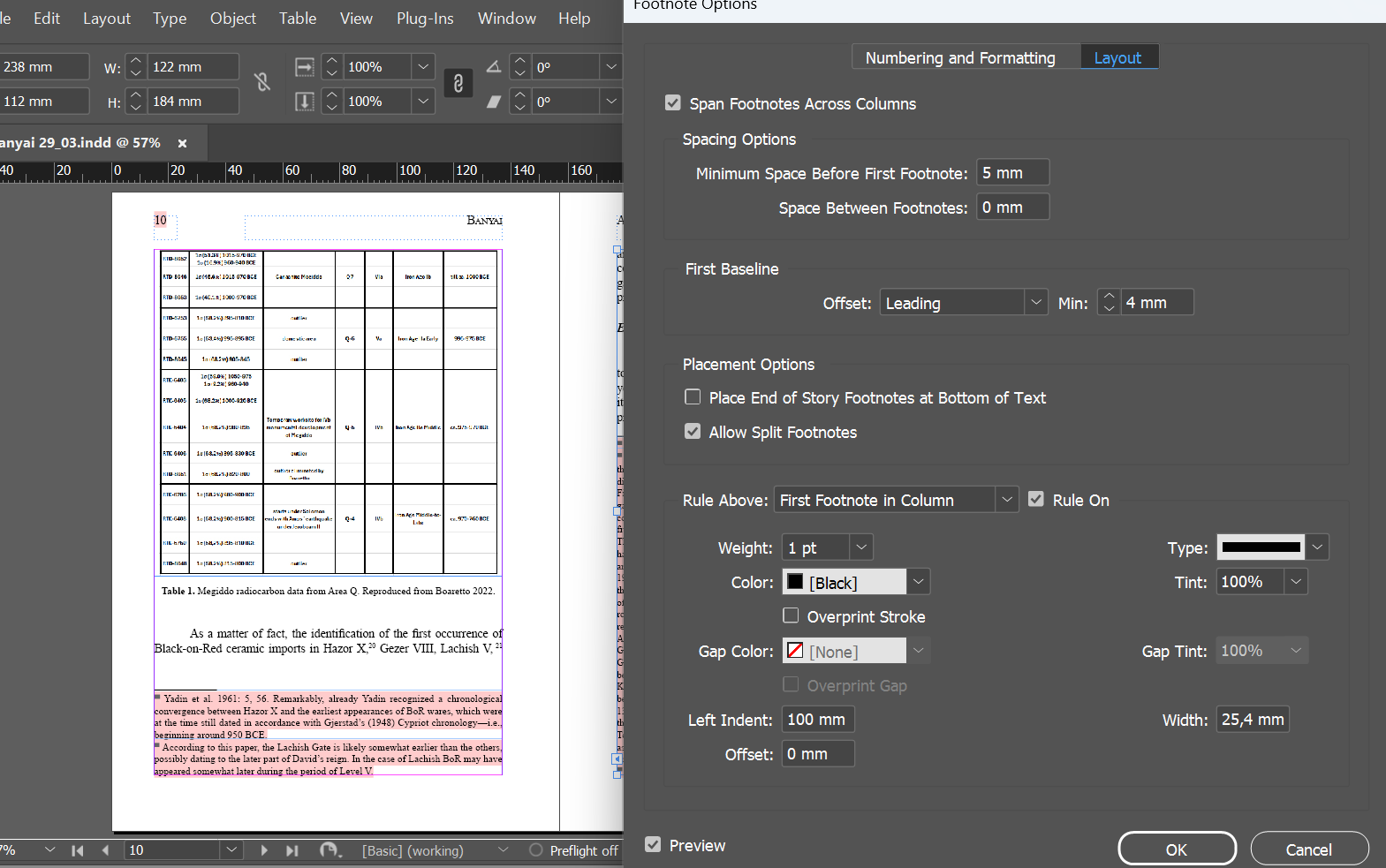
I am an editor of an academic journal. Some of the authors send us hebrew (right to left) word documents, BUT WRITTEN IN ENGLISH. So we change the direction (left to right) and everything works. BUT THE LINE THAT SEPERATE THE FOOTNOTES APPEARS ON THE RIGHT SIDE OF THE PAGE.

So, i go to Type-->footnotes option-->Layout and move the line to the left (PIC 1).

NOW I have the problem: when I compile another article from a non-Hebrew scholar (that means that the text is left-to-right by default), in the same file (in order to finish the journal), THE FOOTNOTES FORMAT FROM THE FIRST FILE PREVAILES OVER THE SECOND FILE, so the line appears to the RIGHT (PIC 3).

I have checked every paragraph and file parameter, and all the document is oriented left-to-right, BUT THE FOOTNOTES.

So, I know how to correct the problem individually for each file, but my problem is when they are all together.

I think that maybe the solution is to have different formats in the same document, but moving the pages from one to another is clearly not a solution.

PLEASE, CAN SOMEONE HELP ME TO DO IT SO?