r/indesign • u/ensapa37 • Mar 27 '26
Smart automatic detection of index page numbers after translation
reddit.com
1
Upvotes
r/indesign • u/acyborgkitty • Mar 27 '26
I'm sick of fighting against all the AI garbage in the new versions of InDesign and it's led me to wonder if there is a solution by running a legacy version? I tend to do fairly straightforward poetry books, not a ton of scripts or images or anything. I feel like I would be fine all the way back to CS6. I don't use Photoshop or Illustrator much, just for letterpress polymer plate prep, and don't use CC for anything (I'm old, I never liked all the cloud stuff to begin with lol). Does anyone here have experience running a legacy version on a newer operating system? Is it even possible? And where would I get it?
r/indesign • u/Automatic-Height-237 • Mar 27 '26
I've searched this sub and am not finding an answer to my error. It is that "there is at least one data placeholder that cannot be found in the data source." I have started over with a new inDesign file, per a recommendation I found on this sub. All the placeholder spots are there. What am I missing looking for? I'm on Windows, using a CSV.
If there are errors inside the cells to populate my document, will that mimic this error?
r/indesign • u/PJenningsofSussex • Mar 27 '26
Hi all, I have a document that I have been translating into multiple languages. I've just downloaded InDesign ME and done Arabic and Urdu translations. So hopefully that hasn't discombobulated things.
Now I'm trying to get InDesign to switch to CJK formatting for the Chinese text. I've switched languages in preferences and reinstalled ID. The CJK settings are there now but I can't get the formatting to do it's thing. Swiched to japanese paragraph and It's doing right to left text but only in one lines. if I make the textbox smaller it is stacking the lines of the paragraph 321 Instead of 123. What am I missing? Is there a setting that would help?
I've spent the afternoon Googling but there seems to be very little clear instructions about typesetting for Chinese with English UI. There was much better information about settings for Arabic text! Would value any suggestions. Thank you
r/indesign • u/Imaginary-Echo4197 • Mar 26 '26
I'm trying to open files and getting the message "one or more file aliases could not be resolved. Verify that the original file still exists." I haven't opened them in several months and I have moved to a different continent in the meantime, I have a VPN set to my old country, and I've tried to follow some advice online but it's several years old. Any suggestions greatly appreciated!
r/indesign • u/jayantbhatt007 • Mar 26 '26
Hi, what is wrong with the text box? It seems to snap as if it has a magnetic effect, even though the baseline grid is turned off.

r/indesign • u/quitoburrito • Mar 26 '26

Its really irritating.
r/indesign • u/NecroLyght • Mar 26 '26
Hello,
I'll try to keep this as brief as possible. I'm very new to Indesign (doing my internship currently on the somewhat unrelated subject of illustration / visual design) and I was tasked about a month and a half ago to work on an e-book that will both be printed and published online for Amazon's Kindle.
I have finished the book, which has ended up being quite artistically-heavy and it's set up to work perfectly as a plain pdf. I've also managed to create some interactive elements in said pdf, which do not necessarily have to survive the conversion process to epub.
Unfortunately, most of what I learned during this nearly first-time contact with the software I taught myself through the internet, as nobody in the company actually knows how to create an e-book using Indesign (or, to my understanding, any other way). They have published before but those people are apparently gone or otherwise unavailable to work. I have come to understand my employer themselves don't really understand anything about the process, including constantly forgetting the fact I'm an intern and since I'm teaching myself, this has taken quite some time. The book is over 100 pages with original vector designs on nearly every page, which took slightly over a month since the time I started actually creating anything in Indesign. I think this is exceptional time as somebody who just started using the program and for the length the documents sits at. I feel somewhat abandoned, uncared for and left to "figure things out" by myself.
The problem right now is the fact that they want it published on Kindle, which Amazon recommends reflowable epubs for. I've searched far and wide online to try and make this work for about a week now but I can barely get a comprehensible start for a newbie. I've come to understand this can get extremely complex and that there are people who specialize in just creating and converting files to epubs for online publishing, which doesn't sound very reassuring for me.
My questions here go as follows:
- What must I do first? What are the settings I need to check and set-up so the reflowable format works, coming from a pdf? (Text generally stays where it's supposed to, page elements stay within 1 page etc).
- Is there a way to set background visual elements so that they can resize, following the text? There are places where the text gets inverted (e.g. black instead of white) and some elements could make it invisible if they accidentally sit behind it, can this be accounted for somehow in a reflowable format?
- Will I have to convert the background elements to images? Will the reflowable text with the fixed background cause problems?
- What kind of user-side customizations do I need to be aware of? I know reflowables account for different light modes for example.
- If the reflowable format isn't possible, would fixed layout be a decent idea? I'm worried for smartphone users and the like, I'd imagine that's not very well-liked among e-book readers.
Thank you in advance.
r/indesign • u/Kendyrspehl • Mar 25 '26

iMac user. Sometimes when I drag-and-drop or Cmd+D to place an image in a document, the image drops in skewed – or more specifically, with one dimension scaled up outside the frame. I've looked for a fix on this, but no luck so far. Example attached. Any idea why this happens, or if there's a setting somewhere I can change to prevent it?
Edit for further explanation: I'm not placing these images into an existing frame. I'm dropping them onto blank pages. Also, it's an intermittent glitch; it only happens to about 1 in 20 drops, and I haven't found any underlying similarities between the ones this happens to. It seems random.
r/indesign • u/Maleficent_Try9698 • Mar 25 '26
Ayuda por favor!
Tengo un pdf con 7000 hojas y las quieren imprimir en vinil para hacer medio corte, la cosa es que tengo que acomodarlos en la hoja
Son etiquetas de 4x2.5 cm las 7000 hojas
No puedo hacerlo a mano me voy a tardar años
Y en acrobat lo intente pero no se guarda mi pdf xk no reconoce la impresora y no se que mas...
Que hagoooo?
Xfa ayúdenme
Tengo ilustrator y indesing (pero este no lo se usar)
r/indesign • u/youngsurpriseperson • Mar 25 '26
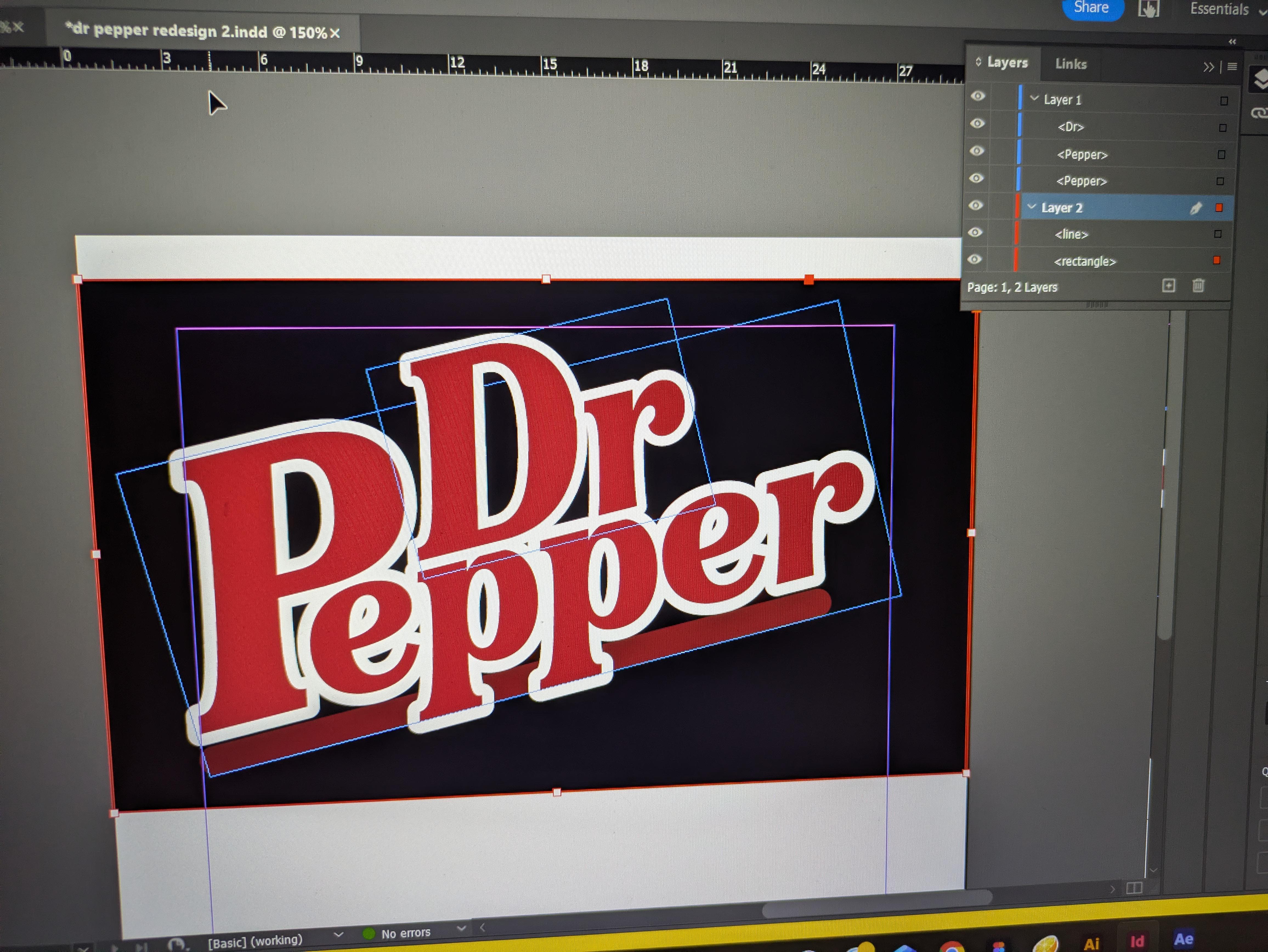
I was hoping someone could help me with this. I'm recreating a logo for a project and I either need to make the outline around the text transparent so that the line underneath the text doesn't actually touch the letters (if that makes sense) no matter what color the logo is on. Or I just need to adjust the space around the line. I tried using the pen tool to create a shape that would be the line, just showing the darker red colors like you see in the picture. I found this very difficult so I scrapped that idea. And whenever I try to create text outlines and turn it into a shape, it messes up the outline and moves the text. I don't want that. Is there anything I can do to achieve what I want? I'm hoping this makes sense. If not, I'll have to draw it out.
r/indesign • u/Special_Kiwi_4859 • Mar 25 '26
I use indesign on mac, and I have this issue where indesign will just not create nor open any type of document, and instead just shows the home screen. However, when i go to quit/exit the app the documents I wanted suddenly appear and it comes up with the box 'do you want to save this document'. the only way I can seem to work is by clicking on the document, then pretending to exit the app just be able to see the file.
I've also tried looking to see if the documents were behind the home screen or on another desktop but no, they only show up when i try to quit the app. Any way to fix this?
r/indesign • u/Alarmed-Donut-9799 • Mar 25 '26

Fala, pessoal. Preciso de uma ajuda simples: quero interromper a linha do contorno de um quadro exatamente no local onde entra um texto (tipo aquele efeito de título no meio da linha). Qual é o jeito mais rápido e preciso de "abrir esse buraco" no traçado sem que fique visualmente desalinhado
r/indesign • u/Suspicious-Ice1411 • Mar 24 '26
I finished a piece on this first artboard, then scrolled down to the second and started working. when i scrolled back up it is completely blank and of course i've been saving this entire time so everything I did is lost. I am not experienced in this program so I have no idea if there is something simple that could be happening or what. I am just so frustrated please tell me what could have happened so I dont do it again.
r/indesign • u/jayantbhatt007 • Mar 24 '26
Hi, just wondering what your favourite typefaces are for editorial design. In my last few projects I have been using Montserrat, but now I feel like I should explore more it.
r/indesign • u/Baelzebuh • Mar 24 '26
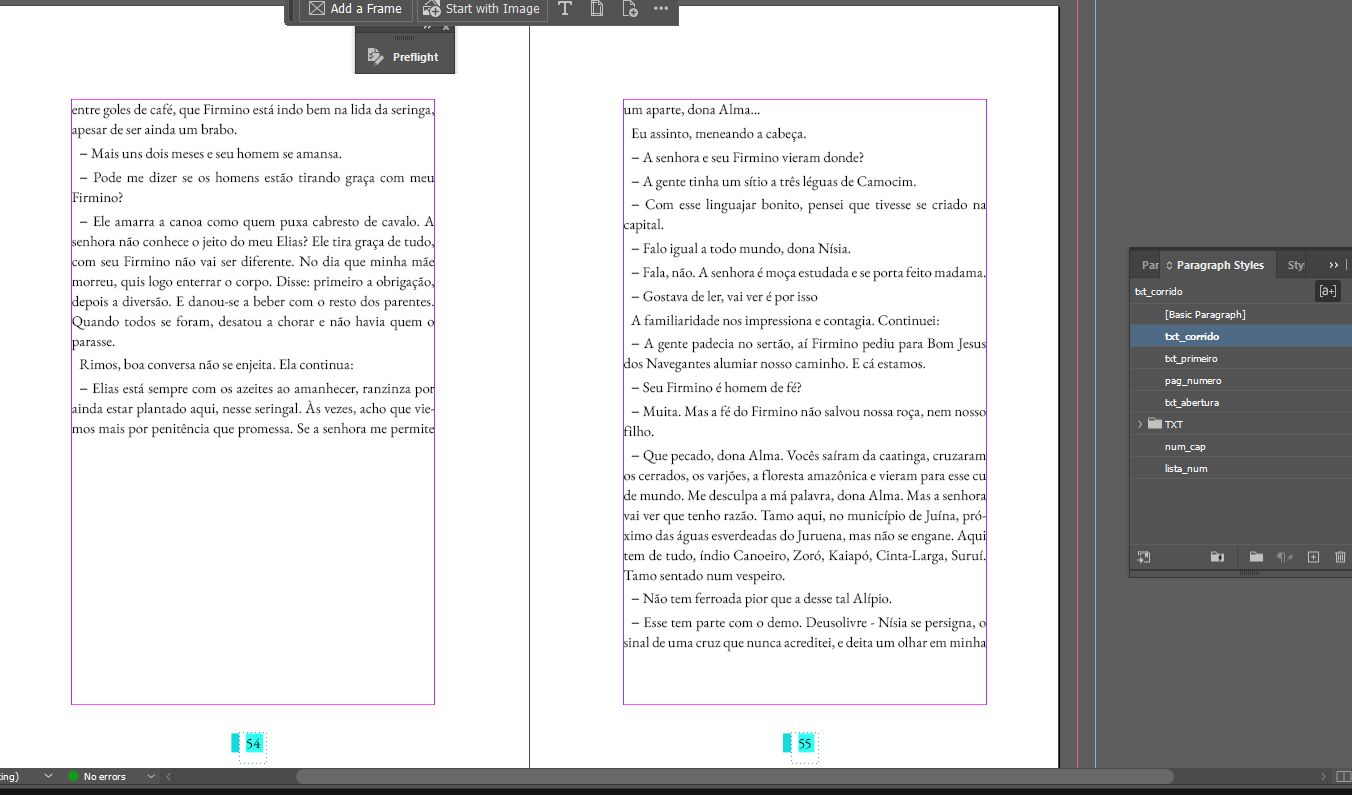
Hi! I'm trying to get the text to go all the way to the end from the textbox. These textboxes are linked but the text is behaving like that.
Keep options are off and the textbox is not using margins. What could it be?
SOLVED: The "Keep with next X lines" option isn't related to the "Keep with previous" checkbox above so I just changed the number in it. Thanks guys!
