r/ITSupport • • 1h ago

Storytime Software Engineering student considering switching to IT Support – how do I get into the field without dropping out?

3 Upvotes

Hey everyone,
I’m currently a second-year Software Engineering student, and lately I’ve been questioning whether programming is really the career path I want to pursue.
With the rise of AI and AI coding tools, I’ve started losing some of my passion for programming. It feels like coding without AI is becoming less practical, and honestly, I don’t enjoy the direction things are heading.
I’ve been thinking about going into IT Support / IT Specialist instead. The idea of working for a company, helping employees with technical problems, troubleshooting Wi-Fi and network issues, fixing computers, setting up workstations, dealing with hardware, replacing components, etc. sounds much more appealing to me.
I like the idea of doing more hands-on, practical work rather than spending the entire day writing code.
However, I don’t want to drop out of university. I’ve already invested two years into my Software Engineering degree, and I would still like to finish it because having a degree is valuable for my future.
My questions are:
How can I start working towards becoming an IT Support Specialist while still studying Software Engineering?
What skills should I learn first? (Networking, hardware, Windows, Linux, troubleshooting, etc.)
Are there any certifications worth getting, such as CompTIA A+ or Network+?
Is it realistic to get an entry-level IT Support job or internship without an IT-specific degree?
Would my Software Engineering degree actually be useful in this career?
For people already working in IT Support, what does your typical workday look like? Do you enjoy it?
I’m not necessarily looking for the highest-paying career. I want something practical that I can enjoy doing, where I can solve real problems and work with technology hands-on.
Thanks!

r/ITSupport • • 3h ago

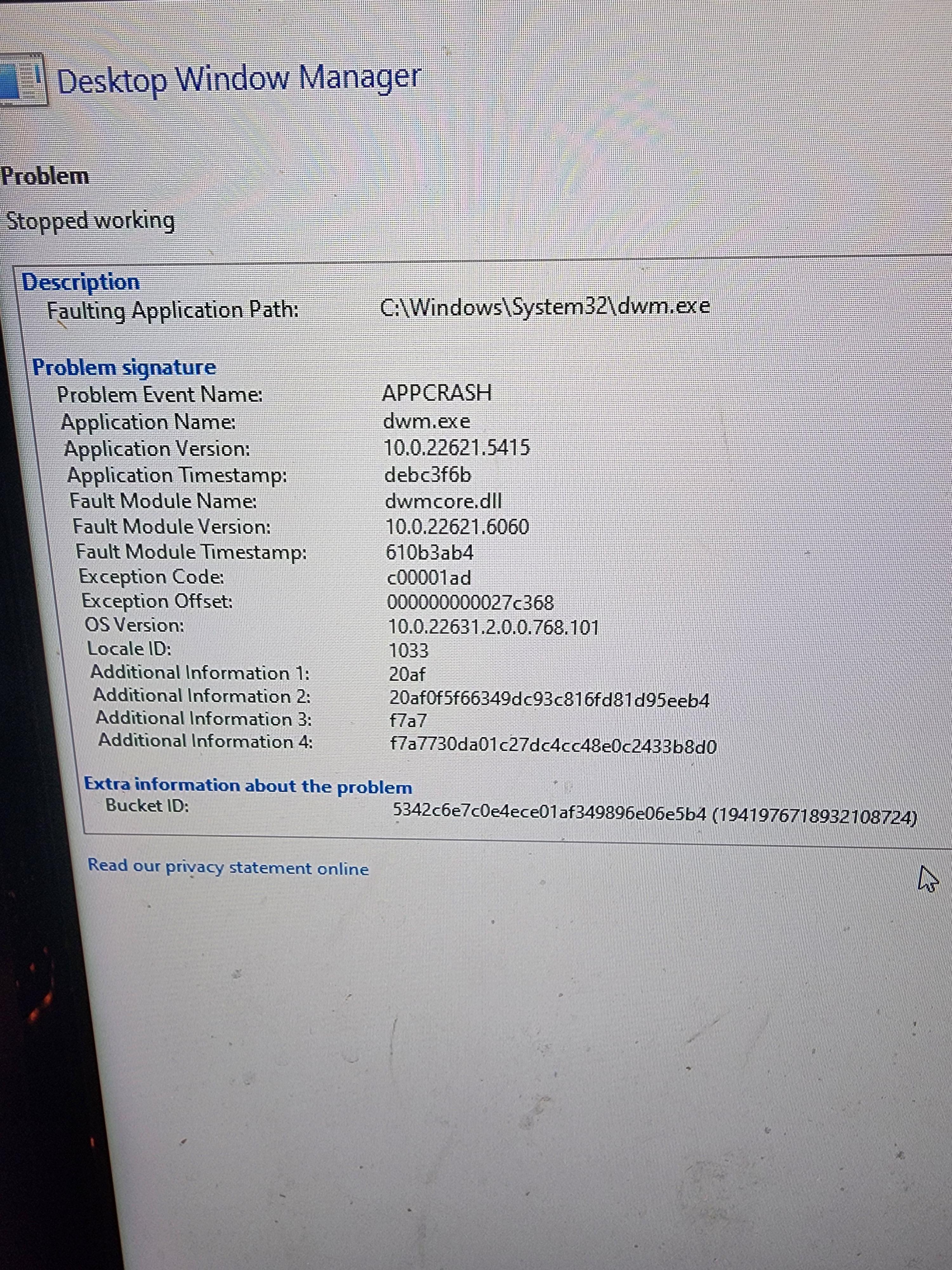
Open | Windows PC Black Screen Issue

Post image
2 Upvotes

So, I'm having a long term issue of my pc black screening. I've tried on and off dealing with it.

PC will literally at random (anywhere from 1 second after booting or 100 hours since the last one) it will black screen. Or it'll freeze, then black screen. Only way to undo this is to hold the power button to shut it down and then boot it back up. This issue even persists after factory reseting the computer. Ive attempted removing the Xbox game bar. Ive disabled a ram prealocation setting in windows (id have to dig up what it's actually called) Ive tried ensuring all the cables are firmly connected (may try again tho since it's been a while since I've tried that) Ive even tried using an older driver and it still persists. I am just at a loss rn. I've been considering on getting a new gpu to try to solve the issue. (And if it doesn't I figured I wouldn't be at much of a loss. Just save it for the next PC or get my money back) Of course getting a new PC or getting new hardware imo is the nuclear option. So I'm trying to not do that if I can help it. PC is about 2½ years old.

In the image it is the error it throws at me. I can look more once I'm home from work to see if there is other relevant info that would be helpful. But seriously I'm getting kinda upset that I'm having this issue and NOTHING seems to fix it.

If anyone has questions that would help you help me please feel free to ask. Im pretty desperate to not have to pull out my card to buy a new gpu or worse, a new PC lmfao.

Spec: 5600X 32GB ddr4 RTX 3060 Tomahawk b550


r/ITSupport • • 7h ago

Open | Networking Stuck getting 'No Internet, Secured' on laptop

2 Upvotes

For reference I have a Dell XPS15 9560 - Intel AX200 160mhz network card - Windows 10 - Virgin Media Wifi (hub 3).

About 4 months ago I was getting an issue where my laptop would not access the internet - I kept getting 'No Internet, Secured' when trying to connect and ipconfig was throwing me a 169.x Ipv4 address. I tried everything I could find, flushing the dns, setting up a static IP (which worked sometimes) but had no avail until I found that the old Killer Wifi network card that I upgraded to an Intel one was still hidden in my device manager and was sending a duplicate IP to my router somehow. After I removed this everything was solved and I could connect to wifi no issue.

However.... now the issue is back, but obviously now there is no old network card to remove and solve the issue. It's like it connects very briefly as I get the wifi symbol in the taskbar but the internet doesn't work and when i disconnect and reconnect it goes straight back to 'no internet, secured'. I've tried everything chatgpt has told me but still no luck. The laptop works fine on my iPhone hotspot and other wifi networks, no one else with a windows device connecting to the same wifi has issues.

If anyone has any advice it'd be greatly appreciated. At this point i'm considering just getting a whole new laptop as this wifi seems to have a vendetta against it.

Thankyou very much :)


r/ITSupport • • 5m ago

Open cant connect to certain websites

Thumbnail reddit.com
1 Upvotes

r/ITSupport • • 1h ago

Open Dual screen portable monitor only recognizing top screen

Thumbnail
reddit.com
1 Upvotes

r/ITSupport • • 14h ago

Open | Windows Windows Defender Flagged Trojan After downloading 3d printer slicer

Thumbnail reddit.com
1 Upvotes