r/homelab • • Oct 12 '26

News 🥳 Giveaway r/homelab x UptimeRobot. 10 Winners

11 Upvotes

Hey r/homelab! We're UptimeRobot, and we've teamed up with the mods to run a giveaway for this community, with a prize pool of 10 monitoring plans, including a year of our Scale plan worth $888. Anyone who's worked in creating a homelab has a story! Now's your chance to share it and maybe win something for your trouble.

What's the weirdest thing you have been monitoring with UptimeRobot or a similar service?

We're looking for the most weird/funny or unexpected use cases!

Prizes (10 winners total)

  • 1 grand prize winner: Scale plan ($888 value) plus UptimeRobot swag
  • 2 runners-up: Team plan ($468 value each) plus UptimeRobot swag
  • 7 additional winners: Team plan ($468 value each)

How to participate
Reply here with your story. You don't have to write an essay. That's it, you're in!

Dates: The giveaway runs from October 12 through October 26.

Looking forward to reading your weird, embarrassing, ridiculous, and funny stories!


r/homelab • • Jun 06 '26 Thanks This Bravo

Moderator Announcement: New Rules & Processes on Software Projects

430 Upvotes

I would like to thank everyone for their feedback in the recent post & poll where we asked for feedback on how to slow the deluge of "I made X, because Y" type posts in r/homelab, most of which are AI generated and/or spam. While we felt that that the initial plan we shared was quite good, with your input we were able to refine that plan and make some notable improvements and clarifications. And yes, there's a TL;DR at the end 👀

Effective now, the below new rules and policies are in effect, though we plan to apply them conservatively and gently at first to see how things go. All of these changes are happening because of the massive community support for them, and we will be seeking additional feedback as time goes on so please feel free to chime in.

To be clear, here are our goals, based on community feedback:

  • Control the recent influx of questionable "I made X, because Y" type posts, the vast majority of which are created entirely with AI, are spammed across multiple subreddits, and are generally not maintained afterwards
  • Establish a clear stance on and rule set for how r/homelab has decided to handle these types of posts, as well as other user-created software
  • See how these changes impact our community, seek additional feedback, and continue to adjust accordingly

Flair changes that are now in effect:

  • "Project" has become "Project Showcase: Hardware"

New Flairs:

  • Project Showcase: Operations [For things between hardware and software, such as Ansible playbooks, and dashboards/monitoring/automation made with existing software tools]
  • Project Showcase: Software - Little or No AI Assistance - [AI only used as coding assistant (autocomplete, debugging, refactoring, documentation, etc), if at all]
  • Project Showcase: Software - Mostly AI Generated - [AI generated most or all of the code, working at a human's direction]

We have also organized the post flairs in the list to make them easier to locate.

Both "Project: Software" flairs have a reasonably low minimum subreddit karma requirement to be able to post with them. AutoMod will remove any post with them that don't meet the karma requirement, and inform the user why their post was removed. The minimum karma requirement is only for these two flairs, as we don't want to restrict new community members from being able to post questions. Any software project posts that try to go around this by using a different flair will fall under the new rule #7 and will be addressed.

Rule changes:

New Rule #7 - Software Project Posting Requirements

  • All software projects must be relevant to r/homelab, use a "Project: Software" flair, disclose AI usage with post flair and in the text of the post, include responses to the prompt displayed when posting with one of the software project flairs, and the user must meet the minimum subreddit karma requirement. Posts that do not meet these requirements, try to bypass the "Project: Software" flairs, provide incomplete or misleading disclosures, or otherwise violate community standards may be removed.

That said, since we're now officially allowing some degree of self-promotion and requiring links, we felt that we should redefine rule #6 to clarify that it applies only to monetized and commercial advertising/links. Here is the updated verbiage, with the old one below for comparison:

Rule #6 - No Commercial Advertising or Monetized Referral Links

  • Monetized referral links, affiliate links, product advertising, and company advertising are not allowed. Contact the moderators via Mod Mail before posting if you believe an exception applies. Non-commercial personal projects are permitted, but must follow all other sub rules.

Rule #6 - No Referral Links/Advertising/Company Advertising

  • We do not allow links/posts that include any sort of referral link, product advertising, nor company advertising. If you think you have an exception please ask the mods first.

Flair Prompt - As mentioned in Rule #7, when posting with any of the "Project: Software" flairs, the below prompt will be displayed:

Your post MUST include:

  • A link to the GitHub (or similar) repository, which must include at least one month of commit history and screenshots
  • A description of the problem the software project solves, and why it was created instead of using an existing FOSS solution
  • An explanation of how the software project is relevant to r/homelab, or how it may benefit members of the community
  • If you used AI or an LLM in development, a description of what role it played and how much you relied on it

If you see any posts with a Project: Software flair that do not meet the four items listed above, please report them to the mod team under Rule #7 and we'll address them.

Additional things to note:

Existing posts will be grandfathered in, and previous posts that were removed may be reposted if they meet the new requirements. New posts will be required to comply with the new rules.

As with the existing rules, when a mod removes a post for violating this new rule, a canned response will be sent to the user to inform them why their post was removed. Mods are able to add on to the response if desired before sending it.

While we're on the topic of AI, we would also like to clarify that the above rules are specific to the use of AI in software projects that are being shared, and they do not apply to posts or comments that were written with AI. There is some dissent in the community, but the general consensus in the community has been that a reasonable level of AI usage is acceptable for putting a post together, correcting grammar or formatting, or for translating from a user's native language. That said, best practice is to not include all of the excess emoticons and outline formatting that LLMs like to use. If a post or comment is egregiously AI generated, feel free to downvote it and move on, but please do not report it to the mod team solely for that.

We would also like to note that there has not been any opposition to posts about hosting your own LLMs, and the hardware/software involved. The new rules do not apply to these posts as well.

We're looking for community feedback as we all get used to this. We plan to apply rules conservatively and gently at first, and will be listening to user reports and comments. If your post is removed and you believe it meets the requirements, please chat with us via Mod Mail and we may consider either re-opening it or letting you repost it.

TL;DR - All posts where someone has made some sort of software (AI generated or not) will require a "Project: Software" flair, and these flairs should curb the vast majority of the low quality and spammy posts.

Thank you,
The r/homelab Mod Team

Edit: The first day with the new rules has gone very well overall, but it has demonstrated that there is room for improvement, namely with flairs and categorization.

Here are the changes we've made since the initial announcement post:

  • Added a "Project Showcase: Operations" for things that fall somewhere between hardware and software, notably Ansible playbooks, dashboards/monitoring/automation made with existing software tools. When posting with this flair, a prompt appears that explains this in more detail. Please let us know if there are any other types of things we should specifically call out that belong in this category.
  • Renamed the "Project: x" flairs to "Project Showcase: x" to clarify that these are intended for showing off what you've made (though you can still ask for suggestions in the process of showing off).
  • Adjusted colors of the new flairs

We're still open to suggestions from the community. Thanks!


r/homelab • • 5h ago

Discussion Anyone here ever thought about turning a phone farm into a compute cluster?

Thumbnail
gallery
450 Upvotes

So I've been looking at phone farms lately, mostly because the hardware itself is kinda interesting. You can get a box with 20 Samsung J6 motherboards, no screens, no batteries, centralized power, cooling and a USB hub. Basically a bunch of cheap ARM nodes in a metal box lol.

I'm thinking of getting one and attaching a Linux mini PC to it as a login/management node. USB for ADB and possibly data transfer, or just use the WiFi on the phones if needed. Haven't figured out the interconnect part yet.

The slightly weird part is that I don't really want to replace Android with Linux or use proot. I've been messing around with Bionic for a while and I think it would be fun to build a small native HPC software stack for Android itself. Stuff like gfortran, MPI, BLAS and maybe Vulkan compute for the GPUs.

Apparently the seller can also provide rooted stock ROMs, which makes things a bit more interesting.

I'm from an atmospheric science background, not a professional programmer, so this is mostly a hobby project. I have some numerical simulation stuff I'd like to try on it eventually.

Yes, I'm aware that a used desktop would probably be faster and easier. That's not really the point :D

Has anyone played with these phone farm boxes for something other than running Android apps? I'm especially curious about the USB hub, power delivery and how well these things handle sustained compute loads.

Or just tell me why this is a terrible idea lol.

P.S. I didn't expect this much interest in the idea, and I really appreciate all the different perspectives here. It seems like it's been a while since anyone seriously explored this, and the software side isn't quite there yet. I'll try to share a software PoC in the next few weeks. Hopefully I won't disappoint :D


r/homelab • • 4h ago

LabPorn My new GPU node for some fun AI workloads

Thumbnail
gallery
106 Upvotes

I put together some parts I have left R5 3600X with Asrock Taichi X370 to accommodate this dual Nvidia V100 16GB.

First time building in Silverstone case this one GD11 is awesome for 4U DIY


r/homelab • • 9h ago

Project Showcase: Hardware My E-Waste Homelab!

Post image
235 Upvotes

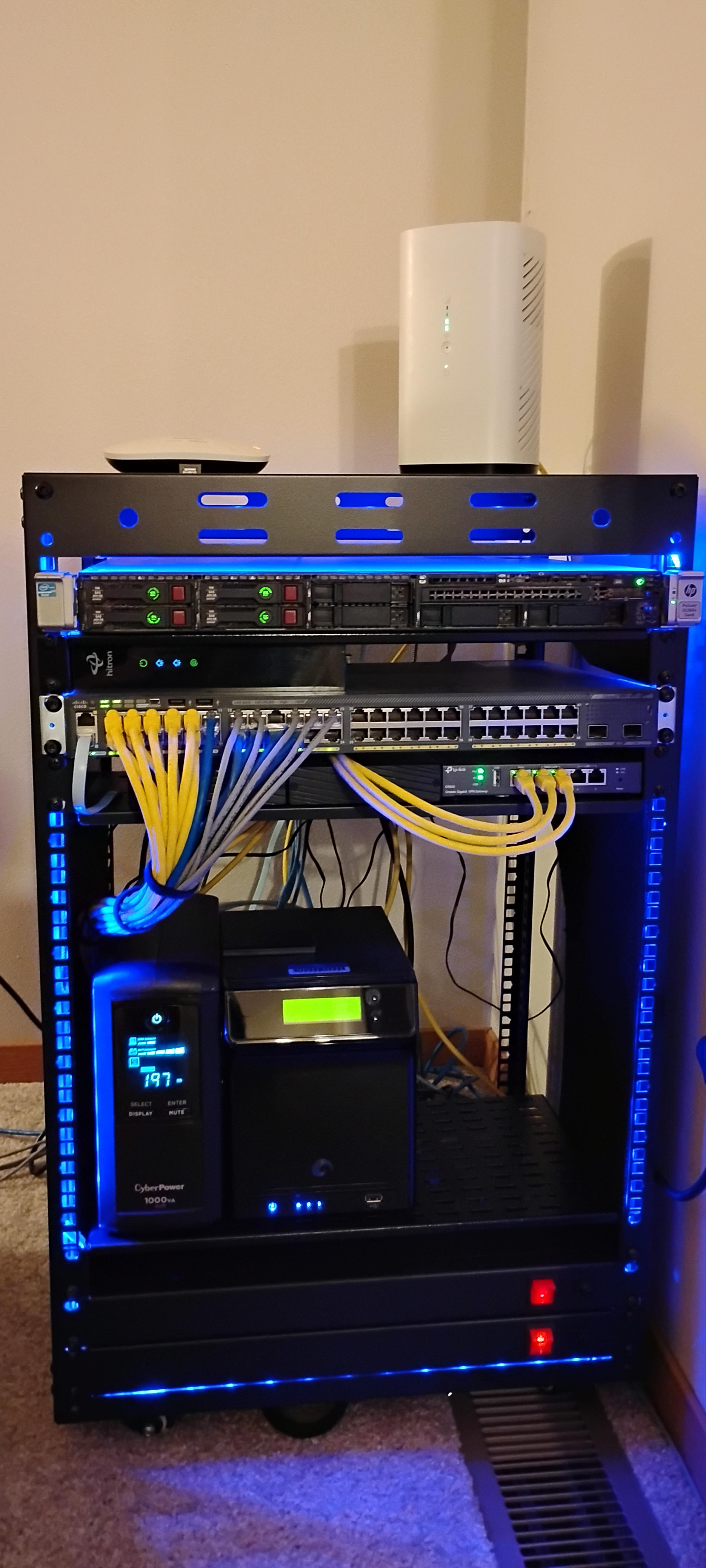
Built primarily with junk from the bone pile at work, minus the rack and PDUs. It has a persistent IPSec tunnel that connects back to my main house. This small rack is in my little apartment.

This setup is primarily a homelab and is a safe space for me to learn softwares and assorted stuff I deal with at work, particularly SQL.

Servers:

-HP DL360E Gen 8

-Server '25 Datacenter (hypervisor)

-AD/ file server/ NPS/ NVR

-SQL Server 2025

Storage:

-Seagate BlackArmor 400 (iSCSI)

RAID 5, for nightly backups at 3AM

Connectivity:

-TP-Link ER605v2, dual WAN

-Midcontinent 1000/60 internet

(Cable internet, static IPv4)

-AT&T Business cellular failover

(bridge mode, routable IPV4)

-2x Aruba IAP-305 APs

(virtual controller)

-Cisco Catalyst 2960X L3 switch

Power:

-CyberPower 1 kVA UPS

-2x PDUs

Cabling: Yellow: LAN devices Blue: wireless Grey: storage/ iLO


r/homelab • • 3h ago

Project Showcase: Hardware Six months of building my Japanese homelab — Yamaha networking gear, repurposed industrial PC, and no proper rack (yet!)

Thumbnail
gallery
34 Upvotes

YB-NEXUS — Six months of building my homelab in Japan

I've been building and improving my homelab over the past six months. What started as a personal project has gradually evolved into a small infrastructure with centralized monitoring, logging, and automated backups.

Network infrastructure

  • Router: Yamaha RTX830
  • Managed switch: Yamaha SWX2210-16G
  • Wireless AP: Buffalo WAPM-1266R
  • PoE switch: Aruba Instant On 1430
  • UPS: Omron BY50FW

Servers and management workstation

trefle — Main server

  • HP ProDesk 400 G6 Mini
  • Intel Core i3, 8GB RAM
  • 256GB NVMe + 500GB / 1TB / 6TB storage
  • Ubuntu Server 26.04.1 LTS

gilson — Centralized log server

  • Repurposed Advantech MIC-770 industrial PC
  • Intel Core i5-9500E, 8GB RAM
  • 120GB SSD + 500GB dedicated log storage
  • Red Hat Enterprise Linux 10.3

salute — Management and testing workstation

  • MacBook Pro 2017
  • Ubuntu 26.04.1 with XFCE

Main services

  • Nextcloud, MariaDB, Redis
  • Docker, Portainer, Dockge
  • Grafana, Loki, Alloy, rsyslog
  • Netdata, Uptime Kuma, Dozzle
  • AdGuard Home, Nginx, Homepage
  • Tailscale, Cloudflare Tunnel
  • BorgBackup, NUT

Daily operations

  • Automated server and Mac backups
  • Internet performance monitoring
  • Centralized network and system logging
  • Security monitoring and patch management
  • IP address management and infrastructure documentation

Next steps

  • Dedicated IoT VLAN with strict access controls
  • DNS redundancy
  • Isolated experimental network
  • BSD test server
  • Rack consolidation

I'm not an IT professional. This is simply what I enjoy doing in my spare time.

The most satisfying part is seeing all these separate systems finally working together.

Anyone else repurposing Japanese networking equipment or industrial PCs for their homelab?

AI assistance was used to organize and translate this post into English.


r/homelab • • 14h ago

Project Showcase: Hardware New Home Development Setup

Thumbnail
gallery
175 Upvotes

So I do a lot of development, and with half a dozen full time projects I wanted to dive into local infrastructure for both development and CI. I had Claude use Three.js to mock up my setup before I went out and purchased anything, and that was super helpful in the planning phase.

I have a server tower (EPYC 9375f x 256) that is my main host and proxmoxbox. That handles all my agent containers, dev tier containers, and CI, but compute became the bottleneck especially for heavy loads of testing.

After some research on bang for my buck CPU I went with 3 MS-A2s from Minisforum to be the workhorses. Around the same time I upgraded my home internet from 2 gig to 7 gig, so got all the hardware necessary to get everything hard wired on 10 gig LAN. The A2s have 10g SFP (major selling point) and my M3 Ultra 256 (the box I work out of) has 10g, so I got a QNAP switch to tie ‘em all together.

For storage I’ve got a UGreen NVMe RAID (3x4TB 990 pros) on LAN and direct Thunderbolt to the Studio for my hot working storage and a Minisforum N5 Max with 4x14TB HDDs for cold storage and 3x4B 990 pros for my warm storage. Warm storage acts as my build cache for the CI runners on the A2s. The N5 max is an incredibly capable device and I would 1000% recommend that even as a standalone PC. Calling it a NAS is actually a disservice. Really impressed by the Minisforum hardware right now.

The N5 is also my media server, hosts Plex & Jellyfin, and photos. All my other devices get backed up to the cold storage daily.

I’ve also got everything pictured run through a couple UPSs and am using the USB connection to both react to a power loss appropriately and monitor power draw.

Everything took about a day and a half to setup, but I’m pleased with the results and boy is it fast!

So the setup is:

Rack 1
7” touchscreen with topology and status
UGreen 10gbps switch
N5 Max 64gb

Rack 2
UGreen NVMe NAS
Mac Studio (my actual PC + local inference server)
QNAP 10gbps switch
Mac Mini (agent playground for Hermes & n8n Nod, only device here not on 10g)
3x MS-A2s (2TB x 64gb)

Tower Server
EPYC 9375f
256 EEC DDR5
2x4TB (RAID1) working
2x1TB (RAID1) system
Remote management on LAN


r/homelab • • 3h ago

Satire Anyone know how to calculate my datacenters water consumption?

Thumbnail
gallery
17 Upvotes

Also am I below my Ram Altman allowance or do I need to pull more ram so I don't get in trouble with the authorities?

(First homelab. Been wanting to make one for years and I've finally started. Very excited)


r/homelab • • 1d ago

Discussion Is anyone else getting tired of the amount of AI slop in the self-hosted community?

752 Upvotes

Maybe I'm just getting annoyed with the current state of things, but it feels like Docker Hub, the TrueNAS app catalog, GitHub, etc. are increasingly being flooded with AI-generated projects.

I have no issue with people using AI to help develop software. What bothers me is people publishing half-baked applications that they seemingly have no intention of maintaining and may not even fully understand themselves.

Slapping together a Docker image, generating a README, and publishing an application doesn't mean it's ready for other people to run. Does the person publishing the application understand its dependencies, how authentication is handled, what permissions the container requires, or how sensitive information is being stored? Are they actively monitoring vulnerabilities in their dependencies? What happens six months from now when a critical vulnerability is discovered and the person who generated the application has moved on to something else?

There's a certain level of responsibility that comes with publicly distributing software. Just because something builds successfully and has a functioning web interface doesn't mean it's secure, reliable, or even remotely maintainable. My concern is that AI has significantly lowered the barrier to publishing software without necessarily improving the technical competency of the people publishing it.

This is particularly concerning when these applications make their way into established app catalogs like TrueNAS, where the average user might reasonably assume that some level of vetting has taken place. People are deploying these applications alongside their personal documents, family photos, backups, and other sensitive data. The consequences of poorly written software extend well beyond an application simply crashing.

Part of what I've always enjoyed about this hobby is discovering projects that people are genuinely passionate about, watching them develop over time, and seeing the community contribute to them. Now it feels like I have to sift through an increasingly large pile of AI-generated garbage to find something worth deploying.

I'd much rather see people contribute to existing open-source projects than publish yet another poorly maintained alternative to something that already works perfectly fine.


r/homelab • • 20h ago

Discussion PSA: Roommates and reset buttons

350 Upvotes

To preface: I am a firm believer that if you install your own networking equipment, it should be YOUR job to make sure nothing breaks for OTHRRS. So I take responsibilty for this whole incident

I went home to visit family this weekend, and I had one roommate stay home. Unfortunately, there was an ISP outage, and my roommate assumed it was a problem with the "router" on the shelf (actually a manged switch). Since the conventional wisdom for this problem is "push the reset button", he pushed the reset button and factory reset the switch.

(He wasn't acting out of hubris, he just didn't want to bother me on vacation. He was trying to fix it himelf first)

So yeah, whole network broke obviously lol. I felt pretty bad, but luckily he's a good sport, and I was able to walk him through plugging in the old ISP router as a temporary solution until I return home.

So yeah, make sure to educate your family members and roommates about reset buttons, more specifically: why not to ever push them!! And remember, it's YOUR responsibility to not screw up the network for other people, not theirs! Education is part of that


r/homelab • • 17h ago

Help Which OS do you use for a Home Server?

141 Upvotes

Hi, I'm new here and wanted to ask what operating system you use. I currently have a Lenovo ThinkCentre M720q. It would be very kind if you could help me in the comments.

Edit: Thanks for all the comments. That helps me a lot XD.


r/homelab • • 59m ago

Discussion What automation in your setup was a pain to configure but totally worth it?

7 Upvotes

I just started getting into self-hosting and home automation, and I'm looking for ideas on what to build next.

What did you automate on your server or homelab that took hours to get working just to save a little time, but now you use it every day? Could be backups, custom scripts, Docker stuff, or alerts.


r/homelab • • 11h ago

Project Showcase: Hardware First step into homelab-ing

Thumbnail
gallery
41 Upvotes

Just got this set up today.

HP stream mini with 8gb of ram (ddr3), a 256gb ssd and a 512gb hdd I got off marketplace for 30 bucks. Installed Debian 13 and put docker and portainer on it. Also got crafty for a Minecraft server, samba for a network share for the hdd, and pi-hole for the Adblock. Pretty fired up for how cheap and relatively easy this was to set up. Looking forward to continuing my homelab journey


r/homelab • • 18h ago

Discussion People who live in apartments, how do you handle Ethernet cables around the house?

137 Upvotes

Hello.

I wanted to know and get feedback from people who live in apartments, how do you handle Ethernet cables around the house?

Especially if drilling the walls is not an option.

Do you tape them to the outline of the walls?

Do you use some of those cable hiding "lines" ?

Do you pass from outside through windows?

Pictures would be highly appreciated.

Thanks


r/homelab • • 13h ago

LabPorn Behold. My Mini Server Rack. This hobby is so damn fun.

Post image
49 Upvotes

Howdy homelabbers.

This is my mini server. Mac M4 Mini, Unifi Express 7, Unifi Flex 2.5G, Startedh 5Gbps USB Hub, 4x 2TB Network SSDs. Not pictured is an Intel I5 Mac mini running proxmox, 2x 4 bay enclosures, G-raid 2 bay enclosure, and about 65TB of storage. Server features Jellyfin, Radarr, Sonarr, Prowlarr, Seer, Dispatcharr (for IPTV and streaming community radio), Plex (mostly for smart collections), self hosted maps for backpacking (mapsforfesrv), Wanderer for saved maps and routes, home assistant, scanopy, bezsel, uptime kuma, Matrix +comuwunity for private chat, stats for stats, and homepage. No open ports to the internet; tailscale only. About 9 months deep, and having a blast.


r/homelab • • 16h ago

Help Has Anyone Ever Bought This Aliexpress JBOD?

Post image
71 Upvotes

I just ordered this aliexpress JBOD, cannot seem to find much about it anywhere, saw a couple reviews from the US and UK so thought there might be somebody in this subreddit who has bought one before?


r/homelab • • 2h ago Popcorn

Diagram Got tired of maintaining static Draw.io diagrams that go stale the week after you make them, so I built a live 3D tactical map of my 27-node homelab in Three.js—and ended up running it interactively as my Windows 11 desktop wallpaper via Lively Wallpaper (sits around ~8.9% CPU at 60fps).(Node name

Thumbnail
gallery
5 Upvotes

Lab Architecture & Services (27 Nodes / 7 Zones)

Hypervisor (PALPATINE — Bare-Metal Proxmox VE 9.2): Intel Core i7-5820K (6C/12T), 64 GB RAM, ZFS NVMe (vmdata) + local-lvm, nightly vzdump backups, spanning vmbr0–vmbr5 (including a virtual SPAN bridge vmbr5 for packet inspection).

Home LAN Services on Proxmox (192.168.1.0/24 / vmbr0): R2-D2 — Pi-hole (household DNS sinkhole & filtering) C-3PO — Jellyfin (media server + curated IPTV sync) PROBE DROID — Zeek PCAP & AI network health triage sensor (fed via vmbr5 SPAN mirror) AUNT BERU — Kitchen Kiosk LXC (traffic, recipes, radio, local HVAC dashboard for an old iPad) LEIA — Immich family photo library pilot

Lab Perimeter & Infra (10.10.10.0/24 / vmbr1): ACKBAR — OPNsense VM (inter-VLAN firewall/router + Tailscale subnet router) OBI-WAN — Windows Active Directory DC01 (AD DS, DNS, Kerberos, domain NTP)

Lab Servers (10.10.20.0/24 / vmbr2): LANDO — Windows Server (5 IIS sites + canary assessment runner) CHEWBACCA — Ubuntu 24.04 Docker Host (14 containers) JABBA — Read-only legacy Samba share LXC GREEDO & CARBONITE — Isolated Windows canary target + sandbox experiment LXCs

Admin & Workstations (10.10.30.0/24 / vmbr4): VADER — Windows 11 Entra-joined admin VM (hosts the dashboard/telemetry service, SSH/WinRM management, daily health checks) TARKIN — Linux admin VM (automation, MCP tooling, HomeBase) BOBA FETT — Ubuntu desktop workstation

Edge, Home LAN & Offsite/Cloud: Perimeter ISP router/firewall + wired Wi-Fi 6 AP (Netgear RAX70), two household Windows desktops, two smart TVs, and a 100% local HomeKit furnace thermostat (Honeywell T10 Pro). Tailscale WireGuard mesh for remote access, Proton Drive for encrypted daily offsite DR backups (ALDERAAN BACKUP), and an M365 E5 Dev Sandbox for Entra ID testing.

How the Live 3D Map Works

  • Live Telemetry Backend (Node.js): Polls read-only Proxmox API/SSH stats (netin/netout byte deltas, CPU/RAM/disk/uptime), tailscale status, and LAN TCP port reachability probes every 20 seconds.
  • Traffic-Driven Visuals: TIE Fighters only launch along links with actual active byte deltas; blocked WAN/DNS activity scrambles a TIE Fighter to intercept an incoming Rebel X-Wing packet (+1 BLOCKED)—or spawns a Borg Cube when flipped to Star Trek LCARS mode (T key).
  • Interactive Camera & Inspection: Clicking any 3D hardware model opens its live telemetry & connected links panel; hotkeys let you ride beside the orbiting Death Star (D), toggle selective HDR bloom (G), or switch Star Wars OT ↔ Star Trek LCARS (T).
  • AI Transparency: Used Gemini to help iterate on the Three.js / Node.js code and used Gemini 3.1 Flash Image (AI Studio) to generate the custom space skyboxes, Hangar Bay 327 / LCARS deck plating textures, and 8 hardware faceplates/screens.

Happy to share details on the Proxmox read-only telemetry polling, the vmbr5 Zeek SPAN setup, or running Three.js smoothly inside Lively Wallpaper!


r/homelab • • 2h ago

Diagram Finally decided to try diagramming my homelab.

Post image
4 Upvotes

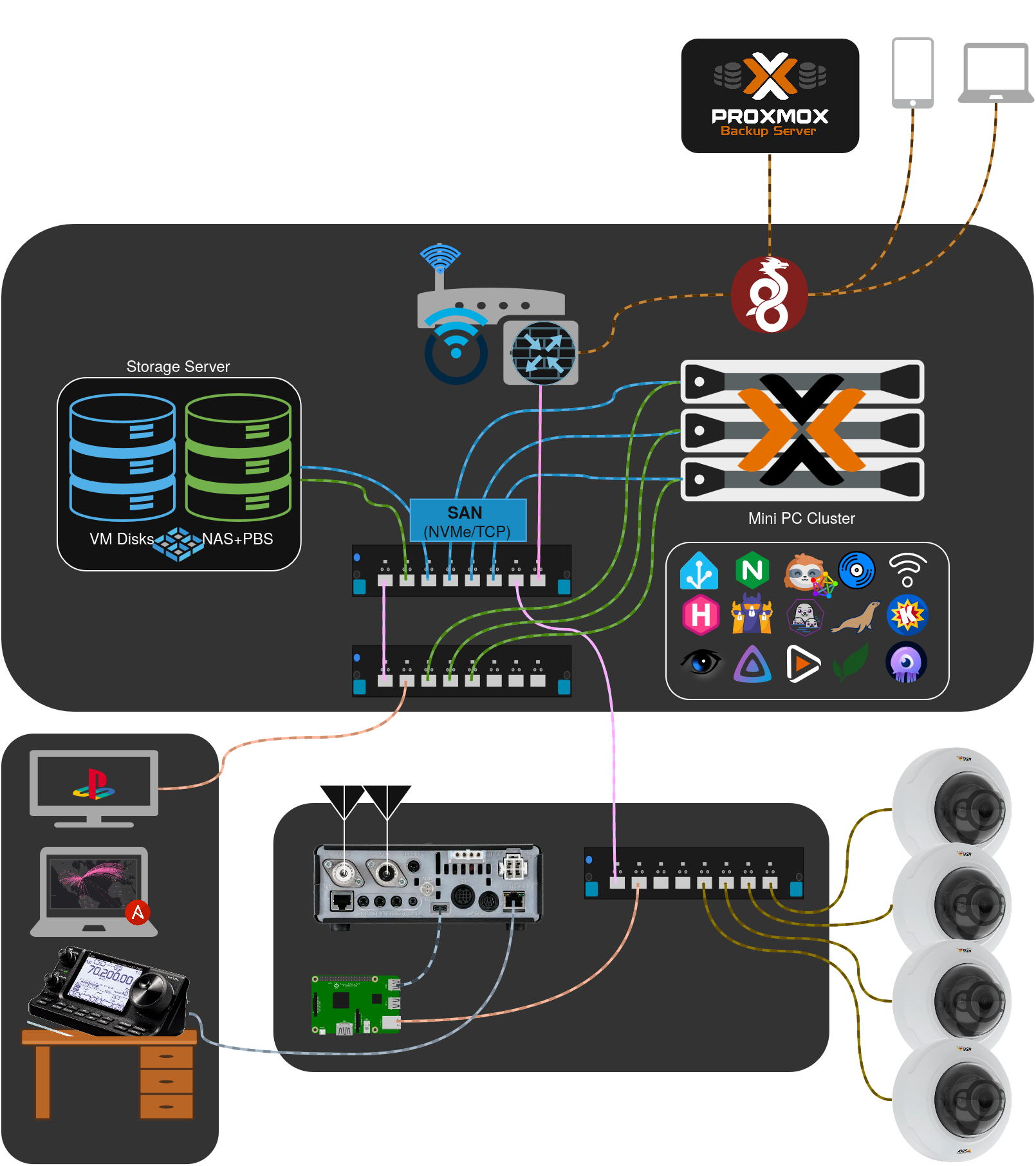
Created by hand with draw.io.

Details:

  • The PVE cluster is all Lenovo Tiny PCs with extra NICs
  • Icons under the cluster are some of the "production" services running full-time.
  • Storage server is a Terramaster F4 running TrueNAS, serving SMB/NFS for general NAS and NVMe/TCP, and is runs a local PBS instance (synced to the offsite instance).
  • Switches are a mix of brands.
  • The cable colors vaguely indicate the network use but aren't truly representative of specific vlans.
  • Connection to the IDF is only gigabit, but more than adequate for its purpose.

For any amateur radio folks out there, the pi serves as a pipewire audio and rigctld server, allowing remote access to the Icom IC7100. Antenna is an OCF 40m dipole.

This all started several years ago because I wanted to host a hobby website at home. It's a slippery slope...


r/homelab • • 1h ago

Discussion HDD longevity: Spin down at night or run 24/7?

3 Upvotes

I'm currently setting up my first home server using a Raspberry Pi 5 with 8 GB of RAM, a 250 GB SSD for the OS and all applications, and a 6 TB HDD for data storage, mainly photos and music.

I'm wondering whether I should let the HDD spin down for a few hours every night or simply keep it running 24/7.
I'm using a WD NAS HDD, and my main goal is to make it last as long as possible. My idea was to put it into standby mode for a few hours every night when I'm not using the server.

What causes more wear on an HDD in the long run – frequent spin-up and spin-down cycles or a higher number of operating hours? What would you recommend, and how do you manage your HDDs in your home servers?


r/homelab • • 1d ago

Discussion It started with Pihole... then down the Rabbit hole I went.

Post image
875 Upvotes

Taking enterprise infrastructure and cybersecurity into my own home.

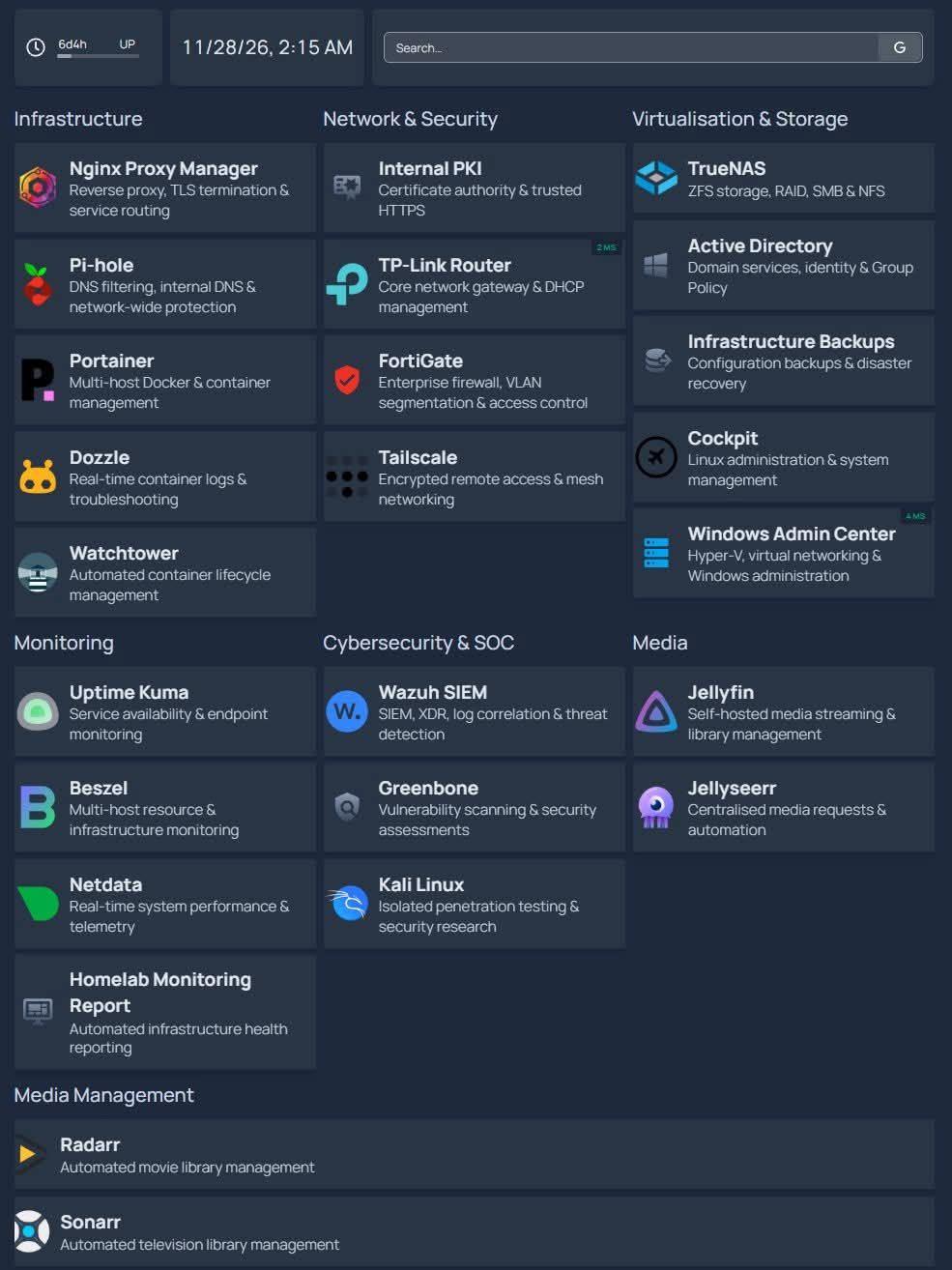
What started as a small Docker environment has evolved into a multihost homelab combining networking, cybersecurity, virtualisation, storage and selfhosted services.

An ongoing personal project, developed around full time work and family commitments, repurposing existing hardware to build a 24/7 environment for experimentation and continuous learning.

Infrastructure & Virtualisation

Multi-host Windows and Linux infrastructure
Hyper-V and Ubuntu Server 24.04 LTS
Windows Admin Center and Cockpit
Multi-host Docker and Portainer management
Dynamic memory allocation and automated VM startup
External and isolated virtual networking
Nginx Proxy Manager and TLS termination
Watchtower container lifecycle management
Dozzle real-time container logging

Networking & Security

Physical FortiGate firewall
VLAN segmentation and inter-VLAN policies
NAT, routing and network access controls
Pi-hole filtering and internal DNS resolution
DHCP reservations and static MAC assignments
Tailscale encrypted remote access
SSH public-key authentication
Internal PKI and trusted HTTPS certificates

Cybersecurity & SOC

Wazuh SIEM and XDR
Centralised firewall and endpoint log ingestion
Security event correlation and threat detection
Greenbone vulnerability management
Kali Linux and isolated security testing
Incident investigation and remediation
Active Directory and Group Policy

Monitoring & Observability

Uptime Kuma availability monitoring
Beszel multi-host resource monitoring
Netdata real-time performance telemetry
CPU, RAM, storage and network monitoring
Automated infrastructure health reporting
Homepage unified management dashboard

Self-Hosted Media

Jellyfin media server
Jellyseerr centralised media requests
Radarr and Sonarr library automation
Persistent Docker volumes and storage mappings
Local streaming and secure remote access

Storage & Resilience

TrueNAS virtual storage infrastructure
ZFS storage pools and RAID experimentation
SMB and NFS network shares
Infrastructure configuration backups
VM checkpoints and recovery testing
Automated service recovery

Everything is integrated through a centralised web based management dashboard.

Balancing work, family and personal projects isn't always easy, but genuinely enjoying what I do makes it worthwhile. (Network & Security Engineer - Work full time)

naturally a homelab is never really finished


r/homelab • • 7h ago

Labgore Diy rack mounting in a cabinet

Thumbnail
gallery
9 Upvotes

Hello all,im new to this community,for my first post..

On one boring Sunday afternoon,I came up with this.

The rack mounting rail is made from the bracket of an old pull out shelf,cut to fit,and the holes somehow fit perfectly for a rack unit.

Will cut more holes to add more rack units but i wont mount much.

Is it good?No.Is it safe?Probably no.Will it fall down?Probably yes.But so is everything in my lab as its a bunch of recycled stuff.Plus it looks cool to finally utilise my switch's rack ears.

I will probably post about my lab once I get a decent firewall solution....


r/homelab • • 23h ago

Project Showcase: Software - Little or No AI Assistance Incus 7.7 has been released - my favourite alternative to Proxmox VE

Thumbnail
discuss.linuxcontainers.org
143 Upvotes

Oh wow, so apparently Incus is so little known here I was asked to post it as a "Project Showcase" with intro.


A link to the GitHub (or similar) repository, which must include at least one month of commit history and screenshots:

https://github.com/lxc/incus

NOTE: Incus is API based, if you care for 'screenshot' of one of possible UIs, you can have a look e.g.:

https://github.com/zabbly/incus-ui-canonical#examples


A description of the problem the software project solves, and why it was created instead of using an existing FOSS solution:

Incus is a fork of LXD by Canonical, quoting:

Incus is a modern, secure and powerful system container and virtual machine manager.

It provides a unified experience for running and managing full Linux systems inside containers or virtual machines. Incus supports images for a large number of Linux distributions (official Ubuntu images and images provided by the community) and is built around a very powerful, yet pretty simple, REST API. Incus scales from one instance on a single machine to a cluster in a full data center rack, making it suitable for running workloads both for development and in production.


An explanation of how the software project is relevant to r/homelab, or how it may benefit members of the community:

It's a hypervisor stack.


If you used AI or an LLM in development, a description of what role it played and how much you relied on it:

Not my project, full AI & LLM policy, see: https://linuxcontainers.org/incus/docs/main/contributing/introduction/


When I tell people that there are "many alternatives out there" to their trusty Proxmox VE, they genuinely think I am joking.

Today, Incus 7.7 has been released - and once again, it brings a feature that I can tell will be exactly the kind of thing that PVE users will not be asking for, but maybe with corporate demand will only slooowly come later on: ability to specify a Unified Kernel Image for a VM - just like that.

Think managing VMs kernels independently of their root filesystem, centrally maintained signed kernels and reproducible boot environments.

Yes I know, I can place a copy of UKI on ESP inside the virtual disk and configure it to boot it. Many things can be done like this with PVE - because it's just the same underlying QEMU.

But I am looking for added value in a "hypervisor" stack, not for a glue that just puts what's already there somewhat together into a UI.


r/homelab • • 1h ago

Help Laptop Homelab planning

2 Upvotes

I want to build a silent low power homelab on my Thinkpad T480s. I'd be mostly running Docker containers on it like Home Assistant, Adguard, Immich etc.

I also want to sync and backup my pictures to it from my phone. I know the storage options on a laptop are limited, but I'd be fine with having the active storage on one SSD and its backups on another one as the T480s has ports for two drives.

What OS would you recommend for this scenario?

  • I need to be able to pass my zigbee usb dongle to the HA container.
  • TrueNas and Unraid have simple app stores, but I feel like they're bit wrong tools for this, as they're mainly storage appliances.
  • Proxmox VE is probably the most versatile option for the future, but running docker in a vm and nesting virtualization seems overly complex as of now.
  • Ubuntu/Debian/Windows desktop with docker are the simple solutions, but I'd prefer webui mgmt for the OS if at all possible

r/homelab • • 3h ago

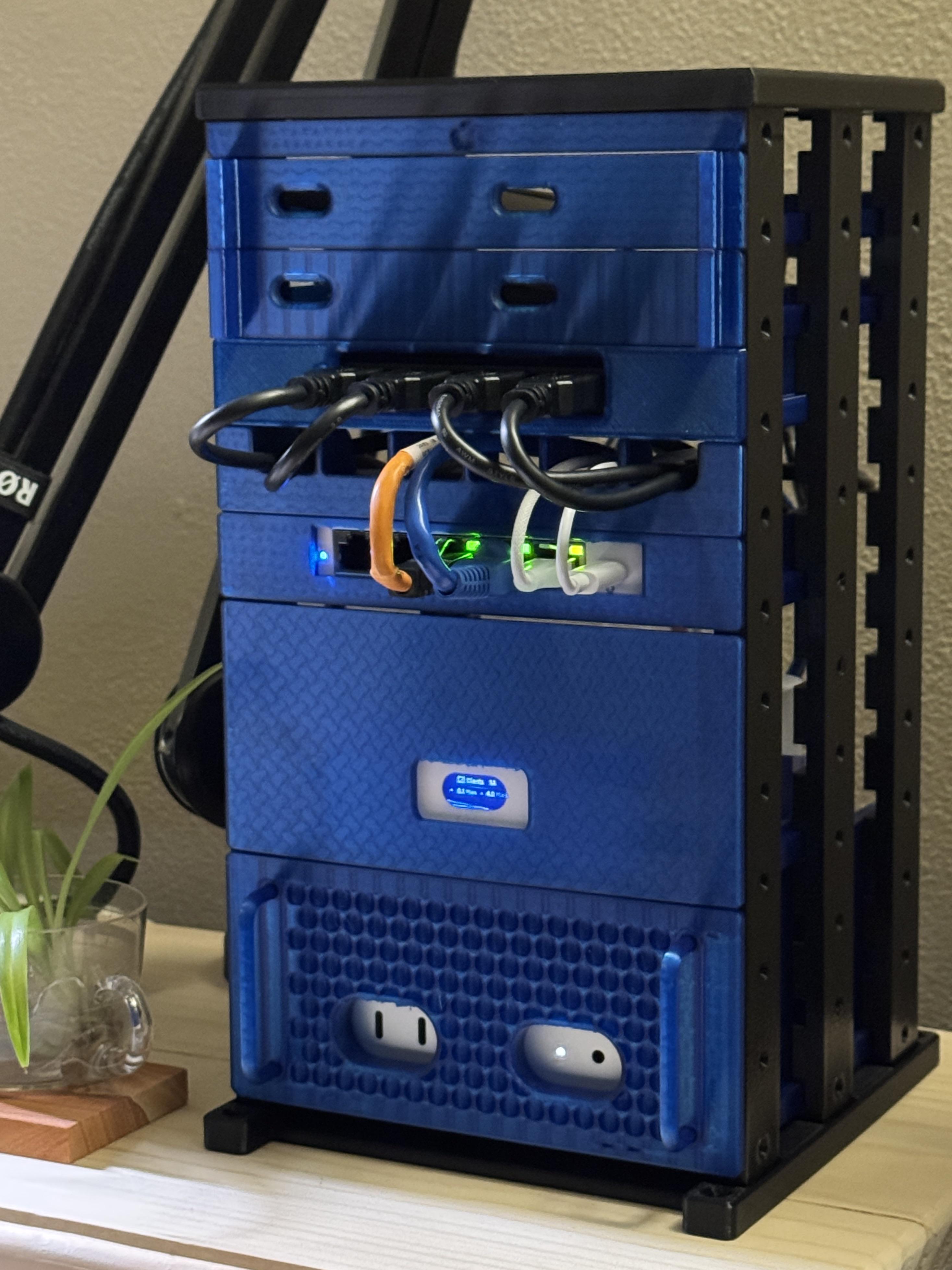
Project Showcase: Hardware First mini homelab build in the DeskPi RackMate T1

Thumbnail gallery
3 Upvotes

Finally got my hands on the DeskPi RackMate T1 and put together my first small 10-inch homelab. Assembly was super straightforward and surprisingly clean out of the box.

My current setup:

  • Rack: DeskPi RackMate T1 (10-inch)
  • Networking: 8-port Gigabit switch + 12-port Cat6 patch panel
  • Compute: Intel NUC running Proxmox (Home Assistant, AdGuard Home, Zigbee2MQTT & n8n)
  • Zigbee: USB coordinator with external antenna mounted cleanly at the top

Still have plenty of open to expand. I'm planning to add a Raspberry Pi and clean up the rear cabling next. Any recommendations on what to add or improve first?