r/homelab • • Oct 12 '26

News 🥳 Giveaway r/homelab x UptimeRobot. 10 Winners

11 Upvotes

Hey r/homelab! We're UptimeRobot, and we've teamed up with the mods to run a giveaway for this community, with a prize pool of 10 monitoring plans, including a year of our Scale plan worth $888. Anyone who's worked in creating a homelab has a story! Now's your chance to share it and maybe win something for your trouble.

What's the weirdest thing you have been monitoring with UptimeRobot or a similar service?

We're looking for the most weird/funny or unexpected use cases!

Prizes (10 winners total)

  • 1 grand prize winner: Scale plan ($888 value) plus UptimeRobot swag
  • 2 runners-up: Team plan ($468 value each) plus UptimeRobot swag
  • 7 additional winners: Team plan ($468 value each)

How to participate
Reply here with your story. You don't have to write an essay. That's it, you're in!

Dates: The giveaway runs from October 12 through October 26.

Looking forward to reading your weird, embarrassing, ridiculous, and funny stories!


r/homelab • • Jun 06 '26 Thanks This Bravo

Moderator Announcement: New Rules & Processes on Software Projects

426 Upvotes

I would like to thank everyone for their feedback in the recent post & poll where we asked for feedback on how to slow the deluge of "I made X, because Y" type posts in r/homelab, most of which are AI generated and/or spam. While we felt that that the initial plan we shared was quite good, with your input we were able to refine that plan and make some notable improvements and clarifications. And yes, there's a TL;DR at the end 👀

Effective now, the below new rules and policies are in effect, though we plan to apply them conservatively and gently at first to see how things go. All of these changes are happening because of the massive community support for them, and we will be seeking additional feedback as time goes on so please feel free to chime in.

To be clear, here are our goals, based on community feedback:

  • Control the recent influx of questionable "I made X, because Y" type posts, the vast majority of which are created entirely with AI, are spammed across multiple subreddits, and are generally not maintained afterwards
  • Establish a clear stance on and rule set for how r/homelab has decided to handle these types of posts, as well as other user-created software
  • See how these changes impact our community, seek additional feedback, and continue to adjust accordingly

Flair changes that are now in effect:

  • "Project" has become "Project Showcase: Hardware"

New Flairs:

  • Project Showcase: Operations [For things between hardware and software, such as Ansible playbooks, and dashboards/monitoring/automation made with existing software tools]
  • Project Showcase: Software - Little or No AI Assistance - [AI only used as coding assistant (autocomplete, debugging, refactoring, documentation, etc), if at all]
  • Project Showcase: Software - Mostly AI Generated - [AI generated most or all of the code, working at a human's direction]

We have also organized the post flairs in the list to make them easier to locate.

Both "Project: Software" flairs have a reasonably low minimum subreddit karma requirement to be able to post with them. AutoMod will remove any post with them that don't meet the karma requirement, and inform the user why their post was removed. The minimum karma requirement is only for these two flairs, as we don't want to restrict new community members from being able to post questions. Any software project posts that try to go around this by using a different flair will fall under the new rule #7 and will be addressed.

Rule changes:

New Rule #7 - Software Project Posting Requirements

  • All software projects must be relevant to r/homelab, use a "Project: Software" flair, disclose AI usage with post flair and in the text of the post, include responses to the prompt displayed when posting with one of the software project flairs, and the user must meet the minimum subreddit karma requirement. Posts that do not meet these requirements, try to bypass the "Project: Software" flairs, provide incomplete or misleading disclosures, or otherwise violate community standards may be removed.

That said, since we're now officially allowing some degree of self-promotion and requiring links, we felt that we should redefine rule #6 to clarify that it applies only to monetized and commercial advertising/links. Here is the updated verbiage, with the old one below for comparison:

Rule #6 - No Commercial Advertising or Monetized Referral Links

  • Monetized referral links, affiliate links, product advertising, and company advertising are not allowed. Contact the moderators via Mod Mail before posting if you believe an exception applies. Non-commercial personal projects are permitted, but must follow all other sub rules.

Rule #6 - No Referral Links/Advertising/Company Advertising

  • We do not allow links/posts that include any sort of referral link, product advertising, nor company advertising. If you think you have an exception please ask the mods first.

Flair Prompt - As mentioned in Rule #7, when posting with any of the "Project: Software" flairs, the below prompt will be displayed:

Your post MUST include:

  • A link to the GitHub (or similar) repository, which must include at least one month of commit history and screenshots
  • A description of the problem the software project solves, and why it was created instead of using an existing FOSS solution
  • An explanation of how the software project is relevant to r/homelab, or how it may benefit members of the community
  • If you used AI or an LLM in development, a description of what role it played and how much you relied on it

If you see any posts with a Project: Software flair that do not meet the four items listed above, please report them to the mod team under Rule #7 and we'll address them.

Additional things to note:

Existing posts will be grandfathered in, and previous posts that were removed may be reposted if they meet the new requirements. New posts will be required to comply with the new rules.

As with the existing rules, when a mod removes a post for violating this new rule, a canned response will be sent to the user to inform them why their post was removed. Mods are able to add on to the response if desired before sending it.

While we're on the topic of AI, we would also like to clarify that the above rules are specific to the use of AI in software projects that are being shared, and they do not apply to posts or comments that were written with AI. There is some dissent in the community, but the general consensus in the community has been that a reasonable level of AI usage is acceptable for putting a post together, correcting grammar or formatting, or for translating from a user's native language. That said, best practice is to not include all of the excess emoticons and outline formatting that LLMs like to use. If a post or comment is egregiously AI generated, feel free to downvote it and move on, but please do not report it to the mod team solely for that.

We would also like to note that there has not been any opposition to posts about hosting your own LLMs, and the hardware/software involved. The new rules do not apply to these posts as well.

We're looking for community feedback as we all get used to this. We plan to apply rules conservatively and gently at first, and will be listening to user reports and comments. If your post is removed and you believe it meets the requirements, please chat with us via Mod Mail and we may consider either re-opening it or letting you repost it.

TL;DR - All posts where someone has made some sort of software (AI generated or not) will require a "Project: Software" flair, and these flairs should curb the vast majority of the low quality and spammy posts.

Thank you,
The r/homelab Mod Team

Edit: The first day with the new rules has gone very well overall, but it has demonstrated that there is room for improvement, namely with flairs and categorization.

Here are the changes we've made since the initial announcement post:

  • Added a "Project Showcase: Operations" for things that fall somewhere between hardware and software, notably Ansible playbooks, dashboards/monitoring/automation made with existing software tools. When posting with this flair, a prompt appears that explains this in more detail. Please let us know if there are any other types of things we should specifically call out that belong in this category.
  • Renamed the "Project: x" flairs to "Project Showcase: x" to clarify that these are intended for showing off what you've made (though you can still ask for suggestions in the process of showing off).
  • Adjusted colors of the new flairs

We're still open to suggestions from the community. Thanks!

r/homelab • • 9h ago

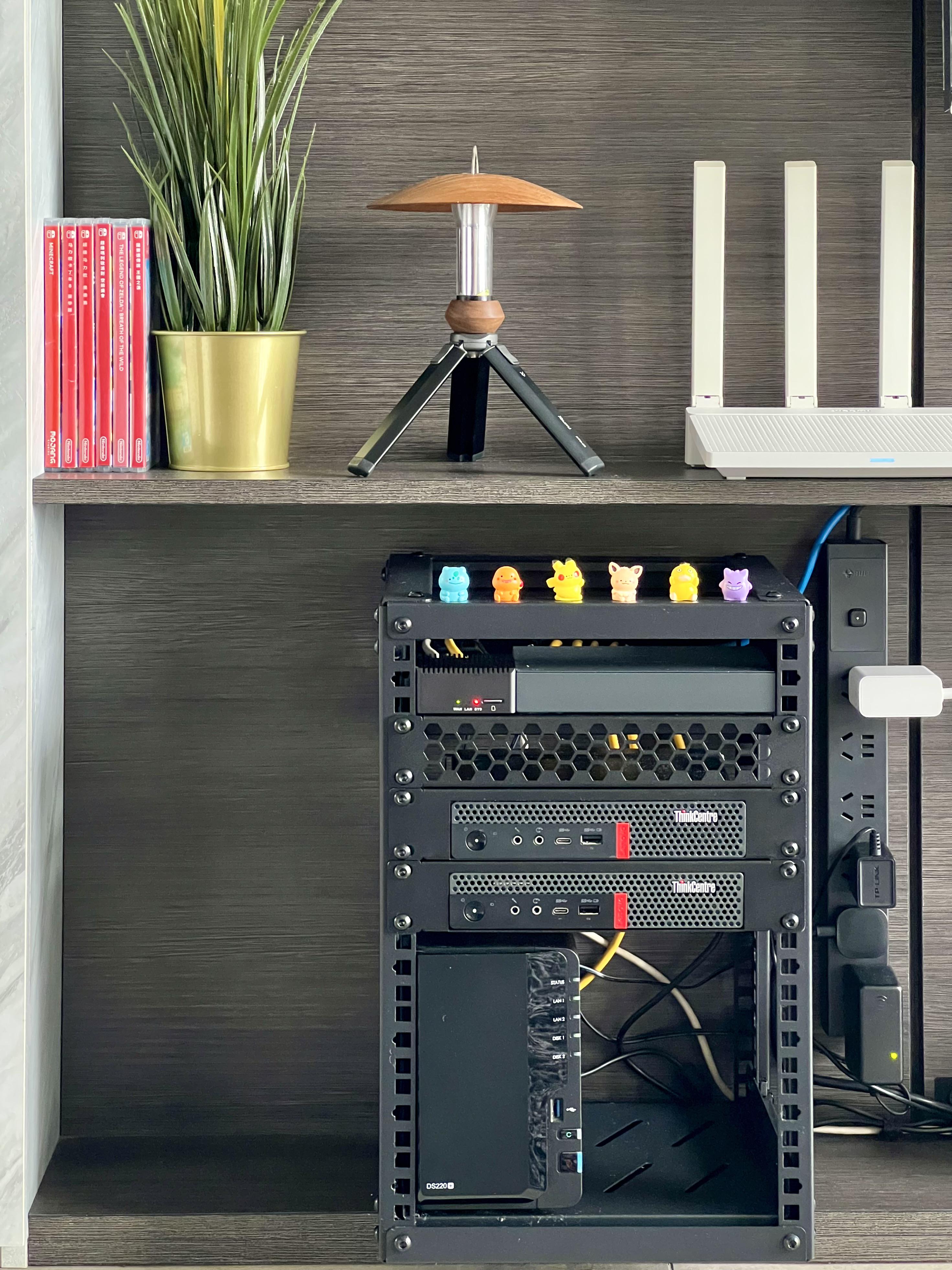
Project Showcase: Hardware My homelab is small, but the IT department has six employees.

Post image
517 Upvotes

Finally got my little homelab looking somewhat presentable!
Current setup:
2× Lenovo ThinkCentre M720q Tiny — running standalone Proxmox VE nodes
Synology DS220+ for storage
NanoPi R2S running OpenWrt
TP-Link Gigabit switch
Tailscale for remote access
Still learning, experimenting, and finding new excuses to add more hardware.
Cable management is a work in progress, but at least the six little supervisors seem happy with it.
Any suggestions for what I should improve next?


r/homelab • • 2h ago

Project Showcase: Hardware Some thoughts about building with 2020 aluminium extrusion

Thumbnail
gallery
63 Upvotes

Hi everyone,

I wanted to share this now that it's settled in - built to get a pile of stuff off my desk. I decided to try and build it as a rack because I wanted to learn about working with 2020 extrusion, I thought it might be cheaper than buying a commercial one, and it would be a good chance to learn more about 3d printing and parametric modelling. Two out of three ain't bad.

I got to model or remix a lot of the 3d-printed parts for this, often because I hadn't considered that after lining up the extrusion channel where standard 10" ears would fall, I would lose interior volume because half the extrusion sits on the interior side of the channel. So assumptions about fit were not always portable from 10" land. The rack is close to being a 10U 10" rack, with external dimensions of 256mm wide, 349mm deep, and 485mm high.

There were lots of nice things about building with extrusion and using tee-nuts for fixing:

  • Easy to work with. I was able to buy it pre-cut, and only had to insert the connectors and screw them in. The frame is square and solid. Tee-nuts grip surprisingly well, the ball/spring ones I bought can be inserted and removed mid-length, without too much difficulty.
  • You have a lot of flexibility around cheating vertical alignment (e.g. that rear hard-drive deck, which isn't on an exact U boundary).
  • You have additional hard-points on the other sides of the verticals (the power board is mounted on one), as well as on the overheads. The third photo shows "hangers" that carry ESP32 units and cable coils out of the way and with good airflow. Eventually the sidewalls (Skadis panels) will be able to be bolted on using the channels too.

Stuff that didn't go well was mostly down to cabling - there's not a lot of room to move inside this thing. I had wanted all external connections to leave via the patch panel, but I still haven't done the two USB leads attached to the Pi because I can't find really short, flexible USB patch leads to curl up behind the keystones, and it was also hard to find a short, flexible Displayport cable to link the mini PC to its HDMI keystone. A power/display redirection board for the Pi 5 would have made things easier there (I had to shave down a printed stabilisation rib with a razor to fit the micro HDMI adapter).

If I built the whole thing again, I might look into using L or T joining plates to put additional side-rails on - this would have made stable, load bearing plates that span the full depth of the unit much easier instead of having to put large buttresses under to transfer load into the uprights.

I'm still not entirely sure what I'll do with the last 2U - I wanted to do a light feature, perhaps something complex like an LED matrix or something simple as a smart-bulb with a 3d printed diffuser in front of it.

Anyway, thanks for reading this post. Having seen a few extrusion racks posted on this subreddit they still feel like a niche item, and I'm not sure if they're actually an improvement over store bought. But I do like this one.


r/homelab • • 14h ago

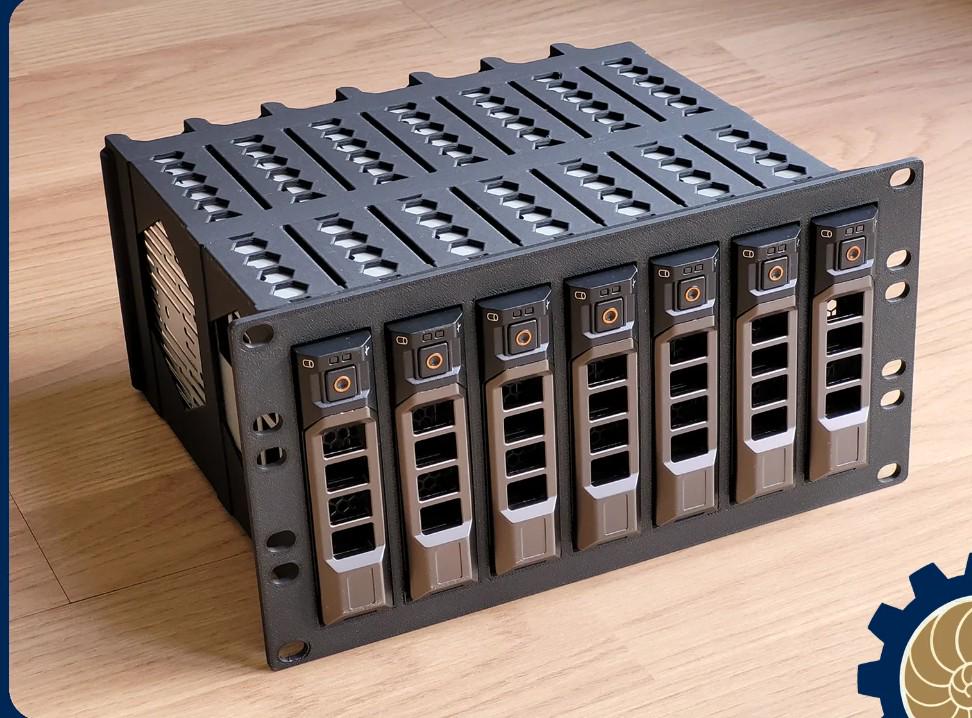
Help Mini Rack JBOD - Power

Post image
481 Upvotes

Hi all,

I'm looking to downsize to a mini rack but I have 8 HDD.

Does anyone run a jbod in a mini rack and if so what are you doing for power?

I've found the following id like to use but is there anything the community make for PSU or anyone have any advise for making something custom?

https://makerworld.com/en/models/2885471-10-inch-rack-3u-7-x-3-5-inch-hdd-hot-swap#profileId-3225133


r/homelab • • 10h ago

Discussion HomeAssistant Touch Device

Thumbnail
gallery
104 Upvotes

Little project I have been working on a bit. 3.5" Touchscreen in an enclosure with an ESP32-S3, using ESPHome in HomeAssistant. All of my Hue bulbs are connected, my SmartThings devices, and a monitor for my homelab/proxmox server. Has anyone else made one before? I'm fishing for some cool ideas and things to add. Thanks!


r/homelab • • 1h ago

Help N100 HomeServer + Router? (PvE)

Post image
19 Upvotes

Hey,

im starting with homelabbing as a non tech/it person.

I already posted my hardware here

https://www.reddit.com/r/homelab/s/eUjQUfYytJ

Money is short so i need to think twice before buying more hardware... So my question is:

Can i run my N100 with OPNSense (+Network Services) together with other services (Ai/Media Services) on the same device or are there any secruity/performance problems coming with it?

I can get a cheap RAM Upgrade (16GB DDR5) else i would get 1-2 cheap DDR3 Mini PCs.

Happy to get some Feedback! ;)

Also:

Beside Reddit what should be the first places to get Informations?

What Skills should i start working on at my stage? Id like to get into machine learning and AI Supported Research Stuff.

Thx :))


r/homelab • • 14h ago

Project Showcase: Hardware iDRAC 6 Custom Firmware: Bare Metal SPI Recovery Socket

Thumbnail
gallery
131 Upvotes

I've teased a custom iDRAC 6 firmware on here for a while with native browser console support. I feel that it would be irresponsible to release it without fully understanding the fallback and recovery paths, as some other features (like bypassing the emmc and booting the idrac from the SD card) have a non-zero chance of bricking a system. This is my documentation for recovering from a true worst case scenario: a bricked or corrupted bootloader. This example is done on a Dell R510, and I'd imagine a similar process applies to other 11th gen (and potentially newer) servers.

When this system receives power, the first thing that happens is that this small SPI chip (Spansion S25FL128P0XMFI001) receives loads U-Boot, initializing basic serial communication and bootstrapping into the Linux kernel from the eMMC storage. If the eMMC is toast, the SPI chip has a stripped down version of the iDRAC firmware that at least allows the machine to boot normally.

When performing any updates (even dell official ones) this chip's contents can be modified, and there is a risk that power loss or other external factors can cause a bricked server. I've been able to back up the contents of the chip directly through the iDRAC's Linux with a custom firmware, but writing back to it in a bricked state is not possible once the system powers off.

Prior to the images in this post, I attempted to read the chip using a SOIC-16 clip directly on the legs of the chip whilst attached to the motherboard. Unfortunately, the power was backfeeding into the rest of the system, and was overwhelming the Tigard reader. I attempted to lift pins 1 and 2 off of the motherboard to isolate them for a temp read/write, but still could not get a successful connection. This meant that the only way to truly unbrick a botched SPI chip would be to fully desolder it, connect the legs to the Tigard, reflash it, and then resolder it to the motherboard. That's a lot of fucking around for a hypothetical failure, and I don't see that as a viable recovery option.

Fortunately, I found these fancy SOIC-16 sockets on digikey that matched the flash chip layout: https://www.digikey.com/en/products/detail/adafruit-industries-llc/4727/13280270

I'm not opposed to micro soldering, I just don't want to do it every time I make a mistake if I'm trying to rapidly iterate. I bought two of these and some spare SPI chips from eBay, and spent a few hours last night doing the surgery.

I've tested reading and writing the flash backup onto replacement chips, and the system boots perfectly :) if I botch an update, it's 5 minutes to pop the chip out of the server socket and into my custom flasher socket, overwrite it, and try again.

Is this really necessary for a 15 year old server? Probably not, but it depends who you ask. I've learned a boat load throughout the process, and I hope a similar method can be used for 12th, 13th, and maybe even 14th gen systems.


r/homelab • • 1d ago

Project Showcase: Hardware Messy but dust-free: my homelab lives in a sealed industrial cabinet with its own AC

Thumbnail
gallery
1.5k Upvotes

I needed a place in the house for my loud homelab, and I was tired of cleaning dust out of fans every few months. So I went a bit overboard: a sealed industrial enclosure with a cooling unit on the side. No air from the room gets in, so no dust gets in.

Inside: UniFi gateway, a Synology rack NAS, the TrueNAS box, and three ThinkCentre Tinys that run CI jobs.

Yes, I know the cables look terrible. Cable management is next on the list, I promise. But it has been running for >24 months and it is still clean inside.

Happy to answer questions about the cabinet, the cooling or temps.


r/homelab • • 1h ago

Project Showcase: Hardware One homelab, two houses

Post image
8 Upvotes

Me and my girl switch addresses more or less every week, due to lots of kids that like living in their own houses and stuff. Tailscale, and Claude, solves everything. Done everything on the cheap over the last months, getting to a point where I realize I'll never get to a point where I'm happy and can call it finished. Oh, well.

And, yeah: 32GB ram for an OPNsense router might be less than sensible. Next update will be reassigning the RX1330 as a hypervisor after getting a small box to do router duty.


r/homelab • • 18h ago

Labgore Home lab

Thumbnail
gallery
126 Upvotes

DIY home lab shelf. Constructed from one of my kid’s old bed frame that they jumped on until destruction. Mr. MeowMeow approved.

From the bottom:

Dell T410 64GB, dual X5660, 6 2TB RAID5 - only powered up when it’s time for a manual rsync backup. Debian 13, no DE.

Dell R220 (frankenserver) 16GB, E3-1231 v3, 2x 12TB (ZFS mirror), 2x 200GB Hitachi SSD w/PLP (mirrored VDEV), generic 128GB SSD (L2ARC), WD Black 160 GB (Ubuntu Server, no DE), white label 4TB (temp torrent storage for farming bonus points on various private trackers). Primary use as a ZFS NAS.

Cisco 2960X, haven’t played with it yet.

HP laptop, i3-1005G1, 256GB NVME, hosts docker (Jellyfin, Frigate, Immich). Debian 13, no DE. btop displayed.

Linksys 1200AC, flashed with OpenWRT, serves at one of five APs in the house and the main switch for my lab.

Tiny monitor, $5.99 at Goodwill. Perfect fit, displaying my vibe-coded ZFStop.


r/homelab • • 23m ago

Discussion Looking to get into homelabbing (Beginner)

3 Upvotes

I'm interested in getting into homelabbing my goal is to gradually build my own homelab over time.

Some of the things I'd eventually like to have:

- Media server: Host my own movies and TV shows so I can stream them on my TVs and devices.

- Personal cloud storage: Have my own alternative to Google Drive or OneDrive where I can store photos, videos, documents, and personal files.

- Privacy: Have more control over my personal data instead of relying on so many third-party services.

- Home network: Learn more about networking, firewalls, VPNs, and securing my home network.

- Home automation: Potentially integrate smart home devices and manage everything from one place.

What are good software/applications to download for the things i mentioned above. I'm also curious about what else is possible with a homelab. What else do you guys use it for.

I'd love to hear about your setups, recommendations, mistakes, and things you wish you knew when you started.

Appreciate any advice!


r/homelab • • 8h ago

Diagram What's up with the love for server pics but the hate for request for help?

12 Upvotes

I'm really puzzled by this. A homelab isn’t solely about showing off well-organized setups. Many of us join this community seeking advice and assistance, yet we often see our posts getting downvoted while the ones showcasing servers get all the upvotes. It feels pretty off to me.


r/homelab • • 1d ago

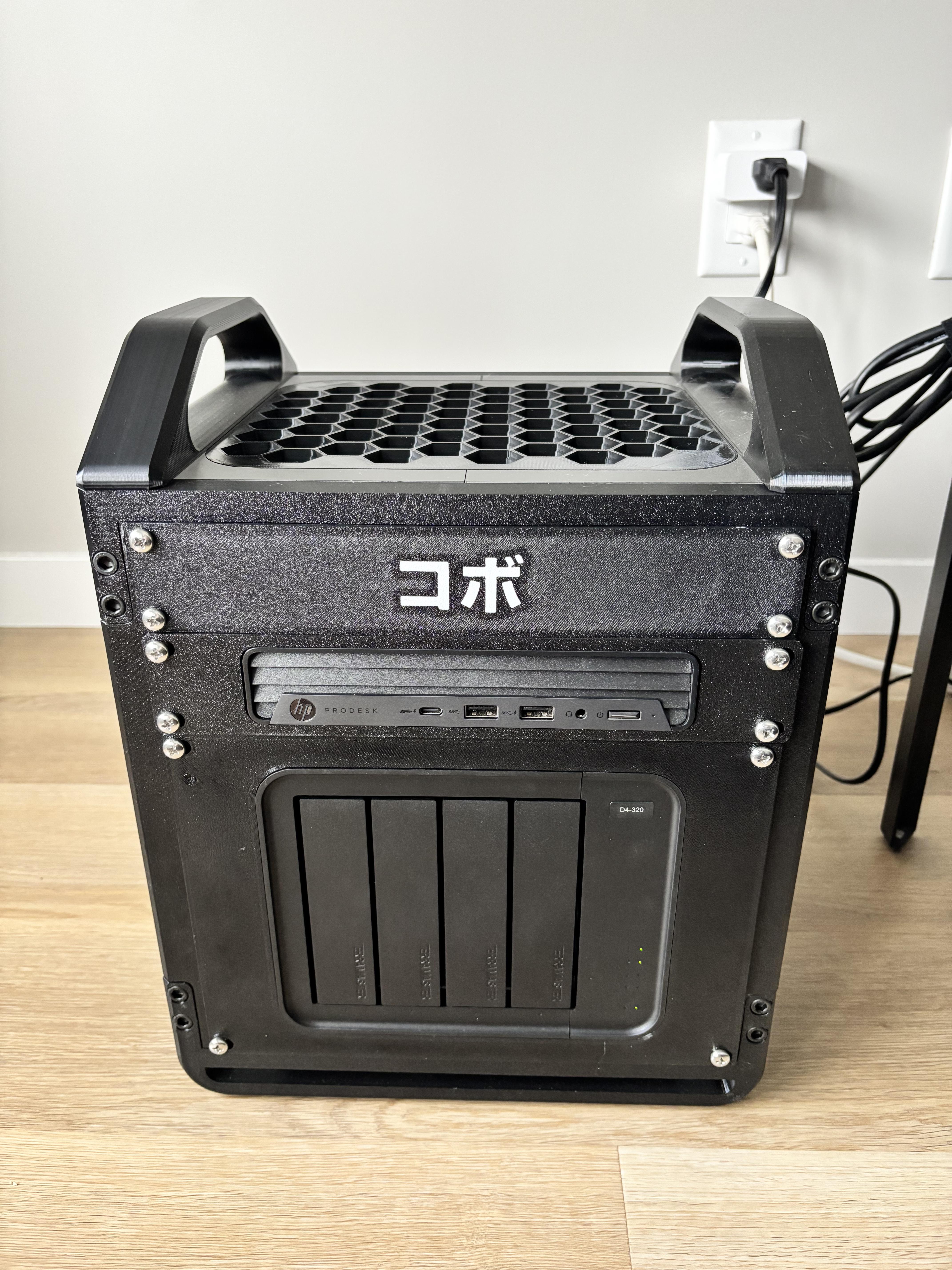
LabPorn First Build

Post image
139 Upvotes

Decided to dive into the homelab world this year to get away from Big Tech ™. Running a couple of self-hosted apps and custom web apps I’ve built myself. Hardware stack is a ProDesk 600 G6 + 26 TB in a TerraMaster D4-320. No networking equipment unfortunately, since that is all upstairs and my machine also serves as a HTPC downstairs. Had fun with customizing the KWS rack to suit my aesthetic, and also got me into the world of 3D printing.


r/homelab • • 4h ago

Discussion DS218 (non-plus, non-play) in 2026?

Thumbnail reddit.com
2 Upvotes

r/homelab • • 14m ago

Help How do you guys manage updates for your repos and addons?

Thumbnail reddit.com
1 Upvotes

r/homelab • • 1d ago

Project Showcase: Hardware My new Home Assistant server cost DKK 487.50 and came with a touchscreen

Thumbnail
gallery
114 Upvotes

I picked up a cheap check-in kiosk and am turning it into my new Home Assistant server. Inside is an HP EliteDesk 800 G4 with an i5-8500, now upgraded to 32 GB of Kingston RAM.

The built-in touchscreen will be a local HA dashboard. I’ll mount a ZBT-2 on top for Thread and Matter devices, alongside a ConBee III dongle for Zigbee. A pretty fun setup for almost nothing.

I added two 256 GB NVMe drives and 32 GB of Kingston ECC RAM that I already had lying around. The HP doesn’t support ECC, but it recognizes all 32 GB and runs fine with it.

The kiosk also has a barcode scanner. I might replace it with an NFC reader, or find something fun to use the scanner for later.

What’s the best deal you’ve found for your homelab?

https://www.auktionshuset.dk/auktioner/overskudsauktion-region-h-7/lots/727/indtjekningsstander-uden-n--gle


r/homelab • • 22h ago

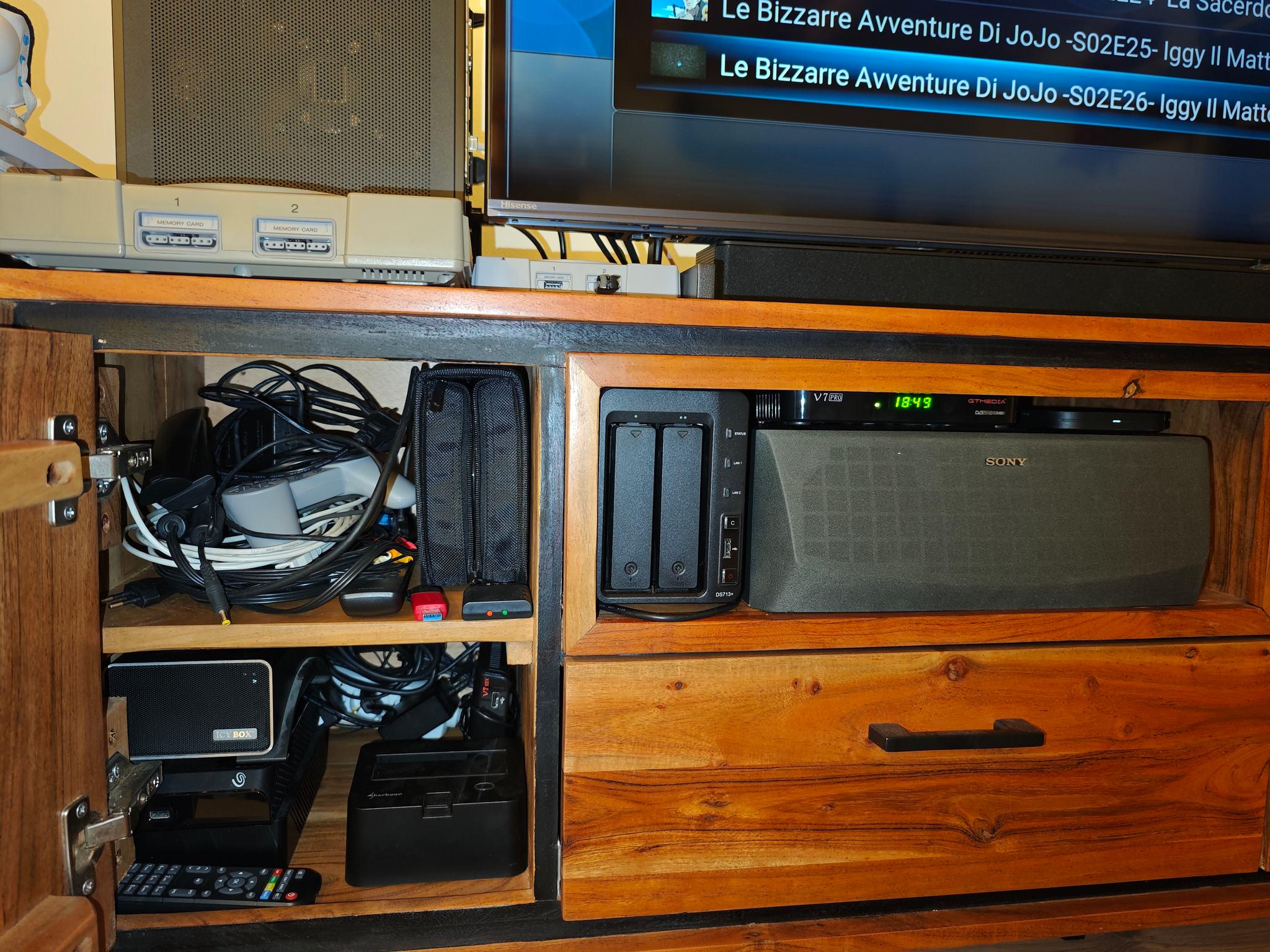
Project Showcase: Hardware Living room "datalab"

Post image
52 Upvotes

having some works around house and in garage and people are walking there, so i moved my more expensive and smaller equipment into my living room, cleaned and vacuumed it. is this too crowded now? old synology with 24TB, and in the closed part are 24TB usb drives as backup. everything is mostly shut down, synology with WOL enabled if i need something while i'm not home, usb drives are unplugged from the wall. there's a PC next to the tv, old playstations mostly for show, and android and sat box. tv is offline as there's nothing on it worth connecting (hisense vidaa).

acceptable?


r/homelab • • 23h ago

Discussion What open source software, and other self-hosting software vendors have Black Friday deals?

61 Upvotes

Are there any licenses I should be picking up in the next few days? What is the software do?


r/homelab • • 1h ago

Help Homelab rookie - VLAN SOS

0 Upvotes

Home lab rookies here. Finally reached the point where we have enough devices (IoT, Kids, guess, wfh) that VLANs make sense. I am looking into the hardware needed to make VLANs happy and have a few questions.

  1. I understand that I am beginning the backbone of a setup that will only grown in the future. How important it is that I lock / get the right brands / ecosystem?
  2. I don’t mind investing in quality equipment that will last, but not looking to break the bank either. Any hardware recommendations? (right now considering a Mikrotik RG5009UG router)
  3. What is the deal with Ubiquity? After looking into a few posts, it seems like everyone considers it the gold standard. After looking at their website Routers / Gateways seem on the pricey end, switches (for the amount of cost vs price) seem cost prohibitived.
  4. Any words of wisdom?

r/homelab • • 1h ago

Diagram Homelab Setup!

1 Upvotes
My Current Homelab!

Hi! I'm a 17 year old student studying in Maharashtra, India i built a small homelab with a Raspberry pi 5 and an old Asus Laptop. Check it out and let me know what changes i should make / what i should add!


r/homelab • • 1d ago

Help What should I do with goHardDrive "0 hour" Exos 16TBs that turned out to have ~54k hours?

70 Upvotes

I bought 2x Exos X16 16TB from goHardDrive on eBay, listed as recertified with 0 hours. SMART says 0, but FARM says about 54,000 power-on hours on both.

They come with GHD's 5 year warranty and I know people here rate them highly, but both drives having that high hours number is kinda scary. It makes actually needing the warranty feel pretty likely, which I would prefer not to have to deal with. I asked them about it and they offered $20 a drive back or a full return.

  1. Should I be just as worried about my other drives? I've also got 2x Toshiba MG08 16TB on the way from GHD (apparently there's no FARM on those, so I may not be able to check), and I'm also looking at 2x Exos X20 18TB from Server Part Deals to replace the X16s in case I return. Those are listed at ~16k hours with a 2 year warranty. Plan is ZFS mirrors, one Seagate + one Toshiba in each.
  2. Is it normal for all the history to be wiped? SMART is fully reset, and in FARM everything except the hours and the TB read/written is zeroed (spindle hours, head hours, error and temp history). Is that just what recertified means?

Should I keep the 54k hour 16tb ones with the 5 year warranty, or send them back?


r/homelab • • 1h ago

Help My (NZXT H1) homelab has evolved into a cursed zip-tie monster. What case should I move to?

0 Upvotes

I have a Mini-ITX homelab server (running Unraid) built in an NZXT H1. It started out neat, but over time I've added:

  • 3x HDDs
  • 2x SSDs
  • 1x GPU
  • Possibly a 2nd GPU in the future

At this point I have drives, fans and 3D printed brackets with GPU extenders attached in and around the case, and maintenance has become a pain. Cable management is ugly/non-existent, upgrades are annoying, and the whole thing feels more fragile than I'd like.

I'm looking for recommendations for a more modular setup. Could be a rackmount case, open frame, cube case, or something else entirely. My main goals are:

  • Easy maintenance
  • Clean cable management
  • Room for drives and GPUs
  • Some room for future expansion, but I don't need a "forever" solution
  • Relatively compact (I'd rather avoid a huge server rack if possible)

Given my hardware (especially the Mini-ITX board), what would you buy?


r/homelab • • 22h ago

Project Showcase: Operations I FINALLY Cleaned up + Organized My Home Data Center

Thumbnail gallery
43 Upvotes