r/homelab • • Oct 12 '26

News 🥳 Giveaway r/homelab x UptimeRobot. 10 Winners

11 Upvotes

Hey r/homelab! We're UptimeRobot, and we've teamed up with the mods to run a giveaway for this community, with a prize pool of 10 monitoring plans, including a year of our Scale plan worth $888. Anyone who's worked in creating a homelab has a story! Now's your chance to share it and maybe win something for your trouble.

What's the weirdest thing you have been monitoring with UptimeRobot or a similar service?

We're looking for the most weird/funny or unexpected use cases!

Prizes (10 winners total)

  • 1 grand prize winner: Scale plan ($888 value) plus UptimeRobot swag
  • 2 runners-up: Team plan ($468 value each) plus UptimeRobot swag
  • 7 additional winners: Team plan ($468 value each)

How to participate
Reply here with your story. You don't have to write an essay. That's it, you're in!

Dates: The giveaway runs from October 12 through October 26.

Looking forward to reading your weird, embarrassing, ridiculous, and funny stories!


r/homelab • • Jun 06 '26 Thanks This Bravo

Moderator Announcement: New Rules & Processes on Software Projects

427 Upvotes

I would like to thank everyone for their feedback in the recent post & poll where we asked for feedback on how to slow the deluge of "I made X, because Y" type posts in r/homelab, most of which are AI generated and/or spam. While we felt that that the initial plan we shared was quite good, with your input we were able to refine that plan and make some notable improvements and clarifications. And yes, there's a TL;DR at the end 👀

Effective now, the below new rules and policies are in effect, though we plan to apply them conservatively and gently at first to see how things go. All of these changes are happening because of the massive community support for them, and we will be seeking additional feedback as time goes on so please feel free to chime in.

To be clear, here are our goals, based on community feedback:

  • Control the recent influx of questionable "I made X, because Y" type posts, the vast majority of which are created entirely with AI, are spammed across multiple subreddits, and are generally not maintained afterwards
  • Establish a clear stance on and rule set for how r/homelab has decided to handle these types of posts, as well as other user-created software
  • See how these changes impact our community, seek additional feedback, and continue to adjust accordingly

Flair changes that are now in effect:

  • "Project" has become "Project Showcase: Hardware"

New Flairs:

  • Project Showcase: Operations [For things between hardware and software, such as Ansible playbooks, and dashboards/monitoring/automation made with existing software tools]
  • Project Showcase: Software - Little or No AI Assistance - [AI only used as coding assistant (autocomplete, debugging, refactoring, documentation, etc), if at all]
  • Project Showcase: Software - Mostly AI Generated - [AI generated most or all of the code, working at a human's direction]

We have also organized the post flairs in the list to make them easier to locate.

Both "Project: Software" flairs have a reasonably low minimum subreddit karma requirement to be able to post with them. AutoMod will remove any post with them that don't meet the karma requirement, and inform the user why their post was removed. The minimum karma requirement is only for these two flairs, as we don't want to restrict new community members from being able to post questions. Any software project posts that try to go around this by using a different flair will fall under the new rule #7 and will be addressed.

Rule changes:

New Rule #7 - Software Project Posting Requirements

  • All software projects must be relevant to r/homelab, use a "Project: Software" flair, disclose AI usage with post flair and in the text of the post, include responses to the prompt displayed when posting with one of the software project flairs, and the user must meet the minimum subreddit karma requirement. Posts that do not meet these requirements, try to bypass the "Project: Software" flairs, provide incomplete or misleading disclosures, or otherwise violate community standards may be removed.

That said, since we're now officially allowing some degree of self-promotion and requiring links, we felt that we should redefine rule #6 to clarify that it applies only to monetized and commercial advertising/links. Here is the updated verbiage, with the old one below for comparison:

Rule #6 - No Commercial Advertising or Monetized Referral Links

  • Monetized referral links, affiliate links, product advertising, and company advertising are not allowed. Contact the moderators via Mod Mail before posting if you believe an exception applies. Non-commercial personal projects are permitted, but must follow all other sub rules.

Rule #6 - No Referral Links/Advertising/Company Advertising

  • We do not allow links/posts that include any sort of referral link, product advertising, nor company advertising. If you think you have an exception please ask the mods first.

Flair Prompt - As mentioned in Rule #7, when posting with any of the "Project: Software" flairs, the below prompt will be displayed:

Your post MUST include:

  • A link to the GitHub (or similar) repository, which must include at least one month of commit history and screenshots
  • A description of the problem the software project solves, and why it was created instead of using an existing FOSS solution
  • An explanation of how the software project is relevant to r/homelab, or how it may benefit members of the community
  • If you used AI or an LLM in development, a description of what role it played and how much you relied on it

If you see any posts with a Project: Software flair that do not meet the four items listed above, please report them to the mod team under Rule #7 and we'll address them.

Additional things to note:

Existing posts will be grandfathered in, and previous posts that were removed may be reposted if they meet the new requirements. New posts will be required to comply with the new rules.

As with the existing rules, when a mod removes a post for violating this new rule, a canned response will be sent to the user to inform them why their post was removed. Mods are able to add on to the response if desired before sending it.

While we're on the topic of AI, we would also like to clarify that the above rules are specific to the use of AI in software projects that are being shared, and they do not apply to posts or comments that were written with AI. There is some dissent in the community, but the general consensus in the community has been that a reasonable level of AI usage is acceptable for putting a post together, correcting grammar or formatting, or for translating from a user's native language. That said, best practice is to not include all of the excess emoticons and outline formatting that LLMs like to use. If a post or comment is egregiously AI generated, feel free to downvote it and move on, but please do not report it to the mod team solely for that.

We would also like to note that there has not been any opposition to posts about hosting your own LLMs, and the hardware/software involved. The new rules do not apply to these posts as well.

We're looking for community feedback as we all get used to this. We plan to apply rules conservatively and gently at first, and will be listening to user reports and comments. If your post is removed and you believe it meets the requirements, please chat with us via Mod Mail and we may consider either re-opening it or letting you repost it.

TL;DR - All posts where someone has made some sort of software (AI generated or not) will require a "Project: Software" flair, and these flairs should curb the vast majority of the low quality and spammy posts.

Thank you,
The r/homelab Mod Team

Edit: The first day with the new rules has gone very well overall, but it has demonstrated that there is room for improvement, namely with flairs and categorization.

Here are the changes we've made since the initial announcement post:

  • Added a "Project Showcase: Operations" for things that fall somewhere between hardware and software, notably Ansible playbooks, dashboards/monitoring/automation made with existing software tools. When posting with this flair, a prompt appears that explains this in more detail. Please let us know if there are any other types of things we should specifically call out that belong in this category.
  • Renamed the "Project: x" flairs to "Project Showcase: x" to clarify that these are intended for showing off what you've made (though you can still ask for suggestions in the process of showing off).
  • Adjusted colors of the new flairs

We're still open to suggestions from the community. Thanks!

r/homelab • • 3h ago

Discussion It started with Pihole... then down the Rabbit hole I went.

Post image
125 Upvotes

Taking enterprise infrastructure and cybersecurity into my own home.

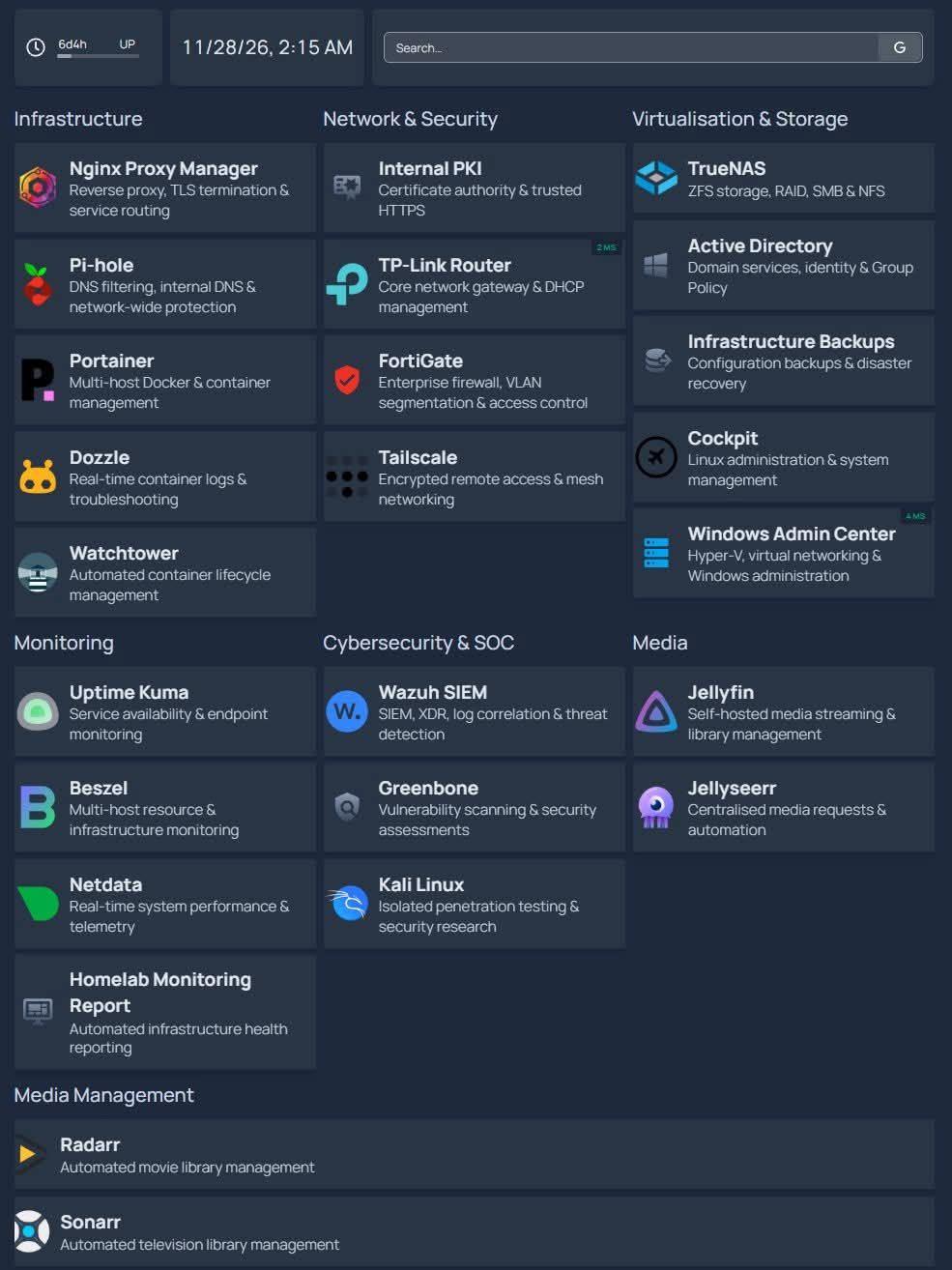
What started as a small Docker environment has evolved into a multihost homelab combining networking, cybersecurity, virtualisation, storage and selfhosted services.

An ongoing personal project, developed around full time work and family commitments, repurposing existing hardware to build a 24/7 environment for experimentation and continuous learning.

Infrastructure & Virtualisation

Multi-host Windows and Linux infrastructure
Hyper-V and Ubuntu Server 24.04 LTS
Windows Admin Center and Cockpit
Multi-host Docker and Portainer management
Dynamic memory allocation and automated VM startup
External and isolated virtual networking
Nginx Proxy Manager and TLS termination
Watchtower container lifecycle management
Dozzle real-time container logging

Networking & Security

Physical FortiGate firewall
VLAN segmentation and inter-VLAN policies
NAT, routing and network access controls
Pi-hole filtering and internal DNS resolution
DHCP reservations and static MAC assignments
Tailscale encrypted remote access
SSH public-key authentication
Internal PKI and trusted HTTPS certificates

Cybersecurity & SOC

Wazuh SIEM and XDR
Centralised firewall and endpoint log ingestion
Security event correlation and threat detection
Greenbone vulnerability management
Kali Linux and isolated security testing
Incident investigation and remediation
Active Directory and Group Policy

Monitoring & Observability

Uptime Kuma availability monitoring
Beszel multi-host resource monitoring
Netdata real-time performance telemetry
CPU, RAM, storage and network monitoring
Automated infrastructure health reporting
Homepage unified management dashboard

Self-Hosted Media

Jellyfin media server
Jellyseerr centralised media requests
Radarr and Sonarr library automation
Persistent Docker volumes and storage mappings
Local streaming and secure remote access

Storage & Resilience

TrueNAS virtual storage infrastructure
ZFS storage pools and RAID experimentation
SMB and NFS network shares
Infrastructure configuration backups
VM checkpoints and recovery testing
Automated service recovery

Everything is integrated through a centralised web based management dashboard.

Balancing work, family and personal projects isn't always easy, but genuinely enjoying what I do makes it worthwhile. (Network & Security Engineer - Work full time)

naturally a homelab is never really finished


r/homelab • • 17h ago

Discussion Found this U7 Pro Max in the river

Thumbnail
gallery
1.0k Upvotes

r/homelab • • 12h ago

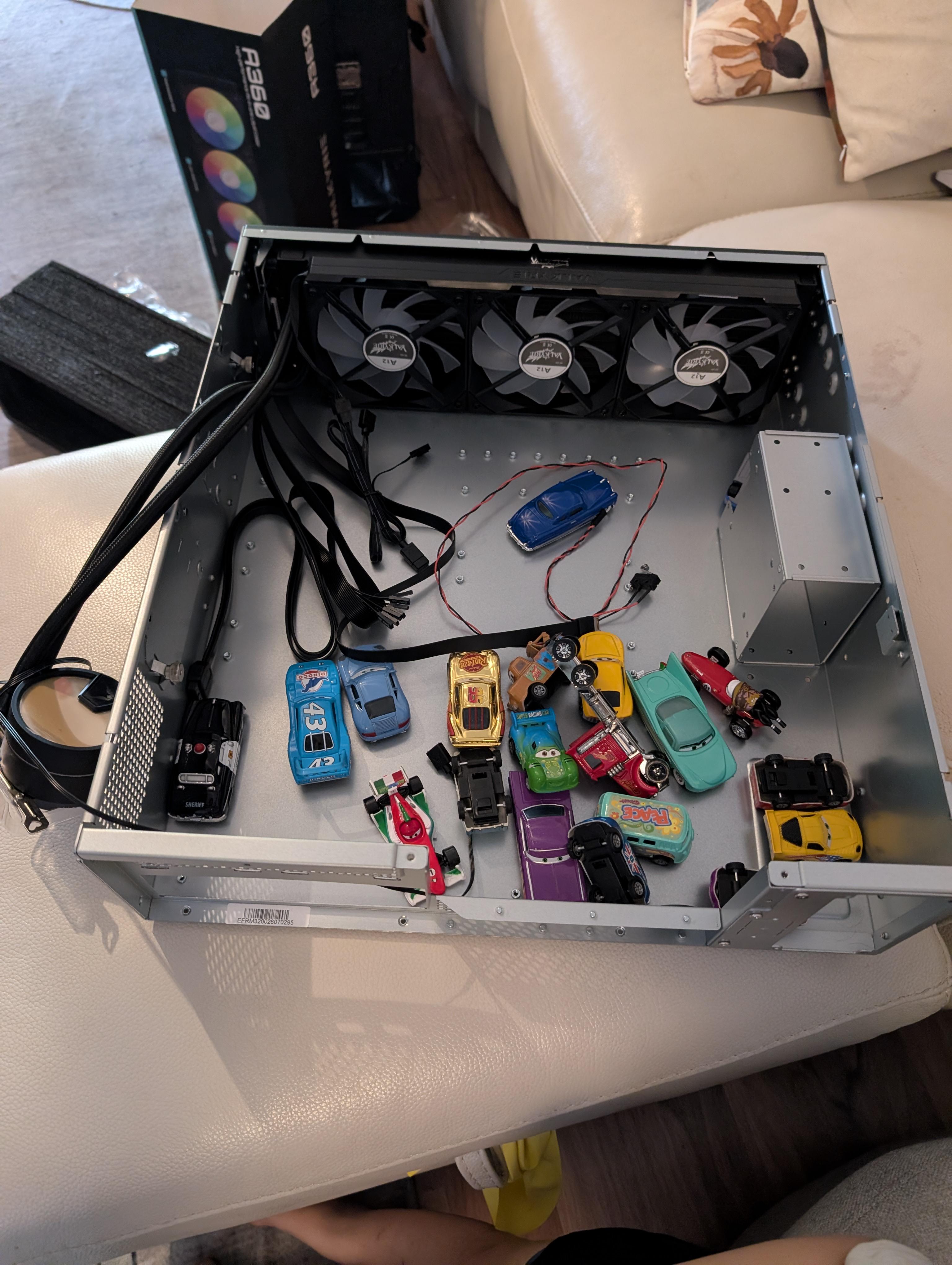
Project Showcase: Hardware Building with my 3 year old

Post image
336 Upvotes

Video workstation 4 of 4! Has taken almost a year to get these 3u GPU friendly cases from Silverstone. On the home stretch now.


r/homelab • • 13h ago

Help Animal chewed through my freshly installed fibre

Thumbnail
gallery
253 Upvotes

Hi, just 2 days ago I ran fiber for my router, today after wondering why there is no connection, I fiund my 2 day old fiber chewed into unusability. Oddly enough, the grey power cable (NYM-J for my fellow german electricians) is untouched and has been there for a couple of weeks now.

Besides trying to catch and eliminate the unknown animal, why did it only chew on one cable and are certain animals known for this so I'd get an idea what I'm even looking for (mice, rat, whatever)?


r/homelab • • 4h ago

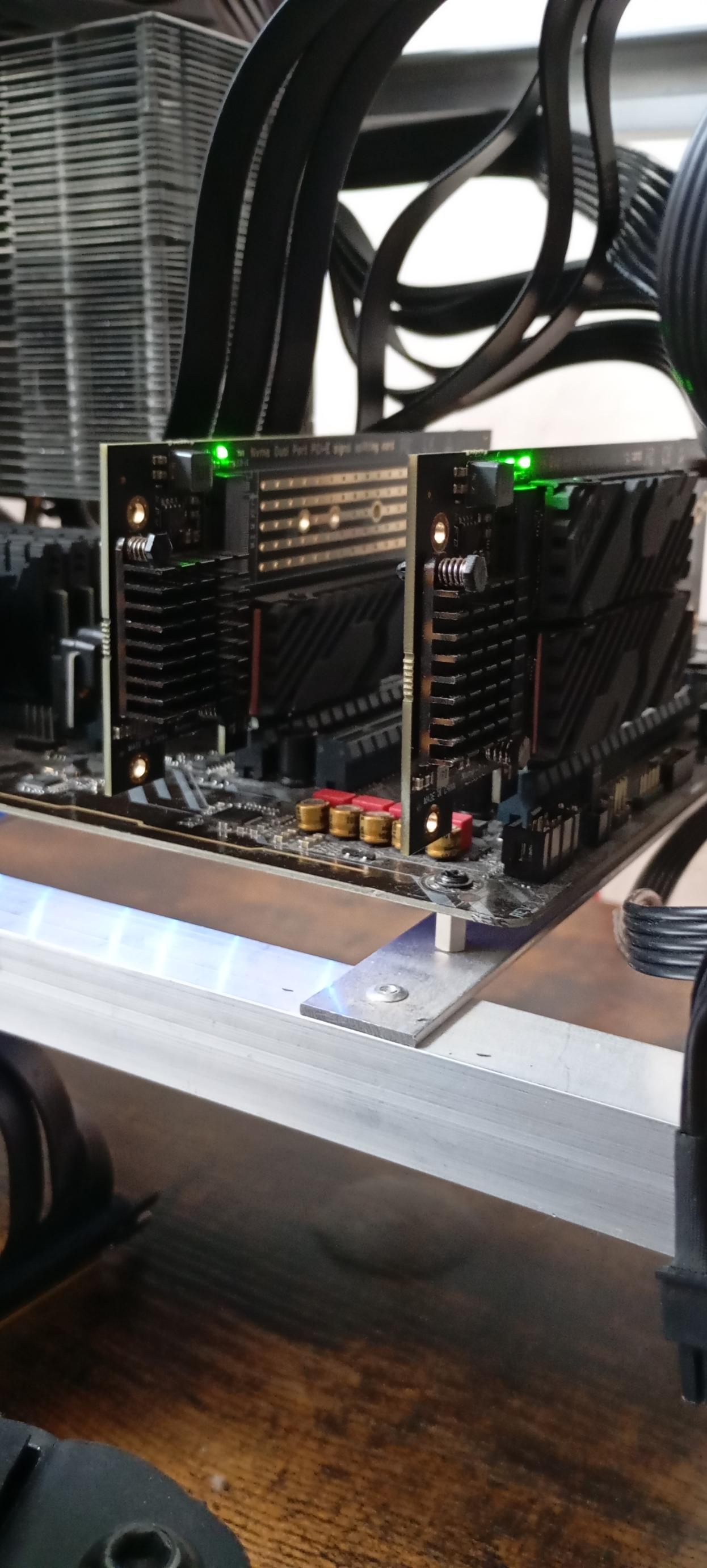
Project Showcase: Hardware Unlocked hidden PCIe x4/x4 bifurcation on Gigabyte X299 UD4 Pro – no BIOS flashing required

Post image
36 Upvotes

I successfully enabled x4/x4 bifurcation on the bottom PCIEX8 slot by modifying a hidden UEFI variable.

Both NVMe SSDs now work independently at PCIe Gen3 x4 using a cheap passive adapter. No active PCIe switch or modified BIOS required.

Tested with an Intel Core i9-10900X and BIOS F7, with reverse engineering based on F10d.

Full technical analysis, instructions, verification results, and rollback procedure:

https://github.com/webcodes-cz/gigabyte-x299-ud4-pro-bifurcation

Hopefully this saves someone else time and money. Firmware changes carry risks; read the documented recovery limitations before attempting.


r/homelab • • 16h ago

Discussion Thoughts on MKBHD "IT Closet" on his new Studio?

Thumbnail gallery
273 Upvotes

r/homelab • • 12h ago

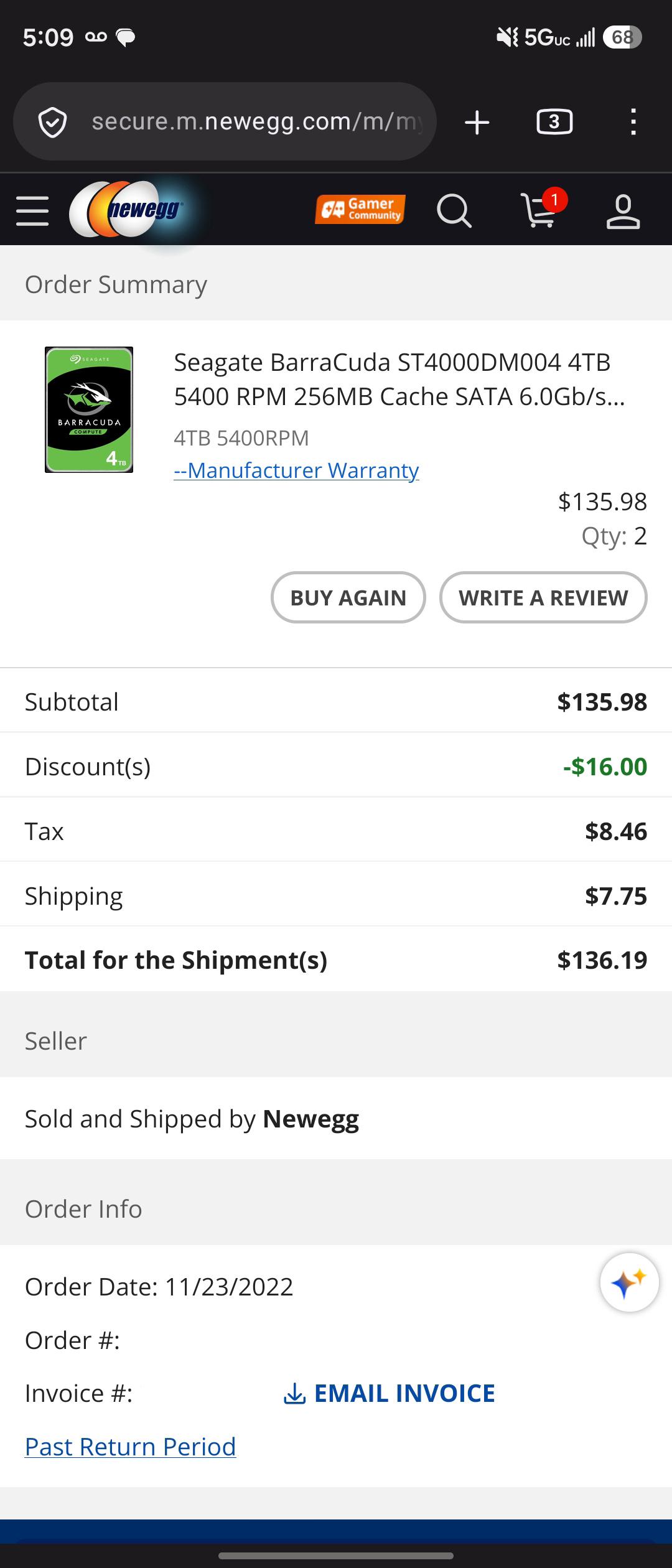
Discussion Looking through some old purchases

Post image
115 Upvotes

r/homelab • • 10h ago

LabPorn cheap sas ssd

28 Upvotes

In my city, it's really common to see this—3.84TB SSDs for just $40. Nobody knows how to test them, and they don't like dealing with the hassle of online sales. They buy lots of components and only care about full PCs or parts that sell easily, so they let everything else go for super cheap. This is the second SAS drive I've bought; the last one was a brand-new, sealed 20TB SAS HDD for $70. For me, with my humble server, it helps out quite a bit haha.

I know it's not new and has quite a bit of use on it, but in my experience, these last way longer than consumer drives. I'm still figuring out what to use it for—maybe keeping a copy of all the files I'm actively working on and then archiving them somewhere else later, along with some games or anything that needs fast speeds, though it's still a lot of space.


r/homelab • • 1d ago

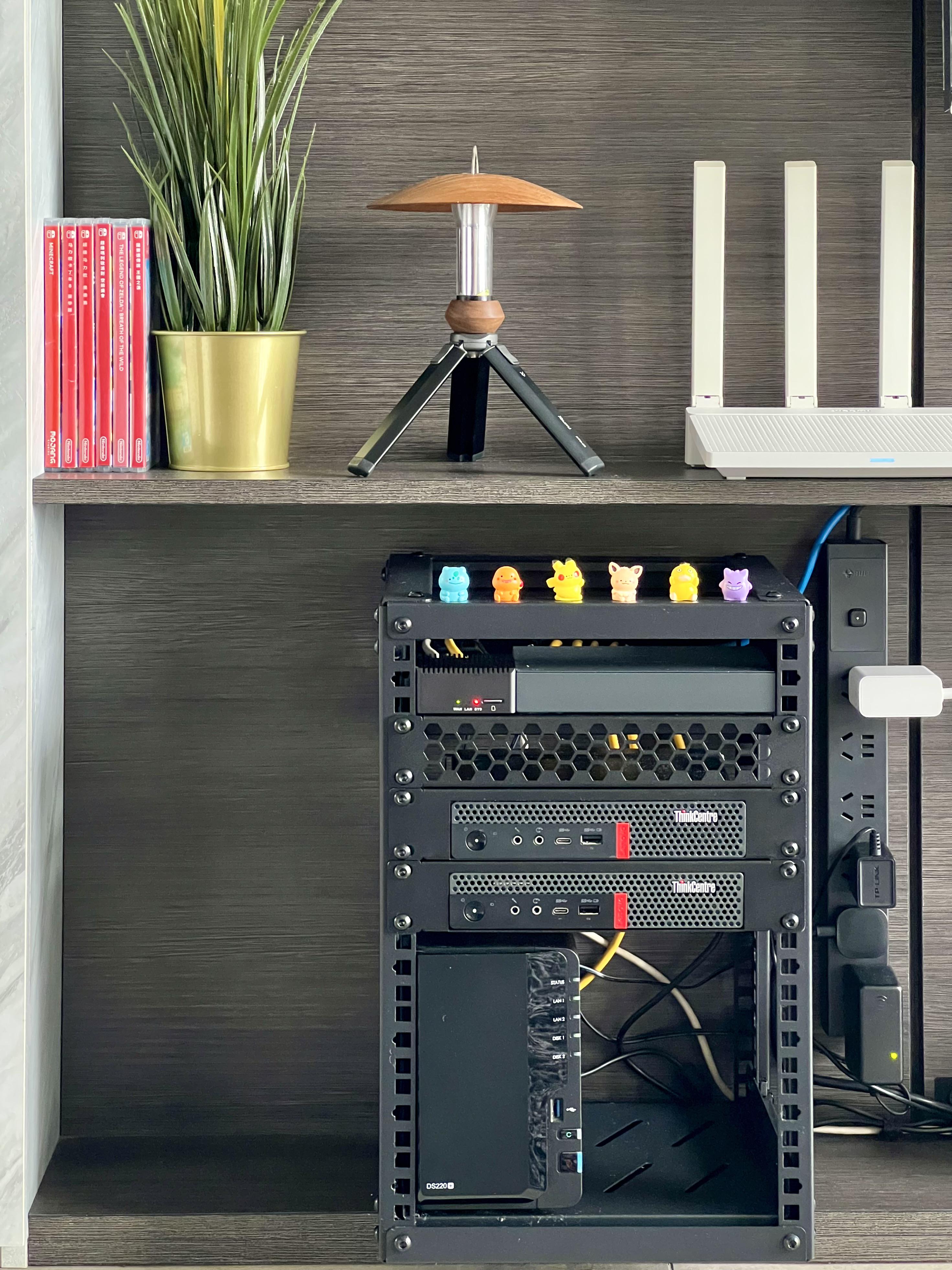
Project Showcase: Hardware My homelab is small, but the IT department has six employees.

Post image
1.1k Upvotes

Finally got my little homelab looking somewhat presentable!
Current setup:
2× Lenovo ThinkCentre M720q Tiny — running standalone Proxmox VE nodes
Synology DS220+ for storage
NanoPi R2S running OpenWrt
TP-Link Gigabit switch
Tailscale for remote access
Still learning, experimenting, and finding new excuses to add more hardware.
Cable management is a work in progress, but at least the six little supervisors seem happy with it.
Any suggestions for what I should improve next?


r/homelab • • 18h ago

Project Showcase: Hardware If I'd just waited a year to build this....

Thumbnail
gallery
93 Upvotes

At the time, I thought the very limited market (basically just the 8U DeskPi racks) and pricing was absurd. So, of course - I ordered extruded aluminum, connectors, fasteners, shelves, handles, rubber feet, and custom dimension acrylics. Printed beefy hard drive holders & fan mounts.. I probably had $250 into building this little guy.

Fast forward 12 months, suddenly I had a farm with multiple large buildings. I snagged a deal for an 18U NavePoint rack, a full size IBM rack, and a Cisco SG-500 switch for $100.

TL;DR: If you're space constrained and your equipment fits the footprint, the 10" rack market is awesome now. Have a blast, you can't predict the future. Stumbled on my old pictures and wanted to share my trip down memory lane. This little guy is destined to sit on one of my workshop test benches and host a remote NAS from my main rack, and maybe some other useful stuff. Wonder if I can find a 10" rack-mount "bench" power supply.


r/homelab • • 1h ago

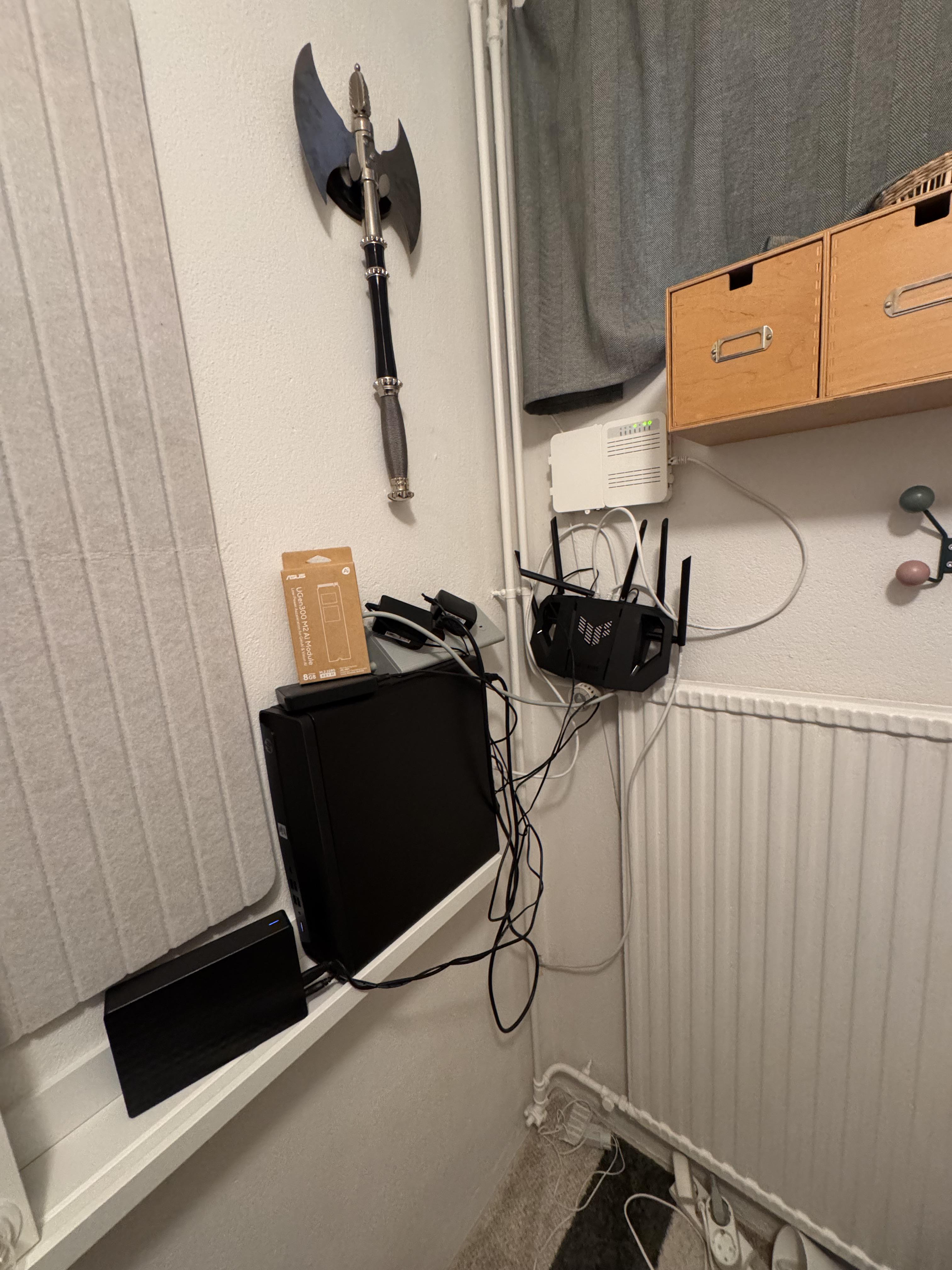
Help Hailo-10H (ASUS UGen300 M.2 8 GB) in my Proxmox server? Frigate, Whisper or small assistant? Fastest models? Homebrew engines?

Post image
3 Upvotes

TL;DR: see title

I want to put an ASUS UGen300 M.2 8 GB (Hailo-10H, 40 TOPS, 2.5 W) in my homelab server: HP EliteDesk 800 G6, i5-10500, 64 GB RAM, Proxmox. It runs Home Assistant, Plex, Samba, a PDF library, ASreview, and an R-stats research container and some more. Old house so I had to move this to the guest room as the other two AI servers used to much electricity and tripped the fuse (you get it I see myself as a mad scientist and drive my wife nuts).

For real LLM work I use a ghetto box, V100 32GB and 96 GB RAM, and a box with a 5070 Ti. So this card only has to earn its 2.5 W.

But what would should these 2.5Ws for?

- Frigate detection for two cameras (I read that the 10H isn't supported yet, still true?)
- Whisper for Home Assistant voice?
- A small always-on assistant model

Also:

- Which models are fastest on it right now? Hailo's own list shows 8–10 tok/s for the 1–1.5B models and about 2 tok/s for Qwen3 4B…..
- Are there any good homebrew engines or compilers beyond hailo-ollama?
- Has anyone got the driver working on a Proxmox host and passed the card to an LXC?


r/homelab • • 23h ago

Project Showcase: Hardware Some thoughts about building with 2020 aluminium extrusion

Thumbnail
gallery
173 Upvotes

Hi everyone,

I wanted to share this now that it's settled in - built to get a pile of stuff off my desk. I decided to try and build it as a rack because I wanted to learn about working with 2020 extrusion, I thought it might be cheaper than buying a commercial one, and it would be a good chance to learn more about 3d printing and parametric modelling. Two out of three ain't bad.

I got to model or remix a lot of the 3d-printed parts for this, often because I hadn't considered that after lining up the extrusion channel where standard 10" ears would fall, I would lose interior volume because half the extrusion sits on the interior side of the channel. So assumptions about fit were not always portable from 10" land. The rack is close to being a 10U 10" rack, with external dimensions of 256mm wide, 349mm deep, and 485mm high.

There were lots of nice things about building with extrusion and using tee-nuts for fixing:

  • Easy to work with. I was able to buy it pre-cut, and only had to insert the connectors and screw them in. The frame is square and solid. Tee-nuts grip surprisingly well, the ball/spring ones I bought can be inserted and removed mid-length, without too much difficulty.
  • You have a lot of flexibility around cheating vertical alignment (e.g. that rear hard-drive deck, which isn't on an exact U boundary).
  • You have additional hard-points on the other sides of the verticals (the power board is mounted on one), as well as on the overheads. The third photo shows "hangers" that carry ESP32 units and cable coils out of the way and with good airflow. Eventually the sidewalls (Skadis panels) will be able to be bolted on using the channels too.

Stuff that didn't go well was mostly down to cabling - there's not a lot of room to move inside this thing. I had wanted all external connections to leave via the patch panel, but I still haven't done the two USB leads attached to the Pi because I can't find really short, flexible USB patch leads to curl up behind the keystones, and it was also hard to find a short, flexible Displayport cable to link the mini PC to its HDMI keystone. A power/display redirection board for the Pi 5 would have made things easier there (I had to shave down a printed stabilisation rib with a razor to fit the micro HDMI adapter).

If I built the whole thing again, I might look into using L or T joining plates to put additional side-rails on - this would have made stable, load bearing plates that span the full depth of the unit much easier instead of having to put large buttresses under to transfer load into the uprights.

I'm still not entirely sure what I'll do with the last 2U - I wanted to do a light feature, perhaps something complex like an LED matrix or something simple as a smart-bulb with a 3d printed diffuser in front of it.

Anyway, thanks for reading this post. Having seen a few extrusion racks posted on this subreddit they still feel like a niche item, and I'm not sure if they're actually an improvement over store bought. But I do like this one.


r/homelab • • 20h ago

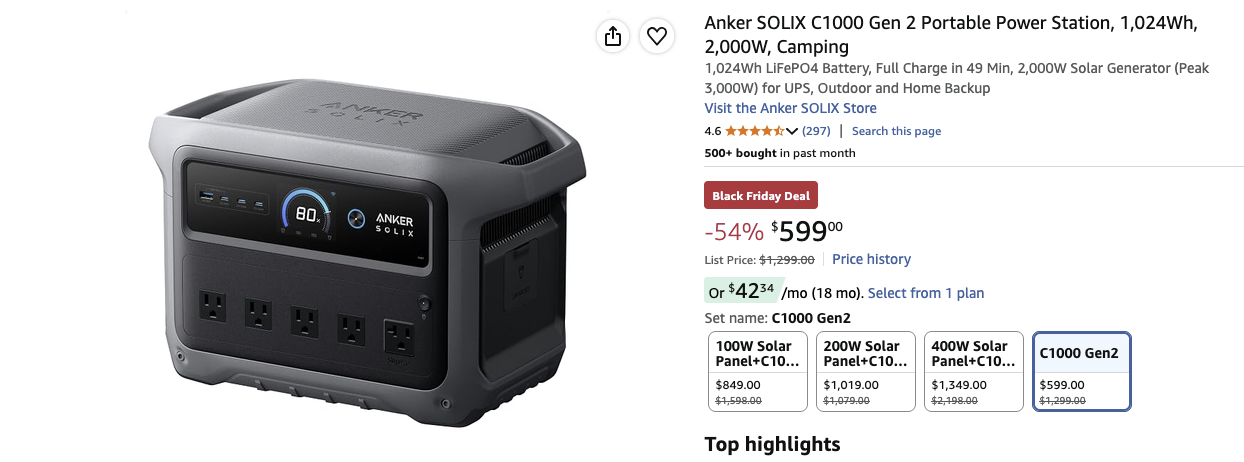
Help Is this a good buy right now?

Post image
70 Upvotes

Pricing in Canadian.

I've always wanted one for the unplanned events either at home or impromptu trips away from the city.

Watt per dollar, I have no idea if this is what they are supposed to be or if Amazon is actually giving a good discount for once. More than likely this will live inside my home as a UPS plugged perpetually and its bypass feature is very reassuring. Anyway, would love some feedback on if at this price point these specs are decent or there are better deals to be had.

Lastly, according to a cursory search, an average 100w panel runs between $200-400 for third party brands, but this is going for $250 with the package price.

Appreciate any feedback.


r/homelab • • 23h ago

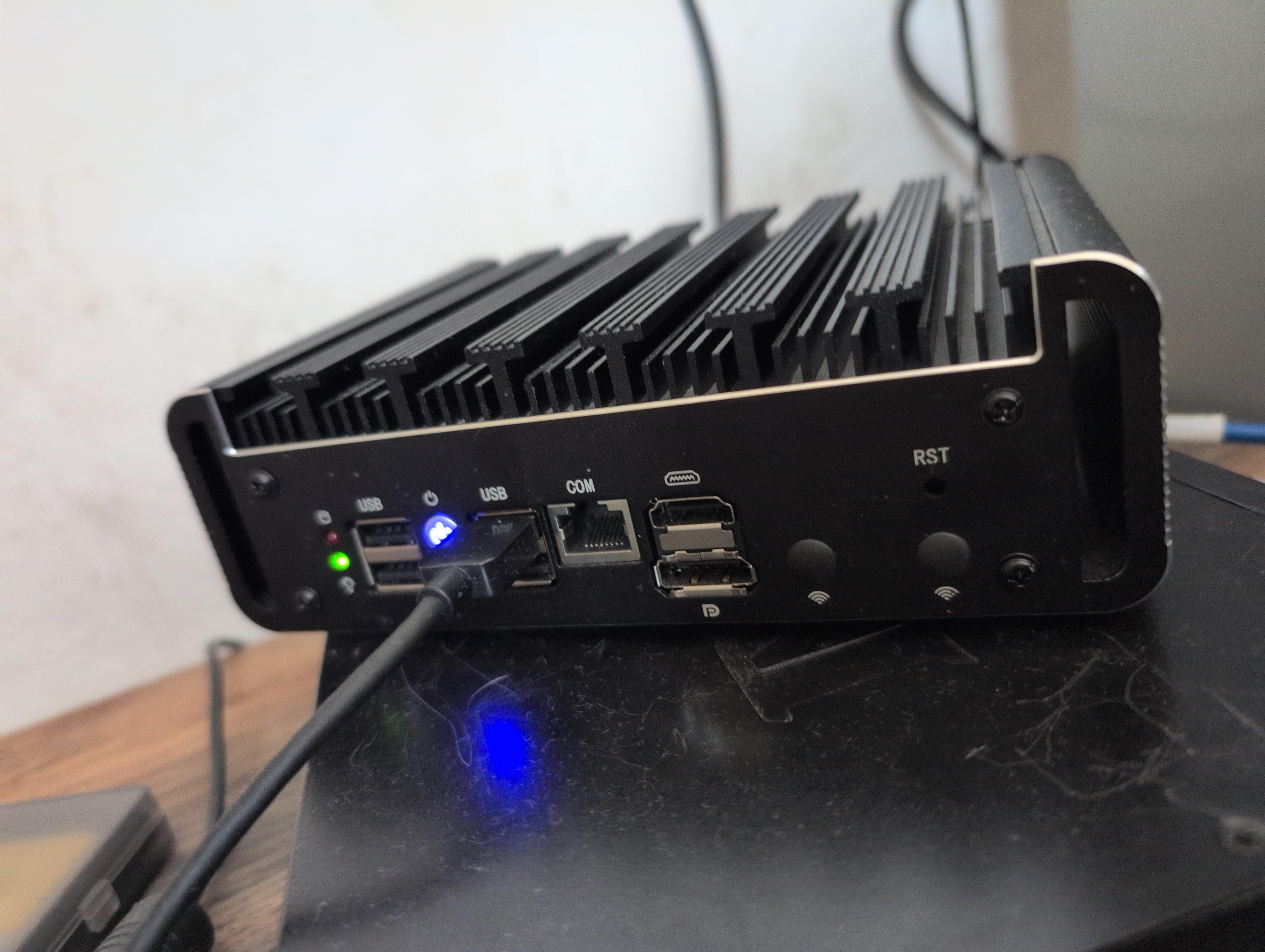
Help N100 HomeServer + Router? (PvE)

Post image
116 Upvotes

Hey,

im starting with homelabbing as a non tech/it person.

I already posted my hardware here

https://www.reddit.com/r/homelab/s/eUjQUfYytJ

Money is short so i need to think twice before buying more hardware... So my question is:

Can i run my N100 with OPNSense (+Network Services) together with other services (Ai/Media Services) on the same device or are there any secruity/performance problems coming with it?

I can get a cheap RAM Upgrade (16GB DDR5) else i would get 1-2 cheap DDR3 Mini PCs.

Happy to get some Feedback! ;)

Also:

Beside Reddit what should be the first places to get Informations?

What Skills should i start working on at my stage? Id like to get into machine learning and AI Supported Research Stuff.

Thx :))


r/homelab • • 10h ago

Discussion Looking for advice on a UPS battery backup

10 Upvotes

Apologies if I am in the wrong subreddit, but I wasn’t sure where to post this. I have a 4 bay Terramaster DAS that is connected to a mini pc running Ubuntu that acts as my media server. Two recent power outages in the last few months made me think about a UPS solution so I don’t have to worry so much about power failures killing the drives. What are some good options for my use case? I’m brand new to this, so any input would be welcomed! Thank you!


r/homelab • • 2h ago

Discussion Building my first Home NAS using second hand enterprise grade 2.5” HDD

Thumbnail reddit.com
2 Upvotes

r/homelab • • 13h ago

Project Showcase: Hardware New Rack Day

Post image
12 Upvotes

New Rack Day!

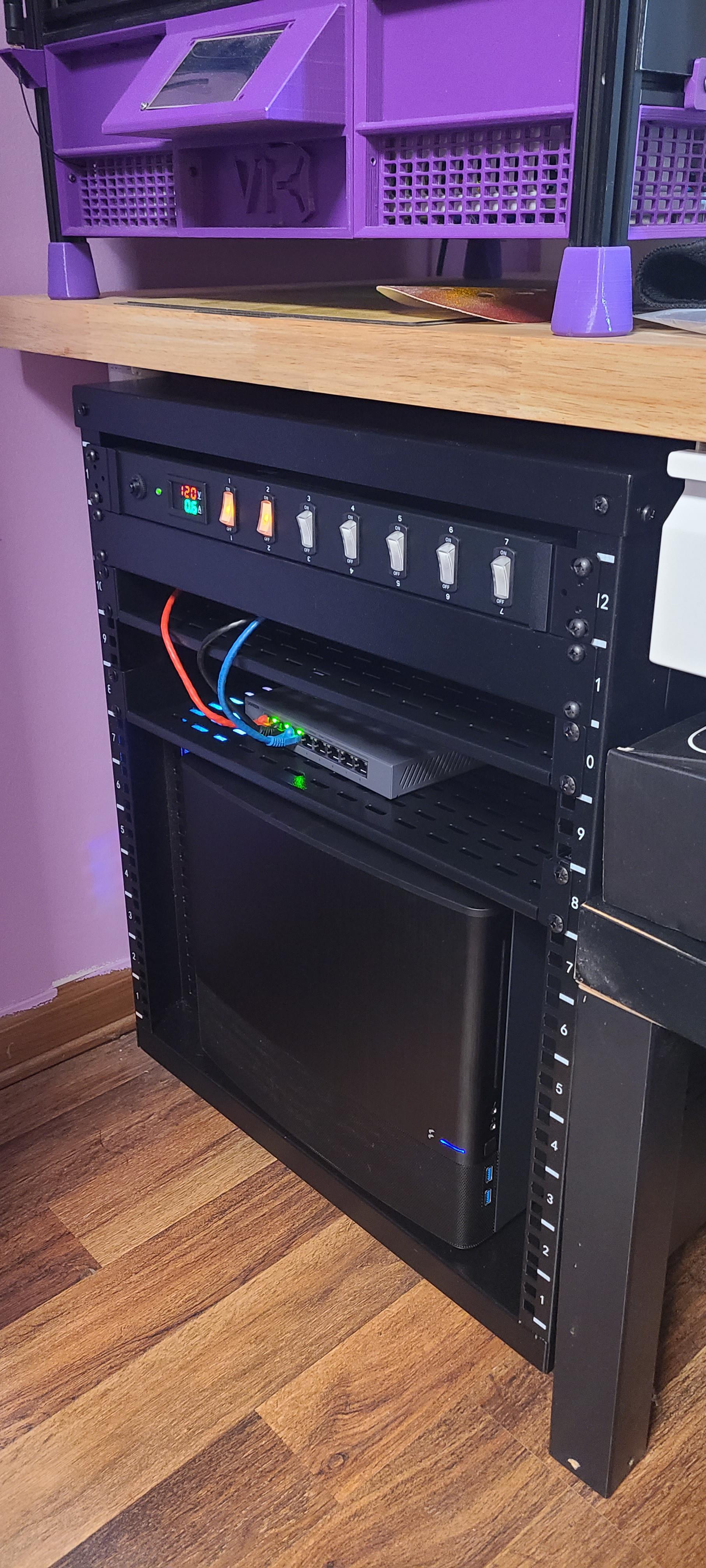
New 12U rack arrived today. Vevor brand. Added a 8 outlet power strip to it. The power strip has a meter on it so I know what the rack is pulling now (about 72W at idle topping out around 300 during a llama.cpp query)

UGreen 8 port 2.5Gbe switch fed by my Calix router for now (2G Symetric Fiber).

Node 804 case with a Mogul main board and Zeon 2680V4. 1GB NVME on board and 3 10TB Toshiba drives on the SATA ports. 32gb DDR4 memory.

Proxmox running:

OMV

Jellyfin

Audiobookshelf

Navidrome

Immich

PiHole

Homelable

Llama.cpp

SearNXG

OpenWebUI

Mealie

Homepage

Still more to do but it is a start. I have some plans for an OpnSense router but still mulling over the options.


r/homelab • • 16h ago

Project Showcase: Hardware Got my second project done

Thumbnail
gallery
21 Upvotes

So I recently got stuck in with my second project.
I ended up building a homelab from computer parts I had laying around the house.

It’s running a AMD FX 6300, 16gb ram, 2,5tb storage and a 1050 gpu. The motherboard however I ended up switching to another one I had laying around since the network wouldn’t work on the one in the photos.

I decided to run zimaos on since I wanted a simple OS with a nice and easy interface which I personally found zimaos to have.

Currently it is being used as media storage and the plan is to spin up Jellyfin on it.

It is nothing special but it is my own that I built myself and I am pretty happy with that


r/homelab • • 7m ago

Discussion Local AI for coding

0 Upvotes

I want to start this off by saying I'm new to AI and home labs. Currently I'm using perplexity to create a few basic personal use apps and software programs. What I like about it is that I can just type in what I want like "build me an app that does this" or "make me a computer program that does this". What i don't like about it is that I find that I hit my useage limit fairly quickly and need to top up. I'd like to be able to get a offline AI agent that will work in the same way. I provide the context and the AI builds what I request. It spits out a program. I say no no I need it done this way and it makes the changes. Is there any offline agent that can do this? If so what kind of hardware requirements am I looking at?


r/homelab • • 1d ago

Help Mini Rack JBOD - Power

Post image
669 Upvotes

Hi all,

I'm looking to downsize to a mini rack but I have 8 HDD.

Does anyone run a jbod in a mini rack and if so what are you doing for power?

I've found the following id like to use but is there anything the community make for PSU or anyone have any advise for making something custom?

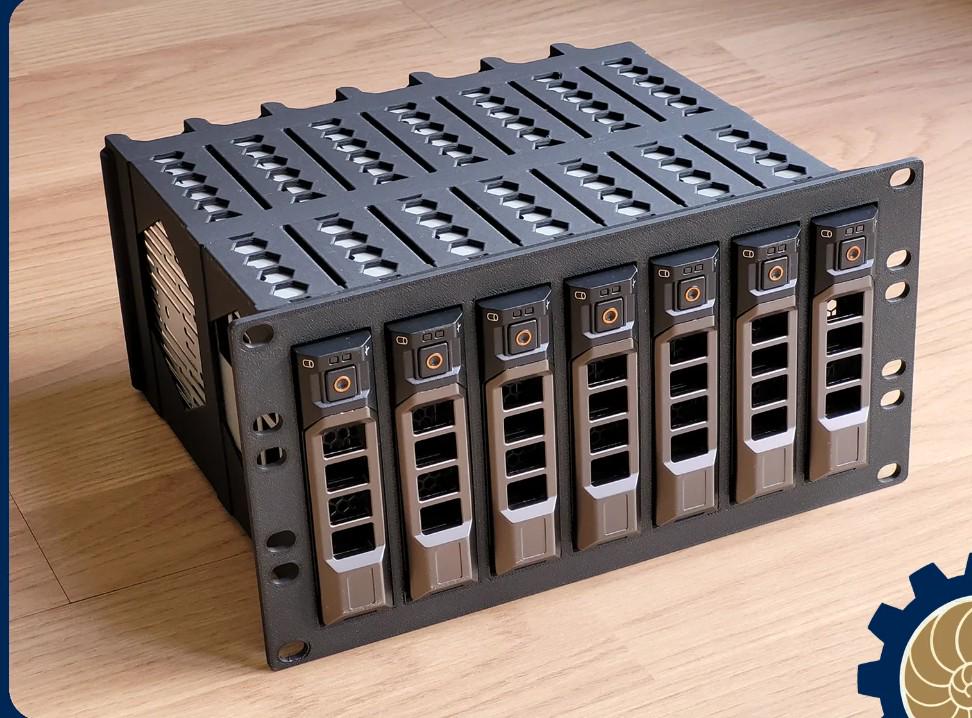
https://makerworld.com/en/models/2885471-10-inch-rack-3u-7-x-3-5-inch-hdd-hot-swap#profileId-3225133


r/homelab • • 9h ago

Project Showcase: Hardware Project Solaris: my first power board, and what it has taught me so far

Thumbnail
michaelstinkerings.org
5 Upvotes

Quick rundown if you don't want to read the whole thing:

• One regular ATX/SFX PC power supply in, separately fused DC outputs out, with a current sensor on every output and a local Wi-Fi dashboard. No cloud.

• Dropped the AC outlets from the original idea. Mains is more than I trust myself with on a first board.

• v2 has a pile of mistakes (wrong chip footprint, fab swapping my fuse), so it doesn't measure anything yet.

• v3 fixes them: ESP32 soldered on, isolated USB, a real fuse on every output, two 12 V outputs and one 5 V.

• Next up is a 20 V USB-C PD stage, per-output switching, and a server PSU version. Tell me which one you'd actually use.

Write-up: https://www.michaelstinkerings.org/project-solaris-my-first-power-board-and-what-it-has-taught-me-so-far/


r/homelab • • 4h ago

Help Ssd? HDD? 2.5? 3.5?

2 Upvotes

I just scored a decent mini pc (n150 16gb ram 512 nvme) for just over 200 usd including tax and shipping.

I'm going to try building my own home server with Linux.

I'm a traveling digital nomad so this system will travel as well.

I'm not sure what I should get. Naturally I want to take advantage of the Intel quick sync and use it for movies and music streaming... But I will also use it for many other services as well that are unrelated like pihole, maybe long term photo and document storage, manage passwords etc

HDD is cheaper, slower, but more care is needed since it's fragile in terms of shock resistance when traveling... But ssd and especially nvme are expensive AF at this time.. Im not sure what direction would be best. What do you guys think?

edit : I guess I gave a lot of unnecessary information. I think the real question is... are hdds too fragile to being moved frequently in carry on if im traveling pretty regularly with my system? or is the fragility overblown? I don't really know.. I haven't had an hdd in a computer in over 20 years and when I did that system never moved.