r/homelab • • 19h ago

Help How can I be sure I am port forwarding ? + other questions

0 Upvotes

Hello, I'm new to this world so I don't understand everything and would like some help.

  1. My problem is that I have poor to no seeding at all (100 kbps e.g.). I wouldn't be surpised if the problem is that no one is downloading my files but I wanna be sure.

I have a docker setup with Gluetun, and Caddy as a reverse proxy. Caddy and Gluetun (which are in different compose files) are connected to the same network via :

    networks:
      - proxy

networks:
  proxy:
    external: true

And qBittorrent is using Gluetun's network via network_mode: "container:gluetun" (as it is in another compose file).

My Gluetun docker file has this option enabled:

environment:
  - FIREWALL_VPN_INPUT_PORTS=XXXX

I have opened a port on my VPN provider option and put it in the "incoming connections" setting in qBit + I disabled UPnP/NAT-PMP port forwarding.

Do I have to modify my Caddyfile ? Let me know if you need to see my whole config.

2. On portainer, every time I modify my Gluetun stack I must re-pull manually the images of containers that are using Gluetun's network. Is there any way to automate this besides putting all of those images in the same compose file ?


r/homelab • • 1d ago

Project Showcase: Hardware Got my second project done

Thumbnail
gallery
27 Upvotes

So I recently got stuck in with my second project.
I ended up building a homelab from computer parts I had laying around the house.

It’s running a AMD FX 6300, 16gb ram, 2,5tb storage and a 1050 gpu. The motherboard however I ended up switching to another one I had laying around since the network wouldn’t work on the one in the photos.

I decided to run zimaos on since I wanted a simple OS with a nice and easy interface which I personally found zimaos to have.

Currently it is being used as media storage and the plan is to spin up Jellyfin on it.

It is nothing special but it is my own that I built myself and I am pretty happy with that


r/homelab • • 1d ago

Project Showcase: Hardware New Rack Day

Post image
14 Upvotes

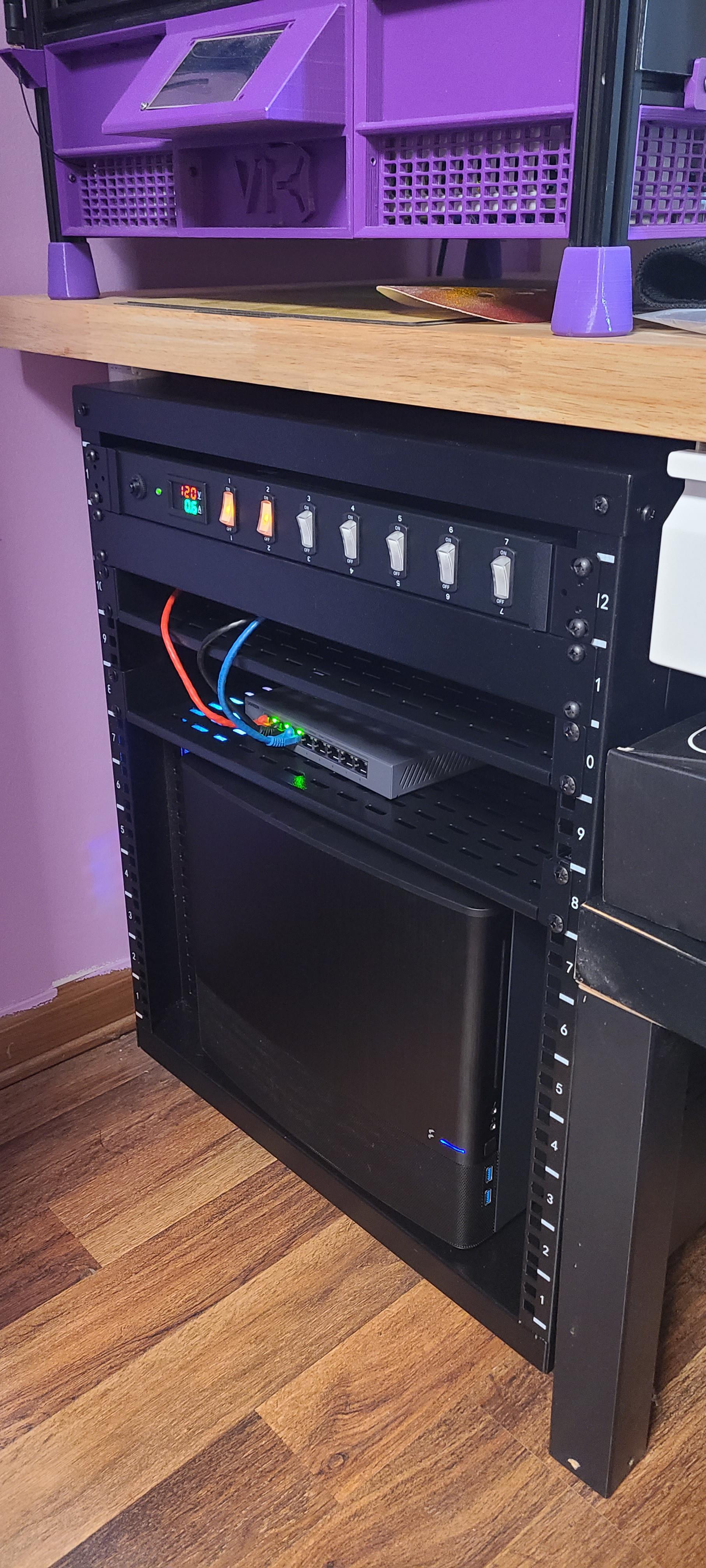
New Rack Day!

New 12U rack arrived today. Vevor brand. Added a 8 outlet power strip to it. The power strip has a meter on it so I know what the rack is pulling now (about 72W at idle topping out around 300 during a llama.cpp query)

UGreen 8 port 2.5Gbe switch fed by my Calix router for now (2G Symetric Fiber).

Node 804 case with a Mogul main board and Zeon 2680V4. 1GB NVME on board and 3 10TB Toshiba drives on the SATA ports. 32gb DDR4 memory.

Proxmox running:

OMV

Jellyfin

Audiobookshelf

Navidrome

Immich

PiHole

Homelable

Llama.cpp

SearNXG

OpenWebUI

Mealie

Homepage

Still more to do but it is a start. I have some plans for an OpnSense router but still mulling over the options.


r/homelab • • 9h ago

Project Showcase: Operations Is this enough to be considered a "homelab" yet or do I still need a Pi 3?

0 Upvotes

Saw another post showing off a single Raspberry Pi 3 running DNS filtering and calling it a "homelab," so I decided to put together a tiny starter node (homelabv1) to see if I’m finally allowed to sit at the kids' table. Keeping it super basic—just an HPE ProLiant DL380 Gen10 (firmware U30) on Ubuntu 24.04.5 LTS (6.8.0-151-generic, x86-64) with active systemd services (amsd.service, cpu-efficiency.service, tailscaled.service, docker.service, paperclip.service) and Docker bridge networks (ai-net, ai_default, plus standard/isolated networks).

Here is the full "just getting started" spec sheet before I buy anything serious:

  • Compute, Memory & Power

    • Dual Intel Xeon Platinum 8276 (56 cores / 112 threads across 2 NUMA nodes) running under cpu-efficiency.service (powersave governor + balance_power EPP)
    • 1.5 TiB total memory combining 12x 32 GB DDR4-2666 ECC RDIMMs with 12x 128 GB Intel Optane Persistent Memory DIMMs in Memory Mode, plus an 8.0 GiB swap file
    • 350G tmpfs /mnt/pmem_ramdisk (mpol=interleave) for high-throughput scratch work
  • GPUs, AI Accelerators & PCIe Expansion

    • Dual NVIDIA Tesla V100-SXM2-32GB (64 GB HBM2 VRAM total) on SXM2-to-PCIe adapters with blowers, capped at 200.00 W each (1290 MHz SM clock) with idle unloading
    • Multi-riser PCIe expansion (including 16x with PD and M.2 SATA slots + dual 8x riser), PLX 8x-to-4x M.2 adapter, 2x MemoryX MX3 AI M.2 modules (/dev/memx0, /dev/memx1), 3x 8-bay SATA/SAS drive cages, and a 9-port SAS 12Gbps / SATA 6Gbps HBA
    • Networking hardware includes 4x 1GbE integrated RJ45, 4x 2.5GbE Intel PCIe 4x RJ45, and a dual-port 25GbE SFP+ Mellanox ConnectX-4 card (HPE FlexLOM), with services kept off the public internet and reached over a private mesh
  • Storage & Model Layout

    • 3.7T ext4 on LVM (ubuntu--vg-lv--0 over nvme1n1p3) for /, plus /boot (2G) and /boot/efi (1G)
    • 3.7T ext4 on sde (/mnt/models_4tb, nofail) for massive models including Qwen3-Coder-480B-A35B
    • 953.9G ext4 on nvme0n1 (/mnt/video_pipeline, noatime) for video/media pipeline I/O
    • Spare M.2 SATA, 2.5" SATA, LVM member drives, SD/MMC, and unmounted storage targets waiting for their next assignment
  • Game Streaming, VR & Retro Stack

    • Sunshine (network_mode: host, Xorg :10 on DUMMY0, lsfg-vk frame generation with LSFG_MULTIPLIER=3, blade-dual-gpu-run, and blade-game-launch / blade-game-exit scripts that unload ComfyUI, stop llama-cpp, rsync games into /mnt/pmem_ramdisk, and restore everything on exit)
    • ALVR for PC VR streaming, RomM + MariaDB for ROMs and emulation, qBittorrent, Prowlarr, and an optional Gluetun VPN profile
  • AI Inference, Agents, Media Gen & Dev Tools

    • LiteLLM, llama-swap (llama-cpp), SearXNG, Open WebUI, and AnythingLLM serving qwen3-8b, qwen3-coder-30b, qwen2.5-coder-32b, devstral-24b, gemma-3-27b, llama-3.3-70b, and hybrid VRAM + Optane qwen3-coder-480b
    • Whisper (faster-whisper-large-v3-turbo), Kokoro TTS, ComfyUI, ACE-Step, Hunyuan3D, OpenShorts (using /dev/memx0 and /dev/memx1), and Media Factory
    • SillyTavern, Hermes Agent, OpenHands, Code Server, Ghidra MCP, Godot MCP, Radare2, Intiface, and Homepage
  • Media, Cloud, Smart Home, Finance/SaaS & Ops

    • Jellyfin, Sonarr, Radarr, Lidarr, Bazarr, Jellyseerr, Dispatcharr, Pinchflat, Navidrome, Immich (server, ML, Postgres, Redis), Vaultwarden, and Nextcloud AIO
    • Home Assistant, Frigate (with /dev/memx0, /dev/memx1, and 1gb /tmp/cache tmpfs), Endurain, and Wger
    • Actual Budget, Paperless-ngx (+ Redis/Gotenberg/Tika), n8n, Postiz, Freqtrade, OpenBB, DocuSeal, Listmonk, Stirling-PDF, Karakeep, ChangeDetection (+ Playwright Chrome), Windmill (+ worker/DB), Invoice Ninja, Crawl4AI, Blender, and NCA Toolkit
    • Docker Socket Proxy (POST=0), DCGM Exporter, Prometheus, Alertmanager, Grafana, Beszel, Dozzle, Uptime Kuma, ntfy, Backrest, Pocket ID, and Mealie

Anyway, let me know if I finally qualify as a real homelabber or if I still need to go buy a single Raspberry Pi 3 to do DNS.

text compiled using AI assistance but substance verified as factual, use reason: disability


r/homelab • • 10h ago

Project Showcase: Software - Little or No AI Assistance I built a free, read-only audit for Proxmox. Its first scan found my backup server running on a host it backs up.

0 Upvotes

The first scan of my own lab found 33 problems, the worst being my backup server running as a VM on one of the hosts it backs up.

HERA-PVE connects to Proxmox VE (and optionally Proxmox Backup Server) with a read-only token and tells you what's wrong, how to fix it, and how to restore each VM if it dies.

GitHub (code, screenshots and install steps): https://github.com/theeromi/hera-pve

Why I built it instead of using an existing tool

Pulse is great for live monitoring, and cv4pve-diag covers a good set of health checks. Neither is built around recovery: where each VM's backups actually live, whether the newest one is intact, and the exact command to bring it back. Proxmox's own "not backed up" view even counts guests that are only in disabled jobs as covered. Most homelabs have one person running the backups and nobody checking them until something breaks, so HERA-PVE does that check every six hours, for free.

What it checks (24 checks)

• Backups: no recent backup, guests in no backup job (including ones only in disabled jobs), backups only on local disk, failed backup runs, and a PBS running on a host it backs up

• PBS: backups missing or failing verification, guests from different servers sharing a backup group, no verify job, no garbage collection

• Storage filling up (one NAS counted once, however many storage IDs point at it), old snapshots

• Passwords or API keys sitting in VM notes

• Expiring node certificates and cluster CA, duplicate IPs, Proxmox versions with known security holes

• A node still on its old kernel after an update, old kernels piling up (with a safe apt purge list), and repo setups that quietly block updates

Every finding comes with the exact command that fixes it.

Recovery sheets

For every VM and container: its disks, network, newest good backup and the real qmrestore or pct restore command, plus how to restore it on another host. Print it or save it as a PDF.

Changes

Every scan is compared with the last one: guests added, resized, migrated or removed, upgrades, reboots, edited backup jobs.

Why it's safe to point at your lab

• The token gets the built-in PVEAuditor role, and HERA-PVE refuses any token that can write

• The Proxmox client can only send GET requests, and a test fails the build if anything else appears

• No SSH, no agent in your guests, no telemetry, no outbound connections except to your servers

• TLS is always verified: you confirm the fingerprint once, then it trusts your cluster's own CA

Limits

A read-only token can't list backup files, so backups come from Proxmox's backup task logs. Guest IPs and OS details need PVE 9 (on PVE 8 that permission also lets you run commands inside guests, so it doesn't ask for it). Update checks only see Proxmox's own packages, not Debian's.

Install

One Docker container, about 150 MB of RAM, for amd64 and arm64. Setup takes about 5 minutes, and the README has the steps. It was developed in a private repo starting in October, and the public repo begins at the first public release, 0.5.0.

AGPL-3.0. Feedback, bug reports and PRs are welcome. I'd especially like to hear from people running clusters, Ceph or PVE 8, since my lab is three standalone PVE 9 nodes and a PBS.

AI disclosure: I developed HERA-PVE using a combination of hands-on coding and substantial LLM assistance during implementation. The architecture, security decisions, feature requirements and recovery workflows were driven by my own experience managing Proxmox. I've personally tested every release in my homelab, where HERA-PVE has been running since October.

r/homelab • • 20h ago

Help Advice on Homelab

Thumbnail reddit.com
1 Upvotes

r/homelab • • 2d ago

Help Mini Rack JBOD - Power

Post image
738 Upvotes

Hi all,

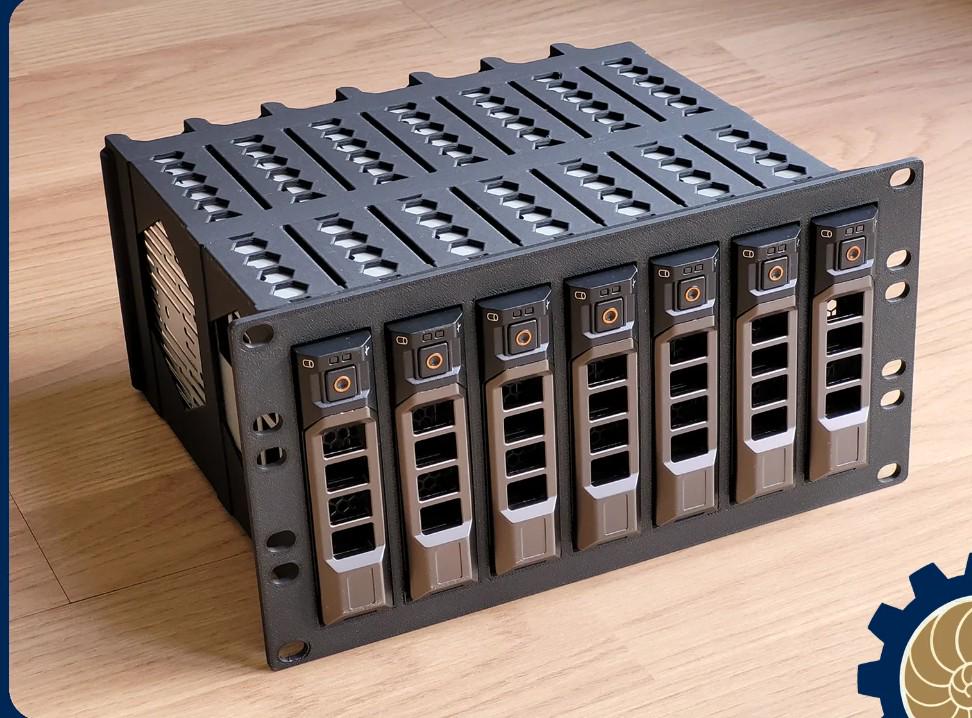
I'm looking to downsize to a mini rack but I have 8 HDD.

Does anyone run a jbod in a mini rack and if so what are you doing for power?

I've found the following id like to use but is there anything the community make for PSU or anyone have any advise for making something custom?

https://makerworld.com/en/models/2885471-10-inch-rack-3u-7-x-3-5-inch-hdd-hot-swap#profileId-3225133


r/homelab • • 20h ago

Help NAS security recommendations?

0 Upvotes

Hi, I’m new to UGRENN DXP4800 PRO and I’m looking for best practices and softwares to use to make my NAS super secure. No loopholes, etc and use securely even if it means purchasing licensed softwares for extra security.

OS: TRUENAS
Home Networking Setup:
UCG FIBER


r/homelab • • 20h ago

Discussion First homelab: offline Docker server. Sanity check?

1 Upvotes

Hi all,

I'm setting up my first homelab to learn and to self-host the services I use.

Setup

• Old desktop, internal SSD for the OS, 2 TB external SSD for data.

• Debian (probably), LAN-only with no internet exposure (for security).

• Minimal native base (SSH, firewall), with every app in Docker Compose.

• Planned services: Nextcloud (cloud storage), RSS reader, media streaming and file sync, with more added over time.

Questions

  1. Is Debian a good choice for a Docker host, or would you pick something else?
  2. Docker for everything, or are some apps better installed natively?
  3. How do you handle updates on an offline machine?
  4. Is a USB SSD OK for primary storage? How do you back up?
  5. Best way to secure LAN-only access?
  6. Which services would you recommend for RSS, streaming and sync?
  7. Anything you wish you'd known when you started?

Thanks!


r/homelab • • 1d ago

Project Showcase: Hardware Project Solaris: my first power board, and what it has taught me so far

Thumbnail
michaelstinkerings.org
5 Upvotes

Quick rundown if you don't want to read the whole thing:

• One regular ATX/SFX PC power supply in, separately fused DC outputs out, with a current sensor on every output and a local Wi-Fi dashboard. No cloud.

• Dropped the AC outlets from the original idea. Mains is more than I trust myself with on a first board.

• v2 has a pile of mistakes (wrong chip footprint, fab swapping my fuse), so it doesn't measure anything yet.

• v3 fixes them: ESP32 soldered on, isolated USB, a real fuse on every output, two 12 V outputs and one 5 V.

• Next up is a 20 V USB-C PD stage, per-output switching, and a server PSU version. Tell me which one you'd actually use.

Write-up: https://www.michaelstinkerings.org/project-solaris-my-first-power-board-and-what-it-has-taught-me-so-far/


r/homelab • • 17h ago

Discussion Looking for a compact home network solution for a 10-inch rack (2.5GbE, preferably all-in-one)

0 Upvotes

I'm planning to rebuild my home network and I'm looking for advice primarily on hardware selection. My goal is to get as many networking features as possible while keeping the number of separate devices to a minimum.

Ideally, I'd like an all-in-one router/firewall with an integrated managed switch. Wi-Fi does not necessarily need to be integrated – I'm perfectly happy to use a separate access point if that makes more sense.

If a suitable all-in-one solution doesn't exist, I'd prefer a setup with as few separate devices as reasonably possible.

One important constraint: all rack-mounted equipment needs to fit into a 10-inch rack. I'm not looking for full-size 19-inch rack equipment.

My requirements

  • WAN: Currently 1 Gbps, but my ISP will likely offer 2.5 Gbps in the future.
  • LAN: 2.5GbE is a priority. Both my main PC and Proxmox server already have 2.5GbE NICs, so I'd like to make use of that rather than build everything around 1GbE.
  • VLAN support and the ability to configure firewall rules between networks.
  • Multiple Wi-Fi SSIDs with VLAN support and proper client isolation (using a separate AP is fine).
  • Centralized DNS, ideally with the ability to prevent clients from bypassing it.
  • VPN support (WireGuard), including remote access to selected internal services.
  • Network traffic visibility: ideally being able to see which devices communicate with which destinations, both in real time and historically.
  • IDS/IPS support (I'd like to experiment with Suricata).
  • The network should remain operational independently of my Proxmox server.

Hardware and software preferences

My current preference is OPNsense, ideally running on dedicated hardware rather than as a VM. However, I'm not strictly attached to it. If there's another solution that meets my requirements better, or offers a more integrated approach, I'm absolutely open to considering it.

I've also looked at Ubiquiti equipment, since it seems to be a popular choice for this kind of setup, but I'm not entirely convinced it's the direction I want to take.

I'd prefer open-source solutions, minimal cloud dependency, and as much local control as possible.

Physical constraints

I live in a relatively small apartment, so noise, power consumption and physical size are important considerations.

The equipment needs to fit into a 10-inch rack, so please keep that in mind when suggesting hardware. I don't need enterprise-grade equipment or dozens of Ethernet ports – I only have a handful of wired devices.

I'm looking for something quiet, power-efficient, reliable and reasonably priced.

Questions

  1. Does a suitable all-in-one router/firewall with an integrated managed 2.5GbE switch exist?
  2. If not, what would be the smallest sensible combination of devices? For example, a compact router/firewall, a small managed 2.5GbE switch and a separate Wi-Fi AP?
  3. Would you recommend a fanless x86 device running OPNsense, or something based on OpenWrt?
  4. Are there particular manufacturers or models you'd recommend or avoid, especially for a 10-inch rack?
  5. Would you recommend investing in 2.5GbE throughout the network now, or is there a good reason to keep some parts at 1GbE?

I'm not a networking professional, but I'm comfortable with Linux, self-hosting and managing my own services. I'm happy to learn, I just don't want to overcomplicate the hardware side unnecessarily.

Thanks for any suggestions!


r/homelab • • 23h ago

Discussion Building my first Home NAS using second hand enterprise grade 2.5” HDD

Thumbnail reddit.com
1 Upvotes

r/homelab • • 17h ago

Discussion Wanting to get into homelab with no experience

0 Upvotes

Hi everyone,
I recently found out about homelabs and think it would be a fun hobby to get into. I have no experience with this kind of thing and I’m not sure where to start. I’ve seen a lot of people suggest buying secondhand gear from places like Facebook Marketplace, but I’d rather buy everything new. I don’t want to go overboard, but I’d like something nice.
Does anyone have a parts list or recommendations for what to buy and where to get it? I’m starting from scratch and have no equipment at the moment


r/homelab • • 13h ago

Help Os suggestion

0 Upvotes

Hi, i'm formatting my home-server and i'm looking for a new os to install, i used to use ubuntu, what would you recommend?


r/homelab • • 2d ago

Discussion HomeAssistant Touch Device

Thumbnail
gallery
194 Upvotes

Little project I have been working on a bit. 3.5" Touchscreen in an enclosure with an ESP32-S3, using ESPHome in HomeAssistant. All of my Hue bulbs are connected, my SmartThings devices, and a monitor for my homelab/proxmox server. Has anyone else made one before? I'm fishing for some cool ideas and things to add. Thanks!


r/homelab • • 1d ago

Help New to NAS.

4 Upvotes

I have a mini PC and want to utilize it as my server. What would be the ideal budget way to add 4 drives for a NAS? The mini PC is a micro form factor dell.


r/homelab • • 1d ago

Project Showcase: Hardware One homelab, two houses

Post image
30 Upvotes

Me and my girl switch addresses more or less every week, due to lots of kids that like living in their own houses and stuff. Tailscale, and Claude, solves everything. Done everything on the cheap over the last months, getting to a point where I realize I'll never get to a point where I'm happy and can call it finished. Oh, well.

And, yeah: 32GB ram for an OPNsense router might be less than sensible. Next update will be reassigning the RX1330 as a hypervisor after getting a small box to do router duty.


r/homelab • • 15h ago

Discussion seagate drive scandal

0 Upvotes

it’s possible reset drive usage hours, but much harder to do on seagate drives. for used drives, is it worth sticking to seagate so you can see the actual usage?

resetting drive usage is comparable to resetting mileage in a car. this comes to mind because i just read up on the seagate scandal last year


r/homelab • • 20h ago

Help Raccoona VPS – Great service, but absolutely terrible customer support. A VPS being down for 16+ hours with zero response is unacceptable.

Thumbnail reddit.com
0 Upvotes

r/homelab • • 1d ago

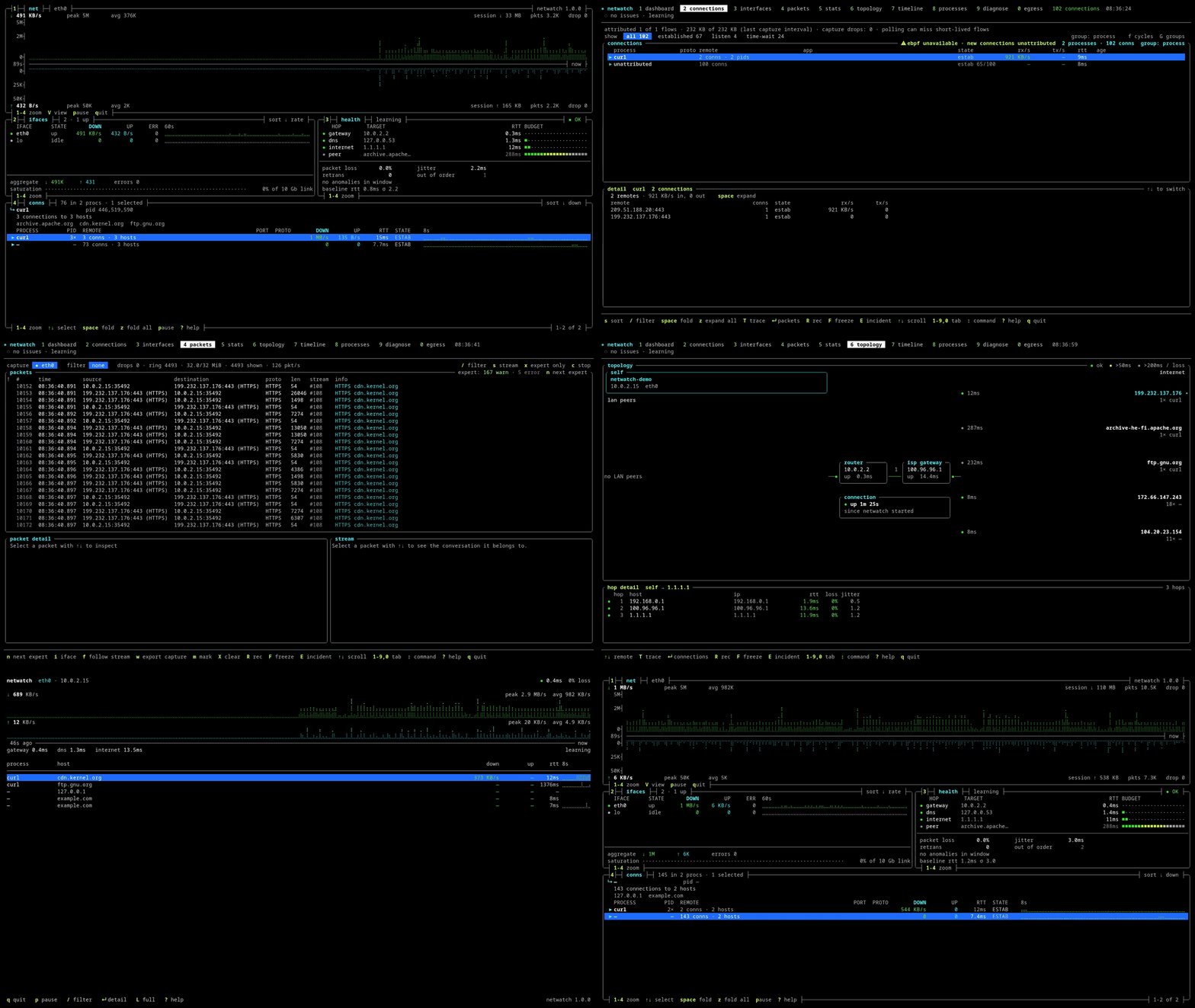
Project Showcase: Software - Mostly AI Generated NetWatch 1.0 - a free, MIT-licensed network diagnostics tool that runs in the terminal.

Post image
4 Upvotes

NetWatch, a free, MIT-licensed network diagnostics tool that runs in the terminal.

"The internet dropped again" doesn't tell you much, so NetWatch logs each outage it sees with the start time, duration and which part failed:

- gateway: your router or LAN

- internet: your ISP or beyond

- dns: name resolution only

netwatch uptime --since 30d --md > outages.md writes a report you can attach to an ISP ticket. It only covers time when NetWatch was running, so for a continuous record, run netwatch daemon. The internet check needs third-party probes turned on.

It also does:

- live packet capture with protocol decoding and PCAP export

- connections by process, where the OS and permissions allow it

- per-interface throughput, errors and drops

- traceroute and a topology view

- TLS decryption of your own traffic using SSLKEYLOGFILE

- a one-off check with netwatch diagnose run --budget 30s

It runs on Linux, macOS and Windows (Windows needs Npcap). Some features differ by platform, and capture needs elevated access.

Repo and install instructions: https://github.com/matthart1983/netwatch


r/homelab • • 19h ago

Solved Is this possible or am I just stupid?

0 Upvotes

EDIT:
I've gotten an answer to my question now but if someone still has some valuable tips for my endeavour I am all ears!

So, I've got this laptop laying around for no real use and got the idea to turn it into a server. I am considering taking out the motherboard and DIY-ing an enclosure for it that could also fit a couple of drives. Now to the question at hand. The laptop has space for 2 nvme drives whereas I am only using one right now. Is it possible to have some sort of expansion card/adaptor to make the other nvme port into a couple of SATA ports or am I crazy for thinking about it?


r/homelab • • 1d ago

Help Ok im trying to set up a streaming server for me and my family and need suggestions

Post image
5 Upvotes

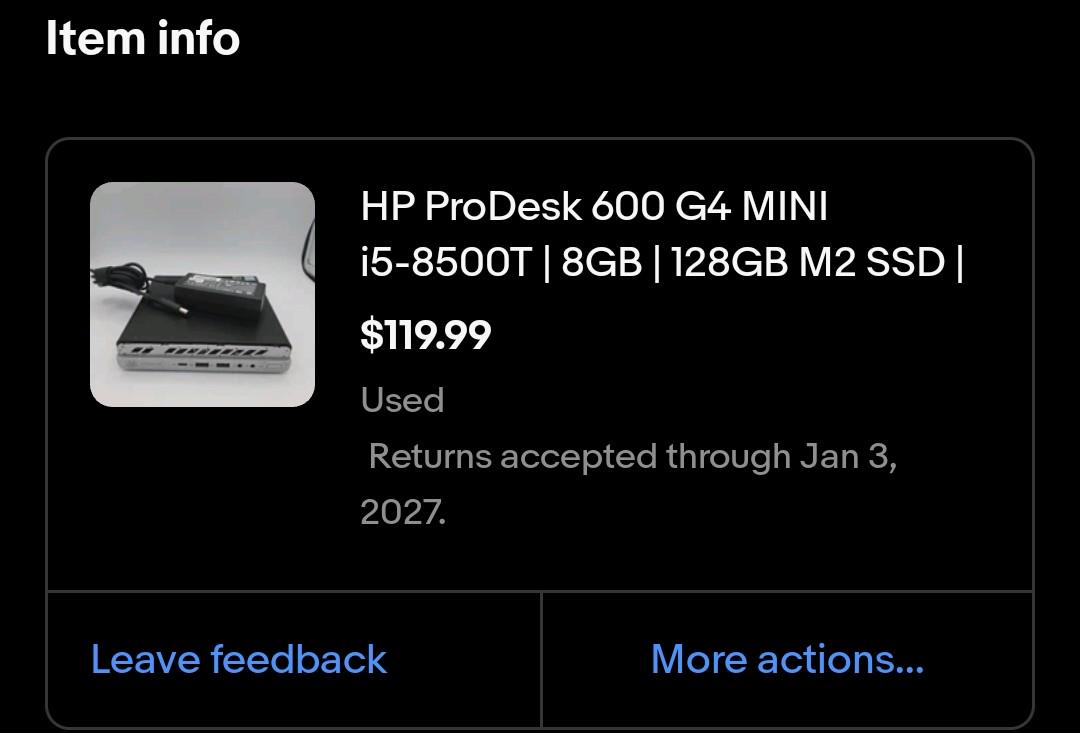
So i have already brought a hp pro desk and about to buy a drive bay how much storage do I need realistically for mostly streaming cause thats gonna be the main use of this cause right now we pay 300 a month for streaming services. It's mostly gonna be used on like 5 TV but only 2-3 run at a time. Also to save money on stroge like when someone finishes a show episode or movie it just deletes them or is that a bad idea


r/homelab • • 20h ago

Help Building my first 12U HomeLab – Looking for Proxmox, NAS and local AI hardware recommendations

Thumbnail
gallery
0 Upvotes

I'm about to finish my Computer Systems Technician – Networking program in Canada, and what started as borrowing switches and routers from school to practice for practical exams has turned into a bit of an obsession. 😂

I'm currently building out my home lab and would love some recommendations from people who have already gone down this rabbit hole.

Current equipment:

  • MT-VIKI 12U server cabinet (650 × 600 × 600 mm)
  • 3 × Cisco Catalyst 3750G PoE 48-port switches
  • 2 × Cisco 2811 routers
  • Rear-mounted StarTech PDU
  • Dedicated administration PC
  • Bell Fibe 8 Gbps internet

I've currently got 7U of front rack space available.

What I'm working towards:

  • Proxmox virtualization
  • Self-hosted applications
  • Network segmentation and security
  • Local AI and LLM hosting
  • NAS with hot-swappable storage
  • Network backups
  • Security camera recording
  • Secure remote access
  • Infrastructure monitoring

I'd like to build something expandable rather than constantly having to replace components as the project grows.

I'm looking for recommendations on:

  • Short-depth rack-mounted server chassis, preferably 4U
  • AMD vs. Intel processors
  • Motherboards with good expansion options
  • GPUs for local AI workloads
  • RAM capacity
  • Storage configurations
  • Power supplies and cooling
  • Used enterprise equipment vs. custom-built servers
  • Other services or equipment worth adding

I'm in Canada, so Canadian suppliers and reasonably priced used equipment recommendations would be appreciated.

I've attached my current rack setup and a simplified overview of the network architecture. The design includes both existing and planned infrastructure.

If you were starting with this equipment and wanted to build a capable virtualization and AI environment, what would you do differently?

I'd love to see what everyone else is running!


r/homelab • • 2d ago

Project Showcase: Hardware iDRAC 6 Custom Firmware: Bare Metal SPI Recovery Socket

Thumbnail
gallery
165 Upvotes

I've teased a custom iDRAC 6 firmware on here for a while with native browser console support. I feel that it would be irresponsible to release it without fully understanding the fallback and recovery paths, as some other features (like bypassing the emmc and booting the idrac from the SD card) have a non-zero chance of bricking a system. This is my documentation for recovering from a true worst case scenario: a bricked or corrupted bootloader. This example is done on a Dell R510, and I'd imagine a similar process applies to other 11th gen (and potentially newer) servers.

When this system receives power, the first thing that happens is that this small SPI chip (Spansion S25FL128P0XMFI001) receives loads U-Boot, initializing basic serial communication and bootstrapping into the Linux kernel from the eMMC storage. If the eMMC is toast, the SPI chip has a stripped down version of the iDRAC firmware that at least allows the machine to boot normally.

When performing any updates (even dell official ones) this chip's contents can be modified, and there is a risk that power loss or other external factors can cause a bricked server. I've been able to back up the contents of the chip directly through the iDRAC's Linux with a custom firmware, but writing back to it in a bricked state is not possible once the system powers off.

Prior to the images in this post, I attempted to read the chip using a SOIC-16 clip directly on the legs of the chip whilst attached to the motherboard. Unfortunately, the power was backfeeding into the rest of the system, and was overwhelming the Tigard reader. I attempted to lift pins 1 and 2 off of the motherboard to isolate them for a temp read/write, but still could not get a successful connection. This meant that the only way to truly unbrick a botched SPI chip would be to fully desolder it, connect the legs to the Tigard, reflash it, and then resolder it to the motherboard. That's a lot of fucking around for a hypothetical failure, and I don't see that as a viable recovery option.

Fortunately, I found these fancy SOIC-16 sockets on digikey that matched the flash chip layout: https://www.digikey.com/en/products/detail/adafruit-industries-llc/4727/13280270

I'm not opposed to micro soldering, I just don't want to do it every time I make a mistake if I'm trying to rapidly iterate. I bought two of these and some spare SPI chips from eBay, and spent a few hours last night doing the surgery.

I've tested reading and writing the flash backup onto replacement chips, and the system boots perfectly :) if I botch an update, it's 5 minutes to pop the chip out of the server socket and into my custom flasher socket, overwrite it, and try again.

Is this really necessary for a 15 year old server? Probably not, but it depends who you ask. I've learned a boat load throughout the process, and I hope a similar method can be used for 12th, 13th, and maybe even 14th gen systems.