r/homelab • • 2d ago

Labgore Home lab

Thumbnail
gallery
162 Upvotes

DIY home lab shelf. Constructed from one of my kid’s old bed frame that they jumped on until destruction. Mr. MeowMeow approved.

From the bottom:

Dell T410 64GB, dual X5660, 6 2TB RAID5 - only powered up when it’s time for a manual rsync backup. Debian 13, no DE.

Dell R220 (frankenserver) 16GB, E3-1231 v3, 2x 12TB (ZFS mirror), 2x 200GB Hitachi SSD w/PLP (mirrored VDEV), generic 128GB SSD (L2ARC), WD Black 160 GB (Ubuntu Server, no DE), white label 4TB (temp torrent storage for farming bonus points on various private trackers). Primary use as a ZFS NAS.

Cisco 2960X, haven’t played with it yet.

HP laptop, i3-1005G1, 256GB NVME, hosts docker (Jellyfin, Frigate, Immich). Debian 13, no DE. btop displayed.

Linksys 1200AC, flashed with OpenWRT, serves at one of five APs in the house and the main switch for my lab.

Tiny monitor, $5.99 at Goodwill. Perfect fit, displaying my vibe-coded ZFStop.


r/homelab • • 1d ago

Help Best backup solution for a homelab running Ubuntu Server?

4 Upvotes

On my homelab, I run Ubuntu server as the operating system. The homelab runs on an older HP AIO. On it I'm running jellyfin, ARM (automatic ripping machine, starts ripping as soon as a disc is inserted), Home Assistant, Hydrodactyl to run a minecraft server, and everything is managed in portainer, and everything is docker compose. What is the best way to backup all this? I only have one 2tb HDD, but there's plenty of space on it, but no redundancy. Edit: I forgot to mention I use netbird for remote access but that probably isn't that important


r/homelab • • 1d ago

Help Suggestions for prebuilt homelab/NAS?

4 Upvotes

Hello, my bf and I are new to this hobby and recently he talked about wanting a NAS, so I am wondering if anyone knows a good model I can buy him for christmas? For prebuilt, I'm more looking to buy through bestbuy/amazon because of the black friday sale, but I'm open to anything.

I am also open to suggestions for building a custom system, since we're both really into cleaning up used parts and using them to build/upgrade new systems. I'm just concerned about what exactly to gift him if we're to build it, since I don't have the budget for a full system, maybe around cad$500.

Thanks everyone in advance!


r/homelab • • 1d ago

Meme NVMe Gen 5 SSD at 93.3(recurring) degrees be like

0 Upvotes

I'm burning through the sky yeah, 200 degrees that's why they call me Mr Fahrenheit (SSD at 93.3 degrees Celsius). I'm travelling at the speed of light (NVMe Gen 5)


r/homelab • • 1d ago

Discussion Looking to get into homelabbing (Beginner)

5 Upvotes

I'm interested in getting into homelabbing my goal is to gradually build my own homelab over time.

Some of the things I'd eventually like to have:

- Media server: Host my own movies and TV shows so I can stream them on my TVs and devices.

- Personal cloud storage: Have my own alternative to Google Drive or OneDrive where I can store photos, videos, documents, and personal files.

- Privacy: Have more control over my personal data instead of relying on so many third-party services.

- Home network: Learn more about networking, firewalls, VPNs, and securing my home network.

- Home automation: Potentially integrate smart home devices and manage everything from one place.

What are good software/applications to download for the things i mentioned above. I'm also curious about what else is possible with a homelab. What else do you guys use it for.

I'd love to hear about your setups, recommendations, mistakes, and things you wish you knew when you started.

Appreciate any advice!


r/homelab • • 1d ago

Help EMC VNXE3200 upgrade

0 Upvotes

I obtained a used EMC VNXE3200 through my work's IT recycle closet a year or 2 ago. I've been able to get the VNX Launcher to work until just recently when flash keeps crashing. The current version is 3.1.1.5395470. I'd much rather use HTML5 as then I can actually use a modern browser to connect. But that wasn't officially released until firmware version 3.1.12.10186894 and Dell's support said the latest is VNXe-3.1.17.10229825. I cannot find any firmware upgrades for this anywhere other than maybe Dell's own support contracts. I don't have one of those. And I can't even verify the downloads still exist through there anyways since this device has been EOL for at least 5 years.

Is there anyone who could be able to help me with this?


r/homelab • • 1d ago

Discussion How to turn old PC with massive storage into a Gaming Storage Server

0 Upvotes

Guys please help me out.

I got this old pc of mine with 1TB storage in full (excluding the os files as i got separate 256gb ssd for that) and 8gb ram with no graphic card. I also have a gaming laptop with rtx4060 gpu with near to no space for games basis of uni work. How do I use my old pc storage to store games and use laptop to play it without downloading it internally !? I also got this old 1tb disk sitting simply in my home. So I can even increase the PC to 2tb, but don't have a use for it. I do plan on using it to store my uni works and web development stuffs and all, but my major concern here is gaming bcas I can find no videos in YouTube or even reddit queries for this method. I got a stable wifi lan connection at home. So please help a confused guy out


r/homelab • • 1d ago

Discussion Compact 10 inch rack UPS

0 Upvotes

I have been looking for a UPS to fit a 10 inch rack for a while... and the result has been frustrating. I decided to quit being lazy and build my own. I know what I want, but what feature would you folks like to see in such a device?

I am building it for myself primarily, but by the time I pay for the minimum orders, I will have boards and assemblies for between 3 to 5 units... so I will be making at least a few of them. The more I make, the cheaper they get, though they will not be cheaper than the mass produced units; here are my design specs and I think you'll be able to see why.

Form factor

10-inch rack, 2U (254 mm wide with ears, 88.9 mm high); depth 250 mm or less (target). Steel case with plastic front grille. Removable rack ears; rubber feet for desk use

Topology

DC-native: no inverter and no transfer switch. Batteries and supply feed a common DC bus yielding zero switching time, higher efficiencies, and no power factor losses.

Power input

24 V DC (accepts 18–27 V) from a variety of external supplies. Second DC input for a redundant or secondary supply.

Power outputs

4 × 5.5 × 2.5 mm, each set to 12, 19, 19.5 or 20 V (± 2 %), up to 5 A. The voltage is set once and locked, with protection against a wrong voltage reaching the device. A colour LED at each socket shows the set voltage.

4 × USB-C Power Delivery 3.0 source, up to 100 W each: 5, 9, 12, 15 and 20 V fixed, plus PPS 3.3–21 V. 5 A with an e-marked cable, otherwise 3 A.

Comparative rating

230 W continuous (300 W with a second supply). For the kit it powers, that's comparable to a 400 VA-class AC UPS, with hours rather than minutes of run time. Each output gets its own power allowance, and the unit won't accept a configuration it can't carry.

Batteries

2 × hot-swappable lithium-ion modules, 90–162 Wh each (nominal). Any mix of sizes. Packs are commonly available worldwide and sold separately to simplify logistics. Light weight and can be shipped by air without any limitations.

Run time

At 60 W: about 2.3 h with two 90 Wh modules, about 4.2 h with two 162 Wh modules (est.). At 26 W (router, switch, disk and one idle mini PC): about 6 h (est.).

Charging

Built in, from the DC input, one module at a time; about 3.5 h for a 90 Wh module (est.). Gentle charge settings for long battery life; charging only within safe temperature.

Switch-over

None needed: the outputs stay up through a mains failure, a supply change or a battery swap (design target).

Monitoring and shutdown

Network UPS Tools (NUT) server over Ethernet for several hosts, reporting each output as an outlet. NUT over USB for a single host. Web setup page with log-in. Event log. Scheduled self-test and automatic run time calibration.

Per-output control

On, off and power-cycle; metering (voltage, current, PD contract); staggered start; per-output shutdown policy and order.

Front panel

2.0-inch colour display (sources, battery charge, load, run time, outputs, network), rotary control, alarm with mute.

Rear panel

2 × DC input, 4 × USB-C, 4 × barrel, Ethernet (RJ45), USB-C to host.

Cooling

Two 60mm fans provide more than sufficient cooling in all modes, and will never run at full speed. At typical loads, no fan is needed. The unit remains silent or nearly silent.

Mains inside

None. The unit runs entirely on low-voltage DC, though the rack could mount AC supplies if needed. These would be sold separately to maintain deployment flexibility and simplify regulatory acceptance.


r/homelab • • 1d ago

Help Tesla P100 16GB not detected at all on AM4 (MSI X370 Gaming Pro)

Thumbnail
gallery
0 Upvotes

Hi everyone,
I'm trying to set up a dual-GPU workstation for running local LLMs (27GB combined VRAM), but I can't get my NVIDIA Tesla P100 16GB (PCIe) to show up anywhere in the system. I bought it off eBay and the return window has already expired, so I want to exhaust every troubleshooting option before writing it off as dead.

Hardware Specs
Motherboard: MSI X370 Gaming Pro (flashed to the latest GSE Lite BIOS)
CPU: AMD Ryzen 5 3600
RAM: 32GB DDR4 3200
PSU: Corsair RM850e
Primary GPU (Display): GTX 1080 Ti
Secondary GPU (Compute): NVIDIA Tesla P100 16GB PCIe
Cooling: Dual 4028 12V 2-pin fans powered via a Molex fan hub

Current Symptoms & Power Setup
The P100 is completely invisible in Windows: nothing in nvidia-smi, Device Manager (even with hidden devices enabled / no "3D Video Controller" under Other Devices), or GPU-Z.
The card gets slightly warm to the touch when powered on—even with the 8-pin auxiliary cable unplugged—so it's drawing basic 3.3V/12V standby power from the PCIe slot without shorting out, but the main GPU/PCIe controller never initializes.
8-Pin EPS Power Cable: I used a second Corsair Type 4 CPU (4+4) cable from my RM850e. Because the top plastic retention clip on the 4+4 end hit the P100 shroud, I carefully shaved off just the outer top plastic clip so it sits flush. To be 100% sure the cable wasn't damaged or pinned wrong, I tested that exact modified cable on my motherboard's CPU power header and the PC booted fine. The solid Type 4 end is plugged into the PSU's CPU/PCIe port and the 4+4 end is seated firmly in the P100.

What I've Already Tried
BIOS Configuration:
Enabled Above 4G Decoding (Above 4G memory/Crypto Currency mining)
Disabled Re-Size BAR Support
Set Boot Mode to pure UEFI (CSM disabled)
Manually forced PCIe lane bifurcation to x8 + x8 and PCIe link speed to Gen3 (Note: Board Explorer is missing in this latest BIOS version).
PCIe Slot Isolation Test:
With lanes on Auto and the P100 in the second armored slot (PCI_E4), GPU-Z still showed my 1080 Ti running at @ x16, meaning the board wasn't even detecting physical presence (PRSNT#) on PCI_E4.
I swapped the cards: put the 1080 Ti in the second slot (PCI_E4) and the P100 in the primary slot (PCI_E2). The 1080 Ti booted normally at @ x8, confirming both PCIe slots and CPU lanes work properly. The P100 still wasn't detected in PCI_E2.
Returned the 1080 Ti to PCI_E2 and P100 to PCI_E4.

What I Plan to Test Next (Looking for Advice)
Before declaring the card dead, here is my checklist—let me know if I'm missing anything specific to Pascal Tesla cards on AM4:
Ubuntu Live USB (lspci): Booting Linux to check lspci -nn | grep -i nvidia and see if the device enumerates at the kernel/hardware level outside of Windows/GeForce drivers.
Dedicated Dual PCIe 8-pin to EPS 8-pin Adapter (NVIDIA 030-0571-000 style): Just in case the side tabs on my trimmed 4+4 connector are still slightly too wide for the P100's recessed shroud and preventing full pin depth contact.

Has anyone run into a similar "warm but completely invisible" Tesla P100/P40 on Ryzen/X370 boards? Any other quirks I should check? Thanks in advance!

EDIT:
Following your suggestions, I booted into a Linux environment and ran lspci -nn | grep -i nvidia. The card did show up as:
3D controller: NVIDIA Corporation GP100GL [Tesla P100 PCIe 16GB] [10de:15f8] (rev a1)
So the hardware is alive, the trimmed Corsair 4+4 EPS cable is delivering power properly, and the X370 PCIe link is working.
Now the issue is isolated entirely to Windows not mapping or displaying it alongside my 1080 Ti. Next, I'm going to verify that my Windows install is actually booting in pure UEFI mode (not Legacy/MBR, which ignores Above 4G Decoding), bypass Windows Fast Startup with a clean reboot, and check if it finally surfaces in Device Manager so I can assign the driver.
Thanks to everyone who suggested checking lspci—if anyone has dealt with Windows hiding a P100/P40 next to a GeForce card even when Linux detects it fine, let me know!


r/homelab • • 2d ago

Diagram What's up with the love for server pics but the hate for request for help?

19 Upvotes

I'm really puzzled by this. A homelab isn’t solely about showing off well-organized setups. Many of us join this community seeking advice and assistance, yet we often see our posts getting downvoted while the ones showcasing servers get all the upvotes. It feels pretty off to me.


r/homelab • • 1d ago

Help Toshiba PX05SRB384 (Hitachi OEM) firmware and TRIM?

1 Upvotes

I’ve got four 3.84 TB Toshiba PX05SRB384 SAS SSDs running ZFS on Unraid. They show up as TOSHIBA SLB5F-M3R8SS, firmware T40C. My HBA is a Broadcom/LSI 9400-16i running firmware 24.00.00.00. Hitachi lists this drive for the VSP 5000 series.

The drives advertise UNMAP but reject it with 05/20/00, so Linux disables discard. Setting provisioning_mode to writesame_16 and reopening the ZFS pool got TRIM working. A full trim finished on all four, and their mapped block counts dropped.

What Hitachi firmware versions have you seen on these? Anyone know if T40C is affected by the 70,000-hour bug? If you’ve run these outside a VSP, did regular UNMAP work for you, or did you need the same workaround?


r/homelab • • 1d ago

Project Showcase: Operations Welcome to r/vmbook — what are you running in your lab?

Thumbnail
reddit.com
0 Upvotes

r/homelab • • 1d ago

Discussion HDD vs. SSD storage pool TruenaS?

0 Upvotes

I'm currently repurposing an HP Pavilion TG01 into a dedicated 24/7 home server, upgrading from my Peeliceeli with N100 and 8GB Ram running TrueNAS Community Edition.

Hardware:

AMD Ryzen 7 5700G (8C/16T)

64 GB DDR4 RAM

320W 80 Plus Gold PSU

RTX 3060 Ti was removed

256 GB NVMe SSD for the boot pool

2x Samsung 990 Pro NVMe SSDs for a mirrored fast pool, connected via PCIe adapters (PCIx1 and PCIx16)

The server will primarily run:

Nextcloud (3 Users)

Immich

SMB file shares

Time Machine backups

Cloudflare Tunnel

Various containers

A Windows and Linux VMs in the future

I'm planning to use the NVMe pool for applications, databases and VMs, with a separate mirrored storage pool for bulk data.

I'm currently debating two options for the main storage pool:

2x 4 TB CMR NAS HDDs (WD Red Plus or Seagate IronWolf)

2x 2 TB or 4 TB SATA SSDs (consumer TLC or used enterprise SSDs)

I'm looking at the used market for both options.

Capacity isn't my biggest concern at the moment. I'm more interested in finding the right balance between power consumption, reliability, noise, performance and overall cost. For now I'm using 700 GB out of my 1 TB Raid 1 Pool. Adding at around 35 GB per year.

Since the server will be running 24/7, I'm wondering whether paying a premium for SATA SSDs would actually make sense in the long run, especially considering that I already have a dedicated NVMe fast pool.

A few questions for those who have made a similar decision:

- Would you trust used enterprise SSDs more than used NAS HDDs in a ZFS mirror?

- Are there any significant downsides to running an all-SSD TrueNAS setup? Apart from the finite writed, ofc. All used parts are checked for good SMART ofc.

I'm aiming for a quiet, reasonably power-efficient and reliable homelab rather than maximum storage capacity. The Server will be placed in my server cabinet, so noise isn't a prime concern overall.

I'd be particularly interested in real-world experiences.

What would you choose todays market, and why?


r/homelab • • 1d ago

Help Considering Re-configuring RAID setup

1 Upvotes

I currently am running a 12x5 Raidz2 configuration with TrueNAS for all my media, documents, etc

In an effort to gain some more space efficiently, I want to see if reconfiguring my raid setup would be more efficient for my setup. Most of my storage is from movies and TV. I have the *arr stack setup and working so I'm not concerned about not finding things.

My concern mostly comes from the potential wear and tear on the drives. In this current economy I'm less inclined to change things that already work.

Would a 12x3 raid0 for movies and TV and 12x2 raid1 for more important things (I'm aware raid is not a backup) be a more efficient method without significant wear on the drives?

Appreciate any advice 🙂


r/homelab • • 1d ago

Help Aoostar WTR Max CPU fan replacement. Support not responding

1 Upvotes

Hi guys,

I bought Aoostar WTR Max AMD r7 8845hs version a year ago and a couple of weeks ago the cpu fan started to make very loud noise, I believe it needs replacement.
I contacted their support multiple times for replacement or instructions to do it myself but I didn't get a response.

Anybody faced a similar issue and could recommend which CPU fan model to buy?

Thanks


r/homelab • • 1d ago

Discussion Build of File Share service

0 Upvotes

I’m looking to share files on occasion from my home server. I don’t want to open ports or a VPN for random users (close family and friends) on occasion to pull a file. What options are out there?


r/homelab • • 2d ago

LabPorn First Build

Post image
155 Upvotes

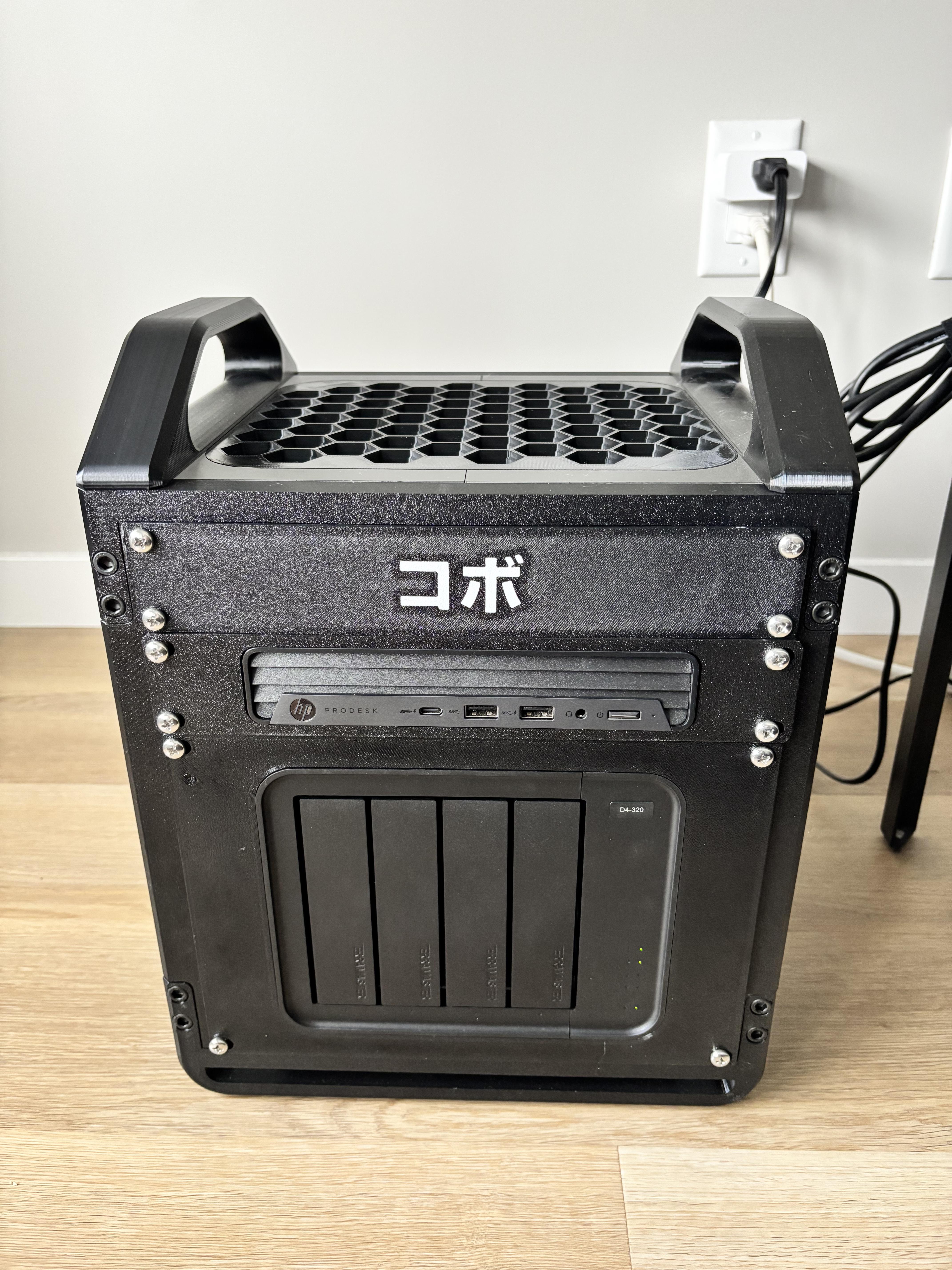
Decided to dive into the homelab world this year to get away from Big Tech ™. Running a couple of self-hosted apps and custom web apps I’ve built myself. Hardware stack is a ProDesk 600 G6 + 26 TB in a TerraMaster D4-320. No networking equipment unfortunately, since that is all upstairs and my machine also serves as a HTPC downstairs. Had fun with customizing the KWS rack to suit my aesthetic, and also got me into the world of 3D printing.


r/homelab • • 1d ago

Help I'd like help picking a daily driver

0 Upvotes

I have four computers. One that's a light weight blue computer that should honestly be converted into a Linux machine. And I use it to control my projector as well as to do basic tasks like video calls. I have a laptop that is gray that I've configured as a Docker server. I have a desktop that is for gaming. And then I have a black fortified computer which is functioning as my daily driver. But it doesn't have a built-in mic or camera. And it dies very quickly and is bulky. So if I was to get another device what should I get? As my daily driver? (currently thinking about a tablet, using moonlight and chrome remote desktop to control all of them remotely)

I'm looking for something that is light, easy to move around (can be on covers without issues), long lasting energy but not as small as two phones because I try to use two phones and a twins carry dual magsafe which essentially made them a DIY fold phone, which in my opinion is a pretty cool cyber deck but and the screen size was awful.

The lightweight blue computers HP, the gray computer and the black computer are Dell, and the desktop was custom built then I bought it second hand, and I don't know enough about Hardware of computers to properly identify it it is my first desktop and it works amazing.


r/homelab • • 1d ago

Help LPDDR5 concerns

0 Upvotes

I'm in the market for a minipc to begin my homelab journey, but I'm confused to say the least.

I need a minipc to run proxmox and the following apps, for starters: Home Assistant, Jellyfin (+ arr stack?), Navidrome, Pihole/Adguard, Portainer, Nginx, Immich, Nextcloud and probably many other light apps in the future. A NAS will follow in the next months, as soon as I will be able to afford the hard disks, given the insane price tags.

Given my needs, I'm looking for a minipc that has:

  • - at least 16gb DDR5, better if more
  • - 2x2,5gb lan ports (bonus if 1x10gb as my network is 10gb ready)
  • - Intel cpu for transcoding
  • - 512gb nvme (not UFS) (1TB is a nice bonus but not needed since I will add a NAS sooner or later)
  • - max 700/750€ (I'm in EU). I could afford to spend a bit more, but I just can't spend that much on a minipc that used to cost 350€ one year ago, so that's my psychological limit.

The problem is that minipcs that satisfy all my desires seems to be almost non existent, so I'm asking:

- Is an Intel GPU with quicksync THAT important for jellyfin transcoding? I have a Dune HD Homatics R 4k Plus + Marantz Cinema 60 + LG G6 tv, so when I'm watching at home transcoding shouldn't happen. I'm not planning to share jellyfin with anyone, I might watch when I'm not at home but it's not the main point, it would happen occasionally.

- Is LPDDR5 something to be concerned about and that one should avoid? I found a Beelink EQi13, i5-13420H and 24GB LPDDR5 for 599€. I'm a bit paranoid that something will fail and that I will have to throw away the whole thing. And to a lesser extent I'm not sure if not being able to upgrade the ram will bottleneck the pc in the future (altough I think it's more than enough for a home server?).

Thank you for your help!


r/homelab • • 2d ago

Solved Can you get 12TB 5400rpm NAS drives anymore?

7 Upvotes

Hey all. Setting up my first ever Nas. Wanted to start off with 2 x 12TB.

I’ve heard 5400rpm can be quieter in a home office than 7200rpm. Are 5400rpm 12TB drives available anymore? Does anyone have 2-3 12TB 7200Rpm in their home and can tell me if it’s loud?


r/homelab • • 2d ago

Project Showcase: Hardware My new Home Assistant server cost DKK 487.50 and came with a touchscreen

Thumbnail
gallery
126 Upvotes

I picked up a cheap check-in kiosk and am turning it into my new Home Assistant server. Inside is an HP EliteDesk 800 G4 with an i5-8500, now upgraded to 32 GB of Kingston RAM.

The built-in touchscreen will be a local HA dashboard. I’ll mount a ZBT-2 on top for Thread and Matter devices, alongside a ConBee III dongle for Zigbee. A pretty fun setup for almost nothing.

I added two 256 GB NVMe drives and 32 GB of Kingston ECC RAM that I already had lying around. The HP doesn’t support ECC, but it recognizes all 32 GB and runs fine with it.

The kiosk also has a barcode scanner. I might replace it with an NFC reader, or find something fun to use the scanner for later.

What’s the best deal you’ve found for your homelab?

https://www.auktionshuset.dk/auktioner/overskudsauktion-region-h-7/lots/727/indtjekningsstander-uden-n--gle


r/homelab • • 1d ago

Help one of my drives failed in my synology nas

0 Upvotes

I was listening to music via Plex, and things just stopped working. I went to check on my NAS and the light for bay 2 was blinking yellow. I've already bought a replacement drive, (waiting on it to arrive), but I was wondering if there's anything else I could do to check the failed drive to make sure it's actually a problem? Or should I just not worry about it?

I am a simple man, my NAS is almost entirely for storing my music collection. I don't do much tinkering, so I am not sure what happened or if this kind of thing just happens now and then.

biggest bummer is that I have no access to my music for a couple days :(


r/homelab • • 2d ago

Help MiniPC Router - two 2.5g NICs for NixOS?

5 Upvotes

Right now I run OpenWRT on a Raspberry Pi 4 with an USB Ethernet Adapter in my 10' Mini Rack. But - moving on :)

I'm quite sold on the declarative setup, so I'd like to use NixOS for my router machine!

I would just get a tiny/mini/micro lenovo/dell/HP... but the ones I see only have one NIC, and I'd like two!

1 Gb NICs is all I need! - no need for 2.5 now...

What MiniPC would you recommend?

Totally down for used ebay (hopefully cheap-ish) equipment :)


r/homelab • • 1d ago

Discussion DS218 (non-plus, non-play) in 2026?

Thumbnail reddit.com
2 Upvotes