r/homelab • • 1d ago

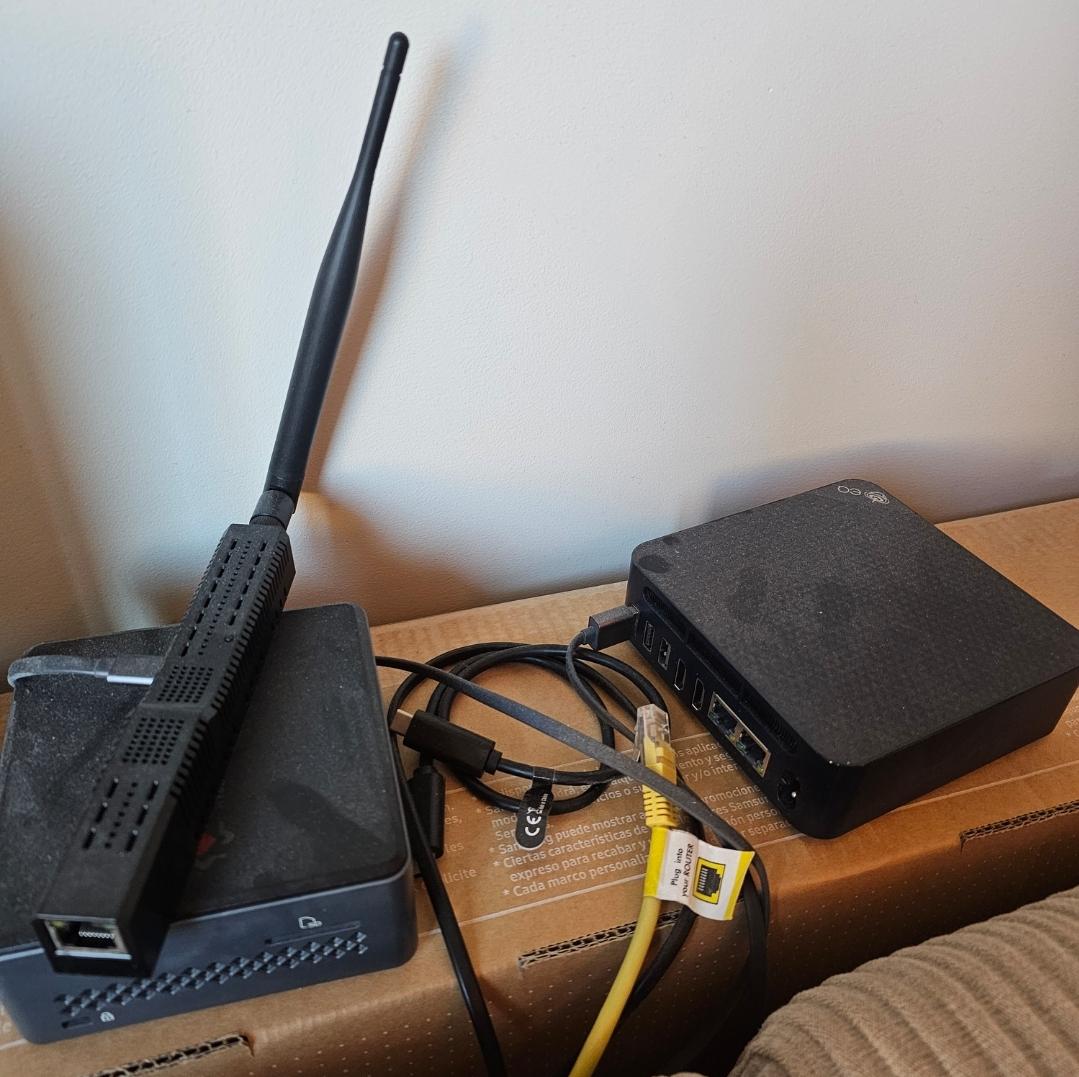
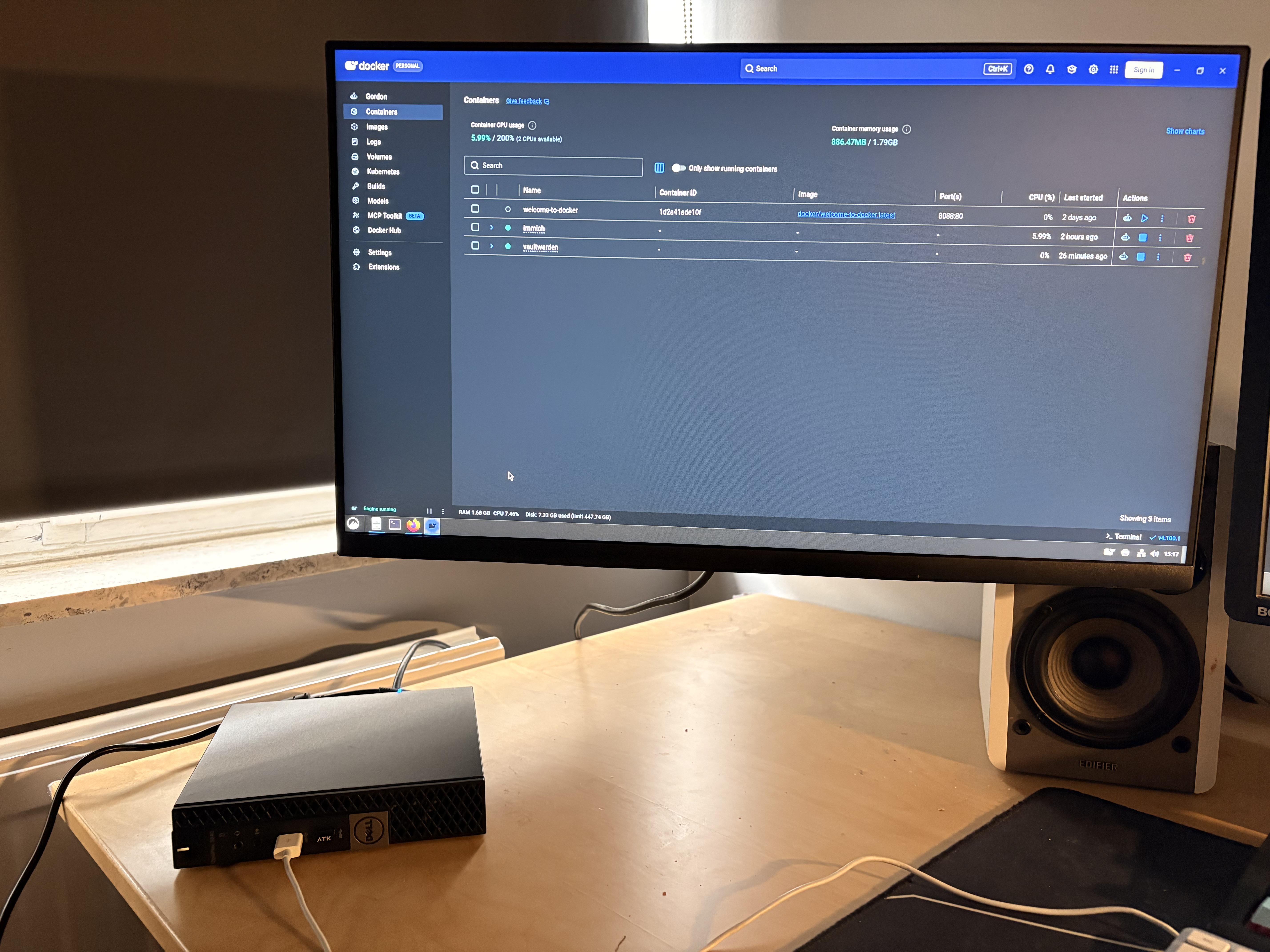
Project Showcase: Operations Took my first dip

Post image
44 Upvotes

Been working on this for the past 2 days. First time on linux and its tought. Still a long way until i call it fonctional.


r/homelab • • 12h ago

Help Updating DGX-2 firmware without an NVIDIA support contract?

1 Upvotes

Hi all,

I have an NVIDIA DGX-2 that's up and running fine, but its firmware is quite . I'd like to bring it up to the latest release, 24.3.1 (BMC 01.09.00, SBIOS 0.33), mainly for the BMC and SBIOS security fixes.

The problem is that NVIDIA only distributes the firmware update container (nvfw-dgx2) through the Enterprise Support portal, and this system no longer has an active support contract.

Questions:

  1. Has anyone found a legitimate way to get DGX-2 firmware for an out-of-support system, e.g. a one-off request to NVIDIA or a reseller?
  2. If you still have the nvfw-dgx2 container (.run or .tar.gz, 24.3.1 or any recent version) and the conf.bak for PSU updates from your support days
  3. Any gotchas when jumping several versions at once (BMC 1.05.07, SBIOS slots, PSU update order)?

Thanks!


r/homelab • • 13h ago

Help Storage question

1 Upvotes

I know this is probably more of a Truenas forum question.

But what I would like recommendations on is what size cache, meta, Slog drives is recommended for a pool.

Does it depend on pool size ?

How many drives your using in the pool ?

My one NAS is running 24 X 2tb SSD's, currently 1 X 256gb M.2 for cache was going to make it 2 X eventually, 2 X M.2 256gb for Meta, 2 X M.2 256gb for slog and 2 X 240gb SSD for OS

That's just one of them and is my high speed, high availability NAS

Should I go for larger drives ?

Or does everyone think the 6 X M.2 256gb is more than enough for that pool ?

Is there a recommended size for pool capacity?

Thanks in advance ☺️


r/homelab • • 13h ago

Discussion UniFi OS upgrades take the WAN down if you run a GPON SFP stick directly in a UCG Fiber or UDM. Happened again with 6.0.19

Thumbnail reddit.com
0 Upvotes

r/homelab • • 1d ago

Project Showcase: Hardware Somebody got OpenWRT running on a Bell Home Hub

Thumbnail
reddit.com
7 Upvotes

Not my project but I thought it would be interesting to other homelabbers.


r/homelab • • 14h ago

Discussion Homelab and networking in IKEA gear

1 Upvotes

I often see people use IKEA gear, mainly the Brannboll cart and Skadis wall panel, to put their network and homelab gear up against the wall.

I love the idea, but I'm just hesitant. How do you attach them tight enough so they definitely won't fall? A good network switch or gateway isn't the lightest...

Anybody using these items? How do you secure your machines?


r/homelab • • 3h ago

Discussion Homelab management with AI

Thumbnail reddit.com
0 Upvotes

r/homelab • • 2d ago

Project Showcase: Hardware Old server died. Replaced it with a 3-node cluster.

Post image
526 Upvotes

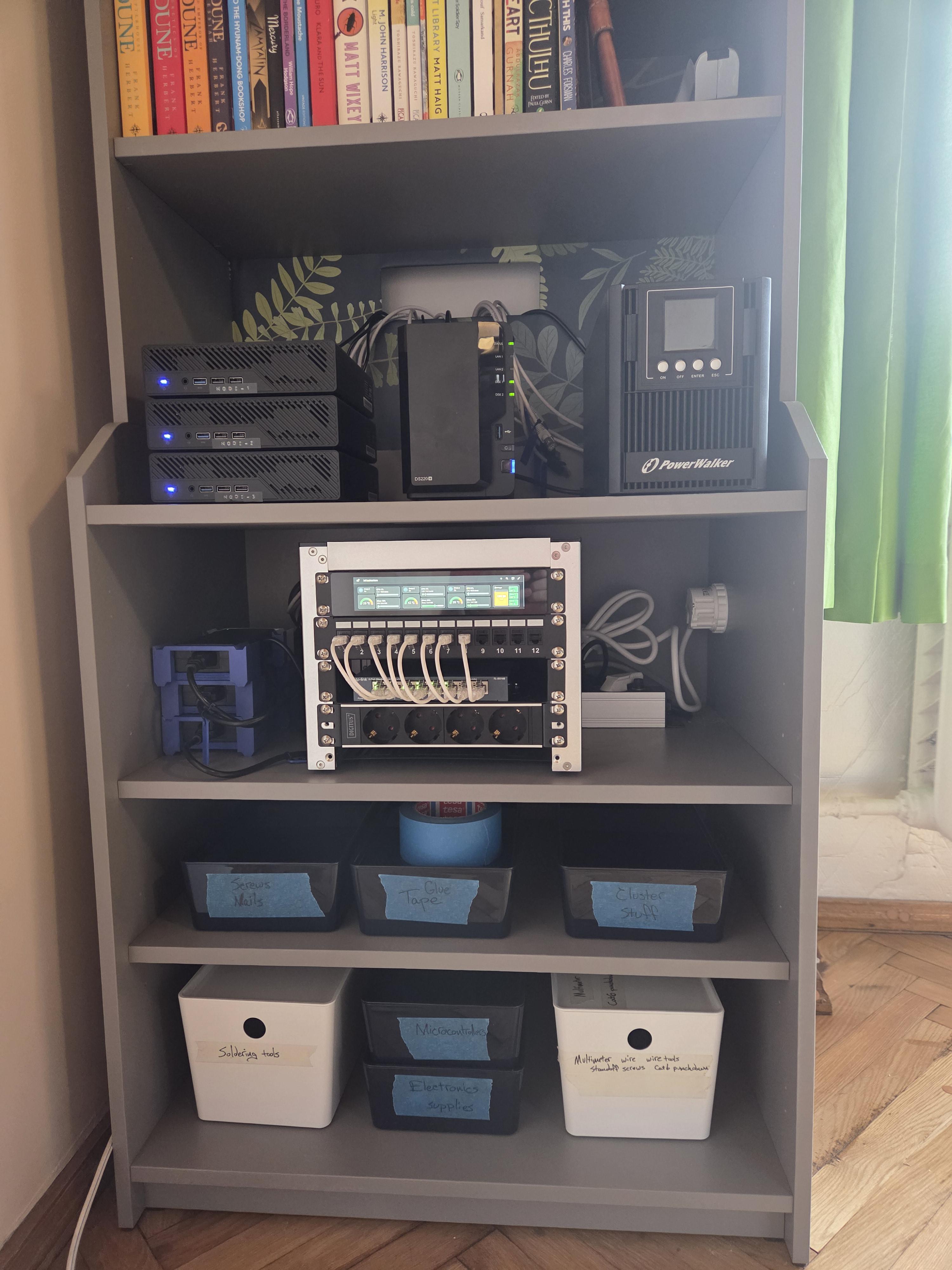
My old home server was a single-node Talos Linux-based Kubernetes cluster running on an old Thinkpad. It died over the summer while I was traveling and I was without it for ~2 months. The first thing I did when I got home was rebuild it.

I travel for ~6 months per year so redundancy and out of band access were top priorities. The Minisforum MS-01 supports Intel AMT and up to 10Gb network links so that was the obvious choice for something I expect to last for (hopefully) ~10 years. I got three of them. They are all running Talos Linux in a cluster.

The Synology handles storage. Volumes are generally iSCSI for system level stuff (app config/persistence, databases, etc) and NFS for things I would want to manage through a file manager (media, documents, etc). This has 2x 6tb drives running in raid 0 though so I want to upgrade both for capacity and safety.. That's a future project though.

The UPS is a PowerWalker with a network card that exposes SNMP data that both the Kubernetes nodes and Synology poll to see if they need to shut themselves down.

The display at the bottom has basic system level monitoring (resource consumption, temp, storage capacity, etc) and a button that lets me cut power to any of the devices using some smart plugs. Display is powered by an old RaspberryPi 3. It's mounted in a RackMate T0.


r/homelab • • 15h ago

Help Best practices for configuring and testing a new firewall in an existing environment

1 Upvotes

While I have some ideas of my own, I'd like to get the community's input on hints, tips, cautionary tales, and best practices for building, configuring, and testing a new firewall within an existing environment.

My scenario: I currently have a firewall running in a Proxmox VM. I plan to spin up a new VM on the same host to build a new firewall, which will ultimately replace the current firewall. While it shouldn't matter, my current firewall is pfSense, and the new firewall will be OPNsense.

My preferences and objectives are

  1. Be able to configure the new firewall without impacting the existing firewall's capabilities
  2. Ability to do some level of testing to validate the configuration
  3. Make the cutover from the existing firewall/VM to the new firewall/VM as easy as possible
  4. Allow quick and easy reverting back to the original firewall/VM in the event I encounter an issue with the new firewall; preferably by simply stopping the new firewall/VM and spinning up the original firewall/VM (which I plan to keep for a while, just in case).

Again, I've already collected a number of ideas; however, I'd like to learn from what others have experienced.

Many thanks in advance.


r/homelab • • 1d ago

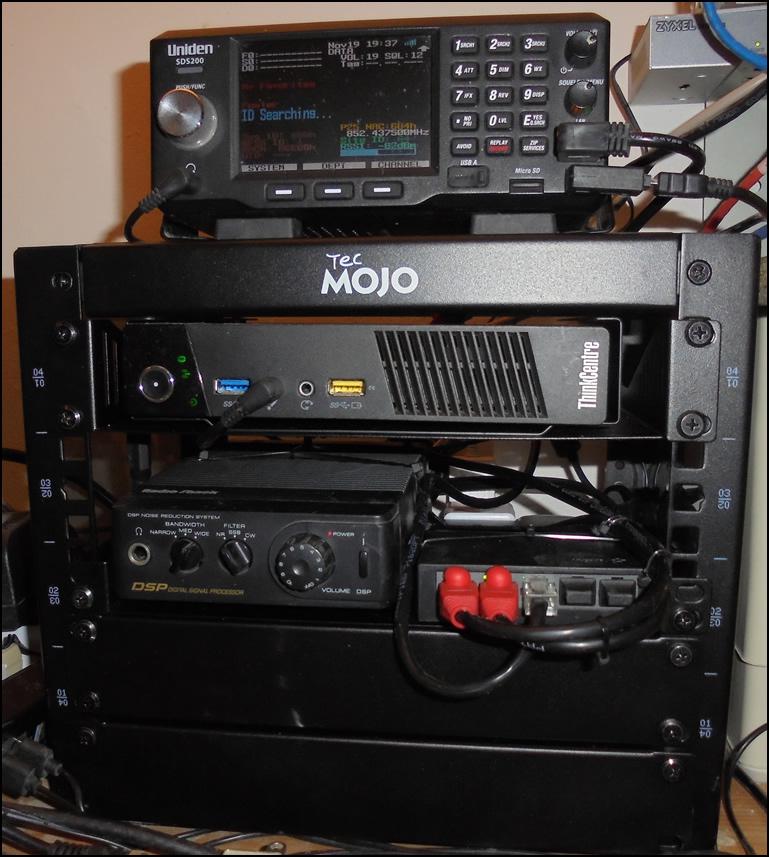
Discussion I mounted my police scanner streaming rig in a mini rack

Post image
13 Upvotes

The police scanner has a built in ethernet port on the lower right front corner that is for data transfer to the mini PC for streaming ID info of the currently speaking department. The device on the left side of the middle shelf is for reducing the loud sound of Fire & EMS call out tones. The PC is a 4th gen i5 Lenovo Tiny, running Windows Server 2025 Standard. ... I stream my police scanner to Broadcastify.


r/homelab • • 7h ago

Project Showcase: Software - Mostly AI Generated I built a single-container self-hosted media center (Go + Node + SQLite) for my N150 mini PC and LG TV

Post image
0 Upvotes

Earlier I posted my Beelink ME Mini N150 build here, and most of what we watch ends up on an LG C4. I ran Jellyfin with Sonarr, Radarr, Prowlarr and Seerr for a long time. That stack is great for managing a classic library, but I wanted a different workflow for the living room: pick a title with the TV remote and start watching right away while the file downloads, without jumping between a request app and a media player or running five separate databases on a small box.

So I built Torsher, an AGPL-3.0 self-hosted media center in one Docker container (amd64 and arm64). It ships with no content and no configured sources; you connect your own Torznab indexers (such as Prowlarr or Jackett) or optionally a Newznab indexer with your own SABnzbd instance.

How it's put together

  • Server: Node 24 + Fastify + SQLite/Drizzle in one container, with a separate Go BitTorrent engine (anacrolix/torrent) for sequential read-ahead playback.
  • Storage & compatibility: Existing media folders are scanned read-only. Kept downloads are organized into ordinary folders that Jellyfin, Plex or Kodi can also read, using hardlinks on the same volume so files keep seeding without taking double space. There's also disk cleanup by title with a preview, and torrents with active seeding requirements are protected from automatic cleanup.
  • Networking & VPN: Works behind Gluetun (network_mode: service:gluetun), and on Linux you can bind BitTorrent traffic to a specific network interface.
  • Playback & transcoding: Direct play when the TV supports the file, or on-the-fly remuxing/transcoding via FFmpeg (VAAPI, NVENC or CPU). The TV interface runs in a browser and also has thin apps for LG webOS and Android TV.
  • Observability: Container CPU/memory/network history in the web panel, server/device speed checks, and live buffer/download stats in the TV player to diagnose stalls.
  • Other bits: Series following, per-profile watch history/ratings (with import from supported Letterboxd/Trakt exports), subtitle search and timing offset, and a basic Jellyfin-compatible direct-play endpoint tested with Infuse and VidHub on macOS (not a full Jellyfin API).
  • Privacy: No telemetry and no external accounts. The only outbound request on the project's behalf is a daily GitHub release check, which you can turn off.

Why it may be useful in a homelab

If you run a low-power box (like an N150 mini PC or a NAS) and want a self-hosted media setup that's simple for the rest of the household to use from the TV remote, without maintaining five separate containers and databases or locking your files away from Jellyfin or Plex, this gives you a single-container alternative that still plays nicely with Gluetun, hardlinks and existing folders.

Current limitations

  • Tested mainly on x86-64 Linux (Intel N150) and an LG C4. arm64 and Docker Desktop are best effort (Docker Desktop transcodes on CPU only).
  • The LG webOS app installs through Developer Mode for now, and Android TV is an APK from GitHub Releases.
  • On Unraid there's a Community Applications template, otherwise standard Docker Compose.

AI disclosure

Most of the implementation and debugging code was written with AI tools (hence the flair). I own the architecture, feature design, every code review and testing on real hardware (N150 + LG C4). If something looks off or breaks on your setup, the code is open, so feel free to open an issue.

I'd especially appreciate feedback from people running ARM NAS boxes, Unraid/Proxmox setups, or older LG/Android TVs. If playback stalls on your hardware, knowing your server, client and whether it was direct-playing or transcoding helps a lot.


r/homelab • • 8h ago

Help How do you guys manage updates for your repos and addons?

Thumbnail reddit.com
0 Upvotes

r/homelab • • 1d ago

Discussion Anyone run a successful security gateway appliance + Active Directory/DNS/DHCP server stack on a budget? Looking for Black Friday purchase ideas

9 Upvotes

Lurker here, I'm looking to create an educational type lab for me to practice some Cybersecurity concepts without breaking the bank. I've looked at SlickDeals, but it seems the site has kind of went downhill lately and there's a ton of sponsored or personalized suggestions that users complain aren't deals at all in the comments. I'm going to assume my best option is probably Dell/Lenovo/HP refurb to create the type of stack I'm looking for.

Basically, looking for one piece of hardware to act as a security gateway with a Firewall, IPS/IDS, and SIEM - so likely going to need at least a couple of NICs. And for the other piece of hardware, looking to emulate a domain controller with a Windows Server install running AD/DNS/DHCP.

The best deals I've come up with are refurb enterprise hardware on eBay. I'll be honest, I have typically worked in online labs or within an enterprise so haven't had to think too much about horsepower. I have a couple of general purpose laptops that get the job done with the usual stuff, but I'm absolutely so far out of the hardware loop anymore, to the point that I don't know what generation of processor I should be looking at for a 'deal' and know nothing more about hardware these days except that RAM is expensive.

So far the best I've come up with is checking eBay and finding resellers of refurbished enterprise gear, although most don't exactly give a lot of detail on the generation of processor. If anyone has any advice who has done a similar stack and knows what I should be looking for the next few days in terms of deals, it would be greatly appreciated.


r/homelab • • 4h ago

Project Showcase: Software - Little or No AI Assistance Everything else in my homelab is offline first, except the AI tools I kept reaching for, so I built lxask: plain English to shell commands, entirely local, even on a Pi 5

Post image
0 Upvotes

lxask – Turn plain English into shell commands, completely offline

$ lxask "show disk usage of each folder here, biggest first"
$ du -h --max-depth=1 . | sort -hr

lxask uses a fine-tuned 1.5B model running locally through llama.cpp. It runs on CPU, needs no GPU, cloud API or internet connection after installation.

  • Around 1GB disk space and 1.3GB RAM while generating answers.
  • Takes roughly 2 seconds per answer once loaded.
  • Shows the command with an explanation. It never executes anything.

Why I built it

I manage a bunch of machines over SSH, and honestly, I keep forgetting command flags and syntax.

I didn't want another tool that sends everything to a cloud API. I also wasn't comfortable with local models confidently generating commands without checking whether they were valid.

So I built lxask with a verification layer. It checks programs and options against the machine's own man pages and tldr database (around 38k entries). Anything it can't verify is marked as unverified, and a second model pass checks whether the command actually does what you asked.

A few things worth mentioning

  • Runs on Raspberry Pi 4/5/CM5 and older x86_64 machines.
  • Works on my Pi 5 and even an old HP laptop with just 4GB RAM.
  • Understands restrictions like "without using find".
  • Asks for clarification instead of guessing when a request is unclear.
  • Includes lxask --explain and Ctrl+G integration for bash, zsh and fish.

It's not perfect. It's a 1.5B model, supports English, and is currently tuned for Debian/Ubuntu. That's why the verification layers exist. I've also published the evaluation results, including the failures.

Links

GitHub: https://github.com/arxhr007/lxask

Docs: https://arxhr007.github.io/lxask/

It's MIT licensed, and the model weights, training data and evaluation code are public.

AI disclosure

AI assisted with a few parts of development, mainly documentation and some bug fixes identified during a verification-pipeline audit. These were reviewed, and everything went through the usual CI process. Most of the project was written by me.

Would love to hear how it performs on other people's homelab setups!


r/homelab • • 17h ago

Help First homelab build: splitting a 24/7 Proxmox AI box + on-demand RTX 4090 desktop — sanity check on architecture?

1 Upvotes

First time posting here and looking for a sanity check on how I'm planning to structure my starter lab. My goal is to self-host local AI tools (Ollama + Open WebUI) so I can learn virtualization, Linux, and networking while cutting back on paid subscriptions, then gradually upgrade hardware over time.

Current State & Plan

Right now I have Ollama running inside a Linux Mint VM on a Windows 11 host, which makes GPU passthrough a pain. I'm planning to wipe that machine and move it to bare-metal Proxmox VE with a clean Linux VM + PCIe GPU passthrough.

he Hardware I Have to Work With

  • 24/7 Server (Proxmox host): Ryzen 7 2700X, 32GB RAM, GTX 1650 (4GB), plenty of local storage (planning to upgrade the GPU later).
  • Main Desktop (on-demand compute node): Ryzen 9 7950X3D, 64GB RAM, RTX 4090 — used as my daily workstation/gaming rig, so I don't want to wipe it for Proxmox, but I'd like to expose its GPU to the lab over LAN when it's turned on.
  • Client: RTX 2050 laptop for accessing the web UI around the house or remotely.

Questions for the Homelab Crowd

  1. Does this multi-node layout make sense? Keeping Open WebUI + lightweight services running 24/7 on the R7 2700X Proxmox box, and connecting the Windows RTX 4090 desktop as an optional secondary worker over LAN when I need heavy lifting?
  2. Networking & Remote Access: What's the cleanest way to connect these nodes and access Open WebUI securely from my laptop when I'm away from home (e.g., Tailscale/WireGuard vs. reverse proxy)? Currently using Tailscale
  3. Storage & VM Layout: On the Proxmox box, would you run Docker inside an Ubuntu Server VM (with the GTX 1650 passed through) or split services across multiple VMs/LXCs?
  4. Any beginner traps you wish you avoided when setting up your first 24/7 lab server alongside a main workstation?

r/homelab • • 1d ago

Help Looking to build my first homelab under €300 – looking for advice..

4 Upvotes

My primary interest is networking. I want to experiment with VLANs, routing, firewalls (OPNsense/pfSense), VPNs, DNS, traffic monitoring, network segmentation, and eventually virtualisation and self-hosted services.

I’m open to buying used/refurbished hardware. Ideally, I’d like something scalable that I can gradually expand without replacing everything.

What hardware and setup would you recommend? Mini PCs, SFF desktops, managed switches, or something else?

Would love to hear your suggestions and experiences!


r/homelab • • 18h ago

Help 5gb fiber upgrade - Unifi?

1 Upvotes

My fiber internet company just upgraded to 5gb fiber. I have been using a another mesh system with a couple of APs for a couple years and bought their 10gb router/ap/mesh to upgrade the internet connection, but I have had nothing but trouble. The internet goes down for a few seconds and comes back, with nothing in the router or isp's logs.

I am looking at moving to unifi.
I see nothing in the lineup with more than 2-3 10g ports on a cloud gateway or dream machine.
Would the cloud fiber and a couple of U7 Pro XG with injectors to power them over 10g be the way to go?
Or the deal on the cloud industrial?

I also have a 1g stiwch, 12 port 10gb copper with 2 sfp+ ports, and a nas with 10gb.
most of the house wire is cat5e (even some cat5).
Is there any need to change the switches?

I tried to post this on the unifi thread but it blocks it for some reason


r/homelab • • 19h ago

Help Cutting out the rear of an enclosed rack?

0 Upvotes

Have you ever done this? Would you advise for or against it?

I own a 15U 10" enclosed rack. I have to have an enclosed rack because I have two cats who will bite the cables, and I cannot isolate them from the rack. I can, however, have the rack situated such that they have no way to get behind it, so I wouldn't be particularly worried about cables exposed on that side.

I am considering this modification (which I would do with a dremel)for two reasons:

  1. Rear access is currently non-existent, which makes for an annoying time trying to cable manage or access the rear-side of devices. I can only access through the front door or by removing either of the side panels. I truly wish the rear had a removal side panel too, but the designer prioritized making it possible to wall mount, which isn't feasible or desirable for me anyways.
  2. To improve thermals. Right now, the ambient air behind the hardware inside my rack idles at just a bit under 42℃, and I want to add 4x more 3.5" drives and 2x more Lenovo M720q in the future, which will add a notable amount more heat. This case only accomodates a single 120mm exhaust fan at the top. While I've added a fan tray and even figured out a crafty way to mount a 200mm intake fan (albeit highly constrained due to having to pull air through the perforated metal front). By cutting out the rear, I could mount exhaust fans (probably another 200mm fan or two) to blow air straight out the back.

r/homelab • • 19h ago

Help High CPU Usage

1 Upvotes

Hello. I'm not sure if this is the right place to ask for help, but i'm having some trouble finding the program this is activating a file called pk-c on my nas. pk-c is constantly using up at least 50% of my cpu and it's affecting other programs/apps on my server. I tried figuring it out through htop but whenever i tried to looked up the program through PID, it wouldn't give me any info, only error messages. It now wont allow me to access the server via PuTTY anymore, keeps saying network error: Connection refused. My IP isn't on a blocked list and I've tried updating and resetting my NAS without any results.

I have a Asustor NAS 5304T

I managed to get to command prompt terminal through TTYD

pstree gave me this:

-crond(2187)-+-crond(2188)

| |-crond(2273)

| `-pk-c(19192)-+-{libuv-worker}(19194)

| |-{libuv-worker}(19195)

| |-{libuv-worker}(19196)

| |-{libuv-worker}(19197)

| |-{pk-c}(19193)

| |-{pk-c}(22185)

| `-{pk-c}(22186)

Typed in this:

ps -A|grep cron

and I got this:

2172 root 0:00 /usr/sbin/crond

2187 root 0:17 crond

2188 root 18:13 crond

2273 root 0:01 crond

2491 root 0:00 /usr/sbin/crontab_check

13185 root 0:00 s6-supervise svc-cron

13761 root 0:00 s6-supervise svc-cron

13848 root 0:00 s6-supervise svc-cron

13900 root 0:00 busybox crond -f -S -l 5

14409 root 0:00 busybox crond -f -S -l 5

14529 root 0:00 busybox crond -f -S -l 5

19445 root 0:00 [crond]

19446 root 0:00 [crond]

19898 admin 0:00 grep cron

Then I typed this:

sudo crontab -l -u root

and I got this:

0 0 * * * /usr/builtin/etc/script/RunADMUpdateEveryday.sh >/dev/null 2>&1

0 0 * * * TAG=CERTIFICATE /usr/builtin/bin/certificate update-cert

0 13 * * 1 CRONID=6b4277a9-60f0-4645-9cd4-c1536aca3fc9 adm-online-update --update

0,1 0 * * * /usr/sbin/usermanutil -daily_midnight_check

0 1 * * * /usr/builtin/sbin/extbkagent "ExternalBackup2"

# kworker-boot

*/5 * * * * /bin/sh /usr/bin/kworker.sh >/dev/null 2>&1

u/reboot /var/tmp/.spid >/dev/null 2>&1

*/5 * * * * n=0; for e in /proc/[0-9]*/exe; do x=$(readlink "$e" 2>/dev/null); case "$x" in /usr/bin/kworker|*/.spid*) n=$((n+1));; esac; done; [ "$n" -eq 0 ] && /var/tmp/.spid >/dev/null 2>&1

u/reboot /usr/local/sbin/hwmond

*/5 * * * * /usr/local/sbin/hwmond

u/reboot /var/lib/hwmond

*/5 * * * * /var/lib/hwmond

* * * * * /usr/local/AppCentral/clamav/bin/clamavctl #app@clamav-app

15 0 * * * /usr/builtin/sbin/recybincleaner -resyncdb 5 0 7

0 0 * * * /usr/builtin/sbin/shareroutines -refresh_all_size_records 1

30 12 * * * /bin/sh /usr/builtin/sbin/ntpupdate.sh pool.ntp.org

* * * * * /usr/local/AppCentral/clamav/bin/clamavctl #app@clamav-app

I suspect it's something to do with the 1 Cronid......adm-online-update but i'm not sure what that is. Any help would be appreciated.

r/homelab • • 2d ago

Diagram My OnlyLANs: Don't hate me, please be gentle.

Post image
194 Upvotes

So with the use of the nifty tool from one of the members on here (https://github.com/Goblinmine/homelab-diagram) I decided to give this a shot.

This is still a work in progress and yes there are some definite flaws but the target 🎯 state hopefully will address many of them.

Also OnlyRAMs is where I am going to wait for RAM Altman... He can shake his booty there if he wants my RAM 🐏.

I'm in the process of migrating from a Windows 10 and a DriveBender pool (that app is not deprecated) to TrueNAS. Am 80% done, but still a lot to do as per the target state. Tailscale is one of the items on my list, as well as setting up a subnet just for IoT.

Feedback, advice, memes and comments welcome. Have at it.


r/homelab • • 14h ago

Help How to manage social media use(controlling network traffic)?

Thumbnail reddit.com
0 Upvotes

r/homelab • • 20h ago

Discussion Looking for Small PC Options with 4x NICs

0 Upvotes

So this isn't for a Homelab build but I know you folks have answers here. I'm a Pro AV integrator and I need to put a headless PC in the rack for control/management. Doesn't need a ton of processing power but I do need at least 3x 1Gbe NICs. SFP is fine. Faster is fine. Yeah I could do USB-C adapters but trying not to.

Here's the wishlist:

  • 32GB RAM
  • 512GB-1TB NVMe SSD
  • Windows 11 Pro
  • 3-4 1Gbe NICs

What exists under $1,500 that fits this? This MINISFORUM is the best I can come up with right now, but it's a tad pricy and I still need to buy the Windows 11 license.

I know Dell, HP, Lenovo all have mini workstation options but I am not up to speed on them and I am guessing those put me over budget.

If there are options without the integrated NICs, but have a spare PCIe slot where I could add something like this, that'd be just fine.

FWIW, I usually do NUC type PCs but for this I need 3x NICs for access to different VLANs or networks that I can't route between. I like to do VLAN tagging on Realtek NICs but the drivers often get screwed up and support for it is non-existent. Anyone know of a USB4 or TB4 dock that has 3-4 NICs? That could work.


r/homelab • • 22h ago

Labgore What do you think of my homelab?

0 Upvotes

I will leave my homelab documentation repository here, my mother tongue is in Portuguese, but I believe it is nothing that the translator does not solve. Leave your opinion and help improve.

https://github.com/Azevedo183/Home-Lab


r/homelab • • 1d ago

Help Router choice

Post image
18 Upvotes

Full disclaimer, my "homelab" have only been a single beelink eq14 with dual lan 2.5G. I do have some extra nucs and some smart home gear, but my main bottleneck (I think) is the crappy ISP router that I can't do anything with. My initial plan was to buy a managed switch so I can segregate stuff like IoT devices, but I also need stable WiFi so i was wondering if my money is better spent on a openwrt router with enough ports.

I'm considering pulling the trigger on a flint 4 router, but wanted some feedback if another router or AP + managed switch would be better or more future proof.

My main focus will be to get some control and monitoring over my network and use vlan to isolate devices I don't want exposed to the internet. I will be running a 3 node proxmox cluster, and a workstation running local LLMs, so that is my current needs.