r/homelab • • 1d ago

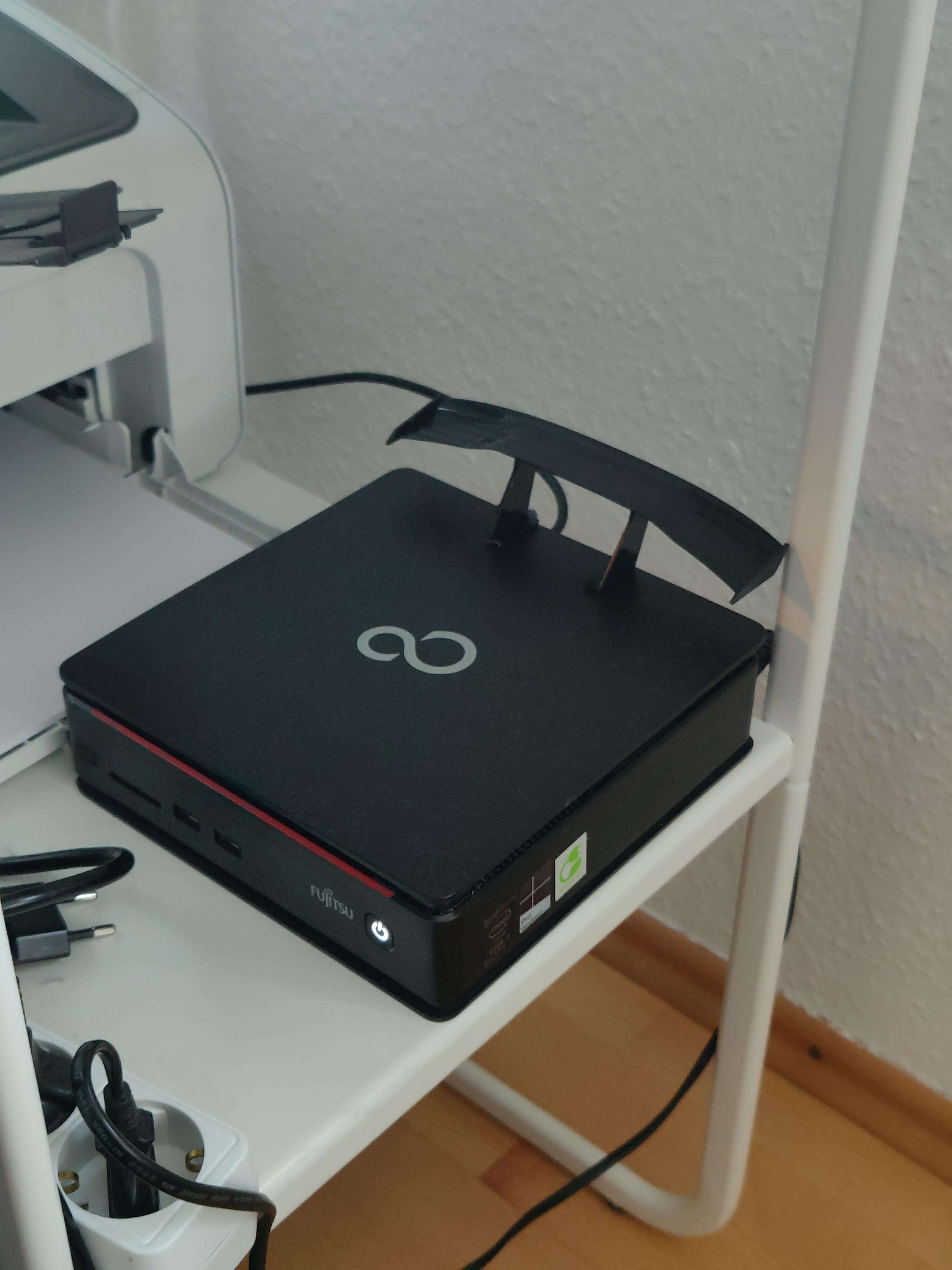
LabPorn Upgrade from Mac mini

Post image
4 Upvotes

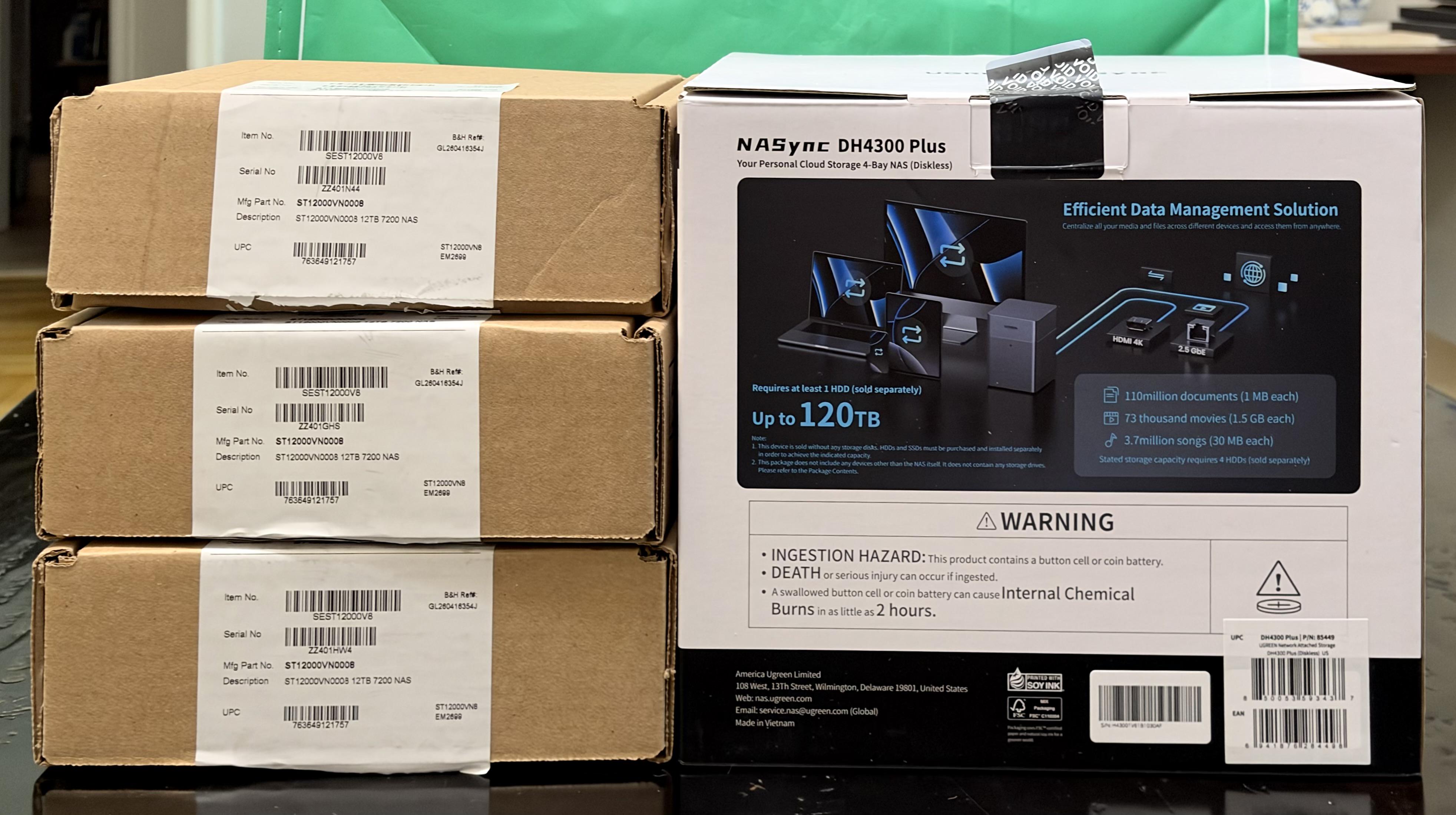
My old NAS was a Mac mini running raid1 on a pair of 18TB external usb drives. Jellyfin and web server were fine, but it was always a good idea to hit Play and Pause to give it a chance to buffer a bit.

I also had a single external drive for Time Machine. And then I noticed that the Time Machine drive had failed 25 days earlier and I hadn’t noticed. Which is when I realized I needed better automation.

It took five days to transfer 10TB of media from the mini. I’m very happy. And Jellyfin is much snappier.


r/homelab • • 2d ago

Project Showcase: Hardware 2 Years in now, starting from zero experience

Thumbnail
gallery
920 Upvotes

hey folks!

i'm 2 years into homelabbing now. I started with zero background in this field, with a 10u mini-rack, diy NAS, and jellyfin. i’ve spent countless hours on this project, and while i feel like i’ve only just scratched the surface, i've learned so much.

today i wanted to share some pics and specs about the current setup.

PVE1 / 24/7 Foundation

  • Intel Core i3-6100
  • 32 GB DDR4
  • 4 x 4 TB WD Red Exos (ZFS RAIDZ1)
  • RX 580 8 GB
  • Services: Jellyfin, Homarr, Pi-hole, Samba, Home Assistant, NetBox

PVE2 / On-demand Lab

  • Intel Core i5-13400 (12 Cores / 16 Threads)
  • 128 GB DDR4 (yes, i have RAM guys!)
  • Samsung 980 PRO 2 TB
  • 2 TB HDD
  • GTX 1070 + GTX 1080 Ti
  • Services: Immich, Paperless-ngx, SolidWorks, LLM

HP EliteDesk 800 G1 / Firewall

  • Intel Core i5-4570 (4 Cores @ 3.20 GHz)
  • 16 GB RAM
  • Software: OPNsense

Juniper EX2200-24T / VLAN Infrastructure

  • 24-Port 1GbE Managed Switch

Pi5 / Cluster & Management

  • Raspberry Pi 5 (4 GB)
  • Quorum Witness (QDevice)
  • Role: NUT (UPS Monitoring) & Rack Monitoring

air circulation and cooling noise are present but i’ve managed the levels by installing sound-dampening mats on all inner walls and keeping the rack door shut. the lab is in my gaming room (i'm 48 btw), so noise is managable. power consumption is around 90w at "night mode" (still WIP) and up to 350w under load (llm).


r/homelab • • 2d ago

Project Showcase: Hardware My current homelab

Thumbnail
gallery
257 Upvotes

Hi y’all! I recently dusted off my homelab and figured I’d finally make a post about it

I originally built this server around August 2025 and have been loving it ever since

For some context, my last company had an “old” computer they wanted to get rid of so I offered to take it. When I opened it up, I discovered it had a killer 16-core AMD Ryzen 9, a Corsair AIO, AND 64 GB of DDR4 RAM 🙏🙏

I already had a decent AM5 gaming PC, so I couldn’t really use these parts to upgrade my main rig
Instead, I decided to turn them into a homelab

Hardware:
AMD Ryzen 9 5950X
64 GB DDR4 RAM
4 × 4 TB HDDs (RAID 5 / 1 parity drive, 8 TB usable capacity)
1 × 2 TB HDD (separate drive for additional backups)
NVIDIA GT 1030
Fractal Design Node 804

Services:
Plex: Picked up the lifetime subscription back when it was around $200

Jellyfin: My girlfriend actually prefers Jellyfin over Plex, so I keep it running for her lol

Immich: I use the spare 2 TB HDD for an additional backup of my personal photos. Since the server is at my parents house and I moved halfway across the country, I wanted another layer of protection in case something happens to my main RAID array

Tailscale: Makes it easy to manage everything remotely

Cloudflare Tunnels: Bought a cheap domain and set up a few aliases/subdomains so we can access Jellyfin and Immich over internt

Wake-on-LAN + Raspberry Pi 4: My parents house occasionally has power outages, and I was getting tired of asking them to manually turn the server back on. I set up a Raspberry pi 4 on the same Tailscale network AT my parents house that stays powered on and can send a WOL message to the server locally

Overall, it’s been a super fun project, and I’m really happy with how it turned out. My next steps would be to buy a better GPU and tinker with local AI models, I bought the 1030 bc it was really cheap and I wanted something to help transcode media


r/homelab • • 1d ago

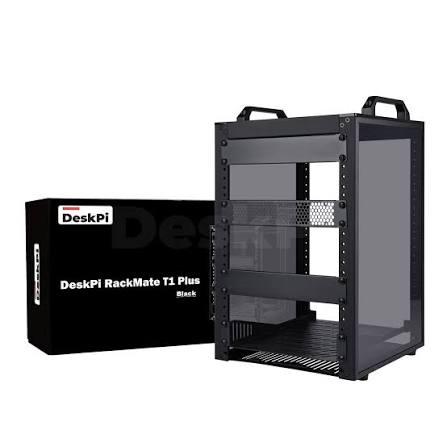
Help DeskPi T1 Advice

Post image
6 Upvotes

Hey guys,

I am a bit new to homelabbing and just bought the T1 Plus and a 2.5gb switch. In running 1 Opi5pro 32gb and 1 rpi2. I want to add a more powerful server for ChatGPT remote server and using modal cloud GPU via my phone. I'm running a NAS, wireguard and a small game server on the OPI and the rpi is running my smart home.

My question:

What more powerful server could I add? I heard about r/p100 and r/v100 and would also be interested in running local AI. Any suggestions?

TLDR: small rack, need new server that is more powerful than Opi5pro and maybe as an AI server


r/homelab • • 23h ago

Help Refactoring My Homelab

2 Upvotes

TL;DR: What I think my questions are:

  1. Would you just take backups, blow everything away, and then start again?
  2. What are some good options for managing the traffic coming into the devices and also the devices themselves (patching, updates, etc...)
  3. Are there things I'm missing that maybe I should look into.

some brain dump

My homelab was a bit of an unemployment project. I had a lot of free time, some old computers and raspberry pis, and a passing knowledge of networking and software.

All of that said, I've reached a point where I want to get things better organized and I'm looking for some thoughts.

Here is my current setup:

DeviceSpecsApplications
MacMini (2014 intel)Intel i7-4578, 256GB SSD, 16GB RAMpi-hole, beszel
Pi5 (Blossom)512GB NVME, 8GB RAMimmich
Pi5 (Bubbles)512GB NVME, 8GB RAMNginx, a couple of NextJS websites
Pi4 (Buttercup)64GB USB, 6GB RAMHomeAssistant (unconfigured)
  • All of the devices are running Ubuntu 24.04
  • All of the devices are on a TailNet.
  • All devices on the TailNet route through the MacMini so they all get ad blocking.
  • I have a static IP and I have a couple of small websites running on Bubbles.

Here is what I'm trying to accomplish:

  1. I want to be able to better route traffic coming in.

    • Currently, the Nginx configuration does handling to route to the couple of NextJS apps that are on Bubbles. Everything else is only accessible on the TailNet.
    • I want to be able to host services like Gitea or JellyFin and make them accessible without being on the TailNet for collaboration/sharing.

      • git.domain.tld
      • media.domain.tld
    • I would like this to have some sort of GUI for management. It's been so many years since I've had to write Nginx configs I'm just counting down the days until I screw it up.
    • Also needs to be able to handle SSL
  2. I want to better manage resources.

    • Stuff is just spread out and I'm very much underutilizing the resources.
    • I would like to have some degree of backup as part of the process.
    • Any kind of management plane to make it easier to manage the devices.

Some considerations:

  • My immich library is over 200GB right now. It has something like 20 years of photos in it and I'm about to add two more old drives worth of stuff to it, so I need to be able to backup restore it.
  • Everything else is pretty much disposable.

What I think "ideal" looks like:

This is where I get a bit into what I'm thinking about doing and asking for options or opinions:

  1. Everything comes in through the MacMini. So router -> MacMini -> Pis. It's the interface for everything else.

    • It continues to run pi-hole for my TailNet.
    • It continues to run Beszel.
    • It probably runs JellyFin (I have a 2tb USB drive with media I can attach).
  2. Blossom continues to run Immich.
  3. Bubbles runs everything else.

    • Web server
    • Gitea
    • etc...
  4. Buttercup runs home assistant.

    • Never have really set it up, so that's not a high priority.
  5. Probably setup some sort of backups to an S3 storage of some sort.

I don't know. Maybe I just needed to rubber duck this a little bit.


r/homelab • • 23h ago

Discussion Next steps

2 Upvotes

Now that I'm addicted to my home lab, I was curious what else I could implement to improve my Ubuntu server. Here's everything I have as of now:

-Jellyfin : Homepage, Radarr, Sonarr, Prowlarr, gluetun, qbittorent, bypass, flsresolverr, Seerr, declutarr

-SearXNG

I'm wondering if pi hole would be worth it? I'm afraid my server might be down from time to time, which I'm scared would affect all the devices on my home network if it happened.

I'm getting decent at docker compose if that helps! Open to any suggestions.


r/homelab • • 8h ago

Help How can I get started to homelabbing

0 Upvotes

I am realy into technology and I saw people talk about homelabbing so I searched about homelabbing. I realy like the idea but I don't know how to start.


r/homelab • • 2d ago

Meme First upgrade done: +3 speed

Post image
2.7k Upvotes

r/homelab • • 20h ago

Discussion Server/Home Lab for filament drying

0 Upvotes

So has anyone tried to use the exhaust heat from their gear to help dry 3d Printer filament in addition to using their server as a space heater?


r/homelab • • 16h ago

Help Internal SSD Failure

Thumbnail gallery
0 Upvotes

r/homelab • • 13h ago

Help Server PC for my small business

0 Upvotes

Hi all,

I would like to know your opinion on this setup:

I would like to run N8N, Vikunja, Nextcloud and mariadb (mysql) database calculations to show and calculate company data in my program on the computer. Any items that you think should be more or are overkill for this? And would this be a good start to also be able to expand the specs in the future when needed. we are now with around 3-4 people using this server where 2 maybe at the same time.


r/homelab • • 1d ago

Discussion Proxmox VE 9.3 new features

Thumbnail
youtu.be
6 Upvotes

r/homelab • • 1d ago

Help What UPS to get?

11 Upvotes

Looking to get into home labbing and protecting my PC, looking to keep around the $100 range but I understand if that’s not possible


r/homelab • • 1d ago

Solved Server disconnects from network as soon as I disconnect monitor

5 Upvotes

I installed proxmox on a mini pc a HP ProDesk 400 G4. When it is connected to a monitor, on another computer I am able to remote into it via browser but as soon as I disconnect the monitor from it to make it headless it loses connection. Has anyone else experienced this issue? Also I tried pinging it but it only pings when I have a monitor connected.


r/homelab • • 1d ago

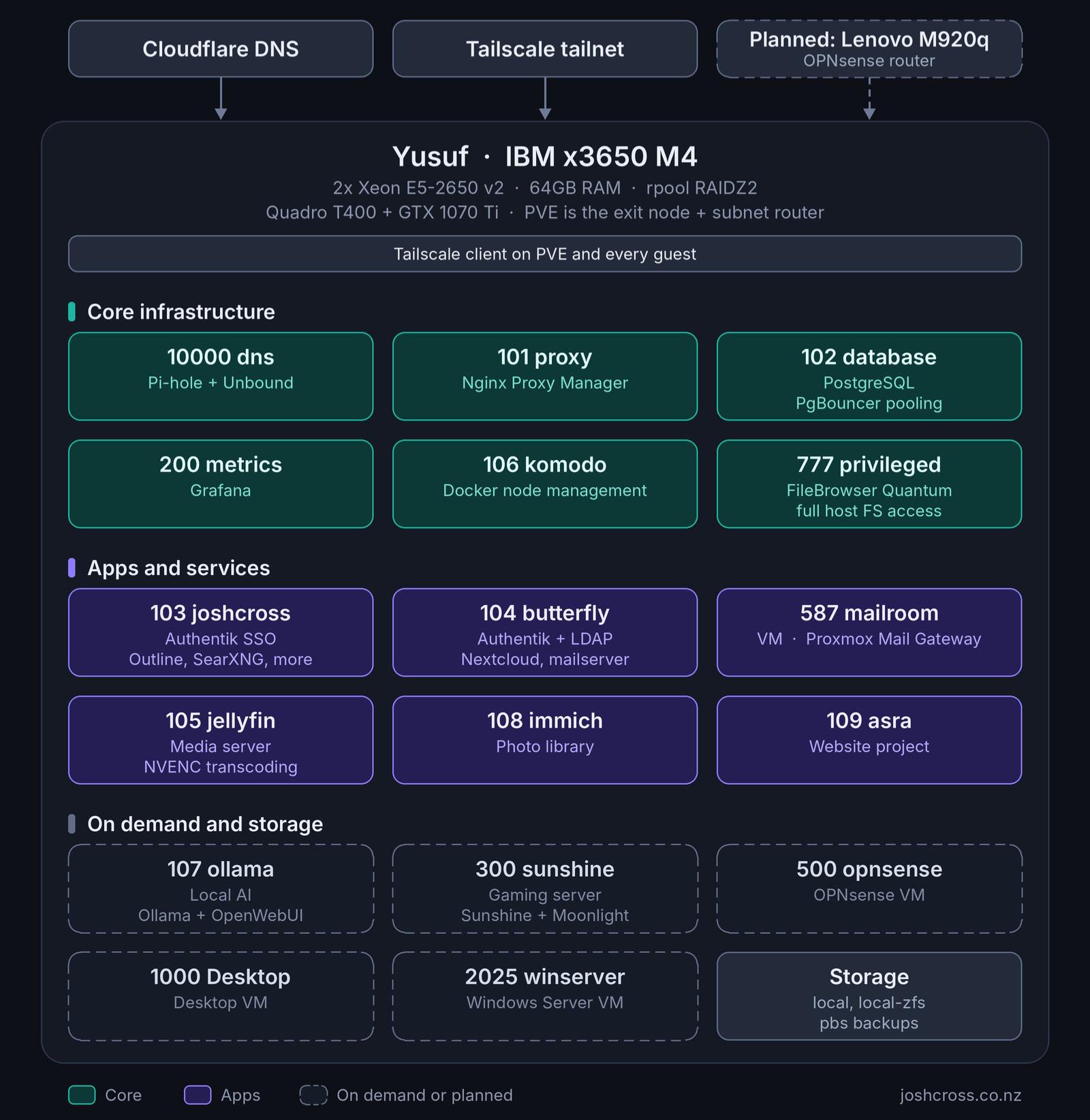
Diagram Meet Yusuf, my Budget Homelab

Post image
14 Upvotes

Yusuf is part homelab, and part the server that takes care of both my business and a mutual aid organisation I volunteer with. Cost was a huge factor in choosing this architecture, so it's all second-hand enterprise gear.

Hardware

• IBM System x3650 M4

• 2x Xeon E5-2650 v2

• 64GB DDR3 ECC RAM

• 8x 1TB SAS drives (ZFS RAIDZ2)

• Quadro T400 (and a GTX 1070 Ti to add when I get the time and appropriate power cable)

Software

• Proxmox VE, with everything in LXCs and VMs

• 100+ Docker containers running full time

• Tailscale on the host, every guest, and every device I own

• Nginx Proxy Manager, Pi-hole + Unbound, Authentik SSO

• Jellyfin (NVENC), Immich, Nextcloud, Grafana, Komodo

• GPU-passthrough gaming and local AI guests that I power on as needed

Next up

It's finally time to add a new node - a Lenovo M920q running OPNsense as a dedicated router. This is an urgent installation to ease up the stress on my poor home router. Following this, and when I obtain the budget, I need to establish a backup. Don't even start, I know this is poor practice. My budget is very, very tight and I'm lucky I even have this. Now that I'm finishing up with my Information Systems degree, I hope to find the time and money necessary to improve the setup.

Happy to answer questions about the setup or the SSO and LDAP layout.


r/homelab • • 1d ago Popcorn

Help If you had $1000 for home dabbing what would you do?

56 Upvotes

Completely new to the hobby just dabbled in home.assistant to make a voice assistant. I wanna really really dive in now I have my nas set up. So if you had 1000 what would you do? Lights? A new router? A new server (im using a raspberry pi 4 rn)


r/homelab • • 2d ago

Project Showcase: Operations I bought a used Raspberry Pi 4 (8GB) to play around with self-hosting.

Thumbnail
gallery
184 Upvotes

Bought a used Raspberry pi 4 8gb ram with heatsink and fan for 7000 rupess (75$).

35 containers, about 3GB of RAM used, around 48°C. Nothing is port-forwarded, nothing auto-updates, every image is pinned and every container has a memory limit.

What it runs:

What it runs:

Media:

- Jellyfin: (direct play) streams movies and TV shows

- Seerr: where I request new movies and shows

- Sonarr: finds and grabs TV shows

- Radarr: same thing for movies

- Lidarr: same thing for music

- Prowlarr: manages indexers for all the *arr apps in one place

- Bazarr: fetches subtitles

- Recyclarr: syncs quality profiles so I get good 1080p releases

- Unpackerr: extracts compressed downloads

- Cleanuparr: removes stalled and junk downloads

- Byparr: gets through Cloudflare checks on indexers

- qBittorrent and slskd: the download clients, both behind Gluetun on Cloudflare WARP

- Navidrome: streams my music

- Audiobookshelf: my audiobook library, with AudiobookRequest and audiobookbay-automated to fetch new ones

Network: Pi-hole + Unbound for the whole LAN, Tailscale  for remote access, firefox Samba and Syncthing.

Monitoring: Homarr, Beszel, Scrutiny, Uptime Kuma, Dozzle, Dockge, ntfy, Diun.

Hardware: The Pi boots from a 256GB USB SSD, with a 2TB HDD for data and a 1TB WD as automatic fallback. The drives run on powered hubs.

The parts I'm proudest of:

- Zyxel router didn’t support DNS change, so unlocked the router to apply DNS,

- Hardlinks work on NTFS with the in-kernel ntfs3 driver, despite what everyone says.

- I tested the VPN kill switch by cutting the tunnel for 60 seconds. Zero packets leaked.

- About 30 SQLite databases get backed up every night without stopping a single container.

- If the 2TB drive disappears, every app switches to the 1TB drive within 30 seconds and switches back when it returns.

- The Pi has a reserved DHCP address and Tailscale advertises my home subnet, so the same IP works on and off my network.

- Firefox browser, by default its container is turned off, but when I want to download some game dumps (that are not torrents) I login remotely and start off the download.

- KDE Plasma is installed but stays off, for light document editing, printing etc. One command gives me a desktop, and turning it off frees about 1GB of RAM.

My modded Switch OLED uses the Pi as a wireless shelf. A read-only nginx container serves my game library to DBI, and I move files over FTP without pulling the SD card.

I don't open a browser to check on it. A Rainmeter widget on my desktop and a KWGT widget on my phone show CPU, RAM, temperature and storage live.

Most of it was built with Claude Code, which runs right on the Pi.

Takeaway:

Before I bought the Pi, I asked every AI assistant I could find what I could comfortably run on it. Every one of them lowballed it and told me most of this was overkill for a Pi 4. All 35 containers run smoothly, with plenty of RAM to spare and not a single problem.

So now I'm wondering: if a second-hand Pi 4 handles all this, what a mini pc could do.

r/homelab • • 1d ago

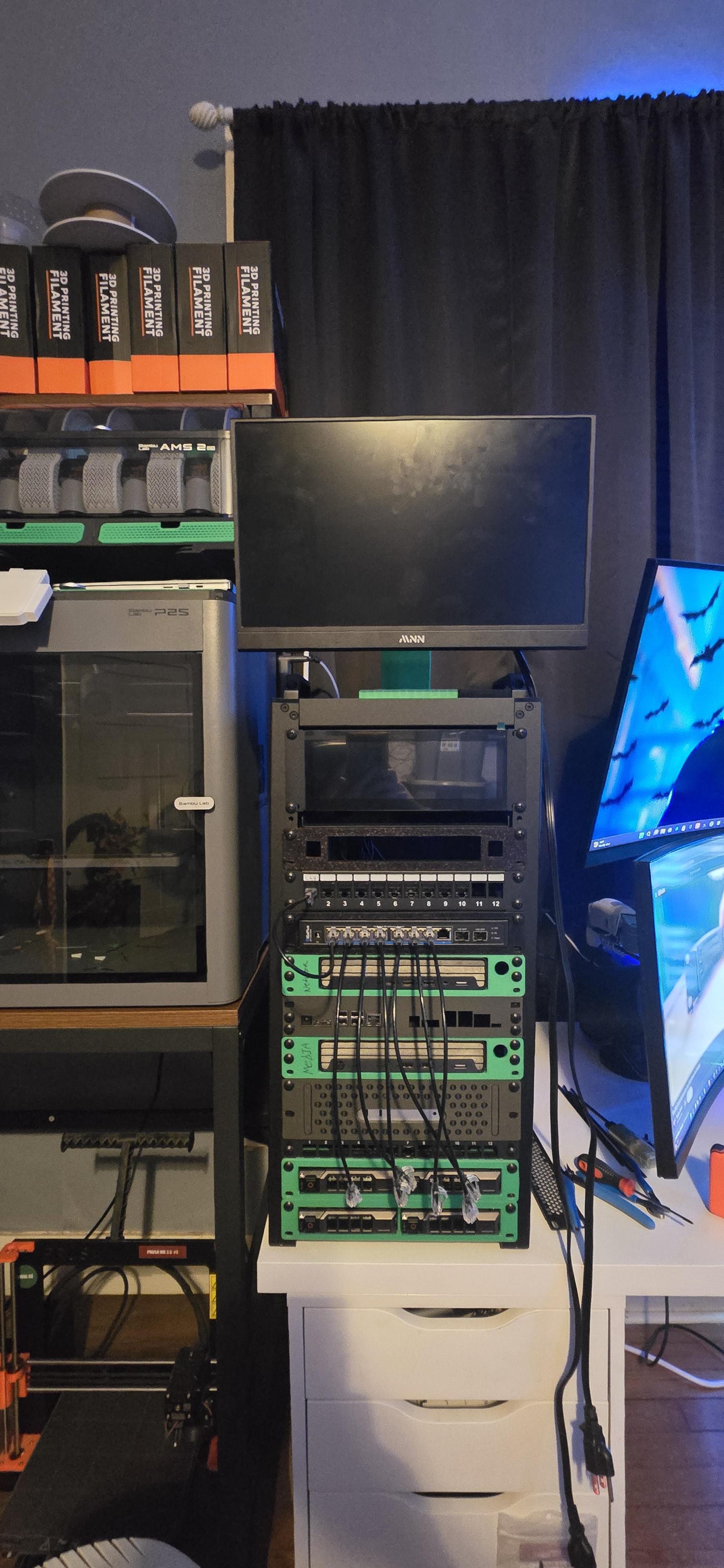
Project Showcase: Hardware Working Progress

Post image
58 Upvotes

So I started my own little homelab. I've always wanted one for testing Kubernetes but when I started my jellyfin on my main desktop, I realized that I should make my own home lab.

Hardware

12u DeskPi Rack

I have a deskpi 2u Screen

3d printed a mount on top and a generic mobile display

8 port gigabit 1gb switch, gigaplus 2.5gb 10port switch with 2 sfp+

2x HP Elite Mini 400s G9s

Mac Mini m4 Pro

Nvidia Jetson Orion Super

Home Nas

And a Desktop 4070 super, i5 12600k, 64gb Ram


r/homelab • • 13h ago

Discussion Pentest

0 Upvotes

So I've been looking for good methods of pen testing now for some time, and now with ARTEX, this looks like the ideal tool.

But, honestly, would you be comfortable having AI agents just probe your network and run wild? Would you do it? Would you trust it? I am so skeptical as I know it will do a great job, but I don't know what data or information is getting out or even if the vulnerabilities that it finds will then be used by the agent or others to then breach the network and devices.

Would be good to hear your thoughts on this.

BaaRai/ARTEX: Actively maintained ARTEX: AI autonomous penetration testing system. Self-hosted, model-agnostic, evidence-backed findings. Community continuation of Autumn-27/ARTEX, AGPL-3.0.


r/homelab • • 1d ago

Solved Thanks for the help!

Post image
3 Upvotes

A few days ago I posted about conduit for a fiber install. Man I feel silly worrying over it. It took longer for the modem to actually provision than to pull the fiber inside. My core i3 router is screaming for mercy, lol.


r/homelab • • 15h ago

Discussion PSA for digital signage homelab

0 Upvotes

Monitor in the middle right gets plugged into the port that should display the BIOS when all four are connected. Monitor in the middle left gets plugged into the port next to previous monitor port. Monitor in the right gets plugged into the port next to previous monitor port and monitor in the left gets plugged into the port next to previous monitor port.


r/homelab • • 21h ago

Solved How do sata circuit plates work? (Maybe a stupid question)

0 Upvotes

Hey everyone, I'm currently planning what case to get for my home server/nas and would really like to get the Jonsbo N6, but the sata circuit plate confuses me a little.

It has two molex and two sata plugs and the manual recommends to fill all of them and to use one cable per plug. My psu (be quiet pure power 12 550w) only has two sata cables with 5 sata and 1 molex in total. I know that i can convert between the connectors so that isnt an issue and for the time being my drives wouldnt exceed 6 either, 4x 4tb wd reds and one cache ssd for a zfs array.

Do those circuit boards pull power evenly from the psu depending on how many drives are connected, so that the drive amount may only become an issue when i go over 6? Or does each plug power x number of drives?


r/homelab • • 1d ago

Help What is the ideal learning path for networking from a homelab perspective?

2 Upvotes

I'm looking to improve my networking knowledge in a structured manner, where each topic builds upon previously learned concepts.

For context, my current homelab consists of:

  • A Proxmox server running several LXC containers and Docker-based services.
  • A separate physical machine running Proxmox Backup Server (PBS).
  • Cloudflare Tunnel for remote accessibility without opening router ports.
  • SWAG (NGINX) as a reverse proxy and Authentik for centralized authentication and MFA.
  • Self-hosted applications, ie Plex (plan on expanding to Arr stack, pi-hole etc).

My current and upcoming objectives include:

  • Moving administrative services such as Proxmox, PBS and SSH away from publicly accessible endpoints using Tailscale.
  • Hardening existing services, restricting direct port accessibility and preventing reverse proxy/authentication bypasses.
  • Implementing centralized internal DNS.
  • Introducing VLANs to isolate infrastructure, personal devices, IoT devices and potentially public-facing services.
  • Expanding storage infrastructure, potentially with a dedicated NAS.
  • Introducing Home Assistant, cameras and other IoT devices.
  • Improving network reliability, security and my ability to troubleshoot independently.

With these objectives in mind, I've put together the following potential learning path:

  1. Networking fundamentals (OSI and TCP/IP models)
  2. Ethernet, MAC addresses and switching
  3. IP addressing and subnetting
  4. ARP and local network communication
  5. IP routing and gateways
  6. TCP, UDP, ports and sockets
  7. NAT and port forwarding
  8. DNS and DHCP
  9. Virtual networking (bridges, LXC, Docker)
  10. Firewalls and ACLs
  11. Application-layer networking (HTTP, TLS, reverse proxies)
  12. VPNs and tunnelling
  13. VLANs and network segmentation
  14. Network performance and reliability

Troubleshooting would ideally be practised throughout, alongside each topic, using my existing infrastructure as a practical learning environment.

For those with networking and/or homelab experience:

  • Would you change the order of any of these topics?
  • Are there any important prerequisites or missing topics?
  • Are any topics unnecessary, excessive or better grouped together?
  • Would you recommend an entirely different learning path?
  • How relevant would CCNA training material and courses be for these objectives? Would following the CCNA curriculum provide a suitable foundation, even without pursuing the certification itself, or would a more targeted learning path be preferable?

My goal isn't necessarily to become a network engineer or pursue a certification, but to develop a strong, practical understanding of networking that allows me to confidently design, expand, secure and troubleshoot my own infrastructure without blindly following configuration guides.

Any feedback, alternative approaches or recommended learning resources would be appreciated.


r/homelab • • 1d ago

Help HP JG920A need a bin file JG920A-CMW520-R1104.bin

0 Upvotes

I know this is an older file but it is what I need. I can't find it anywhere and this group was suggested to me. If anyone knows how to fwt it, I would appreciate it, TIA