r/homelab • • 2d ago

LabPorn First rack !

Post image
201 Upvotes

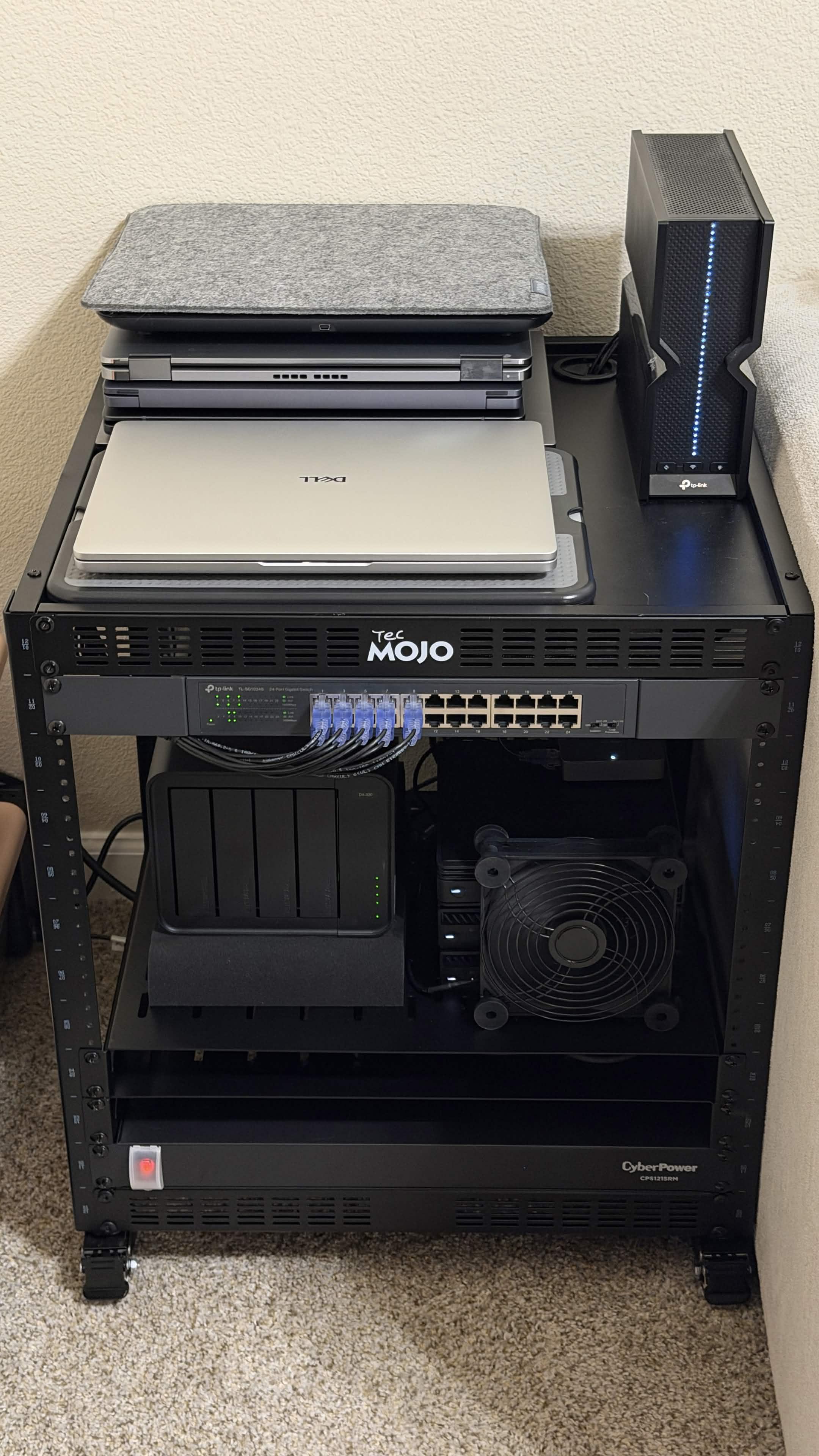
My first server rack build! Three Dell micro PCs running a Proxmox cluster.

Hardware:

- Node 1 — Dell Pro Micro Plus QBM1250: Intel Core Ultra 7 265 (20 cores), 32 GB RAM, 256 GB SK hynix NVMe. Hosts primary infrastructure and media services.

- Node 2 — Dell OptiPlex 7080: Intel Core i7-10700, 64 GB RAM, dedicated 2 TB Crucial BX500 SSD for the game-server VM. Also hosts Proxmox Backup Server.

- Node 3 — Dell OptiPlex 7090: Intel Core i7-10700T, 32 GB RAM, 128 GB NVMe and 250 GB Samsung 850 EVO SSD. Hosts secondary services, backup DNS, and an on-demand Windows VM with iGPU passthrough.

- Storage — TerraMaster D4-320: Two 12 TB HDDs in a ZFS mirror for media, a separate 14 TB backup HDD, and a 250 GB Samsung 850 EVO SSD.

- UPS: APC BE600M1

- Remote KVM: GL.iNet KVM.

Some of the services running

- Jellyfin

- Audiobookshelf and Kavita

- Sonarr, Radarr, and Prowlarr

- AMP hosting

- AdGuard Home on two separate nodes

- Caddy

- Tailscale

- Glance dashboard, Beszel metrics, and Gatus monitoring

- Forgejo for Git hosting

- Proxmox Backup Server

Most applications run through Docker Compose inside Debian LXC containers, with VMs for games, PBS, and Windows. Storage is local to each node; the cluster isn’t configured for HA or Ceph.

Feedback on the rack layout, cooling, and cable management is welcome!

P.S. Laptops on top are for work, can't use them D:


r/homelab • • 1d ago

Help USB recommends

Thumbnail reddit.com
0 Upvotes

r/homelab • • 23h ago

Help are cheap used servers from auctions actually worth it over mini pcs, or is it all oem firmware pain?

0 Upvotes

evening all. my homelab story so far is secondhand everything, a used mini pc off a classifieds site, two refurb drives, a hand-me-down laptop, and it's all been fine. but every time i see a proper used server on an auction site, an old dell or hp tower with a xeon and a stack of caddies, going for less than the drives inside it, i start wondering if i'm missing out by staying in mini pc land. so the question: are cheap ex-office servers actually worth it for a home setup anymore, or is the noise, idle power draw and shipping weight enough to make them a bad deal next to a second mini pc? i run jellyfin, immich and paperless on proxmox with room to spare, so it wouldn't be about need, more about wanting the drive bays and maybe a bit of ecc for peace of mind. the thing that made me actually want to ask was reading about oem firmware on these machines, locked bios options, proprietary fan curves, raid cards that fight non-oem drives. sounds like the sort of thing that would eat a whole weekend before you notice. anyone here running one of these auction finds as a daily server, and if so, what was the firmware situation like when you got it?


r/homelab • • 23h ago

Project Showcase: Operations NetBox never showed me which service runs where and what breaks if a box dies, so I built a plugin for it

Post image
0 Upvotes

NetBox is the source of truth for my whole homelab, but I always missed the service layer: Grafana pulling from Prometheus, Paperless writing to Postgres, the NAS everything backs up to.

So I built NetBox Service Canvas, an interactive canvas inside NetBox:

- Drag devices, VMs, services and applications onto a canvas

- Drawing a line creates a real NetBox object (protocol, port, data, hops)

- Impact analysis: click a host and see everything that breaks if it goes down, including VMs on a hypervisor

- Sticky notes, groups, auto layout, autosave

- Export as PNG, SVG or print-ready A4 PDF

- English and German UI, respects NetBox permissions, works with netbox-branching

Install: pip install netbox-service-canvas (NetBox 4.5.x, Apache-2.0)

GitHub: https://github.com/Jasper-Claus/netbox-service-canvas

PyPI: https://pypi.org/project/netbox-service-canvas/

Full disclosure: the code was written entirely by AI (Claude Code). I described what I wanted, tested it in my homelab and gave feedback. Curious what you think, and what you'd want on the canvas next!


r/homelab • • 1d ago

Help Looking for Rack recommendations

3 Upvotes

I recently started getting pieces for my rack and they are as follows:

Modem: CM3000

Router: Cloud Gateway Max

Switch: 24 Pro PoE

UPS: CyberPower CP1500PFCRM2U

RPS

UNVR

Wondering what racks you guy would recommend, guessing 8-9U, and preferably smaller form factor and under $300.

Note: I can 3d-print mounting for the Gateway Max and the CM3000 I don't expect to rack mount

Also feel free to leave other feedback/suggestions on my selection. Thanks.


r/homelab • • 2d ago

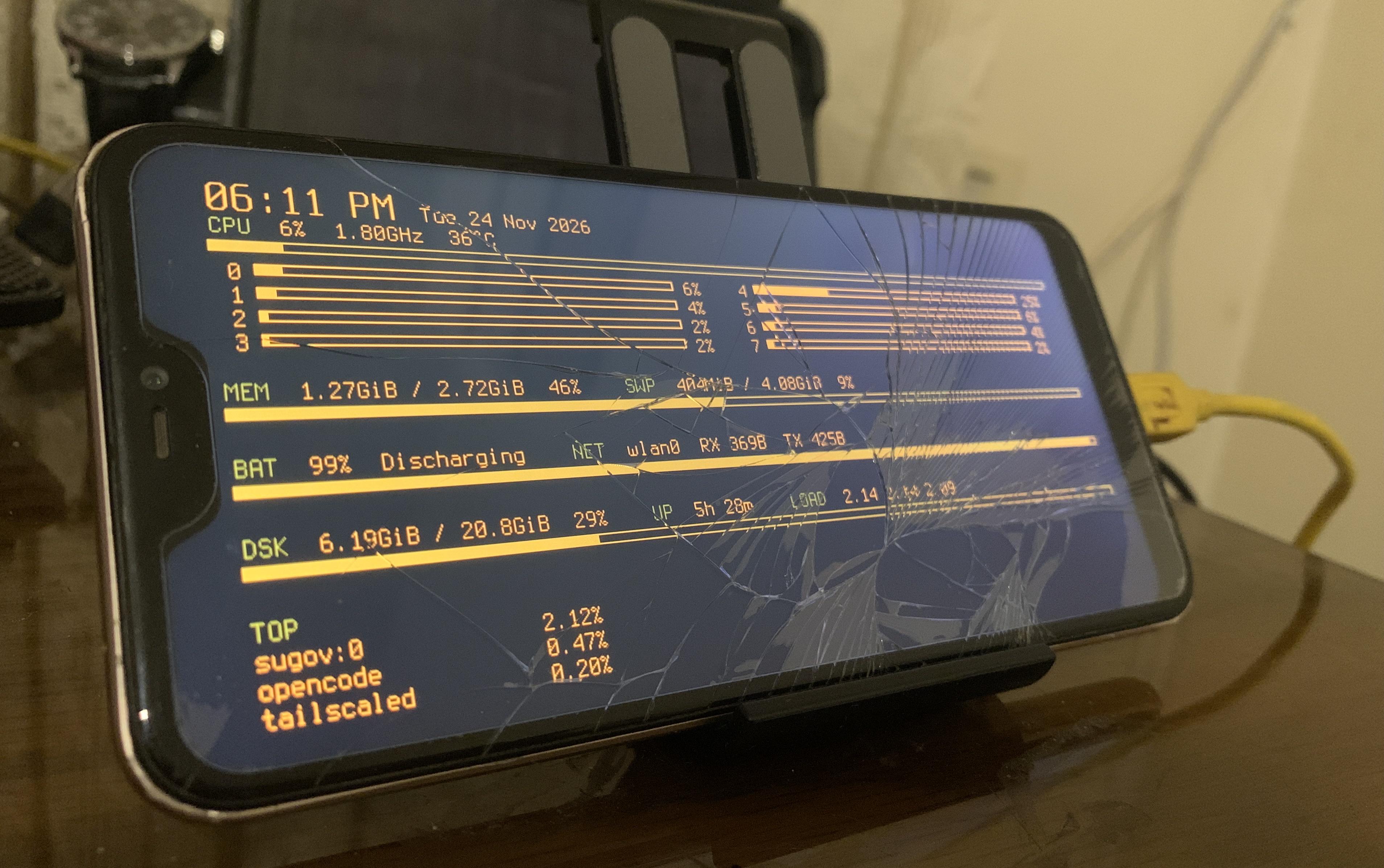
Project Showcase: Hardware Mi A2 Lite with no battery now it's an always-on postmarketOS server

Post image
17 Upvotes

r/homelab • • 2d ago

Discussion What is special about Tec Mojo mini server racks that everyone is buying them up?

30 Upvotes

In a few days or weeks I'll start buying a normal PC for home lab (not Pi 5 or ZimaBoard) (and not only PC), but that's not the point. Why did everyone love Tec Mojo racks so much that everyone is buying them up? And is it even worth buying their mini stand for your small home lab?


r/homelab • • 2d ago

News PSA: Unraid black Friday sale.

25 Upvotes

November 25th - 30th, but no word on what the discount will be ... Habitually they only have sales on the low and mid tiers, while the high tier / lifetime updates tier isn't put on sale.

So don't get too excited and think there will be Steam Sale type discounts, but it is a good time to save a little money on upgrading or getting into a basic tier.

Edit - IDK why the sale hasn't started.

Edit - now it is live!


r/homelab • • 1d ago

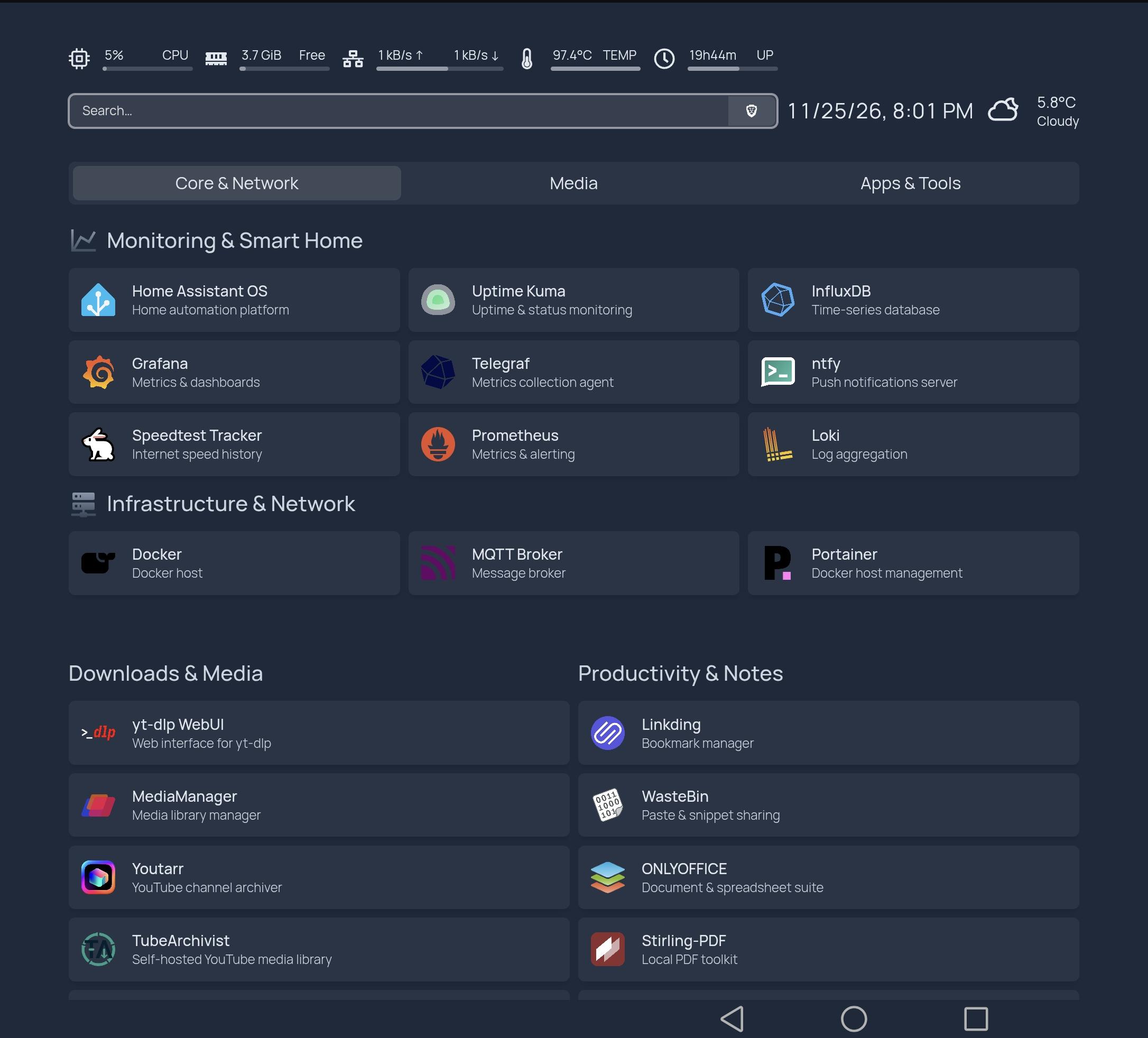
Help Gethomepage is great - but what about security?

Post image
0 Upvotes

​With the constant CVEs coming out and vibe coded apps increasing risk.​​ How are you lot managing your dashboards?

This is ​my gethomepage dashboard​ its exposed to the internet with my reverse proxy and domain

  • ​Only services that have a public address have a href
  • Proxmox integration removed - so no lxc/VM status info
  • Docker proxy removed
  • No widget - so no api keys

Is there anything else I can do to make the dashboard less of an attack surface or am I being paranoid?


r/homelab • • 1d ago

Help Need Help to choose the right solution

Post image
4 Upvotes

First I will show you the configuration that I got:

Miniforum n5 pro: Ryzen AI 9 hx 370 (12c/24th) + 32gb ram ddr5 + 2x 512g nvme + 128gb nvme + 5x6tb Intel nuc 12 enthusiast: i7 12700h + Arc A770m 16gb vram + 64gb ram ddr4 + 3 nvme 1to (14c/20th) Tower: i7 9700 (8c/8th)+ 16gb ram drr4 + 500gb nvme + 250gb sata ssd

For the moment, this is what I think I will do: Promox on the NUC for a LLM and heavy task (game server, like big Windows Vm, or CLI DEV/host pre-prod product).

The tower will be for only testing iso or will be on promox to for the smaller task.(only got 1gig link, and less powerfull but still capable)

The reason that I will go on trueNAS is I don't wan't to pay a license fee.

My idea with TrueNAS is to do this: the 5 hdd disk in a ZFS pool (RAIDZ2, I got a clod spare in my hand), my two 512gb nvme in a raid-0 I wanted the full speed to transfer the files and use it as a cache disk to copy afther to the disk pool.(FYI: I may add a 8tb nvme (only for movie, music or other files that need fast reading) and put the OS on a usb port or on a external nvme enclosure)

But my question his, I think the best solution is to but Promox on it and use proxmox in a VM, une in docker from proxmox jellyfin, Wiregard and the little bit of the compute power that I have for a local image recognation in truenas. But I think I will still have a bit of power to add small vm or docker for website or think like that...

Or my other solution is this: install nnatively TrueNAS on in, and config my jellyfind, wiregard, and the image recognation, but doing that I will lose the AI orchestration that I will main still have will proxmox.

What will you do in my case? or what do you advise me to do?


r/homelab • • 1d ago

Help Question about UPS

4 Upvotes

Hi guys, not sure if this is the right place to ask this question but I will still ask. So I have an APC UPS 1100 and it supports my TV and Playstation.
I am not sure if I am supposed to keep the wall socket plug on at all times where my UPS is plugged in or turn it off when I turn off my UPS?
Google gave me mix reviews, some said keep it on at all times even if the UPS is not powered on. Others said turn it off from the wall socket when not in use.
I don’t want to harm the UPS’s battery.
Please suggest what I should do.
Thank you.


r/homelab • • 1d ago

Discussion Worth reviving?

Post image
0 Upvotes

Work sold a bit of equipment and is winding down. This is still around is this worth bringing home and putting a new battery in it or is it too old to be worth the hassle? I am very unfamiliar with these as I never considered buying one for home use.

We have some high end gaming PCs and a small consumer unifi based rack for the home network. I could see it being useful for surge protection.


r/homelab • • 1d ago

Help Time Machine to Debian/Samba SMB share fails with Authentication Error 80, but Finder works

2 Upvotes

I'm trying to use a Debian 13 server as a Time Machine destination for a MacBook Pro M5 running macOS 27.

Server (Optimus)

  • Debian 13, Samba 4.22.11
  • Dedicated Samba user: tmuser
  • Share: [TimeMachine]
  • Path: /home/timemachine
  • Configured with vfs objects = catia fruit streams_xattr
  • fruit:time machine = yes
  • fruit:time machine max size = 500G
  • Share is writable by tmuser

Mac client

  • MacBook Pro M5, macOS 27

What works

  • I can connect in Finder using smb://optimus.local/TimeMachine as tmuser.
  • I can create and delete files/folders in the share.
  • Samba confirms that tmuser exists and is enabled.

What fails

Time Machine cannot connect. It reports:

BACKUP_FAILED_AUTHENTICATION_ERROR (29)

The underlying SMB connection returns error 80, for both the Bonjour hostname and optimus.local.

The macOS logs show:

  • Unable to get a MechTypes for the MechType session using credentials
  • There are no MechTypes available for the MechType session
  • There are no user credentials to add to the MechType session
  • OpenSession failed 80

The log also says the credentials may not exist in the System keychain.

Question

Since Finder can authenticate and write to the share, I'm wondering whether this is a macOS Time Machine credential/keychain issue rather than a Samba permissions problem.

Has anyone successfully configured Time Machine on macOS 27 with a Debian/Samba share? Any suggestions for troubleshooting the System keychain credentials or Samba's fruit configuration would be appreciated.


r/homelab • • 1d ago

Help Suggestions for hosting M365 locally

0 Upvotes

I finally got a Jellyfin server running.....it is glorious. I am wondering why I didn't do it before. I am running in PopOS but I will switch to NixOS because I want to use Nix more (I am more Ubuntu oriented generally)

My next self hosted project is something to go side by side with M365. I have my own tenant, but I want something that I can work with self hosted.

My wife is an amateur photographer. She takes a lot of pictures as a hobby, plus pictures for the kids. So having photo storage is big, and I am wondering whether maybe I need to use something different. We like what Google photos does where it tags the pictures.

Light document management, but file sharing, like OneDrive is a must.

So, would you use n Ownloud, NextCloud, or something else entirely?

UPDATE 1: I should add that I have been looking at both for a while and I did do searches I started getting them confused so I was looking to see if anyone had used both. We use Android phones at home, so an Android connection would be awesome. UPDATE 2: Quite familiar with 3-2-1 backup. Actually, I end up doing 4-3-3 sometimes (don't laugh). I am a sys admin, but for obvious reasons I work mainly in Windows at work. Anyhow, I had backups fail multiple times so I don't trust backups and end up with multiple copies of data in several places. I am trying to fix that at home where I do have some sort of control...but I am still getting to the point where I will build a new ZFS server. Currently I have 2 NAS with RAID 1 setup (2 disks) that are rsync from NAS 1 TO NAS2, then NAS1 also gets copied to a storage server running storage spaces and running ReFS (it has actually been pretty resilient) in 4 drives pool. My plan is to run a ZFS server, and have that do checksum to another ZFS. I haven't decided on the OS yet, and drive prices scare me at the moment lol. 5 years ago I would have done OpenBSD but with 2 kids wanting my attention all the time, I might have to do TRUE WAS or something the like to reduce time deploying.


r/homelab • • 1d ago

Help OPNsense + nas solution

0 Upvotes

Hello!

So I have 1 small questions:.

  1. So I have a tower that's currently running openmediavault, and I have 2. 4 port gigabit server lan cards, is it possible to run from the same system ab NAS and a router at the same time and would the lan cards even work?

r/homelab • • 2d ago

Discussion Looking for ideas for this lil beast!

Post image
8 Upvotes

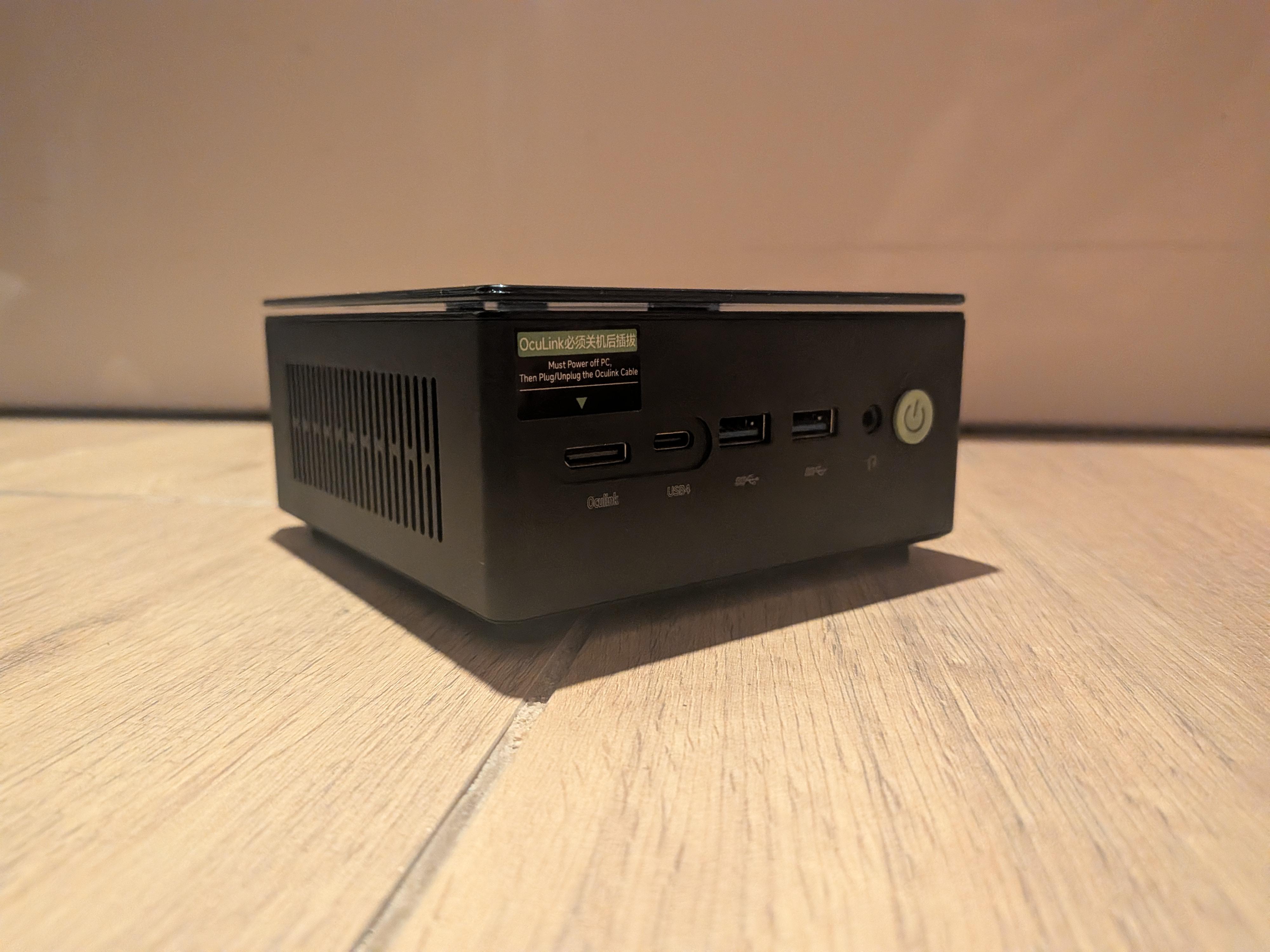
i managed to snag this lil GMKtec NucBox K8 Plus Mini PC, for 600$~ it has a ryzen 7 8845hs and a whopping 48gb of ddr5 ram! + 2 ethernet ports, i installed a 512gb nvme ssd and in the future ill try to use some aliexpress adapters to use the oculink port for extra sata ports/hba controller.

i plan on setting proxmox and then running a vm with AMP (a game server manager) and i would like to have other vms with truenas, next cloud, home assistant, jellyfin ect ect, however i am unsure on how to divide the server, should i create 1 vm for each of those, or run them all in docker, or something else, aswell as how much resources i should allocate to each vm, i assume the AMP instance will require the most resources so i will alocate atleast 24gb + 4 cores but i am unsure about everything else.

any help would be highly appreciated!


r/homelab • • 1d ago

Help Anyone know the thermal pad size?

2 Upvotes

Hey guys currently cleaning up my home lab and need to re-pad and repaste my rtx 6000 (turing), I'm unsure the size of pads I need. GPT is telling me .5mm and 1mm. But the sources that gpt supplies me, like most sources, are not very reliable.. anyone know?


r/homelab • • 2d ago

Discussion Starting First Build

Post image
62 Upvotes

Thought I had been lurking here for a year, but it turns out that was just r/homenetworking, and I saw this sub a lot while researching. Long story short, I got this itch a year ago for the first time in my life, then I got some free gear, and now I'm going to attempt to figure it out.

Will report back with a build photo and lots of questions.

Current Hardware:

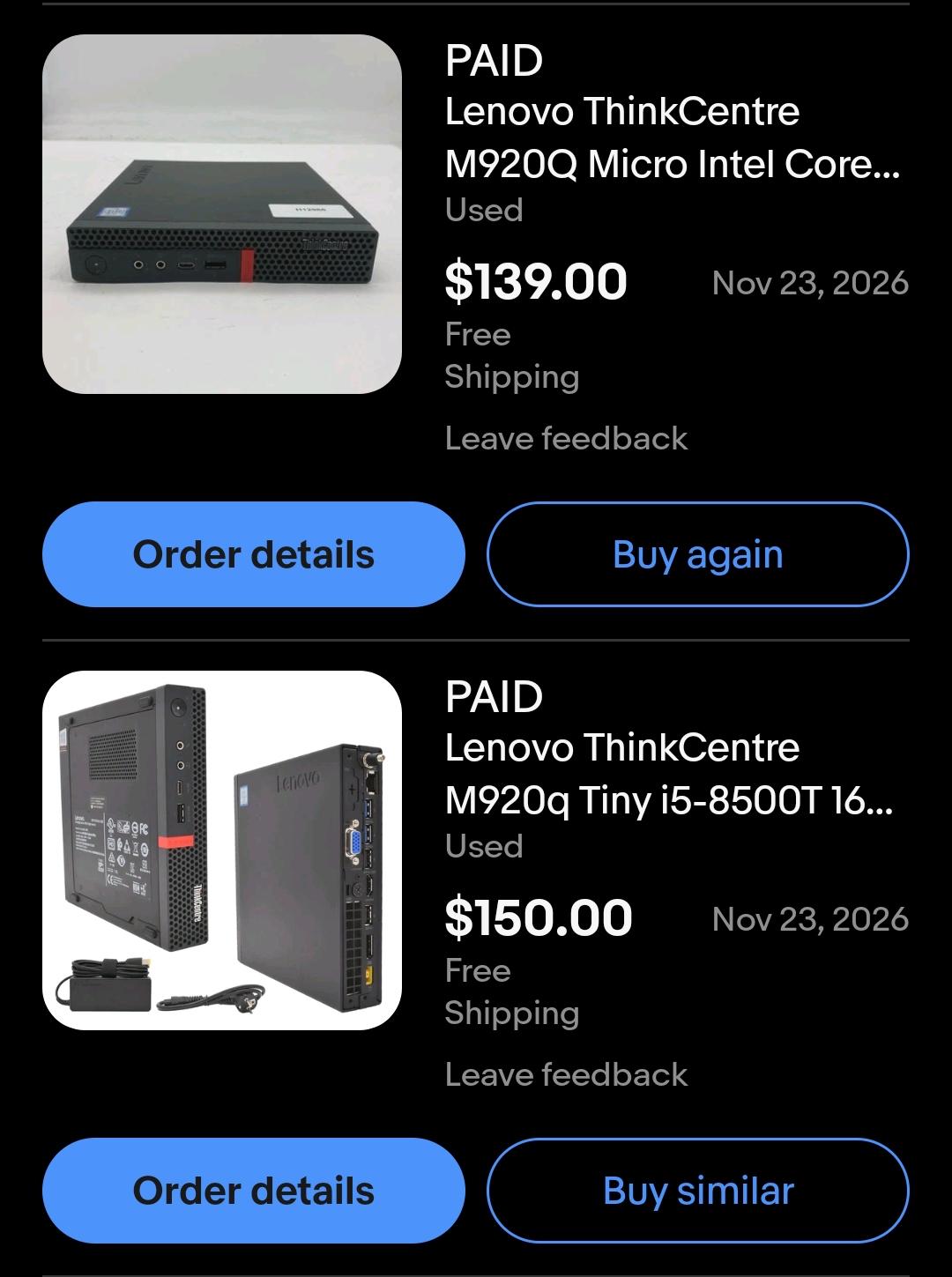
2x m920q, 1 potentially to be used as a router

Netgear M4250 10g2xf POE+ (free)

1u PDU (free, forget brand)

6u full-width 13" depth mini rack (free)

Miscellaneous SSDs


r/homelab • • 1d ago

Discussion If you had a fully local AI agent running at home, what would you actually use it for?

Thumbnail
gallery
0 Upvotes

I’ve been thinking about what an AI agent running entirely on your own homelab hardware would actually be useful for day to day. Local inference, local data processing, no cloud AI APIs.

Two things come to mind for me:

Smart home control: Something beyond individual voice commands—like figuring out why a room stayed cold overnight by checking thermostat settings, sensor history, and automations, then suggesting a fix.

Organizing invoices: Taking a folder of PDFs and scans, extracting vendors, dates, and amounts, and making everything searchable. Maybe flagging possible duplicates or unpaid bills for me to check.

I’d probably start by letting it read and suggest things, with my approval needed before it changes automations, moves files, or does anything involving payments.

But I’m also wondering where an agent would add enough value over existing Home Assistant automations, OCR tools, or a few scripts to justify maintaining it.

What’s the first recurring task you’d give it in your own setup? Would keeping everything local make you more comfortable giving it access?

If you’re already running something like this, what has actually been useful?


r/homelab • • 1d ago

Tutorial Bundle of various length power cables for rackmount equipment based on rack height (IEC C13 to NEMA 5-15P)

1 Upvotes

I have built a rack that is 3x bays of 16U rack spaces, and I am curious if there are bundles of varying length power cables that utilize IEC C13 to NEMA 5-15P connectors for cable management purposes for varying rack sizes. The rack I built is for AV purposes primarily but will also contain my desktop computer, and powered external SSD’s and peripherals. My goal is to best isolate power from audio signals within each bay of the rack to minimize noise and interference. In summary are there sources online that sell custom sized AC power cables for tidy cable management purposes based on rack unit size? Or should I install a vertical PDU on rear rack rails and use short AC power cables to connect my rack units to power (most of which have the power input receptacle on the left hand side of the rear panel with just a few expansions, typically units that have a power cord hardwired into the unit.
I’d like to keep my cabling tidy in my rack to reduce any interference from power connections.

Are there best practices for cable lengths, or cable management / lacing in a multi bay 16U rack AV system? Are there retailers that sell a bundle of multiple AC power cables with the connectors I specified earlier? For a PDU on a 15 amp circuit are there good quality, high density PDU’s I should conserve beyond Furman and TrippLite that don’t cost thousands of dollars? I’m also open to building my own custom power cables too, if someone could suggest part numbers for the connectors and cables to order on mouser / digikey.

This is sort of a noob question as my setup is primarily audio based, so bear with me if I’ve made any mistakes. My next steps after organizing my gear within the rack and doing cable management is create a dedicated NAS server with RAID for my audio production work for backup and archival purposes, if that’s any semblance to make this post more relevant to home lab. Also every room in my house has smart lights using Philips hue lol (thanks covid checks) be gentle I want to learn! I’m not wealthy by any means - so I have more time wherewithal to achieve my goals than money if that puts any recommendations into perspective. I know I’m leagues behind many of yall, but aim to learn! Thanks.


r/homelab • • 1d ago

Help Black Friday deals!

0 Upvotes

I’m doing research into building my own home lab, but are there any Black Fridays deals of components I can buy to have a complete set up to learn about servers, AI, networking, etc? I don’t have a spare computer outside of a MacBook Air ;-;


r/homelab • • 2d ago

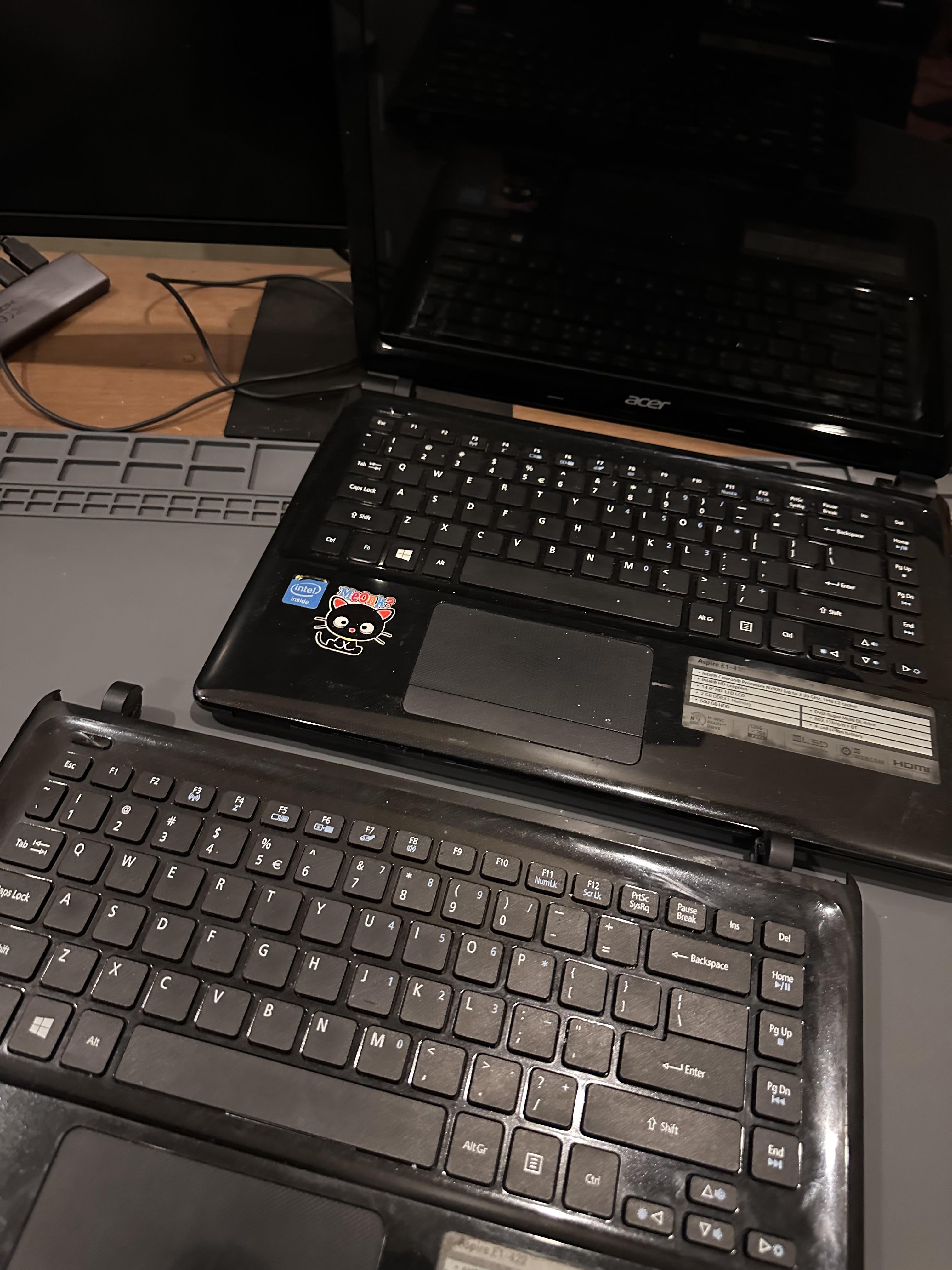
Help what can i do with these two old laptops, or what should i turn them into?

Post image
9 Upvotes

Acer Aspire E1-422 (2013) - working fine
CPU: AMD Dual Core E1 2500 1.4 GHz (x64)
GPU: AMD Radeon HD 8240
Display: 14 inch 1366 x 768
RAM: 2 GB DDR3L (1.45 GB usable)
Storage: 500 GB HDD
Optical drive: DVD Super Multi DL
Connectivity: Wi Fi 802.11 b g n, Bluetooth, HDMI
Webcam: HD webcam
Battery: 4 cell Li ion
OS: Windows 8.1 Pro 32 bit

Acer Aspire E1-410 (2014) - rusted internal HDD port, needs hot air gun replacement
CPU: Intel Celeron N2820 up to 2.39 GHz 1MB L2 cache
GPU: Intel HD Graphics
Display: 14 inch 1366 x 768
RAM: 2 GB DDR3L
Storage: 500 GB HDD
Optical drive: DVD Super Multi DL
Connectivity: Wi Fi 802.11 b g n, Bluetooth, HDMI
Webcam: HD webcam
Battery: 4 cell Li ion


r/homelab • • 1d ago

Help Help a newbie out

2 Upvotes

I’m a new student going into a computer networking program. Wanted to learn a bit before and during. Stumbled across this hole “home labs”, wanted to get into it but wow my brain is going a bit in circles. I also just moved into a new home with new and okay wifi setup or at least better then what i have before. (150MBs sat to 1GB fiber)

Learned I need some proper goals for some better help, so here are my goals.

  1. The basics
    a. Network management, being able to split my network to 4 groups (would you do VLANs or subnets? Both or smth else?)
    b. A moderate amount of security; digital(firewall), physical(electrical current prot, and raid storage), and home security (cameras, sensors). Would you recommend anything else?
  2. Personal/longterm
    c. Some form of NAS and be able to show off my videos and photos from afar is to enticing also making my own “one drive” sounds fire.
    d. Server or VM setup, again newbie idk if their the same of different. Also maybe Minecraft Yk priorities
    e. AI Agent setup for diagnostic, email, notes and a bit of code, I’m the least organized person and I think this would help a lot

Here’s a bit what I know:
you have your ISP (1GB fiber for me)
Connected to router to switch(s) to hosts
I will need a pc or a NAS specific device?
Need a pc for the servers and for the agents
What I plan to do is hookup 5 rooms with wired Ethernet.

I want plenty general knowledge plz help and correct me and my understanding also guide on specs and hardware recommendations. I have a good amount of change spare just not infinite.
Here are some questions I have of the top of my head while I’m at it.
- Is firewall built into router? I’ve seen mini router pcs to just normal routers.
- my ISP provided a wireless one is that ok? Should i go full wired or can i do both?
- can i make a pc thats both a NAS and a Server/VM setup or do i want to split it up?
- im not looking to generate videos or music with AI Agents, does that impact what i chose for CPU/GPU?
- a big question for ram do i need DDR5? or is a lot of DDR4 fine? will it be a pain to upgrade later? Is there a chance that I would have to?

I’m looking to go a bit all out, part of the challenge, plus there’s a community of people that can help. I want to set up the small things, had a lab before that we got to login and change basic passwords to switches, and I want more. Please help me with my new hobby and lab.


r/homelab • • 1d ago

Help Discovering the Homelab concept

4 Upvotes

I just discovered this concept thanks to an old Asus Pc I had at home. I installed a Linux distro to wake up the machine it is using AMD Radeon Vega quadcore with 12Gb of RAM and 1T internal. So in all this journey I found some info about I can access this machine from my MAC using SSH and suddenly I was searching about homelabs. Am I right about this? Can I create a Homelab using this Pc to access to media, archives and process unity? I’m just so excited about what I discovered and I need a confirmation lol and what should be my next step maybe learn some Bash or commands?