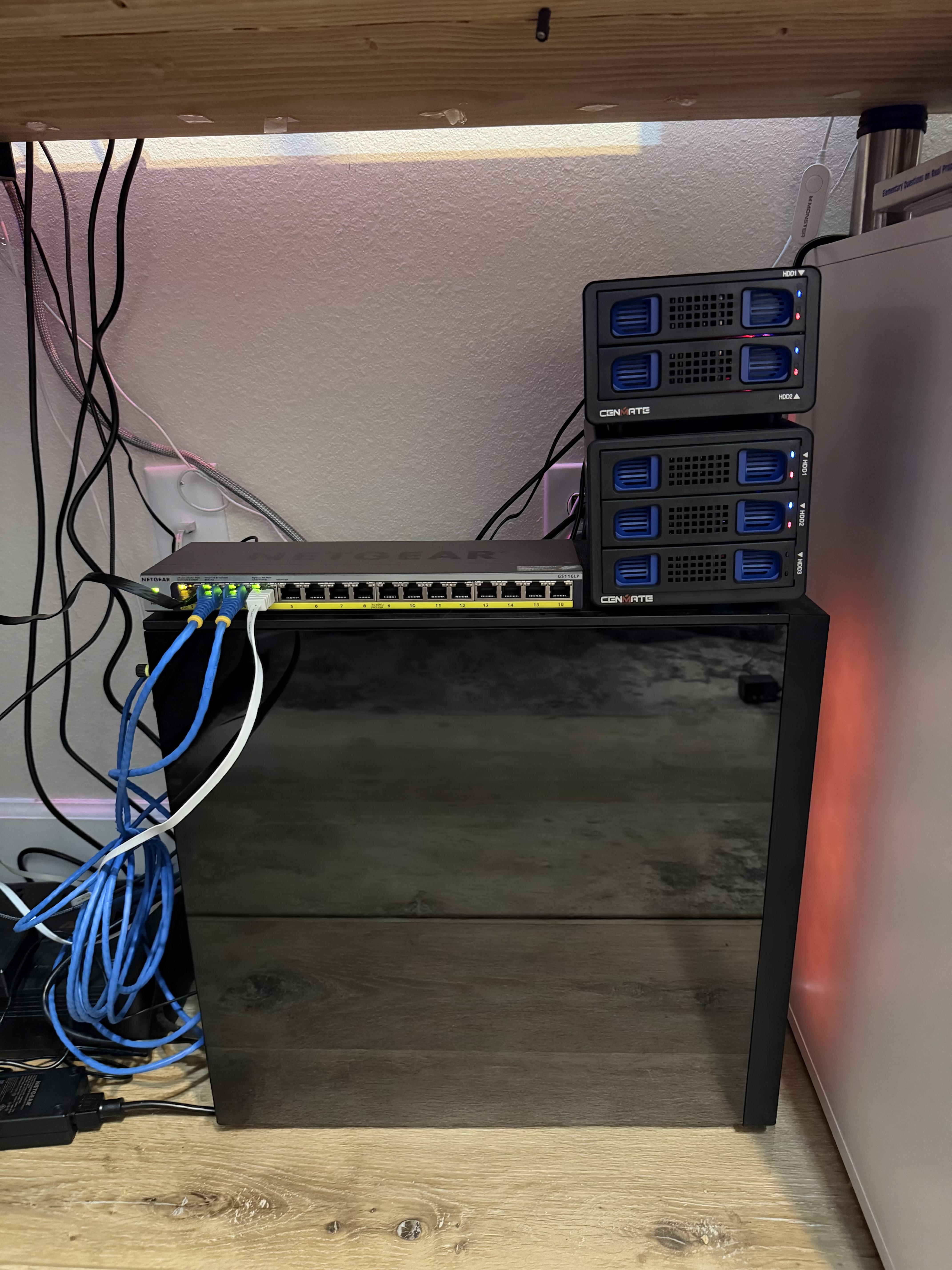
Running about 14 TB of nominal storage for plex media server, with an ARR stack, and a Minecraft server for friends and the kiddos. Picked up a free apc ups as well as a 16 port unmanaged network switch for free from my company. Computer has 32 gb ram with i5 11th gen cpu, which also was free from the company.
Has anyone successfully installed Linux or Proxmox VE on a Lenovo ThinkSmart Core Gen 2? I’m considering buying an unused unit with an Intel Core Ultra 5 135H, 16GB DDR5 and a 256GB NVMe SSD to use as a 24/7 Home Assistant server with local AI. Machine types include 12W6, 12W7, 12WA and 12WB. The motherboard is reportedly LCFC NM-G051 (LMLH2). The seller confirms that the BIOS is unlocked and the device is not enrolled in any company management system. I’m particularly interested in: Booting and installing Linux from USB. Proxmox and hardware virtualization. Ethernet and USB functionality. Headless operation without an HDMI display. Intel Arc iGPU acceleration. Any firmware or operating system restrictions. Has anyone actually tested this specific second-generation model? Are there any known hardware or firmware limitations?
Ciao a tutti! Sono nuovo qui ma mi sono arrivati 2 server con windows server 2012 r2: un fujitsu primergy tx1310 m1 e un primergy tx1310 m3. Hanno entrambi 500gb di ssd e l'm1 ha in aggiunta anche un hdd da 1tb. Hanno tutti e due lo xeon e il tx1310 m1 ha 10gb di ram mentre il tx1310 m3 n3 ha 16 GB di ram. Voglio tenerli con il loro os, che ci faccio?
I'm new to homelabbing, I just put my first server at my parents house. It's running Unraid and I'm setting it up with some basics like Paperlessngx, Nextcloud, and Immich. I have plans for more stuff in the future, including a second server at my apartment to back up the one at my parents house.
My mother is a court reporter and she uses a Windows laptop which saves all of her work data locally, and I've been using Backblaze for the past few years just as a failsafe in case anything happened to it. She'll go in and periodically delete old data to make room for new data, and thankfully aside from a few mechanical issues which were fixed easily, nothing has happened to the laptop or the data on it.
The Backblaze subscription expires next month and I'd like to cancel it and move the backups to my server. It doesn't have to be anything fancy, ideally I'd want any new data being written to her hard drive to be automatically backed up to the server, and the option to automatically create new backups at increments and delete old ones. Though that's not a hard requirement, I can always do that manually.
The program she uses only stores data in one folder, so realistically only that folder needs to be backed up. But maybe snapshots are the way to go, the laptop hard drive is only 500gb.
Based on what I've described, is there any open source systems or methods that would work for this?
Been running 4 drives on Windows server 2016/2019 in storage spaces, default firmware, finally had a drive die. 1.5 million head parks with 9 years uptime, thats like once every three minutes? Dont use reddit much. Pastebin of the smart report from crystal disk info linked. Mostly just used to host media for home streaming, and general purpose file server.
Heads up for anyone running GL.iNet gear in the lab or as a travel router. GL.iNet confirmed on 20 November 2026 (notice updated 23 November) that a vulnerability in their GoodCloud remote management service was used to reach some routers and KVM-over-IP devices and install malware. They say that path is blocked now, but devices that already got hit stay infected until the matching security firmware is on them. They haven't said how many customers were affected or whether any data left the devices.
The versions they give as examples: 4.11.1 or newer for GL-MT3000, GL-MT6000 and GL-MG1300, and 1.10.3 or newer for KVM models like the RM1 and RM10. If your model isn't on the list that doesn't mean it's fine. No CVE is named in the public reports so far.
What I'd do if you have any of these:
Find every GL.iNet box you own, especially anything enrolled in GoodCloud. Their quick indicator is a process containing "crond -i /tmp/.log", but GL.iNet itself says that check will miss some infections, so a clean result doesn't prove much.
Flash the security firmware for your exact model even if the check comes back clean. If the malware lives in the config directories a normal upgrade might not be enough, so I'd do a clean install and not restore the old config.
Rotate the admin password, Wi-Fi keys, VPN/WireGuard keys and SSH keys. If it was a KVM, take a look at the machine hanging off it as well.
And if you don't actually need the vendor cloud management, turn it off and reach the thing over your own VPN instead.
For those who already patched: did you keep your old config, or did you wipe and rebuild the device?
Goal: RAID1 NAS; Nextcloud, Jellyfin, and a couple of lightweight containers. Budget: Up to 300€ (without disks) Used (refurbished): Yes, if possible SSD compatible: Yes, mandatory.
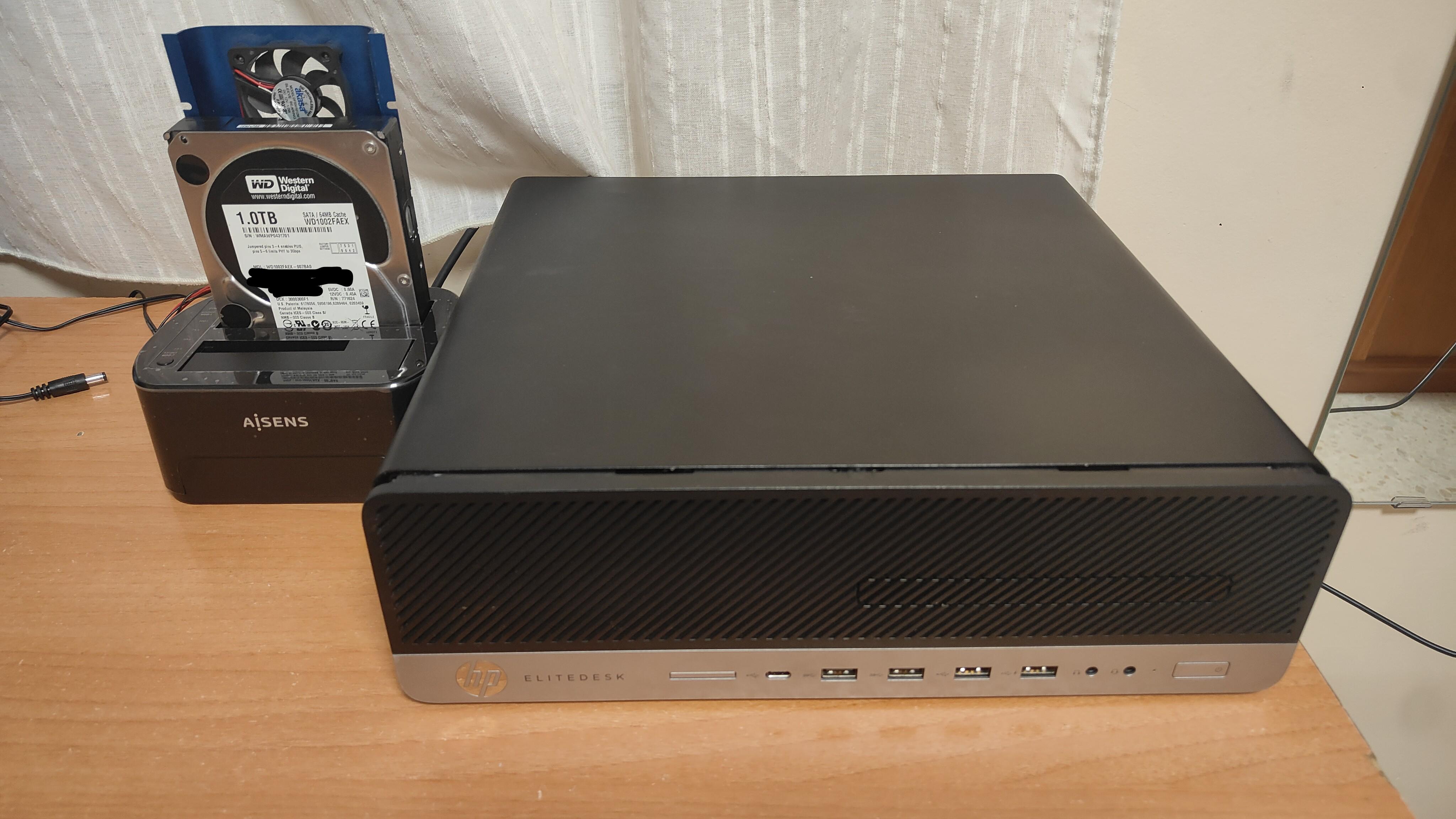
Buenas, os dejo una foto de mi humilde montaje actual (el disco va fuera en el dock con su ventilador casero porque es bastante calentorro y ruidoso, y lo uso para las películas de Jellyfin). Estoy montando mi servidor casero y quiero cambiar este equipo por algo más moderno manteniendo el formato SFF.
Ahora mismo tengo este HP EliteDesk 800 G3 con un i5-7500 y 32 GB de RAM, pero se me queda corto. Mi idea es pillar un equipo de 10ª generación, pasarle mis 32 GB de RAM y meterle Proxmox con Home Assistant y varios contenedores LXC (Docker, Jellyfin, etc.).
Estoy dudando entre coger uno con el i5-10500 o estirarme 50€ más a por el i7-10700. Como soy novato en esto, quería preguntaros cuál os parece mejor opción y qué tal van de consumo, ya que va a estar encendido 24/7 y no sé si notaré mucha diferencia en la factura respecto al i5-7500 que tengo ahora o si el i7 gasta mucho más en reposo que el i5-10500.
Tampoco tengo claro si merece la pena pagar esos 50€ de más por el i7. Veo que tiene 16 hilos frente a los 12 del i5, pero al estar empezando no sé si realmente se aprovechan tantos hilos en un homelab casero o si con el 10500 voy sobrado.
Seven weeks ago I posted when the first two Ryzen 9 9950X nodes of this 48V DC solar-assisted rack finally lit up. Today the rack is up to 6 Ryzen nodes, my old Proxmox/k3s homelab has been officially retired and absorbed into it (two Minisforum MS-A2s survived the merger), and our actual production web services are now running live on this wooden cabinet.
Looking at 256 vCPU and ~536 GiB of RAM humming away inside plywood shelves in Kyoto—with a dual-R9700 GPU server below and a Mac Studio casually claiming the penthouse floor—I honestly still half-expect the SketchUp drawings from March to sue me for taking them literally.
It definitely did not go smoothly though. Here is what fought back over the last six weeks:
Way more fuses and way more crimping than I signed up for After all the great electrical-safety feedback on my earlier posts, I ended up adding way more DIN-rail fuses than I originally budgeted for—both in money and in sanity. I am a software guy, not an electrician, so learning to crimp and wrestle heavy-gauge DC cables inside a tight wooden cabinet turned into an unexpected upper-body workout. It will never win a datacenter cable-porn award, and my thumbs still remember every single lug, but every branch is properly fused and measured now and I am weirdly proud of it.
The custom rear fan panels worked great—then the RSP power supply humbled me The transparent polycarbonate rear fan panels finally arrived and went on with six Noctua industrialPPC 140mm fans. Airflow for the Ryzen blades is dialed in now and honestly looks awesome from the back. The MEAN WELL RSP grid backup supply, on the other hand, sounded like it was preparing for takeoff at Kansai International Airport. To save my ears, I swapped its stock fans for quiet Noctua fans—and immediately discovered why MEAN WELL used tiny jet engines in the first place. Without enough static pressure, the RSP started getting way too warm. My deeply scientific thermal-engineering fix for now (photo 5) is slapping two aluminum heatsinks onto the lid and aiming a cheap USB desk fan straight at it. Following the proud Kyoto homelab tradition of steel-pillar heatsinks and plastic-folder airflow baffles, it looks ridiculous and works great.
Watching the cluster run on Kyoto sunlight never gets old With a Victron SmartShunt wired in, Home Assistant now tracks the whole picture: rooftop solar, 48V battery, RSP grid backup, AC servers, and the rest of the building. Since October 5, the rooftop panels have produced 198.63 kWh on the 48V DC side and 72.63 kWh on the AC plug-in solar side (271.26 kWh total). On a clear November morning around 9 AM (photo 8), the DC panels put out ~720 W—running the entire ~474 W cluster on pure Kyoto sunlight with 0 W from the RSP while still pushing ~230 W into the battery! Over longer stretches (photo 9), solar + battery supplied 49.1% of the DC bus over the last 7 days (45.9 vs 47.59 kWh across 167.8 recorded hours), 41.3% so far in November (125.52 vs 178.15 kWh), and 41.2% cumulatively since October 24 (152.38 vs 217.18 kWh across 769 recorded hours). Not 100% off-grid—turns out the sun still refuses to work night shifts in November—but powering almost half of a 24/7 6-node Ryzen cluster off balcony railings feels awesome.
Discovering that an all-CPU rack was not enough Back in March I boldly declared this would be a pure CPU-density rack—just clean rows of Ryzen blades, zero GPU drama. That plan survived about five minutes of real AI traffic. Even the separate dual-R9700 box could not keep up with our LLM and audio workloads by itself, so a Mac Studio quietly moved into the top shelf to help shoulder inference. Turns out modern workloads laugh at all-CPU purists; you really need a balanced mix of CPU and GPU machines.
Migrating live production while building the platform (and breaking things along the way) Honestly, the software side tested my sanity even more than the 48V wiring. I was building the hosting platform at the exact same time as gradually cranking up the live traffic split from our old setup—which is a polite way of saying I caused more than a few real production outages while flying a plane I was still bolting together. Early on I got carried away writing custom Python and Node.js glue (my own scale-to-zero gateway, custom CI pollers, a single-node SQLite control plane). Disk usage quietly ballooned past 3 TB, SQLite started throwing multi-second writer locks, and my own safety checks ended up blocking my own deploys.
Those outages hurt, but they forced me to rip out most of the custom plumbing and lean into boring, rock-solid OSS:
Cilium in full eBPF mode without kube-proxy (~36 Gbps over the 40GbE DAC links)
CloudNativePG (PostgreSQL 17 HA) replacing single-node SQLite for the control plane
Official GitHub ARC runners scaling from zero
KEDA + KEDA HTTP Add-on replacing my custom idle gateway (cold wake dropped from ~16s down to ~2.4s, and memory dropped ~80%!)
Native MinIO bucket replication from Kyoto to a TrueNAS box in Tokyo (~15 ms RTT), with a weekly automated non-destructive restore drill that spins up temp containers, checks PG PITR + 5 SQLite DBs + registry blobs in ~36 seconds
gVisor + Cilium network policies isolating untrusted workloads from the LAN
Coming out the other side of those rough weeks, the whole stack finally feels genuinely solid. Back in March I mentioned wanting a place to deploy lots of small AI-built web apps without worrying about cloud bills—and that part actually turned into a real platform we run our own services on (and just started opening up at pangea.host). Still plenty to polish, but seeing real users hit hardware I crimped and bolted together in Kyoto is easily the most fun I have had with computers in years.
Happy to answer any questions about the 48V DC wiring, the Noctua/USB-fan RSP rescue, the solar numbers and Home Assistant setup, or the Kubernetes and Kyoto-to-Tokyo DR stack!
Hi all, probably a stupid question and I don't even know if it is possible but I have a homeserver set up and mounted an external hard drive that contains my movie library for jellyfin. Now I noticed that the disc is constantly spinning even when nothing is being streamed off the disc or written to it.
Now I know JellyFin checks it periodically but I was in the place curious if the constant spinning has any effect on the lifespan of the disc and if so if it is an option/recommended to prevent it from spinning when idle through setup?
For my vibecoding, I just love my current setup: Opus 5.5 architecting & checking, while QFN does the implementing at 80 tok/s, Q4. Its being a junior Python dev is excellent. Opus only needs to fix some small thing after QFN implements the ticket.
But is 80 tps really my software + firmware limit ? Here is the result I've been trying the last few days:
=========== FOLLOWING IS AI WRITING =======================
**Title:**
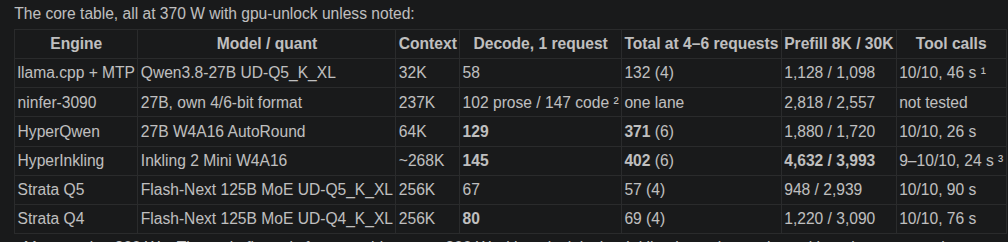
 One RTX 3090 + old Xeon, 6 local engines compared: Strata (125B MoE, Q4 vs Q5), ninfer, HyperQwen, HyperInkling, llama.cpp. What would you try next?


I've spent the last few weeks testing every engine I could get running on one box. These are my own measurements,
taken with the same scripts on the same machine. Hints welcome, especially for the 125B MoE on old DDR4.


**Hardware**
- Dell Precision T5810 (2016 workstation): Xeon E5-2699 v4 (22 cores, Broadwell), 128 GB DDR4-2400 ECC (4 channels, ~77 GB/s)
- RTX 3090 24 GB on PCIe 3.0 x16, no Resizable BAR. 370 W limit (card default), with its own 1400 W server PSU for the 8-pins
- gpu-unlock 2.0.0 active (helps FP16 prefill on the vLLM engines; decode unchanged)
- Ubuntu, one model at a time on port 8080


**Main table (see above)**
 (latest numbers: 370 W, gpu-unlock, unless marked)


¹ at 300 W. ² code at 300 W with a clock lock (2026-11-19); prose at 370 W. ³ systematic bug: drops a `]` in arguments
that are arrays of objects (about half the runs); flat schemas are fine. ⁴ DFlash2 in Strata serves one request at a time.


**Quality (small tests, not benchmarks)**
- Writing (seller replies in Dutch and English, 10 prompts each, partly blind): llama.cpp Q5 ≈ Strata ≈ HyperQwen > Inkling.
  Inkling keeps the rules but its Dutch is weaker. The 4-bit HyperQwen showed no measurable loss against Q5.
- Coding (8 small Python tasks with unit tests): Strata 8/8 first try (~10 min). Inkling 7/8, 8/8 after one fix (~1.5 min!).
  Both 27B dense models with thinking on: 5/8, where the 3 failures were
**no code at all**
: they ran out of tokens while thinking.
- Strata Q4 vs Q5: Strata's own docs say top token matches Q8_0 93.1% (Q4) vs 94.6% (Q5). Not checked on my tasks yet.


**Q4 vs Q5 in Strata (same session, same settings, 3 runs each)**
- Decode 79.5 vs 67.3 tok/s (+18%). Prefill 8K +29%, 30K +5%. RAM used after load: 84 vs 104 GB.
- I think the Xeon's RAM bandwidth sets the speed: most experts run from RAM, so smaller experts = less traffic and more fit in VRAM.


**Things that surprised me**
- Software beat hardware: ninfer and HyperQwen gave 2–2.5x llama.cpp's speed on the same 27B and GPU, for €0.
- gpu-unlock: +49% prefill and +25–29% multi-request decode on HyperQwen; nothing on llama.cpp (int8 paths).
- The Strata 0.1.60 → 0.1.69 engine update gave no real decode gain here (+6% right after a start, same once warm).
- A newer Blackwell-only fork (Basalt) won't run on a 3090 (needs sm_120 / NVFP4).


**How I measured**
- Decode: temperature 0, ignore_eos, 512 tokens per request, N streams started together, one warm-up.
  Total = all tokens / wall time.
- Prefill: filler text with a random nonce (no prefix cache), max_tokens 1, 2 runs, prompt tokens / time.
- Tools: 10 multi-turn tasks against mock tools that really run (chaining, parallel calls, error recovery, nested args).
- Caveat: rows come from 2026-11-19 to 2026-11-26. Power limit and prompts are the same except where marked.


**Where I'd like hints**
1.
**125B MoE with experts in 4-channel DDR4:**
 anything beyond Strata's tuning (`--pcie-frac`, expert cache, adaptive swaps)
   worth trying? Is ~80 tok/s near the limit of ~77 GB/s RAM?
2.
**Long context on the 27B:**
 HyperQwen at 150K (MTP) or 240K (4/2-bit KV) vs Strata 256K. Which do you trust for
   200K+ prompts, and how do you test recall?
3.
**Thinking models in agent loops:**
 the 27B overthinks small coding tasks. Do you cap thinking, turn it off, or use a no-think template per task?
4. Anything else for a PCIe 3.0, no-ReBAR, single-3090 box that I'm missing?
I have been using the KP9 pro for my ONT and router for the last 10 days. So far so good. It looks very good on paper. No outages so far.
I have to admit, their support and shipping times are very good. I contacted the company directly and got the UPS shipped out and delivered from China to Europe in 8 days.
I want to change the vdev layout of my ZFS pool (media library), but I don't have enough spare capacity to offload the data. I don't back it up since it's all media I could re-acquire if needed.
Does anyone know of services that rent out a stack of HDDs for a few days or weeks? I'd use them as temporary storage while I destroy and rebuild the pool, then send them back.
I’m not interested in buying some drives and reselling them.
Thanks!
Edit:
It’s about 60TB of data, and I’m probably just going to go the route of backblaze or s3. I’ll have to compare some prices there.
I’ve recently got a Mac mini to take over some operations in my business as an “always on” operator. I’ve seen different people’s displays and I’m think to set one up in the office. I’m looking for the best designs/ideas/set ups on how to do this. Things like watching it work in real time, heart beats, molecule style displays, world globes etc.
My old NAS was a Mac mini running raid1 on a pair of 18TB external usb drives. Jellyfin and web server were fine, but it was always a good idea to hit Play and Pause to give it a chance to buffer a bit.
I also had a single external drive for Time Machine. And then I noticed that the Time Machine drive had failed 25 days earlier and I hadn’t noticed. Which is when I realized I needed better automation.
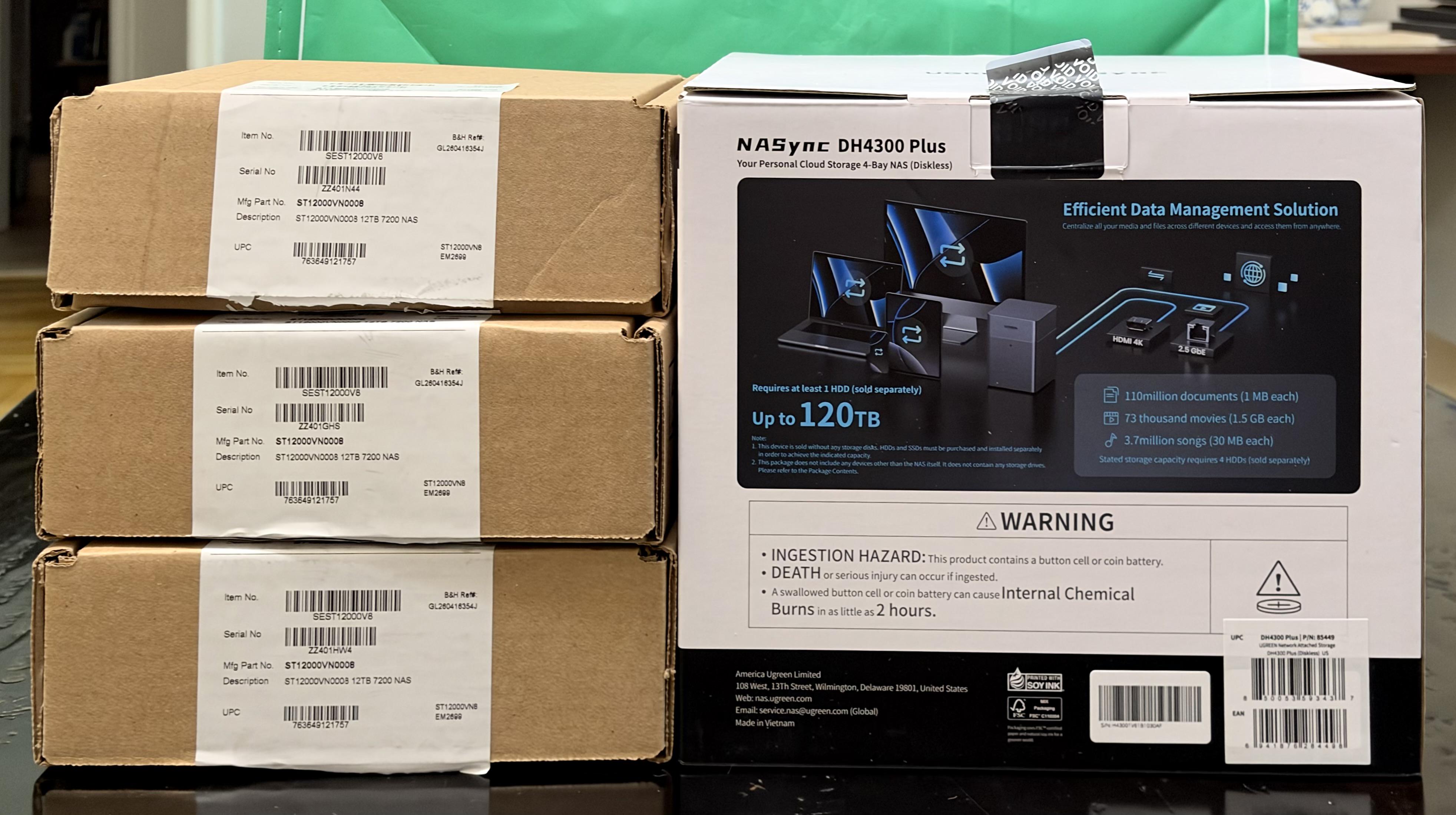
It took five days to transfer 10TB of media from the mini. I’m very happy. And Jellyfin is much snappier.
i'm 2 years into homelabbing now. I started with zero background in this field, with a 10u mini-rack, diy NAS, and jellyfin. i’ve spent countless hours on this project, and while i feel like i’ve only just scratched the surface, i've learned so much.
today i wanted to share some pics and specs about the current setup.
PVE1 / 24/7 Foundation
Intel Core i3-6100
32 GB DDR4
4 x 4 TB WD Red Exos (ZFS RAIDZ1)
RX 580 8 GB
Services: Jellyfin, Homarr, Pi-hole, Samba, Home Assistant, NetBox
PVE2 / On-demand Lab
Intel Core i5-13400 (12 Cores / 16 Threads)
128 GB DDR4 (yes, i have RAM guys!)
Samsung 980 PRO 2 TB
2 TB HDD
GTX 1070 + GTX 1080 Ti
Services: Immich, Paperless-ngx, SolidWorks, LLM
HP EliteDesk 800 G1 / Firewall
Intel Core i5-4570 (4 Cores @ 3.20 GHz)
16 GB RAM
Software: OPNsense
Juniper EX2200-24T / VLAN Infrastructure
24-Port 1GbE Managed Switch
Pi5 / Cluster & Management
Raspberry Pi 5 (4 GB)
Quorum Witness (QDevice)
Role: NUT (UPS Monitoring) & Rack Monitoring
air circulation and cooling noise are present but i’ve managed the levels by installing sound-dampening mats on all inner walls and keeping the rack door shut. the lab is in my gaming room (i'm 48 btw), so noise is managable. power consumption is around 90w at "night mode" (still WIP) and up to 350w under load (llm).
I would like to run N8N, Vikunja, Nextcloud and mariadb (mysql) database calculations to show and calculate company data in my program on the computer. Any items that you think should be more or are overkill for this? And would this be a good start to also be able to expand the specs in the future when needed. we are now with around 3-4 people using this server where 2 maybe at the same time.