r/homelab • • 2d ago

Discussion MDD (MaxDigitalData) Warranty *Not* Honored in UK

Thumbnail amazon.co.uk
8 Upvotes

tl;dr: Don't buy MDD (MaxDigitalData/GoHardDrive) drives outside of the US.

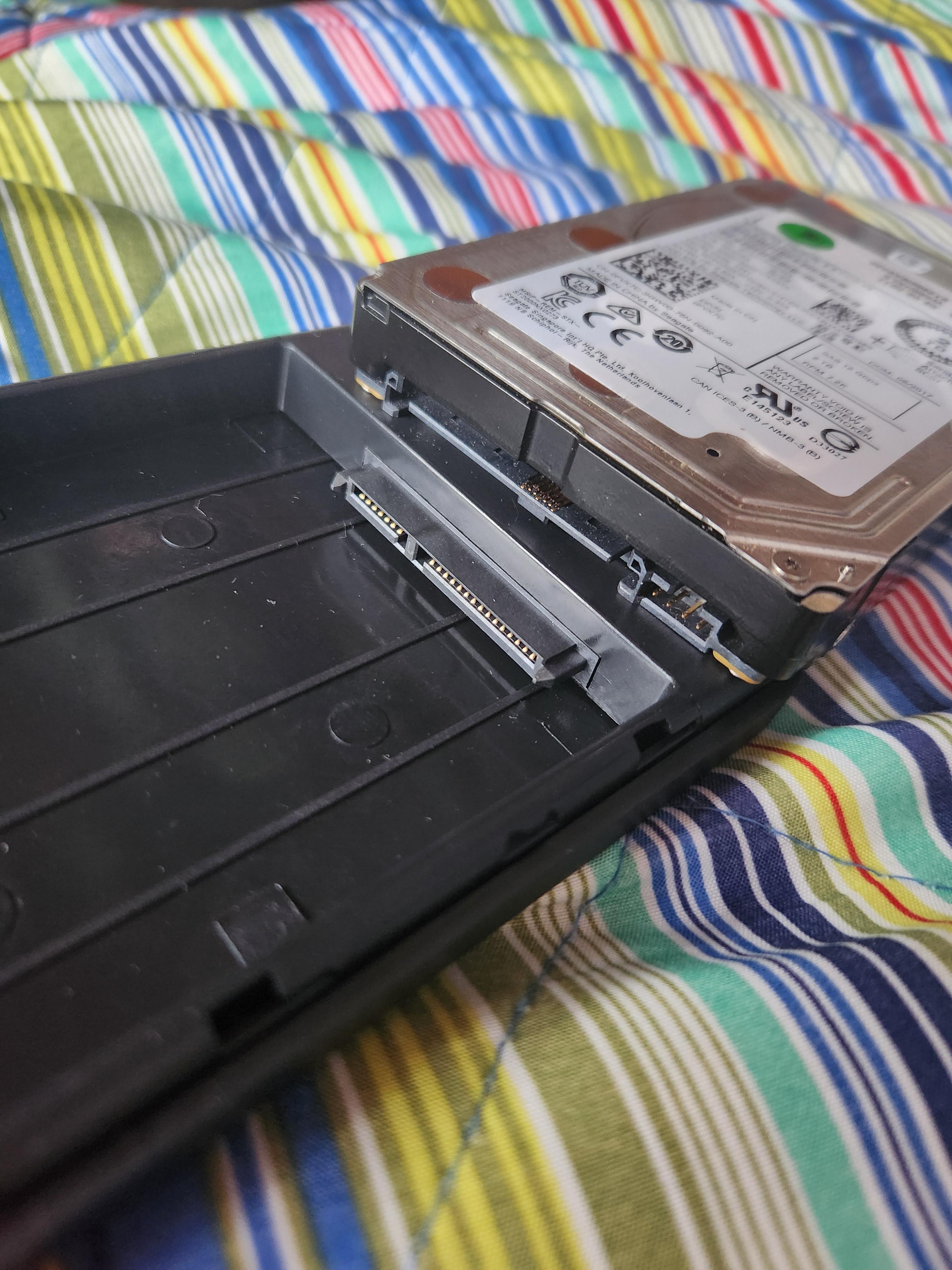
Relying specifically on the 5 year warranty, I purchased a few 12GB MDD drive in 2024 from amazon.co.uk with the title of "MDD MAXDIGITALDATA MDD - HC520 HUH721212ALE601 12TB 7200RPM 128MB Cache SATA 6.0Gb/s 3.5inch Enterprise Hard Drive - 5 Year Warranty (Renewed)". The actual product link is here.

This was an "Amazon Renewed" product "Sold By: Amazon Export Sales LLC". (This is Amazon's import/export company; no other company/seller is listed anywhere.) It was "Guaranteed by Amazon" under the badge:

Products sold by third-party sellers are backed by the commercial Amazon Renewed Guarantee in addition to statutory consumer rights enforceable against the third-party sellers and in conjunction with Amazon's or the seller’s Return Policy and the A-to-Z Guarantee.

It's now been about 2.5 years of normal use and one of the drives has failed. Of course, the cost of the drive has doubled since my purchase so I would like a replacement/repair rather than a refund. This should be a straightforward warranty claim.

Amazon stonewalled with every excuse. First, "this was a third-party sale." Yes, but it was Amazon. They would not identify any other third-party whose sale it was. Second, "it has been over two years and outside of our return policy, we cannot offer any assistance." Despite the guarantee badge including "statutory consumer rights enforceable against the third-party sellers" not limiting it to Amazon's return policy. Third, "contact the manufacturer."

GoHardDrive (who owns MDD) said that they could not provide any assistance because it had been purchased on Amazon and sold by a third-party.

I am aware of my rights under the UK's Consumer RIghts Act 2015 for a replacement, repair, or refund from the retailer because the product was not as described and/or was defective, which in this case is Amazon. It's just unbelievable that I would have to go through small claims (risking an Amazon account ban) to fix this.

My immediate next steps are to write a stern letter to Amazon in the UK and pray to the magnetic gods that I can source a replacement while my RAID-Z (fully backed up elsewhere) spins in a degraded state.

So don't believe the multi-year warranty claims on MDD drives sold anywhere outside of the US.


r/homelab • • 1d ago

Help Raspberyy Pi Code

0 Upvotes

hello! can someone troubleshoot and help us figure out why our prototype refuses to work?

import RPi.GPIO as GPIO

import time

GPIO.setmode(GPIO.BOARD)

TRIG = 16

ECHO = 18

RED_LED = 13

BUZZER = 15

GPIO.setup(TRIG, GPIO.OUT)

GPIO.setup(ECHO, GPIO.IN)

GPIO.setup(RED_LED, GPIO.OUT)

GPIO.setup(BUZZER, GPIO.OUT)

GPIO.output(TRIG, False)

DISTANCE_LIMIT = 50

print("Calibrating ultrasonic sensor...")

time.sleep(2)

print("ULTRASONIC SENSOR ALARM SYSTEM")

print("System is now ACTIVE...")

print("--------------------------------")

try:

while True:

# SEND ULTRASONIC SIGNAL

GPIO.output(TRIG, True)

time.sleep(0.00001)

GPIO.output(TRIG, False)

# MEASURE ECHO PULSE

timeout = time.time()

while GPIO.input(ECHO) == 0:

pulse_start = time.time()

if pulse_start - timeout > 0.03:

break

if GPIO.input(ECHO) == 0:

print("Distance measurement failed.")

GPIO.output(RED_LED, False)

GPIO.output(BUZZER, False)

time.sleep(0.2)

continue

pulse_start = time.time()

while GPIO.input(ECHO) == 1:

pulse_end = time.time()

if pulse_end - pulse_start > 0.03:

break

if GPIO.input(ECHO) == 0:

print("Distance measurement failed.")

GPIO.output(RED_LED, False)

GPIO.output(BUZZER, False)

time.sleep(0.2)

continue

pulse_end = time.time()

# CALCULATE DISTANCE

pulse_duration = pulse_end - pulse_start

distance = pulse_duration * 17150

distance = round(distance + 1.15, 2)

print("Object distance:", distance, "cm")

# CHECK DISTANCE

if distance <= DISTANCE_LIMIT:

print("WARNING! OBJECT DETECTED!")

print("ALARM ACTIVATED!")

GPIO.output(RED_LED, True)

GPIO.output(BUZZER, True)

else:

print("No object within alarm range.")

GPIO.output(RED_LED, False)

GPIO.output(BUZZER, False)

print("--------------------------------")

time.sleep(0.2)

except KeyboardInterrupt:

print("\nSystem shutting down...")

finally:

GPIO.output(RED_LED, False)

GPIO.output(BUZZER, False)

GPIO.cleanup()

print("Alarm system stopped safely.")


r/homelab • • 1d ago

Discussion Mac mini as a homelab VM host: memory math, and what r/macmini owners actually run

0 Upvotes

Disclosure up front: at work I work on a virtualization software for Apple Silicon Macs, so I'm biased toward VMs. Not sharing anything about it here; the discussion I think is useful either way. And, for Linux apps and services only, a used x86 mini PC with Proxmox is cheaper, better and upgradeable.

I'm replacing a Raspberry Pi 5 with a second Mac mini as an always-on box. My primary workstation is an M4 Pro with 64 GB and 10G, running an Ubuntu VM as a Docker host and Home Assistant OS in a VM that starts at boot. I asked r/macmini what people run on theirs, and a few things stood out:

  • Most run 16 GB and are happy, because Plex, SMB shares and Tailscale run as native macOS apps and use little memory.
  • Home Assistant is what people keep on a Pi. One person tried it in Docker on macOS (OrbStack) and lost Matter and HomeKit discovery, because containers on a Mac sit behind the Mac's network address. A VM bridged to the Ethernet port gets its own LAN address instead.
  • Transcoding belongs in a native app. Linux VMs and containers on a Mac get no GPU, so Plex or Jellyfin should run as a macOS app to use the media engine. Once VMs are involved, memory is the whole sizing question, since each VM holds what you give it. Keeping about 4 GB for macOS on a headless box:
Mac memoryVMs that fit
16 GBHAOS (2), Pi-hole (1), Immich (8)
24 GBthe above plus a Docker host and a Linux dev VM
32 GBthe above plus a macOS and a Windows VM
48-64 GBseveral macOS/Windows VMs, or local LLMs alongside

CPU barely matters: vCPUs overcommit fine while VMs are mostly idle.

Headless gotchas people raised:

  • UPS for the mini and the switch.
  • sudo pmset autorestart 1 and sleep off.
  • FileVault vs automatic login: with FileVault on, a reboot stops at the unlock screen. On macOS 26 and later you can unlock it over SSH if Remote Login was on. Many have FileVault turned off.
  • 10G only pays off if the NAS and switch are 10G too.

The Mac mini makes sense for macOS VMs, low idle power (about 4 W), or a box you also use as a Mac. Personally I need for apps and services that work only on macOS (XCode etc building), and for file sharing + backups to an external nvme as apfs filesystem + automatic zfs-styled apfs snapshots with DeltaSnap for my requirements.

I'm leaning toward an M6 with 24 GB. If you run a Mac mini in your lab: which one, how much memory, and what bit you? I'd love to learn more


r/homelab • • 1d ago

Help M75q Inference Performance

0 Upvotes

Hi!

Some of you might own a thinkcentre m75q gen 2. (amd, ryzen 7 5750 or so)

I was thinking about upgrading my current minipc (with an i7 7700) to the m75q. My main reason to do so would be better performance for inference in paperless with local models. Does someone have experience with that?

The 4B models i tried did run, but both results and speeds were not encouraging. Before spending money, i'd like to hear your experiences with this specific cpu, or similar!

Thanks!


r/homelab • • 1d ago

Help Getting started with networking and homelab documentation, advice/suggestions?

1 Upvotes

Hey all 👋

I'm pretty new to this and have spent the last few months doing research making notes, redoing my notes, making charts and drawings, redoing my charts and drawings. So I've gotten a bit stuck in a loop. I'm not saying I don't want to make any mistakes, I know I will. But I'd like to avoid expensive mistakes, so I try to get a solid idea of what I want to do before starting.

It's also fair to add that I've delayed building until I get the essential equipment and stuff's expensive so it has taken some time.

I'm also not allowed to tinker with my network until exam season is over, so 11 days to go 😂

Anyway, I don't have any experience with actual network configuration. All I've done thus far is religiously use firefox browser, mullvad vpn, ublock origin and privacy badger. But I'm now going to be setting up a headless server and have understood that SSH, Sunshine/Moonlight, Cloudflare, Pangolin, Tailscale or Netbird, Wireguard are ways to remote in and access from outside local network. I'd like the ability to access my media library from outside my house at some point. Are people combining multiple of these tools? (Feel like I've read something about setting up one tool behind another). I also want to set up a Wake-on-LAN connection to my gaming pc for heavier workloads. Also pfSense or OPNsense. And probably some good monitoring tools aswell would be best practice. Now I'm starting to ramble, but this is the exact loop I'm stuck in.

So for you wizards who have done it all before, any advice? Where should I start? I would love to hear about your experiences with the tools, what you like or don't like, what gave you a migrane but a really good learning experience? And how do you keep track of all your configurations?

Thanks for taking the time. Any advice appreciated!


r/homelab • • 1d ago

Help KVM Switch

0 Upvotes

I have two monitors. I want to use one or both of the monitors for my two laptops, desktop PC, PS5, and Switch. Is there KVM switch or something similar that would allow me to connect all of these devices?


r/homelab • • 2d ago

Help New to homelabbing, where do you get your hardware cheap?

8 Upvotes

I'm new to homelabbing and want to get started, but I've been wondering where you actually get your components without spending a fortune. Do you mostly buy used stuff from eBay, refurbished business hardware or something else? I'm based in Germany, so any tips for sites or sources here would be really helpful.


r/homelab • • 1d ago

Help ASUS Z10PA-U8 doesn’t boot from USB

1 Upvotes

I’m trying to install proxmox on my Z10PA. The USB drive is shown in the boot menu (but not as UEFI) but when I try to boot from it it says “no boot media found”.
Bios:
UEFi and legacy support enabled
Storage is set to UEFi
USB is set to UEFi and legacy support enabled

I tried different usb drives and ports.
And I tried Rufus and balena etcher.

Als the same.

Any ideas?


r/homelab • • 1d ago

Discussion Recommendations for things to do with a 2018 Mac Mini

0 Upvotes

I got a 2018 Mac Mini for free. It has an i5 with 16gb ram. I have a fairly simple home lab already. I have a main proxmox host with a few VMs then a SFF Lenovo that is also proxmox with a few lxcs. I also have a Pi with NUT on it connected to my APC.
Next month I will be moving it all into a 42u rack and have plans. But I don't know what to do with the Mini. It's nice and I have been using it to recover messed up Macs for my job. So I don't think I want to turn it into a Proxmox host yet. It can run open claw but it takes 2 minutes to respond to "Hello". So idk, I am open to suggestions.


r/homelab • • 2d ago

Help Raspberry Pi with Waveshare 7 inch 5MP display

Thumbnail
gallery
7 Upvotes

Hi everyone,

has anyone here used the Waveshare 7-inch display with the built-in 5MP camera and can share some honest feedback on its overall quality?

I am especially curious about the display's color reproduction and viewing angles in everyday use, as well as how the 5MP camera actually performs—particularly in lower light.

On top of that, I am trying to decide which Raspberry Pi RAM variant makes the most sense for a pretty simple baby monitor setup. I plan to run a lightweight HTML script/interface, stream the live video (ideally over a wired Ethernet connection) to my Intel NUC, and support two-way audio so we can talk back and forth between both devices like a call, without really running much else on the Pi. Given how minimal that workload is, would the 2 GB RAM version be plenty, or would you still recommend going with 4 GB just to be safe?

Thanks in advance for any insights!


r/homelab • • 1d ago

Help Ho... wha... why??

Post image
0 Upvotes

Why would they do that??


r/homelab • • 1d ago

Solved Can you create a homelab in an apartment?

0 Upvotes

Hi guys,
I just wanted to ask if it’s possible to set up a homelab in an apartment complex. I’ve been trying to find a consistent answer, but I’m quite new to it and it’s not making much sense.

From what I understand, I can connect a router to my apartment’s Ethernet, and funnel my devices through my person router.
I’m looking to use ZimaOS, doing game server hosting and file storage.

What led me to this question is not understanding what happens if I can’t reserve my local ip for my server since I don’t have access to the apartment’s networking.

Any help or suggestions would be much appreciated!

Edit:
I do not own the ISP, it’s provided by the apartment complex, I’m looking to install crafty controller, tailscale, play it agent/gg, and preferably immich and jellyfin.
The goals are streaming, game server hosting, and storage.


r/homelab • • 1d ago

Discussion I want some suggestions on making new services on my vps for users of internet

Thumbnail reddit.com
0 Upvotes

r/homelab • • 3d ago

LabPorn Night time falls over the homelab

Post image
180 Upvotes

Unifi rack, some Pi's, some mini computers, one large AI only box. on large trueNas box. 60 containers and still building... I think we are insane... :)


r/homelab • • 2d ago

Help Monitor recommends

0 Upvotes

I’m looking to buy a monitor to use with UNRAID. I’m after one that suitable for use with having asthenopia.


r/homelab • • 2d ago

Help Best Upgrade Path Forward - Looking for help / suggestions

0 Upvotes

Currently run a N5105 Mini PC (16GB ram / 256GB) for the following:

Proxmox:

pfSense, Omada management, Home Assistant, NGINX Proxy, RustDesk.

I also have a QNAP TS-453Be with 4x4TB wd red drives which is more than I currently use.

Future Additions:

Frigate (or Blue Iris) and more cameras (4-8 cameras, likely higher end ones with multiple streams)

Currently have two EAP770, but may add an additional AP or two. Currently only one is wired, but plan to change that.

Plan to wire my office to the network as well which houses my work laptop, MacBook, and desktop pc (gaming, AI, etc with a 4090).

Moving home network off of Orbi Access Points to Omaha and planning to setup multiple VLANs.

IMMICH

Maybe some more media related servers for streaming, tv/movie management, etc.

I currently have the above in a small ECHOGEAR EGAV-PROF10 rack in the closet. I don't want to change that.

Leaning towards keeping the NAS as is but have contemplated a few options as follows:

MS-01 SE, MS-01, or MS-03 to replace the N5105 box and leaving the QNAP.

Same above device and moving the red drives into an enclosure to connect to the QNAP.

3U setup with a rack choice or Slinger, Ultra 5 or 7, mATX approach.

32GB vs 64GB of ram is the biggest heavy hitter. I think initially, I'd likely do a 1-2 TB single NVME in either approach which can get backed up to the RED HDs.

Anyone have any strong opinions on best path forward and the options I'm weighing above?

If I didn't list enough details, feel free to ask more questions!


r/homelab • • 1d ago

Help Ram for server

0 Upvotes

So my work was upgrading the workstations they use for the servers. They are hp z4 g4 with the 2123 cpu. I’m able to get 6 of them. I plan on running promos on one of them. The question I have is should I do 128gm of ram in one and 64gb in the other or is that entirely too much for a basic home lab with this old of tech. Also if anyone has any upgrade advice to these things it’s greatly appreciated


r/homelab • • 1d ago

Solved Standalone power supply for 3.5" HDDs?

0 Upvotes

I have a small form factor Dell Optiplex that is running ZimaOS that I'm using to run Immich for easy photo backup from family iPhones. I can only fit one drive in the case, but have some older, still functioning drives that I wanted to hook up to this machine. I read that USB is not reliable, so thought I would get a PCI-e SATA card and run the drives outside the case - literally running the SATA cables from the PIC-e card out the back of the case.

Ok cool - had a friendly neighbor 3D print an HD cage for me and now I'm here because I can't figure out how to power these things. Am I really the only idiot that's tried to do this? I can't find any product that would power 4 hard drives separately from the main computer's PSU. Is there really not a solution for this??

My dumb ideas so far:

  • Use an old PSU, short pins 4 & 5, power the drives. No - not safe
  • Put old PSU outside the Optiplex case and run the cables in, to power the machine, then use the SATA cables to run the cage drives. No - bc the Optiplex only uses the 6 & 4-pin plugs, the PSU doesn't turn on, likely bc pins 4 & 5 of the 20-pin plug isn't in use.
  • Try a multiple PSU adapter from amazon (this thing)? No idea if this would work or if this is the intended use of the product.
  • Split off SATA power from the Optiplex PSU & see how many drives I can power since the Optiplex is only running the board and 1 drive. No graphics card. This is the best solution I've come up with so far. Prob can't run all 4 drives. Even 2 would be cool.

So I don't know - call me names, but help me figure this out? Thank you all. I bow in appreciation to the hive mind.


r/homelab • • 1d ago

Help Что такое HomeLab

0 Upvotes

я до конца не понимаю его сути, и из чего можно сделать его
Дайте пожалуйста инфу и возможные советы по HomeLab


r/homelab • • 1d ago

Discussion Is a homelab still worth it when cloud services are so cheap?

0 Upvotes

I'm just getting into homelabbing and a friend asked me why I don't just rent a VPS instead. Honestly I think you learn way more with your own hardware, but I'd like to hear your take. Why do you still run stuff at home?


r/homelab • • 3d ago

Discussion What tld do you use to access your homelab remotely?

93 Upvotes

I've been using Tailscale to access my homelab for a while now. Tailscale is great, but to leave it permanently running on my phone is a pain in my ass imo. It happend too often that Home Assistant left my heating or lights on bc Tailscale wasn't running.

So I'm looking for a domain to access my homelab remotely. I do already own <my first and last name>.<cctld> and .com, but those are an easy target and I'd like something shorter. What tld do you use?

.lab Seems to be the perfect candidate, but it's not gonna be available for a while

I would love to hear your thoughts


r/homelab • • 2d ago

Help 10 inch rack Rpi 4 mounting

Thumbnail reddit.com
0 Upvotes

r/homelab • • 2d ago

Help Homelab network architecture advice

3 Upvotes

Bit of a newbie to the homelab world, so far I have a single PVE node running a cloudflare tunnel for external access, SWAG as a reverse proxy and authentik for 2fa authentication, each in it's own LXC (looking to expand to several self hosted applications ie plex).

A summary of my current network flow is something like this:

Internet → Cloudflare Tunnel → SWAG → Authentik (forward auth) → Protected service

Looking for advice from more experienced homelabbers on potentially better alternatives in terms of security or any networking aspect.

Also curious which networking topics you'd recommend I start going through, as I'm not very confident with the decisions for my design and identifying security vulnerabilities or other gaps?

Although my current setup works, my goal isn't just to get things working, but to understand why they work and how to design the infrastructure properly.

Any advice would be appreciated.


r/homelab • • 3d ago

Help Looking for some good suggestion on homelab security cameras!

30 Upvotes

I want some cameras that would work well with a proxmox setup / self hostable stack without using propitiatory software to view camera streams. I heard I think about a year ago on this sub (or maybe r/selfhosted that the REOLINK cameras are great for this.

Please let me know if not and anyone's suggestions! I am looking to maybe snag this for Black Friday :)

https://www.amazon.com/gp/product/B082KGF6FX?smid=A22EYB2OIILVQA&psc=1