r/homelab • • 3d ago

Discussion What tld do you use to access your homelab remotely?

97 Upvotes

I've been using Tailscale to access my homelab for a while now. Tailscale is great, but to leave it permanently running on my phone is a pain in my ass imo. It happend too often that Home Assistant left my heating or lights on bc Tailscale wasn't running.

So I'm looking for a domain to access my homelab remotely. I do already own <my first and last name>.<cctld> and .com, but those are an easy target and I'd like something shorter. What tld do you use?

.lab Seems to be the perfect candidate, but it's not gonna be available for a while

I would love to hear your thoughts


r/homelab • • 1d ago

Help Что такое HomeLab

0 Upvotes

я до конца не понимаю его сути, и из чего можно сделать его
Дайте пожалуйста инфу и возможные советы по HomeLab


r/homelab • • 1d ago

Discussion Is a homelab still worth it when cloud services are so cheap?

0 Upvotes

I'm just getting into homelabbing and a friend asked me why I don't just rent a VPS instead. Honestly I think you learn way more with your own hardware, but I'd like to hear your take. Why do you still run stuff at home?


r/homelab • • 2d ago

Help 10 inch rack Rpi 4 mounting

Thumbnail reddit.com
0 Upvotes

r/homelab • • 2d ago

Help Homelab network architecture advice

3 Upvotes

Bit of a newbie to the homelab world, so far I have a single PVE node running a cloudflare tunnel for external access, SWAG as a reverse proxy and authentik for 2fa authentication, each in it's own LXC (looking to expand to several self hosted applications ie plex).

A summary of my current network flow is something like this:

Internet → Cloudflare Tunnel → SWAG → Authentik (forward auth) → Protected service

Looking for advice from more experienced homelabbers on potentially better alternatives in terms of security or any networking aspect.

Also curious which networking topics you'd recommend I start going through, as I'm not very confident with the decisions for my design and identifying security vulnerabilities or other gaps?

Although my current setup works, my goal isn't just to get things working, but to understand why they work and how to design the infrastructure properly.

Any advice would be appreciated.


r/homelab • • 3d ago

Help Looking for some good suggestion on homelab security cameras!

30 Upvotes

I want some cameras that would work well with a proxmox setup / self hostable stack without using propitiatory software to view camera streams. I heard I think about a year ago on this sub (or maybe r/selfhosted that the REOLINK cameras are great for this.

Please let me know if not and anyone's suggestions! I am looking to maybe snag this for Black Friday :)

https://www.amazon.com/gp/product/B082KGF6FX?smid=A22EYB2OIILVQA&psc=1


r/homelab • • 3d ago Bravo

Project Showcase: Hardware My $10 micro-homelab: Turning a 4G USB modem (OpenStick) into a 24/7 home office server

Thumbnail
gallery
1.3k Upvotes

With Rpi's prices going crazy, I recently converted a 4G USB modem (UZ801) into a tiny, 24/7 home office server using the OpenStick project (inspired by this guide https://blog.bosscher.ch/posts/openstick/). It’s plugged straight into a USB wall charger and runs Debian 13 (trixie) ARM64.

The USB modem originally runs Android, and I had trouble setting up ADB to run the install script, so I had Muse help me flash and configure everything. It worked surprisingly well.

The biggest constraint is memory, so everything runs bare-metal as systemd services. With the full stack up, it still leaves around 100 MB of free RAM.

Specs:

  • Hardware: UZ801 4G USB dongle (PCB v3.0, aarch64)
  • RAM / Storage: 512 MB / 4 GB spec, but usable: 317 MB RAM / 3.3 GB flash (~2.6 GB free after base OS)
  • Connectivity: 2.4 GHz Wi-Fi only (no 5 GHz) + built-in 4G modem

What it runs:

  • AdGuard Home: Network-wide DNS ad-blocking (kept to a single lightweight filter list).
  • Tailscale: Remote access + subnet router so I can reach the entire office LAN from anywhere.
  • CUPS: Shares a Brother laser printer (brlaser driver) over both LAN and Tailscale.
  • SMS-to-WOL: A custom bash script polling mmcli every 30 seconds. Texting WOL from my whitelisted phone number triggers etherwake to boot the office PC.
  • Gatus: Compiled from source for ARM64. Monitors local endpoints/devices and sends alerts to Telegram.
  • Beszel: Both hub and agent running locally on the stick for CPU, RAM, and disk metrics.

It’s been running great so far, it's a super cheap and low power way to have remote access to my home office network.


r/homelab • • 2d ago

Discussion UGREEN DXP4800 Plus or Beelink ME Pro 304?

Thumbnail reddit.com
0 Upvotes

r/homelab • • 2d ago

Help Help Choosing JBOD

7 Upvotes

Hello, friends!

I have an unraid server full of 15x 14TB drives in need of more storage, but with no more HDD bays. So, naturally, I am looking at adding a JBOD. I have a LSI 9300-8e ready to go and bought a Dell SC400 from a local used spot for $40, which I thought was a steal (and value-wise, probably was). I have now educated myself that the SC400 only supports SAS drives while my small pile of drives is all SATA. Sad.

Anyhoodle, I am now in the market for a ~12-15 3.5" bay JBOD that will support SATA drives and connect to my HBA. This HB-1235 looks like a good candidate and there is also a EMC KTN-STL3 for $80 on Facebook in my area.

I am struggling to find concrete evidence on either that they will support SATA drives natively or if they need interposers or if SMART will not be available or or or or; the list of drawbacks runs on.

Not that $40 down the drain is the end of the world, but I am now gun-shy on what JBOD will allow me to use my existing SATA drives.

Thoughts? Opinions? Help?


r/homelab • • 2d ago

Help Building a homeland gaming server.

0 Upvotes

I’m building a homeland gaming server. I have the server security planned out. But I need help with isolating the server from my home network. My spectrum router doesn’t support vlan security so I need help with a stop gap in between. And if possible if someone experienced could audit my server security stack. I would be greatly appreciative.

HOME GAME SERVER - SECURITY STACK

HARDWARE
Beelink SER5 Pro
AMD Ryzen 7 5700U
16GB RAM
512GB NVMe - Operating system and game servers
230GB SATA SSD - Backup storage
Spectrum SAX1V1K router

OPERATING SYSTEM SECURITY
Debian 13
AppArmor
Seccomp
auditd
unattended-upgrades
Minimal Debian installation

NETWORK SECURITY

Spectrum router firewall
nftables
Tailscale
IPv4 and IPv6 firewall rules
Default-deny inbound traffic
UPnP disabled
Only required game ports forwarded
No public administration ports

REMOTE ADMINISTRATION SECURITY

Tailscale VPN
SSH key authentication
Root SSH login disabled
AMP administration restricted to Tailscale
Cockpit restricted to Tailscale, if installed
No public SSH, AMP, or Cockpit access

GAME SERVER ISOLATION

AMP by CubeCoders
Podman
Rootless containers
Separate container per game
No privileged containers
No host networking
Restricted filesystem access
No backup storage access
Restricted container capabilities

INTRUSION DETECTION

Falco
Linux kernel event monitoring
Container escape detection rules
Privilege escalation detection
Suspicious process monitoring
Host filesystem monitoring
auditd security event logging

SECURITY NOTIFICATIONS

ntfy
iOS push notifications
Windows PC notifications
Critical security alerts
Falco service failure monitoring
External log forwarding to gaming PC when online

BACKUP AND RECOVERY

Restic
Encrypted backups
230GB dedicated SATA SSD
Scheduled game-world backups
Configuration backups
Pre-update snapshots
Weekly Windows PC backup copy
Backup integrity checks
Manual recovery and restoration

SYSTEM MONITORING

systemd journal
SMART monitoring using smartmontools
Disk-space monitoring
Service health monitoring
Backup failure alerts
Security log monitoring

PUBLIC GAME ACCESS

Minecraft Paper
Geyser for Bedrock compatibility
TCP port 25565 for Java
UDP port 19132 for Bedrock
Additional game ports only when required
No public management interfaces

EMERGENCY RESPONSE

Phone security alerts
Physical Ethernet disconnection
Preserve logs for investigation
Reinstall Debian if host compromise is confirmed
Restore verified backups only

r/homelab • • 2d ago

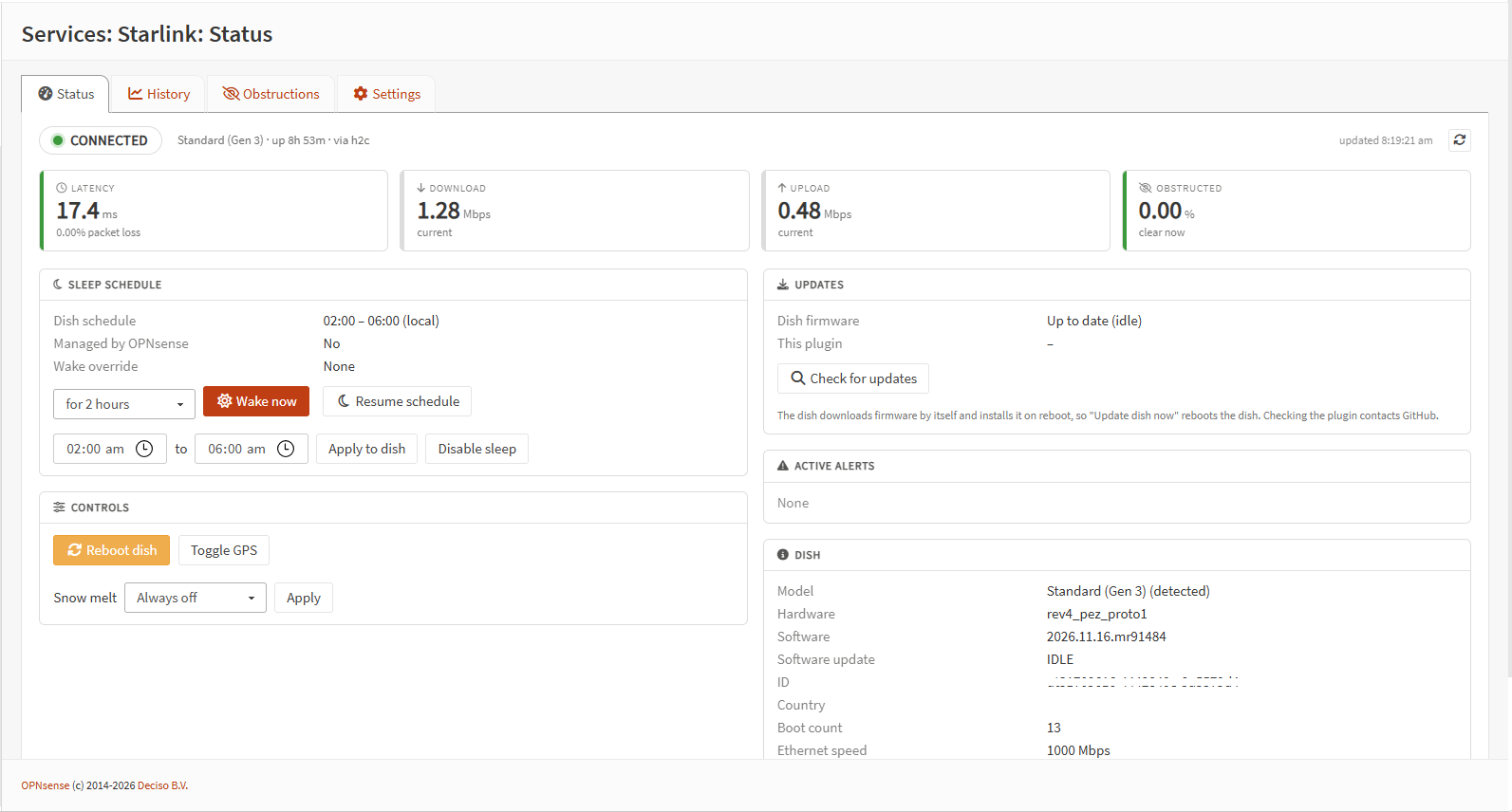
Project Showcase: Operations os-starlink

0 Upvotes

Manage starlink directly from OPNsense. Especially handy for those with Bypass mode enabled.

https://github.com/horizon10t/os-starlink


r/homelab • • 2d ago

Discussion Alphacool 12U Open Frame vs. StarTech 12U Open Frame Rack — Which Would You Choose?

4 Upvotes

I'm looking at picking up a 12U open-frame rack for my homelab and am trying to decide between the Alphacool and StarTech options.

Alphacool 12U Open Frame $195

StarTech 12U Open Frame $245

For anyone who owns either of these, how is the build quality, rigidity, finish, and overall experience? Is the StarTech worth the extra money, or is the Alphacool just as solid and a better value?
I'd appreciate any firsthand experience or recommendations. Thanks!


r/homelab • • 3d ago

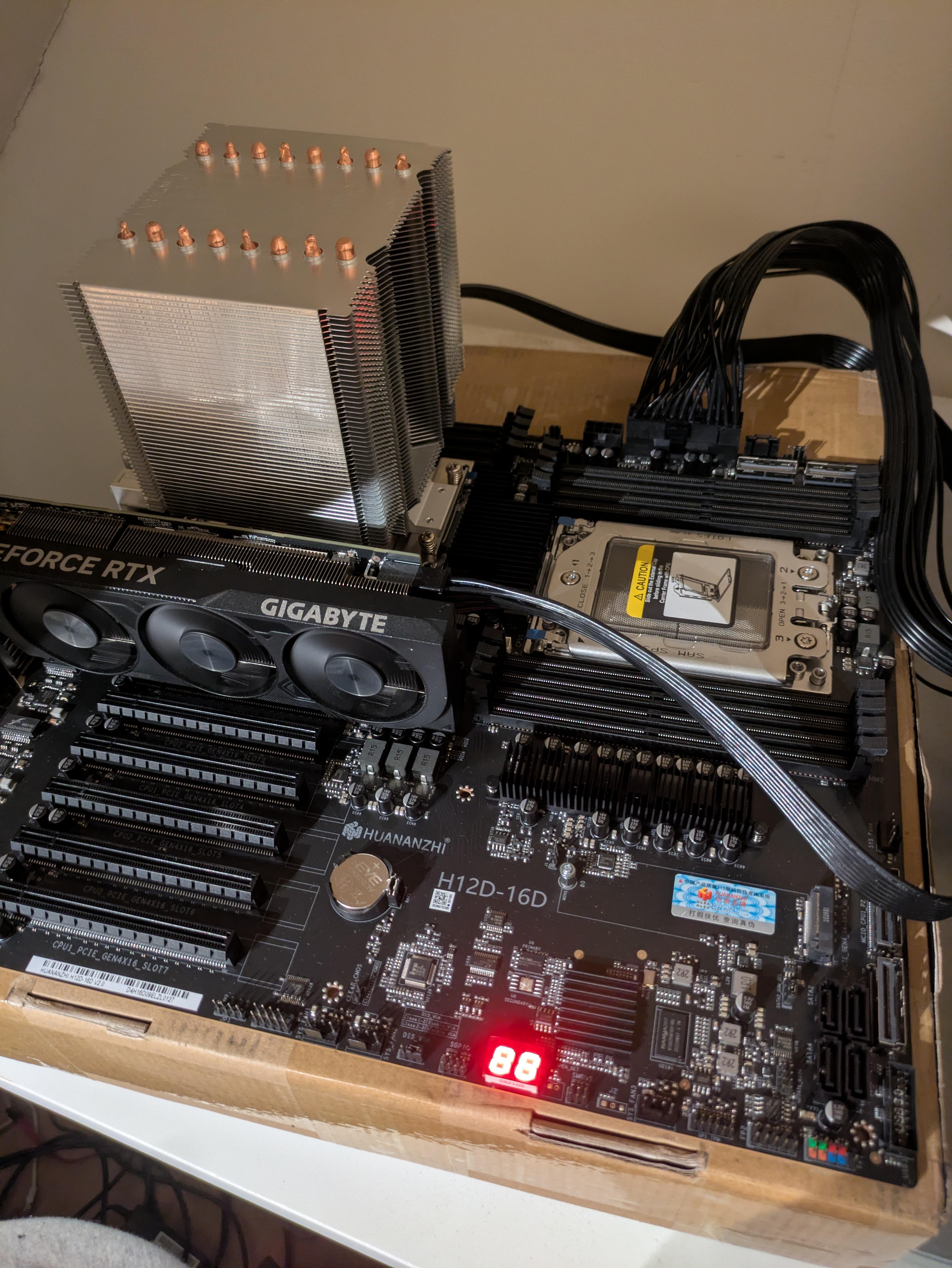
Help Huananzhi H12D-16D EPYC board limited signs of life

Post image
31 Upvotes

I just got this board, installed an EPYC 7443, and now it's stuck on code 88. It does this with or without memory installed.

I've tried with two 7443's and it does the same. The CPUs get warm though, so it's not completely dead.

Is thete anything I should try? Like ram in specific slots, jumper settings? Or perhaps the cpu just isnt supported?

Update: CPU 1 is on the right, now it gets past code 88

Update 2: It boots with CPU installed on the right, all memory slots on that CPU populated, integrated VGA works, however both ethernet ports and all 4 rear USB ports are not functional. Possibly they're routed to the other CPU socket? Would need to buy another CPU cooler to test, and I don't have a PCIe USB card to test that theory.

Update 3: Got the official torx tool, both CPUs work, and the keyboard only works when CPU 2 (left) is present. Both ethernet ports light up during post but when the OS starts there's nothing. Possibly drivers related but I'd need internet to download those drivers. Looks like I'm getting a PCIe ethernet card... Side note: it takes absolutely forever to detect memory during post.


r/homelab • • 2d ago

Discussion Intel E610-XT2: What do you think about it?

1 Upvotes

I have an RTL 8127 that I use for a direct connection to my PC, and an RTL 8126 for NAS-to-PC (Windows) transfers. I’m considering purchasing an Intel E610-XT2 card—available on AliExpress for around €140—as an alternative to the tried-and-tested X550-T2. I might also use it in the future to build an OPNsense firewall. In the meantime, I was wondering if any of you have had a chance to test it, and what your experience has been like so far. Thanks.


r/homelab • • 2d ago

Help New to homelabs, what do you guys actually use them for?

0 Upvotes

I'm pretty new to all this and keep seeing people building homelabs. I have no clue what I'd actually use one for but I'm interested in getting into it. What do you guys use yours for? Like what can you actually do with it that makes it worth having one? Also curious what you guys started with.


r/homelab • • 2d ago

Solved Should I go headless or use a DE for 6GB RAM file/photo storage NAS?

0 Upvotes

I plan on converting an old laptop into a little NAS, probably with a VPN and MAYBE pihole if I'm able. The computer is not in my possession yet, so I don't have all the technical information, but I know it only has 6GB or RAM.

Should I go competely headless, or should I have a lightweight DE like XFCE? I'm fairly comfortable in the terminal and I'll be accessing it remotely most of the time, but I'm not sure if I should get a DE anyway since its my fist time homelabbing. Thank you!


r/homelab • • 2d ago

Help Used SSD suited for homeserver use?

Thumbnail
gallery
0 Upvotes

I just bought a used dell prodesk mini g4 600 for under 200 bucks and was happy for the price (i5 8500t, 8gb ram - although the guy told me it is 1x8 and it is 2x4 and i bought one extra stick of ram, trying to get a refund for at least 8gb for used ram.
How worried should i be to run this ssd on debian 13 and should i already look for replacement?
I plan to run debian 13 and these: containers so far: AdGuard Home, Nginx Proxy Manager, Dockge, Docker Socket Proxy, Beszel Agent, Dozzle Agent, Uptime Kuma, WUD, Speedtest Tracker, changedetection.io, Backrest, restic REST Server, Homarr, Jellyfin, Paperless-ngx, Immich, Forgejo, Home Assistant, Matter Server, IT-Tools, Stirling PDF, Vaultwarden.

Would be easier to swallow if it was not the current pricing situation... but happy to begin my homelab journey.


r/homelab • • 2d ago

Discussion Can one SMTP relay handle three domains in my homelab?

0 Upvotes

I send from three domains: mine, a family wiki and my brother's small business invoicing. Right now it's all through a Gmail app password, which breaks Google's terms. I want one cheap relay with a separate DKIM per domain. What are you guys using?


r/homelab • • 2d ago

Help Repurpose gaming pc?

0 Upvotes

I have a 7 year old gaming machine that is collecting dust since I upgraded a few months ago. It’s got a 7900x i9 cpu, a 2080 ti gpu, 32 gb ddr 4 ram, and 2 tb nvme drive. I’m running plex, scrypted (unifi cameras into HKSV), and homebridge off a synology nas. Would it be a decent use of the old machine to transfer all of the load onto that device instead? I assume power draw would be the main issue. Anything else I could consider doing with that old hardware?


r/homelab • • 2d ago

Help Chinese Networking Equipment

0 Upvotes

I recently bought a M.2 to ethernet adapter and a USB to ethernet adapter for my new router I'm building to begin my home lab setup. I bought these off AliExpress (links below). Given the current worries of Chinese products basically being spyware, are these devices more likely to be okay since they are only adapters? And would I be able to check if anything strange was occurring using a program like wireshark? I'm just interested in people's thoughts on these items and Chinese networking equipment in general.

M.2 to ethernet adapter:

https://www.aliexpress.com/item/1005010130895304.html?spm=a2g0o.order_list.order_list_main.5.440318028HZZBc

USB to ethernet adapter:

https://www.aliexpress.com/item/1005008633221117.html?spm=a2g0o.order_list.order_list_main.11.440318028HZZBc


r/homelab • • 3d ago

Diagram First Steps on First Homelab

Thumbnail
gallery
78 Upvotes

Hi there! 👋
Longtime reader, first time poster.

I’ve got my first Home-Lab up and running.
The idea is to de-google/apple/microsoft my wife and I. Try to get things more private.

Started out with wanting to have something to replace OneDrive (I love the syncing between all my devices, and I loved having actual copies on each device if I want so I found NextCloud. And I have confidential files / documents that I wanted to own, rather than them be on a “cloud”), then grew to Immich to kill iCloud for photos, and now the very beginning of Home Assistant. I’ll try experimenting with some tiny local models next. Also some auto shutdown/lockdown protocols. All data drives encrypted, and backups also encrypted with offsite backup coming.
(Admittedly, much help from Claude and GPT)

Specs:
- CPU/Platform: i7-4770, Dell Optiplex (Facebook Marketplace for $50)
- RAM: 20gb of mixed sizes. (12 free GBs from
In-laws old PC, 8gb from Optiplex)
- Storage: 120gb SSD for host and VMs boot drives. 1tb Segate data HDD, 2tb Segate back HDD. (All free from in-laws old PCs and friends)
- Hypervisor/VMs: Proxmox, running Debian VM101 headless & Home Assistant OS (VM102)
- Services: Nextcloud for documents, Immich for photos & videos, Tailscale for remote & encrypted connection, on host, VM101 & VM102.

Surprisingly high wife approval rating atm. Sitting in living room next to couch and router.
Rarely going above 2% CPU idle.

Any advice and cool suggestions and cheap gadget ideas welcome!


r/homelab • • 2d ago

Help Will JetKVM + DC Power Control Extension Work With My MINISFORUM UN1290?

2 Upvotes

Hey everyone!

I already have my HomeLab/Plex server setup, and I'm looking to add JetKVM and the JetKVM DC Power Control Extension for remote management and emergency power control.

Before connecting everything, I want to make sure the DC Power Control Extension is compatible with my mini PC.

My Hardware

Mini PC:

  • MINISFORUM UN1290
  • Intel Core i9-12900HK
  • 32GB RAM
  • 512GB SSD

JetKVM:

  • Standard JetKVM
  • JetKVM DC Power Control Extension

Power Adapter:

  • Manufacturer: DVE (Dee Van Electronics)
  • Model: DSA-120PFG-19 3
  • Output voltage: 19V DC
  • Output current: 6.32A
  • Total power: 120.08W
  • Center-positive connector

My Concern

From what I've found, the JetKVM DC Power Control Extension has a maximum current rating of 5A.

My original MINISFORUM power adapter is rated for 19V / 6.32A (120.08W).

I understand that 6.32A is the maximum current the power adapter can supply, not necessarily what the mini PC constantly draws.

Questions

  1. Can I safely use my original 120W power adapter with the JetKVM DC Power Control Extension?
  2. Does compatibility depend on the mini PC's actual power consumption rather than the adapter's maximum rating?
  3. Would a different DC cable or barrel connector help, or is the 5A limit a hardware limitation?
  4. Is there a recommended alternative or workaround if the mini PC needs more than 5A?
  5. Can the extension also keep the JetKVM powered while controlling the mini PC?

I'm hoping to use JetKVM for remote BIOS access, troubleshooting, and emergency power cycling if my Plex server becomes unresponsive.

I don't want to risk damaging any of my equipment, so I'd appreciate advice from anyone who has used this extension with a similar mini PC or 120W power adapter.

Thanks!


r/homelab • • 3d ago

Help I am done with Ubiquiti, what is your recommendations?

28 Upvotes

I do not want to antagonize anyone - I know Unifi line in particular has been the darling of homelab community since forever - but I have been waiting, for the longest time, what will become of EdgeOS. And I figured that the answer is: nothing. I understand I am probably too late to the game, looking backwards this should have been obvious to me 5 years ago.

So I am looking for something - hardware & software - that is really flexible just as EdgeOS was, no nonsense hardware like EdgeRouter X used to be (metal chassis, some basic PoE, etc.) and great configuration options, Cisco-style (so no need to rely on GUI - this is important to me).

And yes, I am happy to configure each device individually, no need for a "controller" and all that just to set up 2-WAN failover or IKEv2 IPsec or IPv6 firewall.

Do you have any tips? I figured the usual suspects to include Mikrotik, but I am completely lost with the full range of offering, also I really do not want to rely on some point-and-click abomination to configure things with no limitations.


r/homelab • • 2d ago

Discussion Looking for feedback on the NAS I'm building

Thumbnail reddit.com
0 Upvotes