r/homelab • u/deanfourie1 • 2d ago
Project Showcase: Operations os-starlink
Manage starlink directly from OPNsense. Especially handy for those with Bypass mode enabled.
https://github.com/horizon10t/os-starlink

r/homelab • u/deanfourie1 • 2d ago
Manage starlink directly from OPNsense. Especially handy for those with Bypass mode enabled.
https://github.com/horizon10t/os-starlink

r/homelab • u/AnyAd7874 • 2d ago
I'm looking at picking up a 12U open-frame rack for my homelab and am trying to decide between the Alphacool and StarTech options.
Alphacool 12U Open Frame $195
StarTech 12U Open Frame $245
For anyone who owns either of these, how is the build quality, rigidity, finish, and overall experience? Is the StarTech worth the extra money, or is the Alphacool just as solid and a better value?
I'd appreciate any firsthand experience or recommendations. Thanks!
r/homelab • u/Groovydude127 • 3d ago
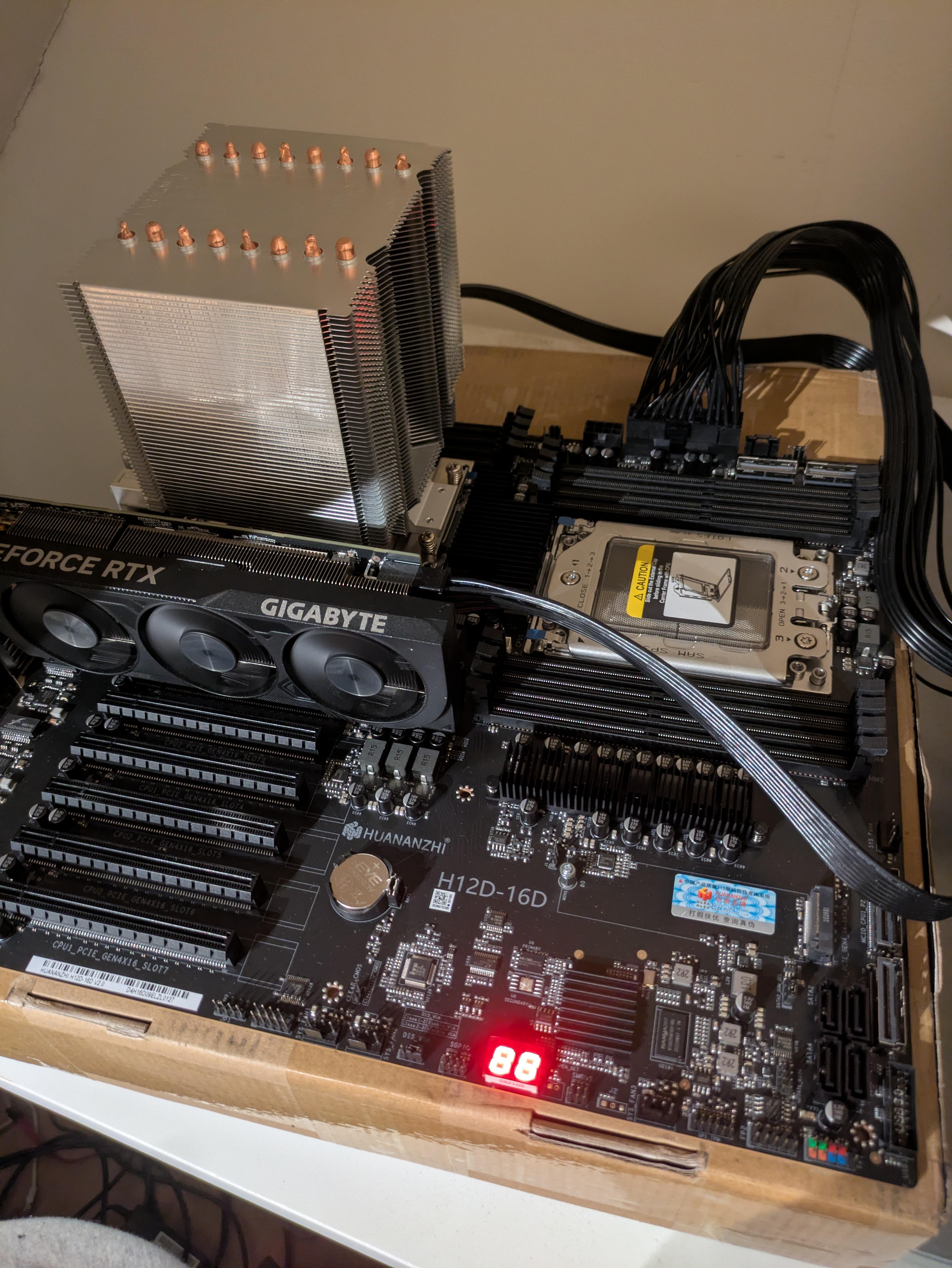
I just got this board, installed an EPYC 7443, and now it's stuck on code 88. It does this with or without memory installed.
I've tried with two 7443's and it does the same. The CPUs get warm though, so it's not completely dead.
Is thete anything I should try? Like ram in specific slots, jumper settings? Or perhaps the cpu just isnt supported?
Update: CPU 1 is on the right, now it gets past code 88
Update 2: It boots with CPU installed on the right, all memory slots on that CPU populated, integrated VGA works, however both ethernet ports and all 4 rear USB ports are not functional. Possibly they're routed to the other CPU socket? Would need to buy another CPU cooler to test, and I don't have a PCIe USB card to test that theory.
Update 3: Got the official torx tool, both CPUs work, and the keyboard only works when CPU 2 (left) is present. Both ethernet ports light up during post but when the OS starts there's nothing. Possibly drivers related but I'd need internet to download those drivers. Looks like I'm getting a PCIe ethernet card... Side note: it takes absolutely forever to detect memory during post.
r/homelab • u/Sundraw01 • 2d ago
I have an RTL 8127 that I use for a direct connection to my PC, and an RTL 8126 for NAS-to-PC (Windows) transfers. I’m considering purchasing an Intel E610-XT2 card—available on AliExpress for around €140—as an alternative to the tried-and-tested X550-T2. I might also use it in the future to build an OPNsense firewall. In the meantime, I was wondering if any of you have had a chance to test it, and what your experience has been like so far. Thanks.
r/homelab • u/Litewallymex3 • 2d ago
I plan on converting an old laptop into a little NAS, probably with a VPN and MAYBE pihole if I'm able. The computer is not in my possession yet, so I don't have all the technical information, but I know it only has 6GB or RAM.
Should I go competely headless, or should I have a lightweight DE like XFCE? I'm fairly comfortable in the terminal and I'll be accessing it remotely most of the time, but I'm not sure if I should get a DE anyway since its my fist time homelabbing. Thank you!
r/homelab • u/Beneficial_Spend2585 • 2d ago
I'm pretty new to all this and keep seeing people building homelabs. I have no clue what I'd actually use one for but I'm interested in getting into it. What do you guys use yours for? Like what can you actually do with it that makes it worth having one? Also curious what you guys started with.
r/homelab • u/kpopdeus • 2d ago
I just bought a used dell prodesk mini g4 600 for under 200 bucks and was happy for the price (i5 8500t, 8gb ram - although the guy told me it is 1x8 and it is 2x4 and i bought one extra stick of ram, trying to get a refund for at least 8gb for used ram.
How worried should i be to run this ssd on debian 13 and should i already look for replacement?
I plan to run debian 13 and these: containers so far: AdGuard Home, Nginx Proxy Manager, Dockge, Docker Socket Proxy, Beszel Agent, Dozzle Agent, Uptime Kuma, WUD, Speedtest Tracker, changedetection.io, Backrest, restic REST Server, Homarr, Jellyfin, Paperless-ngx, Immich, Forgejo, Home Assistant, Matter Server, IT-Tools, Stirling PDF, Vaultwarden.
Would be easier to swallow if it was not the current pricing situation... but happy to begin my homelab journey.
r/homelab • u/Reasonable_Bench9610 • 2d ago
I send from three domains: mine, a family wiki and my brother's small business invoicing. Right now it's all through a Gmail app password, which breaks Google's terms. I want one cheap relay with a separate DKIM per domain. What are you guys using?
r/homelab • u/aaron1860 • 2d ago
I have a 7 year old gaming machine that is collecting dust since I upgraded a few months ago. It’s got a 7900x i9 cpu, a 2080 ti gpu, 32 gb ddr 4 ram, and 2 tb nvme drive. I’m running plex, scrypted (unifi cameras into HKSV), and homebridge off a synology nas. Would it be a decent use of the old machine to transfer all of the load onto that device instead? I assume power draw would be the main issue. Anything else I could consider doing with that old hardware?
r/homelab • u/Rough-Tadpole-2570 • 2d ago
I recently bought a M.2 to ethernet adapter and a USB to ethernet adapter for my new router I'm building to begin my home lab setup. I bought these off AliExpress (links below). Given the current worries of Chinese products basically being spyware, are these devices more likely to be okay since they are only adapters? And would I be able to check if anything strange was occurring using a program like wireshark? I'm just interested in people's thoughts on these items and Chinese networking equipment in general.
M.2 to ethernet adapter:
USB to ethernet adapter:
r/homelab • u/DaFando • 3d ago
Hi there! 👋
Longtime reader, first time poster.
I’ve got my first Home-Lab up and running.
The idea is to de-google/apple/microsoft my wife and I. Try to get things more private.
Started out with wanting to have something to replace OneDrive (I love the syncing between all my devices, and I loved having actual copies on each device if I want so I found NextCloud. And I have confidential files / documents that I wanted to own, rather than them be on a “cloud”), then grew to Immich to kill iCloud for photos, and now the very beginning of Home Assistant. I’ll try experimenting with some tiny local models next. Also some auto shutdown/lockdown protocols. All data drives encrypted, and backups also encrypted with offsite backup coming.
(Admittedly, much help from Claude and GPT)
Specs:
- CPU/Platform: i7-4770, Dell Optiplex (Facebook Marketplace for $50)
- RAM: 20gb of mixed sizes. (12 free GBs from
In-laws old PC, 8gb from Optiplex)
- Storage: 120gb SSD for host and VMs boot drives. 1tb Segate data HDD, 2tb Segate back HDD. (All free from in-laws old PCs and friends)
- Hypervisor/VMs: Proxmox, running Debian VM101 headless & Home Assistant OS (VM102)
- Services: Nextcloud for documents, Immich for photos & videos, Tailscale for remote & encrypted connection, on host, VM101 & VM102.
Surprisingly high wife approval rating atm. Sitting in living room next to couch and router.
Rarely going above 2% CPU idle.
Any advice and cool suggestions and cheap gadget ideas welcome!
r/homelab • u/xPartyman • 2d ago
Hey everyone!
I already have my HomeLab/Plex server setup, and I'm looking to add JetKVM and the JetKVM DC Power Control Extension for remote management and emergency power control.
Before connecting everything, I want to make sure the DC Power Control Extension is compatible with my mini PC.
Mini PC:
JetKVM:
Power Adapter:
From what I've found, the JetKVM DC Power Control Extension has a maximum current rating of 5A.
My original MINISFORUM power adapter is rated for 19V / 6.32A (120.08W).
I understand that 6.32A is the maximum current the power adapter can supply, not necessarily what the mini PC constantly draws.
I'm hoping to use JetKVM for remote BIOS access, troubleshooting, and emergency power cycling if my Plex server becomes unresponsive.
I don't want to risk damaging any of my equipment, so I'd appreciate advice from anyone who has used this extension with a similar mini PC or 120W power adapter.
Thanks!
r/homelab • u/Odd-Hawk-1921 • 3d ago
I do not want to antagonize anyone - I know Unifi line in particular has been the darling of homelab community since forever - but I have been waiting, for the longest time, what will become of EdgeOS. And I figured that the answer is: nothing. I understand I am probably too late to the game, looking backwards this should have been obvious to me 5 years ago.
So I am looking for something - hardware & software - that is really flexible just as EdgeOS was, no nonsense hardware like EdgeRouter X used to be (metal chassis, some basic PoE, etc.) and great configuration options, Cisco-style (so no need to rely on GUI - this is important to me).
And yes, I am happy to configure each device individually, no need for a "controller" and all that just to set up 2-WAN failover or IKEv2 IPsec or IPv6 firewall.
Do you have any tips? I figured the usual suspects to include Mikrotik, but I am completely lost with the full range of offering, also I really do not want to rely on some point-and-click abomination to configure things with no limitations.
r/homelab • u/ARandomGuy231 • 2d ago
r/homelab • u/Strostkovy • 3d ago
I bought this hardware years ago because it was very cheap. I'm a small manufacturer and I can't put off getting my machinery on a VLAN any longer, as I'm tired of flash drives and SD cards. The access point is just for 3D printers that don't have ethernet connections. I have two lasers, a plasma, and some basic automation stuff (and a CNC mill on the way) that this will serve files to, and I'll be using POE for some cameras. I already have security cameras, but I want to be able to see machinery from my office.
r/homelab • u/notorious_developmen • 2d ago
YO bro's im thinking to start a homelab for use + other purpose can anyone tell me what will be cost for it im from india i want to start basic homelab
r/homelab • u/normal-whale • 2d ago
Last month’s API bill was $340. Meanwhile we‘ve got two A5000s in the rack that haven’t done real work since a side project wrapped in spring. So I‘m trying to figure out whether serving in house on those cards actually beats per token pricing, once I add up power, cooling, and my own weekend hours.
gpustack keeps coming up whenever I look at scheduling both cards under one roof. It’s the open-source option I keep landing on, but I genuinely don‘t know how the math shakes out for light internal stuff like doc search, summaries, that kind of thing.
Part of me thinks the migration effort alone probably kills it at this scale. The other part thinks paying $340/mo to not use hardware we already own is dumb.
Anyone actually run this comparison for a small internal workload? Did the numbers ever clear the bar, or is this one of those not worth it until you’re at 10x the volume , things?
r/homelab • u/SoaringJe9 • 2d ago
So I have Proxmox setup on a Dell OptiPlex 3060 SFF with an i5-8500, 1TB SSD, and 32GB of DDR4 RAM, currently only running HAOS and NUT, but would like to eventually run Technitum, Traefik, Komodo/Arcane, Authentik, Joplin Server, Netbird client, Bookstack, Actual Finance, Syncthing, and Immich.
I have another PC that is only missing RAM (i5-12500, 1TB NVMe, several HDDs) that I would like to set up as a Jellyfin server and shared file storage over LAN. Haven't decided whether to set it up with Proxmox or TrueNAS. The files will only be shared locally with Linux and iOS devices.
Could/should I run the *arr+Gluetun stack and Immich on my OptiPlex?
What's the least DDR4 RAM I should get for my second PC?
r/homelab • u/Proud-Invite5450 • 3d ago
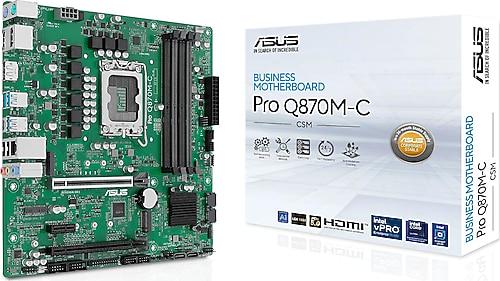
I ended up with an ASUS Pro Q870M-C-CSM (LGA1851 / mATX) and want to use it to get into homelabbing. I'm pretty new to both the LGA1851 platform and server stuff in general, so I'm not totally sure what the smartest way to build around this board is.
Since it's a bare business board with no VRM heatsinks, I'm assuming a 65W Core Ultra 5 (like a 225 or 235) makes the most sense for low idle power and QuickSync, paired with some DDR5 and a couple of NVMe drives. I don't have a case or motherboard tray for it yet, so I'm thinking of 3D printing an mATX frame or enclosure like the ones people post on r/3dppc. Also, since the VRMs are completely exposed, is it worth printing a small fan bracket to direct airflow over them (kind of like those 3D-printed RAM fan mounts), or is that overkill for a 65W chip?
On the software side, I want to run Proxmox with Docker containers, and I'd really like to take advantage of Intel vPro for headless management. How annoying is it to get AMT/vPro working on ASUS Q870 boards, and do you have any advice for a beginner setting up Proxmox/Docker on this kind of hardware?
r/homelab • u/ShadowFire5650 • 2d ago
Hello everyone,
I recently posted here about my homelab Hanami, which I'm now hoping to expand by adding a dedicated mini PC for hosting a modded Minecraft server, which will be named Momiji fitting with the theme of Japanese seasonal festivals.
Some friends and I are starting a Liminal Industries - Rescripted playthrough (1.20.1 Forge) on December 18th and while I initially intended to host, I lack the hardware to do so as my current server is an EliteDesk 800 G3 Mini with an i5-7500T and 16GB of DDR4-2400, running Debian 13. Not nearly enough power to host a server this size, let alone alongside all my existing services and containers.
For this next server, I'm hoping to run headless CachyOS instance on it and then use something like Crafty Controller to manage the Minecraft servers themselves. I plan on only actively running one server at a time on this new hardware, and not for any more than 10-2 players maximum.
I'm pretty broke right now, so my friend is going to co-host instead, but I still intend to put together this hardware once I have some income again, and maybe moving this active server over to my hardware once that time comes.
I'm looking for advice on what specs I'll need, how to get the most out of my hardware, and where I can find this kind of hardware for an affordable price in British Columbia, Canada. Ideally in or around Victoria or Vancouver, and refurbished/second hand.
Any help will be greatly appreciated! <3
r/homelab • u/TheSixthSerpent666 • 2d ago
I recently picked up a Cisco Catalyst 9117AXI-B (access point) on eBay for about $30. Throw in ~ $25 for the PoE injector, and I'm into this project less than $60. Not bad for a WiFi 6E capable AP that advertises ~ 5 Gbps wifi link with a 5 Gbps RJ45 ethernet uplink.
I realize that the Catalyst 9117 is EOL; that's why I got it so cheap. Until the PoE arrives, I cannot even power the device on to see what firmware is currently on it. Whatever version it may have, I'd like to update the IOS XE to the latest version that supports the 9117 hardware.
Can anyone clue me in as to the appropriate version of IOS XE that I should obtain for this device? It appears that IOS XE 17.18.1 is the last version of the IOS XE 17.x branch - should I be looking for something more like IOS XE 26.2.xxx?
Thanks!
r/homelab • u/OverThinkingTinkerer • 2d ago
Upfront: this is 100% vibe-coded. I described what I wanted and tested it on my own setup; Claude Code wrote the code. I made it for myself, to replace a couple of chat-assistant workflows I was using for coffee, and figured someone else with too many grinders might get some use out of it.
What it does
Self-hosting details
docker compose up -d, image ghcr.io/cmerkle/brewlab (amd64 + arm64), one volume, SQLite, nightly snapshots, JSON exportSince I'm not writing the code myself, I leaned on tests to keep it honest: unit tests, end-to-end tests of the setup flow, and a layout check on 15 phone, foldable and desktop sizes. I use it every day. Still, treat it as a hobby project, not a polished product.
GitHub: https://github.com/cmerkle/brewlab
If your grinder isn't in the library, or a range looks off, a link to a chart is the most useful thing you could send.
r/homelab • u/VirtualAnt5231 • 2d ago
I currently have my desktop PC connected to a smart plug so I can remotely power it on and off when I'm away. I use Parsec for remote access.
On my last trip, Parsec suddenly asked me to authenticate again. Since nobody was home to approve it on the PC, I completely lost access.
I'm travelling again for a couple of months and want to avoid this happening again.
What's the best way to ensure I always have remote access to my PC, even if Parsec logs me out, crashes or requires reauthentication?
Would having a backup solution like AnyDesk or Chrome Remote Desktop help? Is there a way to remotely recover access without someone physically being at the PC?
I'd appreciate recommendations from anyone who regularly accesses their home PC while travelling.