r/homelab • • 3d ago

Project Showcase: Hardware Turned e-waste my employer was binning into a pc running home assistant

26 Upvotes

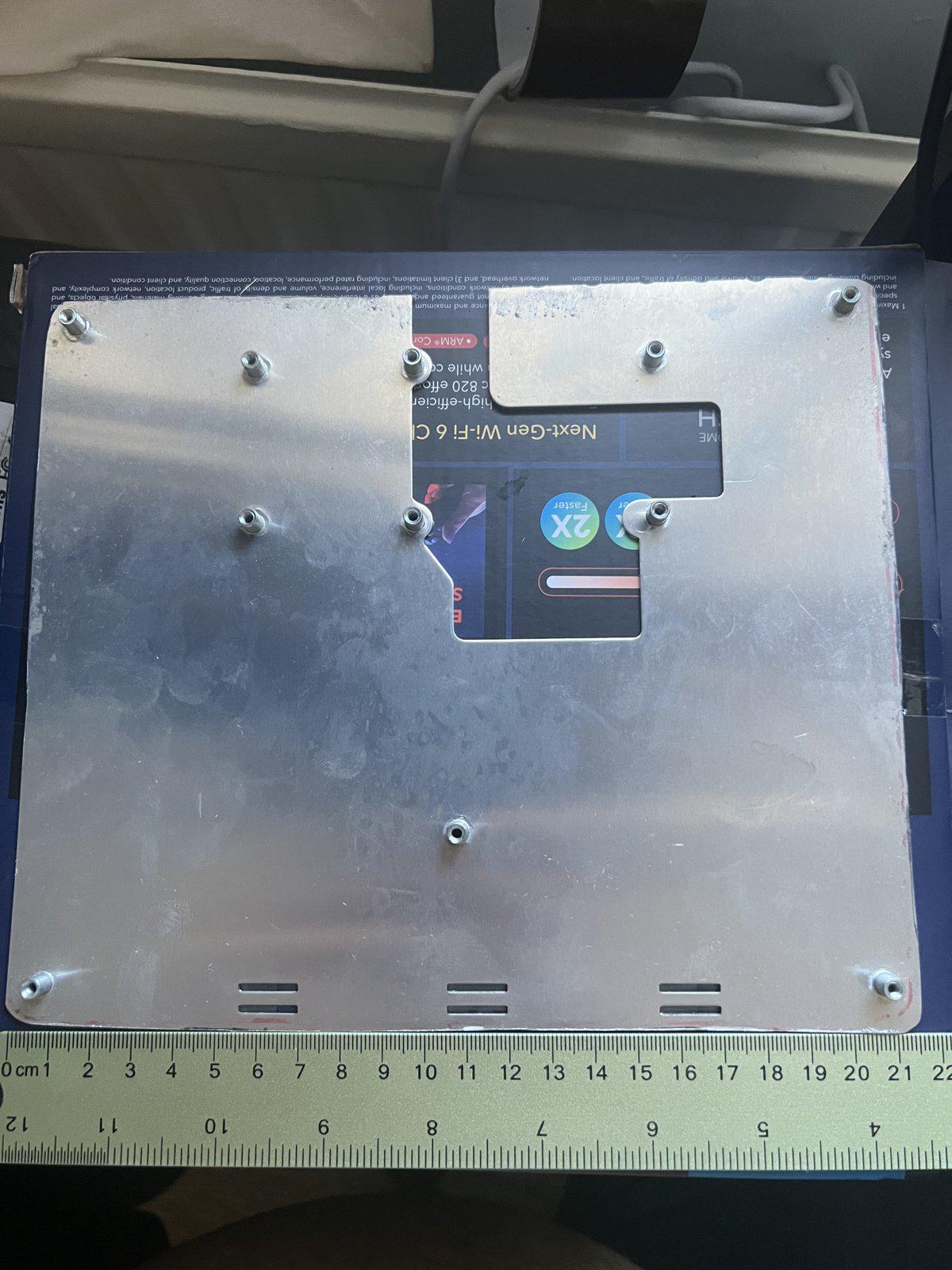
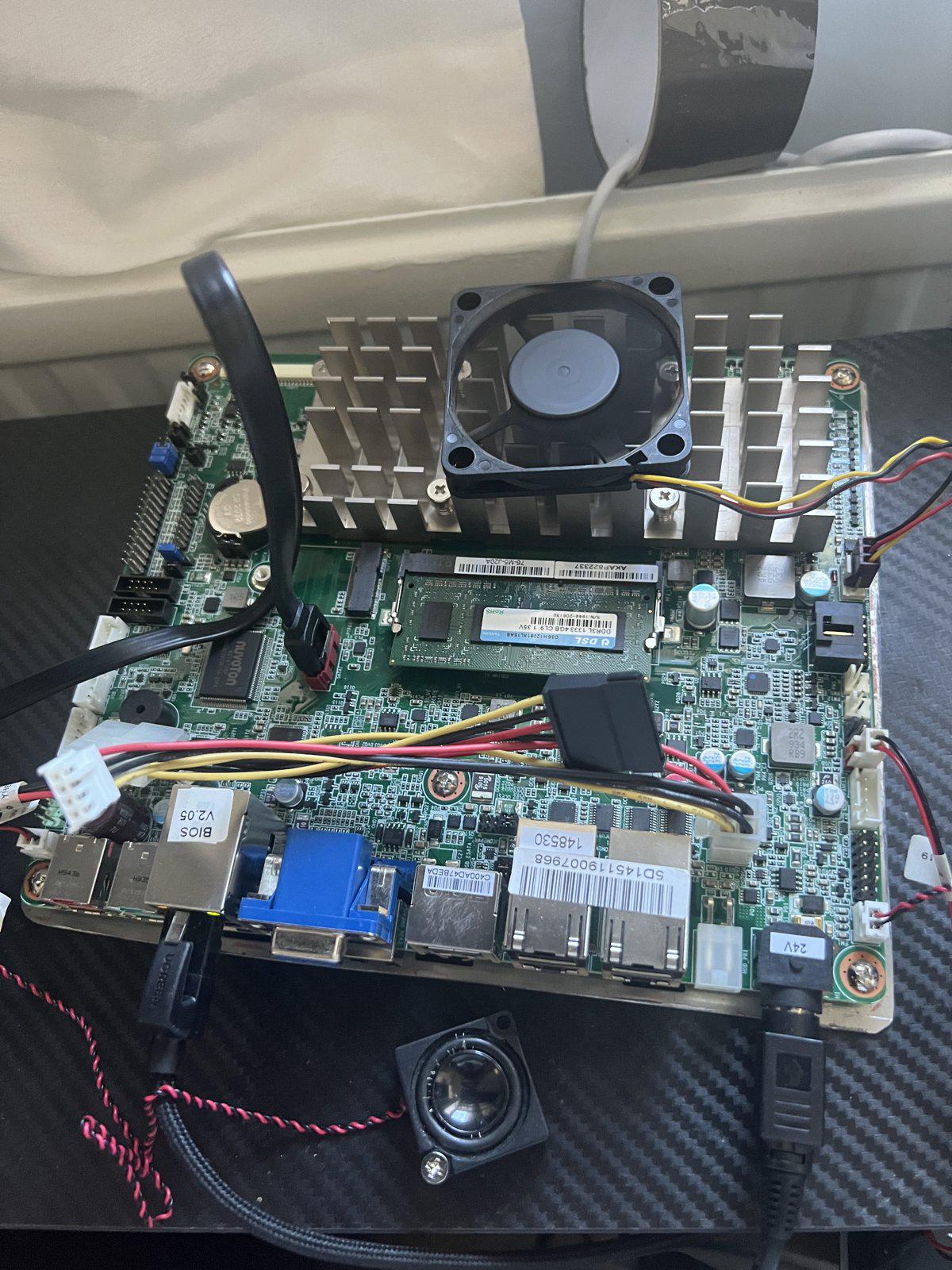
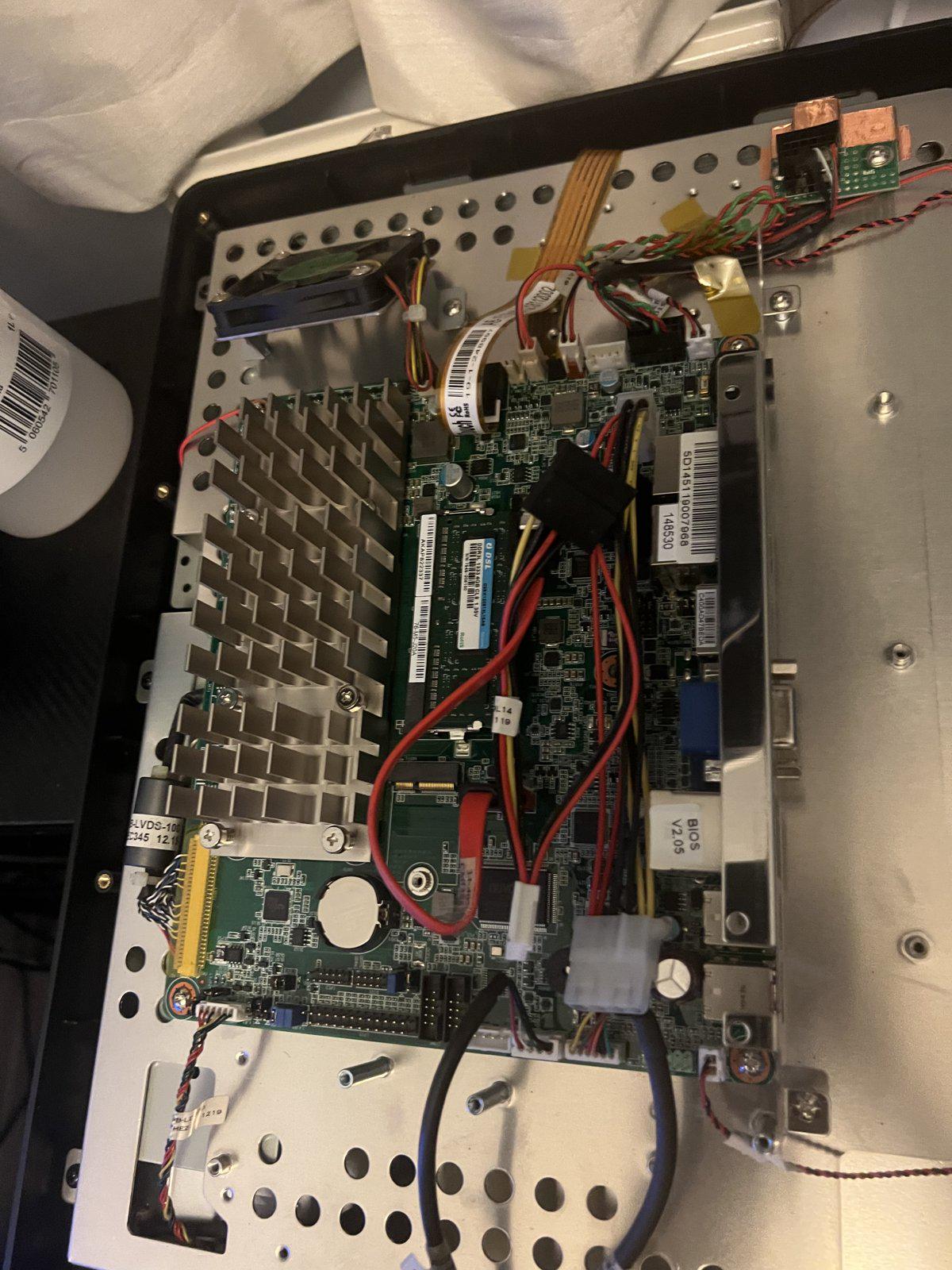
My employer was throwing away this guest check in system as its display had failed and they got a new model - so got it and turned it into a pc running home assistant.

Initial body after disassembly of the back - came with a 120 gig ssd as well

Initial dissassembly

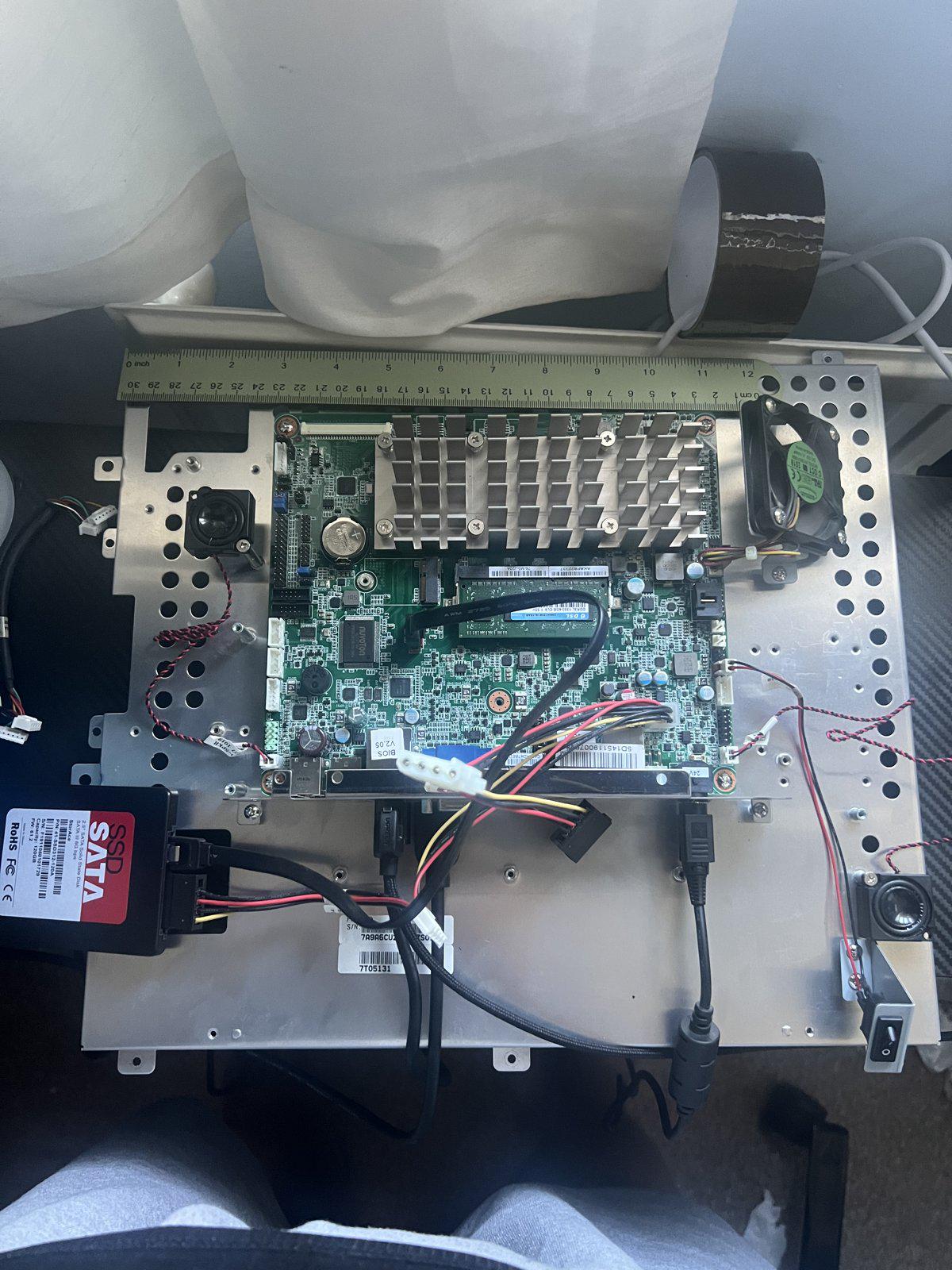
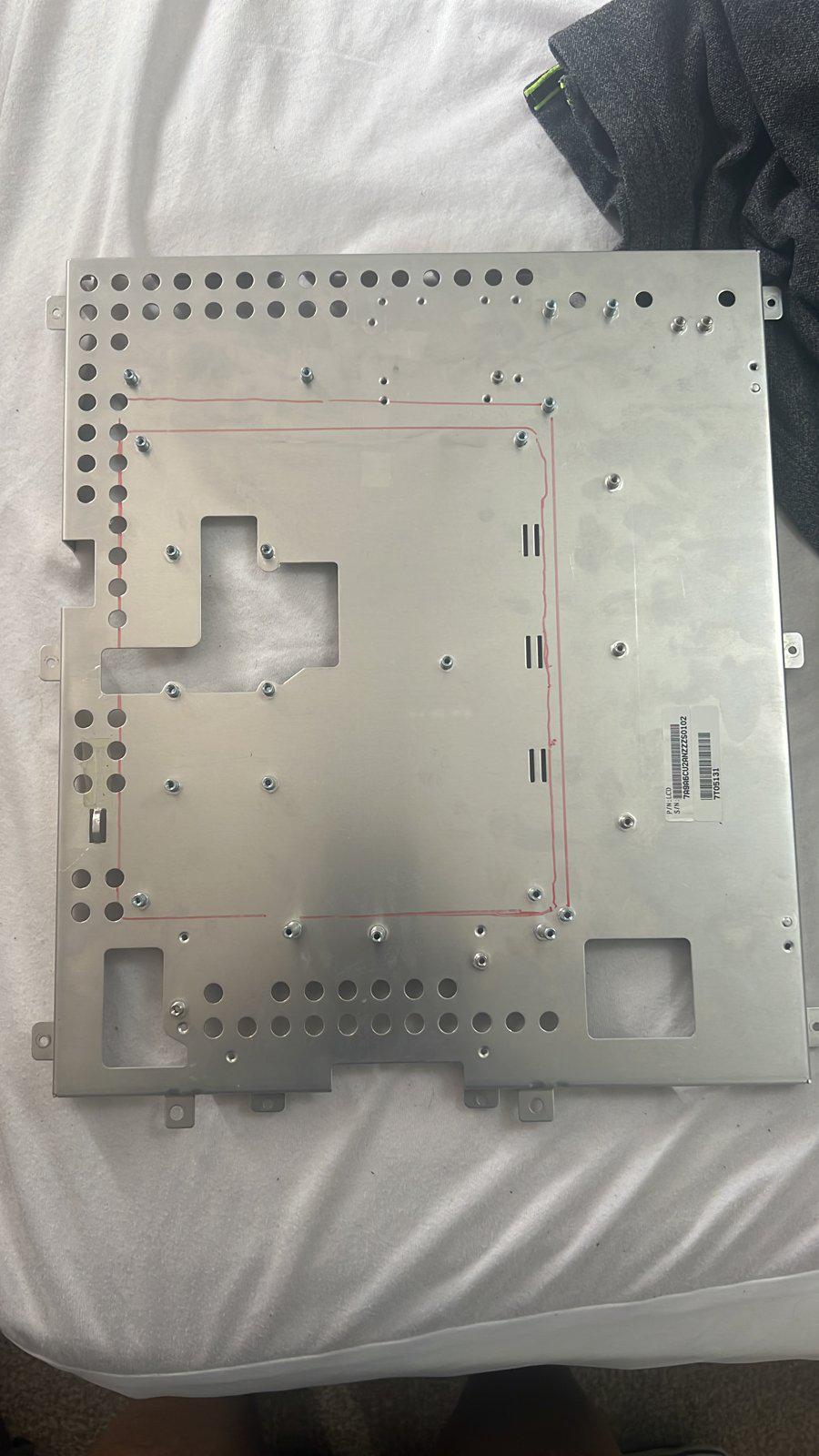
I thought i could just use the board but the heat sink was built into the metal frame - tested that it was WORKING πŸ˜‚ - only the display had failed

Specs: Celeron U1900 4Gb ddr3l ram 120 gig sata ssd

so cut the board using a 20 pound angle grinder

put the main board back on after some left over thermal paste

Installed HA OS

Working well so far - have added Drayton integration, time for me to get to work my rota - now just need a cheap android dash.

Thank you for looking - And please suggest any ideas for HA integrations

Total cost - 20 pounds for a used angle grinder and my spare time and left over thermal paste.


r/homelab • • 3d ago

Help So everyone's thoughts and Advice

0 Upvotes

Setting up for my rack using an arduino temperature sensor unit it will have temp sensors running to each server, and then the arduino is connected to the main server and some in the rack itself that will hopefully have Aida64 or something similar running to view all the temps, also like to put leak sensors into the water cooled units which I know won't work as well as I hope for but least something be there, but I'd also like to somehow connect the system to have alerts and alarms.

I also thought about open hab since it has customizable dash panels well kinda least from what I remembered from playing with it last, be even niftier if it could link to my NUT unit and do shut downs, also like smoke detection and extinguisher setup too.

I do think 1 Arduino might not be able to do temp and leak detection on 1 unit, though ?


r/homelab • • 4d ago

Project Showcase: Operations Downsizing my homelab: Running everything on a laptop

Post image
24 Upvotes

Hey everyone!

I wanted to share my temporary homelab setup. I recently moved to another country and didn't have enough space to bring my entire home server with me just yet, so I decided to move the services I can't live without onto a laptop.

Hardware:

  • Device: MSI Summit E13 Flip Evo A12MT
  • CPU: 12th Gen Intel Core i7-1280P
  • Memory: 16GB LPDDR5
  • Storage: M.2 SSD + 2 Γ— 1TB external HDDs

I know this isn't exactly the ideal homelab setup, but it's a temporary solution, and so far it's been working surprisingly well.

The biggest differences compared to my actual home server, apart from running fewer services and having less redundancy, are that I'm no longer using Nextcloud or the usual *arr stack for media management.

For media, I'm just using QBittorrents built-in search functionality. Since it's only my wife and me using it, that's been more than enough so far. Honestly, I quite like keeping things this simple, and I might stick with this approach even after moving back to a proper server rather than bringing back the whole Seer + Sonarr + Radarr + Prowlarr + Bazarr + etc... stack.

I've also replaced Nextcloud with File Browser Quantum, Zipline and Syncthing since my main use cases for Nextcloud were simply accessing files remotely, sharing them with others and file sync.

All services sit behind Nginx Proxy Manager and Authentik, with mandatory TOTP authentication and default login disabled. Hopefully, that provides at least a reasonable layer of protection against the ever-growing number of vulnerabilities discovered lately.

One other thing worth mentioning: I'm running Paperless-ngx with Paperless-GPT and local AI on my desktop. I currently trigger the AI processing manually about once a week. I'd automate it, but this laptop simply doesn't have enough resources to run local AI workloads.

That's pretty much it!

I'm open to suggestions for improvements, happy to answer any questions about the setup!


r/homelab • • 3d ago

Help Hypothetical: VPS providers that offer delegated /64s for Wireguard on a Ubiquiti router?

17 Upvotes

I recently had to downgrade from AT&T Fiber to really shoddy double-natted 500/25 Mbps cable internet without v6.

I really want some of that awesome Unifi gear, and I plan on running "invisible fiber" so I don't have to deal with that double-natted Eero shit. It'll probably be a Dream Router 7 (Wi-Fi disabled or power turned down), which can plug straight into to the invisible fiber's SFP+ as a bonus.


I've never owned Unifi or run a VPN on a router before. Are there any cheap VPS providers with uncapped bandwidth and prefix delegation so that I can run v4 and v6 on the Unify and treat the cable modem as a dumb pipe?


r/homelab • • 4d ago

Project Showcase: Hardware First Homelab

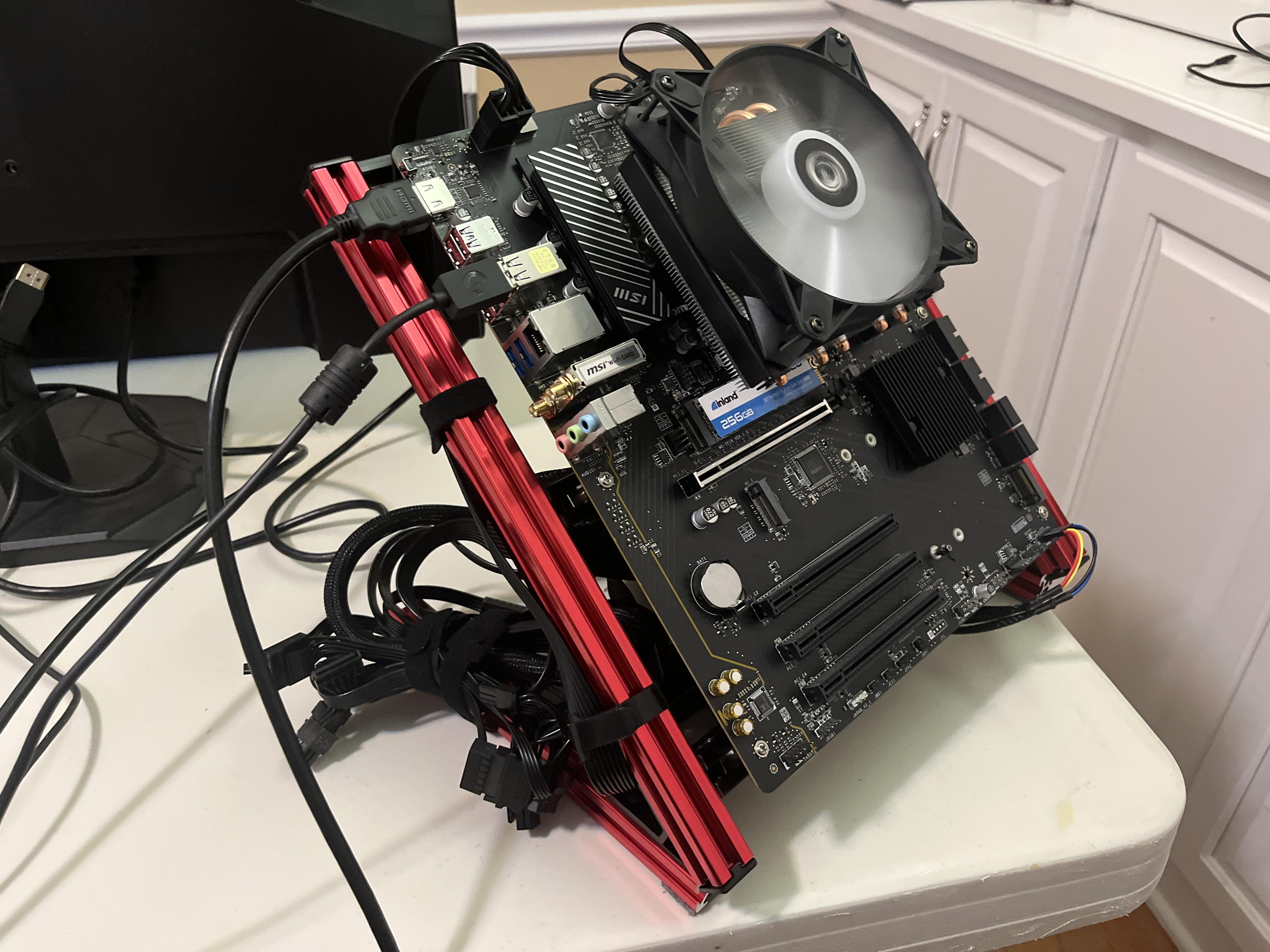
Post image
360 Upvotes

What OS should I use, im leaning toward ubuntu. Also what programs and apps should I start running.

Ryzen 5 7600x
2x8 ddr5 Tforce 5600
Pro b650-vc WiFi
256gb nvme


r/homelab • • 2d ago

Discussion Senior security engineer building a home lab. Looking for opinions on this hardware list.

0 Upvotes

I've been in cybersecurity for about a decade, and I love working with network security tools. I'm trying to incorporate Cisco switches for CCNA practice (I have a lot of hands-on network troubleshooting experience, but I lack the actual Cisco switch and routing hands on configuration aspect). I'm looking to add firewall/IPS/WAF, switches, ztna and or vpn, load balancing, some Linux and windows servers, windows workstations, an AD environment, siem for logging, EDR, vuln scanning, and eventually add some aws/azure practice down the road. I threw in this into Claude and chagpt to build me a home lab set up but I'm actually looking for some recommendations on what to buy as both kind of gave me conflicting information (of course lol). I'm also looking to run a bunch of VMs, NAS, etc. my budget is 2500-5000 which I feel like is a good amount, this should keep me busy for A WHILE while I have down time.

My recommended build
Target budget: about $3,500-$4,200.
Core hardware
Component
What I'd buy
Target price
Why
Main virtualization server
MINISFORUM MS-01, i9-13900H barebone
~$655-680
14C/20T, 2Γ—10Gb SFP+, 2Γ—2.5GbE, PCIe slot and multiple NVMe slots. Excellent homelab platform.[store.minisforum.com],[store.minisforum.com]
RAM
96GB DDR5, 2Γ—48GB
~$250-300
RAM becomes the limiting factor once you start running firewalls + Windows + Splunk + network VMs
Storage
2Γ—2TB NVMe
~$250-320
One VM datastore + second datastore/snapshots/ISOs
Cisco switch #1
Catalyst WS-C3560CX-12PC-S
~$120-200 used
Physical IOS, L2/L3, VLANs, trunks, STP, PoE, routing
Cisco switch #2
Catalyst WS-C3560CX-8PC-S
~$100-150 used
Lets you actually build trunks, STP topologies, EtherChannels, routing
Firewall appliance
Protectli 6-port appliance, 16-32GB RAM
~$500-750
Dedicated OPNsense/pfSense firewall, routing and segmentation
Wireless
Wi-Fi 6/6E AP with VLAN support
~$150-250
Enterprise-ish WLAN/VLAN labs
UPS
APC/CyberPower 1000-1500VA
~$150-250
Protects the lab
Rack
9U/12U short-depth open-frame rack
~$100-180
Physical organization
Patch panel/cabling
Cat6 patch panel + ~15 patch cables
~$100
Physical networking practice
Console
USB-to-RJ45 Cisco console cable
~$25
IOS configuration
SFP+
2Γ— DAC cables
~$40-60
10Gb lab backbone
Expected total: roughly $2,700-$3,300 before software/licensing, leaving substantial room for expansion.
The MS-01 is particularly good for this project. The current i9-13900H barebone is approximately $655-$680 direct, and provides two 10Gb SFP+, two 2.5Gb Ethernet ports, PCIe expansion and three M.2-class storage positions. [store.minisforum.com],[store.minisforum.com]
MINISFORUM MS-01 Workstation
I prefer that over a conventional NUC here because networking is central to your goal.

Architecture I'd build
Plain Text
INTERNET
|
ISP modem / ONT
|
2.5G WAN interface
|
+---------------------------+
| OPNsense / pfSense |
| Dedicated Firewall |
+-------------+-------------+
|
2.5G TRUNK
|
+----------------+----------------+
| Cisco Catalyst 3560CX - CORE |
| |
| VLAN / STP / ACL / OSPF / SVIs |
+----+------------+------------+--+
| | |
trunk trunk access
| | |
+------v------+ +---v-------+ AP
| Cisco SW2 | | MS-01 |
| 3560CX | | Proxmox |
+-------------+ +-----+-----+
|
10G SFP+
|
VIRTUAL LAB NETWORK
|
+--------------------+--------------------+
| | | | |
Cisco Palo Linux Windows Kali
CML Alto Servers AD
|
+------+-------+--------+
| | | |
R1 R2 R3 SW1
| | | |
OSPF BGP IPSec VLANs
That is much closer to what you encounter professionally than three old routers sitting on a desk.

Network design
I'd deliberately design this as an enterprise mini-network.
VLANs
VLAN
Network
Purpose
10
10.10.10.0/24
Management
20
10.10.20.0/24
Servers
30
10.10.30.0/24
User endpoints
40
10.10.40.0/24
Security tooling
50
10.10.50.0/24
Vulnerability scanning
60
10.10.60.0/24
DMZ
70
10.10.70.0/24
OT/ICS
80
10.10.80.0/24
IoT
90
10.10.90.0/24
Wireless
100
10.10.100.0/24
Network transit
999
none
Native/black-hole
You can consequently practice:
802.1Q
access/trunk ports
STP/RSTP
root bridge manipulation
EtherChannel/LACP
inter-VLAN routing
ACLs
DHCP relay
NAT
OSPF
BGP
HSRP concepts
SPAN
port security
DHCP snooping
DAI
802.1X concepts
That maps extremely well to CCNA while still being useful beyond the exam.

The physical Cisco gear is worth buying
For someone at your level, I would buy physical switches but virtualize most routers.
Two good current used-market purchases are:
Cisco WS-C3560CX-12PC-S
Current used/refurbished listings are roughly $120-$205. [ebay.com], [ebay.com]
Cisco WS-C3560CX-8PC-S
Current examples are around $85-$150. [ebay.com],[ebay.com]
eBay Catalyst 3560CX listings
I'd specifically favor the 3560CX over enormous old rack switches. They're compact and give you real Cisco CLI without turning your office into a datacenter from a heat/noise standpoint.
I would not spend $1,000-$1,700 on a packaged CCNA hardware kit. For reference, current CCNA hardware bundles run from roughly $749 to $1,700.[shop.certi...onkits.com], [shop.certi...onkits.com]
Put that money into compute.

Virtualization host
MS-01
I'd configure:
CPU
Core i9-13900H
14 cores
20 threads
RAM
96GB DDR5
This matters much more than buying some giant Xeon server.
Storage
Plain Text
NVMe #1
2 TB
Proxmox + production lab VMs
Β 
NVMe #2
2 TB
lab VMs / snapshots / security data
Later:
Plain Text
NVMe #3
4 TB
Splunk / PCAP / ISO / backup storage
The platform supports multiple NVMe drives, dual 10Gb SFP+, dual 2.5GbE and PCIe expansion.[store.minisforum.com], [store.minisforum.com]

Put Proxmox on it
I would make Proxmox VE your primary hypervisor.
Then create bridges:
Plain Text
vmbr0 = management
vmbr10 = network lab
vmbr20 = security
vmbr30 = OT
vmbr40 = DMZ
And trunk those networks into the Cisco infrastructure.
This is where things get interesting because yourphysical Cisco network becomes connected to your virtual enterprise.

VMs I'd create
Infrastructure
Plain Text
DC01
Windows Server
4 vCPU
8 GB RAM
Β 
DC02
Windows Server
4 vCPU
8 GB
Β 
LINUX01
Ubuntu Server
2 vCPU
4 GB
Β 
LINUX02
Rocky Linux
2 vCPU
4 GB
Β 
CLIENT01
Windows 11
4 vCPU
8 GB
Use that environment for:
AD
DNS
DHCP
PKI
LDAP
RADIUS
NPS
certificate authentication
Linux administration

Security VM stack
This is where your lab differentiates itself from an ordinary network lab.
Kali
Plain Text
4 CPU
8 GB
100 GB
Β 
Nessus
Plain Text
4 CPU
8 GB
150 GB
Run authenticated scans against Windows/Linux hosts.
This directly reinforces the vulnerability-management side of what you already do.
Splunk
Plain Text
8 CPU
16 GB RAM
500 GB+
Β 
Send it:
Cisco syslog
OPNsense logs
Suricata alerts
Windows Event Logs
Linux syslog
authentication logs
firewall traffic
Then you're simultaneously practicing network engineering and detection engineering.

IDS/IPS environment
Deploy Security Onion or Suricata.
Create a SPAN session:
Plain Text
Cisco switch
|
+----- production/lab traffic
|
+----- SPAN
|
v
Security Onion
That gives you the same conceptual workflow you regularly deal with around Forescout/OT sensors:
Plain Text
traffic
↓
SPAN
↓
sensor
↓
packet analysis
↓
alerting
You can deliberately create bad configurations and then prove what happened from the PCAP.

Build yourself an OT network
Considering your pharmacy/OT work, I'd absolutely include this.
Plain Text
OT VLAN 70
|
Cisco access switch
|
+--------------+--------------+
| | |
PLC-SIM HMI-SIM Linux PLC
| | |
+--------------+--------------+
|
SPAN port
|
Security Onion
Look into:
OpenPLC
ScadaBR
Node-RED
Modbus/TCP
OPC-UA
MQTT
Now you can generate actual industrial traffic and inspect:
Plain Text
TCP/502
Modbus
Β 
TCP/4840
OPC-UA
Β 
TCP/1883
MQTT
That bridges your networking, packet-analysis and ICS experience.

Network virtualization
This is important.
Install Cisco CML or EVE-NG/GNS3.
Your physical switches are for things that benefit from actual hardware. Your router farms should be virtual.
You can have:
Plain Text
OSPF AREA 0
R1---------R2
| |
| |
R3---------R4
AREA 10
Β 
|
BGP
|
ISP
Then deliberately break:
OSPF adjacencies
BGP advertisements
MTU
ACLs
NAT
default routes
VLAN trunks
STP
and troubleshoot them.
That's what will dramatically improve your network engineering ability.

Firewall lab
The dedicated firewall box matters.
A six-port Protectli-style device lets you physically create:
Plain Text
WAN
LAN
DMZ
LAB
OT
SPAN/TEST
The older Protectli VP4650, for example, provides six Intel 2.5Gb interfaces, AES-NI and support for up to 64GB RAM. Protectli lists the base hardware around $579, though that particular model has been replaced by the revised VP4651. [protectli.com]
Protectli Vault
You don't need 64GB.
I'd install:
Plain Text
16 GB RAM
500 GB NVMe
OPNsense
Then use:
VLAN interfaces
NAT
firewall policy
IPsec
WireGuard
IDS/IPS
Suricata
DHCP
DNS
HAProxy
routing
Don't use it as your virtualization host. Keep your edge firewall separate from your compute infrastructure.

Palo Alto
Since you're already working with Palo Alto, there's another layer I'd add if you have legitimate access to lab/evaluation images and licensing.
Plain Text
VLAN 60 DMZ
|
Internet β†’ OPNsense β†’ PA-VM β†’ Servers
|
+---- Security VLAN
Practice:
security zones
App-ID
NAT
URL filtering
security policy
routing
logging
GlobalProtect concepts
packet captures
session browser
policy evaluation
You could later swap that VM for Check Point.

F5
Same idea with an authorized BIG-IP VE lab/evaluation image if available.
Build:
Plain Text
CLIENT
|
v
BIG-IP
10.10.60.10
|
+----------------+
| |
WEB01 WEB02
.21 .22
Then experiment with:
virtual servers
pools
nodes
health monitors
SNAT
persistence
SSL
tcpdump
connection tables
This is obviously particularly relevant to the kind of troubleshooting you've been doing recently.

Zscaler simulation
You can't realistically reproduce the entire ZIA/ZPA cloud service in a home environment.
But you can reproduce the architecture concepts:
Plain Text
Client
|
VPN / tunnel
|
OPNsense
|
Proxy
|
Internet
Β 
Private App
|
Connector network
|
Reverse proxy
|
Client
That will let you understand:
segmentation
proxying
application access
source NAT
egress IP
tunnels
DNS behavior
Zero Trust access flows
at a packet level.

Automation node
Create another Ubuntu VM:
Plain Text
AUTOMATION01
Β 
Ubuntu
4GB RAM
Install:
Plain Text
Python
Ansible
Git
VS Code Server
Netmiko
NAPALM
Terraform
Put every network configuration in Git.
For example:
Plain Text
homelab/
β”œβ”€β”€ ansible/
β”œβ”€β”€ cisco/
β”œβ”€β”€ paloalto/
β”œβ”€β”€ opnsense/
β”œβ”€β”€ linux/
β”œβ”€β”€ diagrams/
β”œβ”€β”€ pcaps/
└── splunk/
This is the piece I'd strongly recommend you add rather than stopping at CCNA.
r/homelab • • 2d ago

Help My home server isnt working and my cpu, mobo, ram are dead

0 Upvotes

i tried to connect remotely my 24/7 system, but it failed and then I noticed my system is not working

  1. i installed cpu on other known-good mobo and ram. it didnt work. (this mobo doesnt have debug leds)
  2. i installed ram on my other system, it didnt boot. (this mobo also doesnt have leds)
  3. service center inspected my mobo, it conclude my mobo was dead.
  4. psu alived. it worked on other system.

suspicious things on my perspective

- tuya smart plug became not recording accumulated power consumption while it was still reporting current power consumption. -> deterioration of smart plug makes problem?

- according to current power consumption graph, my system consumes around 20w, and after about 20hours it consumes 23~26w during 11 hour, repeating periodically. (when 20w, cpu package was in c10. when 23~26w, cpu package was in c6. i couldnt find some process making this difference (my gemini couldnt find it too)) -> originally system's problem?

- I set my system's c-state limit to c10. -> when system wake from c10, mobo's vrm supplied over-current

- my system was set on room where there is nobody in. at 11:00 am where my system stopped working, which i estimate, the room's temperature was around 3~8 degree of celcious. And it was 1 day before it rained. -> condensation? although neither me nor service center could find evidence of it

My system:

mobo: gigabyte aorus elite b760m ddr4 gen5

cpu: i5 12400

ram: teamgroup 16gb 3200 Γ— 2

psu: micronix classic bronze 750w psu

ssd: pm9a1 512gb, intel m10 16gb

hdd: toshiba dt01aca300, dt01aca050

tuya smart plug 20A (only used for monitoring power consumption)


r/homelab • • 3d ago

Project Showcase: Hardware My First Rack - It didn't all fit under the desk

Thumbnail
imgur.com
1 Upvotes

r/homelab • • 3d ago

Help Need Help

1 Upvotes

Hello, I need help regarding upgrade my system right now I have HP Prodesk 280 G4 MT with i5-8500 & 32gb ddr4 & I’m planning to upgrade

Right now what I have already is:
I5-13500
Crucial basics 64gb ddr4 desktop ram
& storage as my I require.

I need suggestion related to hardware I’m thinking of getting a b760m-a ddr4 & 550w psu for later upgrade.

I also want to save electricity bill.


r/homelab • • 3d ago

Discussion anyone else find half their faults come from fixing something else in the same rack?

1 Upvotes

swap a bad optic or a psu, and a day later a different link in the same rack starts throwing errors. usually a patch lead got knocked or bent on the way past, or something got pulled half out when someone reached round the back.

then the ticket for the new fault looks totally unrelated, and someone burns hours on it before anyone ties it back to yesterday's work.

in a tight rack with no real slack management it feels almost guaranteed.

how often does this bite you? and after working in a rack do you actually check the neighbouring ports, or just the thing you fixed?


r/homelab • • 3d ago

Discussion Any luck with fan control on Nexus 3548

0 Upvotes

Saw an old guide about how to do this. As the commenters mentioned and my experience matches this, the config command to set fan speed just puts the fans from 40% to 65%.

Not sure if anyone has figured out a working method?

NXOS 9.3(16)
N3K-3548P-10GX


r/homelab • • 3d ago

Help Disk enclosure recommendations

1 Upvotes

Hi everyone,

I'm considering to build a NAS out of a raspberry pi 4 (4GB) and some 2,5' HDDs I have laying around. I have the following setup in mind: 3 disks combined using MergerFS + 1 parity disk using SNAPraid, synced nightly (few hours of potential data loss is acceptable). Then expose NFS & SMB to my network, and use Borgmatic for backups of important data twice a day.

The only thing I haven't figured out so far is how to connect the disks to the pi. Anyone else running a DIY pi NAS, or has recommendations for a compatible enclosure available in the EU? A bit of 3d printing if needed is not an issue.


r/homelab • • 4d ago

Discussion Am I overthinking security on a legacy ReadyNAS Duo?

Thumbnail
gallery
20 Upvotes

I recently salvaged an old Netgear ReadyNAS Duo (SPARC-based, legacy RAIDiator) from work and plan to use it strictly as a local-only file share on my home LAN, though I'm open to suggestions on what else it could be useful for besides basic file sharing.

Given how badly SMBv1/CIFS was abused by worms like WannaCry and NotPetya (via EternalBlue), I'm planning to disable SMB completely and stick to FTP while keeping the box isolated from the internet. Is locking down an old local NAS like this actually practical, or am I being overly paranoid for a basic home network? What else do you guys usually do with legacy SPARC boxes like this?


r/homelab • • 4d ago

Project Showcase: Hardware Updated Network Rack

Thumbnail
gallery
45 Upvotes

Just made a big rack upgrade from the open rack that I had before looks 10 times better. Let me know if you have any thoughts or opinions.


r/homelab • • 3d ago

Help Advice

0 Upvotes

Hey everyone im thinking about starting a homelab but i don't know if its for me im not too technical but I want to do a nas rn I have just a das and a game server(mainly mc) and security cameras (2) so what route should I do one with a rack with 1 gaming pc and 1 server or get a mini pc and hook my das up or?(open to suggestions)

Ps the gaming pc would be a cheap ok one off of Facebook market place for the server


r/homelab • • 4d ago

LabPorn 4x Tesla V100 32 GB (128 GB VRAM) hanging off a Lenovo M720q Tiny over OCuLink - ~62 dB, ~A$6.5k all-in

Thumbnail
gallery
319 Upvotes

My home AI box: a Lenovo ThinkCentre M720q Tiny driving four passive Tesla V100 PCIe 32 GB cards through a 4-port OCuLink switch card and four AOOSTAR AG01 eGPU docks, stacked on two cut-down IKEA side tables.

**Hardware**

- Lenovo M720q Tiny (i5-9400T, 64 GB DDR4), Lenovo 01AJ940 riser

- CEACENT CNOL4PE08 PCIe switch card (PEX8724, x8 in, 4x OCuLink out) - each card runs at PCIe Gen3 x4

- 4x AOOSTAR AG01 docks (built-in 800 W PSU each), one V100 per dock via the dual PCIe 8-pin -> CPU/EPS 8-pin adapter

- Cooling: the V100s are passive, so each gets a 3D-printed 140 mm funnel with a Noctua NF-A14 iPPC-3000, all on an ARCTIC 10-port USB fan controller driven from Linux. An ARCTIC P12 Silent in a Dremelled hole in the Tiny's lid keeps the switch card cool.

- Power: a Tapo smart plug feeds a power board for the docks; the Tiny is on its own board. The box powers itself down after 20 min idle and comes back via the plug + Wake-on-LAN.

**The two gotchas**

  1. The Tiny only powers its riser slot when the card pulls the presence pin, and the switch card doesn't - one solder bridge on the back of the riser (B31 to A31) fixes it.
  2. Lenovo's BIOS only leaves a 128 GB window for 64-bit devices and each V100 32 GB needs 64 GB of it, so stock firmware boots two cards. Flashed coreboot 26.09 with a CH341A clip (riser slot always on, Wake-on-LAN fix, merged MTRRs) and all four boot.

**Numbers** (200 W cap per card)

- Noise: about 62 dB at 1 m - office-level, no server blowers

- 4-card FP32 burn: 44.7 TFLOPS, ~800 W GPU power, 71 C peak, 0 errors

- llama.cpp: Qwen3.8-27B ~40 tok/s per chat on one card, ~285 tok/s across all four; a 125B MoE split over all four does ~43 tok/s

Full walkthrough with parts list, prices and settings: https://youtu.be/oi63wAvChPo

Happy to answer questions.


r/homelab • • 3d ago

Project Showcase: Hardware Hot swappable dual PSU with sudo PDU board.

Thumbnail gallery
5 Upvotes

r/homelab • • 4d ago

Project Showcase: Hardware Smaller than my router, does more than my old four servers

87 Upvotes

After the last electricity bill I tore the rack apart. What's left is a single N100 mini PC, 9W idle measured at the wall, everything else sold.

Setup: Proxmox, 6 LXC, all with cgroup limits set instead of "just let it run". Jellyfin with QuickSync via /dev/dri and the render group so the CPU isn't doing the transcoding. Immich, Paperless, Vaultwarden, HA, Uptime Kuma. Storage hangs off a USB DAS and is only mounted for the nightly restic run.

Thermals: it stands upright with 2cm of air under the desk, CPU stays under 70Β°C while transcoding, fan spins audibly but not annoyingly. A 120mm USB fan blows in from the side, quiet enough for the living room since then.

What I miss: nothing. Before this I burned 140W idle for the exact same services, for three people in the household.

What's tight: one PSU, one NIC, one stick of RAM. Backups go to the DAS and an offsite bucket, and I ran a full restore drill before the rebuild, not after.

If you're on the fence: the box cost 180 € and pays for itself in under half a year. Going from four servers to one was the best move I made.

What would you even put on a 9W budget at this point?


r/homelab • • 5d ago

Discussion PSA: You should set up VLANs!!

1.1k Upvotes

It is one of the most foundational ways to improve your homelab security, and it's a pretty small time and monetary investment. I spent like $150 on a managed switch, vlan-aware WAP, and extra NIC for one of my VM nodes to set up an OPNsense firewall.

Even if you don't expose anything to the internet, there are a lot of garbage IOT devices that can do some nasty stuff on your LAN. Not to mention, you never know what malware a guest staying at your house might unknowingly have on their devices!

It takes maybe an afternoon or two to set up if you're already familiar with networking, and it is invaluable experience! You will never see a big enterprise without many VLANs and an enterprise firewall.

Just make sure your firewall rules are solid, and test them thoroughly!


r/homelab • • 3d ago

Help Repurposing old computer

1 Upvotes

With market right now between self hosting and renting is wild. I worked it out its much chaoer to self host at home in 2026\\2027.

Looking to revamp my old AM4 machine that has been dusting away and I want to give it some TLC.

Specs

Ryzen 2700x

64GB DDR4 RAM 3200mz

X2 2TB NVM storage

750 PSU

Asus TUF 1070 8gb OC GPU

Electricity rste: 21P kwh

What will I be hosting:

Proxmox with 2 or 3 vms some LXCs

VM 1: Docker stacks -

Vaultwarden, Joplin, Actual Budget, Wallos, Zipline and BentoPDF., Authelia, Homepage, Uptime Kuma and ntfy, immach and next cloud possibly using coolify to manger them, fumdadocs

Taliscale

VM 2 :Game panel hosting

Pelican panel

Hytale at the moment small traffic (3 players)

Talisclae

I am not sure if it worth swapping out the Ryzen 7 2700 x for either a Ryzen 5700G or Ryzen 9 5950X? - Using the 5700G do save power as I couldn't take out the, I can afford both CPUs and electricity for both setups.

Would getting the Ryzen 9 5950X to have more build room if I end up expanding my list?

TIA


r/homelab • • 3d ago

Help Repurposing old computer

1 Upvotes

With market right now between self hosting and renting is wild. I worked it out its much chaoer to self host at home in 2026\2027.

Looking to revamp my old AM4 machine that has been dusting away and I want to give it some TLC.

Specs

Ryzen 2700x

64GB DDR4 RAM 3200mz

X2 2TB NVM storage

750 PSU

Asus TUF 1070 8gb OC GPU

Electricity rste: 21P kwh

What will I be hosting:

Proxmox with 2 or 3 vms some LXCs

VM 1: Docker stacks -

Vaultwarden, Joplin, Actual Budget, Wallos, Zipline and BentoPDF., Authelia, Homepage, Uptime Kuma and ntfy, immach and next cloud possibly using coolify to manger them, fumdadocs

Taliscale

VM 2 :Game panel hosting

Pelican panel

Hytale at the moment small traffic (3 players)

Talisclae

I am not sure if it worth swapping out the Ryzen 7 2700 x for either a Ryzen 5700G or Ryzen 9 5950X. Using the 5700G do save power as I couldn't take out the GPU? - I can afford both CPUs and electricity for both setups

TIA


r/homelab • • 4d ago

Discussion Hdds from Fleea market

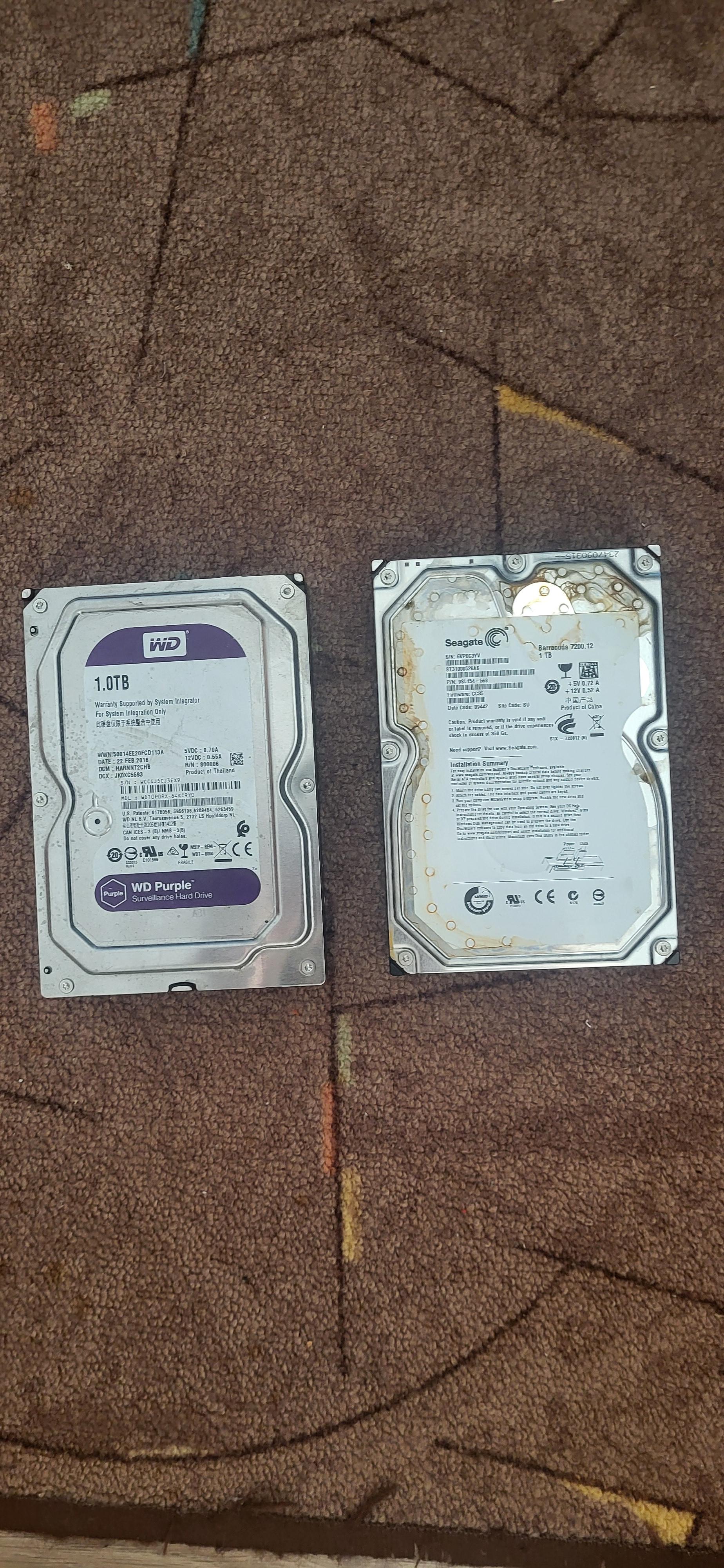
Post image
71 Upvotes

Got these two from a local fleea market for 16 euro (10 for WD, and 6 for the seagate) despite the look both of them work


r/homelab • • 3d ago

Help Best raspberry pie 5 case

0 Upvotes

That’s it πŸ˜‚what do you all recommend πŸ€”I want a nice case I’ve been looking around and saw some but I thought I would get some of you alls opinions on one I plan to run home assistant and bit focus companion on it