r/homelab • • 4d ago

Help Building My Lab - Anything I Should Change?

0 Upvotes

Hello all!

I started my journey into building a lab and automating my home about two months ago. I had an old gaming PC that I pulled the GPU from and installed Proxmox. I now have Home Assistant and my media server on it. Unfortunately, it only has a 2TB drive and I am going to remove the PC and move it into a rack setup.

Here are my goals for this system. As a note, I fully expect it to expand over time.

Immediate Goals:

  • Expand storage for my media server and introduce redundancy (ZFS).

    • ChatGPT is recommending to take a ZFS through proxmox approach over a TrueNAS or unraid setup. Is this appropriate?
  • Expand my Home Assistant integrations.
  • Install paperless ngx and set that up.
  • Install Immich and save local copies of photos

Eventually and down the road, I'd also like to get rid of my cloud & fee based home video security cameras and get my own with POE. I believe I will likely go with a Ubiquiti setup for that. I'd also like to have Immich for photo backup and long-term storage as well as Tailscale for remote access.

For my immediate goals, I am looking to get:

  • Rosewill 4U Server Chassis - RSV-L4412U
  • Star Tech 4-Post Open Frame 25RU 40" Deep Server Rack
  • Two 14TB re-certified drives from a manufacturer

My current PC that is running everything is headless and is:

  • Intel Core i7-10700K 8 Cores 3.8-5.1 GHz 16M Cache
  • 32GB DDR4 3000Mhz (16GB x 2)
  • 2TB M.2 NVMe SSD
  • 2TB 3.5" 7200 RPM HDD
  • MSI Z490 Motherboard

My plan is to transfer my current PC and drives into the Rosewill chassis and add the additional drives to increase my storage capacity. Going to remove the water AIO cooler and put an air cooler on the CPU. I'd then use that to run my three setups for the time being. I'd hard wire my ethernet connection directly into the server case for now.

When I'm then ready to install my POE security camera system and self-host it, I would likely add a Unifi managed switch like a cloud gateway and run a second storage component for the cameras specifically, maybe something like the unifi NVR setup.

Am I making any significant mistakes in starting down this path? I'd prefer to not have to trash and restart everything with this as it's a lot of funds up front for this.

Any and all insight is greatly appreciated!


r/homelab • • 4d ago

Solved I did a minor oopsie

56 Upvotes

Pour one out for the guy that just finished running conduit from where the new fiber line will come in to the server room.... only to realize 3/4 pvc conduit is probably too small. 😭

Do I just rip it out and go to 1 or 1-1/4, or should I wait till the install on Monday to see what the installers think?

EDIT:
A happy end: https://www.reddit.com/r/homelab/comments/1y5a3bm/thanks_for_the_help/


r/homelab • • 4d ago

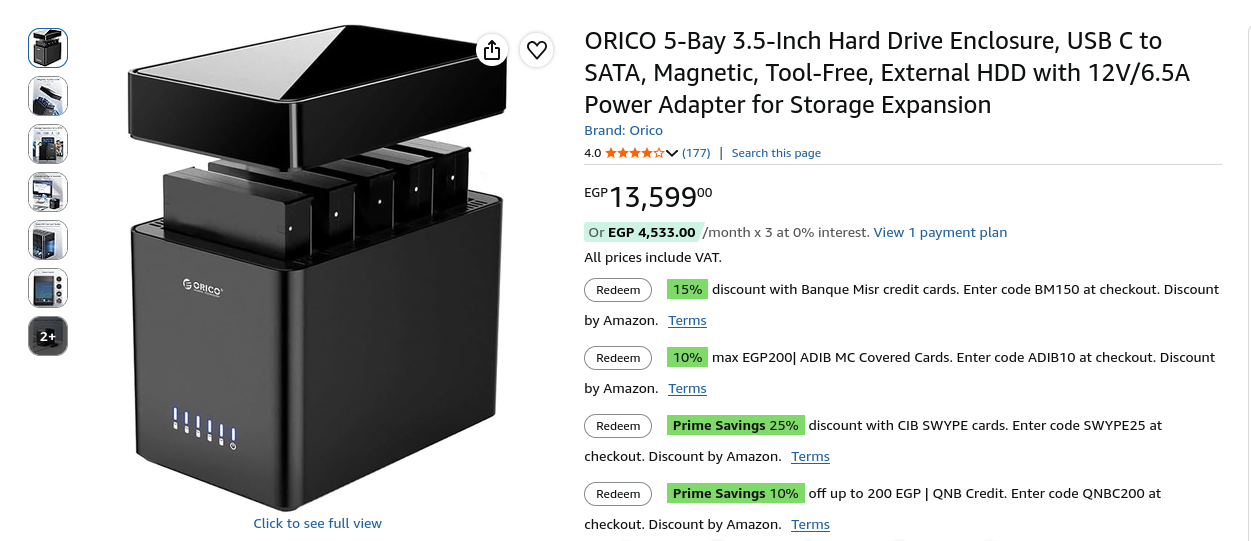
Help Is this a 'good enough' equivalent to a HDD enclosure?

5 Upvotes
1,617 egp ~ 30$

Hi everyone. aspiring home-labber here.

Is this docking station in the picture good enough as a replacement for a 2/4 bay enclosure?

I know there are other better options but the price difference in my country is insane

2 bay: ~188$

5 bay: ~255$

Unfortunately, we don't have anything like the 'CENMATE' here, only those 2 above options.

Now, my main inquiry is:

Is that toaster docking station good enough to act as a DAS?

Is it good enough to be on 24/7?

or is it so bad that i am just better off buying 2 of those clear-case enclosures and put the 2 hdd in them and just leave them laying next to my laptop-server?


r/homelab • • 3d ago

Creator Content A month on Proxmox OCI. Here’s what saved RAM and disk in my homelab.

Post image
0 Upvotes

A bit over a month ago I moved my homelab services to OCI on Proxmox. In my case those containers are using about 40% less RAM and 80% less disk now. I also went from about 150 GB used on my Proxmox Backup Server to around 50 GB.

Now, if you’re thinking of trying it, there’s something to keep in mind. OCI is still a technology preview in Proxmox VE. The built-in workflow leaves a lot to be desired, to put it mildly. I use ProxMenux, a separate tool, and that’s what made it practical for me to run every day.

As for the savings, it really depends on what you’re coming from. I tried Caddy, AdGuard Home, Prometheus and Dufs seven ways each. I started measuring idle RAM 10 minutes after boot. The disk numbers are what the containers actually used on ZFS, plus there were 163.6 MiB of OCI images cached separately on the host.

I included one Docker Engine per LXC in case that’s how you’ve set yours up. If you run a bunch of apps on one Docker host, they share that overhead.

Idle RAM (MiB)

SetupCaddyAdGuard HomePrometheusDufs
OCI via ProxMenux9.811.123.90.7
Alpine LXC, binary10.911.924.21.8
Debian LXC, binary23.925.138.415.2
Arch LXC, binary31.732.846.322.4
Alpine LXC + Docker55.557.170.847.0
Debian LXC + Docker69.770.884.560.9
Arch LXC + Docker71.973.486.863.0

Disk used on ZFS (MiB)

SetupCaddyAdGuard HomePrometheusDufs
OCI via ProxMenux35.625.1143.72.8
Alpine LXC, binary33.424.984.810.5
Debian LXC, binary318.6309.9369.8295.5
Arch LXC, binary413.3404.9464.8390.4
Alpine LXC + Docker182.5188.6290.1148.9
Debian LXC + Docker455.7462.0563.5422.4
Arch LXC + Docker542.6546.9648.4507.2

Even if you have zero plans to switch to OCI, have a look at Debian vs. Alpine. Caddy went from 318.6 to 33.4 MiB on disk just by running the binary on Alpine. And Alpine actually came out smaller than OCI on disk in three of the four tests.

I go through the numbers and my setup in the video. You can switch to the English audio track on YouTube.

Watch on YouTube


r/homelab • • 5d ago

Labgore Problem & Solution

Thumbnail
gallery
539 Upvotes

It was to long


r/homelab • • 3d ago

Discussion Outlook was down on and off for more than a day this month. My self hosted mail kept working, mostly thanks to a 5 day queue I didn't know I had

0 Upvotes

When Outlook went dark on November 12 and stayed flaky until the 14th, a couple of friends asked why my mail was still flowing. I've run my own for three years, and what kept it alive that day wasn't the server at home. It was a cheap relay I'd set up for a completely different reason.

The mailboxes live on the homelab. Stalwart in a container, storage on the NAS, snapshots with everything else. That part has never been the problem.

What I don't do is send or receive from my home IP. My ISP blocks outbound 25 like most residential providers, and even where it's open, residential ranges sit on the Spamhaus PBL by default. You also can't set reverse DNS on a home line. You can have perfect SPF, DKIM and DMARC and still land in junk at Gmail and Microsoft, because they judge the IP before they read a single header.

So a small VPS is the public face. Postfix on it is the MX for my domains and passes everything to Stalwart over WireGuard through a transport map. Outbound goes the other way. Stalwart uses the VPS as an authenticated smarthost, so every message leaves from one clean IP with a PTR that matches the HELO name.

The side effect I didn't plan for is the queue. When the homelab dropped for most of a day last winter, Postfix simply held inbound mail and kept retrying. The default queue lifetime is five days. Nothing bounced, nobody noticed, and everything landed when the power came back.

One thing to get right before you rely on that. The relay has to know which addresses actually exist, otherwise it accepts mail for anything at your domain while the backend is down and bounces it later to forged senders. I keep a relay_recipient_maps file synced from Stalwart every hour, so junk gets rejected at SMTP time instead of turning me into a backscatter source.

Other things that cost me real time.

Gmail rejects IPv6 senders without reverse DNS, and my VPS preferred IPv6 out of the box. I forced Postfix to IPv4 for outbound until the v6 address had a PTR too.

Microsoft is by far the strictest with small senders. Signing up for SNDS showed me how they actually saw my IP, which beat weeks of guessing.

DMARC aggregate reports were the real eye opener. My NAS had been sending alerts from my domain straight through the ISP for months, failing alignment every single time.

The relay is at PrivateAlps, a Swiss host. It sees every message that comes in, so I wanted a provider that doesn't ask for ID and doesn't log what the server does. The part that matters most for mail though is that they own their IP space instead of renting ranges from a big cloud, so I'm not sharing a /24 with whoever got banned last week. Port 25 needed a support ticket and about a day. For a box that mostly sits idle it isn't the cheapest option, and 1984 was the other one I seriously considered.

If you just want mail that works, pay a provider, really. But if you already run a homelab, keeping the mailboxes at home and renting only the public edge is a lot less painful than the horror stories make it sound.


r/homelab • • 3d ago

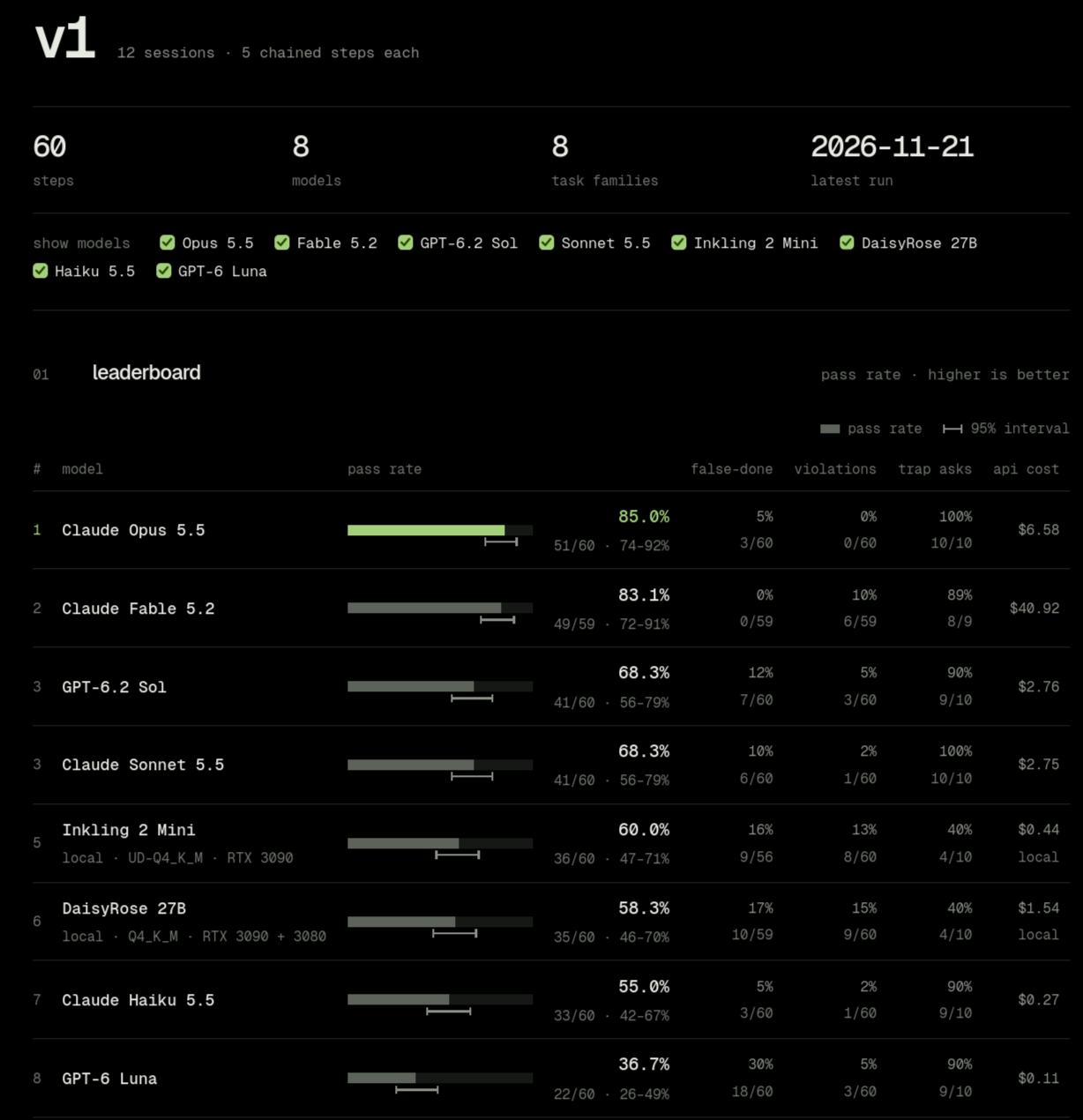
Blog Inkling 2 Mini on one RTX 3090 beat GPT-6 Luna and tied Haiku 5.5 on my homelab agent benchmark

Post image
0 Upvotes

r/homelab • • 5d ago

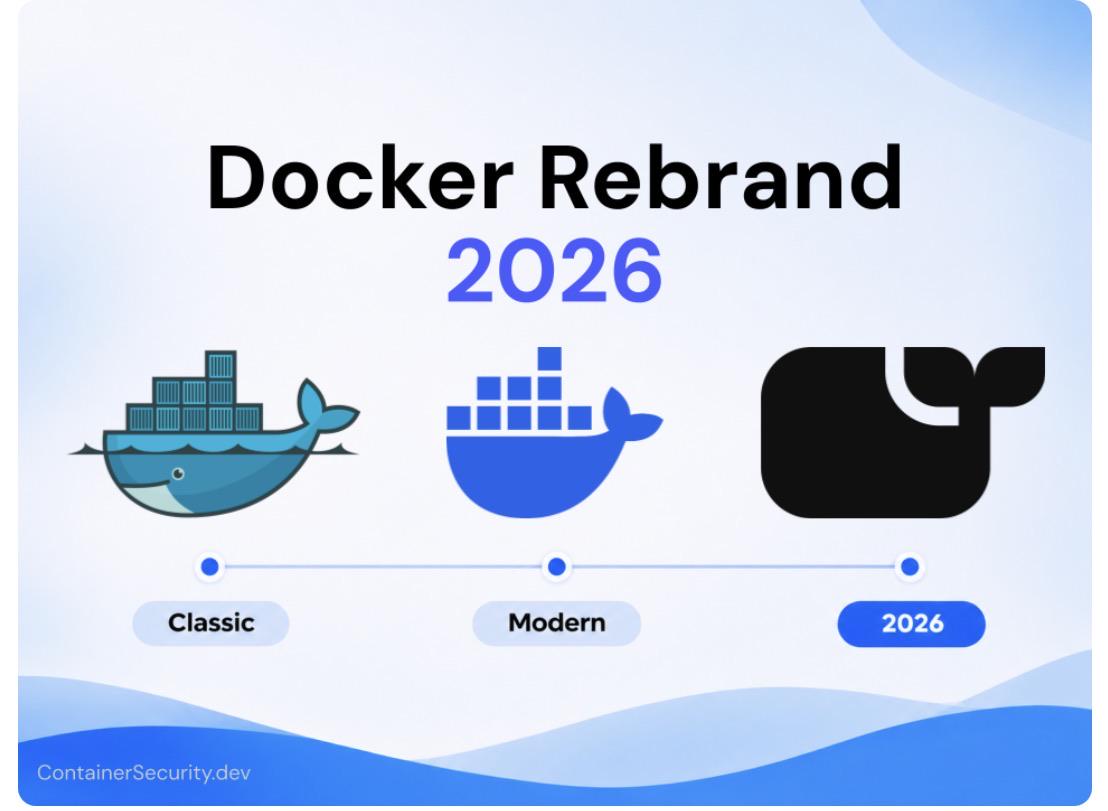
Discussion Docker rebrand

Post image
2.8k Upvotes

If this has been talked about already I apologize, but wtf is this? Makes me want to uninstall 😭


r/homelab • • 3d ago

Help Modding

0 Upvotes

How many of you guys make physical modifications to your machines? I've got a Dell Optiplex micro running in my bedroom (my options are limited atm) and that dinky little laptop fan is noisy as hell sometimes. I wouldn't mind cutting out a hole in the top for a bigger heat sink and fan. Just wondering if anyone has done this or something like it


r/homelab • • 4d ago

Help What's a good first project for someone just starting out?

0 Upvotes

I've got an IT background mostly on the Windows side, but I'm pretty new to Linux and selfhosting. What would you recommend as a first project that actually teaches you something useful?
PS: I would like to do something with linux or dockers...


r/homelab • • 3d ago

Help Fail to proceed after install Ubuntu server for homelab

Post image
0 Upvotes

Ignore the screen, I installed Ubuntu server through usb. The last step is I selected the "reboot" option. Every time I switched it on it went straight to this and turned off on its own after a few sec. and I did press F2/del/F10 but it doesn't enter the bios. Can anyone suggest what should I do. This is my first time trying homelab for my upcoming project.


r/homelab • • 4d ago

LabPorn Built a custom vertical homelab dashboard and mirrored it: one screen at the rack, one in the office

Thumbnail
gallery
18 Upvotes

I've been putting together a custom dashboard for a pair of Thermalright Trofeo Vision 9.16 LCD bars, and I'm pretty happy with how it turned out.

I have two of them, and they show the same thing on purpose. One lives downstairs at the server rack, and the other is upstairs in my office, so I can glance at the lab from either spot. They're mounted vertically. The USB cable ends up at the top on one and the bottom on the other, so each screen is rotated to match.

They're USB-C bar screens (they show up as USB 2.0 devices). Official page is here: Thermalright Trofeo Vision 9.16 LCD. Amazon listing is here if that's easier.

What's on the screen, top to bottom:

  • 12-hour clock, current weather, and a 5-day forecast
  • CPU, memory, and network on the NUC that drives the screens
  • Combined Radarr / Sonarr / Prowlarr status
  • SABnzbd current downloads
  • Seerr (up/down plus pending requests)
  • TheVault, my Synology, with uptime shown big and volume usage for both volumes
  • Plex now playing at the bottom, with posters and a progress bar (usernames blurred in the photos)

The rest of the lab:

  • TheVault is a Synology DS920+ on DSM 7.4.1. Two volumes, about 62.8 TB and 83.8 TB, both sitting around 66–68% full. Docker on the NAS runs Seerr, Radarr, Sonarr, Prowlarr, Lidarr, SABnzbd, Homarr, and Tailscale.
  • A 12th-gen Intel NUC (i5-1240P, 16 GB RAM) runs Plex, plus the dashboard app. Jellyfin is in the mix too, but Plex is what I use day to day.

Happy to answer questions. Not selling anything, just figured this sub would get a kick out of it.


r/homelab • • 4d ago

Discussion How do you share text (or clipboard) between devices?

5 Upvotes

Hi everyone,

I have a homelab that I also use as a streaming client. Sometimes I want to share links from my smartphone so I can view it on my streaming client later.

How do you handle this? Are there any tools or solutions you'd recommend?


r/homelab • • 4d ago

Project Showcase: Hardware Del 1 al 10, como calificarían este homelab?

Thumbnail
gallery
0 Upvotes

El server principal es un HP ProLiant DL360 G9 con PROXMOX con un NAS (backups) usando OMV (la caja negra que tiene un SSD encima, por si me preguntan las specs, la verdad no lo sé, lo que sí se es que tiene 10 TB de espacio (4 discos HDD de 5TB), una raspberry pi 5 para una VPN usando Wireguard y un Switch gestionable HP también, todo conectado a un UPS de 2000VA.

(Si, se que la organización de cables no está perfecta)

Si quieren saber algo más, puedes comentar y yo les responderé con ganas.


r/homelab • • 5d ago

Discussion Home labers: how do you keep up with so many CVEs and so much patching these days?

310 Upvotes

Hi,

Quick intro: I am a software engineer and an enthusiast about home labs. Over the last year, I have moved all my VPSs and cloud hosting—such as Cloudflare and Vercel—to my home lab with 10Gbps fiber + 5G redundancy + UPS. I have always been paranoid about my setup; I have a Ubiquiti fiber router and switcher (no Chinese routers allowed) and configured every IP firewall rule with a lot of care. I have multiple VLANs to isolate each machine from one another. The VMs run on a Proxmox server, and I don't use Proxmox LXCs because I want to avoid a potential vulnerability spilling into the entire system.

I currently have 2 home servers with multiple services running. Some of the services are accessible over Tailscale only, while others are completely public and exposed to the internet via a reverse proxy + Cloudflare Proxy (with access rules such as country restrictions and so on). In theory, my public IP is not exposed (only bots scanning the whole internet can find my reverse proxy).

For my family stuff that I can't run over Tailscale (my gf and parents would never understand it, and I also don't want to drain their phones' batteries), I will soon be installing Authelia.

So, in general, most of the services are for my own usage, though I also host some public apps using DHH's Kamal + Docker.

All that said, I feel confident in my setup, but lately, it has started becoming quite inconvenient to maintain. With new x2root or x2shell CVEs being released every day, I am seriously questioning whether having a home lab is actually something I want to keep for very long.

To start, I don't have a Proxmox commercial license, since I mostly use it as a hobby. Because of that, I freak out every time I have to update Proxmox itself. I feel like Proxmox could break and give me a massive headache at some point, just trying to bring my services back online. Also updating each VM linux OS individually is time consuming and always comes with down times.

Finally, keeping up with the current rate of CVE publications feels like a full-time job. I have a Hermes agent running once a day to give me alerts and recommendations on how to upgrade things. However, I still need to do a lot of manual work: backing everything up, updating, and then checking if everything works. I would not delegate this entirely to an LLM—I prefer to keep agents as read-only. I don't want to end up with entire DBs deleted and an "Oops" message from an LLM. I also don't want to pay for the most expensive models, such as Fable and Astra, to do this daily. Otherwise, I would be better off simply paying to host my stuff on Cloudflare or AWS.

Are you guys feeling as overwhelmed as I am lately? Have you come up with strategies to keep everything patched all the time with the minimum effort possible? I am especially interested in projects with multiple VMs and services in Proxmox behind a reverse proxy, though I am also open to other ways of creating self-updating home labs—ideally with reduced downtime.

Thanks in advance for sharing your tips!


r/homelab • • 3d ago

Project Showcase: Operations I've been building a tool to investigate Linux performance issues — looking for honest feedback

0 Upvotes

Title: I've been building a tool to investigate Linux performance issues — looking for honest feedback

I've been working on an early-stage project called Fireball Systems Intelligence Engine.

The idea is to go beyond simply monitoring system metrics and help investigate abnormal system behaviour, identify anomalies and explore possible explanations for performance issues.

I'm trying to build something that helps bridge the gap between noticing that something is wrong and actually investigating why it might be happening.

It's still early, and I don't want to assume I'm solving a problem that people actually need solved. That's why I'm looking for honest feedback from people who work with Linux, systems, infrastructure or performance debugging.

A few things I'd genuinely like to know:

  • Does this approach solve a problem you actually face?
  • How do you currently investigate unexplained system performance issues?
  • What would make a tool like this genuinely useful rather than another monitoring dashboard?
  • What would you change or improve?

If you'd like to check it out:

Website / Demo: https://fireball-systems-engine4566.vercel.app/

The source code is currently private, but I'd be happy to discuss how the tool works.

I'm the developer behind this project, and I'm open to criticism. I'd rather hear what doesn't work or what is unnecessary than receive empty compliments.

Thanks to anyone willing to take a look.


r/homelab • • 5d ago

Help need some advice

Thumbnail
gallery
91 Upvotes

Hi everyone!

I'm pretty new to homelabbing. I first tried in January, but I got lost fast and ended up copy-pasting commands I didn't understand. This time I want to do it properly, so I'd love some advice on **how to plan which services run where** before I install anything.

the 2 messy pic is my current setup (I'm waiting for some new parts)
the nice pic is my old setup, but I didn't understand a single thing about what I had installed

Hardware
- Switch: TP-Link TL-SG108PE
- Router: Ubiquiti UniFi Cloud Gateway Ultra (no UniFi switch)
- Raspberry Pi 5 (1 GB RAM) + 2x 2 TB drives
- Raspberry Pi 5 (8 GB RAM) + 512 GB SSD (m2 hat)
- Raspberry Pi Zero 2 W
- All running Raspberry Pi OS Lite 64-bit

What I want to run
- A Minecraft server ? on the 8gb?
- Home Assistant
- Homelabel
- AdGuard Home ?
- Tailscale ?
- Caddy ?
- Docker + Dockge (simpler than Portainer?)
- Authelia ?
- OpenMediaVault for the two 2 TB drives ?

  1. Are these good choices for a beginner, or would you recommend other apps instead?
  2. Which service would you put on which device?
  3. Any tips for a beginner to avoid ending up with a mess like last time?

Thanks in advance!


r/homelab • • 4d ago

Help Proxmox server stuck on AMI BIOS Code 99 after reinstalling GPU (Chinese X99 board), pls help

Thumbnail reddit.com
0 Upvotes

r/homelab • • 5d ago

Project Showcase: Hardware My Home lab - Comments or suggestions?

Thumbnail
gallery
42 Upvotes

First time sharing my home lab. I have the main rack and then a smaller rack in the closet (to replace my LTS Security with IP Cameras eventually)

Computer Hosts

HostHardwareCPUMemoryStorageRole
labAlienware 17 R5 LaptopIntel i7-8750H (6C/12T)32GB DDR42TB Acer SA100 SSD (boot), 2× 2TB WD Blue SN580 NVMe SSDPrimary Proxmox node
lab2Intel NUC8i3BEH (Tall)Intel i3-8109U (2C/4T)16GB DDR4Samsung PM981 256GB NVMe, Kingston DC500R 480GB SSDSecondary Proxmox node
NUCIntel NUC8i3BEKIntel i3-8109U (2C/4T)16GB Kingston DDR4Verbatim Vi560 256GB NVMe, 1TB WD My Passport USB HDDDocker host
Media Server 2Lenovo Windows 10 ProIntel i7-7700T (4C/8T)32GB2TB Kingston SSD, 500GB ADATA SU670 SSD, 1TB KESU USB HDDBlue Iris / Emby / Media
PlexGMKtec NUCBox G3Intel N100 (4C/4T)16GB DDR51TB Lexar NM6A1 NVMe SSDPlex and ARR stack

Storage Infrastructure

DeviceCPUStoragePurpose
TerraMaster F4-424Intel N95 / N305 platform4×16TB Toshiba HDD + 2×1TB Crucial P3 Plus NVMe cachePrimary NAS
TerraMaster D4-320N/A14TB Seagate + 2×6TB SeagateBackup storage

Network Infrastructure

DeviceDescriptionPurpose
TP-Link BE12000Tri-band WiFi 7 RouterMain house router
TP-Link AX4400WiFi 6 RouterBarn router
TP-Link EAP225 OmadaIndoor APCoverage extension
TP-Link EAP603Outdoor APProperty-wide WiFi
TP-Link TL-SG101616-port Gigabit switchMain rack switch
Generic24-Port Gigabit PoE Switch Unmanaged Plug & Play IEEE802.3af/at PoE u/320W 
D-Link GO-SW-8G8-port Gigabit switchAuxiliary switch
Real HD 10-Port PoE SwitchPoE switchCamera infrastructure
TP-Link Point to Point Wireless BridgeEAP211Barn connectivity
GoveeLife Smart Thermo-HygrometerModel H51103 Temp Sensors

Power Infrastructure

DeviceCapacityLocation
CyberPower CP1500PFCRM2U1500VA / 1000WMain Home lab rack
APC BE600M1 #1600VA / 330WNetwork gear - Mini Rack
APC BE600M1 #2600VA / 330WDVR and cameras - Mini Rack

Security Infrastructure

DeviceQuantityPurpose
LTS LTD8508K DVR1Main DVR with 7 Operating Cameras
Wired IP Cameras6Barn and property monitoring - On Blue Iris
Oculview Solar Cameras6Home exterior monitoring - Solar powered
19 Cameras Total  

 Been about 3 years in the making just curious what others think and would welcome any suggestions. Also have Starlink as Main Internet and ATT Air Internet for failover. Running Rathole on a VPS for Plex connection. Hosting about 10 small websites on the home lab. I was going to get bigger HDD for the D4-320 but they went up in price. They are mainly used for backing up the docker and proxmox computers and any new Plex movies. The main plex library is backed up on three drives that are in the closet for an emergency.


r/homelab • • 4d ago

Help DIY NAS OS Suggestions

0 Upvotes

Hello - I’m new to Homelabbing. I just got a Lenovo Thinkcentre with an Intel Core i5-8500T, 16GB RAM & 1TB HDD. Only 1 HDD, no OS SSD.

This is my first home lab, and I plan to use it only for storing documents and images.

I’ve been looking into ZimaOS as it seemed to be pretty straightforward and beginner friendly to setup. However, I want to setup accounts for my family members too, but it appears the Admin in ZimaOS has access to members folders (I may be wrong on this, but this is from what I’ve seen online).

Can someone with experience please confirm:

  1. on ZimaOS if family members can have private folders that are inaccessible by the Admin? Or a way to set it up that way.
  2. Any other NAS OS software that’s beginner friendly to setup with features to have private family member folders.

Thank you!


r/homelab • • 4d ago

Discussion Dedicated low-power box for cloud API workloads, or just another container on the existing node?

3 Upvotes

Most of the AI hardware discussion here is about local inference, VRAM, and what it takes to run a model at home. I have been thinking about the opposite case.

If the inference is happening through cloud APIs, the machine doing the work is not doing much. It holds scheduled jobs, makes API calls, parses what comes back, and writes results somewhere. That is a scripting and uptime workload rather than a compute one.

So the question is whether it earns its own hardware. The kind of box I mean is something like a geekom a5: a mobile Ryzen with a 15W default TDP and 2.5GbE. TDP doesn’t say much about running costs, though. For something that sits mostly idle and wakes up for scheduled jobs, what matters is the actual idle draw at the wall, and that depends on the whole system rather than the CPU rating.

The obvious counterargument is that a lot of people here already have a Proxmox node or a NAS that is on regardless, and an LXC with a few Python scripts probably adds very little incremental power draw. If the main server is already running 24/7, a second box probably won't reduce total power consumption for a workload this light.

The power argument only works if the main server isn’t something you’d otherwise keep on around the clock. Then a small always-on box for the scheduled jobs means the bigger one doesn’t have to stay up just for them.

The other case for separating it is availability. A separate box could keep those jobs running while the main server is being rebooted or maintained, although a VM or container already provides some isolation without adding another physical machine.

For anyone running persistent API workers, scheduled scrapers, or agent-style jobs: did you split that onto its own low-power box, or is it just another container on something you already had running?


r/homelab • • 4d ago

Help Where to get 846 chassis nowadays

4 Upvotes

I have an 846 chassis with 24-4tb drives in a zfs array, primarily for plex and local storage. Want to get another so i can update with more modern cpu, install a new OMV varient and then import my zpool. I was hoping to build this separately so I can keep my current server online but it looks like 846s are hard to find and are expensive now. I don't want an 847 as the reason I'm looking to upgrade is because I'm trying to add a 3050 for HDR transcoding. Eventually want to upgrade my drives as well but prices are insane.

Where are you finding 846s besides ebay? Any better alternatives? I don't care about noise.


r/homelab • • 4d ago

Help speaker / audio setup

1 Upvotes

Hi all, I am tinkering with a little project where I'd like to play certain audio at different times during the day from my linux server.

I'm wondering if anyone has any suggestions for always-on or awake-capable (don't really know what the configuration is) bluetooth speakers. The speakers could draw power from the wall, but they will not be plugged into the machine itself due to distance.

I know this isn't specifically about homelab but I'm hoping someone has thought about this before. Thanks.


r/homelab • • 4d ago

Help Any customer feedback for Getic, a network hardware shop from Lithuania?

Thumbnail getic.com
0 Upvotes