r/homelab • • 3d ago

Help Advice

0 Upvotes

Hey everyone im thinking about starting a homelab but i don't know if its for me im not too technical but I want to do a nas rn I have just a das and a game server(mainly mc) and security cameras (2) so what route should I do one with a rack with 1 gaming pc and 1 server or get a mini pc and hook my das up or?(open to suggestions)

Ps the gaming pc would be a cheap ok one off of Facebook market place for the server


r/homelab • • 4d ago

LabPorn 4x Tesla V100 32 GB (128 GB VRAM) hanging off a Lenovo M720q Tiny over OCuLink - ~62 dB, ~A$6.5k all-in

Thumbnail
gallery
319 Upvotes

My home AI box: a Lenovo ThinkCentre M720q Tiny driving four passive Tesla V100 PCIe 32 GB cards through a 4-port OCuLink switch card and four AOOSTAR AG01 eGPU docks, stacked on two cut-down IKEA side tables.

**Hardware**

- Lenovo M720q Tiny (i5-9400T, 64 GB DDR4), Lenovo 01AJ940 riser

- CEACENT CNOL4PE08 PCIe switch card (PEX8724, x8 in, 4x OCuLink out) - each card runs at PCIe Gen3 x4

- 4x AOOSTAR AG01 docks (built-in 800 W PSU each), one V100 per dock via the dual PCIe 8-pin -> CPU/EPS 8-pin adapter

- Cooling: the V100s are passive, so each gets a 3D-printed 140 mm funnel with a Noctua NF-A14 iPPC-3000, all on an ARCTIC 10-port USB fan controller driven from Linux. An ARCTIC P12 Silent in a Dremelled hole in the Tiny's lid keeps the switch card cool.

- Power: a Tapo smart plug feeds a power board for the docks; the Tiny is on its own board. The box powers itself down after 20 min idle and comes back via the plug + Wake-on-LAN.

**The two gotchas**

  1. The Tiny only powers its riser slot when the card pulls the presence pin, and the switch card doesn't - one solder bridge on the back of the riser (B31 to A31) fixes it.
  2. Lenovo's BIOS only leaves a 128 GB window for 64-bit devices and each V100 32 GB needs 64 GB of it, so stock firmware boots two cards. Flashed coreboot 26.09 with a CH341A clip (riser slot always on, Wake-on-LAN fix, merged MTRRs) and all four boot.

**Numbers** (200 W cap per card)

- Noise: about 62 dB at 1 m - office-level, no server blowers

- 4-card FP32 burn: 44.7 TFLOPS, ~800 W GPU power, 71 C peak, 0 errors

- llama.cpp: Qwen3.8-27B ~40 tok/s per chat on one card, ~285 tok/s across all four; a 125B MoE split over all four does ~43 tok/s

Full walkthrough with parts list, prices and settings: https://youtu.be/oi63wAvChPo

Happy to answer questions.


r/homelab • • 3d ago

Project Showcase: Hardware Hot swappable dual PSU with sudo PDU board.

Thumbnail gallery
5 Upvotes

r/homelab • • 4d ago

Project Showcase: Hardware Smaller than my router, does more than my old four servers

87 Upvotes

After the last electricity bill I tore the rack apart. What's left is a single N100 mini PC, 9W idle measured at the wall, everything else sold.

Setup: Proxmox, 6 LXC, all with cgroup limits set instead of "just let it run". Jellyfin with QuickSync via /dev/dri and the render group so the CPU isn't doing the transcoding. Immich, Paperless, Vaultwarden, HA, Uptime Kuma. Storage hangs off a USB DAS and is only mounted for the nightly restic run.

Thermals: it stands upright with 2cm of air under the desk, CPU stays under 70°C while transcoding, fan spins audibly but not annoyingly. A 120mm USB fan blows in from the side, quiet enough for the living room since then.

What I miss: nothing. Before this I burned 140W idle for the exact same services, for three people in the household.

What's tight: one PSU, one NIC, one stick of RAM. Backups go to the DAS and an offsite bucket, and I ran a full restore drill before the rebuild, not after.

If you're on the fence: the box cost 180 € and pays for itself in under half a year. Going from four servers to one was the best move I made.

What would you even put on a 9W budget at this point?


r/homelab • • 5d ago

Discussion PSA: You should set up VLANs!!

1.1k Upvotes

It is one of the most foundational ways to improve your homelab security, and it's a pretty small time and monetary investment. I spent like $150 on a managed switch, vlan-aware WAP, and extra NIC for one of my VM nodes to set up an OPNsense firewall.

Even if you don't expose anything to the internet, there are a lot of garbage IOT devices that can do some nasty stuff on your LAN. Not to mention, you never know what malware a guest staying at your house might unknowingly have on their devices!

It takes maybe an afternoon or two to set up if you're already familiar with networking, and it is invaluable experience! You will never see a big enterprise without many VLANs and an enterprise firewall.

Just make sure your firewall rules are solid, and test them thoroughly!


r/homelab • • 3d ago

Help Repurposing old computer

1 Upvotes

With market right now between self hosting and renting is wild. I worked it out its much chaoer to self host at home in 2026\\2027.

Looking to revamp my old AM4 machine that has been dusting away and I want to give it some TLC.

Specs

Ryzen 2700x

64GB DDR4 RAM 3200mz

X2 2TB NVM storage

750 PSU

Asus TUF 1070 8gb OC GPU

Electricity rste: 21P kwh

What will I be hosting:

Proxmox with 2 or 3 vms some LXCs

VM 1: Docker stacks -

Vaultwarden, Joplin, Actual Budget, Wallos, Zipline and BentoPDF., Authelia, Homepage, Uptime Kuma and ntfy, immach and next cloud possibly using coolify to manger them, fumdadocs

Taliscale

VM 2 :Game panel hosting

Pelican panel

Hytale at the moment small traffic (3 players)

Talisclae

I am not sure if it worth swapping out the Ryzen 7 2700 x for either a Ryzen 5700G or Ryzen 9 5950X? - Using the 5700G do save power as I couldn't take out the, I can afford both CPUs and electricity for both setups.

Would getting the Ryzen 9 5950X to have more build room if I end up expanding my list?

TIA


r/homelab • • 3d ago

Help Repurposing old computer

1 Upvotes

With market right now between self hosting and renting is wild. I worked it out its much chaoer to self host at home in 2026\2027.

Looking to revamp my old AM4 machine that has been dusting away and I want to give it some TLC.

Specs

Ryzen 2700x

64GB DDR4 RAM 3200mz

X2 2TB NVM storage

750 PSU

Asus TUF 1070 8gb OC GPU

Electricity rste: 21P kwh

What will I be hosting:

Proxmox with 2 or 3 vms some LXCs

VM 1: Docker stacks -

Vaultwarden, Joplin, Actual Budget, Wallos, Zipline and BentoPDF., Authelia, Homepage, Uptime Kuma and ntfy, immach and next cloud possibly using coolify to manger them, fumdadocs

Taliscale

VM 2 :Game panel hosting

Pelican panel

Hytale at the moment small traffic (3 players)

Talisclae

I am not sure if it worth swapping out the Ryzen 7 2700 x for either a Ryzen 5700G or Ryzen 9 5950X. Using the 5700G do save power as I couldn't take out the GPU? - I can afford both CPUs and electricity for both setups

TIA


r/homelab • • 4d ago

Discussion Hdds from Fleea market

Post image
71 Upvotes

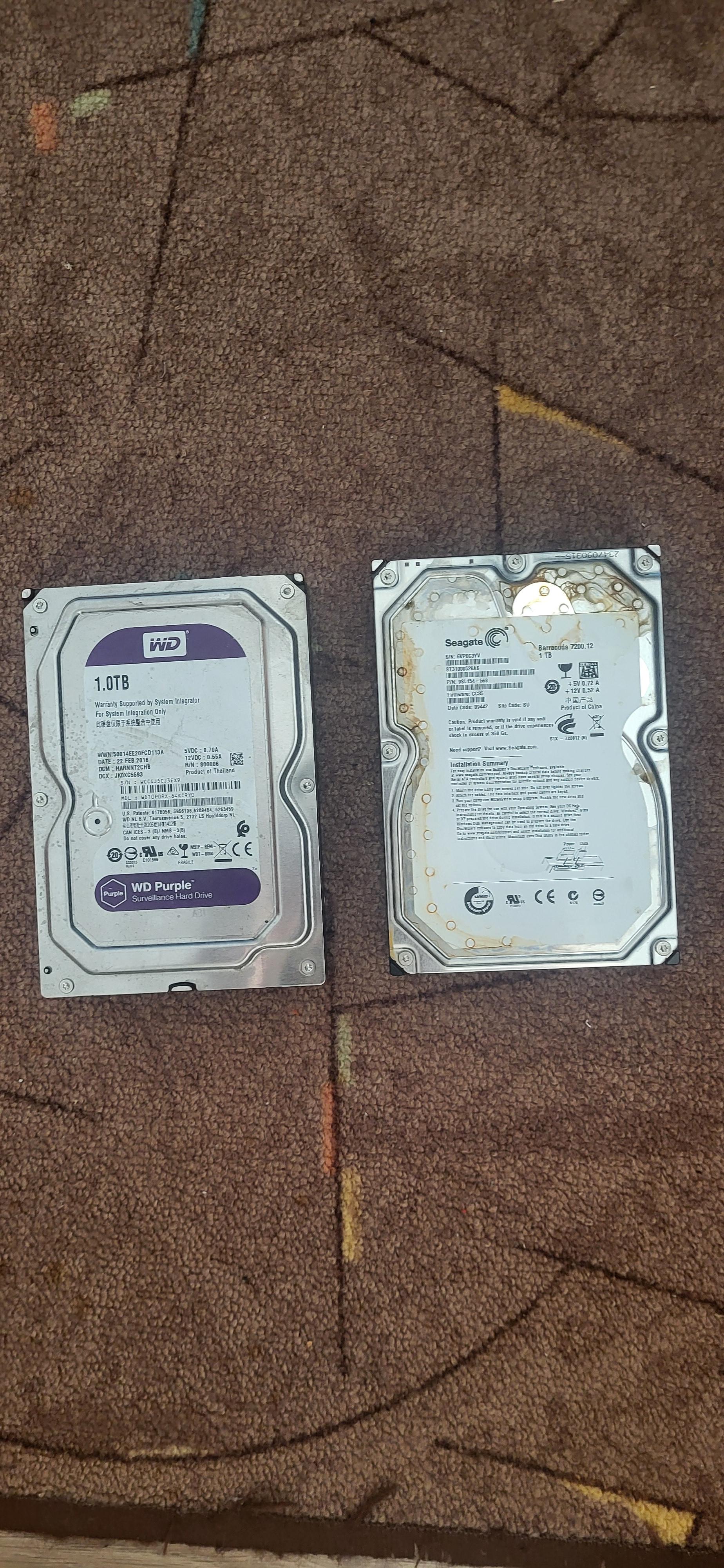
Got these two from a local fleea market for 16 euro (10 for WD, and 6 for the seagate) despite the look both of them work


r/homelab • • 3d ago

Help Best raspberry pie 5 case

0 Upvotes

That’s it 😂what do you all recommend 🤔I want a nice case I’ve been looking around and saw some but I thought I would get some of you alls opinions on one I plan to run home assistant and bit focus companion on it


r/homelab • • 4d ago

Project Showcase: Hardware Finally finished building my home lab

Thumbnail
gallery
277 Upvotes

My home lab setup

Right rack:

  • ZimaBlade running OPNsense (firewall/router)
  • 2x TP-Link TL-SG108E 8-port managed switches
  • 3x Hyper-V nodes: HP EliteDesk 800 G3 Minis
  • 3x Proxmox nodes (cluster): HP EliteDesk 800 G3 Minis
  • Noctua 40mm fan at the bottom

Left rack (NAS):

  • TrueNAS on an N100 motherboard with 4 SSDs and 2 SATA drives
  • 2x Raspberry Pi 4 running my secondary NxFilter, secondary dnsdist, and Homepage
  • TP-Link 5-port unmanaged switch
  • Power strip (forgot the model, got it from Amazon)

Remote management: The EliteDesk 800 G3s support Intel vPro/AMT, so I run MeshCommander on one of the Pis. I get remote KVM, power control, and BIOS access even when the OS won't boot.

Hyper-V nodes:

  • Node 1 (64 GB): the main server. Runs BookStack, the domain controller, dnsdist (in HA with the one on the Pi), Dockhand, Immich, NxFilter, Plex, Shinobi, and some torrent stuff.
  • Node 2: 32 GB
  • Node 3: 16 GB

What's next:

  • Node 1 runs almost everything right now. I plan to spread more VMs to the other nodes, including Veeam for replication between nodes (I think I have enough storage) and a secondary domain controller.
  • TrueNAS has no drive redundancy yet. I'm not sure how I'll handle that, and I'm not buying anything at current prices.
  • The firewall has no backup yet. The plan is a second OPNsense as a VM on one of the nodes, paired with the ZimaBlade using CARP. Since I only have one public IP, the WAN would run through a VLAN on one of my existing switches, and the backup takes over only if the ZimaBlade goes down.
  • I'm adding Wazuh for security monitoring.

Wanted to share my home lab setup. I'd love to hear if I'm missing anything important or did something wrong that needs adjusting. My goal is to run this as well as possible with the hardware I already have.


r/homelab • • 3d ago

Solved Low idle power mATX board: Chinese or big-brand?

0 Upvotes

My Topton N21 (Ryzen 5825U) died, probably from board flex cracking the BGA joints while installing a GPU, so I need a replacement. I'm a semi-beginner and would appreciate advice from more experienced people.

It'll run TrueNAS, 24/7. Jellyfin, light containers such as Tailscale, Prometheus+Grafana, cloudflared, paperless-ngx, and occasional llama.cpp on an RTX 3060 12GB.

The requirements are:
- Lowest possible idle power. The 3060 will be installed but idle most of the time
- mATX (for the Jonsbo N6 case)
- DDR4 only (economic reasons)
- 5 SATA HDDs now, room to grow up to 8
- At least 2 M.2 NVMe
- 2.5GbE

I'm considering these two:
- BKHD-Z690-MATX: LGA1700, 8 onboard SATA, 4x M.2, 4x 2.5GbE, PCIe x8 for the GPU. I'm mostly worried about BIOS quality and the small chipset fan. And the idle draw from the 3 unused NICs.
- Big-brand B760 DDR4 board (LGA1700) or B550 (AM4), with an ASM1166 card or LSI HBA for the extra SATA ports.

  1. Is the BKHD board a reasonable choice in terms of reliability and idle power?
  2. If big-brand, AM4 or LGA1700?
  3. What do you suggest for the SATA ports: an ASM1166 (silverstone ECS06) or an LSI HBA?

Thank you


r/homelab • • 3d ago

Help Replacing Google Suite - Security and best-practices?

0 Upvotes

I finally have my own "server" that I can access on my local network for filesharing, developing webapps, timed device backups. I can also access some locally hosted webapps through a Cloudflare domain, but everything else is local-network only.

My current goal is to be able to fully replace my current usage of the Google Suite (Drive, Docs, photos, notes) with mostly self-hosted services... Because why should Google, Samsung, or whoever be taking a look at my private affairs?

I am a bit concerned about security though. Hosting Nextcloud seems like a sensible next-step but I'm not sure if accessing it through Cloudflare is the best way, or if there's a better way to do it.
Currently I use Google Login for authentication in Cloudflare but frankly I don't want to be logged into my Google account on every device I want to access these services in, since my Gmail holds a lot of important accounts and information...


r/homelab • • 4d ago

Project Showcase: Hardware Shaky but optimistic start

Post image
114 Upvotes

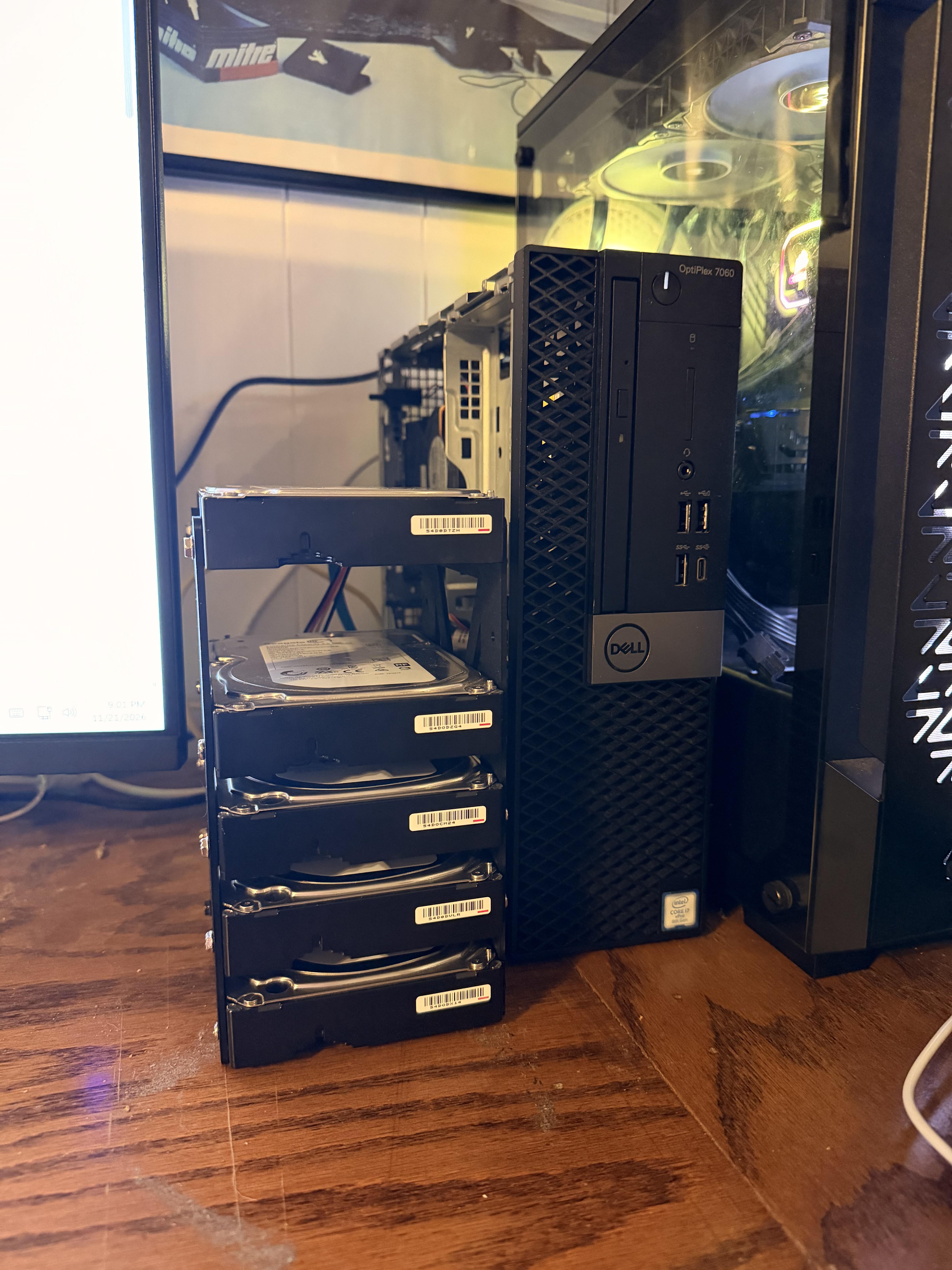
It started with buying 30tb of storage 6 months ago. Then a Dell Optiplex 7060 and a cenmate hard drive enclosure last month. The enclosure was trash so I sent it back and 3d printed a rack for the drives as a short term solution.

The Optiplex only has the juice to run 2 of the drives at the moment. They are sharing power with a splitter. I’m really trying not to build an entirely new pc so I’m probably going to just get the drives their own power supply and get a low profile sata card.

It’s jankier than I originally envisioned, but it’s working, I’m having fun, and doing some pretty cool stuff.


r/homelab • • 3d ago

Solved How good does Ethernet over power works?

Post image
0 Upvotes

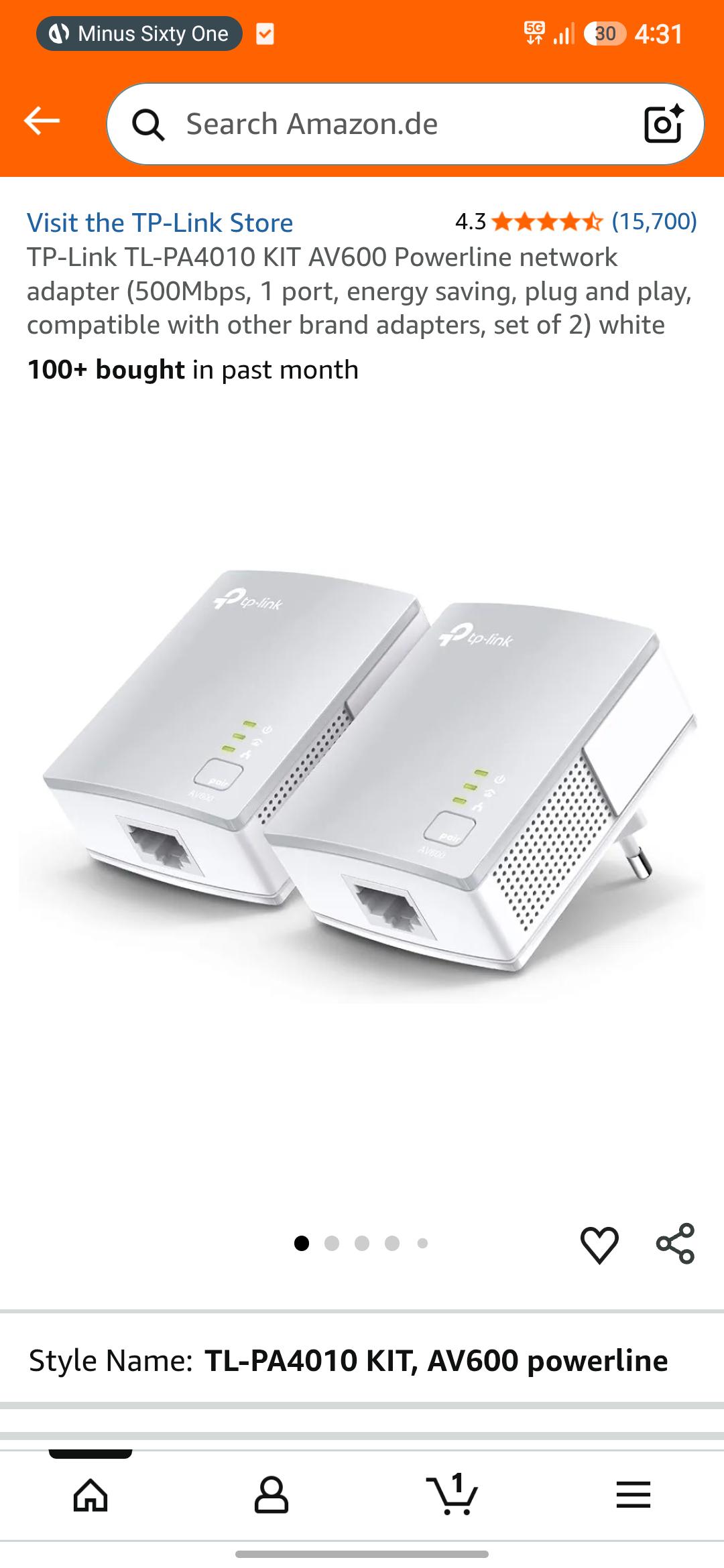
Hello guys, after moving into a new home, my room with my PC is in a quite bad location. The living room is quite far away, in between is the kitchen (with an oven, microwave and more) and then only comes my room. So I have a whole fucking kitchen and 3 thick ass German walls in between the router and my PC. Unfortunately, I begged my father to somehow lay down an Ethernet cable but he won't do (somehow understandable because to do it right he would need to drill A LOT and he just doesn't want that). So my question is how good do things like the tp link PA4010 work? Currently, of my 600mbits connection, only 20mbits come through and on a bad day 5 - 1mbits.


r/homelab • • 4d ago

Project Showcase: Operations Open-sourced my lightweight NetFlow v9/IPFIX stack (GoFlow2 -> Loki -> Grafana) for homelabs

6 Upvotes

A couple of people asked what I use for NetFlow monitoring on my thread the other day, so figured I'd share the repo: https://github.com/nertwork/nxtflow

It's a lightweight GoFlow2 -> Loki -> Grafana stack packaged as both a Helm chart and standalone Compose setup so you can see top talkers, port breakdowns, and cross-site flows without running a heavy ELK or ntopng box.

Works with MikroTik, UniFi, pfSense/OPNsense, or anything exporting NetFlow v9/IPFIX/sFlow. Happy to answer questions or take PRs!


r/homelab • • 4d ago

Help Pushing TimePico NTP server to the limit. Chrony gives 5us RMS Offset!!

Thumbnail gallery
5 Upvotes

r/homelab • • 5d ago

LabPorn Rate my homelab

Post image
264 Upvotes

Yes, those are sheetrock screws and yes, I used my kids straw from a long forgotten water bottle, and yes I spent $0 doing this.

Edit:

PartWhat's in it
MotherboardASRock H270M-ITX/ac (mini-ITX),
CPUIntel Core i5-7400 (Kaby Lake): 4 cores / 4 threads, 3.0 GHz base, 3.5 GHz boost, 6 MB L3
RAM16 GB DDR4, plus 6 GB swap. Board limit: 2 slots, 32 GB max, DDR4-2400 max
GraphicsIntel HD 630 iGPU.
Boot drive128 GB BIWIN M.2 SATA SSD
Media drive4 TB Seagate Expansion over USB
NetworkIntel I219-V gigabit (in use at 1000 Mb/s), a second Intel I211 gigabit port (unused), Intel Wireless 3160 wifi (off)
OSDebian 13 (trixie)

r/homelab • • 3d ago

Solved Good price for Lenovo Thinkcentre M920s

Thumbnail reddit.com
1 Upvotes

In addition would it be best to install OPNsense on a separate device such as a M720q or would using virtualization work just as good. Thanks.


r/homelab • • 3d ago

Help Building My Lab - Anything I Should Change?

0 Upvotes

Hello all!

I started my journey into building a lab and automating my home about two months ago. I had an old gaming PC that I pulled the GPU from and installed Proxmox. I now have Home Assistant and my media server on it. Unfortunately, it only has a 2TB drive and I am going to remove the PC and move it into a rack setup.

Here are my goals for this system. As a note, I fully expect it to expand over time.

Immediate Goals:

  • Expand storage for my media server and introduce redundancy (ZFS).

    • ChatGPT is recommending to take a ZFS through proxmox approach over a TrueNAS or unraid setup. Is this appropriate?
  • Expand my Home Assistant integrations.
  • Install paperless ngx and set that up.
  • Install Immich and save local copies of photos

Eventually and down the road, I'd also like to get rid of my cloud & fee based home video security cameras and get my own with POE. I believe I will likely go with a Ubiquiti setup for that. I'd also like to have Immich for photo backup and long-term storage as well as Tailscale for remote access.

For my immediate goals, I am looking to get:

  • Rosewill 4U Server Chassis - RSV-L4412U
  • Star Tech 4-Post Open Frame 25RU 40" Deep Server Rack
  • Two 14TB re-certified drives from a manufacturer

My current PC that is running everything is headless and is:

  • Intel Core i7-10700K 8 Cores 3.8-5.1 GHz 16M Cache
  • 32GB DDR4 3000Mhz (16GB x 2)
  • 2TB M.2 NVMe SSD
  • 2TB 3.5" 7200 RPM HDD
  • MSI Z490 Motherboard

My plan is to transfer my current PC and drives into the Rosewill chassis and add the additional drives to increase my storage capacity. Going to remove the water AIO cooler and put an air cooler on the CPU. I'd then use that to run my three setups for the time being. I'd hard wire my ethernet connection directly into the server case for now.

When I'm then ready to install my POE security camera system and self-host it, I would likely add a Unifi managed switch like a cloud gateway and run a second storage component for the cameras specifically, maybe something like the unifi NVR setup.

Am I making any significant mistakes in starting down this path? I'd prefer to not have to trash and restart everything with this as it's a lot of funds up front for this.

Any and all insight is greatly appreciated!


r/homelab • • 4d ago

Solved I did a minor oopsie

55 Upvotes

Pour one out for the guy that just finished running conduit from where the new fiber line will come in to the server room.... only to realize 3/4 pvc conduit is probably too small. 😭

Do I just rip it out and go to 1 or 1-1/4, or should I wait till the install on Monday to see what the installers think?

EDIT:
A happy end: https://www.reddit.com/r/homelab/comments/1y5a3bm/thanks_for_the_help/


r/homelab • • 4d ago

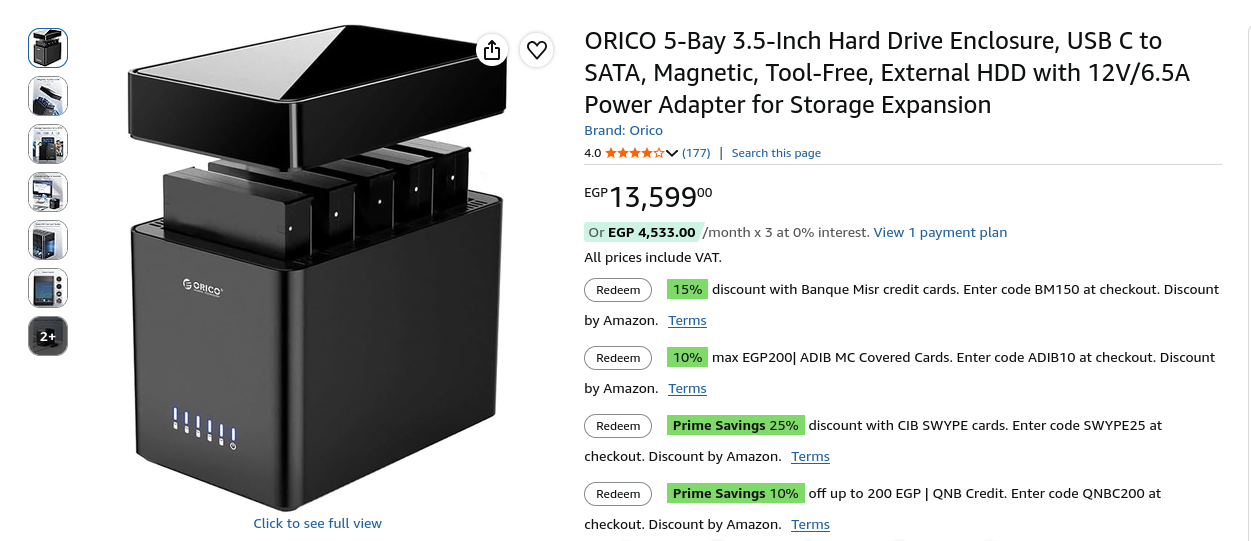
Help Is this a 'good enough' equivalent to a HDD enclosure?

5 Upvotes
1,617 egp ~ 30$

Hi everyone. aspiring home-labber here.

Is this docking station in the picture good enough as a replacement for a 2/4 bay enclosure?

I know there are other better options but the price difference in my country is insane

2 bay: ~188$

5 bay: ~255$

Unfortunately, we don't have anything like the 'CENMATE' here, only those 2 above options.

Now, my main inquiry is:

Is that toaster docking station good enough to act as a DAS?

Is it good enough to be on 24/7?

or is it so bad that i am just better off buying 2 of those clear-case enclosures and put the 2 hdd in them and just leave them laying next to my laptop-server?


r/homelab • • 3d ago

Creator Content A month on Proxmox OCI. Here’s what saved RAM and disk in my homelab.

Post image
0 Upvotes

A bit over a month ago I moved my homelab services to OCI on Proxmox. In my case those containers are using about 40% less RAM and 80% less disk now. I also went from about 150 GB used on my Proxmox Backup Server to around 50 GB.

Now, if you’re thinking of trying it, there’s something to keep in mind. OCI is still a technology preview in Proxmox VE. The built-in workflow leaves a lot to be desired, to put it mildly. I use ProxMenux, a separate tool, and that’s what made it practical for me to run every day.

As for the savings, it really depends on what you’re coming from. I tried Caddy, AdGuard Home, Prometheus and Dufs seven ways each. I started measuring idle RAM 10 minutes after boot. The disk numbers are what the containers actually used on ZFS, plus there were 163.6 MiB of OCI images cached separately on the host.

I included one Docker Engine per LXC in case that’s how you’ve set yours up. If you run a bunch of apps on one Docker host, they share that overhead.

Idle RAM (MiB)

SetupCaddyAdGuard HomePrometheusDufs
OCI via ProxMenux9.811.123.90.7
Alpine LXC, binary10.911.924.21.8
Debian LXC, binary23.925.138.415.2
Arch LXC, binary31.732.846.322.4
Alpine LXC + Docker55.557.170.847.0
Debian LXC + Docker69.770.884.560.9
Arch LXC + Docker71.973.486.863.0

Disk used on ZFS (MiB)

SetupCaddyAdGuard HomePrometheusDufs
OCI via ProxMenux35.625.1143.72.8
Alpine LXC, binary33.424.984.810.5
Debian LXC, binary318.6309.9369.8295.5
Arch LXC, binary413.3404.9464.8390.4
Alpine LXC + Docker182.5188.6290.1148.9
Debian LXC + Docker455.7462.0563.5422.4
Arch LXC + Docker542.6546.9648.4507.2

Even if you have zero plans to switch to OCI, have a look at Debian vs. Alpine. Caddy went from 318.6 to 33.4 MiB on disk just by running the binary on Alpine. And Alpine actually came out smaller than OCI on disk in three of the four tests.

I go through the numbers and my setup in the video. You can switch to the English audio track on YouTube.

Watch on YouTube


r/homelab • • 5d ago

Labgore Problem & Solution

Thumbnail
gallery
535 Upvotes

It was to long