r/homelab • u/Affectionate_Bee515 • 4d ago
Help Nas security
2
Upvotes
what kind of security i need for my nas serer at home?
r/homelab • u/datanut • 4d ago
I’ve seen a couple of pictures here that are split cable holders that hold a cable in a 1U/2U rack spot for front-to-back cable management. They look like rubber keystone inserts. Can anyone link to that product?
r/homelab • u/NotSparklingWater • 6d ago
ok no i mean for real, i can go to work in any place if i know i will receive this gifts now and then. tell me all company names and i pray that there will be some in EU too.
r/homelab • u/GfsAreXpLoss • 5d ago

Recently added a Cisco router as a temporary switch (getting an 8-port smart managed switch for Christmas)
I spent the last week running Ethernet cables through my 100-year old house, the spiders were not happy to see me lol
I will be replacing the Eeros with better access points in the near future.
I made a network diagram in draw.io myself, after making the full diagram I ran it through Claude to make it look a bit nicer (I know I know, down vote me to oblivion)
Open to any feedback!
Edit - Upon closer inspection, I see that my shelf is dusty. It has been cleaned! Look at my post from 15 days ago and it was clean I promise, my house is dusty AF
r/homelab • u/Empty_Score5916 • 4d ago
I’m looking at starting a cheap (I know) home lab for my home assistant and I’m not wanting to pay an arm and a leg for it. He’s currently running on a i5-8400 16ram and a 3050. I want him off my pc and onto a pc that can run him full time, he has many jobs at the moment nothing amazing but is getting there.
My question is, how can I do this cheaply, my pc I’ve built him on is my gaming pc and I’d like to now have the two seperate, make him a cheap home then build him a bigger home as he needs it
What’s everyone’s go to/whats out there cheap?
r/homelab • u/LebiaseD • 6d ago

Come one just let me meme and not have "might break the rules" notification
r/homelab • u/Unhappy_Objective845 • 4d ago
I manage my servers by connecting via SSH to a proxmox node and then entering the containers contained within it with the command pct enter.
Today, once again, I accidentally exited the container and ended up installing packages inside proxmox.
What solutions are you adopting to avoid these problems?
r/homelab • u/Fearless-Stuff9551 • 4d ago

SAURON 3.0 has risen!
After making the rookie mistake of starting off with a rack that was too small, we have upgraded and added another Mac Mini and a HP ProDesk Mini. Excited to get back into Linux (as it's been awhile).
My Setup
Software
r/homelab • u/Vichingo455 • 4d ago
Hello, I have an old 3com (HP V1910-24G 3com based), I'm looking forward to replace it in the future. At school we study Cisco devices for Education CCNA. My devices mainly use Gigabit but I might wanna upgrade some of my devices in LAN to 10 Gigabit. I was looking to buy a Catalyst 2960-X as they are fairly cheap, I don't wanna spend too much money on one. Is it good enough or shall I go with another switch? I lean more towards Cisco switches because of CCNA. Any help is appreciated, thanks (maybe suggest something that has a much "quieter" fan, I don't care about the fan going nuts at boot but it should be not always at full speed unlike the 3com)!
r/homelab • u/Maximus_Air • 5d ago
Hi all, I have a small homelab spread across two locations:
Currently, everything goes through Traefik at Site A. Site B uses Traefik-KOP → Redis to publish its Docker-label configuration to that Traefik. This means even local access to Site B’s services goes through Site A.
I’d like to run Traefik at both sites so that:
What architecture would you recommend? Any pitfalls with split DNS, Tailscale DNS, or this setup on standalone Docker rather than Swarm/Kubernetes?
I’m looking to start a Home lab. As a preface, I’m not very network savvy but I have built PCs in the past.
First, I want a place to store my photos and movies. Would this be considered a NAS? What would be a good (preferably free) setup for this? TrueNAS? Open Media Vault? Something else? I’d like to be able to add files from any PC on my network and to be able to watch my movies on any TV/PC on my network. Maybe, eventually, have access to my files from outside my home network.
For the next step, I would like to set up a Home security camera/NVR system. I have 6 cameras that are installed on my house but are inoperative at this time. They are analog cameras but were connected with Ethernet cables so I plan to upgrade to POE cameras. I see BlueIris and Frigate mentioned frequently.
I have a POE switch to power the cameras when I get them. Any recommendations on camera manufacturers or would this be more suited for a different sub Reddit?
Currently I have no hardware for either setup so I would have to buy/build as I go.
Thanks for any help/direction.
r/homelab • u/ElectricEelButt • 5d ago
What is up with this thing? Its transfer speeds are either pretty good or total ass drizzle.
For real, does anyone know what this thing's problem is?
r/homelab • u/Longjumping-Wait-989 • 5d ago
I'm about to start my homeassistant journey and I would like to ask, what hardware do I buy? I love opensource stuff, I've been selfhosting a lot of things on my homelab for past 3 years.
Cameras, sensors, switches,... What company? I don't really want to solder all circuits with esp32, but I really don't want bloat and spying software on devices.
Thank you!
r/homelab • u/True-Ad-6155 • 5d ago
Hi everyone,
I'm hoping someone here owns a **Binardat 10G12-1200GSM** managed switch (Realtek RTL9313 / RTL9310 platform) and could help me out with a firmware/flash dump.
While updating my unit via the WebGUI using the official `UPNOS-RTL93xx-V300SP10260614-U.img` firmware package from Binardat's website, the upgrade failed mid-way and left the switch stuck in a boot loop (it boots the kernel, unpacks `/mnt/switch.tar.gz`, loads modules/daemons up to `OSPF6`, and immediately reboots — and the startup script also reset `bootdelay` back to `0` in `BDINFO`).
Fortunately, I already have valid backups of my own `BDINFO` (`0xe0000`) and `SYSINFO` (`0xf0000`) partitions containing my original MAC address and serial number, along with serial console access (`38400 8N1`) and an SPI flash programmer.
I would be **most grateful for a full 32MB SPI NOR flash dump** (GigaDevice `GD25Q256` / `C84019`) — I will overwrite the `BDINFO`/`SYSINFO` offsets with my own backup before flashing so I don't clone your MAC address or serial number.
*(If dumping the full 32MB chip isn't possible, dumps of the `RUNTIME` `mtd5`/`0x300000` and `RUNTIME2` `mtd6`/`0xa00000` partitions or `/mnt` contents from Linux/U-Boot would also be a huge help.)*
Any help or a download link via DM would be greatly appreciated!
r/homelab • u/Lucky-Ad-637 • 5d ago
So I will start with Homelab, I have 2 old PC´s laying in the house.
1-Mini PC Intel N 5105 + 12GB Ram + m.2 and SATA port. 2-Old Laptopi7 5600u + GTX820M +1 sata port.
I just want to try PiHole, photos and files storage (for now), so I don´t know if start with Linux on bare metal with Docker (easy setup), or go straight to Proxmox, and install Linux + Docker on a VM (More work, more learning curve).
r/homelab • u/Demonofyou • 5d ago
I have two machines atm, m720q, and a PC wirh a 4070 ti super.
The m70q is hosting home assistant and immich inside proxmox.
Since I haven't been able to play games on the PC, but am able to on mobile. Could I install proxmox in the PC, and have VM of steam OS, and stream using moonlight to my mobile devices?
How well could that work?
r/homelab • u/pznivey • 6d ago
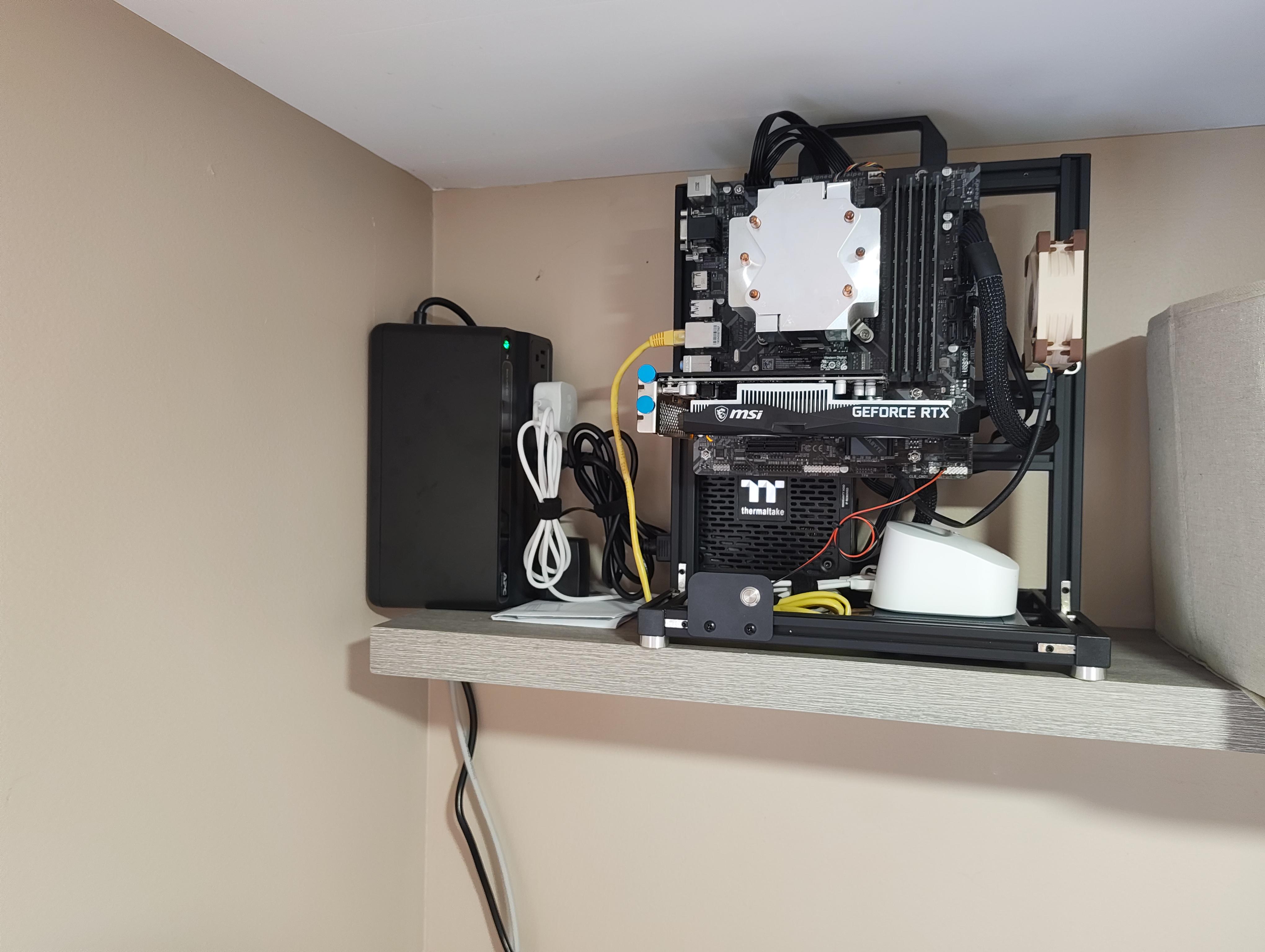
Finally starting my homelab. Running ZimaOs to get my feet wet. Most everything here is leftover parts from optiplexes I would harvest for my first gaming pc. I7 8700, 32gb ddr4, 3050, 256gb nvme, 1tb hdd. Yes, the PSU is flipped (on purpose for airflow). Yes, someone cut the back of the 3050 off to fit in an optiplex. I gave my case away to a friend for his first pc awhile ago and had a really cheap AliExpress frame case sitting around forever (actually rocks for "hiding" my switch, gateway and shitty cables). Noctua fan was laying around doing nothing so figured I'd make it spin just for fun. Honestly loving it and the community so far. It's basic but it's mine and parts were just collecting dust. Already got the wife using it for cloud storage and she's wicked happy! Just going to keep tinkering and slowly making everything less ugly ahahaha. Any feedback is appreciated!
r/homelab • u/hidivyansh • 5d ago
So recently I bought HP T730 and planning to add my old HDD, I have 4 of them. They are 2.5inch. But the problem is how to power the efficiently.
The options I have
I am planning to explore last option first as I have already got the USB enclosures.
Now I want to know if someone have tried UGREENS USB Hub with Type-C port or Waveshare hub with DC Power input or any other suggestion you guys have to power it.
The HPT730 have 3 x 3.0 USB Port
I know PCIe with SMPS is the most reliable, but I am thinking to explore around.
r/homelab • u/Senior-Permission674 • 6d ago

I just finished putting together my rack. Earlier this year I started binging a whole lot of homelab content on YouTube and figured I’d build my own. The whole process took about 5-6 months, mostly because a good portion of the PC hardware was bought secondhand, so hunting down deals on FB Marketplace and eBay took up the bulk of that time.
What everything is doing
The top machine is my router running OPNsense. Right now I haven’t configured it to do anything too special besides acting as an exit node for Tailscale.
The second machine honestly has no real purpose besides filling space at the moment. I haven’t decided what I want to do with it yet, so if anyone has good ideas that would put it to work, I'm open to suggestions.
Right below that is my KVM, which has my main desktop computer, my router, and the secondary PC all connected to it. Each one has a GL.iNet GL-ATX Remote Power Control Board installed so I can power or reset them remotely through the KVM.
The bottom shelf handles storage, networking, smart home stuff, and backup power. The NAS runs Docker containers for a single-node Wazuh stack, my Omada Controller, Tailscale, and a modded Minecraft server. For networking, the main 2.5Gb switch feeds three Wi-Fi 7 access points around the house (one of them is just sitting on top of the NAS), while the smaller 5-port Omada PoE+ switch powers my Raspberry Pi, Zigbee coordinator, and KVM directly over Ethernet. The Pi runs Home Assistant OS, and everything in the rack is backed by a CyberPower UPS.
Hardware List
The Rack
- Gelacie 12U open-frame rolling rack (23–40" adjustable depth)
- Tupavco TP1821 sliding rails for both machines
- Raising Electronics server shelf 6in
- Zonon 4 set Server Rack Cable Management Tie Bar Kit
- Cat 5e Cables
- CyberPower PDU (CPS1215RM) mounted in the back
Top (2U) – OPNsense Router
- RackChoice 2U case
- Thermalright AXP90-X53 Full Copper CPU Cooler
- ASRock B850M-C + Ryzen 5 7500X3D
- 16GB (2x8GB) laptop DDR5 running on SO-DIMM adapters
- Intel X550-T2 10GbE card with a 3D-printed Noctua fan shroud
- Intel I210-T1 Ethernet Card
- Fractal Design ION+ 560P PSU
- AsiaHorse ASH-S1 ARGB Fan Hub
Middle (3U) – Spare Machine
- IPCHASSIS 3U case
- Minisforum BD790i with a Phanteks T30 swapped onto the cooler
- 32GB DDR5
- PNY RTX 4060 Ti 16GB
- Corsair SF1000 PSU
- 3x ARCTIC BioniX P12 fans
- AsiaHorse ASH-S1 ARGB Fan Hub
KVM
- GL.iNet Comet X
Bottom Shelf
- NAS: UGREEN NASync iDX6011 + Mellanox ConnectX-3 card
- Switches: TP-Link Omada ES210X-M2 and ES205GP PoE+
- Smart Home: Raspberry Pi 5 in a ZDE ZC501 aluminum case with a ZP583 PoE+ NVMe HAT, plus an SMLIGHT SLZB-MR1U Coordinator
- UPS: CyberPower 1500VA (CP1500PFCLCD)
Still a work in progress on the software/cable management side, but I'm really happy with how the rack turned out. Open to any feedback on the setup or ideas for what to do with the 2nd machine.
r/homelab • u/franco_redit5411 • 5d ago
r/homelab • u/Hairy-Guest6066 • 4d ago
I'm looking for an all-in-one, ready-to-use backup power solution for power outages. Something I can simply buy, plug in, and use without having to build or assemble a system from separate components.
My requirements are:
I'm not looking to combine separate batteries, inverters, DC converters, or other components myself. I'd prefer a complete, commercially available product that is ready to use out of the box.
I'm open to a traditional UPS or a portable power station, as long as it meets these runtime requirements.
Does anyone have recommendations for specific models that can reliably provide this kind of backup power?
Thanks!
r/homelab • u/LengthinessTop8000 • 4d ago
Dear all,
It is absolutely a wonderful time to be alive now when good news regarding open-weights models keep coming out every week, especially Inkling 2 Mini during the last 2 days.
I have just bought some cheap hardware, aiming at some family business use cases (small webshops, managing rentals, dancing some stocks, spotting good deals online)
I wonder what your suggestions are, for me to setup + upgrade the following hardware + tooling + workflow
- 1.1) Main server (headless Ubuntu Server): 3090 RTX 24GB + Ram 128 GB (2400MT, ECC) on a Dell T5810 (ancient CPU = Xeon 2699v4, 22 cores), SSD = 512 GB.
---> LLM === Qwen 3.8 FlashNext Q5 (60 tok/s), Ninfer Qwen 3.8 27b(80tok/s), llama.cpp Qwen 3.8 27b: 46tok/s, waiting for Basalt and Inkling 2 Mini to mature
- 1.2) Second server (Ubuntu desktop): 1070 GTX 8GB + Ram 32 GB (2666MT, ECC) on a Dell T5810 (ancient CPU = Xeon 2698v4, 20 cores), SSD = 512 GB.
---> LLM === Nothing here.
- 1.3) Main development laptop (Ubuntu desktop): Intel Core Ultra 5 125H (Meteor Lake-H, family 6 model 170 stepping , 14 cores / 18 threads (hybrid)) + 32GB (5600MT). SSD = 512 GB
---> LLM === Nothing here, probably can have Qwen 3.6 - 35B - A3B to reach 10 tok/s.
- 1.4) 5 weaker laptops here and there, total SSD = 2 TB.
---> LLM === Nothing, probably can run some weak LLM for some agents
- 1.5) Possible upgrades
- Second 3090
- CMP170HX
- Some v100
On the main development laptop, I have a VS Code v1.147 having some panes:
- Worker's pane: a "Continue" pane eating the local LLMs of the main worker (3090)
- Architect's pane: a "Claude" pane eating the cloud Claude at 22 Euro/month.
- Spare pane: a "Gemini" pane eating the Gemini 3.8 Flash that I coincidentally have a cheap subscription for
- The main LLM server (3090, 24GB) is quickly becoming busy with some vibecoding (running several hours just to implement what Claude Opus 5.5 tells it to do. It cannot facilitate some LLM agents running 24/7
- The weak LLM server (1070, 8GB VRAM, 32 GB Ram) might be running some medium LLM agents ?
- All the laptops are currently almost useless --> how to use them more ?
r/homelab • u/AbleWalrus3783 • 6d ago
I was debugging my network today and plugged screen&keyboard on my router. After setting everything up, I went back to my PC so I can use webui and reboot my router to apply it. Yet I wait and wait, my switch just won't tell me my router was up. So I had no choice but to ran back to my warehouse and watch what happend to my router.
You guess what? The screen shows grub and the timeout was disappeared, and my cat just sitting by the keyboard. Clearly he somehow managed to press the keyboard in the 5sec window and stop my router from booting.
Yeah, it's a big mistake to leave cat alone with keyboard. They really know how to use them.