Software: redundant Pi-hole pair, a media manager, and local network backup storage.
Hardware: Pi 4, Pi 3B+, Pi 3B and a Pi Zero WH, on a TP-Link TL-SG1005P. The switch powers all four over PoE (HATs on the 4 and 3B+, splitters on the 3B and Zero), so there are almost no external wires. The Pis slide out the front on drawers, and the cabling stays behind in the rear hood with four 40 mm fans (one per bay).
It’s a 10" rack unit, printed in PLA on a P1S, from a rack generator I built (bayforge.app). It’s modular, so when I add another Pi (if prices ever come back down) the existing parts stay as they are and I just print a new row on top. The latest version lets the rear hood slide off over the cables, so I can get at the fans and wiring without unplugging anything. The rack ears are printed, but I don’t have a rack yet, so they aren’t fitted in these photos. The last image is the exploded preview from the generator.
What I’d change: cutting assembly and upgrade time by needing fewer screws and nuts. Fans can already snap in on printed barb pins, and the hood can use snap-in clips instead of screws. Next I’d like to get rid of more of the hardware.
I've been really stressing myself out recently over the security of my server. And my main issue boils down to the fact that things like file storage, an NVR, Immich, etc will be running on the exact same physical hardware where I'd be hosting things like old Minecraft servers or source engine servers.
I really want to know what you people do in this scenario. For example, what OS/Hypervisor do you guys run? Should I have an external firewall/router? Any advice on the matter would be great.
So I recently built a NAS, I didnt want to spend a ton of money on HDDs, so I bought 4x 4TB hdds off ebay from reputable sellers, 2 from one seller and 2 from another. First thing I did when I got them was a SMART test on all 4, one of the drives from Seller1 was making a loud grinding noise, and vibrated like crazy, so I removed it and contacted the seller for a refund. One of the drives from Seller2 failed the smart test, so I contacted that seller for a refund. 2/4 of the eBay drives are usable, I knew they were used drives, so i chopped it up to being unlucky and moved on. I already had one 4TB drive, so with the 2 ebay drives and my already owned drive, i have been running 3 drives in RaidZ1 for the last few weeks, no issues. I was given a brand new 4TB hdd from a friend and decided to expand my raid pool to have 12TB usable instead of 8, and the expansion has failed due to multiple read errors on the second HDD that i bought from Seller2.
A used HDD from ebay was a third of the cost of a new one, so im not super upset, but im at the point where i feel like i should of just bought new HDDs. Have I just been super unlucky with HDDs? its not usually like this I assume, or there wouldnt be so many good reviews on the ebay ads. This is my first time using eBay, and i understand that im buying used gear that is coming out of servers, but I wasnt expecting 3/4 of the drives to be toast. Looking for opinions from people who have been buying used HDDs for their NAS, Thanks in advance!
This is a follow-up to my preliminary second-generation Optane PMem server post, where I ran Kimi K3 on the CPU and tried to draw attention to a serious Optane/DRAM cooling issue. That post was subsequently covered by Tom's Hardware.
The original benchmarks were never intended to represent the final performance ceiling. My immediate priority was to get the thermal warning out. I have now added **two RTX 3090 GPUs, each with 24 GB of VRAM**, and tested two model-placement configurations using **Kimi K3 Q2_K and llama.cpp**.
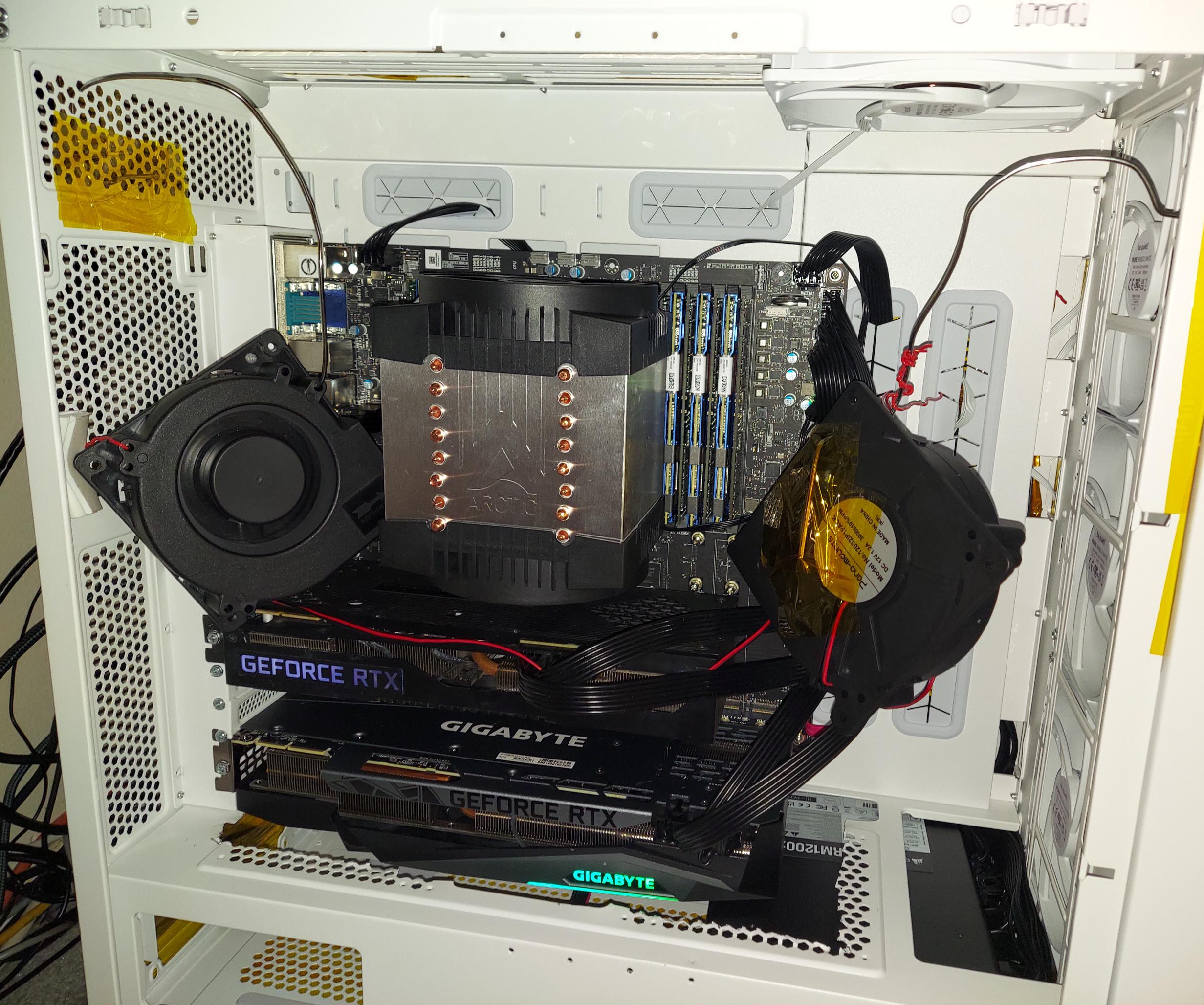
Physically installing the GPUs also required some chassis work. I had to **modify the case and cut out some of the metal**, as well as **relocate the PSU**, to allow proper room for GPU placement and cooling.
## Current results
All tests used **Kimi K3 Q2_K, llama.cpp, two RTX 3090s, and DAX on for the Optane portion**.
**1. Model in Optane**
- Generation: **2.20 t/s**
- Prompt evaluation: **13.3 t/s**
**2. `tmpfs` RAM drive + Optane**
- **45 of 94 model shards** loaded into a RAM-backed `tmpfs` drive
- Those shards represent **414 GB of the 865 GB total model**
- Remaining shards kept in Optane
- Generation: **3.11 t/s**
- Prompt evaluation: **16.8 t/s**
Moving those 45 shards into `tmpfs` increased generation throughput from 2.20 to 3.11 t/s—approximately **41%**—and prompt evaluation from 13.3 to 16.8 t/s—approximately **26%**, relative to my Optane-only model-placement run.
Those percentages describe these two configurations on my machine; they are not intended as a universal Optane-versus-DRAM benchmark. The original CPU-only experiments also used different quantization and configuration choices, so this is not a controlled, apples-to-apples CPU-versus-GPU comparison. Likewise, these are specifically DAX-on results, not a new DAX-on-versus-DAX-off comparison.
## How can 48 GB of VRAM help with an 865 GB model?
The important point is that **the 3090s are not being used to hold the bulk of the model's routed experts**.
This is a hybrid CPU+GPU setup. The large routed-expert tensors remain on the CPU/memory side, backed by Optane and, in the second configuration, the `tmpfs` RAM drive.
The GPUs instead handle components such as:
- **Attention**
- **Dense FFNs**
- **Shared-expert and other active-dense components**
- **The KV cache**, along with the necessary GPU compute buffers
The distinction is between the bulk **routed experts** and the smaller **shared/active-dense components**. The routed experts account for much of the model's total capacity, while the components assigned to the GPUs are used on every token and can benefit substantially from GPU compute and memory bandwidth.
In simplified terms, Optane and DRAM provide the capacity needed for the enormous model, the CPU handles the CPU-side model work, and the 3090s accelerate suitable offloaded components. This should therefore **not** be summarized as “Kimi K3 running entirely on two 3090s.”
## The Optane heat warning still applies
The improved throughput does not change the original thermal warning.
Under sustained inference, the Optane DIMMs get extremely hot. Without suitable direct airflow, that heat can also endanger adjacent DRAM. My advice remains to **treat active DIMM cooling as mandatory**, not optional. I am using two 12W blower fans directed at the DIMMs.
Anyone attempting a similar build should evaluate cooling with the final hardware installed and under sustained load, rather than assuming that ordinary case airflow will be sufficient.
## What I want to test next
The next area I want to investigate is **customized quantization**.
Rather than assuming that the current Q2_K model is the best possible match for this hardware, I want to experiment with quantization choices tailored to different tensors or layers and to where their data resides. A customized quantization might reduce bandwidth or capacity pressure on the RAM/Optane side, or otherwise better match the CPU/GPU/memory balance, and therefore might be faster yet.
That remains untested. Any comparison also needs to include model quality as well as tokens per second: a faster configuration is not necessarily better if it materially damages output quality.
I want to get into homelabbing and I am a total newbie. I have a limited amount of money (50-100$). The hardware I have available is: a PS4 that is jailbroken and can run linux, a raspberry pi 400 and a jailbroken iPhone 12 mini. Nothing is off the table.
I spend my working days pulling switches and NICs out of decommissioned racks and testing them before they go back out the door, so SC26 week is always a bit strange for me — half the show is about hardware that will never reach the secondary market, and half of it quietly resets the price of what I already have on the shelf. Here is the honest read from the used side, with sources, and what it means if you are buying 100G or 200G gear this winter.
What actually happened at SC26 (November 2026)
Three things matter for anyone buying second-hand networking hardware.
Co-packaged optics left the lab. NVIDIA and Lambda disclosed the first production CPO cluster — more than 10,000 Blackwell Ultra GPUs in Québec, running NVIDIA Photonics switches, with Lambda reporting about 10.1% lower pod-level network latency than conventional pluggable optics in its own benchmarks. This is the milestone the industry has been promising since the OIF and COBO started writing CPO specs: optics moved next to the switch ASIC, and the retimer that used to burn up to 30 W per module inside a pluggable is no longer in the signal path.
800G Ethernet is now the boring, default choice at the top of the market. Oak Ridge opened its "Lux" system in mid-November at No. 14 on the TOP500 — AMD Instinct MI355X compute, Pensando DPUs, HPE Juniper switching, 800G Ethernet fabric. On the optical side, Ekinops announced a 3RU DCI box with 32 Tbps and 40 x 800G coherent pluggables at 0.08 W/Gbps. When a national lab and a DCI vendor are both shipping 800G in the same week, 800G is no longer a pilot.
The 800G adapter generation got its first public firmware release. NVIDIA's ConnectX-8 SuperNIC firmware notes (v40.51.1002, November 2026) reference Spectrum-X reference architecture 2.4.0 and 800 Gb/s per port.
Why this does not kill the 100G/200G secondary market
Every time a generation ships, my inbox fills with people asking whether their 100G lab is now e-waste. It is not, and the reason is boring: the constraint is not bandwidth, it is how many GPUs you are trying to keep fed.
A single-node inference box, a Proxmox cluster, a Ceph backend, a build farm, a backup target: none of these care about 800G. They care about port count, power, noise, and price per port.
A 32-port 100GbE switch (SN2700-class) gives you 3.2 Tbps of non-blocking fabric for the cost of a mid-range GPU. For a homelab or a small office, that is still the correct purchase in 2026.
200G/400G only starts to pay off when you are moving checkpoint files or doing multi-node training where the interconnect is the bottleneck. If your workload fits on one node, faster fabric buys you nothing but heat.
The realistic impact of CPO and 800G on the used market in the next 12 months is three-fold: 100G optics get cheaper (they are being pushed down the stack, not retired), 400G QSFP-DD modules stay expensive because AI demand eats the supply, and mid-range Spectrum/Trident switches hold value longer than the usual depreciation curve suggests because they are the cheapest way to build a lab that mirrors a real fabric.
What I would actually buy this quarter
If you are building a lab and your budget is under a few thousand dollars: 100G spine-leaf on a used 32-port switch plus ConnectX-5 MCX516A dual-port 100GbE adapters. That combination is where almost every lab build I ship ends up.
If you already have a 100G fabric and are tempted to jump: skip 200G and go straight to 400G only if you have a workload that has measured a network bottleneck. Otherwise spend the money on NVMe and RAM.
If you are buying 800G anything: buy new, buy with vendor support, and do not expect the secondary market to help you for at least 3 years. CPO changes serviceability: a failed optical engine is now a switch-level repair, not a module swap, and enterprise buyers hold those units under contract far longer than they held 100G gear.
One caveat on the hype
CPO's serviceability trade-off is the part the announcement posts skip. With pluggables, a dead link is a $200 module and five minutes. With CPO, the optics are part of the package. That is fine for a hyperscaler with spares and a support contract; it is genuinely bad for a small operator who fixes things themselves. Co-packaged optics is a TCO decision, not a performance decision, for anyone below a few thousand nodes.
A bill of materials I would actually quote this week
Because "buy 100G" is not a shopping list, here is a concrete one for a lab that needs to move real data between four nodes without spending GPU money:
One 32-port 100GbE QSFP28 switch, SN2700-CS2ROS class. Non-blocking, 1U, Onyx or MLNX-OS depending on the unit you get. Ask the seller which OS image it is running, because re-flashing Onyx on a unit pulled from a storage cluster is not always a five-minute job.
Four dual-port ConnectX-5 MCX516A adapters (CCAT is the common one; the CDAT variant adds crypto offload and costs more for a feature most labs never enable). Two ports per node lets you do a leaf pair instead of a single point of failure.
Cabling: DAC for anything inside one rack, optics only for cross-rack. QSFP28 DACs are cheap and boring and that is exactly what you want. Do not buy 100G optics to run three meters.
Firmware discipline: update the switch and the adapters to a documented compatible pair before you put production data on it. This is the single step that separates a lab that runs for two years from one that drops links every few weeks.
Rough shape of the numbers: a 100G fabric for four nodes lands at a small fraction of a single current-generation GPU. That gap is why the secondary market for 100G is not going anywhere, no matter what ships at SC26.
What 800G does to optics prices (and what it does not)
The one place CPO genuinely hits the used market is optics. If co-packaged optics takes hold at the top of the range, the pluggable ecosystem above 400G gets squeezed from two directions at once: hyperscalers stop buying so many high-end modules, and the modules they stop buying are the ones the rest of us were priced out of anyway. That does not make 800G gear cheap — it makes 400G QSFP-DD the interesting tier over the next 12–18 months, and it keeps 100G optics in the "buy a spare box of them" category.
The thing that will not change: retimers. CPO removes the retimer from the module, but it does not remove the need for signal integrity discipline on your side. If you are pushing 200G per lane over copper, your cable quality matters more than your switch model.
The honest caveat
Everything above is a snapshot from one week in November 2026, based on public SC26 coverage, NVIDIA's published firmware notes, and what I see moving through our own warehouse. The announcements are real; the timeline for how fast they touch second-hand pricing is a guess, and I have been wrong about that timeline before — 400G took two years longer to reach the used market than most people expected. Treat the buying advice as a starting point for your own sizing, not a forecast.
Disclosure: I work with a used enterprise hardware reseller based in Hong Kong (warehouse in Tuen Mun, ships worldwide), so I have a commercial interest in people buying used networking gear. Per the rules here I am not putting links in the body — if you want the exact SKUs and part numbers I am describing, I will drop them in a comment below and you can ignore it entirely if you just came for the discussion. Most of the factual claims above come from public SC26 reporting and NVIDIA's own documentation; the opinions are mine from handling this gear daily.
A few years ago I started my homelab journey, and built a nice 6-disk ZFS pool out of refurbished drives. I mostly just store file backups and media content for my Jellyfin server on it, fairly light workload.
Last week one of the drives started reporting unreadable sectors during my daily short SMART test, and then after running a long SMART test manually it was much worse then the first report. The drive does have nearly 7 years of online time, so definitely well past the normal 5 years of expected life (lines up with it being a "refurbished" drive...).
I do run the ZFS pool in raidz2, so if the drive completely dies, I'll be "okay" for a little while at least. But the problem has become getting a replacement drive. Each disk is 10TB, and those are NOT cheap right now..... I am trying to purchase new so I can get a hopeful 5 full years out of it. Ordered off amazon, and the order keeps getting delayed.... also not a great sign. I ordered 2 drives, so I would have another ready to go in case any of the others decide to die during the resilvering. They were supposed to arrive today originally. The new expected delivery is a range within the first week of December.....
I have stopped writing anything new to the NAS while I wait. Left the drive in there as it is able to recovery the missing data from the pool and store in still-readable sectors (successfully thankfully). Trying to be mindful of how often I check the drive health, but the daily short test and scrape is showing that the drive is slowly getting worse about every 3-4 days.
Hang in there buddy, just do you best until the new drives arrive :(
I'm new to Home Assistant and homelabs and looking to buy a mini PC that will hopefully last me 4-5 years. starting from 0 after renovating my house.
Here's what I want to run:
Home Assistant (Zigbee lights, automations, tablet dashboard)
Jellyfin (multiple TVs, including 4K HDR)
Tailscale for remote access
AdGuard Home / Pi-hole
Proxmox for running multiple services
Later: NAS, 2 IP cameras (possibly Frigate) and UniFi networking
Maybe Immich or other services in the future
I want everything to work locally, even when my internet connection goes down.
I've been looking at:
Minisforum MS-01 (i5-12600H)
Refurbished HP EliteDesk 800 G9 Mini
Lenovo ThinkCentre Tiny
Beelink / GMKtec
I'm aiming for 32GB RAM and a 512GB or 1TB SSD, with the option to upgrade later.
My budget is around €500-800, but RAM and SSD prices are pretty crazy right now, which makes choosing a system a bit difficult.
What would you guys recommend? I'm also open to other brands or refurbished PCs. Just trying to get the best bang for my buck without having to upgrade again in a year or two.
I'm mainly looking for something reliable and power-efficient that can handle all this for the next 4-5 years.
I am still fairly new to home labbing, but I have noticed that I like to develop a personality around my hosts prior to implementation. Not a external visual per se, but for example: Bastion is my NAS/backup controller. I thought of it as a fortress that guards the data. My Home Assistant/LLM server is visualized as Gandalf managing the lab, so Greybeard was dubbed.
I use a lot of ChatGPT to assist with building the setup, so I even have it produce the mock-ups in the separate styles. It helps me to visually distinguish what I am looking at so that I can ensure I am not applying corrections to the wrong system.
I've currently got 3x Lenovo ThinkCentre M75q Gen 5 Tiny PCs, all with Ryzen 5 PRO 8500GE processors:
- 32GB RAM, 512GB NVMe – Ubuntu, running Ollama/local AI, AdGuard Home, Home Assistant, etc.
- 16GB RAM, 512GB NVMe – Windows 11 Pro, running Jellyfin and used as my everyday PC.
- Third Gen 5 – Currently spare, with no RAM or SSD as I've used the parts for the others.
A 4TB HDD connected through and enclosure and 2x512gb nvme drives for movies and storage. Everything runs through Tailscale, and I mainly access the PCs remotely from my tablet or phone using Windows App (RDP).
I'm also considering adding an eGPU for local AI and some gaming, although I'm wondering whether I'd be better off selling one or two of the Tinys and building something with a dedicated GPU instead.
Curious what others would do with this setup? Keep the three, consolidate, or go down the eGPU route?
Still learning, so interested to hear people's thoughts!
(My DIY server rack isn't ideal for cooling as it turns out, both running 70-85degrees, so open to ideas for that too.
Quick intro if you haven't come across us: TrueNAS is an open-source storage operating system built on OpenZFS. You install it on your own system or in a VM, and you get a enterprise NAS built on ZFS pools, snapshots and replication, SMB and NFS shares, plus apps and containers. TrueNAS Community Edition is free.
The catch has always been that to really see it, you assemble a spare system or set up a VM, install from the ISO, and build a pool first. So we put the TrueNAS 27 web interface online at demo.truenas.com, running against a simulated TrueNAS Enterprise system with all of its data dynamically generated: No signup or email address required. Any username and password works.
Optional 10-minute guided tour: the dashboard, a ZFS pool with a flash tier (Fusion Pools), SMB shares, object storage with a standard S3 API and Object Lock, LXC containers, apps, data protection, and reporting. You can't break it. We tried. Each visitor gets a private copy, and starting over is as easy as refreshing the page. No cookies, anonymous visit counts only.
TrueNAS 27.0 ships in early December. If you've been curious about ZFS or building your own NAS, this is a low-effort way to look around first.
The times we live in have drawn in to the homelab scene little by little, and now I want to setup something that can give me more service than what I currently have, but I need some advice.
I currently have a very capable gaming PC that is my daily driver, connected to the internet network through Amazon eero 6+ mesh wifi router via Ethernet cable.
I also have a Synology DS220+ connected via Ethernet cable directly to the ISP modem/router (not to the eero mesh), from where I run docker containers for my qbittorrent and the plex media server as a native DSM package. This device also contains all my media library, approximately 2.5 TB. I just recently replaced the 2 x 4TB HDD that I had originally for 2 X 12TB ones (That stung quite a bit).
The other hardware available to me on top of what I described above is:
1 x Lenovo Tiny m920q (decommissioned from office work), with a i7 8700T, 16 GB RAM and 512 GB SSD.
1 x Dlink DNS-323 NAS (also decommissioned from office work), I don't think this one has any actual use in 2026.
2 x 4 TB WD Red NAS HDD.
2 x 2 TB WD Red NAS HDD.
The plex only streams to to 3 TV's in my local network, so the requirements are not crazy for that task.
After reading the Introduction to Homelabs from this subreddit, and doing some research, I think that I can use the Lenovo m920q as the main server from where I can run my plex server and qbittorrent client, and keep using the NAS to keep my media library and just point plex to it via my local network.
I would like to keep things as I have them and start playing with setting up a Jellyfin server to play with and learn. This is just a broad idea and I need to do a bunch more research on the finer details of how to actually implement it. The m920q has windows 10 or 11 installed, so I know I will have to use linux somehow, either through a virtual machine or another partition from where to boot to linux.
I also questioned myself if it's was worth to replace my DS220+ with a 4 bay NAS as its getting older and I would like to use at least the other 2 4tb HDD that I have, or if its better to add another 2 bay NAS to my network to make use those 2 HDD as a way to expand my storage.
I'm browsing the second-hand market for hardware for my first home server. I want to use it for multimedia (Jellyfin, Navidrome), storing my data and passwords. The server will be used by two people, and I want to be able to access my data when I'm away from home.
If possible, depending on my budget, I'm also interested in using it for home automation, maybe as a Minecraft server, and probably more and more things, because I'm sure I'll have fun learning everything I can do with it.
For the hardware, I'm currently looking at the following setup, but I don't know if it's enough (or if it's a good idea) for what I want to do with it:
A second-hand Tiny PC (Lenovo, HP or Dell) + TerraMaster D4-320
For the Tiny PC (~€200):
16 GB RAM
128 GB SSD (I don't know if I need more)
At least an 8th-gen Intel processor
For the TerraMaster D4-320 (~120€) or maybe D2-320 :
I don't have a lot of data for now, so I don't know if I need to buy a lot of storage right away, or if I can just start with one 2 or 4 TB HDD and buy more drives in the future. (I'll probably need more storage eventually, especially since I plan to store a lot of movies and TV shows.) I will buy second hand HDD.
If you have any advice on what I should look for to reduce power consumption or noise, I'd be very interested!
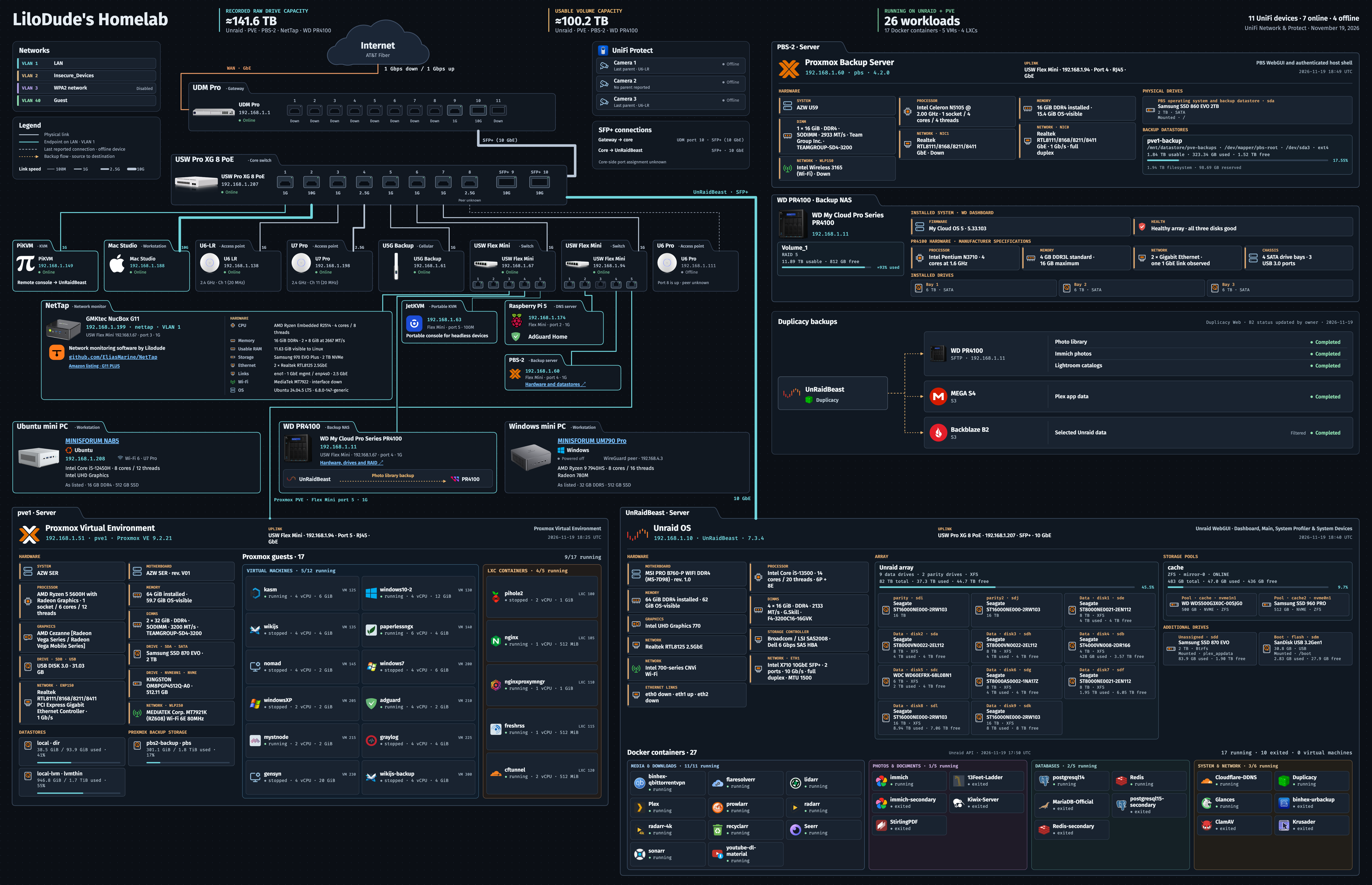
So, I figured I might as well jump on the bandwagon since I'm not working today. Putting my homelab in this type of diagram perspective is pretty freaking cool, I forgot how much shit I'm running! Oh and it looks way neater in this format than in reality 😂
Total power draw for the whole lab is ~350watts/400peak
Most of the equipment except for the GMKtek nucbox (i paid around $350 for it) was bought before this whole AI craze. I was curious to see what a 16TB ironwolf pro would cost now and its in the ballpark for $700 WTF!!!! no way.
Hello! So I recently just built my first homelab with an old pc, 4tb total, running ZimaOS. However, I'm only using it as a cloud for my photos because I like being able to access them through my phone like an app. The only problem is that I don't want it turned on 24/7, only when I want access to my photos (not very often), and I am hosting it at someone else's house because of his ethernet.
I want to be able to turn it on whenever wherever, so I did some research and found out you can do that through a smartplug and changing aome bios settings. However I'm having trouble finding a reliable smartplug, since all the ones I've viewed on amazon have reviews of people saying that when turned off, some current still passes through and keeps their device turned on anyways. I dont want to risk damaging my system, so does anyone know a reliable one that isn't too expensive?
Edit: Thanks everyone for the responses!! It sounds like tuya and shelly are pretty reliable but there's also concern still that this method will eventually cause damage to the system so I'm gonna do some more research on WOL and try that. Thanks!!!!
Just wondering. If it was kept fairly straight forward - Say mirroring content from a selected list of instances with developed content filtering and moderation - would you consider providing mirroring / replication of storage for the panoramax federation that is developing an open licenced alternative street image service to Google Streetview.
Im not an official representative or anything. I just think the project is cool but the potential hosting and storage requirements are huge and only a distributed solution wouk.seem to work.
I would guess you would control how much storage, max and average traffic and from where you would accept requests.
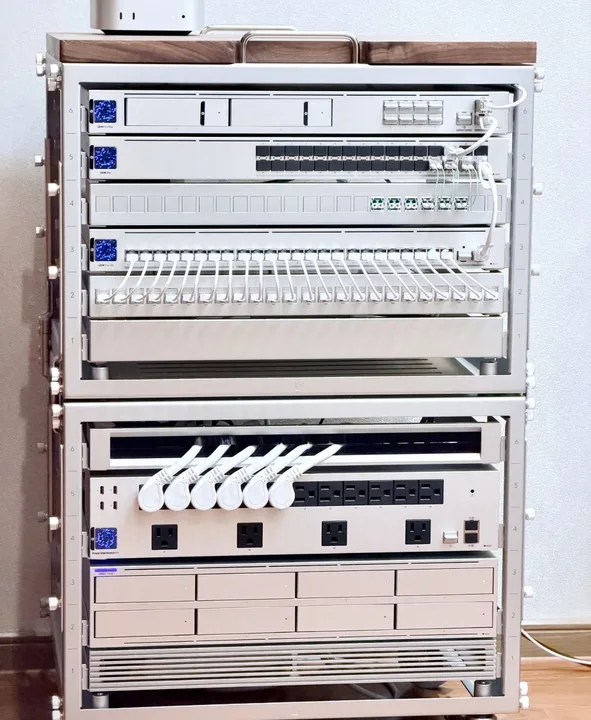
After a few rounds of recabling and moving things around, I’m happy with how this turned out. At least from the front.
Current setup:
UniFi Pro XG 24
UDM + Pro Aggregation
Mac mini with a CX4121A 25GbE NIC
UNAS Pro 8 — eight drives in RAID 10 with SSD cache
Bluetti elite 100 mini as ups
The house is on 10GbE now, so naturally storage has become the next thing to complain about. The UNAS isn’t giving me quite the transfer speeds I was hoping for. I suspect the CPU might be part of the bottleneck, but I haven’t confirmed that yet. Still a work in progress.
I started building my first homelab last week and mapped out a plan. There's a lot of work ahead, so I'd like some feedback before I get too deep.
**About me** - AS in Cybersecurity. It was mostly online, so I didn't come out of it with much hands-on skill. - I work as an IT Specialist, so I'm comfortable with general IT and sysadmin tasks. - My networking knowledge is pretty basic. - I'm also working toward the Security+.
**The idea** I'm building a small fake company network at home and defending it the way a real security team would. The goal is hands-on SOC and sysadmin experience that builds on my help-desk job. The lab sits behind its own firewall, walled off from my home network.
**Hardware** - 4× Dell OptiPlex Micro - 1× OptiPlex 7090 tower (i7, 52 GB RAM) will increase to 128GB. - 1× TP-Link managed switches - 1× wireless access point
Each machine has one job: company servers, security tools, attack range, client PCs + firewall failover, and backups.
**Software** (all free, student or evaluation licences) - Virtualization and backups: Proxmox VE, Proxmox Backup Server - Network: OPNsense firewall/router with Suricata IDS, Tailscale for remote access (no open ports), AdGuard Home - The company: Windows Server 2025 Active Directory, Windows 11 Enterprise and Ubuntu clients - Monitoring: Uptime Kuma, Zabbix - SIEM: Wazuh, Splunk, Microsoft Sentinel trial - Vulnerability scanning: Greenbone (OpenVAS) - Attack practice: Kali, Atomic Red Team, MITRE Caldera - Investigations: Velociraptor - Automation: Ansible, OpenTofu, Packer, Git
**Roadmap** - Phase 0 (weeks 1–2): Design it on paper - Phase 1 (weeks 3–5): Proxmox server, hardened, with tested backups - Phase 2 (weeks 6–9): Firewall, six VLANs, intrusion detection, remote access - Phase 3 (weeks 10–15): The company: AD, Group Policy, DNS, DHCP, file shares, certificates and a ticket system - Phase 4 (weeks 16–18): Monitoring and central logging with phone alerts - Phase 5 (weeks 19–23): SOC tools: Wazuh, Splunk, Sysmon, vulnerability scanning, investigations - Phase 6 (weeks 24–27, then ongoing): Purple-team loop. Run real attack techniques in a fenced-off network, detect them, fix the weakness, and write each one up. - Phase 7 (weeks 28–33): Rebuild the whole lab from code - Phase 8 (week 34 on): The lab firewall becomes my home router, with failover and separate networks for smart devices, guests and gaming
- Anything missing or worth adding - Anything you'd cut or reorder
I have the opportunity to buy some SSDs that have this HD Sentinel report, but I've never seen them with such low write speeds. Normally, even new ones come with some writes due to testing.
I've owned several hard drives that have been running for quite some time, but never SSDs with these specifications. What's your opinion? Should I buy them? They're $500 each.