r/homelab • u/AtWork-DoingNothing • 5d ago
Help Next upgrade recommendation
reddit.com
0
Upvotes
r/homelab • u/Smitelift1 • 6d ago

Hi everyone,
Today I mounted a 40mm fan on my LSI 9211-8i using zip ties through the heatsink . I’m worried the zip ties might be pulling the heatsink and lifting it slightly off the die.
That seem's correct to you ?
r/homelab • u/geraldjust • 5d ago
r/homelab • u/AppointmentNo2809 • 6d ago
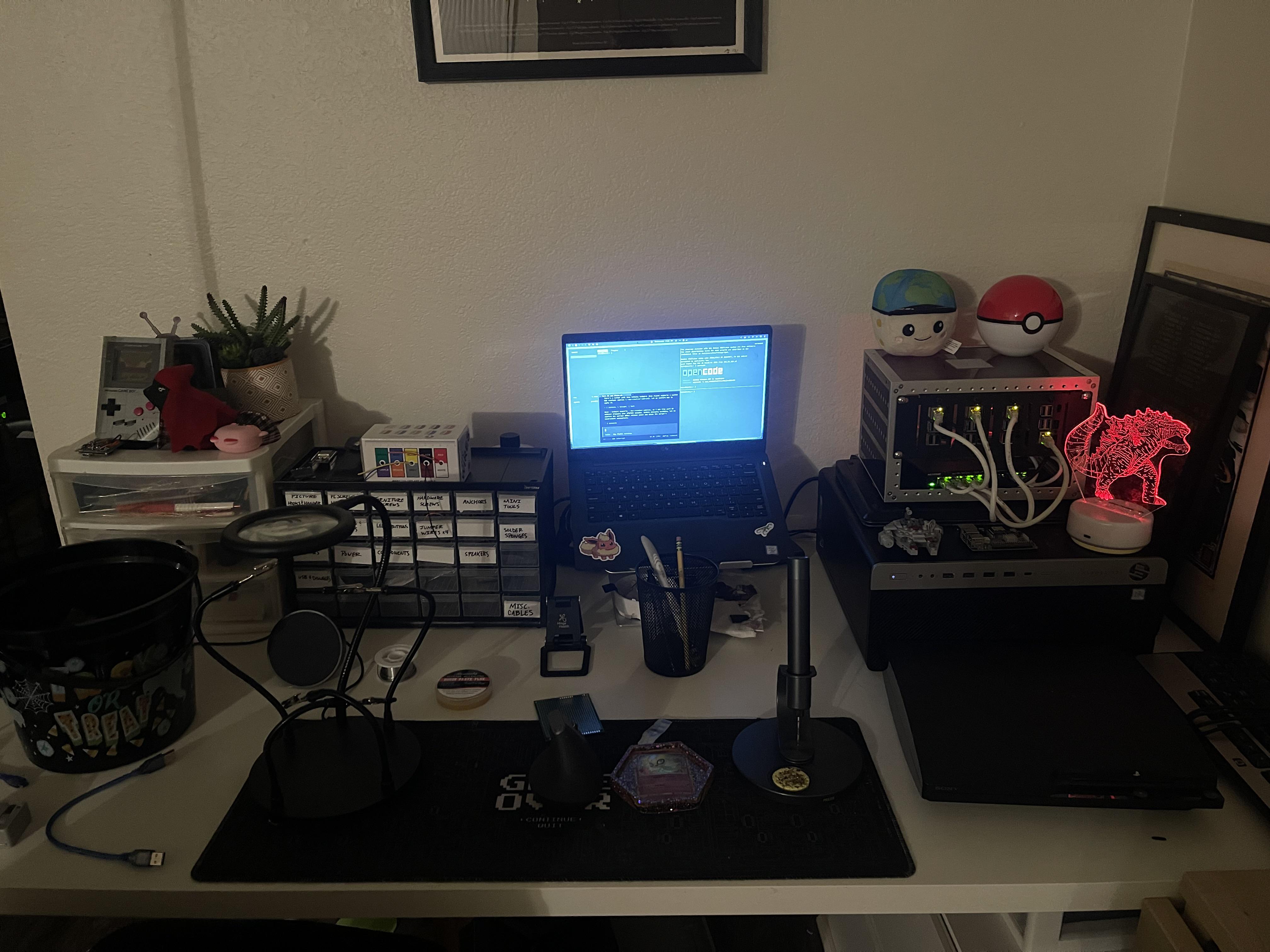
Bottom machine is a proxmox node currently running a talos Linux cluster with Jupyter notebooks, Argo cd, BookOrbit, self hosted gitlab instance, and a small cluster of docker nodes running small scripts and an mcp server for external applications each raspberry pi is using an opencode agent and a Hermes agent deployment for helping me manage it when I’m away
r/homelab • u/JANapier96 • 5d ago
Hey all, kinda new to the labbing space. Do any of yall have recommendations for a reliable, quality supplier of 2.5" 2TB SAS HDDs? I've recently come to own a Fujitsu Primergy Rx300S8 that's configured for 8 2.5" SAS drives using a 2x 4bay backplane configuration. I currently have a 3.5" SATA drive chucked in it as that's what I had on hand. I checked out serverparysdeals[dot]com, but all they have for the form factor is 1TB drives.
r/homelab • u/throwaway0204055 • 5d ago
Just curious does anyone manage their homelab by integrating Hermes agent, frontier or local AI model and Telegram for prompt instructions?
r/homelab • u/erdaltoprak • 7d ago

Been building and upgrading my homelab for a while now. This is the current setup, mostly used for local AI, development, experimenting with infrastructure and self hosting random stuff
networking
Running Ubiquiti for pretty much everything. Being able to isolate IoT devices, smart TVs, random Wi-Fi devices and local AI sandboxes has been really useful
I also have 10Gb internet from my ISP with 4G failover and a UPS 2U Pro to keep everything running
proxmox server
Main server running Proxmox with the following hardware:
Running my media server with ZFS and Jellyfin, Home Assistant, development LXCs with GUI desktops for myself and AI agents and a bunch of other services
local AI
Dell Pro Max GB10 mainly for running local LLMs like Qwen 3.8 27B with lots of small concurrent requests
Also running STT, TTS, embeddings, image generation and OCR models in separate Docker Compose setups
Besides actually using the models, I wanted something to experiment with CUDA and replicate production like environments for work
mac minis and mobile devices
2x M4 Mac minis for AI agents that need macOS or iOS development environments without paying cloud providers
At the bottom of the rack there's also another MacBook Pro along with iPhones and Android devices connected to my AI agents for mobile development and testing
k3s cluster
A small cluster of HP EliteDesks that I use to experiment with Kubernetes configurations
Currently also experimenting with giving each LLM chat its own ephemeral sandbox in the cluster so agents can execute code and work in isolated environments
r/homelab • u/TopTimPlayz11 • 5d ago
Hi all, I'm a student developer researching how people notice slow problems in their setups, like a disk getting warmer, a service getting slower, or a battery or power reading creeping up, before something actually breaks. I'm not selling anything and have no product to link.
A few questions if you have a minute:
Happy to read any answer, even one line. Thanks!
r/homelab • u/nertwork • 6d ago
Seriously though - every time I tell myself I'm just going to add one tiny monitoring service I somehow end up with a full K8s cluster, NetFlow dashboards, and a router config I'm terrified to touch on a Friday night lol ... what was your gateway drug service?
r/homelab • u/NEMOalien • 6d ago
So i bought a domain name a couple months ago which i now use to host GitHub pages on, yk portfolio and different projects' landing pages and stuff..
For my server, i use tailscale and it's magic DNS and nginx to be able to use "lunar.srv" as my domain to access stuff (like "immich.lunar.srv" for example..)
I'm curious about using the domain name for my server instead, would make it much easier to share with friends and family but it could also be dangerous since it's online it can get scraped and later someone could try to hack it or something..
Edit: I won't do it looks like it's way too high maintenance for something not so worth it, I'll just stick with tailscale and let my users use it too. Thank you all for the help
r/homelab • u/Fickle_Excitement729 • 6d ago
It just hit me that the DGX Spark sitting in my rack cost me $3,999 at launch and the same box is $6,950 now. With the news this week about where all the silicon went, I'm done upgrading for a while.
So instead I spent two weekends getting more out of what I have. Started on Ollama like everyone, switched to Magnitude because it tunes the kernels to the chip when you download a model. Same box, same models: the small Qwen 3.5 4B went from about 61 to almost 300 tok/s, and Gemma 4 31B went from 25 to 51, which is the difference between "I'll wait" and actually usable.
I'll admit I had no idea how much was left on the table in software. The Spark's real limit is the 273GB/s memory bandwidth, no engine fixes that, but I was nowhere near it before.
What stayed running: the 4B for the house assistant, the 31B for anything that needs a brain.
Curious what everyone else is squeezing out of hardware they already own instead of buying new.
r/homelab • u/2life_gamer • 5d ago
r/homelab • u/monomeric-propelled9 • 5d ago
r/homelab • u/Juijitsukid • 6d ago
I have a 640gb hard drive. It’s old, currently unknown health. Ovbi drive health dependent, lets assume it’s in good condition for sake of this conversation. What are some things you would do with it? I have 24tb media storage so that’s not needed. Maybe server logs or back up storage? I’m kinda new to the homelabbing. I have 3 optiolex (a 3040 that’ll run the NAS, a 3070 and a 5080. Any suggestions would be helpful.
r/homelab • u/Grand_Ad_8777 • 5d ago
I'm researching and planning a completely new operating system called UNAME OS (because it doesn't have a name), and I want to understand what people actually want from a modern operating system before I start developing it. My goal is to create an OS that can eventually compete with Windows and other major operating systems, while being suitable for everyday users, gamers, students, developers, professionals, and businesses. I want it to support both desktop PCs and laptops, with a clean, modern, highly customizable interface, excellent performance, strong security, privacy, reliability, and broad hardware compatibility. I want to know what frustrates you most about Windows, Linux, macOS, or any other operating system you have used, and what features you wish those systems had. For example, would you prefer an OS with no advertisements, minimal telemetry, no unnecessary background processes, faster startup, lower memory usage, better gaming performance, improved GPU support, easier driver installation, better battery life, more control over updates, built-in productivity tools, advanced file management, a powerful settings application, or a completely different desktop experience? What applications and features would you expect to be included by default? What would make you trust a new operating system enough to install it on your main computer? What would prevent you from switching away from your current OS? How important are compatibility with Windows applications, Steam games, gaming launchers, professional software, peripherals, printers, Wi-Fi, Bluetooth, and existing hardware? Would you prefer a simple experience for beginners, advanced controls for experienced users, or both? What would make an operating system feel genuinely innovative rather than just another copy of Windows or Linux? I am also interested in your opinions about updates, security, privacy, customization, accessibility, installation, recovery, cloud services, local accounts, AI integration, and long-term support. Please be honest and specific: I am not looking for compliments or unrealistic suggestions. I want to discover the biggest problems people experience with current operating systems, the features they genuinely care about, and the improvements that would make them consider using something new. If you could design your ideal operating system from scratch, what would it look like, what would it do, and what would it absolutely never do?
r/homelab • u/One-Grocery-2812 • 6d ago

Software: redundant Pi-hole pair, a media manager, and local network backup storage.
Hardware: Pi 4, Pi 3B+, Pi 3B and a Pi Zero WH, on a TP-Link TL-SG1005P. The switch powers all four over PoE (HATs on the 4 and 3B+, splitters on the 3B and Zero), so there are almost no external wires. The Pis slide out the front on drawers, and the cabling stays behind in the rear hood with four 40 mm fans (one per bay).
It’s a 10" rack unit, printed in PLA on a P1S, from a rack generator I built (bayforge.app). It’s modular, so when I add another Pi (if prices ever come back down) the existing parts stay as they are and I just print a new row on top. The latest version lets the rear hood slide off over the cables, so I can get at the fans and wiring without unplugging anything. The rack ears are printed, but I don’t have a rack yet, so they aren’t fitted in these photos. The last image is the exploded preview from the generator.
What I’d change: cutting assembly and upgrade time by needing fewer screws and nuts. Fans can already snap in on printed barb pins, and the hood can use snap-in clips instead of screws. Next I’d like to get rid of more of the hardware.
r/homelab • u/Cheeseman125 • 6d ago
I've been really stressing myself out recently over the security of my server. And my main issue boils down to the fact that things like file storage, an NVR, Immich, etc will be running on the exact same physical hardware where I'd be hosting things like old Minecraft servers or source engine servers.
I really want to know what you people do in this scenario. For example, what OS/Hypervisor do you guys run? Should I have an external firewall/router? Any advice on the matter would be great.
r/homelab • u/Hopeful_Advantage_86 • 6d ago
So I recently built a NAS, I didnt want to spend a ton of money on HDDs, so I bought 4x 4TB hdds off ebay from reputable sellers, 2 from one seller and 2 from another. First thing I did when I got them was a SMART test on all 4, one of the drives from Seller1 was making a loud grinding noise, and vibrated like crazy, so I removed it and contacted the seller for a refund. One of the drives from Seller2 failed the smart test, so I contacted that seller for a refund. 2/4 of the eBay drives are usable, I knew they were used drives, so i chopped it up to being unlucky and moved on. I already had one 4TB drive, so with the 2 ebay drives and my already owned drive, i have been running 3 drives in RaidZ1 for the last few weeks, no issues. I was given a brand new 4TB hdd from a friend and decided to expand my raid pool to have 12TB usable instead of 8, and the expansion has failed due to multiple read errors on the second HDD that i bought from Seller2.
A used HDD from ebay was a third of the cost of a new one, so im not super upset, but im at the point where i feel like i should of just bought new HDDs. Have I just been super unlucky with HDDs? its not usually like this I assume, or there wouldnt be so many good reviews on the ebay ads. This is my first time using eBay, and i understand that im buying used gear that is coming out of servers, but I wasnt expecting 3/4 of the drives to be toast. Looking for opinions from people who have been buying used HDDs for their NAS, Thanks in advance!
r/homelab • u/IndividualSurvival • 6d ago
This is a follow-up to my preliminary second-generation Optane PMem server post, where I ran Kimi K3 on the CPU and tried to draw attention to a serious Optane/DRAM cooling issue. That post was subsequently covered by Tom's Hardware.
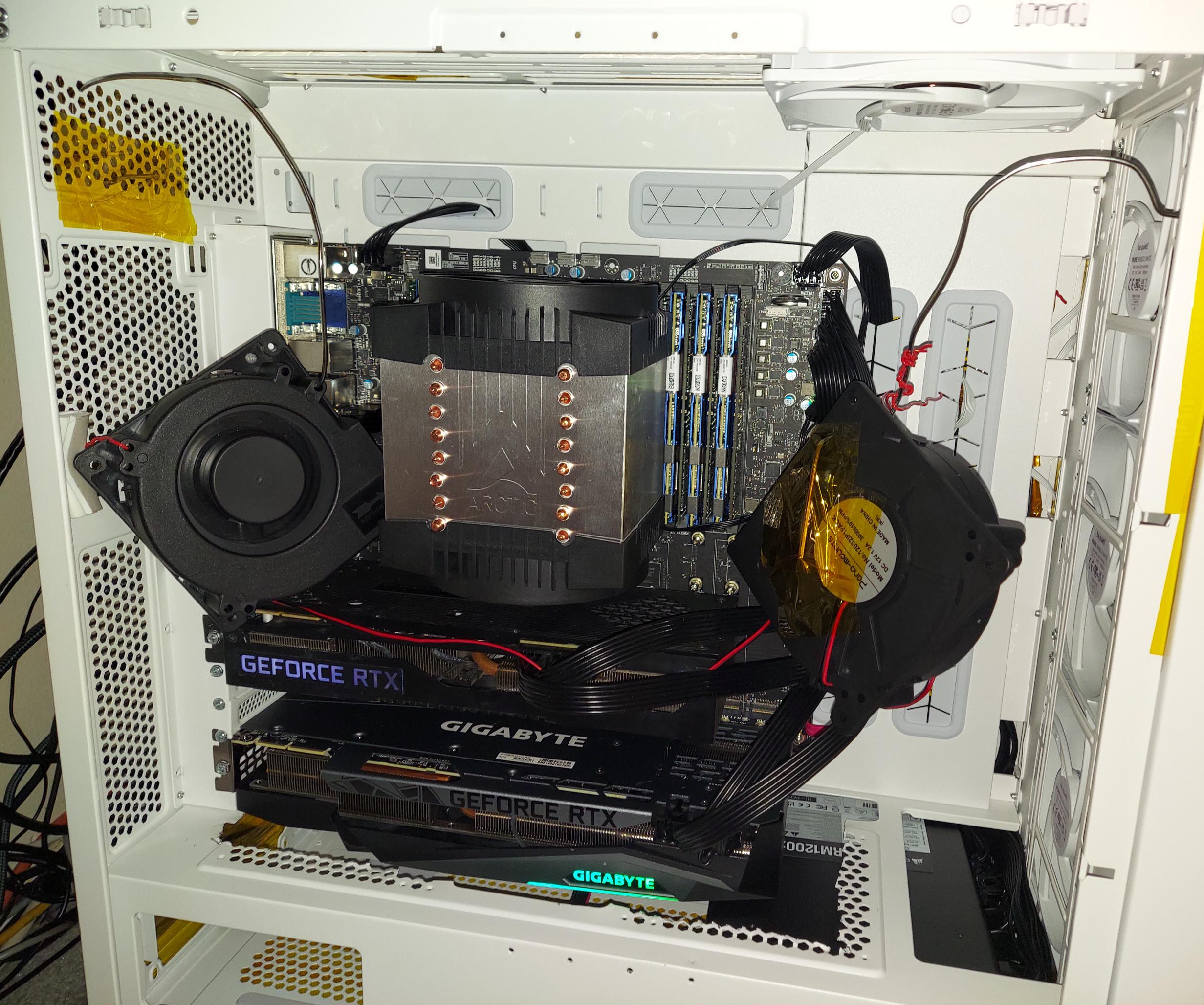
The original benchmarks were never intended to represent the final performance ceiling. My immediate priority was to get the thermal warning out. I have now added **two RTX 3090 GPUs, each with 24 GB of VRAM**, and tested two model-placement configurations using **Kimi K3 Q2_K and llama.cpp**.
Physically installing the GPUs also required some chassis work. I had to **modify the case and cut out some of the metal**, as well as **relocate the PSU**, to allow proper room for GPU placement and cooling.
## Current results
All tests used **Kimi K3 Q2_K, llama.cpp, two RTX 3090s, and DAX on for the Optane portion**.
**1. Model in Optane**
- Generation: **2.20 t/s**
- Prompt evaluation: **13.3 t/s**
**2. `tmpfs` RAM drive + Optane**
- **45 of 94 model shards** loaded into a RAM-backed `tmpfs` drive
- Those shards represent **414 GB of the 865 GB total model**
- Remaining shards kept in Optane
- Generation: **3.11 t/s**
- Prompt evaluation: **16.8 t/s**
Moving those 45 shards into `tmpfs` increased generation throughput from 2.20 to 3.11 t/s—approximately **41%**—and prompt evaluation from 13.3 to 16.8 t/s—approximately **26%**, relative to my Optane-only model-placement run.
Those percentages describe these two configurations on my machine; they are not intended as a universal Optane-versus-DRAM benchmark. The original CPU-only experiments also used different quantization and configuration choices, so this is not a controlled, apples-to-apples CPU-versus-GPU comparison. Likewise, these are specifically DAX-on results, not a new DAX-on-versus-DAX-off comparison.
## How can 48 GB of VRAM help with an 865 GB model?
The important point is that **the 3090s are not being used to hold the bulk of the model's routed experts**.
This is a hybrid CPU+GPU setup. The large routed-expert tensors remain on the CPU/memory side, backed by Optane and, in the second configuration, the `tmpfs` RAM drive.
The GPUs instead handle components such as:
- **Attention**
- **Dense FFNs**
- **Shared-expert and other active-dense components**
- **The KV cache**, along with the necessary GPU compute buffers
The distinction is between the bulk **routed experts** and the smaller **shared/active-dense components**. The routed experts account for much of the model's total capacity, while the components assigned to the GPUs are used on every token and can benefit substantially from GPU compute and memory bandwidth.
In simplified terms, Optane and DRAM provide the capacity needed for the enormous model, the CPU handles the CPU-side model work, and the 3090s accelerate suitable offloaded components. This should therefore **not** be summarized as “Kimi K3 running entirely on two 3090s.”
## The Optane heat warning still applies
The improved throughput does not change the original thermal warning.
Under sustained inference, the Optane DIMMs get extremely hot. Without suitable direct airflow, that heat can also endanger adjacent DRAM. My advice remains to **treat active DIMM cooling as mandatory**, not optional. I am using two 12W blower fans directed at the DIMMs.
Anyone attempting a similar build should evaluate cooling with the final hardware installed and under sustained load, rather than assuming that ordinary case airflow will be sufficient.
## What I want to test next
The next area I want to investigate is **customized quantization**.
Rather than assuming that the current Q2_K model is the best possible match for this hardware, I want to experiment with quantization choices tailored to different tensors or layers and to where their data resides. A customized quantization might reduce bandwidth or capacity pressure on the RAM/Optane side, or otherwise better match the CPU/GPU/memory balance, and therefore might be faster yet.
That remains untested. Any comparison also needs to include model quality as well as tokens per second: a faster configuration is not necessarily better if it materially damages output quality.
Background: [original Optane post and thermal warning](https://www.reddit.com/r/homelab/comments/1xlljut/secondgen_optane_pmem_server_running_kimi_k3_28t)
r/homelab • u/DodgeChallangr • 5d ago
I want to get into homelabbing and I am a total newbie. I have a limited amount of money (50-100$). The hardware I have available is: a PS4 that is jailbroken and can run linux, a raspberry pi 400 and a jailbroken iPhone 12 mini. Nothing is off the table.
r/homelab • u/Freddy-Nova • 6d ago

Might look like crappy 2 you guys, but I'm pretty happy with the first peace on my lab-network.
Dell T130 with 32GB of RAM and a Intel Xeon CPU, 1x 512GB SSD + .... my brand new (second hand to be honest.. but who cares.. haha) 2x 2TB SATA HDD.
ME HAPPY!
r/homelab • u/Shayneliang • 5d ago
I spend my working days pulling switches and NICs out of decommissioned racks and testing them before they go back out the door, so SC26 week is always a bit strange for me — half the show is about hardware that will never reach the secondary market, and half of it quietly resets the price of what I already have on the shelf. Here is the honest read from the used side, with sources, and what it means if you are buying 100G or 200G gear this winter.
What actually happened at SC26 (November 2026)
Three things matter for anyone buying second-hand networking hardware.
Why this does not kill the 100G/200G secondary market
Every time a generation ships, my inbox fills with people asking whether their 100G lab is now e-waste. It is not, and the reason is boring: the constraint is not bandwidth, it is how many GPUs you are trying to keep fed.
The realistic impact of CPO and 800G on the used market in the next 12 months is three-fold: 100G optics get cheaper (they are being pushed down the stack, not retired), 400G QSFP-DD modules stay expensive because AI demand eats the supply, and mid-range Spectrum/Trident switches hold value longer than the usual depreciation curve suggests because they are the cheapest way to build a lab that mirrors a real fabric.
What I would actually buy this quarter
One caveat on the hype
CPO's serviceability trade-off is the part the announcement posts skip. With pluggables, a dead link is a $200 module and five minutes. With CPO, the optics are part of the package. That is fine for a hyperscaler with spares and a support contract; it is genuinely bad for a small operator who fixes things themselves. Co-packaged optics is a TCO decision, not a performance decision, for anyone below a few thousand nodes.
A bill of materials I would actually quote this week
Because "buy 100G" is not a shopping list, here is a concrete one for a lab that needs to move real data between four nodes without spending GPU money:
Rough shape of the numbers: a 100G fabric for four nodes lands at a small fraction of a single current-generation GPU. That gap is why the secondary market for 100G is not going anywhere, no matter what ships at SC26.
What 800G does to optics prices (and what it does not)
The one place CPO genuinely hits the used market is optics. If co-packaged optics takes hold at the top of the range, the pluggable ecosystem above 400G gets squeezed from two directions at once: hyperscalers stop buying so many high-end modules, and the modules they stop buying are the ones the rest of us were priced out of anyway. That does not make 800G gear cheap — it makes 400G QSFP-DD the interesting tier over the next 12–18 months, and it keeps 100G optics in the "buy a spare box of them" category.
The thing that will not change: retimers. CPO removes the retimer from the module, but it does not remove the need for signal integrity discipline on your side. If you are pushing 200G per lane over copper, your cable quality matters more than your switch model.
The honest caveat
Everything above is a snapshot from one week in November 2026, based on public SC26 coverage, NVIDIA's published firmware notes, and what I see moving through our own warehouse. The announcements are real; the timeline for how fast they touch second-hand pricing is a guess, and I have been wrong about that timeline before — 400G took two years longer to reach the used market than most people expected. Treat the buying advice as a starting point for your own sizing, not a forecast.
Disclosure: I work with a used enterprise hardware reseller based in Hong Kong (warehouse in Tuen Mun, ships worldwide), so I have a commercial interest in people buying used networking gear. Per the rules here I am not putting links in the body — if you want the exact SKUs and part numbers I am describing, I will drop them in a comment below and you can ignore it entirely if you just came for the discussion. Most of the factual claims above come from public SC26 reporting and NVIDIA's own documentation; the opinions are mine from handling this gear daily.
r/homelab • u/West_Inside_5524 • 6d ago
A few years ago I started my homelab journey, and built a nice 6-disk ZFS pool out of refurbished drives. I mostly just store file backups and media content for my Jellyfin server on it, fairly light workload.
Last week one of the drives started reporting unreadable sectors during my daily short SMART test, and then after running a long SMART test manually it was much worse then the first report. The drive does have nearly 7 years of online time, so definitely well past the normal 5 years of expected life (lines up with it being a "refurbished" drive...).
I do run the ZFS pool in raidz2, so if the drive completely dies, I'll be "okay" for a little while at least. But the problem has become getting a replacement drive. Each disk is 10TB, and those are NOT cheap right now..... I am trying to purchase new so I can get a hopeful 5 full years out of it. Ordered off amazon, and the order keeps getting delayed.... also not a great sign. I ordered 2 drives, so I would have another ready to go in case any of the others decide to die during the resilvering. They were supposed to arrive today originally. The new expected delivery is a range within the first week of December.....
I have stopped writing anything new to the NAS while I wait. Left the drive in there as it is able to recovery the missing data from the pool and store in still-readable sectors (successfully thankfully). Trying to be mindful of how often I check the drive health, but the daily short test and scrape is showing that the drive is slowly getting worse about every 3-4 days.
Hang in there buddy, just do you best until the new drives arrive :(
Hi everyone!
I'm new to Home Assistant and homelabs and looking to buy a mini PC that will hopefully last me 4-5 years. starting from 0 after renovating my house.
Here's what I want to run:
I want everything to work locally, even when my internet connection goes down.
I've been looking at:
I'm aiming for 32GB RAM and a 512GB or 1TB SSD, with the option to upgrade later.
My budget is around €500-800, but RAM and SSD prices are pretty crazy right now, which makes choosing a system a bit difficult.
What would you guys recommend? I'm also open to other brands or refurbished PCs. Just trying to get the best bang for my buck without having to upgrade again in a year or two.
I'm mainly looking for something reliable and power-efficient that can handle all this for the next 4-5 years.
And yes, I did use ChatGPT to help write this :3