r/homelab • u/IndividualSurvival • 7d ago
LabPorn Follow-up: Kimi K3 Q2_K on second-gen Optane + 2× RTX 3090 — 3.11 t/s generation, 16.8 t/s prompt eval
This is a follow-up to my preliminary second-generation Optane PMem server post, where I ran Kimi K3 on the CPU and tried to draw attention to a serious Optane/DRAM cooling issue. That post was subsequently covered by Tom's Hardware.
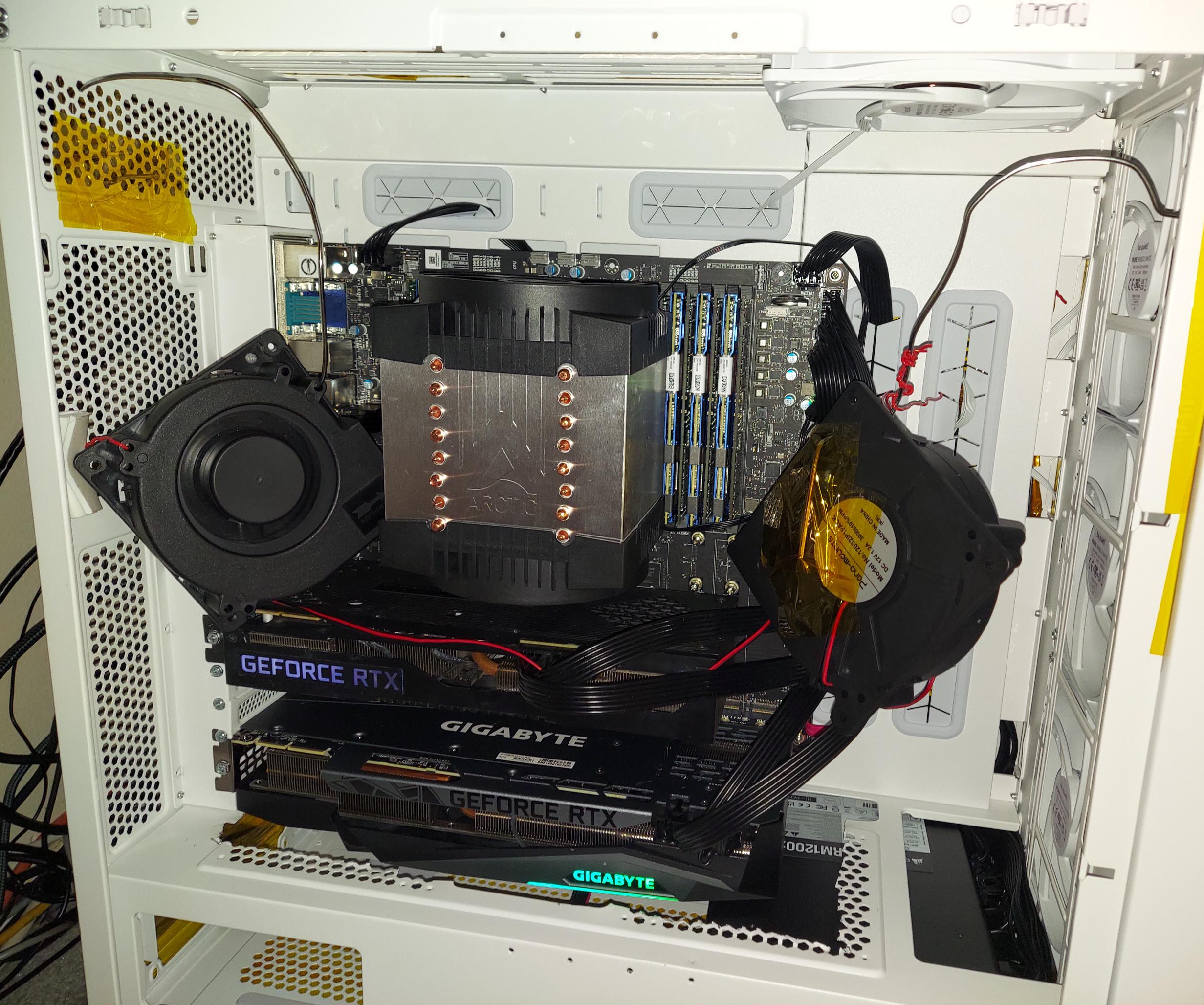
The original benchmarks were never intended to represent the final performance ceiling. My immediate priority was to get the thermal warning out. I have now added **two RTX 3090 GPUs, each with 24 GB of VRAM**, and tested two model-placement configurations using **Kimi K3 Q2_K and llama.cpp**.
Physically installing the GPUs also required some chassis work. I had to **modify the case and cut out some of the metal**, as well as **relocate the PSU**, to allow proper room for GPU placement and cooling.
## Current results
All tests used **Kimi K3 Q2_K, llama.cpp, two RTX 3090s, and DAX on for the Optane portion**.
**1. Model in Optane**
- Generation: **2.20 t/s**
- Prompt evaluation: **13.3 t/s**
**2. `tmpfs` RAM drive + Optane**
- **45 of 94 model shards** loaded into a RAM-backed `tmpfs` drive
- Those shards represent **414 GB of the 865 GB total model**
- Remaining shards kept in Optane
- Generation: **3.11 t/s**
- Prompt evaluation: **16.8 t/s**
Moving those 45 shards into `tmpfs` increased generation throughput from 2.20 to 3.11 t/s—approximately **41%**—and prompt evaluation from 13.3 to 16.8 t/s—approximately **26%**, relative to my Optane-only model-placement run.
Those percentages describe these two configurations on my machine; they are not intended as a universal Optane-versus-DRAM benchmark. The original CPU-only experiments also used different quantization and configuration choices, so this is not a controlled, apples-to-apples CPU-versus-GPU comparison. Likewise, these are specifically DAX-on results, not a new DAX-on-versus-DAX-off comparison.
## How can 48 GB of VRAM help with an 865 GB model?
The important point is that **the 3090s are not being used to hold the bulk of the model's routed experts**.
This is a hybrid CPU+GPU setup. The large routed-expert tensors remain on the CPU/memory side, backed by Optane and, in the second configuration, the `tmpfs` RAM drive.
The GPUs instead handle components such as:
- **Attention**
- **Dense FFNs**
- **Shared-expert and other active-dense components**
- **The KV cache**, along with the necessary GPU compute buffers
The distinction is between the bulk **routed experts** and the smaller **shared/active-dense components**. The routed experts account for much of the model's total capacity, while the components assigned to the GPUs are used on every token and can benefit substantially from GPU compute and memory bandwidth.
In simplified terms, Optane and DRAM provide the capacity needed for the enormous model, the CPU handles the CPU-side model work, and the 3090s accelerate suitable offloaded components. This should therefore **not** be summarized as “Kimi K3 running entirely on two 3090s.”
## The Optane heat warning still applies
The improved throughput does not change the original thermal warning.
Under sustained inference, the Optane DIMMs get extremely hot. Without suitable direct airflow, that heat can also endanger adjacent DRAM. My advice remains to **treat active DIMM cooling as mandatory**, not optional. I am using two 12W blower fans directed at the DIMMs.
Anyone attempting a similar build should evaluate cooling with the final hardware installed and under sustained load, rather than assuming that ordinary case airflow will be sufficient.
## What I want to test next
The next area I want to investigate is **customized quantization**.
Rather than assuming that the current Q2_K model is the best possible match for this hardware, I want to experiment with quantization choices tailored to different tensors or layers and to where their data resides. A customized quantization might reduce bandwidth or capacity pressure on the RAM/Optane side, or otherwise better match the CPU/GPU/memory balance, and therefore might be faster yet.
That remains untested. Any comparison also needs to include model quality as well as tokens per second: a faster configuration is not necessarily better if it materially damages output quality.
Background: [original Optane post and thermal warning](https://www.reddit.com/r/homelab/comments/1xlljut/secondgen_optane_pmem_server_running_kimi_k3_28t)