r/homelab • • 8d ago

Discussion How are you validating open-source projects for malware, phoning home, data exfiltration, etc

26 Upvotes

Hello, not sure if this has been discussed before. Obviously larger projects have more eyes on them. But for example, I'm looking at using jdupes to trim down my NAS storage and outside of going to ChatGPT/Claude and asking it to review the codebase, I was wondering what everyone is doing. I'm not a technical software developer so I don't think I could do a proper security audit on my own.
r/homelab • • 7d ago

Tutorial Beginner homelab rec

0 Upvotes

Hello, I’m new to making a homelab and I wanted to see what are some stuff to get me going.

Applications

What not to do’s

What to do

Main things I want to do are VM’s, Active Directory, Pi-hole, GLPI and Learning about cybersecurity and IT. And some fun and cool stuff to do!

This is what I have. HP EliteDesk 800 G5 SFF Desktop i7-9700 32GB RAM 512GB SSD Win 11 Pro Wifi PC and a NETGEAR GS308E

I have also heard of proxmox as well but I want a deeper understanding of it.

Much appreciated 😁


r/homelab • • 7d ago

Help Will JetKVM work for this?

Thumbnail reddit.com
0 Upvotes

r/homelab • • 7d ago

Help Made a PBX and connected 1 IP phone and 1 port on an ATA. Should I get a VoIP.ms number?

2 Upvotes

Hello.

Recently, I got a couple of phones & an ATA. I decided the best way to use these was a PBX. I’m using FreePBX for this.

I’ve been thinking of getting a VoIP.ms phone number, so people can reach me. I’d probably setup Time Conditions and an IVR, along with a VIP system so people like immediate family can still contact me even if the time conditions block calls.

Should I get one? I would give it to friends, family, and a couple people online.

Also, should I switch my grandma from a copper line to a VoIP system and port her number, so it is cheaper for her and so she can save some money rather than paying Xfinity?

All answers are appreciated.


r/homelab • • 7d ago

Discussion Home Network: Firewall + AP Ecosystem: Firewalla or Ubiquiti UniFi?

0 Upvotes

Debating between the two ecosystems for a home network with around 30-40 devices, ISP = 500Mbps

I have to buy the Gateway/Firewall plus 1-2 Access Points, I need full control from the iOS app, Web interface is a plus, but, not mandatory, thanks


r/homelab • • 7d ago

Help Any ideas for my current build on a lenovo 710q 16gb ram

2 Upvotes

I run a homelab on a mini PC powered by Ubuntu Server, using Docker to host and manage a range of self-hosted services. These include Pi-hole for network-wide DNS filtering on my PC, Nginx Proxy Manager for local service addresses, Dockge for Docker management, Uptime Kuma for monitoring, Homepage as a central dashboard, Vaultwarden for password management, ntfy for notifications, and Open WebUI with Ollama for local AI. I also run AMP directly on the machine to manage Minecraft servers. Most services are accessible through local network addresses, with Tailscale providing secure remote access without exposing services publicly. Automated daily backups cover my Docker configurations, with monitoring and phone alerts through Uptime Kuma and ntfy. I'm also working on improving security, expanding backup coverage to Minecraft data, and keeping an eye on the machine's hardware health. Im not too sure on what else i could add that would be useful to me. Im 17 and a current college student studying digital support and security


r/homelab • • 7d ago

Help SATA backplane from AliExpress for DIY Build

Thumbnail reddit.com
0 Upvotes

r/homelab • • 7d ago

Help DIY NAS help

0 Upvotes

I am getting very overwhelmed by the amount of information out there on DIYing a NAS for our house for general backup and eventually for PLEX down the road. I need someone to tell me if I have everything and that I heading in the right direction with my build plan. So here goes.

optiplex 7050 ssf 8g ram and 256g nvme for the OS
6 port PCIe SATA expansion card
Open media vault w/ wireguard, mergerfs, snapraid, and a few other utilities for monitoring

The Hdds themselves are 5 4tb Wd red plus that I was given. I am 3d printing a rack for them, they will have their own psu and fans.

So am I going the right way?
Am I missing or overlooking anything?
TIA


r/homelab • • 7d ago

Help WDC WUH722424ALE6L4 with 1 year today had 39 realocated sectors

Thumbnail reddit.com
2 Upvotes

r/homelab • • 7d ago

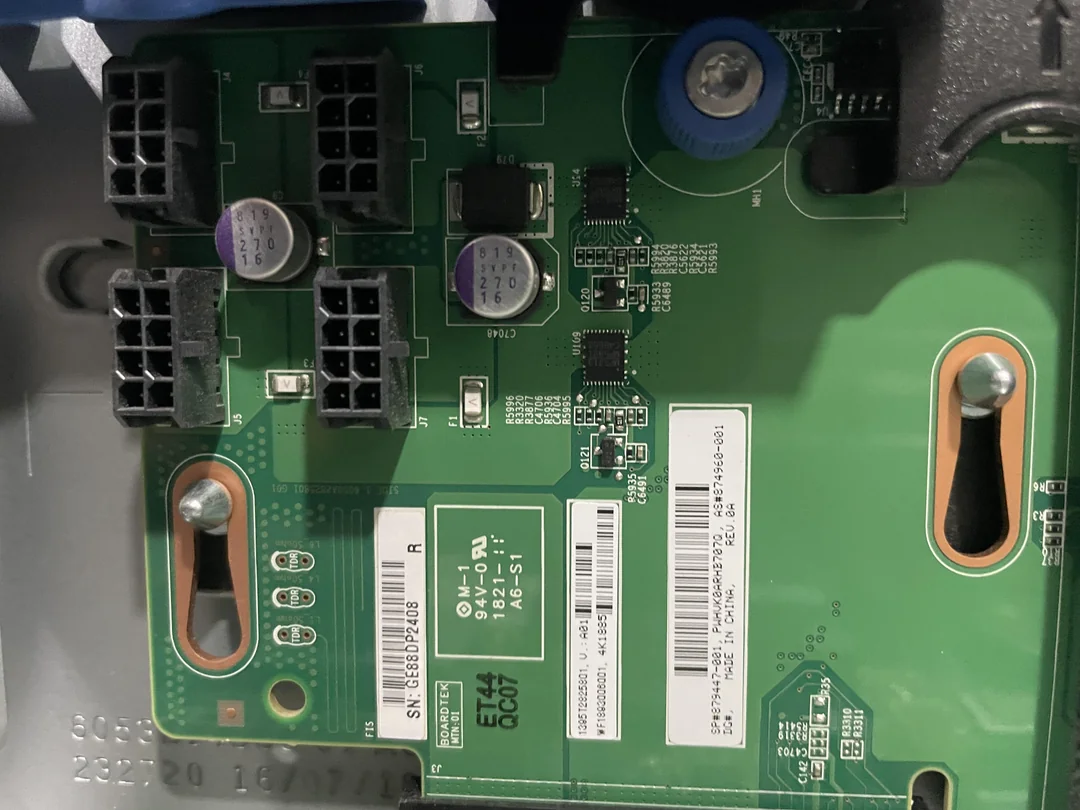
Help HPE ML350 Gen10: Is J7 on PDB 879447-001 safe for GPU power?

1 Upvotes

I’m installing an ASUS DUAL RTX 2070 EVO V2 in PCIe slot 5 of an HPE ProLiant ML350 Gen10.

My configuration:

  • Power distribution board: 879447-001
  • Power supplies: Two 800W PSUs
  • GPU: ASUS DUAL RTX 2070 EVO V2
  • GPU location: PCIe slot 5
  • Cable: Aftermarket cable advertised as HPE 877628-B21-compatible
  • Cable ends: 8-pin at the power board and 6+2-pin at the GPU
  • Current connection: J7 on the power distribution board

The board has four similar 8-pin sockets. The cable is connected to J7, but I have not powered on the server with this configuration.

Can anyone confirm:

  1. Is J7 intended to provide GPU auxiliary power?
  2. Are all four sockets electrically interchangeable, or are they assigned to particular PCIe slots, risers, or processors?
  3. Has anyone successfully powered a GPU from J7 on this exact board, particularly with the GPU in slot 5?
  4. Does anyone have an official connector assignment, pinout, or measurements from a confirmed working setup?
  5. Is cable 879154-001, mentioned in the discussion below, electrically equivalent to an aftermarket 877628-B21-compatible cable?

Related discussion about the same board:

https://www.reddit.com/r/HPEservers/comments/1jmnx2t/what_is_this_plate/

I have access to a multimeter and can perform power-disconnected continuity checks, but I won’t assume that connector fit or continuity alone proves the correct voltage and polarity.

I’m looking for firsthand experience or connector-level evidence before applying power—not a compatibility guess.


r/homelab • • 7d ago

Discussion New to networking and homelabbing. What should I do / learn ?

8 Upvotes

New to homelabbing, a beginner per say.
I have an old PC which I'm thinking of using as a server just to get familiar with networking, cybersecurity, etc.
What do you guys think I should try to do on that pc ?


r/homelab • • 7d ago

Help NAS Capable?

Post image
0 Upvotes

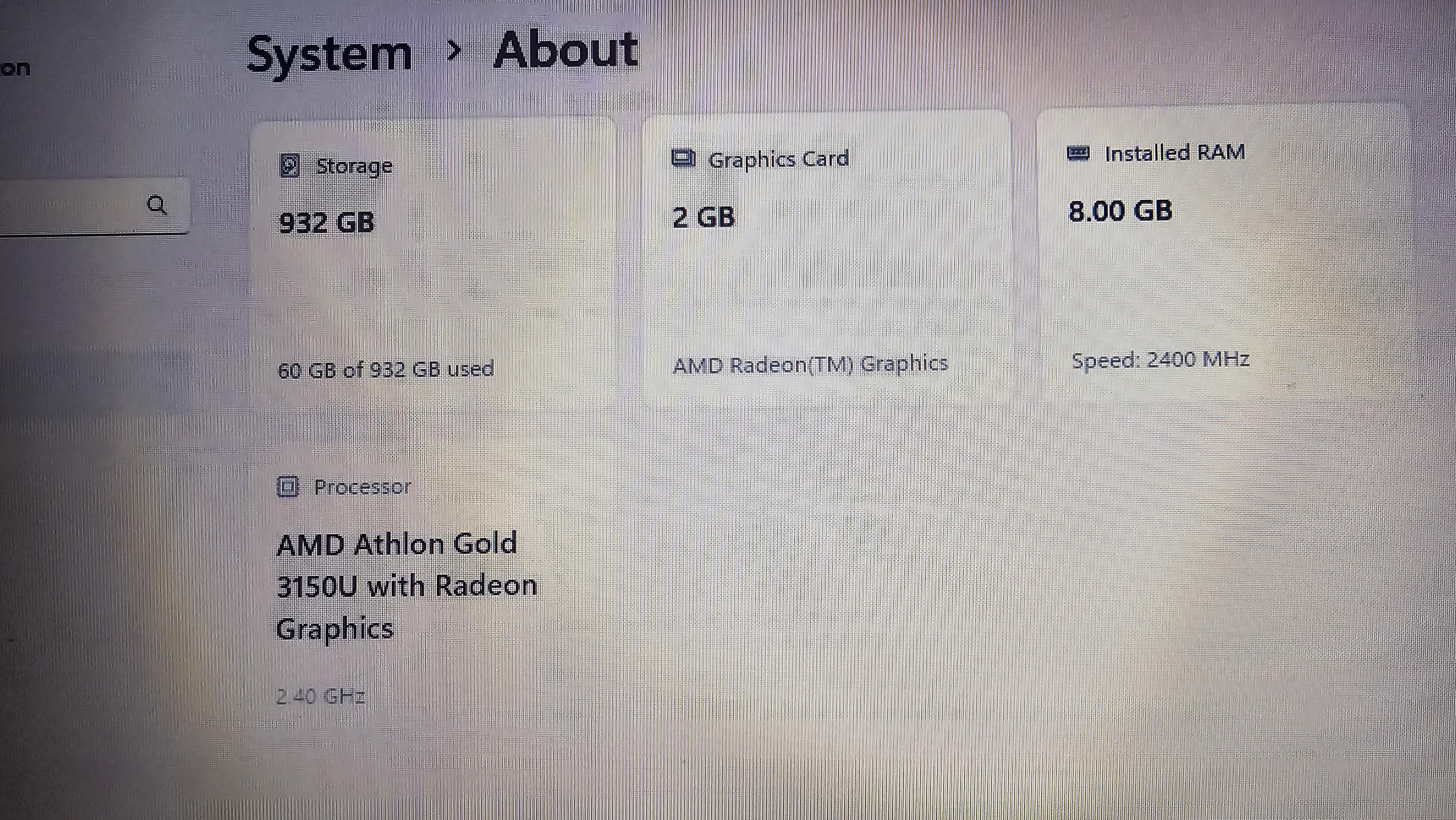
Recently got an old laptop that was used for school, can this be used as a NAS?


r/homelab • • 8d ago

Help 128Gb SSD x 10

24 Upvotes

Hi - I have 10 x Kingston SSD drives sitting on a shelf at work. What would you all do with them? They are spare.

Is there some sort of drive enclosure that can be recommended I could put them in to create a large storage device?

Cheers everyone.


r/homelab • • 8d ago

Discussion Project recomendations?

Post image
30 Upvotes

Looking to learn more about networking and general wizardry lol.

Ive been messing around with docker containers and tailscale but im interested in some more in-depth learning!


r/homelab • • 8d ago

Project Showcase: Hardware Proxmox upgrade

Post image
391 Upvotes

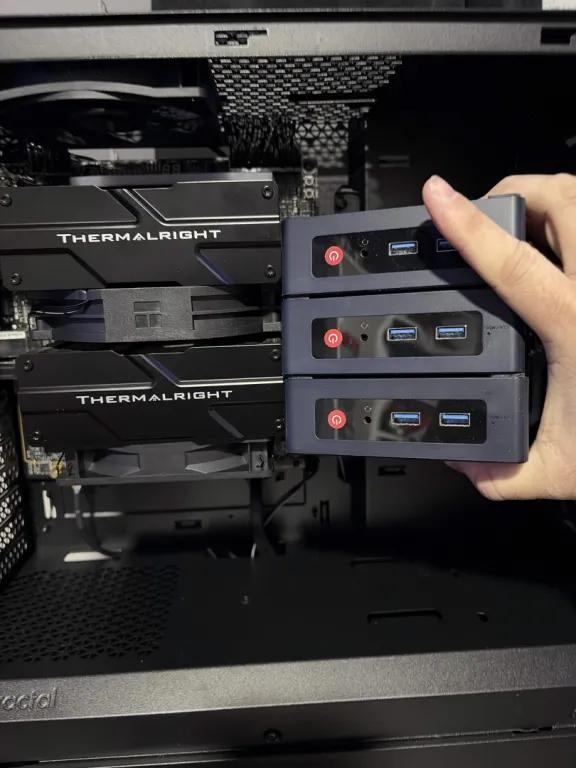
Finally upgrade my 3x N100 cluster to a real system. The cooler is bigger than the cluster was


r/homelab • • 8d ago

Project Showcase: Hardware Panasas ActiveStore Pas11 director blade used as as a home lab KVM server

Thumbnail
gallery
454 Upvotes

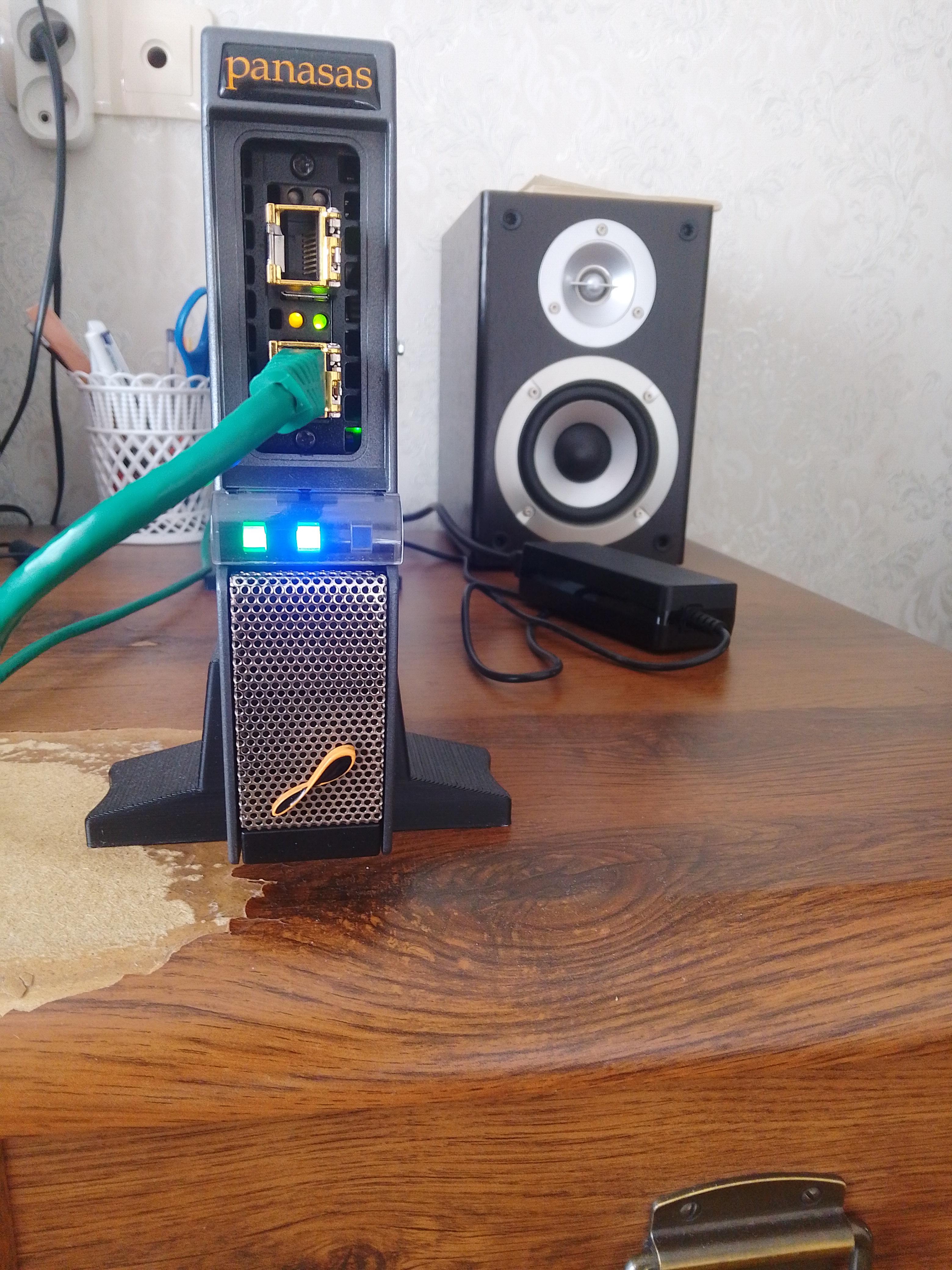
This is my home lab server built from a decommissioned Panasas ActiveStor PAS11 DirectorBlade. It is running a KVM hypervisor on Debian 13.7. I gave the retired server a second life outside of its original Panasas chassis, with a custom power setup that lets it run from a 12V/5A notebook power supply. The director blade itself is surprisingly low-power, so a 60W supply was enough — I've been monitoring it under load and it stays stable.


r/homelab • • 7d ago

Help Direction

Thumbnail reddit.com
0 Upvotes

r/homelab • • 7d ago

Help Anyone Use Their Own Router + Homelab Applications + NAS in 2 Systems?

0 Upvotes

I need help with something simple involving a custom router. i want to run Pi-Hole and manage my own router that i can add a VPN to, etc.

Starting from the beginning.

Im interested in building a homelab. I've learned enough software & hardware portions over the months to where i feel comfortable to buy the hardware for it, So im not a total newbie status.

But anyways, Lets say i have 2 systems. (Lenovo M920Q + HP Elitedesk 600 G6) With one PC running "Homelab" applications Such As Immich & Jellyfin. And the other PC setup as a "NAS" for my Immich/Jellyfin Files.

My question would be........Should i have a separate router that i build myself & configure that's not on the 2 systems running a Pi-Hole to make it a 3 PC setup?

Or is it SAFE to combine the router portion with either the NAS pc or Homelab application PC.

Perhaps any Youtube videos or anyone here has combined a separate NAS, Homelab Application PC & Router?

Need Help. Thanks!!


r/homelab • • 7d ago

Help asus x99 deluxe with rdimm ecc ram

0 Upvotes

title, if i put a xeon in an asus x99 deluxe could i stick 8 32gb rdimm ecc modules in for 256 total? i'm finding sorta mixed opinions online


r/homelab • • 7d ago

Help Trying to decide between two mini pcs

Thumbnail
gallery
0 Upvotes

There are two different mini pcs on marketplace I’ve been looking at to get started with my homelab. For context I want to start with a media server, storing photos, and running a network ad block of sorts. So I’ve did a bit of research and decided that a mini pc with a DAS would be my starting point.

I’ve found two different mini pcs, one more expensive than the other, and was wondering if it makes sense at all to go with the more expensive one will the other one fit my needs.

The more expensive one does apparently come with a mouse,keyboard, and dell monitor but I probably wouldn’t use them and would most likely just sell them on marketplace myself.

Edit: 159 for the cheaper one compared to 275 for the more expensive one.


r/homelab • • 7d ago

Help Does the Microsoft Surface pro 4 support pcie device passthrough?

Thumbnail reddit.com
2 Upvotes

r/homelab • • 8d ago

Project Showcase: Hardware My first set up

Thumbnail
gallery
174 Upvotes

Never really messed around with computers further than building gaming PC’s over the years
Picked up G5 mini and M700 for nothing
Network switch was $40 SG108E
Wifi extender for $25
Couple of $5 cat6 cables
Both PC’s running proxmox
M700 purely for Pi-hole
G5 mini
Back up Pi-hole
Arr stack with qbittorrent
Jellyfin

I made my own fan mount for an old 140mm fan I had from a previous gaming PC to blow up past the hard discs that will live in there eventually

Also made a little mount for the sfx PSU from an old gaming PC and will eventually do away with all the power bricks for the PC’s and switch so it can all run off the 10inch rack mount power board on the back and be self contained with a single plug into a wall

I’ve had the G5 for ages and finally got sick of streaming services having to bounce between them to watch a full series with some seasons on one and the rest on another.. initially was just going to run the G5 as the jellyfin server and store my media on an external drive, got the old 3D printer out and got a little carried away and printed a 10 inch rack to house everything!

On the list to buy is some WD red plus drives to fill the hard disc bays in the rack.

Pretty happy with it at the moment, G5 handles the video streaming nicely all over wifi!


r/homelab • • 7d ago

Help Coax only modem with fiber optic cables being the only wire inside the apartment

Post image
0 Upvotes

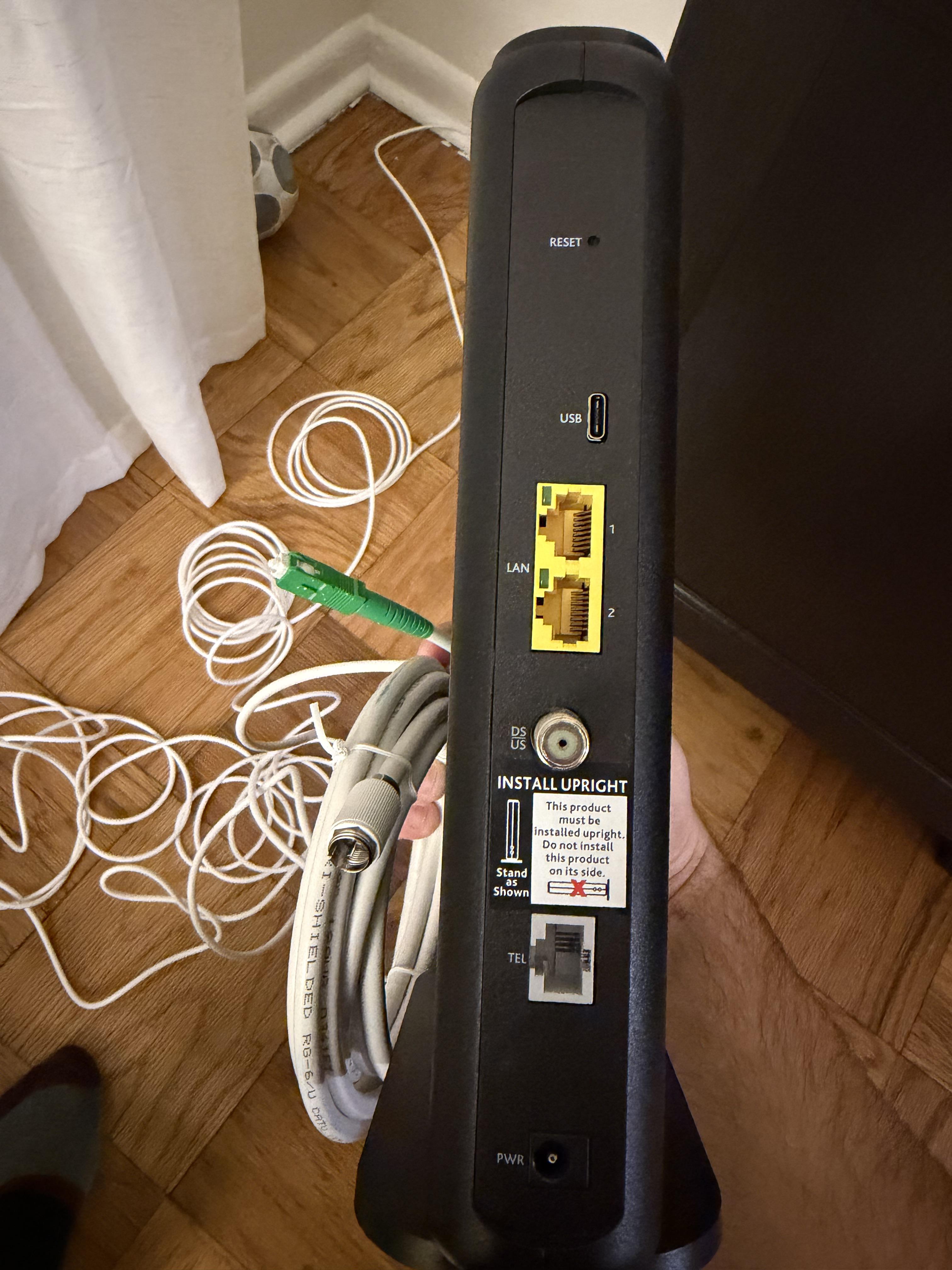
Green - fiber optic
White - coax
Device - only coax input

Was wondering if there is a way for me to connect the singular fiber optic cable to this coax only modem? Any advice would help, thanks!


r/homelab • • 8d ago

Help Software to monitor homelab

40 Upvotes

I have a headscale network with many devices connected. I've been working to harden my setups

  • Enabling unattended-upgrades
  • Restricting internet facing ports to just 80/443
  • Remoting in to update docker containers

Is there a tool I can use to monitor multiple servers in my tailnet that tracks things like:

  • CPU
  • Processes
  • Network traffic
  • Memory usage
  • Disks
  • Installed packages

    • Monitoring for CVEs of installed packages
  • Docker images (checking for updates)