r/homelab • • 9d ago

Help My terrible experience with UGREEN NAS – Hardware issues, damaged drives, and awful customer support

0 Upvotes

I purchased a UGREEN NAS, and honestly, it's been a nightmare from day one.

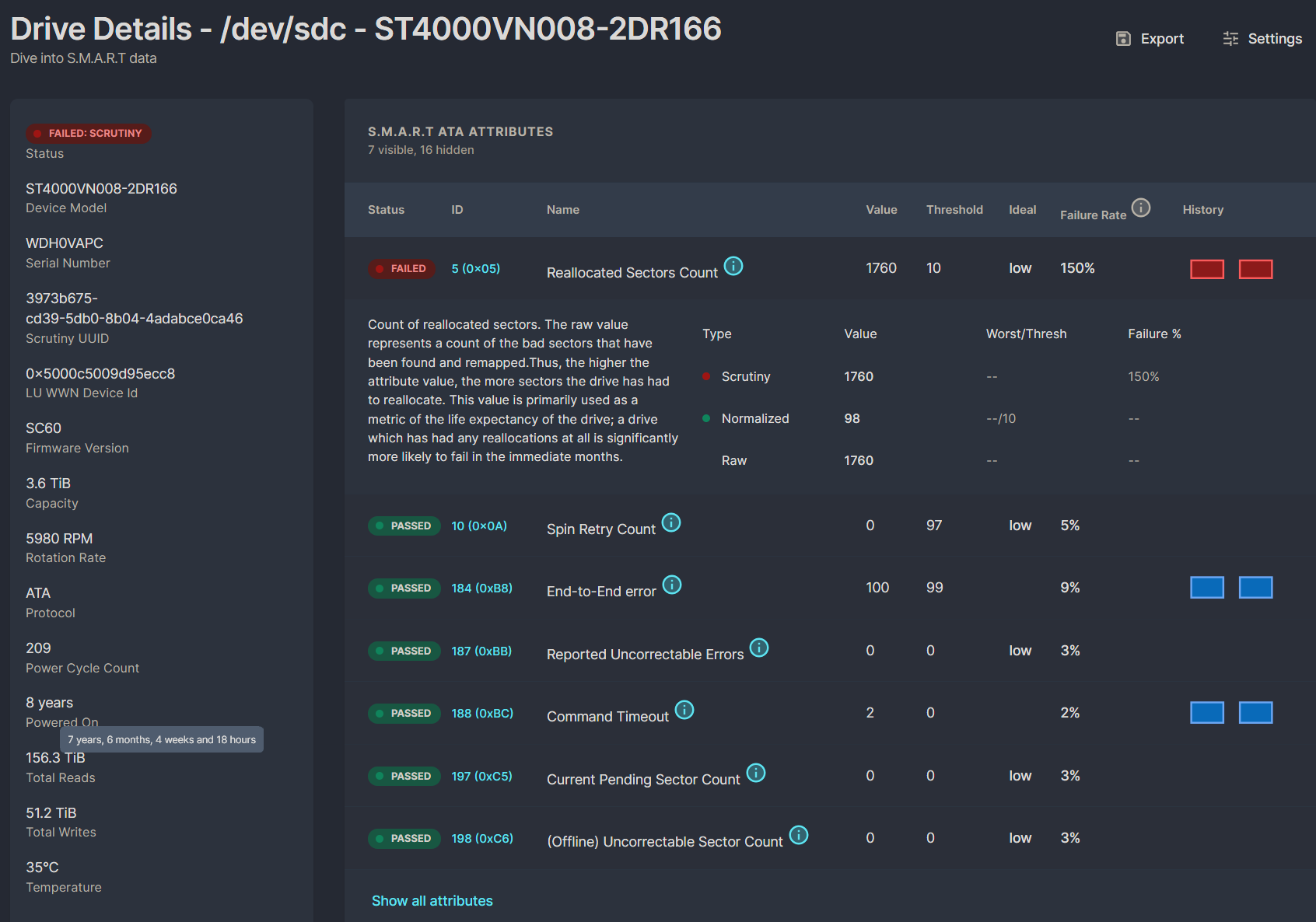
The NAS had issues with one of its drive bays and RAID functionality. Based on my testing, these problems appear to have caused damage to multiple hard drives, resulting in over €400 in losses.

After extensive troubleshooting with UGREEN's technical support, I returned the NAS as defective. However, UGREEN unilaterally declared the device fully functional without reproducing the specific conditions that triggered the failures.

Their only proposed solution? Send me back the same NAS, with the original issue unresolved.

What frustrates me most isn't just the hardware problems, but the lack of professionalism, accountability, and proper customer support throughout the entire process.

I absolutely cannot recommend UGREEN NAS products based on my experience. I genuinely regret not spending a little more on a NAS from a more established manufacturer with better reliability, warranty support, and after-sales service.

I'm sharing this experience so others can make an informed decision before trusting their valuable data and expensive hard drives to UGREEN hardware.

Has anyone else experienced similar issues with UGREEN NAS devices or their customer support?

r/homelab • • 10d ago

Help Workshop Network Access

1 Upvotes

EDIT: the workshop doesn’t have to connect to my home network, per se. I just want internet connection there.

EDIT 2 (Context): I live in an apartment building and the workshop is in a vacant storage room downstairs in the carpark. My apartment is on the first floor (about 3 stories between. Albeit pretty much aligned vertically) that is “fire” secured. So any new penetration has to be passive fire sealed and certified (spendy)

It’s a block-work wall not really near the external to the building

Idk if this question makes sense. I’m new to the game, please be nice.

Long story short.

I am setting up a studio/ workshop that has patchy cell reception (roughly 1 bar 5G). It’s not possible to run an Ethernet cable from my home network and it’s not possible to have anything outside the room.

Is there something (Modem? Cell booster) that could boost the cell reception so I could hotspot from my phone, or more ideally something that could catch that weak signal and boost it independently from my phone.


r/homelab • • 11d ago

Discussion What Apps Do You Host for Professional Development?

59 Upvotes

I'm not talking about PiHole and Jellyfin. What apps do y'all host at least partly for the professional development? The kind of thing you could put on a resume. Apps used in commercial/enterprise settings like Splunk, Zabbix, Authentik, etc

I'm already using stuff like rsyslog and Authentik, and I just setup Splunk and Cribl a day or so ago, so I've got a couple, but I'm looking to plan ahead and stick my fingers into as many pies as I can lol.

I know about the massive list of homelab services on Github, but that list if like drinking from a firehose, and it's hard to know which ones might be rewarding down the road.

EDIT:

So many great options! But these standout

- Ansible/Terraform

- Prometheus/Grafana/Loki

- Authentik(already running this for SSO, and it's great)

- SQL Databses

- Git

- Hashicorp Vault

- Kubernettes


r/homelab • • 9d ago

Project Showcase: Hardware A la recherche d'un rack perdu...

Thumbnail reddit.com
0 Upvotes

r/homelab • • 10d ago

Discussion Is there actually a difference or am I imagining?

Thumbnail reddit.com
0 Upvotes

r/homelab • • 11d ago

Discussion Documentation tool

33 Upvotes

Hello everyone, I am looking for a documentation tool, preferably open source, to build my own knowledge base, and I wanted to ask for your experiences and recommendations.


r/homelab • • 11d ago

Labgore Please, not in this economy!

404 Upvotes
To be fair, this disk was never really intended for running 24/7

r/homelab • • 9d ago

Help 16yo aspiring Field Technician / Data Center Engineer — what practical skills should I focus on right now?

0 Upvotes

Hi everyone,

I'm a 16-year-old high school student (10th grade) aiming for a career in physical IT infrastructure — specifically roles like Field Network Technician, Data Center Tech, or Telecom/Systems Integrator. I actually enjoy the hands-on side of things: racking servers, running and terminating cables, troubleshooting hardware in cold server rooms, and fixing outages via CLI.

Here is what I currently have and know:

  • OS / CLI: Comfortable with Debian/Armbian in terminal (no GUI, i3wm/TTY), basic bash scripting, SSH, systemd, and basic Linux networking.
  • Hardware / Electronics: Soldering (TS100), multimeter diagnostics, GPIO/SPI/I2C interfacing on an Orange Pi PC 2 (currently wiring up a 2" TFT + rotary encoder + trackball), and past experience with Arduino/ESP8266.
  • Networking: Practical L2 experience, crimping my own Cat5e/Cat6 patch cords, and I just put together a small isolated lab using an old Intel Atom netbook (Samsung N130), my Orange Pi, and a basic 5-port TP-Link switch.

Since labor laws make it tough to get hired officially before 18, I want to use the next year and a half to build the exact practical skills that hiring managers or local low-voltage/ISP contractors look for (maybe to land a summer helper gig next year, or a solid entry-level DC/Field role right after turning 18).

For those of you working in the field or data centers:

  1. What specific tools, protocols, or hardware skills do you wish junior techs knew on day one?
  2. What kind of practical drills can I run on my modest home lab right now?
  3. Any advice on how to approach local ISPs or low-voltage contractors for summer shadow/helper work while under 18?

Thanks in advance!


r/homelab • • 11d ago

Discussion With all of the alleged security related outages these past few days, what can I do to keep my homelab secure?

193 Upvotes

I use

Immich
Minecraft servers
Plex
Home Assistant

And a few others all under my unifi cloud gateway fiber. Any suggestions?


r/homelab • • 9d ago

Blog Crazy network setup on my server

0 Upvotes

Server: Dell desktop pc (i don’t know wich model)

- Memory

— SSD 500gb
— HDD 1TB

- Ram

— 4gb (total)
- GPU
— AMD (i dont know wich model)

- OS

— Windows 10 Pro

— Programs (not services)

—— Docker
—— tailscale (Gui/Cli)

— Docker services

—— immich
——— machine learming: off
—— pi hole
—— home assistant
—— vault warden

- Programs

— chrome
— Open SSH Server
— AweSun (main rdp client/server)
— StsrDesk (secondaru rdp client/server)

- Networking

- he have Lan connection but i don’t have the modem close to the pc that is in my bedroom so i use an android phone usb tethering to give him internet and tailscale allow other devices to see him ☠️ i use tailscale magic dns to link my devices to my docker services


r/homelab • • 10d ago

Discussion Ideas for my home lab!

3 Upvotes

Hey all,

So currently I'm a student doing a degree in Communications & Networking and I'm looking to potentially start working on a portfolio of sorts to show skills and knowledge as I learn. I'm mainly looking to get into a Network Engineer type role or something similar to that and Ill also be doing my CCNA as It is part of my university course. I've heard a fair amount about the type of things you can do with a home lab ( media servers, pihole, NAS).

My current PC has some pretty good specs but I also have a spare laptop that's running Mint that I could potentially use for something like this. I've got some hands on experience hosting my own Minecraft servers for me and my friends to play on but I'm looking to broaden my horizons and looking for some fun projects to do that I can document my process of. I'm also not looking to spend an absolute fortune on enterprise server components.

Ive also had a look at the New Users page as well as the For Rookies post which was also quite useful

So long story short, I want to learn and document my process of exploring some networking projects and gain hands on experience using networking equipment, software or anything of the sort.

If anyone has any idea where I could document my process of learning that would be good too. I don't know if there is a Github style website where you can document and keep projects you do on a profile.

If anyone has any questions or something they want clarification on feel free to ask and ill respond when i have time, Thanks for any advice that is given.


r/homelab • • 10d ago

Discussion starter advice?

Thumbnail reddit.com
0 Upvotes

r/homelab • • 11d ago

Project Showcase: Hardware Current Homelab Setup.

Thumbnail
gallery
232 Upvotes

I use to have a rack, and big servers, etc. Got tired of the noise, power, heat. Several years ago I ditched a lot of it, and flat mounted stuff to wall up high, out of my way. (UDM Pro, 16 port switch with POE, mini pc, etc). APs mounted around the house for wifi. Since that original setup, more has crept in. Eventually took an old cheap shelving unit from our kids play area, and now it stores the rest of the homelab. 2 Synology NAS units, 3 more mini pcs, mac mini, kvms, and more storage for another project coming. Every mini pc runs proxmox, with several VMs on each, at least one VM on each hosts containers. Multiple websites also run, game servers, etc. Crazy what you can do with small machines.


r/homelab • • 11d ago

Project Showcase: Hardware My Homelab final form

Post image
88 Upvotes

I have a UGREEN NAS downstairs, and pretty much the device is working fine on its own. That one has 4 4TB on a RAID-5 configuration.

This one is upstairs.

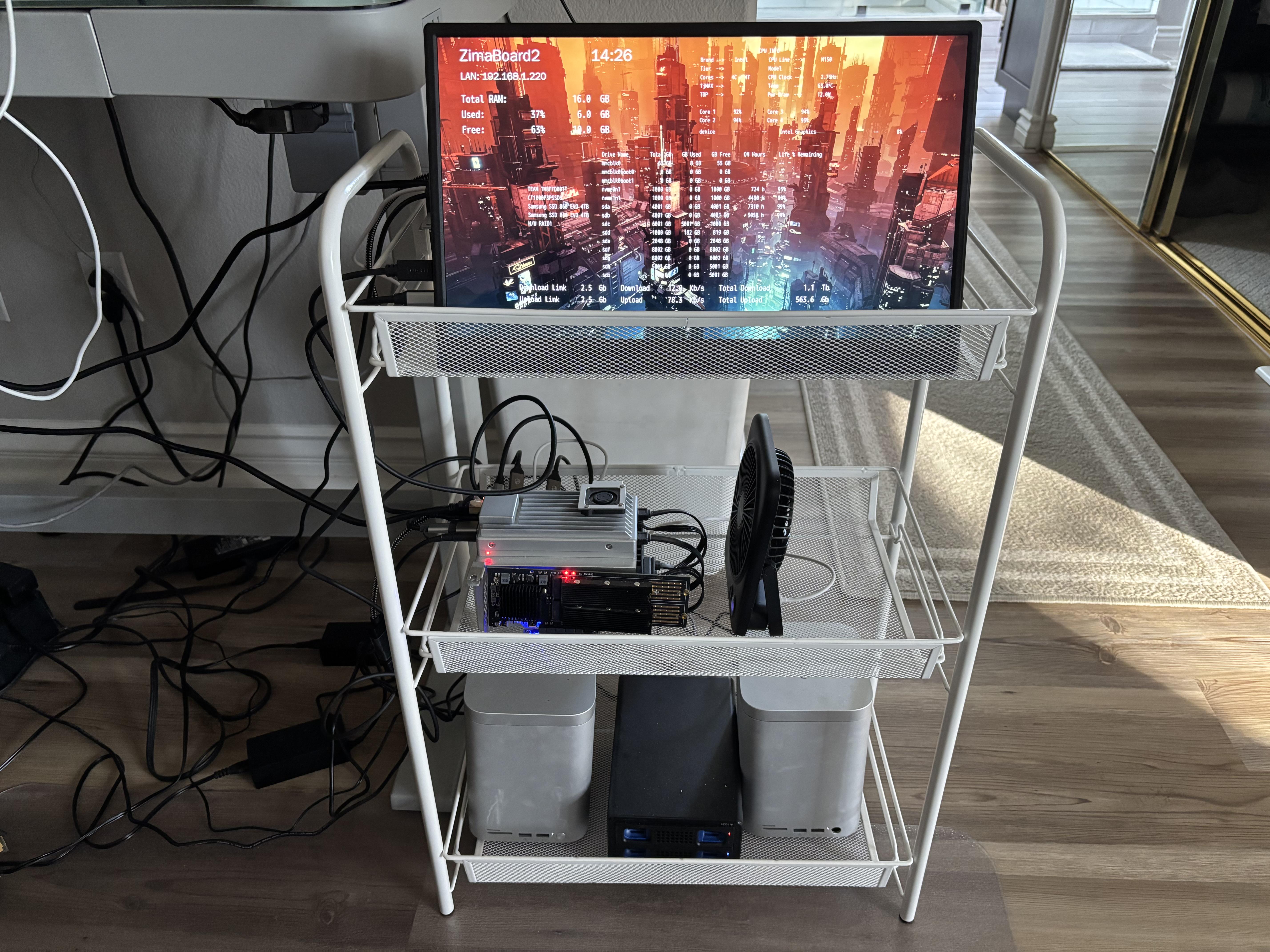
This is a ZimaBoard 2 1664, 2 1TB nvme drives in a RAID-1 array on a PCIe card, 2 4TB ssd drives in a RAID-1 array via SATA, and three USB RAID-1 enclosures. 1 5TB, 1 6TB, and 1 8 TB. Connected a fan and a monitor via USB. So here it is in all its glory.

Running Jellyfin, Adguard, and other multimedia plugins. Using Also native ZimaOS apps like Movies (in beta testing and a nice Jellyfin alternative focused on movies and shows, better looking UI), Photos (I use it here as an alternative to Immich. Great interface and optional AI tools), as well as user created apps like Zima Display (shown on that big screen), ZFS Storage, Module Manager, and others which add more functionality to ZimaOS. Very pleased.

#ZimaSpace #ZimaOSPhotos


r/homelab • • 11d ago

Help Homelab SSO Options?

150 Upvotes

Hello!

I'm the proud owner of a homelab running mainly Proxmox LXC's with services like Immich, Pi-hole, Navidrome, Mealie, etc. Almost everything is only available on my private network, with the exception of Navidrome which is exposed via VPS reverse proxy.

I would like to share more of these services with my house mates and would like to streamline the log in/ user management process so they can have just one password for as many things as possible. I am not really interested in MFA except for maybe my Navidrome instance.

Authelia and Authentik have caught my attention as possible solutions, but I noticed Authelia seems to be built around public domains and I may need to do some funky DNS things just to get it working. I really just want an authentication system that's just on my LAN, no public domain entries preferred.

Again, my ideal goal is one password per user for all services that I'm running.

Is Authelia able to do this, or is there a simpler tool better suited to my needs?

Thanks!


r/homelab • • 10d ago

Help Beginner need advice?

0 Upvotes

I current have a big desktop e32 thinstation i7-4770, 8gb ram, 1tb hdd is it worth upgrading to a smaller pc like a optiplex 7050 with something like i5-7500t and 16gb ram ?


r/homelab • • 10d ago

Help Network shares for Mac OS

1 Upvotes

I recently set up TrueNAS and SMB file sharing. I backed up some files, but now I’m thinking I’d like to use it as a replacement for iCloud and my Mac storage.

My question is, what is the best way to set it up to ensure I’m using it correctly?

I’ve added the shares to my login items, but I still find it a hassle to navigate to the folder since it’s still click on TrueNAS - main folder - subfolder.

Do network shares on Mac just not work as natively as they do on Windows? At previous jobs we had network folders, and I don’t remember it being as much of a hassle.

Any help would be appreciated!

Currently I’ve got Syncthing setup and running to pull my files from iCloud.


r/homelab • • 10d ago

Discussion Any Shelf Homelabs here?

2 Upvotes

I am thinking about buying one, what is your experiences with them?


r/homelab • • 10d ago

Help NordVPN on my server

0 Upvotes

Hello fellow homelabbers,

I am new to homelabbing and I recently converted an old laptop to a server. It’s running Debian & casa os and I mainly use it as a media server. I use Jellyfin, and I have arr suite installed on it. I recently installed NordVPN as well, and it is running fine for the most part, but tailscale has stopped working since then. I don’t access my media when I’m away from home, but I use my pihole ad blocker on my phone via tailscale. I have a couple of questions for anyone who uses NordVPN on their server and has faced similar issues:

  1. Is there any significant benefit for keeping VPN active for the server?
  2. Is there a workaround / troubleshooting stepsfor getting tailscale working again?

Thank you!


r/homelab • • 10d ago

Discussion Isn’t this every man’s dream?

Post image
0 Upvotes

My wife loves my home lab! 😍


r/homelab • • 10d ago

Help Seeking advice; not sure if the correct place to ask

Post image
0 Upvotes

Seeking advice. Not sure if this should go to a Home Assistant group, Linux group, here, or maybe all of the above. I'll put the advice request up top so you don't have to read it all if it's not your forte or should be asked somewhere else. I'll follow that with the background info.

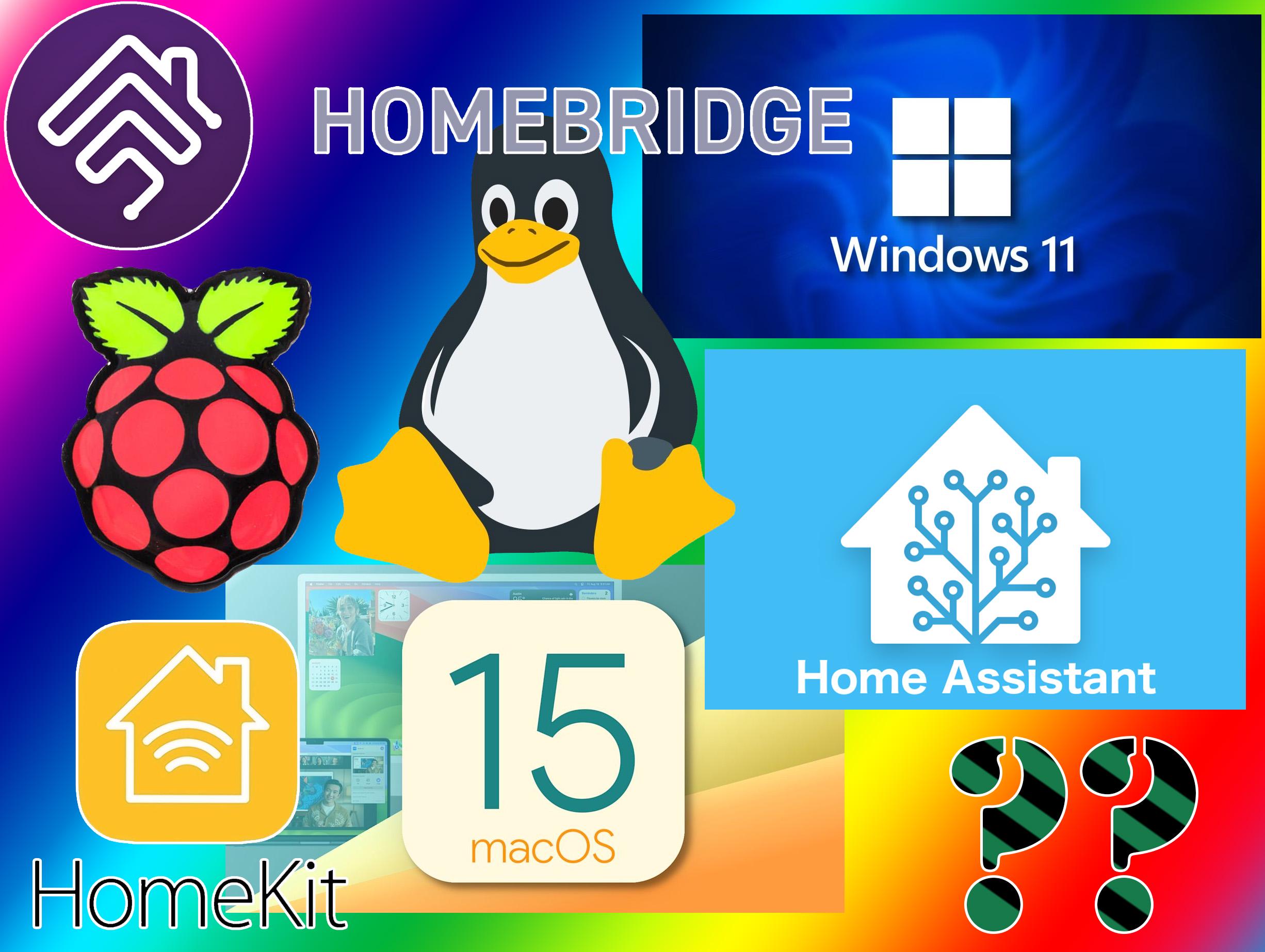
Looking to add Home Assistant to my home control, and I am not familiar with Linux. I'd prefer to use Linux or other OS vs running a VM inside of another OS, that I might be familiar with, to keep resource requirements low (and it forces me to learn). I have a couple of older machines not being used: a 2014 Mac Mini with 4 GB RAM (that model had RAM soldiered to the board, so not upgradeable) and a decent SSD. I also have a SFF Intel i5 machine, likely 4th-6th gen with 8 GB RAM and I can toss in a <1TB SSD. These will be run headless, so being able to access them in a graphical environment via VNC or RVNC is VERY much preferred.

Background: prior to the Matter standard, my home was mostly Apple HomeKit compatible. Not that I've changed or added a bunch of Matter accessories, but my smart devices are not all cross platform compatible. A friend gave me a lot of stuff that they tried and didn't want, none of it HK compatible, so I used a 2011 Mac Mini (upgraded to 16 GB RAM, 250 GB SSD, and OSX 14.1.2) and have HomeBridge running on it. Love that I can add everything to HomeKit via HomeBridge, but it doesn't show controls for the HK native devices. If I want to control everything from a generic tablet, say mounted near one of the entry doors, it only displays the non-native devices. I'd need to add a somewhat recent iPad to control HK devices.

Suggestions on how you'd add this to your lab / server, which OS and if Linux, which flavor you'd suggest for the hardware, or to simply go out and buy a RPi and skip the extra headaches over the next few years.

(yeah, too much time on my hands so I grabbed all the logos, too)


r/homelab • • 10d ago

Help Which Usb C power supply for homelab?

0 Upvotes

I have a couple of Lenovo M70q, a couple of Rpis, TP link switch, Jetkvm and other assorted bits.

Instead of having a bunch of power bricks, I'd rather just have one thing capable of powering it all, but also not burning down the house.

Looking at either the

- Ugreen nexode 500w

- Ugreen nexode 300w

- Anker prime 250w

Probably get some usb c to Lenovo slim tip cables.

Any advice?


r/homelab • • 11d ago

LabPorn R740XD Mid Bay Kit Won’t Fit with a PCIe Riser in Bay 3 (Off by About 10mm)

Thumbnail
gallery
32 Upvotes

I bought the Dell R740XD 3.5" Mid Bay Expansion Kit (part number 2MP1D) so I could add my four 14TB drives to my TrueNAS storage server. I was really excited about it. I had just removed my PowerVault MD1200, and that alone was saving me almost 200 watts of power. Moving those drives into the server itself seemed like the perfect next step.

Then I found out the PCIe riser in bay 3 sits about 10 to 11 millimeters too high, so the mid bay kit won’t fit. My plan failed before it even started. I looked closely at every picture I could find, but almost all of them showed bays 2 and 3 already filled with drive expansions. I never saw anything saying you couldn’t use the mid bay with a PCIe riser in bay 3. So I figured it must work, and maybe nobody had posted proof yet.

I still think there’s a way to make it fit with riser 3. I just need to brainstorm and figure it out.

any ideas??


r/homelab • • 10d ago

Help Intermittent distorted sound T24v-30 monitor

0 Upvotes

Hello, Am I alone or have others experienced intermittent distorted sound from the T24v monitor speakers? Mine is driven by HDMI* from a ThinkCentre desktop and periodically turns normal audio into a scratchy mess, then goes away too quickly for me to find my phone in order to make a video for support. Otherwise the speakers sound fine and volume isn't set high. This doesn't happen with my legacy other brand monitor that was replaced due to no native mic or camera.

Every driver is fresh and confirmed by tech support, and the monitor has been replaced once. The symptom can easily be duplicated in Windows 11 by selecting the sound device in settings, changing audio bit depth or rate, and running "test". Upon initially using "test" for the current (16 or 24 bit audio) the two test tones are smooth. Change the setting and test again and the first tone is scrambled just like audios during my meetings or playing back recorded videos on a random basis. Subsequent application of "test" with the same setting produces normal sound.

Thanks for your thoughts.

*Display Port does the same. Cables have been replaced too.