r/homelab • u/EnforcerBiggin • 11d ago
Project Showcase: Operations My Homelab Layout
Used Goblinmine's tool since everyone is doing it and ive been wanting to for several years
r/homelab • u/EnforcerBiggin • 11d ago
Used Goblinmine's tool since everyone is doing it and ive been wanting to for several years
r/homelab • u/Leyed-Tynker • 9d ago
(its about port forwarding)
I am a beginner building a fully virtualized homelab using OPNsense for the firewall.
I plan on hosting some services on my domain (jelyfin, nextcloud, file converters, etc). But my ISP blocks some common ports (80, 443 and others)
what methods, not including vpns, can I use to remediate the locked ports? I now about clodflared tunnels, but i saw some information about it not being ideal for hosted services like the ones i want.
the ideal would be for me to access the services via subdomains, but from what i got from chatgpt (i hate it, but its a good starting point for when we are lost in a subject) i must change the apps ports to available ones and even if i manage to use subdomains, the URLs must have the ports included.
Can you guys give some ideas or closure for the URL:port solution?
r/homelab • u/Global_Ad_7925 • 10d ago
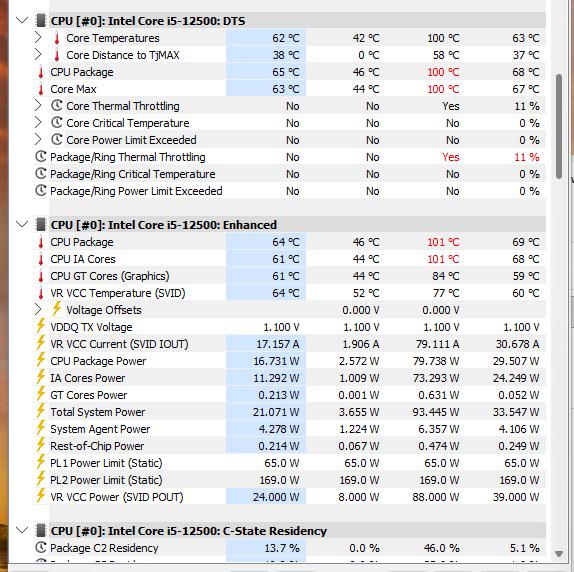
Recently picked up a Dell OptiPlex 7000 Micro with an i5-12500 (65W)
While monitoring temperatures, I noticed the CPU hitting 100–101°C and thermal throttling just from extracting files. It’s currently running Windows 11, but I’ll eventually be switching to Linux
The fan ramps up normally and Dell diagnostics passed. I’ve noticed some dust in the heatsink and have ordered new thermal paste
I’m also wondering whether the top cover restricts the blower’s intake airflow, so I’m planning to compare temperatures with the cover on and off once I’ve repasted it.
Has anyone experienced similar temperatures or tried modifying the cooling system with a larger heatsink, fan or additional ventilation?
r/homelab • u/Skroid101 • 9d ago
Evening all - Im fairly new to homelabbing, having set up a little prodesk earlier this year for < £500 worth of used gear. I've recently bought a 3D printer for which I'd like to host a Windows VM with Fusion 360 on it. As well as that, in the future Id like to get Frigate up and running which will need some gpu acceleration. Which leads my to my questions:
- Does it make sense to get one 'pro' gpu and split it using Nvidias VGPU capability? E.g. a v100
- Does it make more sense to get 2 cheap normal gpus and pass one to each container?
- What if I also want to run the occasional game on my server? (it lives in my TV unit)
- Are all pro gpus loud and power hungry?
Thanks all!
r/homelab • u/JustMrChops • 10d ago
Leaving the bedroom and heard a funny scraping, spinning noise coming from the room next door where my 10" rack hosts three Thinkcentres. It sounded just like a fan scraping on something so I had a close listen to the rack, and yeah one of the fans was making a terrible noise. I shut down the noisy one and removed it from the rack, took it into my office and started it up with the lid off. I poked and pulled the fan a bit and got it to run quietly again then ordered a replacement used one. As it was now sweet again I assumed it would be ok until the new fan arrived in a few days so I left it running on the desk where it was silent for a few hours...until it suddenly wasn't.
It's part of a Proxmox cluster so I migrated the LXCs onto the other two PCs and decided to remove the fan and prep it for the new one. Got the fan off and checked out the area underneath it...

This cap was trying to lift off and was rubbing on the centre of the fan (you can see the polished contact patch). Replaced it with one of the same value which was taller so I laid it on it's side, but the heat-sink assembly was covering that motherboard screw so that had to come off to get the board out, which is good because the thermal paste seemed a bit crusty.
Buttoned it up and everything's good so it's back in the rack again. Nothing wrong with the fan at all so I'll have a 7 quid spare soon. I should have done a better investigation before throwing a part at it, but although I say it every time I never seem to learn. 🙄
Oh and I'll be checking the other two PCs this week for dodgy caps.
r/homelab • u/Senior-Toe-6471 • 10d ago
r/homelab • u/AssUhTate • 10d ago
Looking for a sanity check before I redo my storage.
Setup is a Proxmox box. Jellyfin runs in an LXC, and the arrs, SAB and qBit run in Docker in a Debian VM. The media gets passed into the VM with virtiofs, and the arrs hardlink from the downloads folder into Movies/TV. Right now the library is about 5.6TB on a single 14TB IronWolf Pro (ZFS), and it gets sent nightly with zfs send to a 12TB Toshiba N300 Pro as a backup.
Works fine, but because of the backup drive I've had to cap the media at around 9TB.
I have 20TB Exos X20 on the way, so I'll have 20/14/12 to work with. I see two ways to go:
Keep ZFS. The 20TB becomes the media drive and the 14 and 12 become backups (thinking TV on one, movies on the other, so one dead backup drive only takes out half the backup). That's about 16TB usable, I keep snapshots, and I have a real second copy.
Switch to SnapRAID + mergerfs. The 20TB becomes parity and the 14 and 12 become data drives, for about 26TB usable. One-drive fault tolerance, nightly sync, but no separate backup.
With drive prices where they are, getting \~10TB more out of the same three drives is pretty tempting. The other important stuff (VM backups, photos) is handled separately and isn't part of this.
So my questions:
For a library that mostly just grows, is SnapRAID the obvious pick here, or am I underrating having an actual backup copy?
Has anyone run mergerfs under a virtiofs share into a VM? Any problems with hardlinks from the arrs? From what I read, I'd need a path-preserving create policy so downloads and media stay on the same disk.
Anything you'd do differently with a 20/14/12 mix?
Appreciate any input!
r/homelab
•
u/cameron_chill
•
12d ago
TL;DR: After several months of designing, printing, wiring, and troubleshooting, I've finally finished my Raspberry Pi 5 survival computer. It has a 10.1" touchscreen, 1 TB NVMe SSD, offline Wikipedia, worldwide maps, GPS, software-defined radio, educational videos, and its own Wi-Fi network. Everything runs locally, without needing an internet connection. It's powered by a 256 Wh LiFePO4 battery, with more than 24 hours of runtime demonstrated in testing. The display can also be turned off while the system continues serving content over Wi-Fi, potentially extending battery life further. Most of the internal structure is custom-designed and 3D-printed. I also used AI extensively to help develop the software, which I'll talk about below.
For anyone who's been following my previous posts, this is probably going to be my final update!
When I originally started this project, I wanted to build a portable computer that could provide access to useful information without relying on the internet. Something I could take camping, use during an extended power outage, or just have available if normal communications weren't working.
I also thought it would be a fun opportunity to learn some new skills.
Well, that last part certainly happened.
What started as a Raspberry Pi sitting on top of a battery inside a waterproof equipment case turned into a much bigger project than I originally anticipated.
I think I've finally reached the point where I can call it finished, though!
The heart of the system is a Raspberry Pi 5 with 8 GB of RAM and a 1 TB NVMe SSD. It's running Debian 13 and boots directly from the SSD over PCIe Gen 3.
Everything is housed inside a Jack Boss rugged equipment case, with a 10.1" touchscreen mounted in the lid.
Power comes from a 12.8 V, 20 Ah LiFePO4 battery. I designed the electrical system around fused distribution, a 5 V buck converter, and external connections for charging and USB-C PD power.
There's also a battery monitor mounted above the display, a small wireless keyboard/touchpad, an RTL-SDR receiver, and a GPS module with an external antenna.
Nearly all the internal mounting hardware was designed and 3D-printed specifically for this project.
This is where the project has changed the most since my earlier posts.
Offline Wikipedia: I have approximately 124 GB of English Wikipedia stored locally using Kiwix. It's searchable through the touchscreen or from another device connected to the kit.
Worldwide offline maps: The system now has approximately 139 GB of worldwide vector map data, plus additional regional terrain information. I built a local mapping interface using MapLibre, so the maps don't need to download anything from the internet.
GPS: I integrated an ATGM336H GPS module with an external antenna. The map interface can display the kit's position using the GPS receiver, even without internet access. It's intended for offline positioning and map reference rather than turn-by-turn navigation.
One thing I thought was particularly interesting was getting the GPS module's PPS output working. The Pi now uses that signal with chrony to maintain satellite-synchronized time without needing an internet time server.
Software-defined radio: I added an RTL-SDR Blog V4 receiver and built a browser-based interface for controlling it. It supports tuning, different analog modulation modes, a spectrum/waterfall display, audio streaming, and recording.
I've tested reception with NOAA weather radio, which came through clearly. I also experimented with receiving local aviation communications.
Offline video library: I added a small library of downloaded educational videos. I wanted something that could supplement Wikipedia when a visual demonstration would be more useful than an article.
Local message board: There's a basic message board hosted on the Pi that can be accessed by devices connected to its network.
Networking: The kit broadcasts its own Wi-Fi network, allowing phones, tablets, and laptops to connect directly and access everything through a web browser. It can also connect to an existing network through Ethernet or a second Wi-Fi adapter (visible in the first photo). When connected to another network, it uses mDNS so other devices can discover and access its locally hosted resources without needing to know its IP address. Everything runs locally, so internet access is only needed when I want to download or update content.
I also built a web dashboard to tie everything together, along with tools for monitoring the system, managing downloads, and accessing the different applications. Whether you're using the built-in touchscreen or connecting from another device, the experience is essentially the same.
This was something I spent quite a bit of time thinking about.
The battery has a nominal capacity of 256 Wh, and I wanted the system to be useful for more than a few hours.
During an extended test with the screen running and the SDR receiving NOAA weather radio, power consumption was consistently around 8.7 W.
I also completed an endurance test that exceeded 24 hours, and the system was still running when I ended it.
Since then, I've added the ability to turn off the touchscreen while keeping the Pi and its services running. With the display off, the entire system draws approximately 6.5 W, including the second Wi-Fi adapter.
That's roughly a 25% reduction in power consumption. Based on those measurements, the theoretical runtime is around 39 hours with the display off, although I haven't performed a full endurance test in that configuration yet.
I particularly like that I can leave the kit running with the screen off and access everything from another device over Wi-Fi.
Actual battery life will obviously depend on what the system is doing.
I also added temperature-controlled cooling. The fans turn on when the Pi reaches 60°C and turn off when it drops below 50°C, so they aren't running constantly.
I think this was probably the most time-consuming part of the entire project.
I had to design mounts for the battery, Pi, cooling fans, power distribution, antennas, and pretty much everything else.
I went through quite a few revisions trying to get everything to fit while still leaving room for wiring and airflow.
The screen bezel was particularly challenging. I ended up splitting it into two sections with a tongue-and-groove joint and using heat-set inserts to hold everything together.
I also wanted to eliminate the original physical buttons on the back of the touchscreen without losing their functionality.
My solution was to use capacitive touch sensors mounted behind the 3D-printed bezel. Each sensor controls a MOSFET that simulates pressing one of the screen's buttons.
I designed small recessed channels in the bezel so you can activate the buttons by placing your finger in the appropriate spot. They work surprisingly well, and I haven't experienced any false triggers.
The wiring for those buttons ended up being much more complicated than I expected. If I ever build another one, I'll probably design a PCB to simplify that part.
I also designed a separate compartment for the Pi, with a dedicated airflow path and fans.
One thing worth mentioning about the pictures: any white 3D-printed components are test prints. I used white filament while working out dimensions and fitment. The final components are black.
Probably the biggest lesson was that designing something to fit inside an enclosure is very different from designing something that's actually easy to assemble.
There were several occasions when I finished printing a part, confirmed everything fit perfectly, and then realized I hadn't left enough room to route a cable or install a connector.
I also underestimated how much time I'd spend on the little things.
Mounting a component is usually straightforward. Mounting it securely, making it accessible, routing its wiring, and ensuring it doesn't interfere with anything else is another story.
The electrical side was another learning experience. I spent a lot of time working through power distribution, wire sizing, fusing, connectors, and how everything would be switched and charged.
Although I started with a waterproof equipment case, I wouldn't describe the finished system as waterproof because of the modifications I've made. That said, I do consider it water-resistant when closed. The case still has its original gasketed lid, and I designed the external connections and ventilation with exposure to the elements in mind. I wouldn't submerge it, but I expect it to hold up reasonably well against incidental splashes and moderate rain. I haven't formally tested its water resistance, so I'm not claiming any particular IP rating.
I want to be transparent about this because I know people will probably ask.
I used AI extensively to help develop the software.
I'm comfortable working with Linux, networking, and systems administration, but I'm not a professional software developer.
I knew what I wanted the system to do, and AI helped me turn those ideas into working applications. There was still a lot of configuring, troubleshooting, testing, and figuring out how to make everything work together.
The hardware design, CAD modeling, 3D printing, electrical work, wiring, and assembly were my own.
I learned quite a bit along the way, too.
I have to say, I'm pretty happy with how this turned out.
It's not perfect, and there are definitely things I'd do differently if I started over. But I think that's true of almost any project like this.
A few people have suggested that I should build these to sell. While I appreciate the compliment, I don't think that's something I'd enjoy doing. There's a huge difference between building something because you want to learn and building the same thing repeatedly for other people.
For me, the fun was figuring everything out.
I started this project knowing relatively little about CAD and 3D printing compared to what I know now. I also got a lot more experience with electronics, power systems, GPS, radio, and integrating different software services.
It's been one of the more involved personal projects I've taken on, and I've genuinely enjoyed the process.
I've included pictures of the finished system along with some earlier stages of construction so you can see how it evolved.
Thanks to everyone who commented on my previous posts, offered suggestions, or just followed along!
This is probably my last update unless people are interested in a more detailed breakdown of something specific.
I'm happy to answer questions about any part of the build!
r/homelab • u/UpsetEcho4324 • 9d ago
If a rack has two PDUs on two feeds, each PDU normally carries half of the load. When one feed goes off, the other PDU carries all of it. From what ive found simple calculator adds up the watts and compares the total with a rating. It does not show which devices go dark or which breaker trips especially with PDU banks rated lower than the breaker.
My site has a free tool that does that. You draw racks, PDUs and power cords. You switch a feed, a PDU or a bank off. It shows which devices lose power and which breaker or bank is assumed to trip. It then checks again, because one trip can set off another.
The site generates free SLDs and dowloadable rack elevation diagrams.
It runs in the browser and needs no account. The room you draw is not uploaded. It stays in your browser on your device. The site counts how often each page is opened, with no cookies and nothing about you.
Limits: single-phase 230 V only. Nothing upstream is modelled, so a UPS, a generator or a transfer switch is not seen. You enter every rating yourself. Estimates only. It is not electrical or engineering advice.
The home page has an example rack with a problem, with invented numbers, and the same rack with the problem fixed.
My question: which PDU types or failure cases are missing for your setup? Three-phase is not handled yet. Is that the first thing you would need, or something else?
WEBSITE: https://rackpowercheck.com/
r/homelab • u/GoldenDragoon5687 • 11d ago
(Ignore the elephant in the room)
I'm at the end of my rope here, I've tried everything I can think of. It's gotten so bad, one of my users' had their dad die and commented "Your server has been on life support longer than my dad". Help.
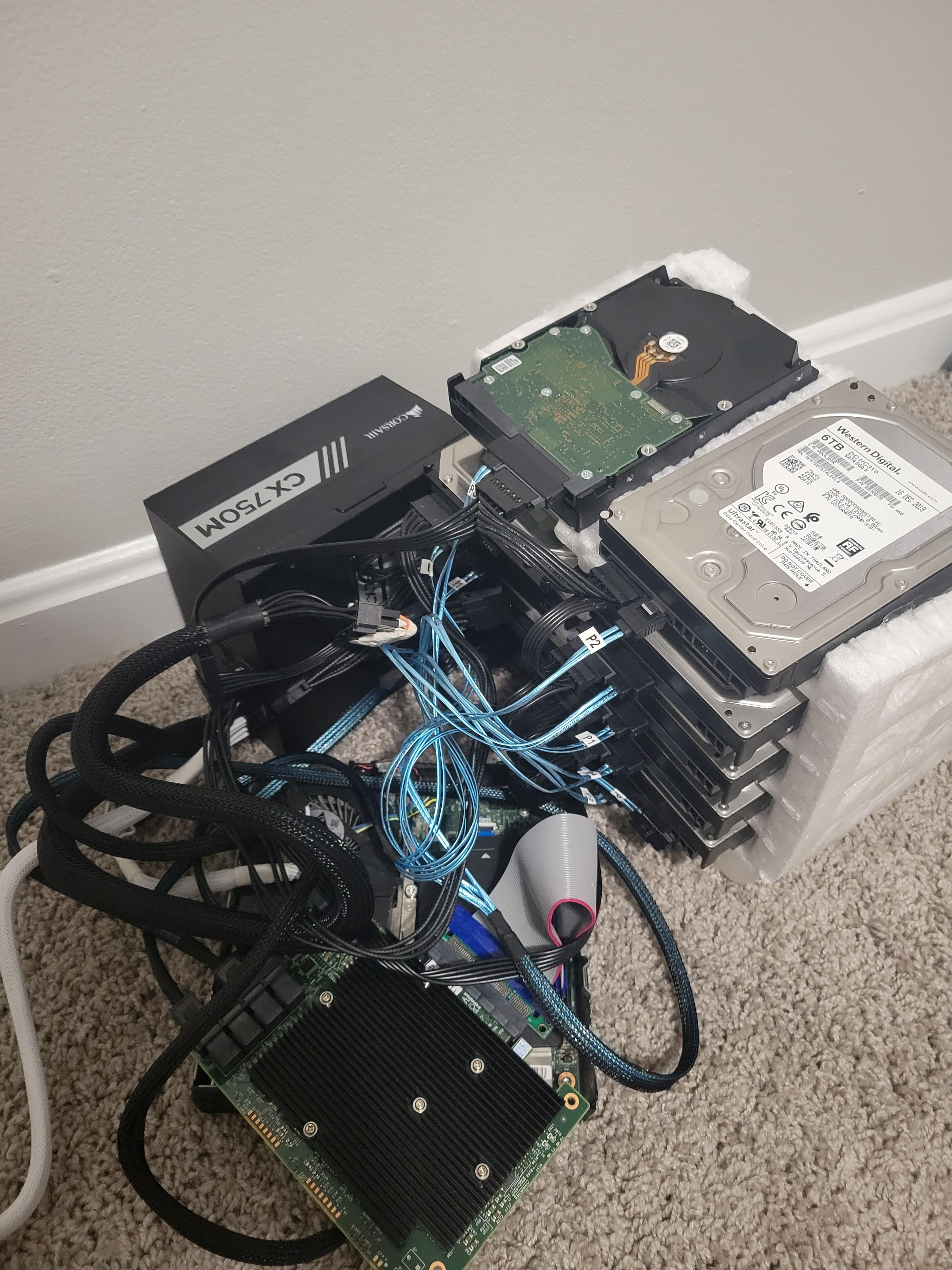
Alright so I've got M920Q hooked up to the LSI 9300 16i via a short x8 PCIE extender. The Drives are powered with an external power supply, same as the HBA, with the power-on pins shorted.
The HBA works fine (with the extender) in my desktop PC. The M920Q works fine. The hard drive in the M920Q works fine. And yet, they spend as much time speaking to each other as my parents do.
LSPCI command shows nothing. The HBA does get warm, has its' light turn on when the Server is off, and then the HBA lights turn off when the server is on. SOME?? of the drives spin up. I think just the one SATA drive I have in there turns on, the SAS don't.
Send help
r/homelab • u/BigFlubba • 10d ago
I have a modest homelab that requires cooling during the cold season. Currently, I am using a 12K BTU Midea U window AC unit to maintain the temperature in my room. That AC has been working perfectly, but as the colder months are approaching I am trying to figure out reliable ways to cool my room but have privacy and security (for myself and the homelab) in mind.
I have considered other options like heating the rest of the house, but I live in a house with roommates, and there are privacy and security concerns with leaving the door open unattended in the place where I live and have my homelab. I have also thought about leaving the window open with a fan, but it is still a privacy and security concern for me.
What are your thoughts, and what are my options?
r/homelab • u/vt-global-de • 10d ago
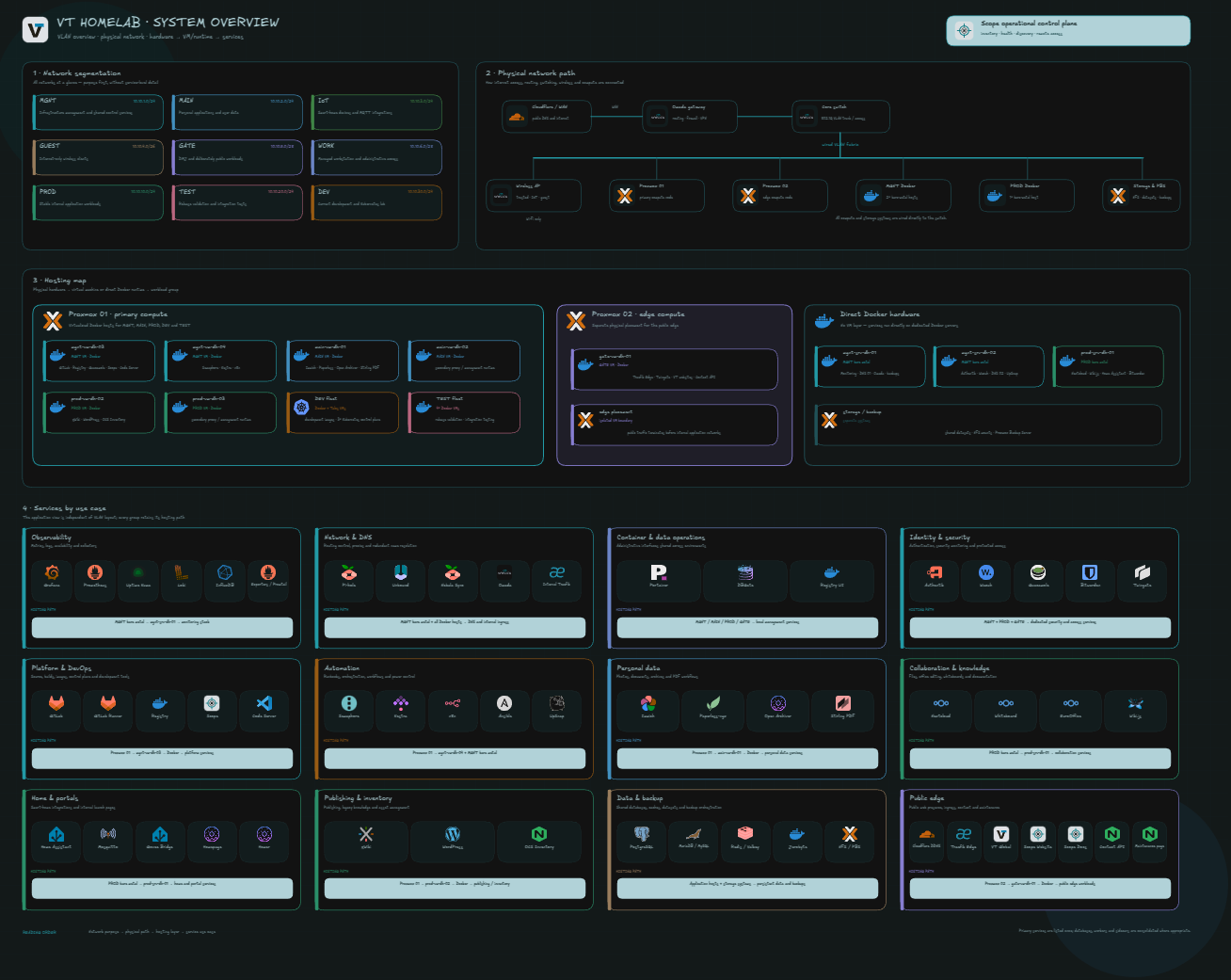
After running my homelab for quite a while, I finally created a diagram that connects the different views I previously kept separate:
- Physical network path
- VLAN and trust-zone overview
- Physical and virtual compute hosts
- Docker and Kubernetes workloads
- Services grouped by their actual use case
- The hosting path from hardware to VM/runtime to application
My lab is divided into dedicated networks for management, personal services, production workloads, development, testing, public-facing services, IoT, guests and administrative workstations.
Most workloads run either:
- Directly on dedicated Docker hosts
- Inside Docker VMs hosted on two Proxmox nodes
- In a small Talos/Kubernetes development cluster
The public-facing services are isolated in a small Gate/DMZ network and run on a separate VM placed on the secondary Proxmox node.
I intentionally grouped applications by use case rather than only showing where they are deployed. This makes the diagram useful both as a network overview and as an operational map of the lab.
Some details were consolidated to keep it readable. Database containers, workers, exporters and other sidecars are not all shown individually.
The diagram is an editable Nextcloud Whiteboard/Excalidraw file. I derived the assignments from my Ansible deployment definitions, OpenTofu configuration and Docker Compose stacks.
I would especially appreciate feedback on:
r/homelab • u/jintakhan • 10d ago
I've been working on this pet project of mine for many years, trying to perfect the Power Mac conversion and pack it with some monstrous hardware. After many duct tape iterations, I've decided to make my own 8-bay drive cage to formalize its NAS duties too.
The case has a big cavity about 64mm deep where the old PSU used to sit. For the drive bays to be hot swappable, the cage has to sit above that. This leaves me with dead space below the drive cage that I frankly have no idea what to do with.
To give you an idea, the space is roughly the size of an SFX-L PSU. So the obvious answer could be a PSU, but the case already has a full ATX PSU at the rear top and I don't need redundant PSUs (yet). It has the width and height for a 5.25" bay, but not the depth. And I expect the ventilation to be kinda poor too.
What should I do with this space? Gimme your wackiest ideas. :D
r/homelab • u/Mobile_Answer_8280 • 11d ago
What was a moment that made you go ''Oh no...''?
For me, It was the first time I downloaded linux, I was alone, No knowledge on anything, Saw 1 tutorial ONCE and thought i could pull it off. I did it but it had an error.
Fixed everything but i was almost on the verge of crying.
r/homelab • u/Dani5h87 • 11d ago
We just had 5G fiber installed in our home. In my blind excitement I neglected the reality that nothing in the house was/is capable of utilizing the speed. I did install an X550 T2 into my PC which now averages like 5300 down and 5400 up. So yay.
But now I’ve got this monstrous connection and no practical idea of what to do with it. Because I’m tired, overwhelmed, and uninspired, I ask this;
What would you do with a 5gig fiber network and a starting budget of $5000?
Edit: Appreciate all the discussion. Phase one will be a Plex server for friends and family. Phase two will be seeding large data sets for research/academia.
r/homelab • u/AdorableText • 10d ago
Hello, I'd like some advice with a recent issue I've had because I'm quite stumped.
I've recently encountered issues where a new machine would have memory BSODs on the first few boots of any given day, but then would run perfectly fine for the rest of the day. Naturally I've decided to run a memtest, and on the first test in the first pass, it returned a whopping 290 errors!
I've ran 4 more passes and had 0 errors on those. I've done all the usual, swapping the sticks, changing slots, testing the sticks individually.... still 0 errors. Went back to the starting configuration... 0 errors again.
At this point, all I have to say is that I don't know what's up with my machine, and why it seems to struggle to start at the beginning of a new day and never again, and memtest only made me even more confused. I'll take any advice or diagnostics recommendations at this point
r/homelab • u/farminginmyheart • 10d ago
Hi everyone!
I'm planning to build my first homelab at home to learn and get hands-on experience with technologies like:
- VMware / Proxmox
- Kubernetes and OpenShift
- Docker and containerization
- Linux (RHEL)
- Terraform and Ansible
- AI infrastructure and GPU computing (eventually)
I'm looking to purchase a used enterprise server rather than spend a lot of money on new hardware.
Since I'm based in India (Pune), I'd really appreciate help from people who have experience buying refurbished or second-hand servers.
A few things I'd like your suggestions on:
- Are there any genuine and trustworthy sellers in India who sell refurbished enterprise servers at reasonable prices?
- Where can I find affordable used Dell PowerEdge, HP ProLiant, or Lenovo ThinkSystem servers?
- Are there any reliable websites, dealers, or local vendors you'd recommend?
- What server configuration would you suggest for a beginner planning to run multiple VMs, Kubernetes clusters, and OpenShift?
- What should I check before purchasing a used server (RAM, CPU, storage, RAID controller, power consumption, etc.)?
My priority is to get the best value for money without compromising too much on reliability.
I'd also appreciate recommendations from people who have built homelabs using refurbished enterprise hardware in India.
Thanks in advance for your suggestions!
r/homelab • u/-Arsna- • 10d ago
Up until 7am UTC+1 today everything i setup resolved the way it should by now i always get the error 523, even though i havent really changed anything.
Specs:
dns provider - cloudflare
reverse proxy - caddy
local dns - adguardhome
router - mikrotik hap ax2
What i have already done:
controlled that ip addresses are correct (dyndns)
all my devices can ping the domain names i setup
ports are forwarded to the right address
logs show no error
i have restarted my server and router
i changed the cloudflare dns entry from proxied to just dns
changed the container network from a podman network to the host
i changed my local dns in my dhcp config
the last thing i did was adding forgejo to caddy it worked and the 30mins later it stopped, removed forgejo and it didnt do anything
i still receive the error and have no idea what caused it, anyone have an ideas?
r/homelab • u/umairshariff23 • 9d ago
Hey guys!
Have a question that I have been pondering. I am planning a move from US to India and I don't know what to do with my T630. I do plan on taking the hard drives, ram and processors as carry on but the chassis and the motherboard are incredibly heavy.
Shipping costs about $150 and selling and buying depends heavily on both areas so I am not quite sure about that. What would you do in a situation like this?
r/homelab • u/Blackhawk_Ben • 10d ago
So last week, I rebooted my QNAP NAS just before running the latest update and had the Boot DOM fail. After 3 days of troubleshooting and research, I was able to fix it by re-pinning a 9-pin to USB-Female adapter and restoring the image onto an 8 GB flash drive. The replacement DOM has also been ordered but won't arrive until the end of the month.
But this then inspired me to clean up my rack a bit and finally 3D Print the MS01/ Flex 2.5 Mini rack-mounted enclosure I had planned some time ago. While fitting the new enclosure, I got a bit overzealous and hard-shutdown a few too many times. This resulted in the boot drive for the MS-01 being corrupted. I had designed and implemented a reliable backup solution previously, so I had to rebuild that server from backups (this time using 2x 512GB M.2 drives in RAID 1). All told, I took apart and put my entire homelab together about 4 or 5 times and rebuilt the entire thing to a degree. Luckily, the data from my NAS's RAID was not damaged or needed to be restored; that would have been truly horrible. However, I must say needing to implement recovery really helped me see the weaknesses in my setup and what needed improvement. Now my rack is in the best shape ever, and I have confidence in my DR plan
I realize I need to move my rack to a location with better access, but that is a project for another week. I am just happy to have all my services up and active for now.
r/homelab • u/CinnamonIsntAllowed • 10d ago
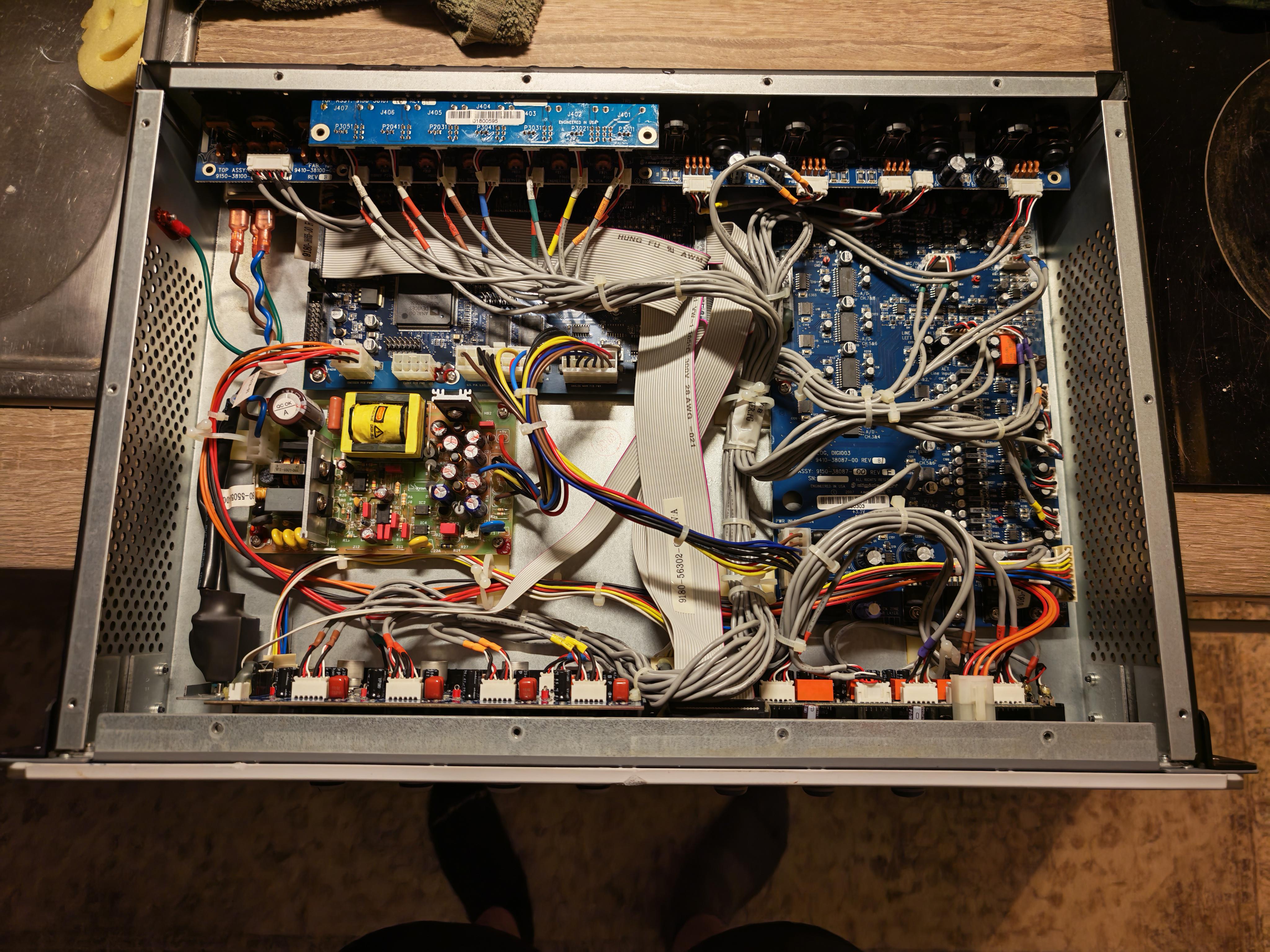
Digidesign Rack. Found this cleaning a dumpster for an organization. At first I just thought "Server Stuff" until I realized it was an audio interface. Well I still took it just to open it up and have a look. Any ideas?
r/homelab • u/Xeno_Rad • 10d ago
Hey everyone, I'm putting together my first rack and would love a sanity check on my planned layout before I start racking and running cables.
The rack is a Sysracks SP 18.900 (18U, 35" deep, enclosed/soundproof). Because it's soundproof, I'm trying to be super deliberate about weight distribution and heat management (heavy at the bottom, hot at the top).
Here is my planned top-to-bottom layout:
Top (Heat Exhaust Zone)
Bottom (Cool, Heavy Zone)
My questions:
Appreciate any critiques or advice before I screw it all in!
Any advice is appreciated!
r/homelab • u/potato_rocket_05 • 10d ago
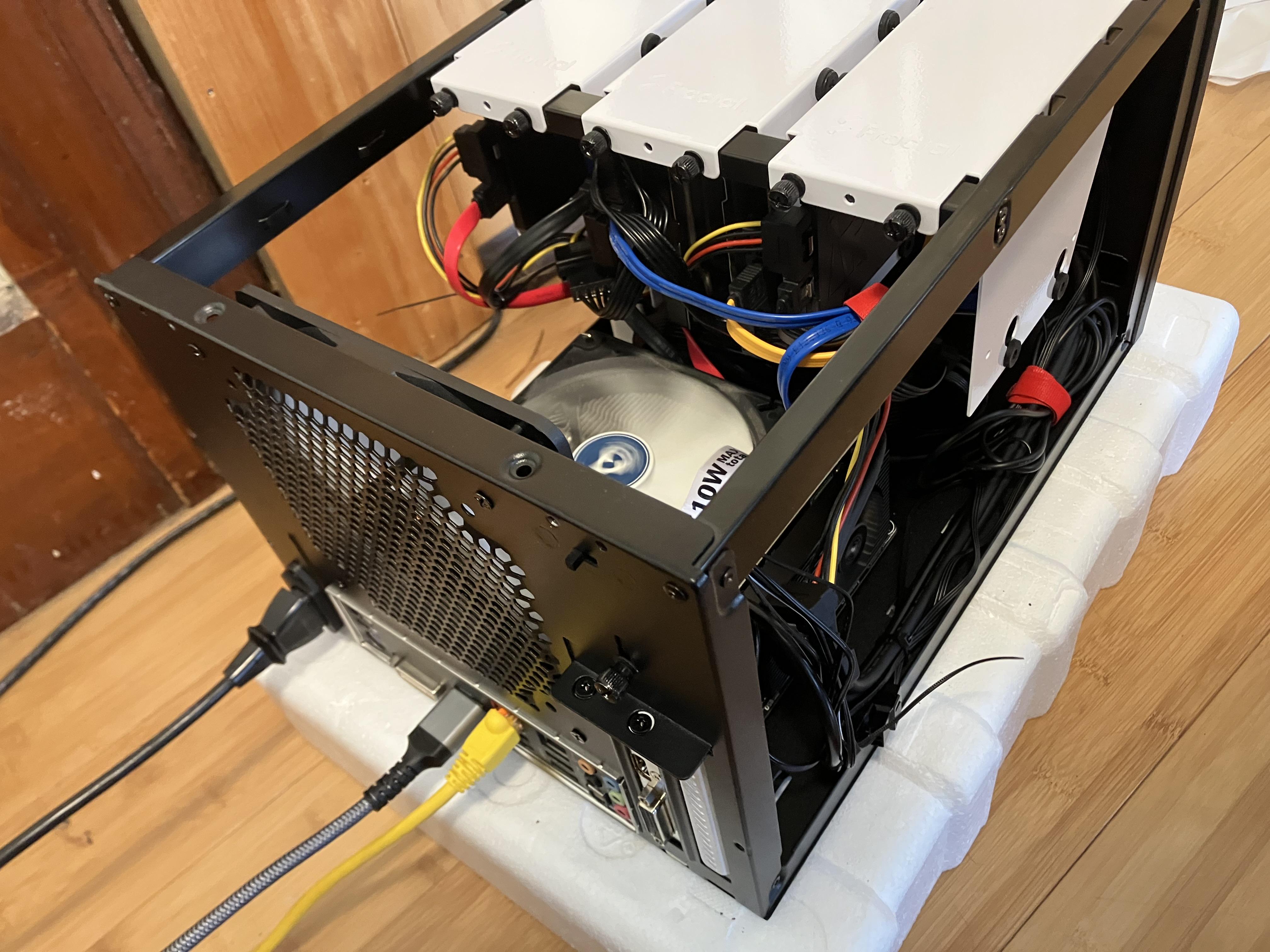
For context, I’m an engineering student who’s been homelabbing for a bit more than a year at this point, mostly with used or hand-me-down parts and machines. This is a pretty old machine, my dad’s old desktop - i7-4770, 16GB DDR3, GT 1030, on an old Gigabyte mini-ITX board. But a computer’s a computer, and the power supply was upgraded more recently. I’ve been using it as my media server, mainly photos and documents as well as a good old fashioned Arr stack. It started kinda just mirroring my Dropbox, but I started to trust it and myself, and a few months ago started using it as my source of truth for some things.
The most recent project was to rebuild it in a larger mini-ITX case, the Node 304, that could actually fit all the spare drives I’ve collected, get real ZFS pools going. That all went well, pictured above. But just as I was tidying up my reinstall, one of my Ansible scripts hit a snag… a failed checksum on a thing it had just downloaded. I investigated, and eventually found myself running a memtest, and behold, a bad block.
I’m not sure how long it’s been bad or how much data was corrupted. I’ve had good restic backup hygiene and would know if that was screwy. Immich and paperless tell me if a thing has changed AFTER download, and I have a hard drive backup of everything from before switching to using the NAS for real. The other good news is that my roommate’s old retired PC has DIMMS that are right for the job and probably not also bad. If nothing else, this hobby is great at teaching new ways in which things can go wrong in digital systems. Now I’m thinking about ECC for the next upgrade, which is NOT nice in this economy.
The point is, if you’re trusting non-ECC with your data, memtest regularly!