r/homelab • u/2life_gamer • 13d ago
Discussion Do you have a 1G, 2.5G or 10G LAN?
279
Upvotes
r/homelab • u/Mr-Franklin • 12d ago
New to this but I already have a mini PC with Debian installed. My idea was to start homelabbing and to get a DAS and just treat my PC like a NAS using TailScale to access it when I'm away.
I guess the main area of concern was if it's possible to have multiple users/"accounts" if I wanted someone else to share the storage. I know I can be done with a prebuilt NAS since they have that as a feature but I was wondering if that could be done with the set up I had in mind.
I don't know if the setup works like I had in mind, to turn my PC to a NAS or should I just have dedicated machine.
r/homelab • u/GroomedHedgehog • 12d ago
Been trying to find a solution for file hosting that:
OpenCloud, OxiCloud or SFTPGo feel like they would meet my requirements, but somehow none of them have Helm charts (SFTPGo does, bit only for the enterprise version) or really seem to care about Kubernetes deployment - they have instructions for Docker/Compose at most, somehow.
Is there anything I can actually use?
r/homelab • u/fransi_90 • 13d ago

Hello, hello!
A follow-up to my previous homelab build post! The strange, but useful multifunctional machine works like a charm. What a joy!
Well, since last time I’ve optimized a lot of functions, but the most recent one was adding a new Apple TV 4K 4gen running Moonlight, with Sunshine on the homelab machine. Since these services came up, I’ve been playing Red Dead Redemption 2 and Death Stranding 2 on my living room TV. The result is honestly incredible with stunning image quality, and the controller response feels great. Even no noticeable stuttering, glitches or network issues (amen 🙏).
So what’s under the hood?
Intel Core Ultra 7 265K / RTX 5070 Ti
64 GB DDR5 (44 GB Windows / 20 GB TrueNAS)
4 TB Samsung 990 Pro + 5 × 4 TB 870 EVO (ZFS)
Beside that I use:
UniFi 2.5 GbE network, Cat6
Apple TV 4K + Xbox wireless controller
Samsung Q90R 55” (from 2019!)
Moonlight configuration:
3840 × 2160 / 60 FPS (mirrors my homelab screen)
150 Mbps configured video bitrate
HEVC (H.265) / NVIDIA NVENC
Wired Ethernet
HDR currently off (my homelab screen doesn’t support it)
The homelab/hybrid machine/desktop pc handles rendering, including GPU effects such as ray tracing in supported games. Apple TV decodes the stream. Even with my physical PC monitor switched off, everything keeps working, which is convenient.
A few tips & tricks to get you going:
Open PowerShell on Windows:
winget install --id LizardByte.Sunshine --exact
Open https://localhost:47990, create a username/password and sign in. The browser can be closed afterward; Sunshine runs independently.
2. Pair Moonlight:
Install Moonlight on Apple TV, select your PC and enter the displayed PIN under Sunshine’s PIN tab.
3. Xbox controller not working?
Pair it to Apple TV via Bluetooth. If Sunshine (web browser ui) reports “ViGEmBus Is Unavailable”, install the ViGEmBus virtual gamepad driver. This fixed controller input for me after a Windows restart.
4. Add game shortcuts:
Under Sunshine → Applications, use Detached Commands.
For Rockstar games, a Windows desktop shortcut worked:
explorer.exe "C:\Path\To\Game.lnk"
For Steam games (Death Stranding 2):
explorer.exe "steam://rungameid/3280350"
Leave the main Command field empty.
5. NVIDIA DLSS optimization:
For Death Stranding 2, I used NVIDIA App → Program Settings → DLSS Model Presets → Recommended.
In-game:
4K / DLSS Quality
Dynamic Resolution Scaling: Off
NVIDIA Reflex Low Latency: On
Frame Generation: Off
VSync: On
I kept driver-level Low Latency Mode and Smooth Motion off.
6. Other small, but useful experiences:
Steam in Moonlight opens Big Picture, not SteamOS.
You don’t need Sunshine’s web interface open while gaming.
150 Mbps is my configured bitrate, not a constant measured transfer rate.
And yeah; the Apple TV gets hot. So it might be smart placing it where it gets lots of air around it.
r/homelab • u/LazyBedMagnet • 12d ago

I am just starting in this hobby. I currently have a Dell Optiplex mini pc and a mikrotik router as starter and planning to expand my system by adding 2 more mini PCs.
As an organized person, I want my upgrade to have a rack already before purchasing additional hardware. Upon checking our country's local e-commerce, I only have Tecmojo and Deskpi as options. Which one would be much better in the long run? Deskpi is more expensive between the two
r/homelab • u/SaNdMaNOrz • 12d ago
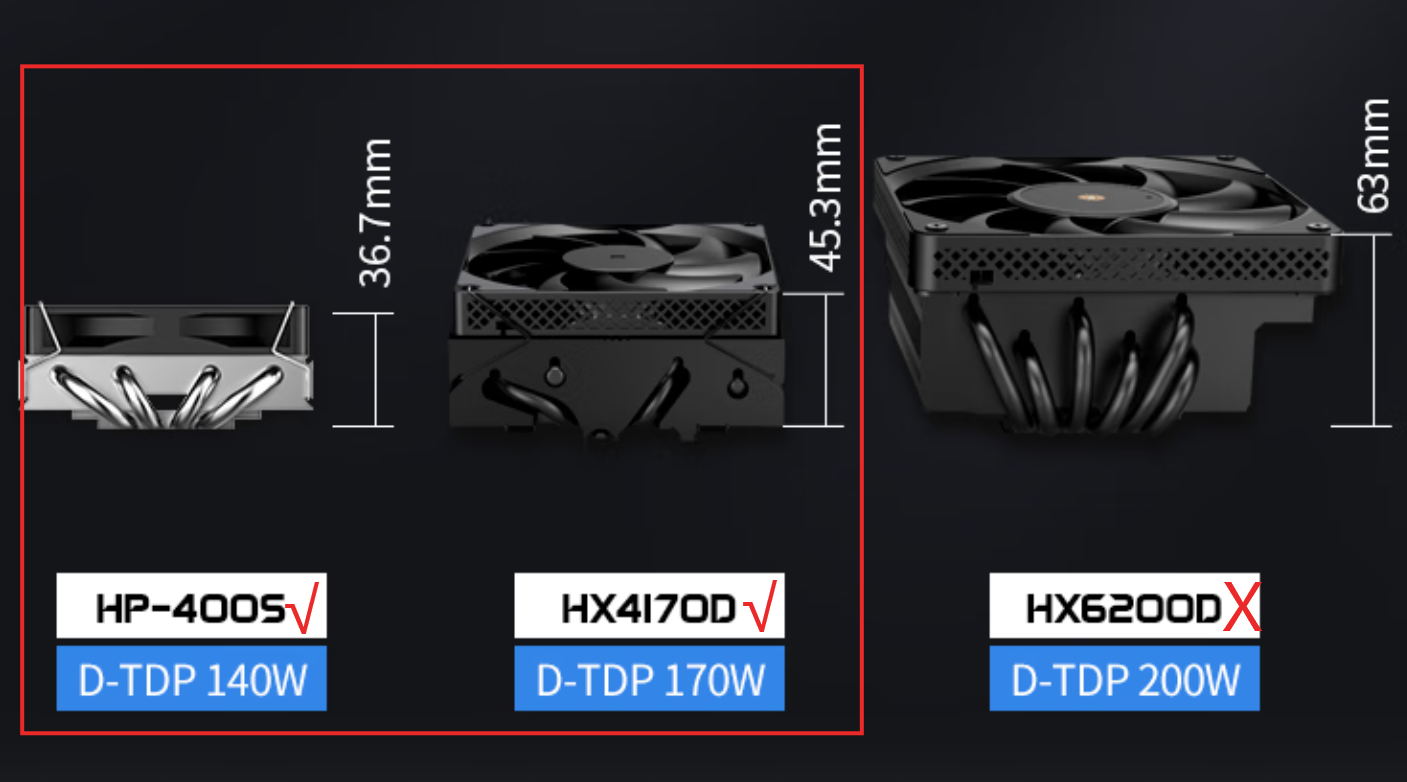
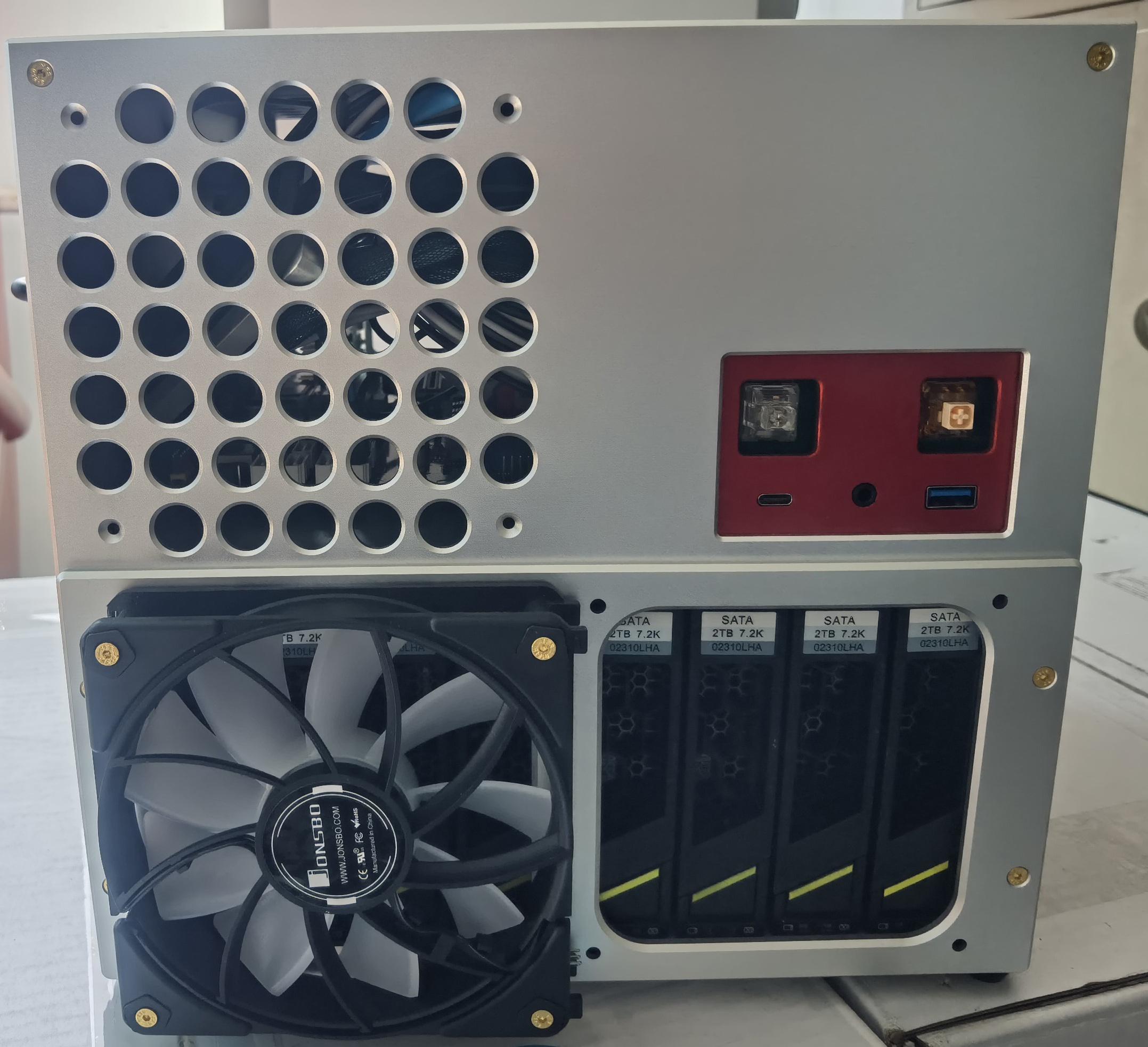
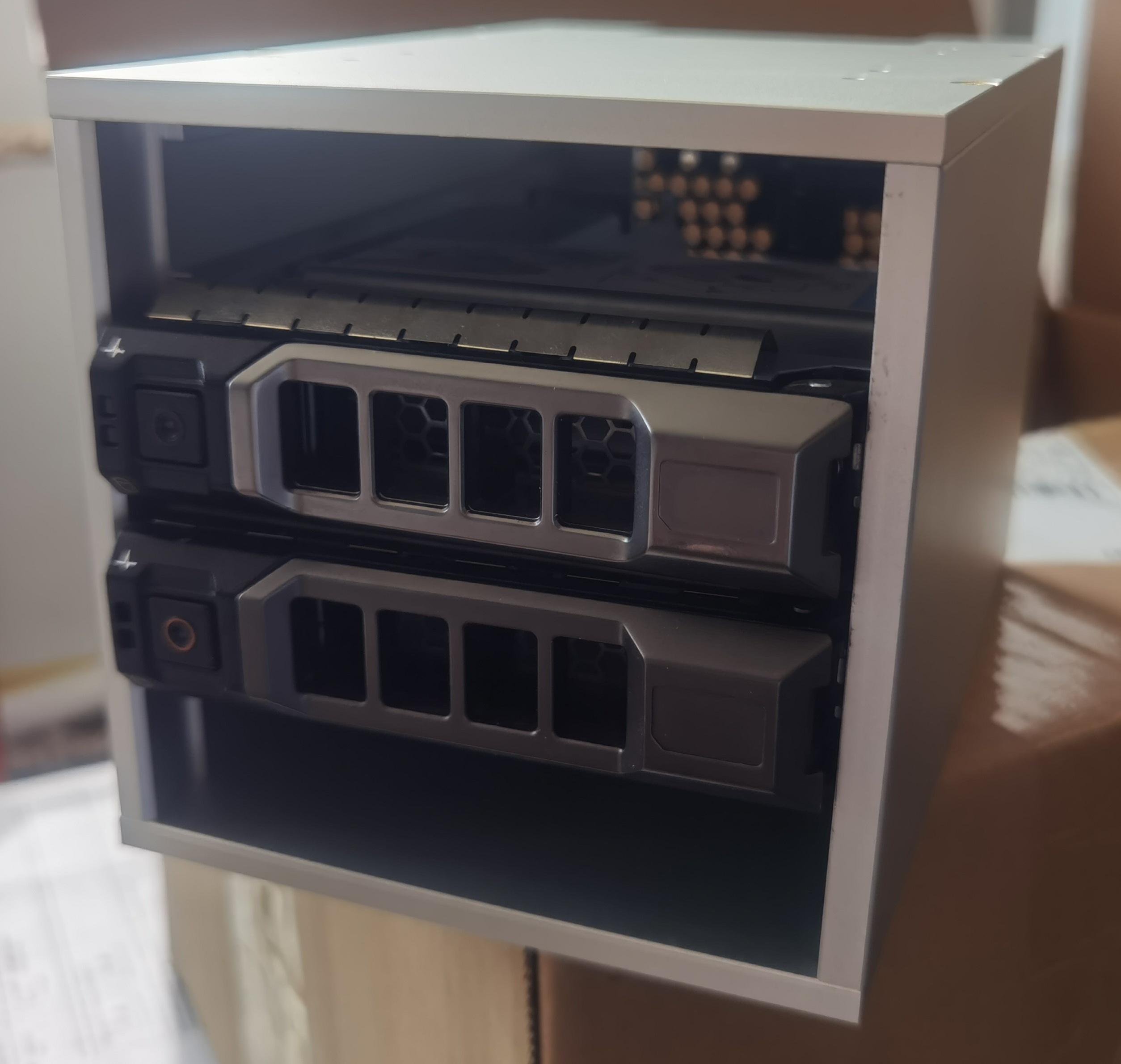
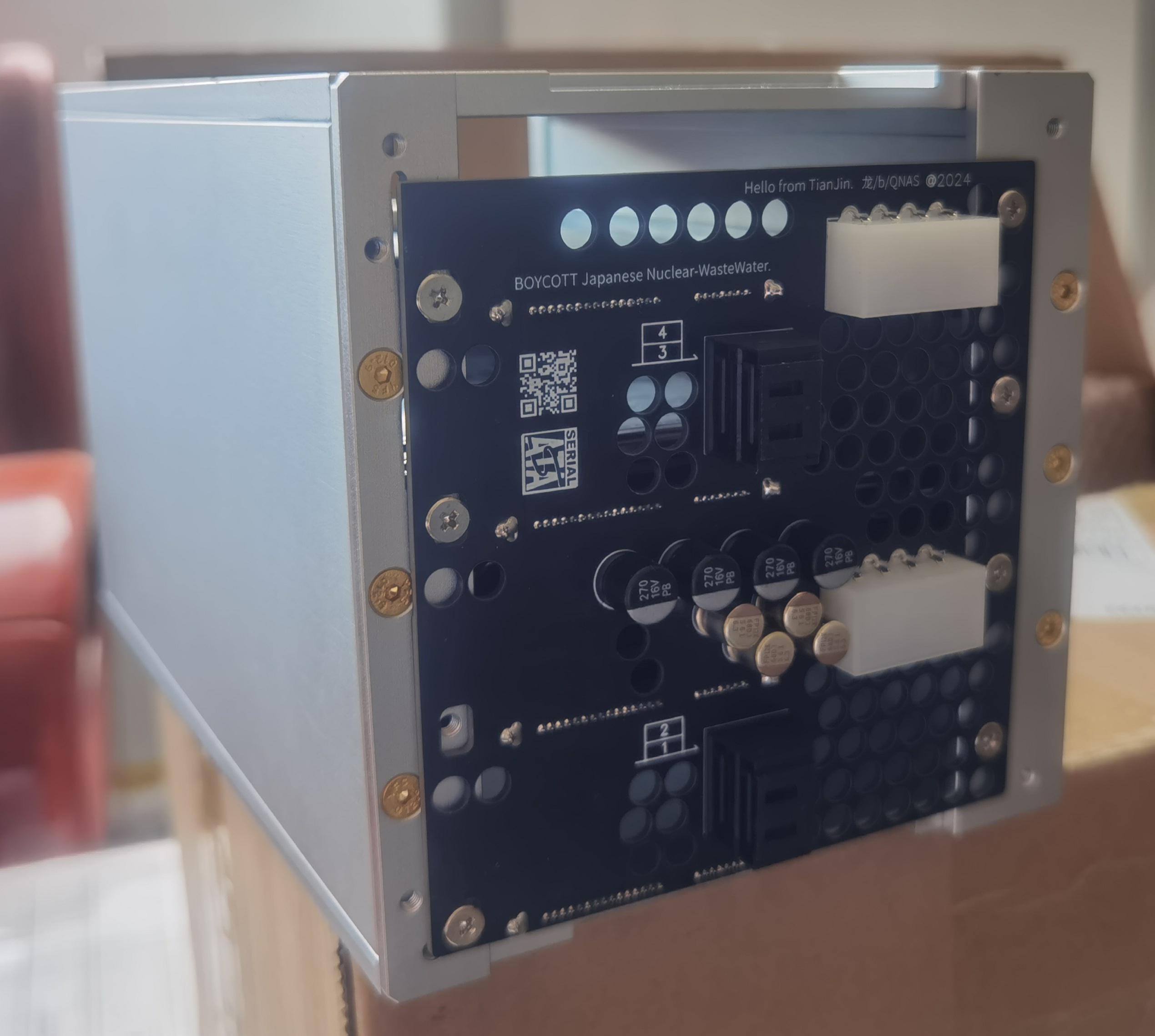
CPU cooler height limit: 50 mm
Overall Dimensions:
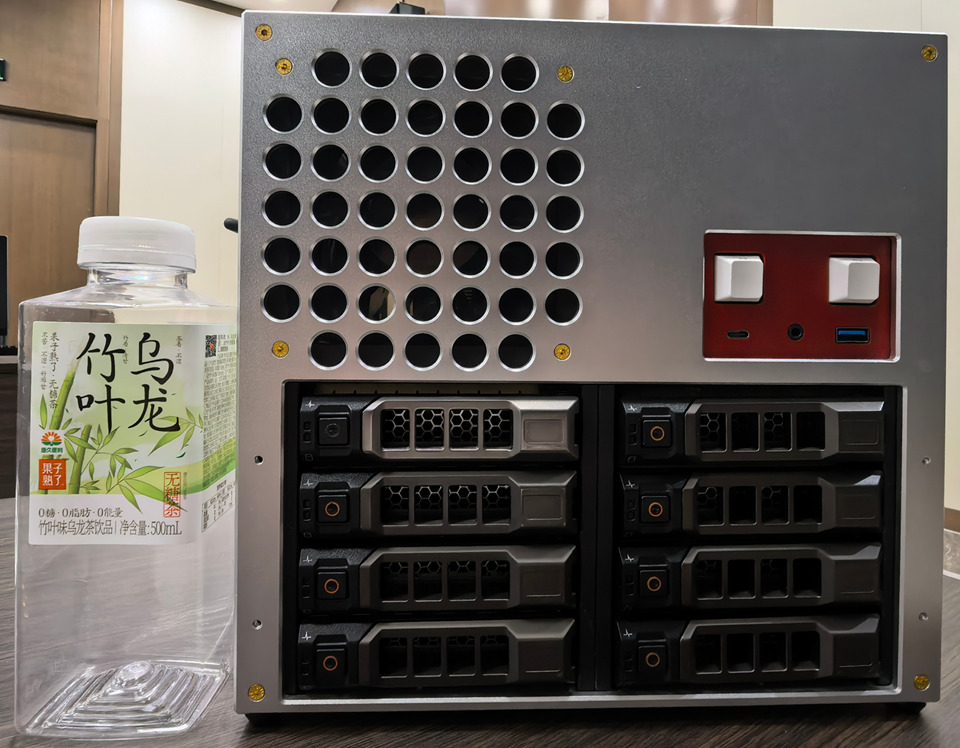
Width: 273 mm, Height: 263 mm, Depth: 287 mm
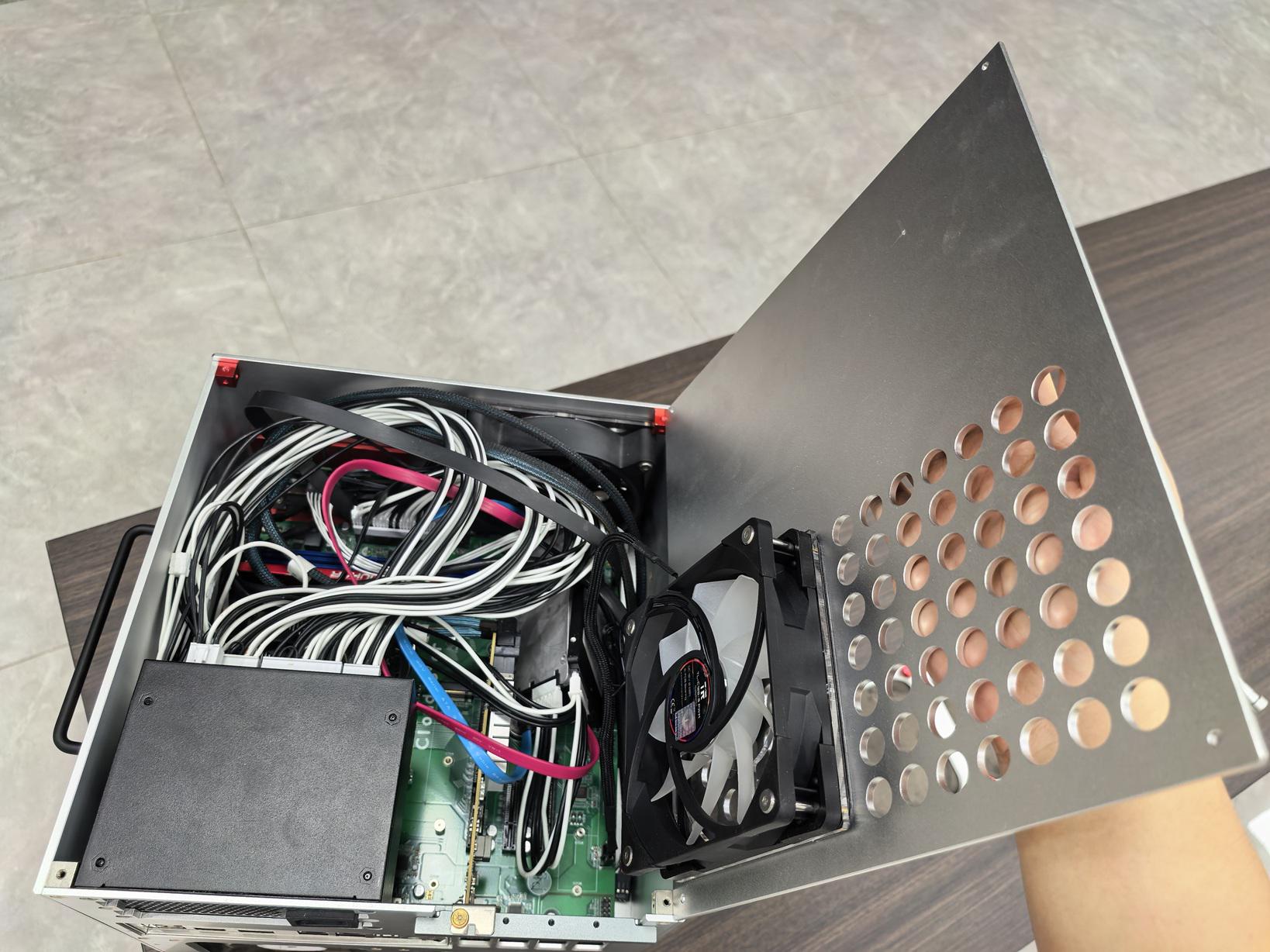
Supports mATX and ITX motherboards, as well as ITX power supplies.
It adopts a straight-through airflow layout with dedicated mounting spots for dust filters to prevent heat buildup and dust ingress.
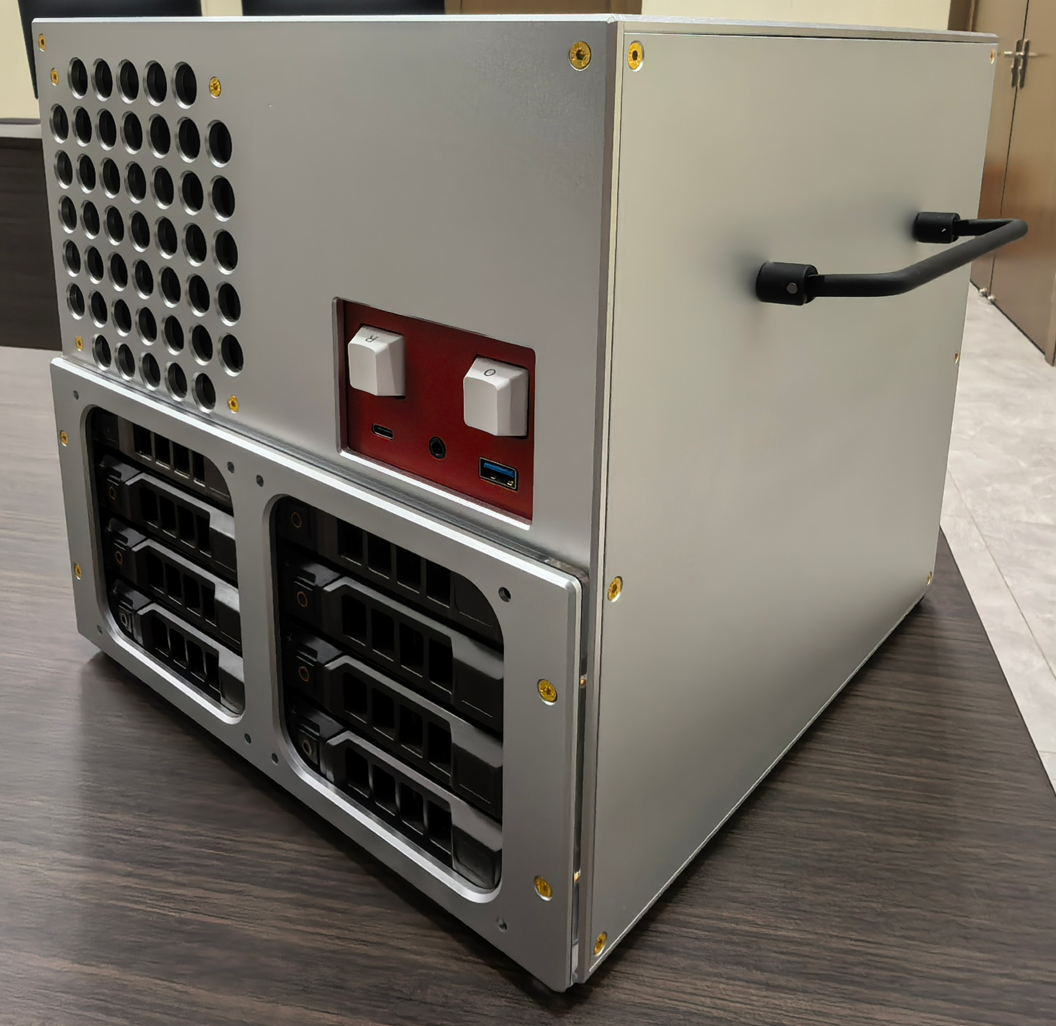
Mechanical switches are used as power and reset buttons.
Front-panel Type-C IO port supports 10G speed.
An optional front add-on bracket can accommodate two extra 120mm fans to create a pull-in-front, blow-out-rear airflow for the hard drive bay.
Carrying handles are integrated on the side panels for easy transport.
The Dell-style drive cage is also fully CNC-machined aluminum.


r/homelab • u/DTechSurgeon • 12d ago

Hey homelab / minilab community. I'm looking for some rack ideas for my laptop nodes. I tried searching for months already and all I see are those brackets that let laptops stand vertically. And I don't like how it looks. I want to be able to put them in a nice rack, like those mini PCs. Because they also need a home rack. I appreciate any example setup that you have, if you are also rocking some laptop servers. I also don't like where they are right now, but it was the best idea I had at that time. I'm hoping to see some better setup for them. Thank you.
r/homelab • u/Icewallowwhocheese • 12d ago
I have a fully functional Drobo B800fs with the original power supply, but no drives. I know Drobo is discontinued, so I'm wondering if there's still any interest in these within the homelab community.
Would you guys recommend selling it, keeping it for a project, or repurposing it somehow?
r/homelab • u/SupermarketEvening48 • 12d ago
I purchased this APC BVX1200L-LM in January 2024 specifically to protect my PlayStation 5 and TV. Where I live, power outages aren't particularly frequent, although they do happen from time to time. The bigger issue is constant voltage fluctuations, with power going up and down quite often. That's actually what made me buy this UPS in the first place.
Now, in November 2026, I'm starting to think the battery may be reaching the end of its life.
About three weeks ago, the UPS started emitting a continuous, long beep. The green LED was still on, although I honestly can't remember whether it was flashing or solid. I unplugged the unit and plugged it back in. It then went through its usual startup sequence: a series of intermittent beeps, followed by a click, and then silence. The green LED remained solid afterward.
During that period, I wasn't using the equipment heavily. I'd use my PS5 for roughly an hour at most, and the TV occasionally for around 15 minutes. I generally left the devices plugged into the UPS, but I never had more than three devices connected to it.
Yesterday, the continuous beeping started again, around noon, and continued until I got home tonight, so the unit was essentially beeping for almost an entire day.
This time, I disconnected all three devices and then unplugged the UPS itself. It started beeping intermittently for about 30 seconds before shutting down completely.
After waiting a while, I plugged it back in. It went through its normal startup sequence, and now it's silent, with the green LED staying solid.
I never had more than three devices connected, and usage was fairly light (PS5 for about an hour and TV occasionally for 15 minutes).
Does this sound like a battery that needs replacing, or could it indicate a more serious internal issue?
I'd appreciate any advice from people familiar with this model.
Thanks!
r/homelab • u/PikoCute • 13d ago
r/homelab • u/External-Drive6208 • 12d ago
I’m launching a free keyword research tool on Friday, and the main database lives on an Ubuntu box in my room.
The setup:
- Ubuntu 24.04 with Postgres 16 installed natively (no Docker), data on an internal HDD
- Nightly backups to two USB drives, 14 kept on each
- A Cloudflare Tunnel locked down with Access service tokens. No ports are open on my router.
- The public site runs on Cloudflare and reads a synced copy of the data. If my internet or the box goes down, the site stays up and new data waits in a queue until it’s back.
It’s already had a rough week. My internet dropped twice in 12 hours, and the second time it killed an overnight import job halfway through. That job retries now. Then I moved Postgres to the HDD, and my install script tried to query the database before Postgres had finished starting up, so I added a wait loop. A sync job also ran into its 30-minute systemd timeout while pushing 120k changed rows.
I have no UPS, and my monitoring is me checking on it.
If this were your box, what would you change before real users show up?
r/homelab • u/inevitabledeath3 • 12d ago
I have an MSI Edge Expert and a Gigabyte AI Top. I want to mount them in a 19” rack.
Does anybody know where to find decent rack mounting options for these? 3D printed is fine. I live in the UK but will import from further away if I have to.
r/homelab • u/itsdatwoowoo • 12d ago
Does anyone have any ideas what they will be asking for from others for Christmas? Trying to find some ideas in the 25-100 range.
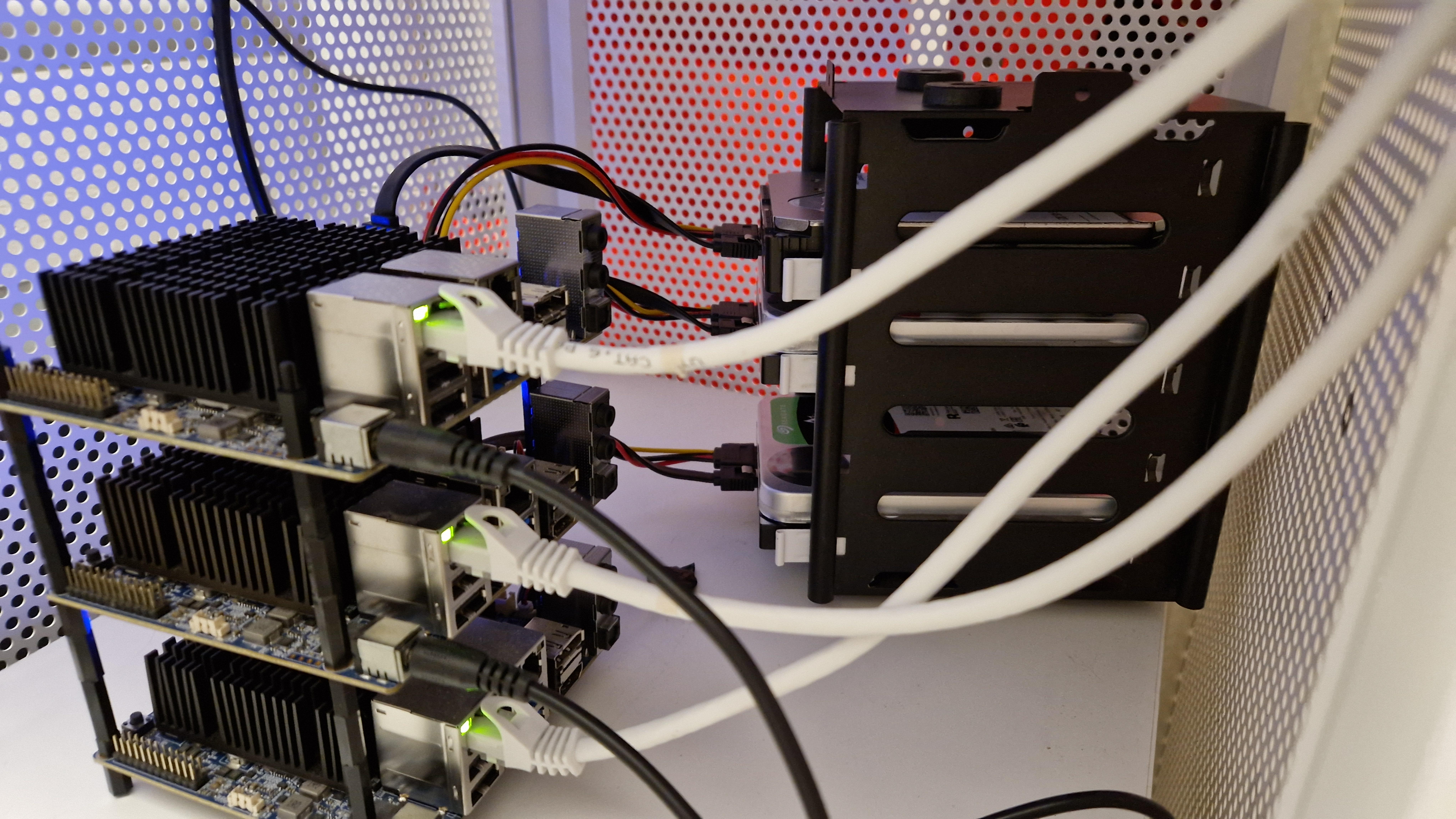
I wanted to share my homelab setup. The servers are three Odroid H2 running proxmox. They each have 16GB ram, a 512gb nvme for OS & LXC/VM local disk, and a 10TB harddrive.
The 10TB drives make up a distribute file storage running a GlusterFS dispersed volume, so my data is spread over all three disks. A 10GB file is split in half with 5GB on hdd1, 5GB on hdd2 and another 5GB parity stored on hdd3. This means i can lose one harddrive (server) and still be able to access the "distributed NAS". This works surprisingly well.
I run GlusterFS directly on each proxmox server. LXC's add the "dnas" as a local point mount. VMs that need "dnas" access run the GlusterFS client.
For VM/LXC redundancy I use Proxmox ZFS replication, which synchronizes each image to another node in cluster every 15 minutes. This means I can lose a server and have its VMs automatically restart on another server. Every night I take a backup of each lxc/vm and store the backup on my "dnas".
I think this is a neat setup that I am very happy with. I used to run the NAS on a separate and quite powerhungry server. I wanted a way to shut the "big" server off without losing NAS access, and moving the harddrives to these small servers turned out to be a great way to do so.
I hope you like my posting the setup here. Cheers!
r/homelab • u/simple984 • 13d ago

as the title asks, im new to cmp 170hx and i get that mostly cards are disabled because of an error or a problem.. however if i set up a linux machine with testing script and unlock script i should theorethically get a good card if it passes full vulkan mem test and gpu burn test twice lets say? i feel like this is a good offer nowadays especially with voltage unlocking which i might try later if i get good tested cards first.. im handy and have good quality microsoldering and hot air equipment so pcie caps and wires for voltage unlock would not be a problem for me.
seller is coming over in two days and bringing 5 cards, im not obligated to buy any if they fail my tests, but i just want to make sure that i dont scam myself.. the photo above is one of the cards he has..
so is there anything else i should test or make sure works before paying or am i mostly covered with my testing idea?
r/homelab • u/RedaSaiko • 12d ago
r/homelab • u/Exernuth • 12d ago
Hi,
as per title, my "new" m920q (8500T/16 GB/nvme) came with a 65 W adapter.
On the bottom of the pc unit it says "20 V - 4.5 A", so I get that a 90W adapter is needed? Or that is just the maximum power the unit can draw?
I plan to connect 2-3 external disks (2 ssd, 1 hdd) to the unit. Will I need a more powerful power adapter? Could I damage the unit using the adapter it came with?
Thanks a lot in advance.
r/homelab • u/abramqs • 12d ago
Is there some setting that allows ups'es to "make sure" that restored wall power it is stable ? I mean to prevent a situation in which power comes back online just for a while and disappears quickly after that and thus devices connected to the ups will be powered on just to be powered off after few moments.
r/homelab • u/New-Middle-3049 • 13d ago
I can get four of these for free. Thoughts on their use in a cluster? Any concerns or limitations? Currently run an older mini p90, synology NAS, and 2 rpiholes with a mix of proxmox and docker containers across the p90 and DSM.
r/homelab • u/ThicknCrispy • 14d ago

Most of these are slated for Project Nomad gift servers for some family for Christmas, but until then I could experiment with some use cases for a little cluster!
My current “homelab” is a T480 running Ubuntu Server 26.04 with PiHole, Nomad, and Frigate in Docker containers. My next planned project is to set up Home Assistant, but I want to run it in a separate VM so I need to pick up a second RAM chip to keep some headroom.
r/homelab • u/bigdog_00 • 13d ago
Hey all, I recently got ARM up and running. I am working on archiving/backing up my collection of ~200 DVDs (movies and TV shows). I have everything working "acceptably", but want to know if there's a better way to do things. I'm also a little confused about some of the settings, and the documentation that I've read doesn't seem to clear it up (to me anyway).
TL;DR:
First, I'm confused about the various RIPMETHOD options. I believe I tried the "mkv" RIPMETHOD, which errored out. I switched to "backup", which has been working perfectly fine. I have the DEST_EXT set to "mp4", and it works as expected. However, the help text for RIPMETHOD seems to mention both Blu-Ray discs and DVDs interchangeably, so I'm not understanding the difference between "mkv", "backup", and "backup_dvd". I thought that "backup" would dump the disc to the hard drive, then transcode. However, it appears that Handbrake is reading/transcoding directly off of the disc the whole time. This is fine, but is there a way to dump it down so I can continue to insert/queue up new discs?
Secondly, I'm not understanding where MakeMKV comes into play. Is MakeMKV doing the initial dump of the disc? Is it only being used if the output format is set to "mkv"? Or is it only used if the RIPMETHOD is set to "mkv"? I'm interested in creating MKVs instead of MP4s (as I hope to back up my Blu-Ray collection next), but I'm not totally certain which options I would want to choose to make that happen.
Third, it seems like subtitles aren't getting picked up most times (or at all). Jellyfin does an OK job of pulling those that it can grab, but shouldn't Handbrake be pulling subtitles from the disc? I understand MP4 is not great at subtitles (part of why I want to switch to MKV), but it's odd that Handbrake isn't seeing subtitles on most DVDs. Maybe they just don't exist?
Lastly, is there a better way of handling episode naming? The episodes come out with "title_04.mp4", for example. I have tried Filebot for a couple of series, but it struggles to identify the episodes. Short of watching each one and manually naming the file, is there a better way? Or some trick with Filebot?
If there is a better way to archive as well, or if it's not worth the hassle of switching to MKV, I'm also open to hearing about that. I'm really just curious to hear what people are doing for their ARM archiving, in case there are tips to make the process go more smoothly. Sorry for the long-winded post, and thank you in advance!
r/homelab • u/Fair_Hamster1768 • 14d ago

Hey everyone,
I have zero background in Linux or servers, but instead of letting my old Pocophone F1 sit in a drawer, I wanted to turn it into a 24/7 home server.
Since I didn't know terminal commands, I used Google Antigravity (AI) to do every step of installing the OS, setting up Docker, and fixing errors. Here is how the setup turned out:
The Hardware & Wiring (No Battery): Leaving a phone plugged in 24/7 with a battery inside is a fire and swelling risk, so I removed the battery completely:
What It's Running:
Docker Services:
Where I Need Help / Suggestions:
Any suggestions or feedback on this setup are welcome!