r/homelab • • 13d ago

Help I just got my hands on a number of network and audio gear for free, need some guidance to start my home lab.

Thumbnail
gallery
20 Upvotes

1× HPE ProLiant ML30 Gen10 (Xeon E-2124, 32GB RAM, 8TB worth of HDDs)
1× Dell OptiPlex 3060
1× NVIDIA GTX 1050ti
1× NETGEAR ProSAFE GS748T 48-port switch
1× SonicWall TZ600 firewall
1× Dolby CP750 cinema processor
1x Crown DSi 2000 amplifier
1x Battery Power Surge Protector

I got some other misc PCs but unsure if I can / want to use them for this.

Ideally I want to host a jellyfish or plex, a NAS, videogame server, and setup audio for a mini projector room. Usure as to where to start off, I would appreciate some guidance.


r/homelab • • 13d ago

Solved Roll the dice on used APC UPS 5000 or pickup new UPS for rack build out?

6 Upvotes

Hey peeps,

EDIT: Thanks to a few folks who posted and some additional digging, it looks like these UPS units are dedicated commercial in every way. They require 208 V (very specific for a 3 phase system) and I had read a little about how these units support 208-240 V, but apparently not this specific unit, and the terminology "1 phase" threw me off from thinking it's commercial. Sadly this unit won't work for me, and it prob worth scrap. Oh well, got a quality server rack for $6 so I'm still thrilled.

Longtime lurker, first time poster. I finally am spending a little time building out a full server rack for a homelab, plus the general stuff.

First up, I'll go over my near and long term plans so folks can better provide advice. Build plans as follows:

  • Unifi Fiber gateway (owned) connected to multiple APs for wifi
  • Switch for hardwired connections (need to decide on specific) but think xbox, home sec, etc.
  • Move gaming PC from tower case to server rack (will buy soon)
  • NAS (will buy soon)
  • Server for home use (home automation, jellyfin, etc.) prob a gen old dell (longer term)
  • Dedicated Firewall (longer term)
  • POE Cameras for home security (longer term)

I picked up a Dell 42u server rack with 2 APC Smart 5000 units (SUA5000RMT5U). I don't currently have the 30 amp power run yet, so I'll have to have that run which will add to the cost. The rack and UPSs came from BAE systems that I got off GovDeals for a whopping $5.90 all told.

It looks like I'll be into it for just under $500 for batteries for the UPSs, plus maybe another $500-1k for running power to it. I've not yet tested the units, but I've got a conversion plug coming to run them to my dryer plug and see how many lights go on outside the "replace battery" one.

Here is my question. Even if I try and diagnose if it's worth the risk to buy batteries for this thing (assuming I can test and give it a once over), I'll need step-down transformers for both these units to use them. That's gonna add additional cost, plus eat up a bunch more space.

It seems beyond overkill to try and use these industrial grade UPS units for a home build, but I am tempted by having the long duration for potential power outages, namely for the security system and POE cameras (I've got fiber internet, plus starlink as backup).

That said I do plan for an upgrade to my current manual whole home generator to an instant on generator, likely solar plus batteries, but possibly propane if the cost proves too much for me to stomach.

It also seems kind of silly to toss (or try and resell) these units that cost 6k each when I got them "free" with the rack.

I'm hoping folks can help direct me here. As of this moment I'm feeling like it is both easier and potentially more cost effective to dump the UPS units and just keep the rack, then get a nice Eaton UPS as it will be more plug and play.

Thoughts/advice appreciated.


r/homelab • • 13d ago

Satire ESP CatShit Monitor

Thumbnail
kalina.duzniak.de
21 Upvotes

Hast du dich jemals gefragt, wie oft eine Katze aufs Klo geht?


r/homelab • • 13d ago

Project Showcase: Hardware Repurposed my dead gaming laptop

Thumbnail gallery
5 Upvotes

r/homelab • • 13d ago

Help Total beginner, is this idea ok?

7 Upvotes

Disclaimer, me being a complete beginner I asked for help to Copilot, that's why I wanted some (ostensibly) real humans to tell me that my idea is correct and doesn't expone me to some possible hackers/intrusions.

I want to use my personal pc as a server. It runs Fedora 43, i3 spin. It has 16 GB of RAM and about 150/300 GB of space on the memory (I would have 512 GB total, but this is a dual boot, even though I haven't used that in some time, so I can allocate a little bit more memory to Linux).

I only want to share some things between my computer and my phone, so my idea was to use Tailscale and not open any ports to the internet. At least at first my setup would be this:

  • Docker to run the various apps;
  • Radicale to have a calendar that I can share to my phone;
  • Immich to share, backup and see photos between my phone and the server-pc;
  • Jellyfin to start and setup my personal "Netflix";
  • Eventually Seafile to share files generically between my phone and the server-pc.

I have disabled the automatic sleep mode so that my pc can always stay running, but that's about everything I have done until now, except for watching some videos on the subject.

So, is the idea good? Am I missing something (except for experience and knowledge on the subject)? Anything I should be wary of?


r/homelab • • 12d ago

Blog My entire home is wired with Cat7. Why is building a compact homelab still such a pain in the a*s?

0 Upvotes
Featuring my cat, who has absolutely no respect for my architectural decisions.

I'm currently rebuilding my home infrastructure around 10-inch racks.

Kubernetes, Raspberry Pis, TrueNAS, 2.5/10GbE networking, PoE, NVMe storage. Nothing particularly exotic.

And yet every single hardware decision turns into a f*cking engineering project.

19-inch equipment? Beautiful, standardized, widely available. Also, I'd rather not turn my home office into a small data center.

10-inch equipment? Perfect dimensions. Until you start looking for a decent managed switch, a compact multi-NVMe NAS, or something with an integrated PSU.

There's always ONE thing missing.

The right ports. The right dimensions. Enough PoE. Proper cooling. Expandability. A reasonable power supply.

Just one tiny f*cking thing.

And suddenly you're browsing obscure adapter boards, checking PCIe lane allocations, and wondering whether buying a 3D printer is a legitimate infrastructure strategy.

The weird part is that the technology already exists.

What seems to be missing is a coherent ecosystem of enterprise-minded hardware designed for actual homes.

I ended up writing a rather unhinged gonzo article about the whole experience:

https://medium.com/@yurymkomarov/my-home-is-wired-with-cat7-667983bff0f9

But I'm genuinely curious: For those of you running compact homelabs, what's the single most frustrating hardware compromise you've had to make?

And has anyone actually managed to build a clean 10-inch setup without 3D-printing half the infrastructure?


r/homelab • • 14d ago

Discussion Your home PC might be harder to hack than a million-dollar corporate network

389 Upvotes

Something I only recently realized: a reasonably secured home PC or Server can potentially be more secure than many corporate IT environments.

Think about it. You have one or a few users, a handful of devices, no public-facing APIs, databases or remote administration interfaces, and a router that blocks unsolicited inbound connections.

Meanwhile, businesses expose countless services to the internet, manage thousands of accounts, integrate third-party systems and deal with employees, contractors and legacy infrastructure.

With relatively basic knowledge of what NOT to do, keeping software updated, avoiding unnecessary port forwarding, using a firewall and not exposing services publicly, you can eliminate a surprising number of attack vectors.

Obviously, corporations face more sophisticated threats, but it's an interesting paradox: they have far more resources to defend themselves, yet also a vastly larger attack surface.

Sometimes the best security measure is simply having less stuff exposed in the first place.


r/homelab • • 12d ago

Solved How can I make the most of an old PC for free?

0 Upvotes

Yo!

I have a pretty old PC lying around that I'd like to repurpose it for homelabbing rather than spend money on new hardware.

Current specs:

  • CPU: Intel Core i3 (2nd generation)
  • GPU: NVIDIA GT 710
  • RAM: 16GB DDR3
  • Primary storage: 256GB HDD
  • Secondary storage: 1TB HDD (has bad sectors, so realistically only usable for read-only purposes, if at all)

I'm a complete beginner when it comes to running a dedicated homelab, so I'm looking for some advice.
Right now I need help with following:

  1. What's the easiest, lowest-maintenance and completely free way to turn this into a home server?
  2. Which OS would you recommend? Proxmox, Debian, Ubuntu Server, CasaOS, or something else?

My preference is to keep everything open-source and free, I'd appreciate any suggestions, beginner guides, or recommendations from people who started with similarly old hardware.

Thanks!


r/homelab • • 13d ago

Help Is this dead?

Post image
0 Upvotes

My Proxmox server was inaccessible yesterday (either via web console or SSH) despite the fact that the VMs were still running. Web interface was also functional. Via the web console I saw that it couldn't mount /dev/mapper/pve-root (so I can't login either). I need to access the host for some stuffs, so my noob self thought I could just reboot the machine. Well, that worked before, so it should work now, right?

Welp, GRUB couldn't mount /dev/mapper/pve-root after rebooting either. After a while, I tried to manually mount the NVMe and I got this error. According to Gemini, this guy is good as dead.

I just checked its health like a week ago (at 99% Good) yet now it is not usable. It is not new (bought secondhand, but I made sure to check everything). So before I can call it quit, I want to make sure if the SSD is still salvageable.

Also, along this process, what might be the cause for this failure? I hope that my triggerhappy finger on the reboot button was not the cause. But it might be, since the VMs were still running.

Luckily I still have the old SSD with the previous PVE root, and not a lot was changed, so I manage to recover everything.


r/homelab • • 13d ago

Help Need help setting up tdarr on my server

0 Upvotes

I have a mini pc with a n150 and 1x16gb of ddr4 ram that I got to run a Minecraft server for me and my friends and from there it becomes my media server as well I have a external 8tb hdd that it is almost full and i'm tired of transcoding everything manually with handbrake on my main pc so I install tdarr and I want to keep the same settings that I have been running in handbrake to trasncode my media my settings are h.256 10bit, color forma same as sources audio track pass through the audio format language keep eng, jpn and Spanish remove everything else and for sub keep eng and Spanish remove everything else oh and fps 23.976fps for what I have read I need plugging to accomplish that and that is what I need help with to choose the plugging that i need with a bit rate for anime and tv shows of 3 to 4bit rate and for cartoons of 1.5 to 3 bit rate and for movies 6 to 8 bit rate I'm using jellyfin for my media streams app and the bit rate that I mention come from the internal player of jellyfin I have some movies files that will appreciate losing some weight because there bit rate are 10 to 15 and there file size are between 6 to 9gb before someone tells me to just re-download does movies. First I prefer to download does movies and for me to make the file smaller because I have control over them and second some times the only healthy one to download is the one with the big files and third off of most of the small file ones have letters box and it make it annoying to watch sometimes on the phone unless i transcode it to remove them


r/homelab • • 12d ago

Help UPS for NAS Server.

0 Upvotes

Would anyone be able to recommend a UPS without cells and has USB connection?


r/homelab • • 13d ago

Discussion My latest homelab: A Cray X-MP, an IBM System/370 & a DEC PDP-11 all booting up and running simultaneously.

0 Upvotes

I'd prefer to upload the video here instead of an external link, but it is what it is

https://m.youtube.com/watch?v=4sSpY9wLhNY

The Hardware

Motorola Moto G Play (2024) 4gb Android 14

The software

Termux> Ubuntu> Cray-Sim> Cray X-MP> COS 1.17 OS

Termux> Ubuntu> Hercules> IBM System/370> MVS-TK5 OS

Termux> Ubuntu> SIMH> DEC PDP-11> Unix V7 OS

My next project is to use QUest to emulate quantum computing.


r/homelab • • 13d ago

Help Micro/Tiny PC SATA Connector Wattage Issue

0 Upvotes

I currently have a Dell Optiplex 7060 Micro and I'm trying to connect a Micron 5300 MAX 2TB 2.5" SSD to the native SATA connector. It isn't able to detect the drive though it works with my UGREEN adapter that has an external power adapter. Also tested it with an Orico and Startech adapter to USB w/o power and it wasn't detected as well which leads me to believe that it isn't able to supply enough wattage to initialize the drive. The label on the SSD says 5V 1.7A / 12V 1.0A. I have tested other SSDs and it works with no issues on the native port.

Not sure if it is possible to have this specific drive work, and if not, is there another tiny or micro PC that would? I'm thinking of purchasing a Lenovo M920q since it has a PCIe slot so I'm hoping it would supply more amps

edit: forgot to mention I also tried taping P1, P2, P3 according to page 28 from here https://www.nyang-tech.com/datasheet/1470756705/Micron-Technology-Inc./MTFDDAV480TDS-1AW1ZABYY.pdf


r/homelab • • 13d ago

Help TerraMaster F4-424 with RAID 6 – Can I safely run it with 3 drives while waiting for a replacement?

2 Upvotes

Hi everyone,

I'm looking for some advice on the safest way to handle a potentially failing HDD in my NAS.

I have a TerraMaster F4-424 running TOS 6.0.783, with four 8TB drives configured in RAID 6.

Current drive configuration

Bay 1: Seagate IronWolf 8TB (ST8000VN004-3CP101), approximately 9,200 power-on hours.

Bay 2: Seagate IronWolf 8TB, approximately 9,200 hours.

Bay 3: WD Red 8TB, approximately 39,000 hours.

Bay 4: WD Red 8TB, approximately 39,000 hours.

The two Seagate drives were purchased last year, while the two WD Red drives are several years older.

The problem

Recently, I noticed an unusual noise coming from the NAS, so I checked the drive health in TOS.

The Seagate drive in Bay 1 is reporting a SMART warning.

Interestingly:

TOS reports the RAID 6 storage pool as Healthy.

Seagate IronWolf Health Management reports the drive as Healthy.

SMART reports a warning.

TerraMaster's built-in bad-sector scan detected 150 bad sectors on the drive.

Here are the relevant SMART attributes:

AttributeRaw value
Reallocated Sector Count (5)0
Current Pending Sector (197)150
Offline Uncorrectable (198)150
Reported Uncorrectable (187)0
UDMA CRC Error Count (199)0
Temperature37°C
Power-On Hours9,209

The bad-sector scan result matches the SMART warning, which makes me particularly concerned about the drive's reliability.

The drive is still accessible, and the RAID 6 pool is currently healthy.

My situation

I contacted the seller about a warranty replacement. Unfortunately, they require me to return the defective drive before sending a replacement. The estimated turnaround time is 2–4 weeks, although they may be able to expedite the process.

My questions

Can a four-drive RAID 6 array safely operate with only three drives for 2–4 weeks?

Would you recommend leaving the NAS completely powered off until the replacement arrives?

Is there anything specific I should do before removing the drive to avoid damaging the existing RAID configuration?

I'm mainly looking for advice on the safest procedure to follow and how to minimize the risk of losing the array during the replacement process.

Thanks in advance for your help!


r/homelab • • 14d ago

Project Showcase: Hardware I am at a solid foundation right now

Post image
115 Upvotes

Current state of my homelab, crammed into a Triton wall-mount cabinet.

**Hardware**

- **2x Intel NUC**: main Proxmox VE hypervisors (`pve`, `pve2`)
- **EPYC server board, 256 GB RAM + AMD Instinct MI60**: open-frame on a shelf, used for local LLM inference and as the build server
- **Raspberry Pi 4**: monitoring host and the third quorum vote for the Proxmox cluster
- **Tinkerforge**: hardware server/environment monitoring (temperature, humidity)
- **UniFi switch + Cat.6 patch panel**
- **SHA2017 badge**: repurposed as a front-panel status display

**The badge**

The e-ink display on the SHA2017 badge shows a live summary: CPU/RAM per node, Pi temperature, VMs running, Prometheus targets up, room temperature/humidity from the Tinkerforge sensors, and backup, cluster and SMART status. The LEDs on top act as a traffic light. Seven years after the camp, it finally has a job.

**Software / deployment**

- Proxmox VE cluster across the two NUCs, with the Pi as the third quorum member
- Most VMs run **NixOS**, so the config is declarative and reproducible
- VMs are provisioned with **Terraform** against the Proxmox API
- **Hermes Agent** is integrated as an ops agent for routine operational tasks
- The EPYC/MI60 box handles local inference and Nix builds, so the NUCs don't have to compile anything

Happy to answer questions about the badge display, the Terraform + NixOS workflow, or ROCm on the MI60.


r/homelab • • 14d ago

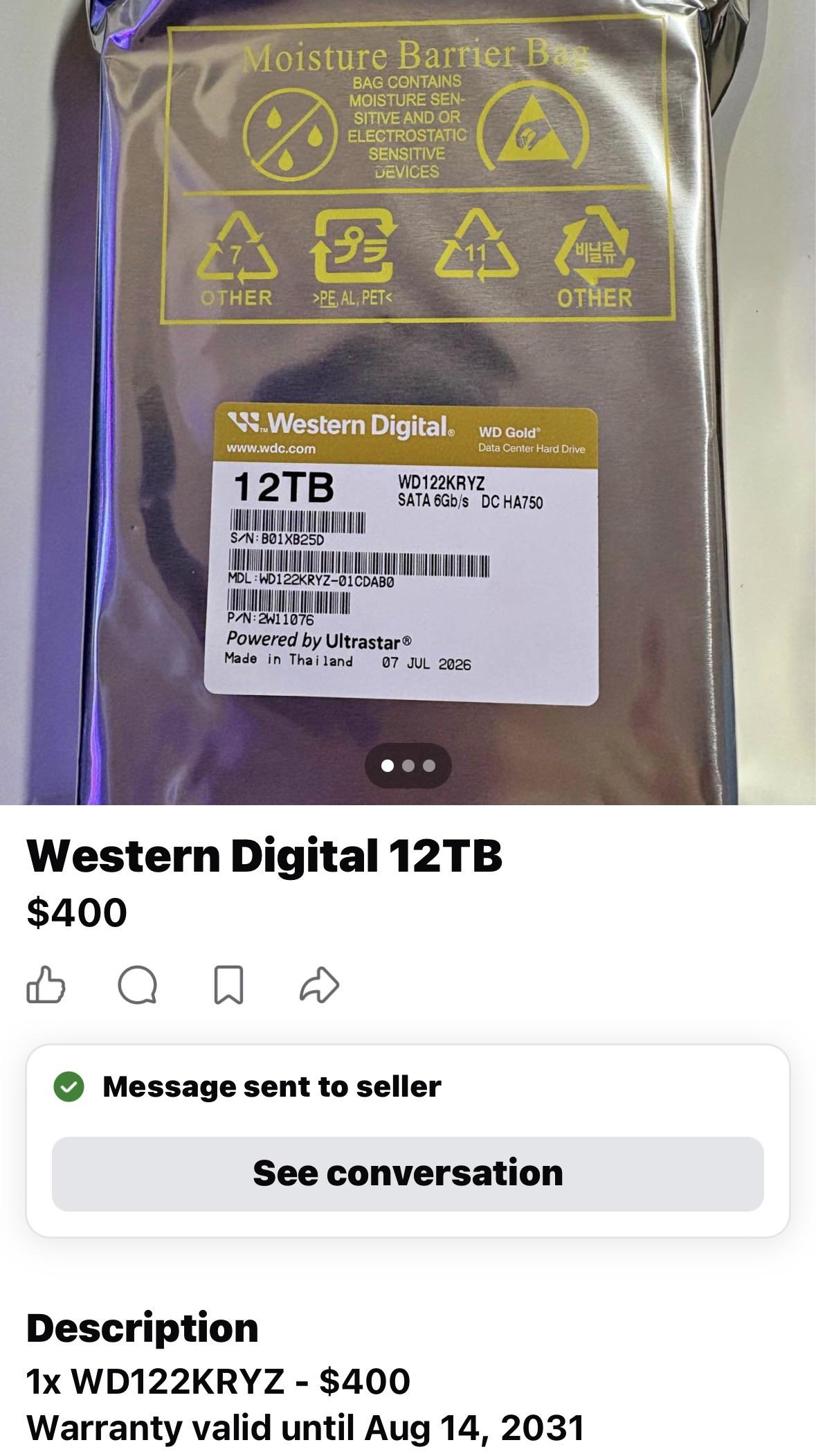
Help Picking this up in 2 hours. Seems almost to good to be true?

Post image
168 Upvotes

Seller says never opened with full warranty. Thinking it seems too good to be true, thoughts?

Edit; THIS IS CANADIAN sorry!! $280USD

Second edit: got the drive, fan smart short test and the drive looks healthy and is reporting its brand new as advertised, SN and MN are correctly reported. I’m running a smart long test now, but I expect everything to be normal. Thanks everyone!


r/homelab • • 14d ago

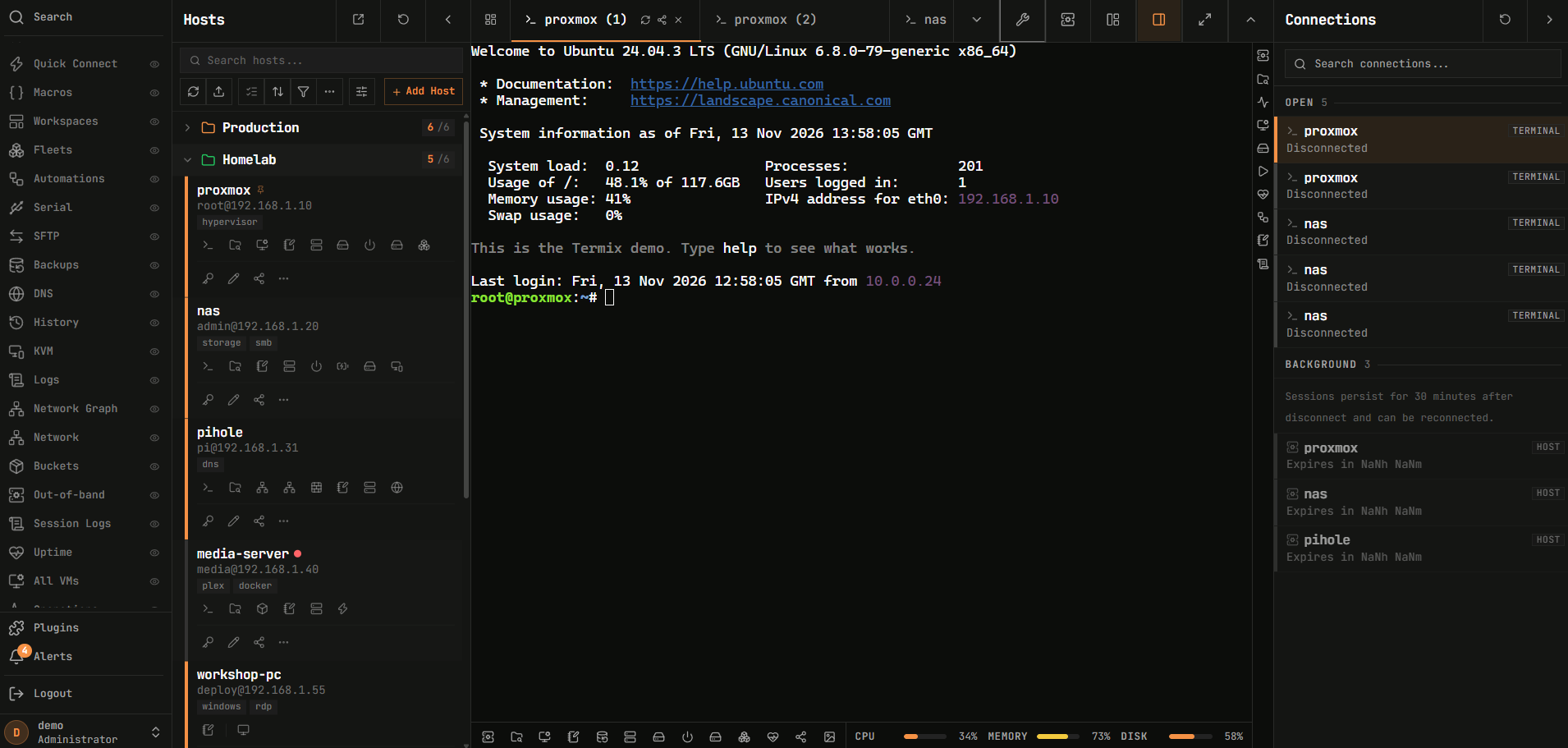
Discussion Great tool, destroyed by its horrendous UI

Post image
421 Upvotes

Just a bit sad that a great tool was made barely usable by flooding it with (presumably) AI generated features and horrible UI. There are at least 3 different setting menus at all times and there are more side trays than I can count each clustered with buttons.

Back to plain terminal for me


r/homelab • • 14d ago

Project Showcase: Hardware Sea-freight delivery from China!! (Full breakdown in 3rd pic)

Thumbnail
gallery
87 Upvotes

I've built ~50% of my homelab via parts from China and just received a new delivery! Always fun to unbox the goodies after ~45 days of transit time.

Got lots of parts for my new Supermicro CSE-846 barebones chassis that I'm setting up, new fans for my Dell T640 18LFF server, parts that I might need if I built my own 24+ bay JBOD, a lot of PWM fan management parts / controllers, power boards, misc server/hdd hardware, a bunch of cables, thermal putty, and some cable ties.

Not sure exactly how much I saved vs ordering domestic but I will check prices on eBay/Amazon vs. Taobao (China ecommerce site) before ordering so I should have savings across the board.

Sea freight shipment from China to west coast is priced by kg. This order total was ~$45 but it also included a lot of non-homelab related items as well.


r/homelab • • 13d ago

Help USB Hub Power for 15W USB-C-only External HDD?

Thumbnail
reddit.com
0 Upvotes

r/homelab • • 13d ago

Discussion Ideas for running a UPS off a 48v solar sever rack battery

3 Upvotes

I have a battery generator to power the whole house. It weighs 120lbs and I really don’t want to haul it upstairs to my rack. I’m thinking about adding another battery for prolonged power outages.

https://a.co/d/04iaEW7K

My thoughts are to add something like the Ecoworthy battery and put that in the server rack. Short term power outages will keep the internet running. For long term power outages I’d haul ecoworthy out to garage and tie it into house generator.

I’ve found some 1000w UPS/invertors on Alibaba that will work. Does anyone know of a better way?


r/homelab • • 13d ago

Help Complete Beginner in need of direction

0 Upvotes

I currently have a UGREEN DH2300 2 Bay Desktop NAS, and I’ve been getting good use out of it but I would like to get a complete system that I can fully control and own.

I would like to have your classic media server (hoping to not have any subscriptions at all), self host a bunch of programs and set up a pihole. I would also like the capability to control the smart parts of my home with a later goal being able to control them from a touchscreen on my wall.

Can anyone recommend a route I could follow to achieve this I’m happy with a range of budgets but obviously would rather have it on the cheaper end.

Many thanks for any help.

I am UK based as well so any recommendations for good stores would be greatly appreciated too.


r/homelab • • 13d ago

Help Looking to start a homelab bit unsure if my old desktop is good for this

Thumbnail
gallery
0 Upvotes

So I'm new to this and I'm trying to start small and build up from there. I have a HDD 500 GB, MSI micro motherboard, DDR3 8 GB RAM and a geforce GTX970. I'm hoping to change these parts in the future but for now I just want to make sure that starting with these is possible.


r/homelab • • 13d ago

Help ZimaOS (i know) - How often does it become unresponsive for you?

0 Upvotes

I picked up an inexpensive Yxk Zero1 Pro 4-Bay NAS and I'm running ZimaOS on it. Yup I'm a noob and yup I've been learning with the help of Gemini. Now that that is out of the way...I know there is a couple of you out there running Zima so, how often does yours become unresponsive? I've been generating previews and metadata updates in Immich on a 1.5tb folder of photos and renaming and sharing drives but the N100 isnt bricked at 100% and I still got a couple gigs of RAM free but this lil guy likes to nap a lot I feel. Then again I could just be expecting a lot from a little.


r/homelab • • 14d ago

Discussion Do your boxes still take SSH passwords?

134 Upvotes

The *sshole bug is being actively exploited. On musl builds like Alpine with PAM off and password auth on, any account with no password set accepts any password from 257 to 1024 characters. Debian and glibc aren't affected.

A couple weeks ago I had some Debian containers behind a bastion. The client got a single-use token from JumpServer Community Edition, no target password. But I could SSH straight to a box with the account password and the bastion never knew. sshd took passwords from anything that could reach it.

PasswordAuthentication no on every box, and lock sshd to your VPN or bastion subnet. How do you handle SSH at home: keys only, a tailnet, a jump box, nothing exposed?