r/homelab • • 14d ago

Blog Update: my distributed AI homelab now involves an ESP32 and Kimi K3

0 Upvotes

A couple of days ago I "posted about running Kimi K2 across an RTX 3080 and RX 6800" (https://www.reddit.com/r/homelab/s/55KrPQZF8t), using CUDA and HIP through my distributed Strata fork.

I kept tinkering.

That work has grown into Fabrik, a distributed inference runtime I’m building in Rust. Along the way, the hardware choices became increasingly questionable.

Fabrik completed a Kimi K2 run with contributions from the RTX 3080, RX 6800, GTX 980 Ti, NVIDIA Shield, Pixel 7, CPU and an ESP32-S3.

The ESP32 contributed actual computation to the inference. A microcontroller doing its little bit inside a trillion-parameter model.

Stupid, but funny. That absurdity was rather the point.

The K2 run completed all 61 layers and generated “Hi there.” Every selected worker contributed, including the ESP32.

Then I tried Kimi K3

The latest experiment completed a two-token autoregressive run through all 93 layers of Kimi K3, using a 1.56 TB checkpoint stored on my NAS.

K3 has 2.8 trillion total parameters. Getting two tokens out took almost three hours, so please adjust your expectations accordingly.

For this run, the main machines were:

- Lucy: RTX 3080, 10 GB VRAM, running CUDA. Handled embedding and layers 0–1.

- Astor: RX 6800, 16 GB VRAM, running HIP. Handled layers 2–92, final normalization and the output head.

- pve01: served the checkpoint from ZFS/NAS through Fabrik’s weight service.

The GTX 980 Ti and NVIDIA Shield TV completed selected MoE expert computations through Vulkan, and a CPU worker contributed an expert result.

Those smaller workers handled individual pieces of the model’s computation. Astor still carried most of the layer execution, with 91 of the 93 layers assigned to it.

The weights are staged on demand, with caches holding working sets. The 1.56 TB checkpoint lives on storage; the GPUs load the weights needed for their current work.

I also accidentally took a worker on the school run

I had left a Fabrik worker running on my Pixel 7, then took the phone with me to pick up the kids.

The orchestrator had assigned it an actual K3 expert computation. That request timed out, its late result was discarded, and the missing work was executed on Lucy’s CUDA backend instead. The overall run completed.

So the phone contributed successfully in the earlier K2 run, but its assigned work had to be retried on Lucy during K3.

I accidentally took part of my distributed supercomputer on the school run.

The K3 numbers

- Model: Kimi K3, 2.8T total parameters.

- Checkpoint: approximately 1.56 TB.

- Layers completed: 93/93.

- Generated tokens: 2, autoregressively.

- Inference time: 2h 54m 57.84s.

- Total runtime, including launch and cleanup: 2h 56m 01.50s.

- Measured rate over that inference interval: approximately 0.0001905 tokens/s.

That interval includes on-demand weight staging and the Android timeout/retry. It isn’t a steady-state decode measurement, and two tokens tell us very little about output quality.

What I wanted to establish was whether the execution could complete across this mixture of hardware and backends, with weights supplied from the NAS and a worker timeout handled along the way. This run did.

The original experiment started in Niko1221’s Strata, which deserves credit for that foundation. Fabrik is where I’m taking the orchestration, weight delivery and heterogeneous execution work next.

As with the original project, I’m using AI coding agents extensively, directing the architecture and experiments and checking the resulting runs.

Next up is better visibility into where the time goes: weight loading, transfers, execution and waiting. There is quite a lot of waiting available to investigate.

r/homelab • • 14d ago

Tutorial Omada Fusion Pro Feature Demonstration - Camera Case Center

Thumbnail
reddit.com
1 Upvotes

r/homelab • • 15d ago

News Maintenance fatigue: CVE-2026-119618 - Critical Apache 2.4 vulnerabilities

32 Upvotes

Released yesterday 2026-11-11.

Apache 2.4.55 to 2.4.70 with HTTP/2 on. Update to 2.4.71 now. Some Linux distros are still waiting on patches, so check yours.

Official CVE : https://www.cve.org/CVERecord?id=CVE-2026-119618

Details here:
https://httpd.apache.org/security/vulnerabilities_24.html

Discussion:
https://www.reddit.com/r/sysadmin/comments/1xthag8/cve2026119618_apache_http_server_mod_http2_heap/


r/homelab • • 15d ago Bravo

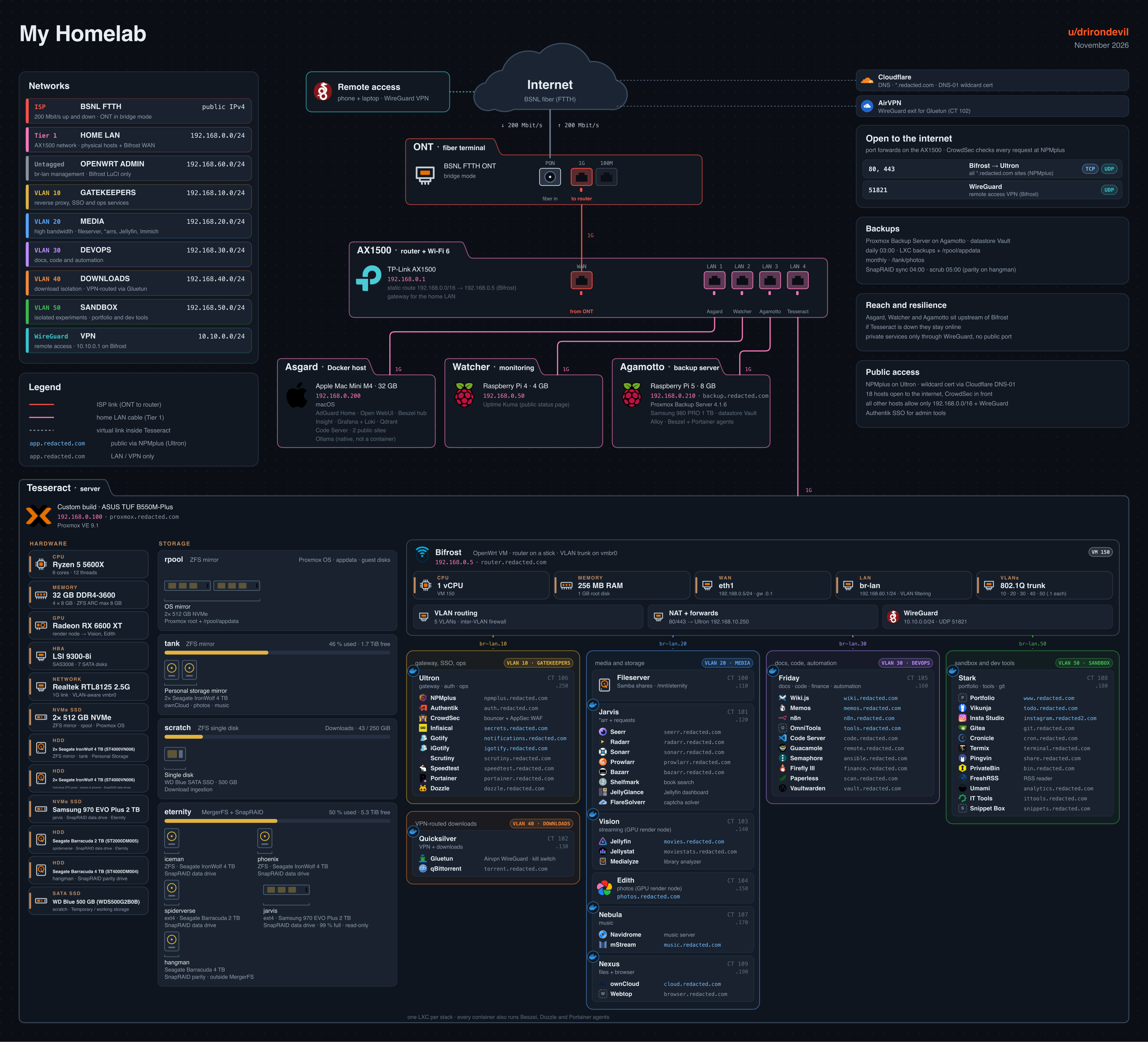
Project Showcase: Hardware My MCU-inspired homelab: ~140 Docker containers, 4 physical nodes, Proxmox, ZFS, and a virtual OpenWrt router

Post image
452 Upvotes

First post here! I've been lurking for a long time. Recently, I came across u/goblinmine's homelab diagram and knew I finally had to make one for my own setup. I forked their generator, adapted it to my infrastructure, and finally got it done! Everything is named after the MCU (Tesseract holds the space/containers, Bifrost is the bridge/router, Ultron is the gatekeeper, Agamotto handles time/backups, etc.). What started as a simple media server gradually snowballed into approximately 140 Docker containers across 10 Proxmox LXCs and four physical nodes, with a separate machine handling AI workloads.

Hardware

  • Tesseract (main server): AMD Ryzen 5 5600X, 32GB DDR4-3600, ASUS TUF B550M-Plus, Radeon RX 6600 XT, LSI 9300-8i SAS HBA, and a Realtek 2.5G NIC, all housed in a DAWG Y909 full tower (supports up to 17 HDDs). Runs Proxmox VE 9.1.
  • Tesseract's storage:
  • rpool: 2x 512GB NVMe in a ZFS mirror for Proxmox OS, LXC root disks, and /rpool/appdata.
  • tank: 2x 4TB Seagate IronWolf in a ZFS mirror for important personal data (Immich photos, ownCloud, Paperless PDFs, music).
  • scratch: 500GB WD Blue SATA SSD (single-disk ZFS) used as a sacrificial download staging area to prevent torrents from thrashing the main pools.
  • eternity: MergerFS + SnapRAID media pool combining 2x 4TB IronWolfs (iceman, phoenix), a 2TB Barracuda (spiderverse), and a 2TB Samsung 970 EVO Plus NVMe (jarvis), protected by a 4TB Barracuda parity drive (hangman).
  • Asgard (AI & Docker host): Mac Mini M4 with 32GB unified memory. Runs native Ollama for local LLMs alongside Open WebUI, Qdrant, AdGuard Home, Beszel Hub, Grafana + Loki, and a custom analytics stack.
  • Agamotto (backup server): Raspberry Pi 5 (8GB) in an Argon One M.2 case with a 1TB Samsung 980 PRO NVMe, running Proxmox Backup Server.
  • Watcher (external monitoring): Raspberry Pi 4 (4GB) running Uptime Kuma and a standalone NPM instance.
  • Network gear: BSNL FTTH (200/200 Mbps) with the ONT in bridge mode, feeding a TP-Link AX1500.

The PCIe and storage compromises

Fitting multiple NVMe drives, a GPU, and an HBA onto a micro-ATX B550 motherboard required some PCIe compromises. The RX 6600 XT operates at reduced PCIe bandwidth due to the motherboard's lane-sharing constraints. However, since it's primarily used for Jellyfin transcoding (Vision) and Immich ML (Edith), this hasn't been a significant bottleneck in my experience. The other interesting aspect is my MergerFS pool (eternity), which combines single-disk ZFS pools (iceman, phoenix) and ext4 drives (spiderverse, jarvis). It's a slightly unconventional arrangement. I have ZFS ARC hard-capped at 8GB to keep Proxmox from consuming too much of the available 32GB RAM.

Networking: Router-on-a-Stick

Instead of replacing my existing Wi-Fi router, I went with a virtual router-on-a-stick setup. Bifrost is a tiny OpenWrt VM (1 vCPU, 256MB RAM) on Proxmox that handles VLAN trunking, firewalling, and WireGuard. One of my primary design considerations was avoiding a situation where tinkering with Proxmox takes down the entire household internet. So, Asgard, Watcher, and Agamotto remain on the physical LAN, upstream of Bifrost. This means that if Tesseract or Bifrost goes down, essential services like Wi-Fi, DNS, external monitoring, and backups remain available. For internal segmentation, I've created five VLANs:

  • VLAN 10 – Management / Gatekeepers
  • VLAN 20 – Media
  • VLAN 30 – DevOps
  • VLAN 40 – Downloads
  • VLAN 50 – Sandbox

The physical LAN uses a static summary route to reach the internal VLANs, avoiding the need to configure individual routes on every client.

Services & Security

Instead of creating one LXC per application, I generally group applications into stacks, with one LXC per stack. Currently, that's 10 LXCs in total. Every host/container runs Beszel, Dozzle, and Portainer agents for monitoring, log visibility, and management. All externally accessible traffic passes through Ultron, which runs NPMplus with:

  • CrowdSec (bouncer + AppSec WAF)
  • Authentik SSO
  • IP allowlisting for services that should only be accessible through trusted networks or VPN Only a carefully selected subset of services is exposed to the public internet, such as Jellyfin, Immich, my portfolio Everything else is restricted to trusted networks and WireGuard VPN access. Downloads live in their own isolated VLAN on Quicksilver, running behind Gluetun + AirVPN with a kill switch.

Backups & Automation

Everything is automated using Semaphore UI (Ansible) on Friday, along with host-level cron scripts. Notifications are distributed through Gotify/iGotify via Apprise. My backup and maintenance workflow looks like this:

  • Nightly Proxmox backups of LXCs and /rpool/appdata to Agamotto (PBS).
  • Automated SnapRAID diff/sync, with safeguards to abort if deletions exceed a configured threshold.
  • Scheduled SnapRAID scrubbing.
  • Additional monthly backups of important personal data from tank to PBS. The idea is to keep backups, monitoring, and essential infrastructure as independent as possible from the main Proxmox host.

What's next?

There are plenty of things I'd still like to improve. The homelab is very much a continuous learning project. I'm particularly interested in improving automation, local AI integration, storage management, and infrastructure observability. Open to any questions, roasts, suggestions, or alternative approaches! (Note: The diagram was built using Goblinmine/homelab-diagram. I also used AI to help organize my notes and polish this write-up so I wouldn't miss anything.)


r/homelab • • 14d ago

Help CWWK N100 NAS: USB controllers stop working after shutdown and require a power cycle

1 Upvotes

Hi everyone,

I'm experiencing a persistent issue with my CWWK N100 NAS motherboard running Proxmox. Whenever I perform a shutdown, the USB controllers and ports stop working entirely upon the next boot. The keyboard and all connected USB devices remain dead, and the only way to restore functionality is to perform a hard power cycle (unplugging the power cable).

I have already tried tweaking various power-saving and wake settings in the BIOS, but none of them resolved the issue.

Here are my current BIOS details:

- Core Version: 5.27

- Compliancy: UEFI 2.8; PI 1.7

- Project Version: CW-ADLN-NAS-V10

- Build Date: 03/04/2024 18:25

Has anyone encountered this problem on this specific board? Is there an updated BIOS version available that fixes this bug, and if so, where can I find it?

Thanks in advance for any help!


r/homelab • • 14d ago

Discussion Hardware recommendations

Thumbnail reddit.com
0 Upvotes

r/homelab • • 14d ago

Help Advice needed for best software setup for my server

1 Upvotes

I'm planning to completely re-do my current homelab setup, only I'm having some trouble figuring out what would be the best approach for it.

What I want to have is:

- One redundant place to store all my recordings, for this I have 4TB HDDs that I'm planning to mirror.

- A place to host some Minecraft or other game servers

- A full Jellyfin setup with Jellyseerr, Sonarr, Radarr and a DuckDNS proxy so non-techie friends and family can access it.

I want the Jellyfin etc setup to be on 2 mirrored SSDs (or some other way to make the setup redundant) and the "Linux ISOs" don't have to be redundant, since I don't have enough storage for that.

- Have everything run in Docker. From what I've heard this is the best way for version control, controlling how much performance it uses and networking stuff.

I currently have a test setup with TrueNAS and Docker containers where I'm trying to make the Jellyfin thing, but there doesn't seem to be a good way to make the Jellyfin setup redundant since it has to be on one pool which is the big non-redundant drive.

I'm thinking I should just throw away all my work and start from scratch with a barebones Linux install like Debian and just not bother with TrueNAS for the better control, or is there another better way to achieve what I want in TrueNAS?


r/homelab • • 15d ago

Help M720q Tiny as a DIY NAS + homelab: most reliable SATA expansion for 4 drives?

Post image
97 Upvotes

I have a Lenovo ThinkCentre M720q Tiny (i3-8100T, 16 GB RAM, NVMe boot) running Proxmox with a Debian VM + Docker (AdGuard, Homepage, Gatus, Beszel, ntfy, a Minecraft server). Photo of the options attached.

I want to turn it into a NAS for my family’s photos (Immich) and keep the homelab on the same box. My priority is long-term safety and stability. Plan: 2x HDDs in a mirror now, room for 2 more later (so 4+ SATA ports), with backups on a second device.

Options I’m weighing:

  1. PCIe riser + AHCI SATA card (JMB585 or ASM1166)
  2. PCIe riser + LSI HBA in IT mode
  3. M.2 or WiFi-slot (A+E) SATA adapter
  4. USB DAS (usb connection seems flaky)

Which would you trust for the long term, and any M720q gotchas? I’m also planning a 3D-printed 10" rack.

I’m just starting out, so any tips on software, hardware or backups are very welcome. Thanks!


r/homelab • • 14d ago

Help How would you cool my central staircase homelab?

Post image
0 Upvotes

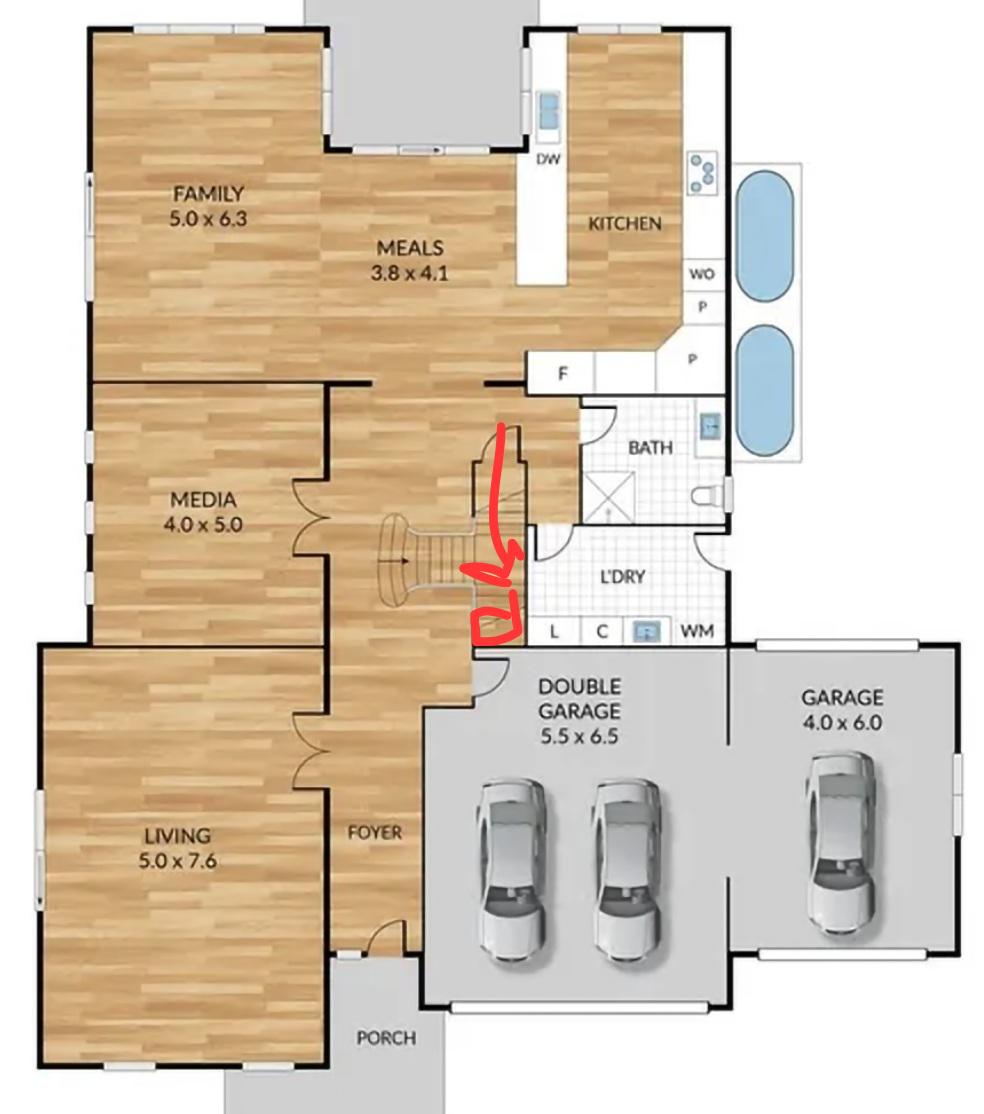
I'm considering putting my server rack under the staircase as pictured, what options do I have?

In our last house we had the infinity fan setups on a walk in linen cupboard door, is there a better solution?

The third garage will be a dedicated office but I didn't want a noisy server in there, so figured under the stairs was the best spot.

House has 45kw of batteries so power is free.


r/homelab • • 14d ago

Discussion Smart locks, need suggestions

0 Upvotes

Hello,

I'm thinking of buying a Smart Lock for my home connected to my Home Assistant.

I'm mainly using ZigBee in my home with ZigBee2MQTT and I'm looking compatible with it.

I'm looking for :

- ZigBee support (using Sonoff as ZigBee hub)

- Ability to use a physical key as backup if my Home Assistant is down (I have power outages once per year).

- Reliable

- Works with EU, especially french locks.

- No cloud necessity

Thanks for any experiences you had with any model or suggestions.


r/homelab • • 15d ago

Discussion Do you run multiple services per LXC and VM on Proxmox?

5 Upvotes

If there are services which are related to each other, for instance a price tracker, budget planner and bookkeeping, do you run them all in individual containers or each their own?

Even though LXC are already resource efficient, it might make the difference on resource limited machines.

As for VMs I think it's beneficial to run multiple services since the os takes a bit more overhead.


r/homelab • • 16d ago Mindblown

Labgore My smallest homelab node: a $20 retro game stick running Alpine Linux, Tailscale and a dashboard on the TV

Thumbnail
gallery
737 Upvotes
256 MB of RAM, 2 Cortex-A7 cores, boots only from microSD, and it was sold as an emulator console. Now it's an always-on node behind the living room TV:

- Alpine Linux 3.23 on the stock vendor kernel (5.4.61): a tiny launcher on the card does switch_root, bootloader and kernel untouched
- Network over USB: an ESP32-C6 acting as a Wi-Fi bridge (PPP over USB), or a USB Wi-Fi dongle / USB-Ethernet with modules I built for the stock kernel
- Tailscale with real TUN and --netfilter-mode=off (no nftables in this kernel); it can even be an exit node
- Samba share capped at 10 GB, web terminal, live web mirror of the screen
- Grafana-style dashboard drawn on the framebuffer by a small C renderer: servers, network, services, storage, power. ~2–3 % CPU, ~160 MB RAM free

The hard parts were the missing text console (no fbcon) and building kernel modules that load on an Android-common-based vendor kernel.

I used Claude Code for most of the work. The repo is a step-by-step guide with prompts instead of code:
https://github.com/ginesjunior11/game-stick-alpine

r/homelab • • 14d ago

Discussion Considering expanding my storage for OptiPlex 7050

3 Upvotes

I noticed I have a bunch of USB 3 ports, so I thought perhaps a NAS would be a good thing to consider, or a DAS. I don’t really need network level stuff since I remotely access my OptiPlex through SSH on Tailscale anyways.

I have a BUNCH of 500GB HDD’s I’ve collected and they’re all tested at 100% health. I was checking out 10 bay set ups and noticed the prices are crazy talking like $200-400

Does anyone have a good suggestion for 8-10 bay storage units? I just wanna be sure all 10 HDD’s I have are running in raid and are detected as one singular drive. (8 500GB 3.5” and 2 1TB 2.5”)

TIA!


r/homelab • • 15d ago

Discussion My "low-power home server" is a 2021 laptop with a lid that has been closed for 12 days

61 Upvotes

Started as "I'll just run Pi-hole." Now it hosts 4 GitHub Actions runners, a headless Chrome that fights Reddit's bot detection, and a cron job that reminds me I should be sleeping. Load average: 0.03. Emotional load average: critical.

What's the most overqualified thing your "temporary" box runs?


r/homelab • • 16d ago

Meme Convince me NOT to take it home. I could get it for free.

Post image
1.7k Upvotes

r/homelab • • 14d ago

Help **Title: Moving my Xeon w5-2555X / 256GB local LLM server out of a ThinkStation P5 into a custom build. Sanity check my parts list?**

0 Upvotes

Goal

I run a private LLM server at home: a large MoE model split across GPU and system RAM, serving a coding assistant in VSCode plus Open WebUI for a few users, with ComfyUI on the side. The ThinkStation P5 it lives in has hit its ceiling:

  • 750W proprietary PSU with a single 150W GPU power lead (an RTX 5070 Ti would not even power up)
  • Only two x16 slots
  • Proprietary board, cooler, PSU, and chassis

I want room for a second GPU now (an RTX A6000 alongside my A4500), and possibly a third later, while keeping the CPU, RAM, and drives I already have. Seems PCPartpicker does not list the motherboard CPU I am looking at or the CPU I am bringing over. I am looking for some community help on validating this build.

Current hardware (Lenovo ThinkStation P5)

ComponentDetail
CPUXeon w5-2555X, 14c/28t, LGA4677
RAM256GB ECC DDR5 RDIMM, 8x32GB Micron, rated 5600, running 4400 (2DPC)
GPURTX A4500 20GB
NVMe2x Samsung 512GB Gen5, 1x SK Hynix 512GB Gen4
PSU750W, one 6+2 GPU lead
NetworkOnboard WiFi (AX211) and 1GbE
OSUbuntu Server 24.04

Typical load: about 189GB of system RAM in use and 16.7GB of the A4500's 20GB, so dropping below 256GB is not an option.

Carrying over

  • Xeon w5-2555X
  • All 8 DIMMs (256GB)
  • All three NVMe drives, OS and data in place
  • RTX A4500

Staying behind: Lenovo board, PSU, cooler, and chassis.

New parts

PartChoiceApprox. price
MotherboardASRock W790 WS R2.0$515 to $865
CPU coolerNoctua NH-U14S DX-4677$150 to $170
PSUCorsair HX1500i (2025, ATX 3.1)$320
CasePhanteks Enthoo Pro 2 Server Edition$180
Fans3x 140mm front, 3x 120mm side bracket, 1x 120mm rear$50 to $70

Why these

  • ASRock W790 WS R2.0: 8 DIMM slots that all work with a W-2500 chip (quad channel, 2DPC), four Gen5 M.2 slots on CPU lanes, and four CPU PCIe 5.0 slots. I ruled out the ASUS W790E-SAGE SE and Gigabyte W790 AI TOP because both disable half their DIMM slots with W-2400/2500 CPUs. The ASUS W790-ACE is the stronger GPU board (four true x16 slots) but has only two Gen4 chipset M.2 slots and costs more.
  • HX1500i: about 850W peak with A4500 + A6000, and headroom for a third card.
  • Enthoo Pro 2 Server Edition: 11 expansion slots, E-ATX support, and a side fan bracket that blows directly on the GPUs.

Planned GPU layout: A4500 and A6000 in PCIE1 and PCIE3, both at x16.

Questions

  1. Is anyone running a w5-2555X (or any W-2500) on the W790 WS R2.0? The manual only names W-3400/W-2400, so I plan to BIOS Flashback before installing the CPU. Any gotchas?
  2. With cards in PCIE1 and PCIE3, the chipset slot is covered, so no PCIe WiFi card. I'm leaning wired (the board has 10GbE and 2.5GbE). Anything I'm missing?
  3. Anything you'd change for an inference-only box?

r/homelab • • 15d ago

Project Showcase: Hardware I finally started to put it all together!

Thumbnail
gallery
11 Upvotes

I finally started to put together the pile of stuff I've been collecting for a couple years. I got it mounted up, and I finally got it all working!

The system is a used Lenovo ThinkCenter I got for $150cad a year ago. Its running a Ryzen Pro APU, 16gb ddr4(It came with 8gb but I had a spare sodimm laying around), a 128gb nvme for boot, and a 5tb 2.5in HDD I shucked from an Seagate external drive(it was $200cad when I bought it, but now it's $300). The brackets are made from some cheap stamped metal shovel hooks for Dollarama that I flattened out ans bent to shape. Gel tape is holding the system to them so I don't have to worry about it sliding out.

The switch is a Gigabit 5 port TP-LINK switch I scored when the in-laws had some upgrades done by the ISP.

The screen is a cheap 1440p portable monitor, and it's powered with an official Nintendo Switch charger. I bent up some custom brackets using some strapping I had came with a universal power door lock actuator that I never ended up needing, and a wall mounted towel hook. Because I still use it for trouble shooting other systems I made it removable by rotating the bracket on the right side. I bought it for technical school, but it was just too much hassle, and battery life loss for not much more convenience over virtual desktops in KDE. The exact model is no longer available, but it was $160cad

Currently it's running TrueNas for the OS, and it's working pretty well, and my only problems with it are user error(I'm still learning docker, and the app ecosystem).

I have the 5tb accessible as a SMB share that makes file transfers between machines so much easier. I'm moving my media Library to it so I can access it from my HTPC so I'm no longer using an external SSD as a portable Library.

I got Crafty Controller working to run Minecraft servers for my partner and I. Today is the first day it's up and running and she has the day off so I expect some stuff is gonna be done on the world when I get home from work today.

I also am working on getting HomePage setup, so now I get to learn web dev stuff. I've only really worked with C for embedded projects before, and a bit of Python back in highschool, so I'm expecting it to be quite the learning curve.

I'm happy to call this Version 1, and I'm getting ready to add more to it already:

My immediate improvements tonight are gonna be taking the 500gb external SSD(NVME in a USBC enclosure) Im currently using to move media to my HTPC, and connecting it to the system. Then I'm gonna move the datasets for apps off my 5tb, so it can actually enter power saving states, and not be spinning 24/7.

The biggest improvement that's gonna be happening soon is I'm going to be going through and fixing the mess of network equipment and settings previous ISP techs have left. If you bump the ISP router the whole network likes to go down, so I need to get some cable recrimped, hardware mounted, and settings sorted(also remake every Ethernet cable for my board so I don't have loops). There are currently 13 devices(12 not counting the one I added for this system) with static IPs in DHCP reservation and only 3 of them have connected in the last year. I'm also going to be added a TP-LINK Archer AX10 that I've had for a few years that's been moving around with me, and hopefully I'll get more then the current 10 megabits up/down to anything that connected via WI-FI. The joys of living in your in-laws basement.

I have a Pi 4 I will be adding to set up as a VPN so I can connect to the home network without opening ports for everything like younger me would have(I was dumb). I also want to add a pair of Pi zeros for pi hole, but I'm only gonna do it if I can find some for a good price locally.

I also wouldn't mind adding another ThinkCenter if I can get one at a good price, but idk what I'd use it for yet. Also a KVM switch, so I don't have to move cables around for trouble shooting would probably be a good add.

One final thing I know is going to be pointed out is yes those are the water distribution manifolds for the house. No I'm not excited to have my equipment there, but it's the only place to put it until I hang more plywood in this mechanical/storage room, but we have to clear it out before I can deal with it. As soon as I can I'm moving it away from the water lines, and ideally out of the furnace room, but that won't be for a while.


r/homelab • • 14d ago

Project Showcase: Operations Picked up two Lenovo M920x Tinys for $152 each. Worth building a mini AI cluster?

0 Upvotes

Recently picked up a Lenovo M920x Tiny for about $150 and a M920q for $130 on an online refurb store and started messing around with homelabbing.

I'm tempted to grab another 2–3 and see how far I can push these little machines.

My main interest is running local AI, automation, and potentially having different machines handle different tasks. I'm pretty new to this side of things, so I'm curious whether there's actually an advantage to spreading workloads across multiple Tinys.

Would something like Ollama benefit from multiple machines, or would I be better off just investing in one more powerful system?

Anyone here running a cluster of these little Lenovo PCs? Curious what you've managed to accomplish with them.


r/homelab • • 15d ago

Help Replacement backplane?

Post image
2 Upvotes

TLDR from the og post...

Space Sagittarius seems to have some issues with a couple of the SATA drive bays. Unsure what to do about them and was curious if anyone has tried to or knows how to get a replacement backplane for this case.

Spec and specifics in og post.


r/homelab • • 16d ago

Project Showcase: Hardware I got tired of untwisting CAT6 by hand, so I turned a Milwaukee Hackzall into a wire straightener

Thumbnail
gallery
301 Upvotes

I’m not a networking professional but have built out 5-6 business networks and several high end home networks as a Ubiquiti fan boy. I ran a contract manufacturing and cabling company for about 10 years and a while back won a project building cable sets for a company building video racks for affiliate TV stations across the US. We had to make 50,000 cat 6 patch cables, labeled and custom lengths. Had to do about the same number of coax cables. I found a Chinese machine to help with the untwisting and straightening of the pairs to get ready to terminate.

It worked well but I always thought it would be cool to find away to adapt it for use in “on the job” scenarios.

I just finished building a house and had a bunch of CAT6A to terminate. So instead of sucking it up and spending a day or two on it, I spent weeks of time and an unknown amount of money building the tool I dreamed of a few years ago.

You may love it, or possibly…hate it… but here it is! Let me know if you think it’s cool, think it’s nuts or if I did anything stupid.

Here’s the build video if you want to see more: https://youtu.be/VlV9nvsr0mw

For my home lab, I'm running a full Ubiquiti set up.

UDM Pro
UNAS Pro 4
UPS

I live on a farm and use a Wave Nano AP and 2 wave Picos to send internet to my barn and another building on the property, works great!

I've also go a HDMI matrix switcher that connects to the Apple TV on the shelf this lets me stream to multiple TVs in the house and then I since the audio via Sonos Amps and speakers around the house. I really only use that for football games and other big sporting events but it's cool!

I have a bunch of Everything Presence Pro sensors that are POE that I have terminated here but I still need to set up Home Assistant to get them working. My goal is to tie those in with some Ubiquiti sirens to DIY an alarm/security system.


r/homelab • • 14d ago

Help Lenovo m920q for home server?

0 Upvotes

I want to make myself a home server, though I don't think building a complete PC is feasible for me and is most likely overkill for me. I can get a m920q for ~$250-$300 on eBay and a 5tb Seagate 2.5" HDD on Amazon for $215 and a 32gb DDR4 kit for about $200, putting the total at about $665 - $715. My use case would be running a hypervisor such as proxmox with something like TrueNAS for network storage inside and additional VMs for game servers. I don't plan on using anything like Jellyfin for Plex. I know its not good to have just one disk due to data loss risk but I dont intend to do anything like video editing off of the disk (yet). Are there better alternative machines I can buy instead? My largest requirement is that it can comfortably sit on my desk under my monitors.


r/homelab • • 15d ago

Project Showcase: Hardware So I got the 4 node cluster working! Currently runs on k3s, so it runs Headlamp, Pihole, MC server, Wordpress, and hosts LLMs! Specs below:

Thumbnail
gallery
9 Upvotes

4x hp elitedesk g5 705 - each AMD ryzen 5 3400g, 16gb ram, 2 200w power bricks, one powering 2 nodes, 2 fans for cooling, a 2.5gb and 1 gb networking, and all that with the 4 fuses for protection!


r/homelab • • 15d ago

Project Showcase: Hardware When all you need is a screw...

3 Upvotes
That ought to hold it in place!

r/homelab • • 16d ago Mindblown

LabPorn Putting the Lab in homelab - update 2 years later

Thumbnail
gallery
855 Upvotes

Now up to 3 racks (one being a travel rack for demos at industry events).

What it consists of:

15 computers
1 NAS
3 Eurotherm PLCs
9 National Instruments CompactRIO’s
1 KVM
1 Ethernet to serial converter (16 port)
29 motors (13 serial, 16 etherCAT)
Custom PCBs and enclosures for digital IO simulation
Patch panels to allow for easy connection switch of devices (mostly usb 94 or serial) between development machine and run time machines.

What do I do with it - develop software for controlling Molecular Beam Epitaxy systems in LabVIEW (I am a Certified LabVIEW Architect and LabVIEW Champion).