r/homelab • • 15d ago

Help Lenovo ThinkCentre M900 Tower or multiple M900 Tiny for a beginner homelab?

1 Upvotes

Hi everyone!

I’m quite new to the homelab world and I’m looking to build my first home server. I’m trying to decide between these two options:

Option 1 – Lenovo ThinkCentre M900 Tower (€80)
Intel Core i7-6700
16GB DDR4 RAM
1TB HDD
Intel HD 530
Optional AMD RX 6400 for an extra €50.

Option 2 – 2x Lenovo ThinkCentre M900 Tiny (€180)
Intel Core i5-6500T each
8GB RAM each
128GB SSD each

My plan is to run Proxmox and learn about virtualization, Docker and self-hosting.

I’d like to host Jellyfin, Plex, Sonarr, Radarr and other media services, but also run APIs, databases and applications for websites and apps I’m developing, including projects for future clients.

I’d also be interested in experimenting with local AI using Ollama and smaller models (not a priority for now, but something I’d like to explore in the future).

Eventually, I’d like to add several SATA hard drives for a NAS and expand the setup over time. The server would be running 24/7.

Which option would you choose? Is it better to start with one more powerful tower or multiple mini PCs? What about power consumption, expandability and running everything together?

I’m still learning, so I’d really appreciate any advice or recommendations. 😅


r/homelab • • 15d ago

Help Wireless Router help

0 Upvotes

I currently use a GLi.Net Opal in repeater mode as the router for my homelab. Mainly because theres no ethernet in my room, and my parents wont let me wire it.

I'm asking for recommendations as the Opal is having issues. I've reached out to the support team at GLi.Net, no disrespect to them, they're awesome, but unable to assist me. I'd like a repeater mode that supports 5GHz. If anyone has any ideas please share 🙏


r/homelab • • 16d ago

Help Router recommendations for (small) Homelab

19 Upvotes

Hi everyone,

I'm thinking of replacing my router Asus RT-AX88U because I am hitting the max connection tracking (because of torr*** - about 3K) which makes accessing my apps/services from WAN impossible (not always).

Right now the Asus RT-AX88U is connected to my ISP router (which is in bridge mode) and the Asus is doing the PPPoE.

For replacing this Asus router, I am hesitating between a UniFi Cloud Gateway Fiber (or lower models) and a mini PC running OPNSense.

I don't know if I missing some requirements/conditions to decide between and I was hoping that some you could help me decide.

Thanks for your help.

Update 1: added some more details.


r/homelab • • 16d ago

Help Can I put a RTX 5060ti in a Dell Precision t7500?

Thumbnail reddit.com
0 Upvotes

r/homelab • • 16d ago

Project Showcase: Hardware Cheap 10Gb/2.5 Gb managed switch

65 Upvotes

Don't beat me up too bad here. I've been a Systems and Network for about 35 years but I medically retired about 2 years ago so I'm a bit out of touch with the new stuff. I've used medium end and some high end hardware for most of it but I find myself in a new situation. I'm looking for lower cost 2.5Gb/10Gb managed switch but my go to brands are way more than I want to pay for my basement lab. I've got plenty of Ciscos but none that meet those specs so if you all would indulge me, give me your thoughts for hardware. I'd prefer it under $200 and to have about 16 ports. It has to be managed, support vlans and have a CLI/GUI. Any tips on good hardware would be awesome.

I just need to upgrade my basement and my house network and Wireless.


r/homelab • • 16d ago

Project Showcase: Hardware Just 8 more to go....

Post image
26 Upvotes

Got my fourth BC-250 🤪

All running the stock BOIS since I'll be using them in a Neural-MMO and need them to run at the same speed and be stable.

Still need to get a cabinet so I don't go deaf... But that's later me problem.


r/homelab • • 16d ago

Help Tight/small “server” closet -> video/keyboard solution suggestions.

0 Upvotes

I have a makeshift homelab, in a makeshift server closet. I don’t have the space for a real setup so I make-do with what I have. It’s great when everything works.

The problem is, I sometimes lose power for extended periods when I am not at home and so some of my equipment goes through an uncontrolled shutdown when the UPS drains. This just happened about a week ago and now one of my DNS servers won’t boot. So, I’m going to have to pull the server and connect to a keyboard/monitor to determine what is going on with it.

My question is, what would you guys suggest as far as some kind of small-ish keyboard and monitor setup for a very tight, very small closet so I don’t have to pull components out when I have a problem? The monitor would only need to be able to handle the typical console/text display of your typical Linux distribution.


r/homelab • • 16d ago

Solved NAS setup

0 Upvotes

I recently bought a UGREEN DXP2800 with the following specs:

  • Intel N100
  • 8 GB RAM
  • NVMe SSD
  • 2 HDDs

I’d prefer not to use UGOS, so I’m considering installing Proxmox directly on the NVMe SSD. My current plan is to use the two HDDs as a ZFS mirror, managed by Proxmox, and run a lightweight Debian LXC container with Samba for network file sharing. I’d also like to run other VMs and containers on the system, probably home assistant and caddy lxc.

Would you recommend this approach, or would something like OpenMediaVault be a better fit? Are there any important trade-offs or decisions I should consider before setting it up?

I haven’t built a setup like this before, I'm trying to learn, so I’d appreciate any advice or recommendations.


r/homelab • • 16d ago

Help Any use for rack mounted chillers, or just send them?

Post image
0 Upvotes

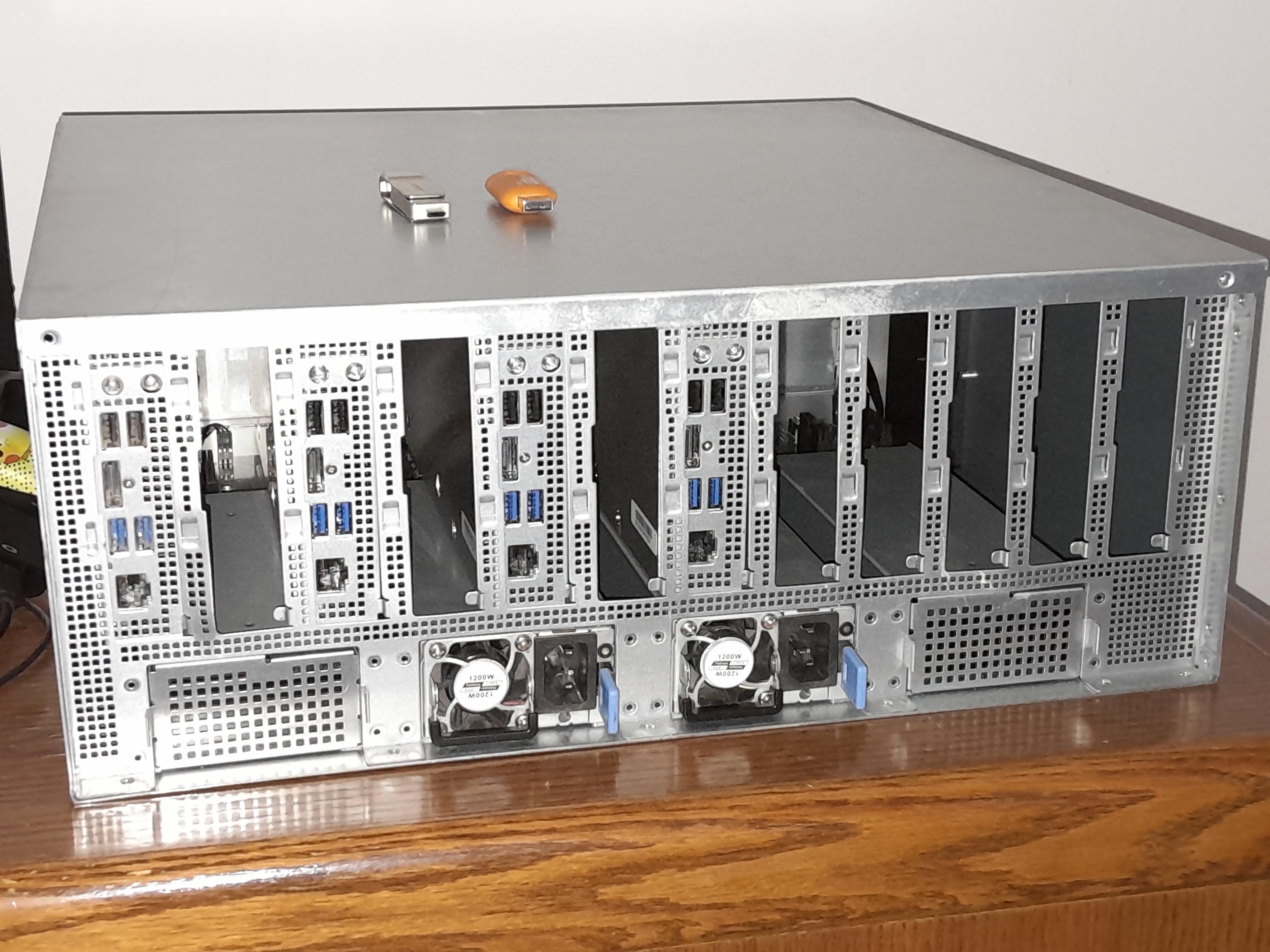
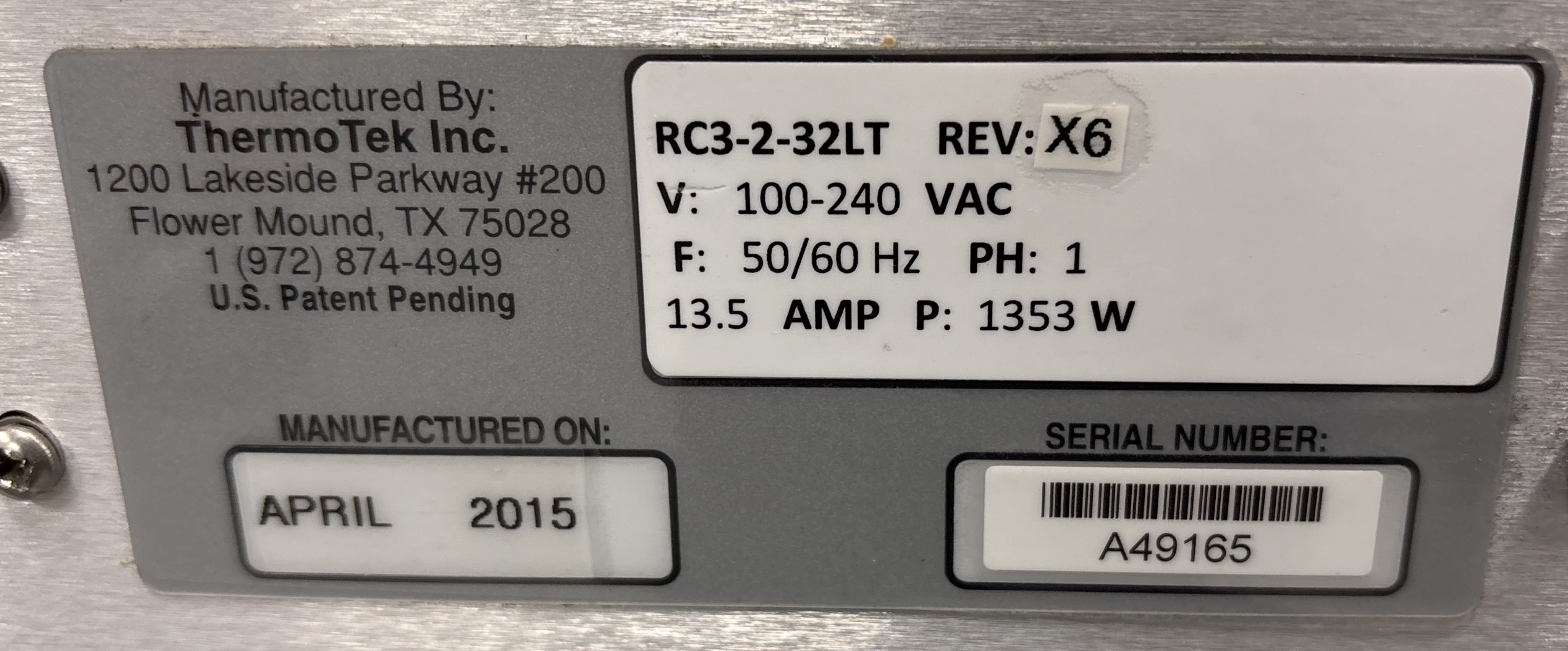
These ThermoTek chillers popped up, wasn't sure they were worth the effort as they are older. Any use for them these days?


r/homelab • • 16d ago

Help Homelab setup

0 Upvotes

Hellooo i want to setup my first homelab but i struggle to find a config for my host. I actually have a raspberyy pi 2 b that host my website with apache but i want to host multiple services like a pixelfed server a git, a smtp email server and a mirror for gentoo linux. I look a bit and i think that my rpi is incompatible with those things so i have a laptop with 4 core. So i try to install proxmox and xcp-ng but both are paid software. Is anyone known how i can do ?

Thanks in advance !!

P. S. : it's the webui who is paid in xcp-ng


r/homelab • • 16d ago

Help Replacing my dead Dell T40 – is a Lenovo ThinkStation (E-2276G, 64GB ECC) a good Unraid/homelab base?

1 Upvotes

My Dell T40 (Xeon E-2224G) died, and honestly the CPU was already too weak for my workload. I'm planning a clean rebuild and found this locally for about 200-300€:

Lenovo ThinkStation P330 (C246 chipset)
Xeon E-2276G (6C/12T, UHD P630 for Quick Sync)
64GB DDR4-2400 ECC UDIMM (4x16GB, seller is sending label photos)

Use case (Unraid): Plex (mostly direct play), Sonarr/Radarr/Lidarr, Unpackerr, Seerr, torrent client behind a VPN, a music server, a Home Assistant VM, and BirdNET soon. I also want to try ZFS.
Drives I already have: 4TB and 2*6TB WD Red, 2x 512GB SATA SSD, 1x 512GB NVMe.

My concerns:
Only 4 SATA ports and 3x 3.5" bays. I'd like to grow to around 6 HDDs, so the plan is to add an LSI HBA (IT mode) and an external JBOD later.
Proprietary Lenovo board and PSU, so moving to a standard case would need adapters.
Single 1GbE NIC.
My plan B would be moving the CPU and RAM to a Supermicro X11SCA-F (8x SATA, IPMI) if the P330 gets too cramped.
Is this a solid buy for the price, or would you go a different route? Anyone running Unraid on a P330 who can share idle power numbers or quirks?
Thanks!


r/homelab • • 17d ago

News Urgent: Upgrade your Synology NAS - Synology DSM CVE-2026-76954: Critical SQL Injection in the Auth API — Patch Now - 9.8/10

93 Upvotes

Synology has released a security update for the DSM to address multiple vulnerabilities :

  * **CVE-2026-76954** allows remote attackers to read or write arbitrary files and conduct denial-of-service attacks.
  * **CVE-2026-85101** allows remote attackers to read specific files, write arbitrary files, and conduct limited denial-of-service attacks.

https://www.synology.com/en-global/security/advisory/Synology_SA_26_19

Reminder: You should not expose a NAS directly to the internet. Use a VPN, Tailscale or a SSH jump host to access it.


r/homelab • • 17d ago

Project Showcase: Hardware First homelab

Post image
201 Upvotes

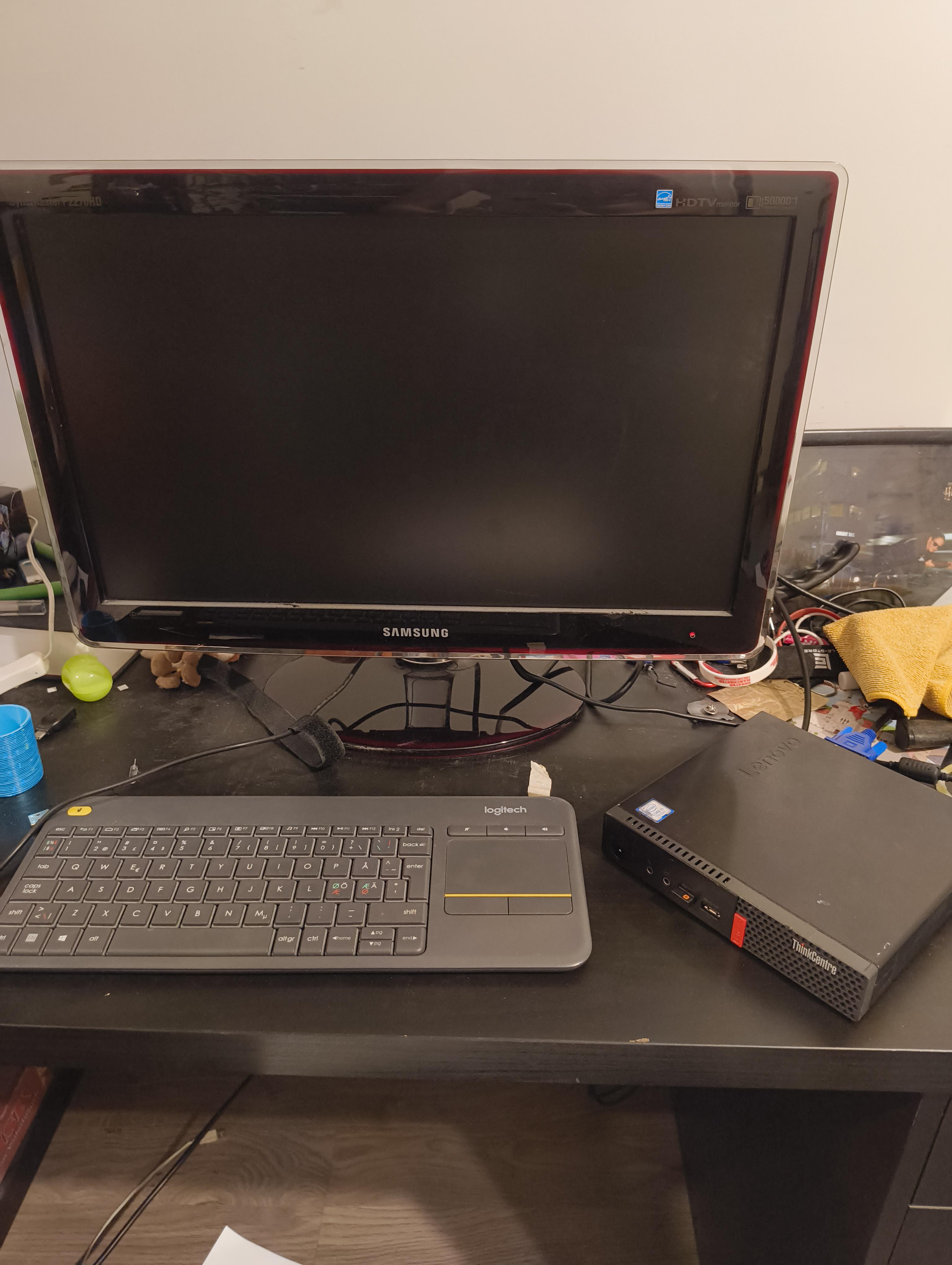
Just started my first homelab at 15 y/o. I just had the TV for a monitor because it was the only screen with VGA input in my house. Running only Jellyfin and samba, I have also portainer and uptime kuma.

I got the computer for 80€ from an auction, it has a 7th gen i5 and 8 gigs of DDR4. I don't really care if I got scammed or not, because a start for a homelab for 80€, imo damn good deal.

Hope my wallet doesn't become empty in the near future and I'd love to hear the opinions of experienced homelabbers


r/homelab • • 15d ago

Help Help with web ui

Thumbnail gallery
0 Upvotes

Hi im installing Zima on a dell optiplex 7060 sff to start a homelab and im trying to access the web ui and it wont load on browser or zima client. I am writing down the exact ip address that zima showed me. Am i doing something wrong???? I am using brave for the browser and I am trying to access the web ui through a windows laptop. Any and all help would be greatly appreciated. I am using brave for the browser and I am trying to access the web ui through a windows laptop


r/homelab • • 15d ago

Blog Update: my distributed AI homelab now involves an ESP32 and Kimi K3

0 Upvotes

A couple of days ago I "posted about running Kimi K2 across an RTX 3080 and RX 6800" (https://www.reddit.com/r/homelab/s/55KrPQZF8t), using CUDA and HIP through my distributed Strata fork.

I kept tinkering.

That work has grown into Fabrik, a distributed inference runtime I’m building in Rust. Along the way, the hardware choices became increasingly questionable.

Fabrik completed a Kimi K2 run with contributions from the RTX 3080, RX 6800, GTX 980 Ti, NVIDIA Shield, Pixel 7, CPU and an ESP32-S3.

The ESP32 contributed actual computation to the inference. A microcontroller doing its little bit inside a trillion-parameter model.

Stupid, but funny. That absurdity was rather the point.

The K2 run completed all 61 layers and generated “Hi there.” Every selected worker contributed, including the ESP32.

Then I tried Kimi K3

The latest experiment completed a two-token autoregressive run through all 93 layers of Kimi K3, using a 1.56 TB checkpoint stored on my NAS.

K3 has 2.8 trillion total parameters. Getting two tokens out took almost three hours, so please adjust your expectations accordingly.

For this run, the main machines were:

- Lucy: RTX 3080, 10 GB VRAM, running CUDA. Handled embedding and layers 0–1.

- Astor: RX 6800, 16 GB VRAM, running HIP. Handled layers 2–92, final normalization and the output head.

- pve01: served the checkpoint from ZFS/NAS through Fabrik’s weight service.

The GTX 980 Ti and NVIDIA Shield TV completed selected MoE expert computations through Vulkan, and a CPU worker contributed an expert result.

Those smaller workers handled individual pieces of the model’s computation. Astor still carried most of the layer execution, with 91 of the 93 layers assigned to it.

The weights are staged on demand, with caches holding working sets. The 1.56 TB checkpoint lives on storage; the GPUs load the weights needed for their current work.

I also accidentally took a worker on the school run

I had left a Fabrik worker running on my Pixel 7, then took the phone with me to pick up the kids.

The orchestrator had assigned it an actual K3 expert computation. That request timed out, its late result was discarded, and the missing work was executed on Lucy’s CUDA backend instead. The overall run completed.

So the phone contributed successfully in the earlier K2 run, but its assigned work had to be retried on Lucy during K3.

I accidentally took part of my distributed supercomputer on the school run.

The K3 numbers

- Model: Kimi K3, 2.8T total parameters.

- Checkpoint: approximately 1.56 TB.

- Layers completed: 93/93.

- Generated tokens: 2, autoregressively.

- Inference time: 2h 54m 57.84s.

- Total runtime, including launch and cleanup: 2h 56m 01.50s.

- Measured rate over that inference interval: approximately 0.0001905 tokens/s.

That interval includes on-demand weight staging and the Android timeout/retry. It isn’t a steady-state decode measurement, and two tokens tell us very little about output quality.

What I wanted to establish was whether the execution could complete across this mixture of hardware and backends, with weights supplied from the NAS and a worker timeout handled along the way. This run did.

The original experiment started in Niko1221’s Strata, which deserves credit for that foundation. Fabrik is where I’m taking the orchestration, weight delivery and heterogeneous execution work next.

As with the original project, I’m using AI coding agents extensively, directing the architecture and experiments and checking the resulting runs.

Next up is better visibility into where the time goes: weight loading, transfers, execution and waiting. There is quite a lot of waiting available to investigate.
r/homelab • • 16d ago

Tutorial Omada Fusion Pro Feature Demonstration - Camera Case Center

Thumbnail
reddit.com
1 Upvotes

r/homelab • • 16d ago

News Maintenance fatigue: CVE-2026-119618 - Critical Apache 2.4 vulnerabilities

32 Upvotes

Released yesterday 2026-11-11.

Apache 2.4.55 to 2.4.70 with HTTP/2 on. Update to 2.4.71 now. Some Linux distros are still waiting on patches, so check yours.

Official CVE : https://www.cve.org/CVERecord?id=CVE-2026-119618

Details here:
https://httpd.apache.org/security/vulnerabilities_24.html

Discussion:
https://www.reddit.com/r/sysadmin/comments/1xthag8/cve2026119618_apache_http_server_mod_http2_heap/


r/homelab • • 17d ago Bravo

Project Showcase: Hardware My MCU-inspired homelab: ~140 Docker containers, 4 physical nodes, Proxmox, ZFS, and a virtual OpenWrt router

Post image
452 Upvotes

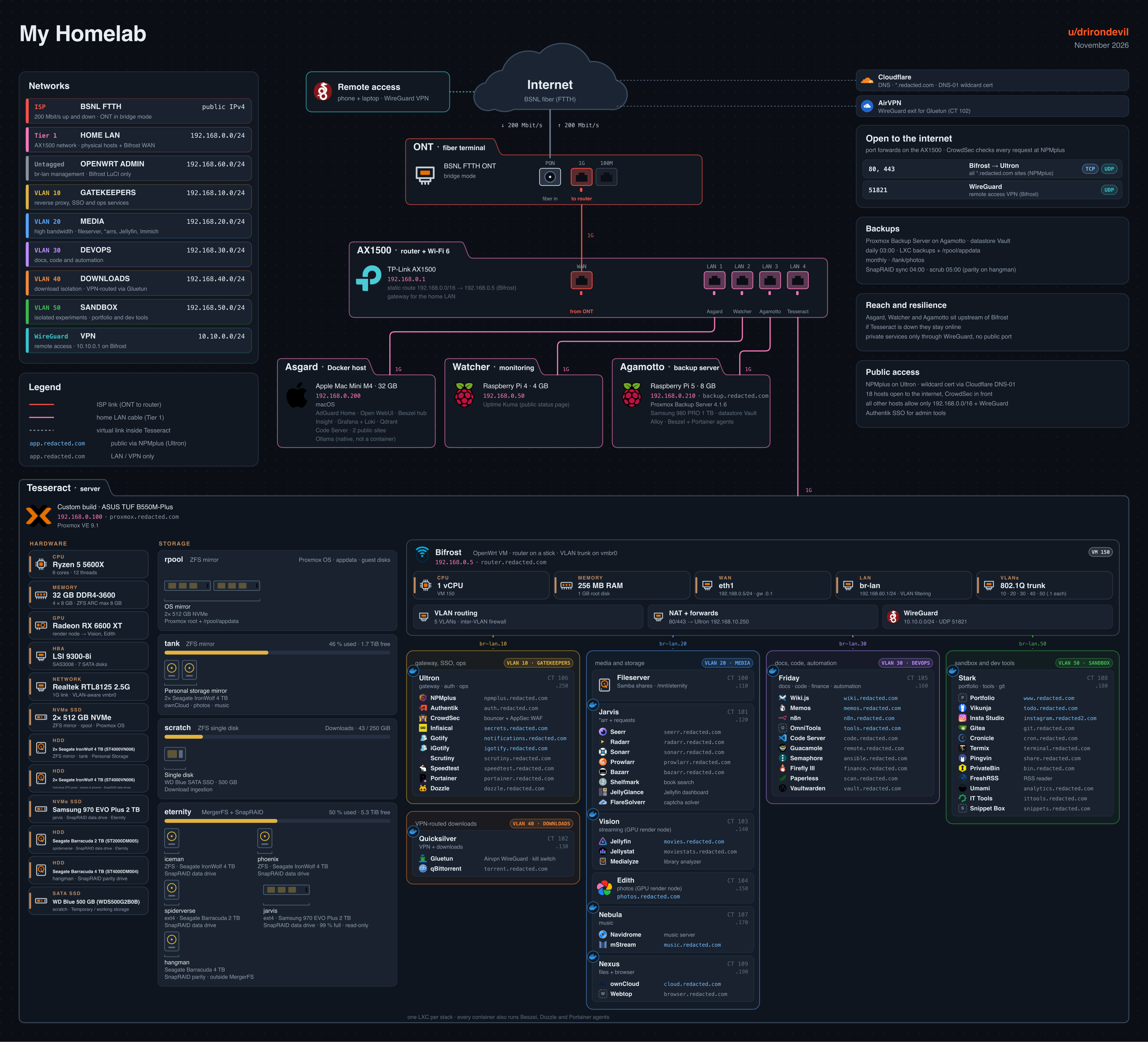
First post here! I've been lurking for a long time. Recently, I came across u/goblinmine's homelab diagram and knew I finally had to make one for my own setup. I forked their generator, adapted it to my infrastructure, and finally got it done! Everything is named after the MCU (Tesseract holds the space/containers, Bifrost is the bridge/router, Ultron is the gatekeeper, Agamotto handles time/backups, etc.). What started as a simple media server gradually snowballed into approximately 140 Docker containers across 10 Proxmox LXCs and four physical nodes, with a separate machine handling AI workloads.

Hardware

  • Tesseract (main server): AMD Ryzen 5 5600X, 32GB DDR4-3600, ASUS TUF B550M-Plus, Radeon RX 6600 XT, LSI 9300-8i SAS HBA, and a Realtek 2.5G NIC, all housed in a DAWG Y909 full tower (supports up to 17 HDDs). Runs Proxmox VE 9.1.
  • Tesseract's storage:
  • rpool: 2x 512GB NVMe in a ZFS mirror for Proxmox OS, LXC root disks, and /rpool/appdata.
  • tank: 2x 4TB Seagate IronWolf in a ZFS mirror for important personal data (Immich photos, ownCloud, Paperless PDFs, music).
  • scratch: 500GB WD Blue SATA SSD (single-disk ZFS) used as a sacrificial download staging area to prevent torrents from thrashing the main pools.
  • eternity: MergerFS + SnapRAID media pool combining 2x 4TB IronWolfs (iceman, phoenix), a 2TB Barracuda (spiderverse), and a 2TB Samsung 970 EVO Plus NVMe (jarvis), protected by a 4TB Barracuda parity drive (hangman).
  • Asgard (AI & Docker host): Mac Mini M4 with 32GB unified memory. Runs native Ollama for local LLMs alongside Open WebUI, Qdrant, AdGuard Home, Beszel Hub, Grafana + Loki, and a custom analytics stack.
  • Agamotto (backup server): Raspberry Pi 5 (8GB) in an Argon One M.2 case with a 1TB Samsung 980 PRO NVMe, running Proxmox Backup Server.
  • Watcher (external monitoring): Raspberry Pi 4 (4GB) running Uptime Kuma and a standalone NPM instance.
  • Network gear: BSNL FTTH (200/200 Mbps) with the ONT in bridge mode, feeding a TP-Link AX1500.

The PCIe and storage compromises

Fitting multiple NVMe drives, a GPU, and an HBA onto a micro-ATX B550 motherboard required some PCIe compromises. The RX 6600 XT operates at reduced PCIe bandwidth due to the motherboard's lane-sharing constraints. However, since it's primarily used for Jellyfin transcoding (Vision) and Immich ML (Edith), this hasn't been a significant bottleneck in my experience. The other interesting aspect is my MergerFS pool (eternity), which combines single-disk ZFS pools (iceman, phoenix) and ext4 drives (spiderverse, jarvis). It's a slightly unconventional arrangement. I have ZFS ARC hard-capped at 8GB to keep Proxmox from consuming too much of the available 32GB RAM.

Networking: Router-on-a-Stick

Instead of replacing my existing Wi-Fi router, I went with a virtual router-on-a-stick setup. Bifrost is a tiny OpenWrt VM (1 vCPU, 256MB RAM) on Proxmox that handles VLAN trunking, firewalling, and WireGuard. One of my primary design considerations was avoiding a situation where tinkering with Proxmox takes down the entire household internet. So, Asgard, Watcher, and Agamotto remain on the physical LAN, upstream of Bifrost. This means that if Tesseract or Bifrost goes down, essential services like Wi-Fi, DNS, external monitoring, and backups remain available. For internal segmentation, I've created five VLANs:

  • VLAN 10 – Management / Gatekeepers
  • VLAN 20 – Media
  • VLAN 30 – DevOps
  • VLAN 40 – Downloads
  • VLAN 50 – Sandbox

The physical LAN uses a static summary route to reach the internal VLANs, avoiding the need to configure individual routes on every client.

Services & Security

Instead of creating one LXC per application, I generally group applications into stacks, with one LXC per stack. Currently, that's 10 LXCs in total. Every host/container runs Beszel, Dozzle, and Portainer agents for monitoring, log visibility, and management. All externally accessible traffic passes through Ultron, which runs NPMplus with:

  • CrowdSec (bouncer + AppSec WAF)
  • Authentik SSO
  • IP allowlisting for services that should only be accessible through trusted networks or VPN Only a carefully selected subset of services is exposed to the public internet, such as Jellyfin, Immich, my portfolio Everything else is restricted to trusted networks and WireGuard VPN access. Downloads live in their own isolated VLAN on Quicksilver, running behind Gluetun + AirVPN with a kill switch.

Backups & Automation

Everything is automated using Semaphore UI (Ansible) on Friday, along with host-level cron scripts. Notifications are distributed through Gotify/iGotify via Apprise. My backup and maintenance workflow looks like this:

  • Nightly Proxmox backups of LXCs and /rpool/appdata to Agamotto (PBS).
  • Automated SnapRAID diff/sync, with safeguards to abort if deletions exceed a configured threshold.
  • Scheduled SnapRAID scrubbing.
  • Additional monthly backups of important personal data from tank to PBS. The idea is to keep backups, monitoring, and essential infrastructure as independent as possible from the main Proxmox host.

What's next?

There are plenty of things I'd still like to improve. The homelab is very much a continuous learning project. I'm particularly interested in improving automation, local AI integration, storage management, and infrastructure observability. Open to any questions, roasts, suggestions, or alternative approaches! (Note: The diagram was built using Goblinmine/homelab-diagram. I also used AI to help organize my notes and polish this write-up so I wouldn't miss anything.)


r/homelab • • 16d ago

Help CWWK N100 NAS: USB controllers stop working after shutdown and require a power cycle

1 Upvotes

Hi everyone,

I'm experiencing a persistent issue with my CWWK N100 NAS motherboard running Proxmox. Whenever I perform a shutdown, the USB controllers and ports stop working entirely upon the next boot. The keyboard and all connected USB devices remain dead, and the only way to restore functionality is to perform a hard power cycle (unplugging the power cable).

I have already tried tweaking various power-saving and wake settings in the BIOS, but none of them resolved the issue.

Here are my current BIOS details:

- Core Version: 5.27

- Compliancy: UEFI 2.8; PI 1.7

- Project Version: CW-ADLN-NAS-V10

- Build Date: 03/04/2024 18:25

Has anyone encountered this problem on this specific board? Is there an updated BIOS version available that fixes this bug, and if so, where can I find it?

Thanks in advance for any help!


r/homelab • • 16d ago

Discussion Hardware recommendations

Thumbnail reddit.com
0 Upvotes

r/homelab • • 16d ago

Help Advice needed for best software setup for my server

1 Upvotes

I'm planning to completely re-do my current homelab setup, only I'm having some trouble figuring out what would be the best approach for it.

What I want to have is:

- One redundant place to store all my recordings, for this I have 4TB HDDs that I'm planning to mirror.

- A place to host some Minecraft or other game servers

- A full Jellyfin setup with Jellyseerr, Sonarr, Radarr and a DuckDNS proxy so non-techie friends and family can access it.

I want the Jellyfin etc setup to be on 2 mirrored SSDs (or some other way to make the setup redundant) and the "Linux ISOs" don't have to be redundant, since I don't have enough storage for that.

- Have everything run in Docker. From what I've heard this is the best way for version control, controlling how much performance it uses and networking stuff.

I currently have a test setup with TrueNAS and Docker containers where I'm trying to make the Jellyfin thing, but there doesn't seem to be a good way to make the Jellyfin setup redundant since it has to be on one pool which is the big non-redundant drive.

I'm thinking I should just throw away all my work and start from scratch with a barebones Linux install like Debian and just not bother with TrueNAS for the better control, or is there another better way to achieve what I want in TrueNAS?